If you want deep blacks, instant response times, and a monitor that won’t dominate your desk, space-saving OLED gaming monitors are an easy upgrade. The best models now combine compact 27-inch designs with high refresh rates and strong HDR performance.
Below, we focus on the most practical options for smaller setups, competitive play, and immersive ultrawide gaming without sacrificing too much space.
Best 10 Space-Saving OLED Gaming Monitors Picks for 2026
Glossy Speed Pick
LG 27GX704A-B 27-inch OLED QHD 240Hz Gaming Monitor

- 240Hz refresh rate with 0.03ms response time
- QHD OLED panel with True Black 400 support
- HDMI 2.1 and DisplayPort for modern gaming
Best For: Competitive gamers wanting a compact, glossy OLED with high refresh speed
Elite QD-OLED Value
MSI MAG 271QP QD-OLED X28 27-Inch 280Hz Monitor

- 280Hz refresh rate with 0.03ms response time
- QD-OLED panel with 99% DCI-P3 color
- USB-C, HDMI 2.1, and DP 1.4a support
Best For: Competitive gamers who want compact QD-OLED speed and strong color accuracy
Balanced Fast Pick
MSI MAG 274QP QD-OLED X24 27-Inch 240Hz Monitor

- 240Hz refresh rate with 0.03ms response time
- QD-OLED panel with 99% DCI-P3 color
- HDMI 2.1 and DP 1.4a for gaming setups
Best For: Gamers who want a compact, well-rounded QD-OLED monitor with high speed
Fast 27-inch OLED choice

- 27-inch QHD QD-OLED panel
- 240Hz refresh, 0.03ms response
- OLED Care Pro with proximity sensor
Best For: Competitive gamers wanting a compact OLED with strong burn-in protection
Glare-free compact OLED

- 27-inch QD-OLED QHD panel
- 240Hz with 0.03ms response
- Glare Free and ergonomic stand
Best For: Gamers who want a compact OLED that handles bright rooms well
Ultrawide OLED performance pick

- 34-inch UWQHD 1800R ultrawide
- 280Hz refresh, 0.03ms response
- AI Care Sensor and HDR True Black 500
Best For: Players who want an ultrawide OLED with top-tier speed and HDR
Quantum-Dot Speed Pick
AOC 27-inch QHD 240Hz QD-OLED Gaming Monitor

- 27-inch QHD QD-OLED keeps the setup compact.
- 240Hz and 0.03ms target fast, blur-free gaming.
- HDR400 True Black and wide gamut colors add punch.
Best For: Compact high-speed OLED gaming with strong color
Borderless Brightness Pick
GIGABYTE 27-inch WOLED 240Hz Gaming Monitor
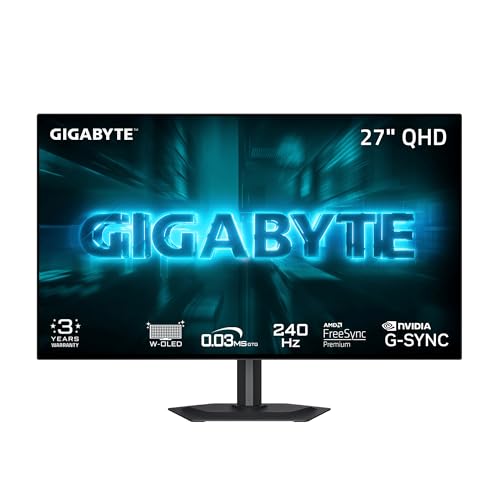
- Four-sided borderless 27-inch design saves visual space.
- MLA+ WOLED panel reaches up to 1300 nits peak brightness.
- 240Hz, 0.03ms, and OLED Care suit competitive gaming.
Best For: Clean-looking competitive OLED gaming with burn-in protection
Glossy Speed Pick – LG 27GX704A-B 27-inch OLED QHD 240Hz Gaming Monitor
If you want a space-saving OLED gaming monitor that still feels fast and premium, the LG 27GX704A-B is built for compact desks without cutting back on performance. Its 27-inch QHD OLED panel, 240Hz refresh rate, and 0.03ms response time make it a strong choice for players who care about motion clarity, color, and responsiveness.
Best For: Competitive PC and console gamers who want a bright, glossy OLED in a 27-inch footprint.
Pros:
- 240Hz refresh rate and 0.03ms response time for very smooth gameplay
- QHD OLED panel with VESA DisplayHDR True Black 400 and deep contrast
- HDMI 2.1, DisplayPort, and USB connectivity for modern setups
- Adjustable stand with height, tilt, swivel, and pivot support
Cons:
- Glossy screen finish may show more reflections than matte alternatives
- 27-inch size may not satisfy users wanting a larger gaming display
- OLED care features require occasional attention to help reduce image retention
This LG model fits the space-saving OLED gaming monitors category well because it blends a compact size with high-end gaming specs. It is especially appealing if you want sharp motion, rich HDR contrast, and flexible ergonomics in one desk-friendly display.
Elite QD-OLED Value – MSI MAG 271QP QD-OLED X28 27-Inch 280Hz Monitor
The MSI MAG 271QP QD-OLED X28 is a strong space-saving OLED gaming monitor if you want top-tier speed in a 27-inch format. It combines a 280Hz refresh rate, 0.03ms response time, and Quantum Dot OLED color with a fanless graphene heatsink, making it a practical pick for fast-paced gaming on a tidy desk.
Best For: Competitive gamers and enthusiasts who want premium QD-OLED performance in a compact 27-inch build.
Pros:
- 280Hz refresh rate and 0.03ms response time for elite motion performance
- QD-OLED panel with 99% DCI-P3 color and 10-bit color support
- DisplayHDR True Black 400 plus up to 1000 nits peak brightness
- USB-C with 15W power delivery, HDMI 2.1, and DP 1.4a connectivity
Cons:
- Peak performance features may be more than casual players need
- 27-inch size may still feel small for users wanting a larger immersion screen
- USB-C power delivery is limited to 15W
For buyers comparing compact OLED monitors, this MSI stands out for speed, color accuracy, and cooling design. It is a well-rounded choice when you want a smaller footprint but still expect premium gaming specs.
Glare-Free Compact Choice – Samsung Odyssey OLED G5 27-inch QD-OLED Monitor
The Samsung 27-inch Odyssey OLED G5 is a space-saving OLED gaming monitor aimed at players who want vivid picture quality without a bulky desk presence. Its QD-OLED panel, QHD resolution, and 180Hz refresh rate deliver a balanced mix of sharp visuals, fast response, and practical features like glare reduction and device switching.
Best For: Gamers who want a compact, glare-resistant OLED monitor for everyday play and mixed-use setups.
Pros:
- QD-OLED panel with QHD resolution for detailed, high-contrast images
- 180Hz refresh rate and 0.03ms response time for quick action
- Glare Free technology helps reduce reflections on the matte screen
- Pantone Validated color and OLED Safeguard burn-in protection
Cons:
- 180Hz is lower than the faster 240Hz and 280Hz alternatives
- Only one HDMI port is listed in the supplied details
- Brightness is specified at 280 cd/m², which may not match brighter premium options
This Samsung model makes sense if you want a smaller OLED display with anti-glare design and reliable everyday gaming performance. It is a smart option for mixed desktop use where clear image quality matters as much as speed.
Balanced Fast Pick – MSI MAG 274QP QD-OLED X24 27-Inch 240Hz Monitor
The MSI MAG 274QP QD-OLED X24 fits the space-saving OLED gaming monitors niche with a 27-inch QD-OLED panel that keeps your desk setup compact while still delivering serious gaming specs. With 240Hz refresh, 0.03ms response time, and a fanless graphene heatsink, it is aimed at users who want fast performance and a practical all-around feature set.
Best For: Players who want a compact QD-OLED monitor with strong speed and a slightly more affordable feature balance.
Pros:
- 240Hz refresh rate and 0.03ms response time for fast, fluid gameplay
- QD-OLED panel with 99% DCI-P3 color and 10-bit color support
- DisplayHDR True Black 400 and up to 400 nits peak brightness
- HDMI 2.1 and DP 1.4a support for modern gaming devices
Cons:
- Peak brightness is lower than some higher-end QD-OLED rivals
- No USB-C connectivity is listed in the supplied details
- 27-inch size may still be limiting for users who want a larger screen
This MSI is a sensible pick if you want fast OLED gaming without moving into a larger monitor class. It balances speed, color quality, and compact sizing in a way that works well for most desk setups.
Fast 27-inch OLED choice – ASUS ROG Strix XG27AQDMES
If you want space-saving OLED gaming monitors without giving up speed or image quality, the ASUS ROG Strix XG27AQDMES is built for competitive play on a 27-inch QHD panel. It combines 240Hz refresh, 0.03ms response time, and QD-OLED color with ASUS OLED Care Pro to help keep the display in good shape over time.
Best For: Competitive gamers who want a fast 27-inch OLED monitor with burn-in protection features.
Pros:
- 240Hz refresh rate and 0.03ms response time for fast-paced gaming
- QD-OLED panel with 99% DCI-P3, true 10-bit color, and Delta E < 2
- ASUS OLED Care Pro plus Neo Proximity Sensor helps reduce burn-in risk
- DisplayWidget Center makes OLED care settings easy to manage
Cons:
- 27-inch size may feel smaller than ultrawide options
- Focused on gaming features more than all-purpose desktop extras
Overall, this is a strong pick if your priority is a compact OLED gaming monitor with top-tier speed and practical panel protection. It fits well on smaller desks while still delivering the sharpness and responsiveness serious players expect.
Glare-free compact OLED – Samsung Odyssey OLED G6
The Samsung 27-inch Odyssey OLED G6 is a practical option if you’re comparing space-saving OLED gaming monitors for a clean desk setup. It pairs a QD-OLED QHD panel with 240Hz speed, 0.03ms response, and Glare Free Technology, making it easier to use in rooms with brighter light.
Best For: Players who want a bright, reflective-resistant 27-inch OLED with smooth motion and ergonomic adjustment.
Pros:
- 240Hz refresh rate and 0.03ms response time for smooth, responsive play
- Glare Free Technology helps reduce reflections from external light
- Pantone Validated display with 2100+ colors and 110+ skin tone shades
- Height-adjustable stand that also pivots, tilts, and swivels
Cons:
- 27-inch size is compact, but not as immersive as ultrawide models
- Burn-in protection is supported by OLED Safeguard, but OLED care remains important
This is a balanced choice for gamers who want a smaller OLED monitor that can handle fast action and everyday lighting challenges. It stands out most for its glare handling and ergonomic flexibility in a 27-inch footprint.
Ultrawide OLED performance pick – MSI MAG 341CQP QD-OLED X28
If you want space-saving OLED gaming monitors but prefer an ultrawide layout, the MSI MAG 341CQP QD-OLED X28 gives you a 34-inch UWQHD panel with a 1800R curve. It combines 280Hz speed, 0.03ms response, and a 5th-gen QD-OLED panel with features aimed at better contrast, sharper detail, and easier care.
Best For: Gamers who want an ultrawide OLED with high refresh speed, strong HDR, and built-in care features.
Pros:
- 34-inch UWQHD 3440×1440 ultrawide format with 1800R curve
- 280Hz refresh rate and 0.03ms response for very fast gameplay
- DarkArmor Film, DisplayHDR True Black 500, and 1300 nits peak brightness
- AI Care Sensor, AMD FreeSync Premium Pro, and NVIDIA G-SYNC Compatible support
Cons:
- Ultrawide size still needs more desk width than a 27-inch model
- Premium feature set may be more than casual players need
For buyers who want a wider OLED experience without jumping to a huge monitor, this MSI model offers a compelling mix of speed, HDR capability, and panel care tools. It’s the most immersive option here, especially if your setup can support an ultrawide screen.
Quantum-Dot Speed Pick – AOC 27-inch QHD 240Hz QD-OLED Gaming Monitor
If you want a space-saving OLED gaming monitor that still feels fast and premium, this 27-inch AOC QD-OLED is a strong fit. It pairs a sharp QHD 2560×1440 panel with 240Hz refresh and 0.03ms response time, so it suits players who want compact desk-friendly sizing without giving up motion clarity or color performance.
Best For: Gamers who want a compact 27-inch OLED with high refresh speed, strong color, and adaptive sync support.
Pros:
- 27-inch QHD QD-OLED panel keeps the footprint manageable for tighter desks.
- 240Hz refresh rate and 0.03ms response time are built for smooth, responsive play.
- HDR400 True Black and wide color gamut coverage support vivid contrast and color.
- Adaptive-Sync compatibility helps reduce tearing and stutter.
Cons:
- No built-in smart or streaming features are listed.
- It is a flat 27-inch display, so it does not add the wraparound feel of an ultrawide.
Overall, this AOC model is one of the more straightforward space-saving OLED gaming monitors: fast, color-rich, and easy to slot into a smaller gaming setup. It makes the most sense if you care more about performance and panel quality than extra extras.
Borderless Brightness Pick – GIGABYTE 27-inch WOLED 240Hz Gaming Monitor
For buyers comparing space-saving OLED gaming monitors, the GIGABYTE GO27Q24G stands out with its 27-inch flat design and four-sided borderless look. It combines a WOLED panel with MLA+ tech, 240Hz refresh, and 0.03ms response time, making it a compact choice for players who want a clean desk setup and fast competitive performance.
Best For: Competitive gamers who want a borderless 27-inch OLED with high brightness and built-in burn-in protection tools.
Pros:
- 4-sided borderless design maximizes usable screen space and looks clean in multi-monitor setups.
- WOLED panel with MLA+ technology is rated for 275 nits typical brightness and up to 1300 nits peak brightness.
- 240Hz refresh rate and 0.03ms response time support fast esports-style play.
- OLED Care features use AI-based protection to help minimize burn-in risk.
Cons:
- The panel is flat rather than curved, so it is less immersive than ultrawide options.
- At 16.5 pounds, it is not especially light for frequent repositioning.
This GIGABYTE display is a practical pick if you want a smaller OLED gaming monitor that still feels premium and aggressive on a desk. The borderless design, bright WOLED panel, and protection tools make it a balanced option for both everyday use and fast-paced gaming.
Ultrawide Smart Curve Pick – LG 34-inch 800R OLED Gaming Monitor
If your idea of space-saving OLED gaming monitors includes a single-screen ultrawide instead of a dual-monitor setup, the LG 34GX90SA-W is worth a close look. Its 34-inch WQHD OLED panel, steep 800R curve, and 240Hz refresh rate aim to deliver an immersive but still desk-efficient gaming experience, while webOS adds streaming and cloud-gaming flexibility.
Best For: Gamers who want an ultrawide OLED that can replace multiple screens and also handle streaming or cloud gaming.
Pros:
- 34-inch 3440 x 1440 ultrawide format can reduce the need for extra monitors.
- 800R curve increases immersion without adding physical width beyond a single ultrawide display.
- 240Hz refresh rate and 0.03ms response time are ideal for fast, smooth gameplay.
- webOS supports streaming apps and cloud gaming directly from the monitor.
Cons:
- It still has a larger footprint than a 27-inch monitor.
- The feature set is broader than basic gaming monitors, which may be more than some buyers need.
In practice, this LG is the most multifunctional option here: it gives you the room-saving appeal of an ultrawide while also adding smart TV-style features. If you want one display for gaming, streaming, and cloud play, it is the most versatile of the group.
How We Picked These Space-Saving OLED Gaming Monitors
We prioritized display size, footprint, and overall value for smaller desks, along with the features gamers notice most: refresh rate, response time, HDR performance, adaptive sync support, and panel type. We also favored models with modern connectivity and built-in OLED protection features that help with long-term use.
Quick Comparison
Most of the compact picks here are 27-inch QHD displays, which hit a sweet spot for desk-friendly gaming: sharp enough for everyday use, fast enough for esports, and large enough for immersive single-player titles. The ultrawide 34-inch options give you more horizontal space on screen, but they still work best for buyers who want one monitor instead of a dual-monitor setup.
Key Buying Factors for Space-Saving OLED Gaming Monitors
Size and Desk Footprint
For truly space-saving setups, 27-inch monitors are the easiest fit. They leave room for a keyboard, mouse, speakers, or a streaming mic without crowding your workspace. If you prefer a wider view for productivity or sim games, a 34-inch ultrawide may still be manageable, but it needs more desk depth.
Resolution and Refresh Rate
QHD 1440p is the most practical resolution for this category because it keeps text sharp while reducing GPU demands compared with 4K. Refresh rates of 240Hz and above are ideal for fast-paced competitive gaming, while 180Hz remains a strong option if you value OLED image quality and smoother motion over absolute top-end speed.
Panel Type and OLED Care
QD-OLED and WOLED both deliver excellent contrast and color, but they can differ in brightness behavior, text clarity, and subpixel structure. If you plan to use one of these Space-Saving OLED Gaming Monitors for mixed work and play, look for features like pixel shifting, screen savers, automatic brightness controls, and burn-in protection tools.
Connectivity and Sync Support
HDMI 2.1, DisplayPort, and adaptive sync support matter if you game on both PC and console. Make sure the monitor matches your system’s output so you can actually use the high refresh rate and variable refresh features without compromise.
Who Should Buy Which Space-Saving OLED Gaming Monitors?
Competitive PC gamers should lean toward 27-inch 240Hz to 280Hz models for the best balance of speed and desk efficiency. If you want richer immersion for RPGs, racing games, or cinematic single-player titles, a 34-inch ultrawide can be worth the extra width. Console players should focus on HDMI 2.1 support and easy setup, while mixed-use buyers may prefer a monitor with stronger OLED care features and a cleaner all-purpose design.
In short, the best choice depends on how much desk space you have, how fast you play, and whether you want a compact standard screen or a wider cinematic format.