OLED gaming monitors deliver deep contrast, vivid color, and fast response times that can make every game feel sharper and more immersive.
If you’re new to OLED, this roundup focuses on beginner-friendly OLED gaming monitors that are easier to set up, practical for everyday use, and strong value picks across different budgets.
Best 10 Beginner-Friendly OLED Gaming Monitors Picks for 2026
UltraGear glossy-speed pick

- 240Hz refresh and 0.03ms response time
- Up to 1300 nits with True Black 400
- HDMI 2.1, G-Sync Compatible, FreeSync Premium Pro
Best For: New OLED buyers wanting speed and bright visuals
Color-accurate console-friendly choice

- QD-OLED QHD panel with 240Hz speed
- Pantone Validated color with 2100+ colors
- Glare Free and OLED Safeguard support
Best For: First-time OLED shoppers who want color accuracy and simple ergonomics
Value-focused QD-OLED pick

- 27-inch WQHD QD-OLED with 10-bit color
- 240Hz refresh and 0.03ms response
- OLED Care 2.0 plus HDMI 2.1 and DP 1.4a
Best For: New OLED buyers who want practical features and strong contrast
Fastest Feature-Rich Choice

- 280Hz refresh rate with 0.03ms response time
- OLED Care 2.0 and fanless graphene heatsink
- HDMI 2.1 plus USB-C with 15W PD
Best For: Players who want a fast QD-OLED with strong protection features
Balanced High-Refresh Pick
AOC 27" Gaming Monitor QHD 240Hz QD OLED

- 27-inch QHD QD-OLED display
- 240Hz with 0.03ms response time
- Adaptive-Sync and HDR400 True Black
Best For: Buyers who want a simple, fast 27-inch OLED monitor
Premium QD-OLED Pick
MSI 27" QD-OLED 240Hz WQHD Monitor

- 240Hz refresh rate with 0.03ms response time
- Quantum Dot OLED with 99% DCI-P3 color
- OLED Care 2.0 plus height/tilt/swivel stand
Best For: New OLED buyers who want a fast 1440p monitor with protection features
High-Speed Value Option
INNOCN 27" QD-OLED 280Hz Monitor

- 280Hz refresh rate with 0.03ms response time
- QD-OLED panel with deep blacks and vibrant color
- HDMI 2.1, DisplayPort, and adjustable stand
Best For: Players who want a fast QD-OLED monitor for PC or console gaming
Bright WOLED Choice
GIGABYTE 27" WOLED 240Hz QHD Monitor
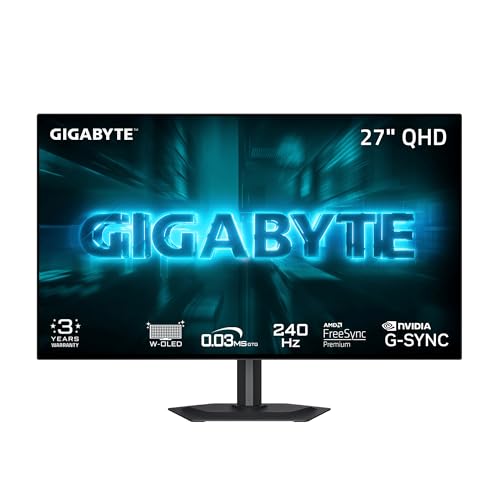
- 240Hz refresh rate with 0.03ms response time
- MLA+ WOLED panel with up to 1300 nits peak brightness
- AI-based OLED Care with adjustable protection settings
Best For: Buyers who want a bright 1440p OLED with burn-in protection tools
UltraGear glossy-speed pick – LG 27GX704A-B 27" QHD OLED
If you want beginner-friendly OLED gaming monitors that make the jump to OLED feel straightforward, the LG 27GX704A-B is a strong starting point. It pairs a 27-inch QHD panel with 240Hz refresh, 0.03ms response time, and dual HDMI 2.1 support, so it covers both PC and console use without much setup guesswork.
Best For: New OLED buyers who want a fast, bright 27-inch monitor for PC or console gaming.
Pros:
- 240Hz refresh rate and 0.03ms response time for smooth, responsive gameplay
- OLED brightness up to 1300 nits with VESA DisplayHDR True Black 400
- G-Sync Compatible and AMD FreeSync Premium Pro for tear-free play
- Adjustable stand plus OLED care features for easier daily use
Cons:
- Glossy screen finish may reflect more light than matte options
- Priced like a premium OLED rather than an entry-level monitor
This model stands out for buyers who want a premium OLED experience without giving up practical features like HDMI 2.1, monitor adjustments, and built-in protection tools. It is a very balanced pick if your priority is speed first, with brightness and comfort features close behind.
Color-accurate console-friendly choice – Samsung Odyssey OLED G6 27"
For beginner-friendly OLED gaming monitors, the Samsung 27-inch Odyssey OLED G6 is appealing because it keeps the feature set focused and easy to understand. You get a QD-OLED QHD panel, 240Hz refresh, 0.03ms response time, AMD FreeSync Premium, and a height-adjustable stand, which makes it a practical all-around gaming display.
Best For: First-time OLED shoppers who want strong color, fast response, and simple ergonomics.
Pros:
- QD-OLED panel with QHD resolution for vivid, detailed gaming
- 240Hz refresh rate and 0.03ms response time for ultra-smooth motion
- Pantone Validated screen with 2100+ colors and 110+ skin tone shades
- Glare Free technology and OLED Safeguard burn-in protection support easier ownership
Cons:
- Only the listed connectivity and features are shown here, so it is less feature-packed on paper than some rivals
- Meant for gaming first, so it may be more monitor than casual users need
This is a well-rounded OLED option if you want accurate color and simple setup aids without wading through a long feature list. The combination of glare reduction, burn-in protection support, and ergonomic adjustments makes it especially approachable for first-time OLED buyers.
Brightest-speed upgrade – LG 27GX700A-B 27" QHD OLED
If you are comparing beginner-friendly OLED gaming monitors but want something that feels a step more premium, the LG 27GX700A-B pushes brightness and speed hard. Its 27-inch QHD OLED panel reaches up to 280Hz with 0.03ms response time, while HDMI 2.1 and G-Sync Compatible / FreeSync Premium Pro support keep it versatile for PC and console play.
Best For: Buyers who want a brighter OLED with extra refresh headroom and flexible gaming features.
Pros:
- Up to 280Hz refresh rate for very fluid gameplay
- Up to 1500 nits brightness with DisplayHDR True Black 500
- G-Sync Compatible and AMD FreeSync Premium Pro for smooth frame delivery
- Switch app support for quick settings, splitscreen layouts, and easy tuning
Cons:
- Higher-end feature set may be more than a casual beginner needs
- Matte finish and premium positioning may not suit everyone’s preference or budget
Among beginner-friendly OLED gaming monitors, this one makes sense if you want more brightness and a little more future-proofing than the typical 240Hz model. It is especially attractive for players who care about clarity in bright scenes and want convenient software controls after setup.
Value-focused QD-OLED pick – MSI MAG 274QP QD-OLED X24
The MSI MAG 274QP QD-OLED X24 is a straightforward pick for beginner-friendly OLED gaming monitors if you want the core benefits of QD-OLED without extra complication. It offers a 27-inch WQHD panel, 240Hz refresh, 0.03ms response time, adaptive sync support, and a 4-way adjustable stand, making it easy to place and play.
Best For: New OLED buyers who want strong contrast, fast response, and practical setup features.
Pros:
- QD-OLED panel with 10-bit color and 99% DCI-P3 coverage
- 240Hz refresh rate and 0.03ms response time for smooth motion
- OLED Care 2.0 plus fanless graphene heatsink for panel support
- HDMI 2.1 and DisplayPort 1.4a for PC, console, and laptop use
Cons:
- Peak brightness is listed at up to 400 nits in the notes, which is lower than some premium rivals
- Feature set is strong, but less flashy than the highest-end OLED options
This MSI is a sensible option if you want a clean, capable OLED gaming monitor that focuses on the essentials. Its mix of strong color, burn-in prevention tools, and flexible connectivity makes it a good first OLED for buyers who prefer practicality over extras.
Easygoing QD-OLED Starter Pick – Samsung 27” Odyssey OLED G5 QHD Gaming Monitor
If you want beginner-friendly OLED gaming monitors without giving up premium image quality, this Samsung 27-inch Odyssey OLED G5 is a straightforward place to start. It pairs QD-OLED color and QHD sharpness with built-in burn-in mitigation, plus simple extras like Glare Free coating and Auto Source Switch+ for a hassle-free setup.
Best For: First-time OLED buyers who want a vivid, easy-to-live-with 27-inch QHD gaming monitor.
Pros:
- QD-OLED panel with QHD resolution for strong color and sharp detail
- OLED Safeguard thermal modulation system helps prevent burn-in
- Glare Free technology reduces distracting reflections
- 180Hz refresh rate, 0.03ms response time, and G-Sync/FreeSync support
Cons:
- 180Hz is lower than the faster 240Hz and 280Hz options here
- Best value depends on whether you need Samsung’s extra features
For a beginner-friendly OLED gaming monitor, this model balances premium visuals with practical protection and convenience features. It is the easiest fit if you want strong image quality now and a smoother transition into OLED ownership.
Fastest Feature-Rich Choice – MSI MAG 271QP QD-OLED X28
Among beginner-friendly OLED gaming monitors, the MSI MAG 271QP QD-OLED X28 stands out for buyers who want a fast, modern panel with a lot of built-in help. Its QD-OLED screen, 280Hz refresh rate, and OLED Care 2.0 package make it a strong option if you want high-end performance with burn-in protection tools already included.
Best For: Gamers who want a high-refresh OLED monitor with broad device support and built-in care features.
Pros:
- 280Hz refresh rate and 0.03ms response time for very fast gameplay
- OLED Care 2.0 and fanless graphene heatsink support panel durability
- 10-bit QD-OLED panel with 99% DCI-P3 and DisplayHDR True Black 400
- HDMI 2.1, DisplayPort 1.4a, and USB-C with 15W power delivery
Cons:
- More feature-heavy than a simple plug-and-play starter pick
- 15W USB-C power delivery is modest for charging larger devices
This is the most performance-forward option in the group, but it still keeps everyday usability in mind with OLED care features and flexible connectivity. If you want a beginner-friendly OLED gaming monitor that can also grow with you, this MSI is a compelling pick.
Balanced High-Refresh Pick – AOC 27" Gaming Monitor QHD 240Hz QD OLED
If you’re shopping beginner-friendly OLED gaming monitors and want a clean balance of speed and image quality, the AOC Q27GAZD fits neatly in the middle. Its 27-inch QHD QD-OLED panel, 240Hz refresh rate, and Adaptive-Sync support make it a practical choice for smooth gaming with deep contrast.
Best For: Buyers who want a straightforward 27-inch OLED monitor with fast refresh and strong contrast.
Pros:
- 27-inch QHD panel with crisp detail and vibrant colors
- 240Hz refresh rate and 0.03ms response time for fluid motion
- HDR400 True Black for deeper blacks and brighter highlights
- Adaptive-Sync helps reduce tearing and stuttering
Cons:
- Lacks the extra protection and convenience features found on some rivals
- No USB-C or multi-device extras listed in the supplied notes
This AOC monitor is the no-fuss middle ground: fast enough for competitive play, but still approachable for someone moving into OLED for the first time. It makes sense if you want a balanced package without chasing the absolute top refresh rate.
Premium QD-OLED Pick – MSI 27" QD-OLED 240Hz WQHD Monitor
If you want beginner-friendly OLED gaming monitors that still feel premium, this MSI 27-inch QD-OLED is an easy place to start. It gives you the usual OLED strengths—deep blacks, high contrast, and very fast response—while adding practical features like OLED Care 2.0, console modes, and a height-adjustable stand.
Best For: New OLED buyers who want a fast 1440p monitor with strong anti-burn-in tools and flexible connectivity.
Pros:
- 240Hz refresh rate with 0.03ms response time for very smooth gaming.
- Quantum Dot OLED panel with 99% DCI-P3 and strong color accuracy.
- OLED Care 2.0, Smart Crosshair, and console modes add useful everyday support.
- Height, tilt, and swivel adjustments make it easier to dial in a comfortable setup.
Cons:
- Glossy screen finish may not be ideal in bright rooms.
- 27-inch 1440p size may feel small if you want a larger desktop display.
This is a strong all-around option if you want the speed and image quality of OLED without giving up practical extras. It feels well-rounded for PC and console use, especially for buyers who value built-in protection features.
High-Speed Value Option – INNOCN 27" QD-OLED 280Hz Monitor
Among beginner-friendly OLED gaming monitors, this INNOCN 27-inch model stands out for buyers who want a lot of speed without a complicated setup. It combines QD-OLED contrast and 1440p sharpness with a 280Hz refresh rate, plus HDMI 2.1, DisplayPort, and a fully adjustable stand.
Best For: Players who want a fast QD-OLED monitor for PC or console gaming with straightforward ergonomics.
Pros:
- 280Hz refresh rate and 0.03ms response time for ultra-smooth motion.
- QD-OLED panel delivers deep blacks and vibrant colors.
- HDMI 2.1 and DisplayPort support modern PC and console connections.
- Height, tilt, and pivot adjustments help with long gaming sessions.
Cons:
- Only one HDMI port is listed, which may limit multi-device setups.
- Built-in speakers are included, but the notes do not suggest they are a major feature.
This is a compelling pick if refresh rate is your top priority and you still want OLED picture quality. The flexible stand and broad compatibility make it approachable for first-time OLED buyers.
Bright WOLED Choice – GIGABYTE 27" WOLED 240Hz QHD Monitor
If you are comparing beginner-friendly OLED gaming monitors, this GIGABYTE model is appealing because it pairs a 240Hz WOLED panel with brightness-focused features. MLA+ Technology, up to 1300 nits peak brightness, and RealBlack Glossy help it stay vivid while GIGABYTE OLED Care works in the background to reduce burn-in risk.
Best For: Buyers who want a bright 1440p OLED with built-in care features and a clean borderless design.
Pros:
- 240Hz refresh rate and 0.03ms response time for fast gaming.
- MLA+ WOLED panel offers up to 1300 nits peak brightness.
- GIGABYTE OLED Care adds AI-based protection with adjustable settings.
- RealBlack Glossy coating and four-sided borderless design improve the viewing experience.
Cons:
- Glossy finish may show reflections in bright spaces.
- Wall-mount focus may be less convenient if you prefer a bundled desk stand.
This monitor is a smart choice if you want OLED clarity but are especially concerned about brightness and protection tools. It offers a polished feature set that should feel manageable for first-time OLED shoppers.
How We Picked These Beginner-Friendly OLED Gaming Monitors
We focused on models that make OLED easier to buy and use, not just the ones with the highest specs. That means prioritizing 27-inch QHD options, strong refresh rates, low response times, and features that help newcomers feel confident, such as Adaptive-Sync support, HDMI 2.1, and recognizable gaming compatibility like G-SYNC or FreeSync.
We also weighed practical concerns for Beginner-Friendly OLED Gaming Monitors, including ease of setup, everyday versatility for PC and console play, and whether the monitor offers a sensible balance between image quality and price.
Quick Comparison
Most picks here fall into two main camps: 240Hz models for straightforward, reliable performance and 280Hz models for buyers who want a little extra headroom for competitive play. QD-OLED panels tend to emphasize color brightness and punch, while WOLED models can be a smart choice for buyers who want a more traditional OLED experience. For most beginners, the best choice is usually the monitor that fits their desk space, console or PC connection needs, and comfort with spending a bit more for premium motion clarity.
Key Buying Factors for Beginner-Friendly OLED Gaming Monitors
Refresh Rate and Response Time
A 240Hz panel is already excellent for smooth motion, while 280Hz is a nice upgrade if you play fast-paced shooters or esports titles. Response time matters too, but almost every OLED in this roundup is already extremely quick, so the bigger decision is whether you actually need the higher refresh rate.
Panel Type and Image Character
QD-OLED usually offers rich color and strong perceived brightness, while WOLED can appeal to buyers who want a more familiar OLED look. Both are excellent, so the better choice depends on which image presentation you prefer.
Resolution and Size
27-inch QHD is the sweet spot for most Beginner-Friendly OLED Gaming Monitors because it balances sharpness, performance, and affordability. It’s also easier to drive at high frame rates than 4K, which keeps the experience more approachable for first-time OLED buyers.
Connectivity and Console Support
If you plan to use a console as well as a PC, look for HDMI 2.1 and solid Adaptive-Sync support. These features make the monitor more flexible and help reduce stutter or tearing.
Who Should Buy What
Competitive PC players should lean toward the 280Hz options. Mixed PC-and-console users may prefer a 240Hz monitor with stronger connectivity. Budget-conscious shoppers should stick with a well-rounded 27-inch QHD model, while buyers who care most about color pop and premium visuals may gravitate toward QD-OLED.
In short, the best Beginner-Friendly OLED Gaming Monitors are the ones that match your platform, speed needs, and comfort level without overcomplicating the purchase.