Choosing the right audio press box or recording interface can make interviews, live events, and multi-microphone podcast sessions cleaner and easier to manage. The best option depends on how many outputs you need, whether you record directly to a computer, and which accessories are already in your setup.
Our roundup includes dedicated passive press boxes alongside versatile USB interfaces, compact mixers, and complete podcasting bundles. Use the guide below to narrow the choices by connectivity, power requirements, portability, and intended workflow.
Best 10 Audio Press Boxes for Podcasting Picks for 2026
Field Distribution Pick

- One line input to 12 mic outputs
- Transformer-isolated channels
- 150-ohm outputs with 20 Hz–20 kHz range
Best For: Multi-recipient podcast and broadcast audio feeds
Host-and-Guest Interface

- Two mic inputs and two headphone outputs
- Auto Gain, Enhance, and mute controls
- Bluetooth phone and camera connectivity
Best For: Two-person podcasts and interview recordings
Portable Recording Value
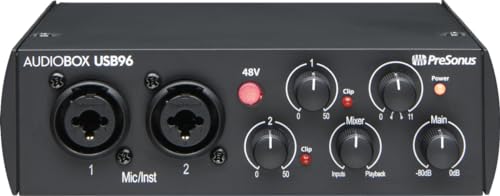
- Two mic preamps and instrument inputs
- 24-bit/96 kHz recording support
- USB bus power and 48V phantom power
Best For: Mobile podcasting and versatile two-channel recording
Large-Scale Feed Distributor
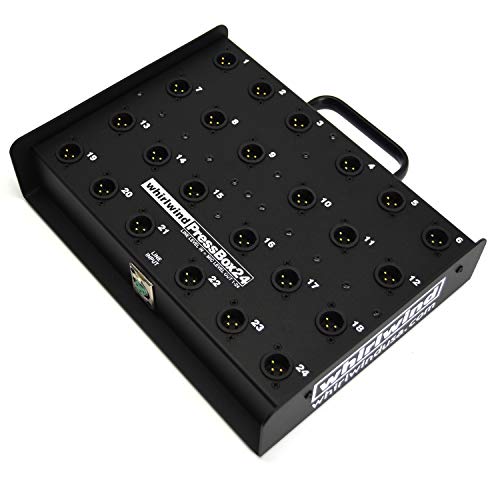
- One input to 24 mic-level outputs
- Transformer-isolated and ground-lifted channels
- 65 dB channel isolation with -103 dB output noise
Best For: Large press events and multi-recipient broadcast feeds
Best Complete Starter Kit

- Includes interface, condenser mic, headphones, stand, and software
- Two mic preamps with 48V phantom power
- USB-powered with zero-latency monitoring
Best For: New podcasters building a complete recording setup
Best for Live Sound Effects

- Four programmable sound pads and voice changer
- Built-in denoise, reverb, and mute controls
- Bluetooth input supports background audio
Best For: Interactive podcasts and live streams with sound effects
Best Broadcast-Ready Accessory Bundle
AudioBox 96 USB Podcasting Kit

- Includes cardioid mic, shockmount, pop filter, and boom stand
- 24-bit/96 kHz two-channel USB interface
- Zero-latency monitoring with adjustable mix control
Best For: Home podcasters focused on controlled vocal recording
Best Streaming Mixer

- XLR input with 48V phantom power
- One-click noise reduction and loopback
- Voice effects, sound pads, and RGB lighting
Best For: Gaming livestreams and interactive creator setups
Best Compact DI Box

- USB-C plug-and-play operation
- Bluetooth smartphone audio pairing
- Balanced XLR outputs with ground lift
Best For: Hybrid live, instrument, and content-creation setups
Best Complete Recording Bundle

- 24-bit/96 kHz two-channel USB interface
- Microphone, stand, pop filter, and headphones included
- Studio One Artist and Studio Magic software included
Best For: New podcasters building a complete recording setup
Field Distribution Pick – Whirlwind PB12
For podcast productions that need to send one line-level source to several microphones or recording positions, the Whirlwind PB12 is a dedicated audio press box for podcasting and broadcast-style distribution. Its passive design provides 12 XLR microphone-level outputs from one input.
Best For: Podcast panels, press events, and multi-recipient audio feeds where transformer isolation is important.
Pros:
- Distributes one line input to 12 mic-level outputs.
- Transformer-isolated outputs help reduce crosstalk, ground noise, and interference.
- 20 Hz–20 kHz frequency range and 150-ohm output impedance.
Cons:
- Passive operation requires a suitable input signal and downstream equipment.
- Designed for distribution rather than USB recording or direct computer connectivity.
The PB12 is a practical choice when your priority is reliable, isolated signal splitting. It is less suitable as a complete podcast interface because it does not provide the recording, headphone, or computer features of a USB device.
Host-and-Guest Interface – Focusrite Vocaster Two
The Focusrite Vocaster Two is a streamlined option for audio press boxes for podcasting when the goal is to record two presenters directly into a computer. It combines two mic inputs, individual headphone outputs, Auto Gain, voice enhancement, mute control, and phone connectivity in a compact USB interface.
Best For: Two-person podcasts, interviews, and camera-based shows that need simple level control and monitoring.
Pros:
- Provides two microphone inputs and two headphone outputs.
- Over 70 dB of gain, Auto Gain, four Enhance presets, and a mute button simplify setup.
- Supports Bluetooth or TRRS phone connections and camera audio output.
Cons:
- Limited to two channels.
- USB connectivity makes it a recording interface rather than a passive multi-output press box.
Vocaster Two is the most podcast-focused option in this group for a host-and-guest workflow. Its guided controls and dedicated monitoring are useful for creators who want to get recording quickly without adding a separate mixer.
Portable Recording Value – PreSonus AudioBox 96
The PreSonus AudioBox 96 is a flexible USB interface for audio press boxes for podcasting when you also want to record instruments or line-level sources. It offers two Class-A mic preamps, two instrument inputs, MIDI I/O, phantom power, zero-latency monitoring, and recording up to 24-bit/96 kHz.
Best For: Portable podcast and home-recording setups that may also handle instruments, MIDI hardware, or condenser microphones.
Pros:
- Two mic preamps plus instrument inputs support varied source types.
- USB bus power makes the interface suitable for mobile recording.
- Includes 48V phantom power, high-powered headphone output, and balanced TRS outputs.
- Includes Studio One Artist, Ableton Live Lite, and Studio Magic Plug-In software after registration.
Cons:
- Provides two channels rather than the many outputs found on a dedicated press box.
- Requires a computer or compatible recording device for USB-based recording.
AudioBox 96 is a strong general-purpose choice for creators who want podcast recording plus broader studio flexibility. Its bus-powered design and bundled software add value, while the two-channel layout keeps it best suited to smaller productions.
Large-Scale Feed Distributor – Whirlwind PB24
The Whirlwind PB24 is built for large events and press environments that need one line-level source distributed to many microphone-level destinations. Among audio press boxes for podcasting, it stands out with 24 transformer-isolated outputs and ground-lifted channels designed to help minimize interference.
Best For: Large podcast panels, broadcast media feeds, and press events requiring up to 24 isolated outputs.
Pros:
- Routes one line-level input to 24 mic-level outputs.
- Transformer isolation and ground lifting help reduce interference between outputs.
- 65 dB channel-to-channel isolation and -103 dB output noise are specified.
Cons:
- Its 9.77-pound chassis is less portable than compact interfaces.
- Passive distribution does not provide USB recording, headphone monitoring, or software controls.
- Output level is specified as -45 dB from a 0 dB input, so downstream gain may be needed.
Choose the PB24 when output count matters more than computer connectivity. It is purpose-built for distributing a clean feed across a large number of recipients, making it better suited to production infrastructure than a typical desktop podcast interface.
Best Complete Starter Kit – AudioBox USB 96 Studio Bundle
If you want audio press boxes for podcasting plus the essentials to start recording, this AudioBox USB 96 bundle combines a two-channel USB interface, condenser microphone, headphones, desktop stand, and recording software. Its two Class-A mic preamps, 48V phantom power, and zero-latency monitoring suit simple interview and solo setups.
Best For: New podcasters who need an interface, microphone, headphones, and software in one package.
Pros:
- Includes an M7 condenser microphone, HD7 headphones, stand, cable, and Studio One software.
- Two combo inputs and two Class-A mic preamps support simultaneous guitar and vocal recording.
- USB bus power, MIDI I/O, and zero-latency monitoring add setup flexibility.
Cons:
- The two-channel design may be limiting for larger multi-guest podcast sessions.
- The included microphone is a condenser model, so the recording environment may matter more than with some dynamic-mic setups.
For a first podcast rig, this is a convenient all-in-one option rather than a bare interface. It is especially practical when you want to avoid separately sourcing monitoring, recording software, and basic microphone accessories.
Best for Live Sound Effects – PUPGSIS Gaming Audio Mixer
For creators comparing audio press boxes for podcasting with live-production controls, the PUPGSIS mixer focuses on real-time sound shaping. It combines a microphone input, noise reduction, reverb, programmable sound pads, voice changing, and Bluetooth background-audio input in a compact streaming-oriented hub.
Best For: Podcasters and streamers who want instant sound effects, voice effects, and hands-on live controls.
Pros:
- Four programmable sound pads can trigger custom clips such as laughs, claps, and alarms.
- Built-in denoise, reverb, voice changer, and mute controls work without software.
- Bluetooth can bring in background music, backing tracks, or sound effects from another device.
Cons:
- It supports XLR microphones only with a separately added 1/4-inch TRS-to-XLR cable, according to the supplied notes.
- Bluetooth is input-only; wireless headphones and wireless microphone output are not supported.
- It is not compatible with 48V dynamic or USB microphones.
This mixer is geared toward interactive live content rather than traditional multitrack studio recording. Verify microphone and cable compatibility before buying, especially if your podcast setup already uses USB or 48V equipment.
Best Broadcast-Ready Accessory Bundle – AudioBox 96 USB Podcasting Kit
This AudioBox 96 package is a strong option for audio press boxes for podcasting when vocal accessories are a priority. Along with the two-channel USB interface, it includes a cardioid condenser microphone, shockmount, pop filter, boom stand, closed-back headphones, XLR cable, and Studio One Artist software.
Best For: Home podcasters who want focused vocal capture and a more complete microphone-positioning setup.
Pros:
- The cardioid condenser microphone, shockmount, pop filter, and stand support controlled voice recording.
- 24-bit/96 kHz conversion, Class-A preamps, and 48V phantom power provide capable recording specifications.
- Zero-latency direct monitoring includes a mix control for balancing input and DAW playback.
Cons:
- The two-channel interface is best suited to smaller recording sessions.
- The supplied notes list Windows as the operating system, so platform compatibility should be confirmed before purchase.
- The kit is more equipment-heavy than a simple interface-only setup.
Choose this bundle if clean vocal positioning and included accessories matter more than minimizing the gear footprint. Its pop filter, shockmount, and boom stand make it particularly convenient for a dedicated home podcast desk.
Best Streaming Mixer – MAONO G1 Neo
For creators comparing audio press boxes for podcasting and livestreaming, the MAONO G1 Neo is a compact gaming mixer built around an XLR microphone input, 48V phantom power, and straightforward controls. Its one-click mute, direct monitoring, loopback, Bluetooth accompaniment, and noise reduction features are particularly useful for interactive broadcasts.
Best For: Gamers, livestreamers, and creators using an XLR microphone with OBS, Discord, Twitch, YouTube, or similar platforms.
Pros:
- Built-in preamp and 48V phantom power support XLR condenser microphones.
- One-click noise reduction, mute, loopback, and direct monitoring simplify streaming.
- Voice effects, customizable sound pads, and RGB lighting add interactive options.
- Works with computers, phones, tablets, PS4, and PS5.
Cons:
- It does not support USB microphones or Xbox.
- Its feature set is focused on gaming and streaming rather than general-purpose studio recording.
The G1 Neo makes the most sense when live interaction and quick control matter more than a traditional podcast studio workflow. Confirm your microphone type and connection needs before choosing it.
Best Compact DI Box – StudioMan MOB-2
The StudioMan MOB-2 is a compact option for shoppers considering audio press boxes for podcasting alongside live sound or instrument connections. It combines an active stereo DI box with a USB audio interface, Bluetooth playback, balanced XLR outputs, and a ground-lift switch for flexible routing.
Best For: Musicians, content creators, and live setups that need USB connectivity, Bluetooth audio, and balanced XLR output.
Pros:
- Plug-and-play USB-C connection works with PCs, smartphones, and tablets without driver installation.
- Bluetooth enables wireless audio pairing with a smartphone.
- Balanced left and right XLR outputs support studio monitors or PA systems.
- Ground lift can help address ground-loop noise.
Cons:
- It is primarily a DI and routing device, not a complete microphone podcast bundle.
- The supplied specifications list a signal-to-noise ratio of at least 75 dB, which may be less suited to buyers seeking the quietest possible recording chain.
Choose the MOB-2 when connection flexibility and instrument or playback routing are central to your setup. If you need a microphone, preamp, and recording software in one purchase, another option may be more complete.
Best Complete Recording Bundle – PreSonus AudioBox 96 Bundle
For buyers evaluating audio press boxes for podcasting, the PreSonus AudioBox 96 bundle offers a more complete recording path than a standalone interface. It includes a two-channel USB interface, condenser microphone, shockmount, pop filter, XLR cable, mic stand, headphones, and Studio One Artist software.
Best For: Podcasters, streamers, voice-over artists, and musicians who want microphone accessories and recording software included.
Pros:
- 24-bit/96 kHz recording, dual XLR/TRS inputs, and Class-A preamps support detailed capture.
- Zero-latency monitoring helps users hear audio while recording.
- The included condenser microphone setup has a shockmount, pop filter, stand, and XLR cable.
- USB bus power and Mac/Windows compatibility support portable use.
Cons:
- The condenser microphone may require appropriate room control because the supplied notes describe it as high-sensitivity.
- It is a larger bundle than needed for buyers who already own a microphone and accessories.
This is the strongest all-in-one choice of the three for starting a podcast or recording workstation. Its two-channel interface also leaves room for recording an additional source, while the included software supports editing and production.
How We Picked the Best Audio Press Boxes for Podcasting
We compared these 10 products by looking at signal distribution, input and output flexibility, recording connectivity, ease of setup, portability, and overall suitability for podcast production. Dedicated press boxes are evaluated primarily for dependable microphone-level distribution at interviews and live events, while USB interfaces and mixers are judged on computer compatibility, monitoring, gain control, and podcast-friendly features.
Because these products serve different roles, the “best” choice is not necessarily the one with the most features. A passive press box may be ideal for distributing one source to many reporters, while a USB interface may be more useful for recording one or two hosts directly into podcast software.
Quick Comparison
- For press conferences and media scrums: Choose a dedicated Whirlwind passive press box with the number of microphone outputs your event requires.
- For two-person podcasts: The Focusrite Vocaster Two or a PreSonus AudioBox 96 model offers a practical computer-based recording setup.
- For beginners seeking an all-in-one package: A PreSonus recording bundle can include a microphone, headphones, software, and other essential accessories.
- For live streaming and gaming: The PUPGSIS or MAONO mixer may be more suitable when sound effects, voice controls, and real-time monitoring matter.
- For flexible direct connections: The StudioMan MOB-2 combines USB audio functionality with DI-box features for certain instrument and line-level workflows.
Key Buying Factors for Audio Press Boxes for Podcasting
Output Count and Distribution
Start with the number of microphones, cameras, recorders, or media outlets that need the same source. A 12-output unit is appropriate for smaller press events, while a 24-output model provides more headroom. Do not buy a high-output press box solely for podcast recording unless you genuinely need signal distribution.
Passive or Active Design
Passive boxes generally need no external power and are simple to deploy, making them dependable for field use. Active units and USB interfaces can offer more control, gain, monitoring, or computer connectivity, but they may require USB power, batteries, or a mains connection.
Computer Recording and Compatibility
If your priority is recording directly into a laptop, confirm that the interface supports your operating system and preferred software. Check the number of inputs, headphone outputs, driver requirements, and whether phantom power is available for condenser microphones.
Podcast Workflow and Accessories
Consider whether you already own microphones, headphones, stands, cables, and recording software. Bundles can reduce setup friction, but included accessories may not match the quality or connection standards of equipment you already use.
Who Should Buy Which Audio Press Boxes for Podcasting?
Event producers and journalists should prioritize a dedicated Whirlwind press box with sufficient outputs. Solo creators and two-host podcasts will generally benefit more from a compact USB interface such as the Vocaster Two or AudioBox 96. New creators building a complete setup should consider a PreSonus bundle. Streamers and gaming podcasters may prefer a mixer with voice effects and quick-access controls. Finally, mobile or hybrid recording users should focus on compact designs, bus power, durable construction, and the connectors required by their microphones and recording devices.