Coding robot toys make programming concepts tangible through movement, problem-solving, and creative challenges. The best options turn sequences, loops, and debugging into hands-on play rather than abstract screen time.
This roundup compares 10 coding robot toys for hands-on learning across age ranges and skill levels, including screen-free activity sets, app-enabled robots, and buildable STEM kits.
Best 10 Coding Robot Toys for Hands-On Learning Picks for 2026
Best Screen-Free Starter
Botley Coding Robot Activity Set
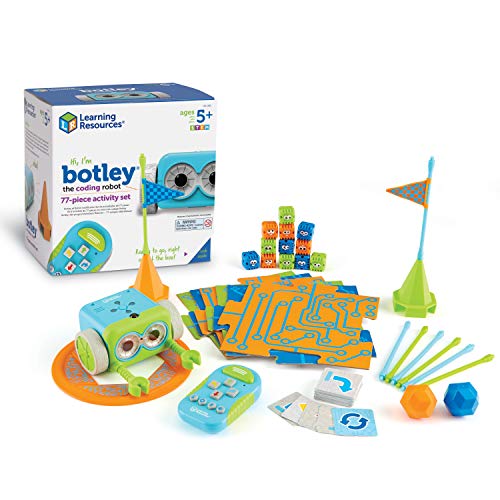
- 77-piece set with coding cards and obstacles
- Remote-controlled, screen-free programming
- Detects obstacles and follows line paths
Best For: Young learners who want guided, hands-on coding play
Best for Creative Maze Building
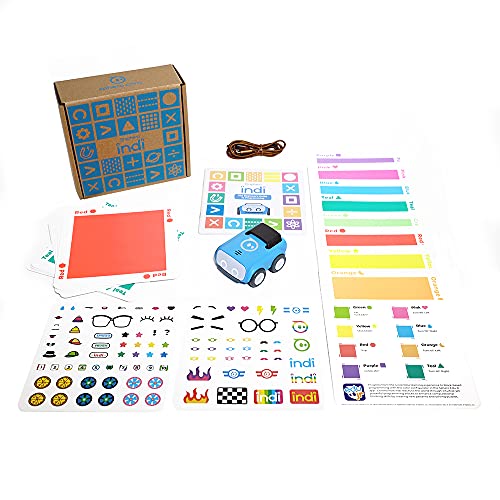
- Color cards enable screen-free coding
- Optional drag-and-drop app support
- Rechargeable battery included
Best For: Exploratory maze building for ages 4 and up
Best Build-and-Code Option

- Builds in about 15 minutes
- Works with Scratch and Arduino
- Expandable with modules and parts
Best For: Ages 8+ who want construction and programming together
Best for Early Maze Coding
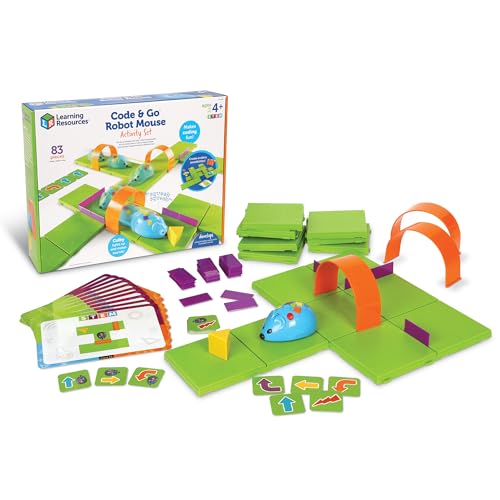
- Screen-free button-and-card programming
- Includes grids, walls, tunnels, and activities
- Designed for ages 4 and up
Best For: Early learners and classroom STEM centers
Best App-Enabled Pick

- Ready to use with no assembly
- Teaches coding through five compatible apps
- Offers up to five hours of active play
Best For: Kids ages 6-11 learning coding through interactive app-based play
Best for Everyday Use
Learning Resources Switcheroo Coding Crew

- Introduces coding without a screen
- Includes rescue missions and coding cards
- Designed for beginner learners ages 4-6
Best For: Young children starting robotics and sequencing through tactile play
Best Build-and-Code Set

- Builds five robots from 348 pieces
- Offers app and remote control
- Combines coding with engineering play
Best For: Kids ages 6-12 who enjoy constructing and customizing robots
Best for Expanding Challenges

- 78-piece screen-free coding kit
- Adds turns and object sensing
- Builds custom mazes and sequences
Best For: Ages 5–10 and open-ended coding practice
Best for Story-Led Starter Play
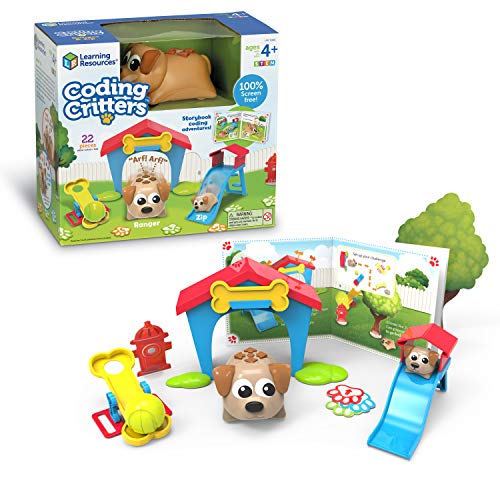
- Screen-free storybook coding
- Includes 22-piece pet playset
- Adds fetch and pet-care modes
Best For: Ages 4+ and imaginative early coding
Best for Simple First Coding Steps

- Easy remote-controlled coding
- No phone or tablet required
- Focuses on core STEM skills
Best For: Ages 5–8 and beginner screen-free coding
Best Screen-Free Starter – Botley Coding Robot Activity Set
For families seeking coding robot toys for hands-on learning, Botley offers an approachable, screen-free introduction to programming. Children use the remote programmer, coding cards, tiles, and obstacle pieces to build challenges and practice sequencing, logic, and problem-solving.
Best For: Young learners ages 5 and up who want guided, screen-free coding activities with plenty of reusable obstacles.
Pros:
- Includes 77 pieces, including coding cards, tiles, and obstacle-building parts.
- Works without a phone or tablet through the included remote programmer.
- Can detect obstacles, follow black-line paths, and handle looping commands.
Cons:
- Requires five AAA batteries and a Phillips screwdriver, which are not included.
- The set has no stated manufacturer warranty.
Botley is a strong choice when you want structured activities without introducing app-based coding. Its included challenges and physical accessories give children multiple ways to practice and extend their skills.
Best for Creative Maze Building – Sphero indi Learning Kit
Sphero indi combines screen-free play with an optional app-based next step, making it one of the more flexible coding robot toys for hands-on learning. Kids create colorful mazes and use color cards to explore movement, patterns, directions, and cause and effect.
Best For: Children ages 4 and up who benefit from exploratory play and may later want simplified drag-and-drop coding.
Pros:
- Color sensor technology lets indi respond to color cards without requiring reading skills.
- Supports screen-free play or optional coding through the Sphero Edu Jr app.
- Rechargeable battery is included.
- Encourages children to design custom mazes and pathways.
Cons:
- App-enabled features require a compatible device and the free Sphero Edu Jr app.
- The kit is designed as an entry-level experience, so advanced learners may want more programming depth.
indi is particularly appealing for open-ended learning. Its color-based controls allow preschool-age children to experiment independently, while the optional app provides a gradual transition toward block-based programming.
Best Build-and-Code Option – Makeblock mBot STEM Robot
For older children ready to connect building with programming, the Makeblock mBot is a hands-on coding robot toy that introduces electronics, robotics, and software. Its metal construction, guided assembly, Scratch and Arduino support, and expandable platform create a more involved learning path.
Best For: Kids ages 8 and up who want to build a robot, learn programming step by step, and explore add-on components.
Pros:
- Can be assembled in about 15 minutes with the provided instructions.
- Supports Scratch, Arduino, Makeblock apps, and mBlock software.
- Offers line-following, obstacle-avoidance, and remote-control functions.
- Compatible with more than 100 electronic modules and 500 parts from the Makeblock platform.
Cons:
- Requires four AA batteries for the robot and a CR2025 battery for the remote controller; batteries are not included.
- The broader programming and expansion options may require more adult guidance than simpler early-learning robots.
mBot is a better fit for children who want to understand how a robot is assembled as well as how it is programmed. Its open-source approach also leaves room for increasingly complex projects.
Best for Early Maze Coding – Code & Go Robot Mouse
The Code & Go Robot Mouse Activity Set makes coding robot toys for hands-on learning especially approachable for children ages 4 and up. Kids program Colby with buttons and coding cards, then guide the mouse through a maze to practice sequencing, directions, logic, and trial-and-error problem-solving.
Best For: Preschool and early-elementary learners, including small groups or classroom STEM centers.
Pros:
- Includes a large maze setup with 16 grids, 22 walls, three tunnels, and activity cards.
- Uses simple buttons and matching cards for screen-free programming.
- Supports repeatable activities for classrooms, STEM labs, and small-group work.
- Introduces sequencing and directional understanding through play.
Cons:
- Requires three AAA batteries, which are not included.
- The robot is designed for early coding concepts rather than advanced programming.
- The set has no stated manufacturer warranty.
Colby is a practical starting point for children who learn best by physically arranging a challenge and testing a sequence. The extensive maze accessories also make it useful beyond one-on-one home play.
Best App-Enabled Pick – Wonder Workshop Dash Robot
For families or classrooms seeking coding robot toys for hands-on learning, Dash offers an engaging way to explore programming through movement, sound, and interactive challenges. It arrives ready to use, with no assembly required, and is recommended for children ages 6 and up.
Best For: Kids ages 6-11 who are ready to learn sequencing, loops, algorithms, and variables through app-enabled robot play.
Pros:
- Works with five iOS, Android, and Fire OS apps, including Blockly, Wonder, and Path.
- Supports hands-on activities such as dancing, singing, obstacle navigation, and voice responses.
- Includes building brick connectors and offers up to five hours of active play.
- Used in more than 40,000 schools globally for STEM learning.
Cons:
- App-based learning requires a compatible device.
- Recommended for ages 6 and up, so it may be too advanced for younger preschool learners.
- Only two building brick connectors are included.
Dash is a strong choice when you want a ready-to-play robot with a clear path from simple activities to more advanced coding concepts. Its rechargeable battery and broad app support add flexibility for home or classroom use.
Best for Everyday Use – Learning Resources Switcheroo Coding Crew
The Switcheroo Coding Crew is a beginner-friendly option among coding robot toys for hands-on learning, using push-button commands instead of a screen. Its rescue-mission format gives young children a practical way to practice sequencing, logic, and problem-solving.
Best For: Children ages 4-6 who need an approachable, screen-free introduction to coding and robotics.
Pros:
- Uses simple push-button coding for screen-free play.
- Includes a 3-in-1 robot, three character shells, puzzle cards, and coding challenges.
- Rescue missions and vehicle transformations encourage repeatable imaginative play.
- Suitable for home, homeschool, or classroom learning centers.
Cons:
- Requires three AAA batteries, which are not included in the listed components.
- Its beginner design may offer limited challenge for older or more experienced coders.
- The set is intended for indoor, single-player use.
This kit keeps the coding experience tactile and easy to understand, making it especially suitable for early learners. Choose it if screen-free interaction and guided activity cards matter more than app connectivity or complex programming.
Best Build-and-Code Set – 5-in-1 STEM Robot Kit
For children who enjoy construction as much as programming, this 5-in-1 kit combines hands-on building with coding robot toys for hands-on learning. Kids can assemble five robot models from 348 pieces, then control them with a remote or smartphone app.
Best For: Kids ages 6-12 who want to build, customize, and experiment with multiple robot designs.
Pros:
- Offers five robot models using 348 interlocking building pieces.
- Supports remote control and smartphone app operation.
- Includes driving, path programming, gravity sensing, and coding modes.
- Encourages engineering thinking, spatial awareness, storytelling, and customization.
Cons:
- The building-focused format requires more setup than a ready-to-play robot.
- App features require a compatible smartphone.
- The notes do not specify the included app platforms or a manufacturer warranty.
This kit is a good fit for children who want an open-ended robotics project rather than a single preassembled toy. Its combination of building, control modes, and character customization provides varied play across multiple robot configurations.
Best for Expanding Challenges – Botley 2.0 Activity Set
For families or classrooms seeking coding robot toys for hands-on learning, Botley 2.0 offers a substantial screen-free setup. Kids can use the remote, coding cards, boards, and obstacles to build routes, practice sequencing, and gradually take on more complex challenges.
Best For: Children ages 5–10 who are ready for open-ended coding activities and custom maze building.
Pros:
- Includes 78 pieces, including coding cards, boards, and stackable obstacles.
- Supports multi-step paths, 45-degree turns, and object-sensing reactions.
- Offers lights, sounds, music, and 16 secret code combinations for varied play.
- Works without a screen through a remote programmer.
Cons:
- Requires five AAA batteries.
- The expansive set may be more equipment than younger beginners need at first.
Botley 2.0 is a strong pick when you want coding robot toys for hands-on learning that can grow with a child’s skills. Its large accessory set supports repeated route-building and problem-solving rather than one-time play.
Best for Story-Led Starter Play – Coding Critters Ranger & Zip
Coding Critters Ranger & Zip introduces coding robot toys for hands-on learning through a screen-free storybook adventure. Alongside beginner coding activities, children can use the pet-themed play modes for fetch, hide-and-seek, feeding, and care.
Best For: Children ages 4–10 who respond well to imaginative stories and interactive pet play.
Pros:
- Combines early coding with a screen-free storybook adventure.
- Includes 22 pieces for designing coding challenges.
- Offers interactive play modes such as fetch and hide-and-seek.
- Pet-care activities add feeding and petting to the experience.
Cons:
- Its coding activities are aimed at early learners rather than advanced programming.
- The smaller 22-piece set provides fewer building components than a larger activity kit.
Ranger & Zip is a particularly approachable choice for children who may find a traditional coding kit too abstract. The combination of story, pet care, and challenge design keeps the learning experience playful.
Best for Simple First Coding Steps – Botley 2.0 Coding Robot
Botley 2.0 is a straightforward option for families comparing coding robot toys for hands-on learning. Its remote programmer sends commands to the robot without a phone or tablet, giving children a direct way to practice sequencing, logic, critical thinking, and problem solving.
Best For: Beginner coders ages 5–8 who want a ready-to-use, screen-free robot with a simple remote.
Pros:
- Provides completely screen-free coding play.
- Includes the robot, remote, and coding cards.
- Targets critical thinking, engineering, logic, problem solving, and STEM skills.
- Can be ready for play after adding the required batteries and using a Phillips screwdriver.
Cons:
- Requires AAA batteries, which are not included in the supplied details.
- Includes fewer accessories than the larger Botley 2.0 activity set.
This Botley 2.0 model makes sense when ease of entry matters more than a large collection of boards and obstacles. It gives beginners the essential remote-controlled coding experience in a compact package.
How We Picked These Coding Robot Toys for Hands-On Learning
We selected products that give children a clear way to practice coding concepts through physical interaction. Our comparison considers age suitability, programming method, setup requirements, activity variety, expandability, and the balance between guided challenges and open-ended play.
Screen-free sets can be especially approachable for younger children because they use buttons, coding cards, maps, or accessories instead of requiring a tablet. App-connected and buildable robots may offer more advanced programming options for older children, including remote control, block coding, robotics projects, and progressive challenges.
Quick Comparison
- Best for early sequencing: Code-and-go activity sets and simple coding pets for preschool and early elementary learners.
- Best for screen-free play: Botley, Botley 2.0, Switcheroo, and similar hands-on systems.
- Best for guided classroom-style activities: Sets with coding cards, obstacle courses, maps, or multiple challenge levels.
- Best for advanced exploration: App-enabled and buildable robots such as mBot, Dash, and 5-in-1 robotics kits.
- Best for open-ended creativity: Robots that support custom commands, accessories, physical construction, or expandable coding projects.
Key Buying Factors
Age and Learning Curve
Choose a robot that matches the child’s current abilities rather than buying solely for maximum features. Younger children often benefit from tactile controls and short, visual challenges. Older beginners may be ready for block-based apps, while experienced learners may prefer construction, sensors, or more complex programming.
Screen-Free Versus App-Based Coding
Screen-free robots support sequencing, spatial reasoning, and debugging without a device. App-based models can provide richer lessons, saved projects, and more flexible commands, but they may require compatible hardware, downloads, and adult setup.
Activities and Replay Value
Look for included cards, maps, obstacles, story-based missions, or progressive lessons. A robot with several ways to play is more likely to remain useful after the first few sessions. Open-ended programming and building also help extend its lifespan.
Durability and Setup
Check whether the robot needs batteries, charging, Bluetooth, Wi-Fi, or a particular operating system. For younger children, durable controls and simple reset procedures matter. For kits, confirm whether tools, batteries, or extra construction parts are included.
Who Should Buy Which Coding Robot Toys for Hands-On Learning?
Parents introducing coding to preschoolers should prioritize simple, screen-free robots with visual commands and short activities. Elementary-age beginners may prefer a larger activity set with obstacle challenges and multiple coding concepts. Children who enjoy technology and creative projects may get more from an app-enabled robot or a buildable kit that supports experimentation.
For classrooms, camps, or siblings sharing a toy, favor products with structured activities and enough accessories for repeated challenges. For a child already comfortable with basic sequencing, choose a model with progression into loops, sensors, custom programs, or robotics construction. The right choice is the one that makes the next coding challenge understandable while leaving room to create something new.