The best beginner-friendly coding robot toys turn programming concepts into hands-on challenges children can see, test, and improve. The right choice depends on age, screen preference, building interest, and how much guidance a child needs.
This roundup compares 10 coding robots, from simple screen-free activity sets for young learners to programmable kits for older children ready to explore robotics, Scratch, Arduino, or app-based coding.
Best 10 Beginner-Friendly Coding Robot Toys Picks for 2026
Best Screen-Free Starter
Botley Coding Robot Activity Set
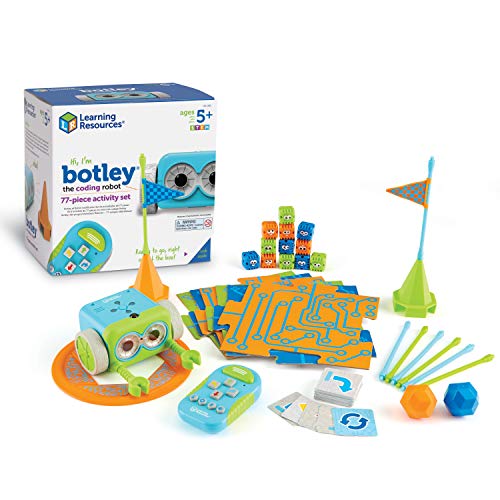
- Screen-free remote programming
- 77-piece obstacle activity set
- Ages 5+ with looping and object detection
Best For: Young beginners starting coding through hands-on play
Best for Preschool Coding
Code & Go Robot Mouse Activity Set
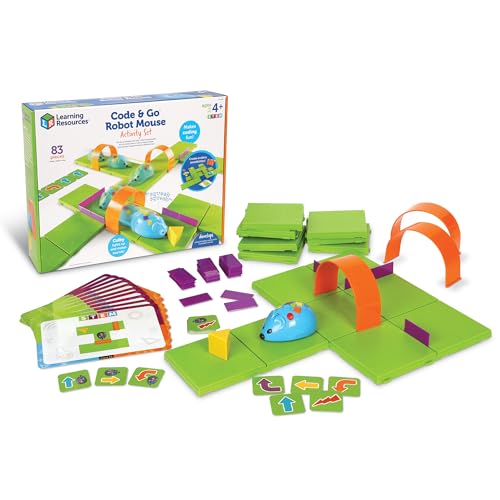
- Designed for ages 4+
- Maze-based sequencing practice
- Includes grids, walls, tunnels, and cards
Best For: Preschoolers learning directional logic and basic coding
Best Build-and-Code Option
Makeblock mBot STEM Coding Robot

- Builds in about 15 minutes
- Teaches Scratch and Arduino
- Supports line-following and add-ons
Best For: Ages 8+ exploring robotics, electronics, and programming
Best for Growing Challenges
Botley 2.0 Coding Robot Activity Set

- Screen-free play for ages 5–10
- Adds turns and object sensing
- 78-piece set with secret codes
Best For: Young learners progressing from simple commands to longer routes
Hands-On Builder
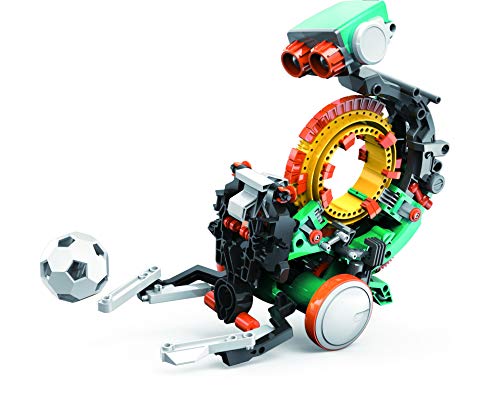
- Mechanical coding wheel programs physical actions
- In-depth build for ages 10 and up
- Supports throwing, lifting, kicking, and drawing
Best For: Older beginners who enjoy engineering-style building
Best for Everyday Use

- Introduces sequencing and logic without a screen
- Programs up to 80 steps with loops and if/then logic
- Includes remote, cards, tiles, and obstacles
Best For: Young children beginning coding through guided play
Growth-Path Kit

- Supports Scratch, Arduino, and Python
- Includes guided assembly with no soldering
- Offers app, mobile, and IR remote control
Best For: Learners progressing from block coding to robotics programming
Best Overall

- Ready to use with no assembly
- Teaches core coding concepts through apps
- Up to five hours of active play
Best For: Children ages 6–11 beginning STEM and coding
Best Compact Pick
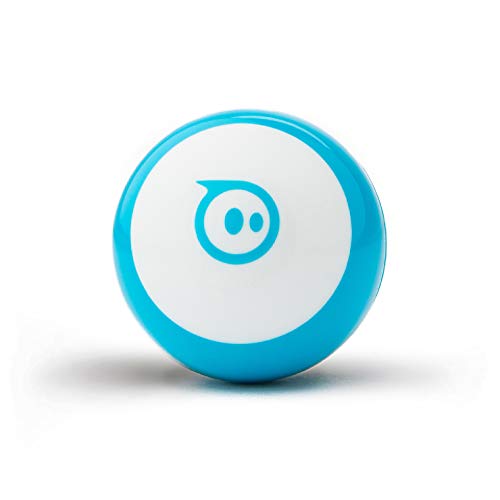
- Tiny design for small-space play
- Supports drawing, blocks, and JavaScript
- Includes cones and bowling pins
Best For: Kids and teens wanting portable coding games
Best Screen-Free Option

- Combines Color Codes with Blockly
- Five skill levels support progression
- Includes markers, lessons, and zip case
Best For: Young beginners and classrooms needing flexible coding activities
Best Screen-Free Starter – Botley Coding Robot Activity Set
Botley is a practical pick for families seeking beginner-friendly coding robot toys without screens. Designed for ages 5 and up, it introduces sequencing, obstacle avoidance, looping commands, and problem-solving through a remote programmer and hands-on challenges.
Best For: Young beginners who want screen-free coding practice with ready-made activities and obstacles.
Pros:
- Includes 40 coding cards, tiles, and 27 obstacle-building pieces.
- Supports object detection, looping commands, obstacle courses, and black-line paths.
- Works without a phone or tablet and is ready to use after adding batteries.
Cons:
- Requires five AAA batteries and a Phillips screwdriver, which are not included.
- The set has no manufacturer warranty listed.
Botley offers a broad set of activities while keeping the controls approachable. It is a strong choice when you want a screen-free introduction that can grow from simple command sequences into custom obstacle challenges.
Best for Preschool Coding – Code & Go Robot Mouse Activity Set
The Code & Go Robot Mouse Activity Set is one of the most approachable beginner-friendly coding robot toys for children ages 4 and up. Kids use simple buttons and coding cards to sequence moves and guide Colby through a hands-on maze.
Best For: Preschool and early-elementary learners practicing direction, sequencing, and trial-and-error coding.
Pros:
- Introduces programming basics with simple controls and matching coding cards.
- Includes 16 maze grids, walls, tunnels, activity cards, and a cheese wedge.
- Suitable for repeatable home, classroom, STEM-center, or small-group activities.
Cons:
- Requires three AAA batteries, which are not included.
- Its focus on maze navigation may be less suitable for children seeking advanced programming.
This set keeps the learning objective clear: plan a route, enter commands, and adjust when the mouse misses the target. Its age-focused design makes it a sensible first step before moving to more complex coding robots.
Best Build-and-Code Option – Makeblock mBot STEM Coding Robot
For older children ready to build as well as program, the Makeblock mBot is a hands-on alternative among beginner-friendly coding robot toys. Recommended for ages 8 and up, it combines a guided build with Scratch and Arduino learning, plus line-following and obstacle-avoidance functions.
Best For: Ages 8+ who want a buildable robot and a pathway from introductory coding to electronics and robotics projects.
Pros:
- Can be built in about 15 minutes using the included instructions.
- Supports Scratch and Arduino learning through Makeblock software, apps, cards, and lessons.
- Offers remote control, line-following, obstacle avoidance, and compatibility with add-on parts.
Cons:
- Requires four AA batteries for the robot and a CR2025 battery for the remote, not included.
- The build-and-software format is more involved than a simple screen-free coding toy.
mBot is a good fit when the goal is sustained STEM exploration rather than only short coding games. Its metal-and-plastic construction and open-source expansion options give learners room to progress into more creative projects.
Best for Growing Challenges – Botley 2.0 Coding Robot Activity Set
Botley 2.0 adds more progression to the familiar screen-free format, making it a strong option among beginner-friendly coding robot toys for ages 5 to 10. Children can start with remote-controlled actions, then create longer command sequences using coding cards, boards, and obstacles.
Best For: Young coders who want an approachable starting point with multi-step routes, turns, sounds, and hidden combinations.
Pros:
- Includes 40 coding cards, six double-sided boards, and stackable obstacle pieces.
- Introduces multi-step paths, 45-degree turns, and object-sensing reactions.
- Lights, sounds, music, and 16 secret code combinations add open-ended play.
Cons:
- Requires five AAA batteries, which are not included.
- Recommended for one player, so group play may require turn-taking.
Botley 2.0 is well suited to families that want coding activities to become more challenging over time. Its combination of guided cards and open-ended maze building supports both early confidence and creative experimentation.
Hands-On Builder – Mech-5 Coding Robot
For older children who enjoy building projects, the TEACH TECH Mech-5 is a beginner-friendly coding robot toy centered on mechanical programming rather than screens. Kids snap coding buttons onto its wheel to program actions such as throwing, lifting, kicking, and drawing.
Best For: Future engineers ages 10 and up who want an in-depth, hands-on introduction to mechanical engineering and coding basics.
Pros:
- Mechanical coding wheel makes programming tangible and visual.
- Supports several hands-on actions, including throwing, lifting, kicking, and drawing.
- Detailed assembly project encourages problem-solving and learning by doing.
Cons:
- Requires multiple hours of assembly and careful attention to the instructions.
- It is a building kit, not a pre-assembled robot.
- Requires two AAA batteries, which are not listed as included.
Mech-5 is a strong choice when the building process matters as much as the finished robot. Its age recommendation and multi-hour assembly make it better suited to patient older beginners than to younger children seeking instant play.
Best for Everyday Use – Botley Coding Robot
Learning Resources Botley is a beginner-friendly coding robot toy for younger children who are starting with sequencing and logic. Its screen-free setup uses a remote programmer, coding cards, tiles, and obstacles for activities at home, in classrooms, or during homeschool lessons.
Best For: Children ages 5 and up who need an accessible introduction to programming concepts through guided, hands-on play.
Pros:
- Screen-free format makes early coding approachable.
- Can program up to 80 steps and use loops and if/then logic.
- Complete kit includes Botley, remote programmer, detachable arms, coding cards, tiles, and obstacles.
Cons:
- Requires five AAA batteries.
- The manufacturer’s recommended age is 5–8, so older learners may eventually want more advanced features.
- Activities focus on remote programming rather than building the robot itself.
Botley stands out for low-barrier, screen-free practice with core coding ideas. The included obstacles and cards help families or educators create structured challenges without requiring a separate app or computer.
Growth-Path Kit – ACEBOTT Smart Robot Car
The ACEBOTT smart robot car is a beginner-friendly coding robot toy that can grow with learners from block coding into text-based programming. It combines hands-on assembly, app or remote control, and 16 story-based tutorials while supporting Scratch, Arduino, and Python.
Best For: Kids and teens ages 8–16 who want a buildable robotics project with multiple programming paths and mobile-device support.
Pros:
- Supports Scratch, Arduino, and Python for different skill levels.
- Offers illustrated instructions, HD videos, and a no-soldering build.
- Works with computers, tablets, and smartphones, plus an included IR remote.
Cons:
- Batteries are not included.
- Assembly and multi-language programming may require more guidance than a simple introductory toy.
- The supplied details list the manufacturer-recommended age as 12 and up, despite broader age-focused product messaging.
ACEBOTT is the most expandable option in this group for learners who may move beyond beginner block coding. Its DIY build and broad device compatibility add flexibility, while the tutorial path can help families or classrooms structure the experience.
Best Overall – Wonder Workshop Dash
Wonder Workshop Dash is a strong choice for families seeking beginner-friendly coding robot toys for children ages 6 and up. It arrives ready to use, supports several learning apps, and introduces coding concepts through interactive challenges.
Best For: Children ages 6–11 who want an engaging, app-enabled introduction to coding and STEM.
Pros:
- Requires no assembly and is ready to play out of the box.
- Teaches sequencing, loops, algorithms, and variables through hands-on activities.
- Can sing, dance, navigate obstacles, and respond to voice commands.
- Offers up to five hours of active play and includes building-brick connectors.
Cons:
- Designed for indoor use.
- Learning features depend on compatible Apple iOS, Android, or Fire OS apps.
Dash stands out for combining approachable coding lessons with expressive robot behaviors and substantial battery life. Its school use and multiple apps also make it a practical option for guided family or classroom learning.
Best Compact Pick – Sphero Mini
Sphero Mini is a compact option for shoppers comparing beginner-friendly coding robot toys for ages 8 and up. Its ball-shaped design supports driving, games, obstacle courses, and coding through drawing, drag-and-drop blocks, or JavaScript.
Best For: Kids and teens who want a portable robot for coding, games, and small-space play.
Pros:
- Small 1.57-inch design is convenient for limited spaces and travel.
- Offers multiple coding approaches through the Sphero Edu app.
- Includes three traffic cones and six bowling pins for obstacle-course activities.
- Provides drive modes and three arcade-style games through the Sphero Play app.
Cons:
- Playtime is limited to about one hour.
- Recommended for ages 8 and up, so it may not suit younger beginners.
Sphero Mini is appealing when portability and playful experimentation matter most. It provides a clear progression from guided driving and games to block coding and JavaScript, though its shorter battery life may require more frequent charging.
Best Screen-Free Option – Ozobot Evo
Ozobot Evo is a flexible choice among beginner-friendly coding robot toys, with screen-free Color Code activities and app-based Ozobot Blockly lessons. Recommended for ages 5 and up, it offers five skill levels and includes markers, activities, and storage for an easy start.
Best For: Young beginners, families, and teachers who want both screen-free and app-based coding practice.
Pros:
- Supports screen-free Color Code learning with five dual-tip markers.
- Ozobot Blockly includes five levels from beginner to master.
- Provides access to more than 700 free STEAM, computer science, and core-subject lessons.
- Includes a Get Started guide and zip case for organized storage.
Cons:
- The kit’s small robot and markers may be easier to misplace without careful storage.
- Advanced Blockly activities may be better suited to children as their skills develop.
Evo is particularly useful for adults who want a gradual introduction to coding without making screen time mandatory. Its color-marker system offers immediate, tactile play, while the tiered Blockly lessons provide room to progress.
How We Picked These Beginner-Friendly Coding Robot Toys
We selected products that introduce coding or robotics through age-appropriate play rather than requiring advanced programming knowledge from the start. Our comparison considers recommended age, setup difficulty, programming method, included activities, expandability, and whether children can work independently or benefit from adult support.
The list includes screen-free robots, coding-card activities, app-controlled models, programmable vehicles, and build-your-own kits. This range matters because a five-year-old learning sequencing needs a different experience from an older child experimenting with sensors, Scratch, or Arduino-compatible hardware.
Quick Comparison
| Best For | Look For |
|---|---|
| Young beginners | Screen-free controls, coding cards, and short guided challenges |
| Creative app-based play | Bluetooth connectivity, visual programming, and multiple activities |
| Building and engineering | Construction components, motors, sensors, and reusable parts |
| Longer-term learning | Scratch, Arduino compatibility, expandable projects, or multiple coding levels |
| Classrooms or groups | Clear lesson support, durable parts, and activities that scale to several learners |
Key Buying Factors for Beginner-Friendly Coding Robot Toys
Age and Learning Curve
Check both the stated age range and the type of help required. Younger children usually do best with visual instructions and immediate results. Older beginners may enjoy building and troubleshooting, but complicated assembly can be frustrating if they have never used robotics components.
Screen-Free Versus App-Based Coding
Screen-free sets are useful for practicing sequencing, commands, logic, and problem-solving without a tablet. App-based robots can offer more variety, saved projects, games, and visual programming, but they require a compatible device and may involve Bluetooth or software setup.
Build Quality and Expansion
Look for sturdy pieces, accessible controls, and parts that are easy to replace or reassemble. If a child is likely to stay interested, choose a robot with progressive challenges, multiple coding languages, sensors, or compatibility with platforms such as Scratch or Arduino.
Activities and Support
A robot is more engaging when it includes structured missions rather than only free-play controls. Activity cards, tutorials, teacher resources, and guided projects help beginners understand why a command works instead of simply making the robot move.
Who Should Buy Which Beginner-Friendly Coding Robot Toys?
Choose a simple screen-free activity set for a first coding experience or for children who prefer physical games to tablets. A coding mouse or basic Botley-style robot is especially suitable for practicing directions, sequencing, and early logic.
For children who want to design, build, and modify machines, consider a construction-focused kit such as a programmable robot car or STEM building system. These are better suited to learners who enjoy following diagrams, testing parts, and solving mechanical problems.
Choose an app-connected robot for children who want games, interactive movement, and visual coding on a tablet or phone. Older beginners interested in deeper robotics should prioritize Scratch or Arduino support, sensors, and room to create projects beyond the included activities.