The best coding robot toys for classrooms turn programming concepts into hands-on challenges students can see, test, and improve. The right choice depends on age, class size, lesson goals, and whether you need screen-free activities or app-based coding.
We compared 10 popular options across beginner accessibility, classroom flexibility, durability, expandability, and teaching value so educators can choose a robot that fits their curriculum and budget.
Best 10 Coding Robot Toys for Classrooms Picks for 2026
Best Screen-Free Starter
Botley Coding Robot Activity Set
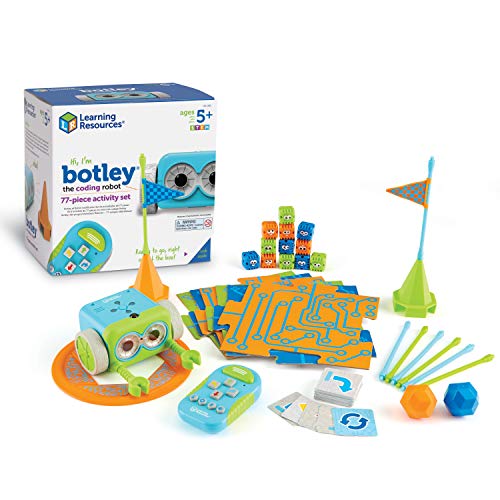
- Screen-free remote programming
- 77-piece challenge-based set
- Ages 5+ with obstacle activities
Best For: Early elementary coding centers and hands-on STEM practice
Best App-Enabled Option

- App-based Blockly and coding activities
- Teaches loops, algorithms, and variables
- Rechargeable battery with up to 5 hours
Best For: Connected classrooms and collaborative programming projects
Best for Early Coding Centers
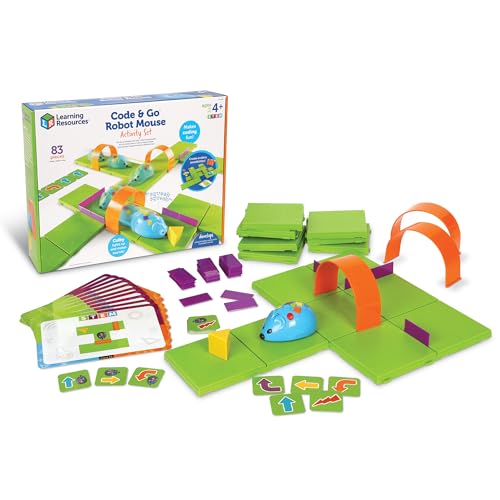
- Screen-free button programming
- Maze grids, walls, tunnels, and cards
- Designed for ages 4 and up
Best For: Preschool and early elementary classroom rotations
Best for Flexible Skill Levels

- Combines Color Codes and Blockly
- Five levels from beginner to master
- Includes access to 700+ free lessons
Best For: Mixed-ability STEAM classrooms and progressive coding instruction
Classroom Pick
Botley 2.0 Coding Robot Classroom Set

- Two robots and two 78-piece activity sets
- Screen-free coding for ages 5 and up
- Supports group challenges and STEM rotations
Best For: Early elementary classrooms and STEM centers
Build-and-Code Challenge
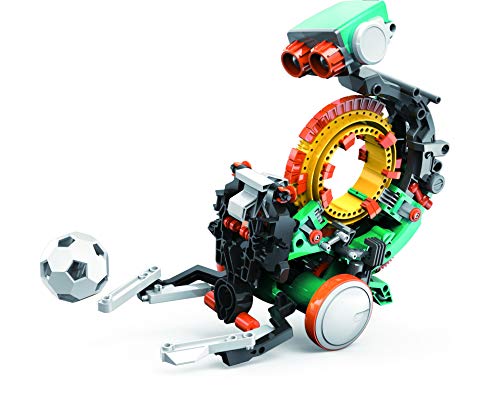
- Students assemble the robot before coding
- Mechanical wheel programs multiple actions
- Designed for learners ages 10 and up
Best For: Older students exploring mechanical engineering
Flexible Activity Kit
Botley 2.0 Coding Robot Activity Set

- 78-piece set with cards, boards, and obstacles
- Adds turns, object sensing, lights, and sounds
- Good for coding stations and small groups
Best For: Screen-free elementary coding centers
Best for Advanced Classroom Builds

- Real sensors, motors, and programmable controller
- Block coding plus simple AI model training
- Designed for solo builders or groups of four
Best For: Robotics classes and STEM groups ages 12+
Best Compact Coding Introduction
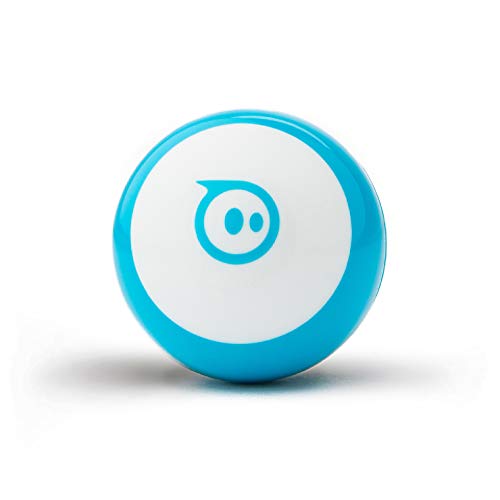
- Draw, block-code, or write JavaScript
- Includes cones and bowling pins for activities
- Compact design with about one hour of playtime
Best For: Beginner coders ages 8+ and small classroom stations
Best for Early Elementary Coding
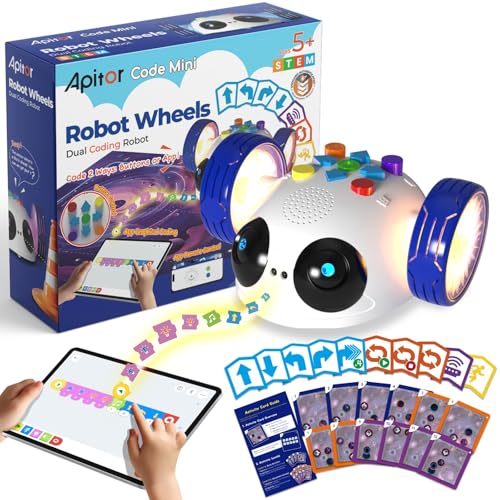
- Starts with screen-free cards and physical buttons
- Adds app-based drag-and-drop coding
- Teaches sequencing, patterns, and problem-solving
Best For: Young learners ages 5–8 and introductory classroom coding
Best Screen-Free Starter – Botley Coding Robot Activity Set
For classrooms seeking coding robot toys for classrooms without tablets or computers, Botley offers an accessible, hands-on starting point for ages 5 and up. Students can program sequences, explore loops, avoid obstacles, and complete guided challenges using the included materials.
Best For: Early elementary coding centers, screen-free STEM activities, and small-group problem-solving practice.
Pros:
- Works without a phone or tablet through its remote programmer.
- Includes 40 coding cards, tiles, obstacle pieces, and a starter guide.
- Supports sequencing, looping commands, obstacle avoidance, and black-line paths.
Cons:
- Requires five AAA batteries, which are not included.
- Its remote-controlled format may offer less app-based progression than connected robots.
Botley is a practical choice when teachers want reusable, tactile coding challenges with minimal technology setup. Its large activity set gives learners several ways to practice foundational programming concepts.
Best App-Enabled Option – Wonder Workshop Dash Robot
Dash is a versatile choice among coding robot toys for classrooms, especially for educators who want app-supported lessons and interactive robot behaviors. Designed for ages 6 and up, it introduces sequencing, loops, algorithms, and variables through coding activities.
Best For: Connected classroom programs, collaborative coding projects, and students ready for more advanced programming concepts.
Pros:
- Supports five apps for iOS, Android, and Fire OS, including Blockly, Wonder, and Path.
- Can sing, dance, navigate obstacles, and respond to voice commands.
- Rechargeable battery provides up to five hours of active play.
- Used in more than 40,000 schools globally, according to the supplied product information.
Cons:
- App-enabled learning requires compatible devices.
- The package includes only two building brick connectors and a USB charging cable for accessories.
Dash suits classrooms with access to tablets or compatible devices and a desire for expandable coding activities. Its rechargeable design and broad app support can make it a strong fit for repeated use.
Best for Early Coding Centers – Code & Go Robot Mouse
The Code & Go Robot Mouse is a classroom-friendly introduction to coding robot toys for classrooms, with simple button controls and maze-based challenges. Designed for ages 4 and up, it helps young learners practice sequencing, direction, logic, and trial-and-error without screens.
Best For: Preschool and early elementary STEM centers, classroom rotations, and small-group maze activities.
Pros:
- Provides screen-free programming through onboard buttons and coding cards.
- Includes grids, walls, tunnels, activity cards, and an activity guide for repeatable challenges.
- Builds sequencing, directional understanding, problem-solving, and early programming confidence.
- Creates a maze board measuring approximately 20 by 20 inches.
Cons:
- Requires three AAA batteries, which are not included.
- Its focus on basic maze navigation may be less suitable for advanced coding learners.
For teachers introducing programming concepts to young children, this set offers a clear, physical cause-and-effect experience. The included maze components also make it easy to organize structured group activities.
Best for Flexible Skill Levels – Ozobot Evo Entry Kit
Ozobot Evo gives classrooms a flexible approach to coding robot toys for classrooms by combining screen-free color coding with online Blockly activities. Its five skill levels and extensive lesson library allow teachers to introduce coding gradually and adapt activities as students develop.
Best For: K–12 STEAM settings, mixed-ability groups, and teachers wanting both unplugged and online coding options.
Pros:
- Offers both Color Code activities and online Ozobot Blockly coding.
- Includes five skill levels ranging from beginner to master.
- Provides access to more than 700 free lessons covering STEAM, computer science, and core subjects.
- Includes five dual-tip markers, a charging cable, a guide, and a zip case.
Cons:
- Online Blockly activities require access to a compatible device.
- The compact robot may provide a smaller physical activity footprint than larger obstacle-course sets.
Ozobot Evo is a strong long-term option for classrooms that want coding activities to grow with student ability. The combination of markers, Blockly, skill levels, and lesson resources supports varied teaching approaches.
Classroom Pick – Botley 2.0 Coding Robot Classroom Set
For classrooms looking for coding robot toys for classrooms, the Botley 2.0 Classroom Set offers screen-free practice with sequencing, logic, and problem-solving. With two robots and two 78-piece activity sets, it supports small-group rotations, obstacle courses, and team challenges.
Best For: Early elementary classrooms, STEM centers, and after-school clubs serving learners ages 5 and up.
Pros:
- Includes two coding robots and two full activity sets for group use.
- Supports coding sequences of up to 150 steps, plus lights, sounds, and object detection.
- Designed for screen-free learning and beginner-friendly classroom activities.
Cons:
- The 5.65 kg classroom bundle is relatively substantial for storage and transport.
- Its recommended starting age of 5 may make it less suitable for older students seeking advanced robotics.
This is a strong choice when multiple students need hands-on access at the same time. Its included activity materials make it easier to organize structured lessons without relying on screens.
Build-and-Code Challenge – Mech-5 STEM Coding Robot
The Mech-5 brings a more involved approach to coding robot toys for classrooms, combining assembly with mechanical programming. Students snap coding buttons onto a coding wheel to program actions such as throwing, lifting, kicking, and drawing.
Best For: Older learners ages 10 and up who are ready for a multi-hour STEM building project and an introduction to mechanical engineering.
Pros:
- Combines hands-on construction with coding basics.
- Can perform several physical actions, including throwing, lifting, kicking, and drawing.
- Detailed step-by-step instructions support a structured building experience.
Cons:
- It is not preassembled and requires multiple hours of build time.
- The single included set is less suited to simultaneous whole-class use.
- Its recommended age of 10 and up limits use with younger elementary students.
Mech-5 is best treated as a focused engineering project rather than a quick coding center. It can work well for older students who benefit from building the mechanism before programming it.
Flexible Activity Kit – Botley 2.0 Coding Robot Activity Set
The Botley 2.0 Activity Set is a compact option among coding robot toys for classrooms, using a remote, coding cards, boards, and obstacles to introduce sequencing and planning. Students can create routes, test commands, and expand challenges with turns and object-sensing reactions.
Best For: Individual learners, small groups, elementary classrooms, and homeschool settings needing a screen-free coding activity.
Pros:
- Includes a 78-piece kit with 40 coding cards, six double-sided boards, and stackable obstacles.
- Offers multi-step paths, 45-degree turns, object sensing, lights, sounds, and music.
- Supports open-ended maze building and 16 secret code combinations.
Cons:
- Only one robot is included, so students may need to take turns in a larger class.
- It requires five AAA batteries.
- The set is intended for one player at a time according to the supplied details.
This activity set suits classrooms that can rotate students through a coding station. Its cards, boards, and obstacle pieces provide enough variety for repeated practice while keeping the learning screen-free.
Best for Advanced Classroom Builds – TinkRbot AI Robot Kit
For older students, the TinkRbot AI is one of the more substantial coding robot toys for classrooms. Learners assemble the chassis, connect real sensors and motors, and program behaviors such as line following, obstacle avoidance, and maze solving.
Best For: Robotics classes, STEM clubs, and student groups ages 12 and up that need a reusable build-and-code platform.
Pros:
- Includes ultrasonic, reflectance, and infrared sensors, plus motors, servo, RGB pixels, and a programmable microcontroller.
- Supports block coding and simple machine-learning lessons through the TinkRcode online library.
- Can be rebuilt and reprogrammed for solo work or groups of two to four.
- Offers real-time sensor visualization for testing and troubleshooting.
Cons:
- Recommended for ages 12 and up, so it is not suited to early elementary classrooms.
- Assembly, wiring, and programming require more setup than a ready-to-play robot.
- Small parts make it unsuitable for children under 3.
The TinkRbot AI is best viewed as a hands-on robotics platform rather than a simple toy. Its rebuildable hardware and varied programming challenges can support multiple lessons, especially where students are ready to connect coding with physical engineering.
Best Compact Coding Introduction – Sphero Mini
Sphero Mini is a compact option for classrooms seeking approachable coding robot toys for classrooms. The small programmable ball works with Sphero Edu for drawing commands, drag-and-drop blocks, or JavaScript, while the included cones and pins create quick activity stations.
Best For: Beginners ages 8 and up, small-group coding activities, and classrooms with limited floor or storage space.
Pros:
- Supports screen-based drawing, block coding, and JavaScript in the Sphero Edu app.
- Built-in gyroscope, accelerometer, and colorful LED lights provide visible feedback.
- Includes three traffic cones and six bowling pins for obstacle-course activities.
- Can also be used with the Sphero Play app for driving and arcade-style games.
Cons:
- Approximately one hour of playtime may require recharging during extended use.
- Its small ball form can be easier to misplace than a larger classroom robot.
- The coding experience depends on compatible mobile-device apps.
Sphero Mini offers a low-barrier way to introduce movement, sequencing, and programming concepts. It is particularly practical for short rotations or stations where several students can experiment with the same compact robot and supplied accessories.
Best for Early Elementary Coding – Apitor Robot Wheels
Apitor Robot Wheels is a practical starting point for coding robot toys for classrooms serving younger learners. Children can begin with physical coding buttons and 48 cards without a device, then move to wireless app control and simplified drag-and-drop programming.
Best For: Preschool and early elementary students ages 5 to 8 learning sequencing, directions, patterns, and cause-and-effect.
Pros:
- Provides screen-free coding with 48 coding cards and physical buttons.
- Includes activity cards, a space map, and a guide for structured challenges.
- The companion app adds remote driving and drag-and-drop programming.
- An infrared sensor detects obstacles and responds with lights and sounds.
Cons:
- Requires three AA batteries, which are not included.
- Designed for one player at a time.
- The app is an optional progression, so classrooms using it need a compatible device.
Robot Wheels balances guided practice with open-ended exploration, making it a strong fit for foundational computational-thinking lessons. Its screen-free starting point can help teachers introduce sequencing and logic before adding app-based programming.
How We Picked the Best Coding Robot Toys for Classrooms
We focused on how effectively each robot supports classroom instruction rather than treating every kit as a general toy. Our comparison considered recommended age, programming method, setup time, lesson flexibility, student collaboration, and the likelihood that a teacher can reuse the kit across multiple activities.
We also looked for a useful range of experiences: screen-free command sequencing for early learners, app-based block coding for developing programmers, and buildable or more advanced robots for older students. Classroom sets and products with educator-oriented features received additional consideration because shared materials and repeatable lessons matter in group settings.
Quick Comparison
| Best For | Recommended Options |
|---|---|
| Early sequencing and screen-free lessons | Botley, Botley 2.0, Code & Go Robot Mouse |
| Guided programming for elementary students | Dash, Ozobot Evo, Apitor Robot Wheels |
| Building and engineering challenges | TEACH TECH Mech-5, TinkRbot AI, Apitor Robot Wheels |
| Compact app-based activities | Sphero Mini, Ozobot Evo |
| Shared classroom deployment | Botley 2.0 Classroom Set |
Key Buying Factors for Coding Robot Toys for Classrooms
Age and Programming Readiness
Choose a robot that matches students’ reading, fine-motor, and problem-solving abilities. Younger learners often benefit from physical remotes, color codes, or screen-free command cards. Older students may be ready for block coding, sensors, robotics construction, or text-based extensions.
Class Size and Materials
Check whether one robot can support a small group or whether your lessons require several units. A classroom bundle can simplify sharing, but multiple individual kits may provide more hands-on time. Account for spare parts, charging needs, storage, and replacement components.
Software and Device Requirements
Screen-free robots reduce device-management demands and are useful for unplugged computing lessons. App-connected models can offer richer programming and progressions, but confirm operating-system compatibility, Bluetooth requirements, account policies, and available tablets or computers before buying.
Lesson Flexibility and Durability
Look for robots that support more than one activity type, including navigation, debugging, storytelling, engineering, or sensor-based challenges. Simple controls help teachers begin quickly, while sturdy parts and clear documentation make repeated classroom use easier.
Who Should Buy Which Coding Robot Toys for Classrooms?
For kindergarten and early elementary introductions, choose a screen-free option such as Robot Mouse or Botley. For a broader range of unplugged challenges and reusable group activities, Botley 2.0 is a strong fit, especially in its classroom set.
Teachers seeking app-guided programming and more expressive projects should consider Dash or Ozobot Evo. Sphero Mini works well when compact devices and game-like coding activities are priorities. For students who enjoy designing mechanisms, Mech-5, TinkRbot AI, or Apitor Robot Wheels offer a stronger building focus.
Before purchasing, match the robot to your lesson objectives, available technology, storage space, and student-to-device ratio. The best classroom choice is the one students can operate independently while still leaving room for meaningful experimentation and debugging.