The best robot building kits for students turn screen time into hands-on learning. They let kids practice mechanics, electronics, coding, problem-solving, and creative design while building something they can actually control.
This roundup covers beginner-friendly solar and remote-control models, programmable Arduino and Scratch robots, and multi-pack kits suited to classrooms, clubs, parties, or siblings. Use the guide below to match the kit’s complexity, components, and learning potential with the student’s age and experience.
Best 10 Robot Building Kits for Students Picks for 2026
Best Solar STEM Pick

- Builds 12 robot and vehicle models
- Explores solar power and engineering
- Includes 190 parts and clear instructions
Best For: Students exploring renewable energy and hands-on construction
Best Programmable Car

- Supports Arduino coding and robotics projects
- Includes FPV, line tracking, and obstacle avoidance
- Uses guided wiring and example programs
Best For: Students learning electronics, sensors, and programmable robotics
Best Beginner Coding Robot

- Assembles in about 15 minutes
- Teaches Scratch and Arduino basics
- Supports line following and obstacle avoidance
Best For: Young beginners starting with coding and electronics
Best Advanced Robotics Project
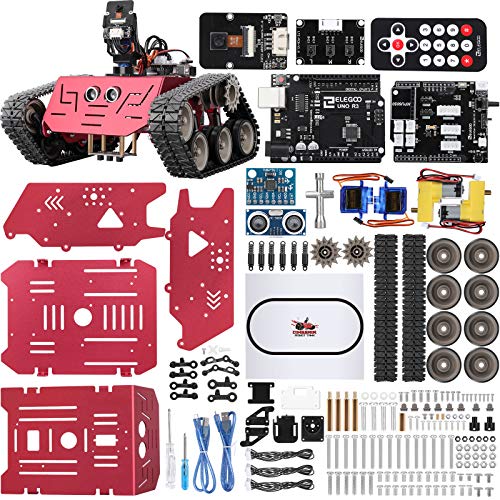
- Builds a tracked metal robot with UNO R3
- Offers five interactive driving modes
- Progresses from block coding to Arduino IDE
Best For: Students tackling advanced coding and robotics projects
Classroom Doodling Set
4-Pack STEM Doodling Robot Kits

- Four individual kits for group activities
- Builds robots that combine drawing and STEM
- Recommended for ages 8 and up
Best For: Classrooms, STEM parties, and creative group projects
Programmable 5-in-1 Pick
Sillbird STEM Robot Building Kit
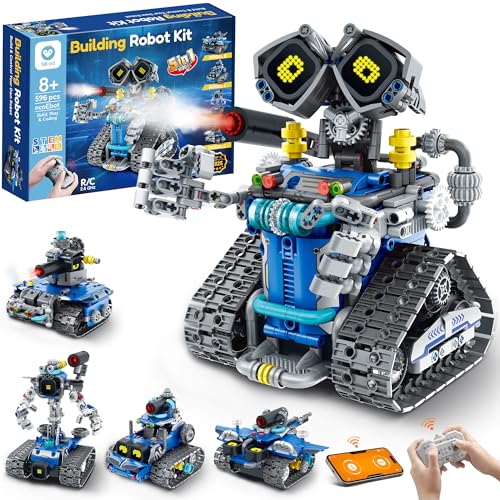
- 596 pieces build five different models
- Supports remote, app, and coding play
- Rechargeable battery lasts up to 40 minutes
Best For: Ages 8-14 seeking advanced hands-on robotics play
Circuits & Motors Bulk Set

- Four kits for classroom or group projects
- Explores circuits, motors, and mechanics
- Includes moving electric-motor robots
Best For: Beginner elementary STEM projects and science activities
Best All-Around Pick
Sillbird 5-in-1 Programmable Robot Kit
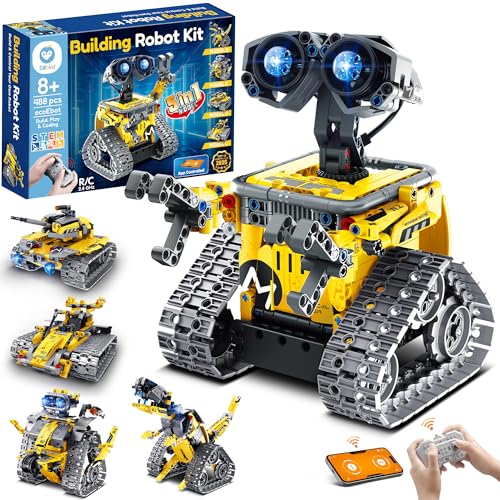
- Five buildable models with progressive difficulty
- App and remote control with basic programming
- 488 pieces and rechargeable playtime
Best For: Younger students learning construction and beginner robotics
Best for Coding Progression
ACEBOTT Arduino-Compatible Robot Car Kit

- Supports Scratch, Arduino, and Python
- 16 story-based tutorials with video guidance
- Codes through computers and mobile devices
Best For: Students progressing from block coding to text-based programming
Best for Rebuilding
3-in-1 Remote-Controlled STEM Robot Kit

- Builds a robot, vehicle, or tank
- Includes remote, motor, and rechargeable battery
- Compatible with most standard bricks
Best For: Students who enjoy mechanical builds and repeated rebuilds
Best Solar STEM Pick – 12-in-1 Solar Robot Kit
If you’re comparing robot building kits for students, the Sillbird 12-in-1 kit is a hands-on option focused on solar power, mechanical assembly, and progressively challenging builds. Its 190 parts let students create 12 different models, including robots and cars, with instructions designed to support independent or family-assisted assembly.
Best For: Students ages 8 and up who are interested in renewable energy, building projects, and screen-free STEM play.
Pros:
- Offers 12 builds with varying difficulty levels.
- Uses sunlight or a strong artificial light source for power.
- Includes a larger solar panel and 190 parts.
- Clear step-by-step instructions support beginners.
Cons:
- Solar performance depends on available sunlight or a sufficiently strong indoor light.
- The manufacturer recommends the kit for ages 10 and up, despite the title’s broader age range.
This is a strong choice when the learning goal is an approachable introduction to engineering and renewable energy. It is less suited to students seeking programmable coding or sensor-based robotics.
Best Programmable Car – UNO R3 Smart Robot Car Kit
For students ready to move beyond basic assembly, this ELEGOO kit combines robot-car construction with Arduino programming, sensors, and camera-based driving. It supports app or IR control, FPV video, line tracking, and obstacle avoidance, making it one of the more feature-rich robot building kits for students in this roundup.
Best For: Students ages 12 and up, coding clubs, STEM classes, and beginners who want guided electronics and programming practice.
Pros:
- Includes Arduino-compatible programming and example programs.
- Offers FPV video, line tracking, obstacle avoidance, and multiple controls.
- Keyed connectors help reduce wiring mistakes.
- Includes a rechargeable 2000 mAh lithium-ion battery.
Cons:
- More involved than a simple beginner construction toy.
- The manufacturer recommends adult guidance for first-time builders.
This kit is a practical bridge from guided building to custom robotics experiments. Its sensors and camera provide meaningful projects, while the illustrated tutorial helps students get through the initial wiring and assembly.
Best Beginner Coding Robot – Makeblock mBot Coding Robot
The Makeblock mBot is designed as an accessible starting point for robot building kits for students. It can be assembled in about 15 minutes, then used for remote control, line following, obstacle avoidance, and coding activities through Scratch and Arduino-compatible learning resources.
Best For: Students ages 8 and up who need a straightforward introduction to electronics, construction, and programming.
Pros:
- Quick assembly with clear building instructions.
- Supports Scratch and Arduino learning pathways.
- Includes coding cards, lessons, apps, and mBlock software.
- Open-source design supports add-on packs and compatibility with LEGO parts.
Cons:
- Requires four AA batteries, which are not included.
- The remote controller requires a CR2025 battery, also not included.
mBot is a sensible pick for younger students or first-time builders because it gets them from assembly to interactive play quickly. Its expandable platform also leaves room for more advanced projects as coding confidence grows.
Best Advanced Robotics Project – Conqueror Robot Tank Kit
The ELEGOO Conqueror is a substantial project for students who want to assemble a tracked robot and experiment with coding, sensors, and live video. Its metal chassis, UNO R3 controller, adjustable camera, and five interactive modes make it a robust option among robot building kits for students.
Best For: Students ages 10 and up working on homeschool projects, coding clubs, classroom builds, or more ambitious robotics challenges.
Pros:
- Combines a stainless-steel tracked chassis with an UNO R3 control system.
- Offers FPV driving, obstacle avoidance, line tracking, auto follow, and IR control.
- Supports visual block coding before advancing to Arduino IDE.
- Includes tools, battery, sensors, servos, and illustrated instructions.
Cons:
- Its metal construction and multiple modules make it a more demanding build.
- The manufacturer recommends it for ages 10 and up.
This tank kit is best when students need a project with room for repeated experimentation rather than a quick build-and-play experience. The progression from visual programming to Arduino IDE gives it useful long-term value for developing robotics skills.
Classroom Doodling Set – 4-Pack STEM Doodling Robot Kits
For educators or parents seeking robot building kits for students, this four-pack offers a simple, hands-on introduction to construction, creativity, and basic robotics. Each kit builds a doodling robot, making it suitable for classroom activities, group projects, parties, or individual STEM play.
Best For: Classrooms, STEM parties, and group activities for children ages 8 and up.
Pros:
- Includes four complete doodling robot kits for group use.
- Combines art and STEM through robots that draw while operating.
- Supports construction, problem-solving, spatial thinking, and motor skills.
- Uses non-toxic, durable materials according to the supplied product details.
Cons:
- Designed around a doodling robot rather than multiple robot configurations.
- The supplied details do not indicate remote control, app control, or programmable features.
This is a practical bulk option when the goal is an accessible, creative robotics activity for several students at once. It emphasizes building and experimentation over advanced coding.
Programmable 5-in-1 Pick – Sillbird STEM Robot Building Kit
This Sillbird set is one of the more feature-rich robot building kits for students, combining a 596-piece construction project with remote control, app interaction, and introductory programming. Five build models with different difficulty levels let children progress from simpler assemblies to more involved designs.
Best For: Children ages 8-14 who want building, remote-control play, and an introduction to programming.
Pros:
- 596 pieces support five build models, including a robot, tank, and car.
- Offers remote control, Bluetooth app interaction, and creative coding features.
- Includes LED eyes, sound effects, and a water-activated mist-spray feature.
- Rechargeable battery provides up to 40 minutes of continuous play per charge.
Cons:
- Its larger piece count may require more assembly time and organization.
- Battery operation and app features may add setup requirements beyond a basic kit.
Choose this model when students are ready for a longer build with interactive functions and multiple ways to experiment. The step-by-step color manual can also support independent building or family-assisted projects.
Circuits & Motors Bulk Set – 4 Set Robot Building Kits
These four individual robot kits are a useful choice for teachers comparing robot building kits for students who are learning basic circuits, motors, mechanics, and engineering. Each project includes an electric motor and googly eyes, creating a straightforward building activity for classrooms, science fairs, STEM competitions, or family projects.
Best For: Elementary classroom projects and small-group activities for children ages 8-13.
Pros:
- Includes four complete kits for group work or separate student projects.
- Introduces electrical circuits, robotics, mechanics, and engineering principles.
- Electric motors and googly eyes add movement and creative character.
- Fits science fairs, STEM challenges, and classroom activities.
Cons:
- The supplied details describe a simple robotics project, not programmable or app-controlled operation.
- Recommended ages and keyword references vary across the supplied listing information.
This set is best suited to educators who need multiple accessible projects with a clear electrical and mechanical focus. It offers more direct circuit exploration than a purely decorative craft while remaining appropriate for beginner activities.
Best All-Around Pick – Sillbird 5-in-1 Programmable Robot Kit
For students who want robot building kits for students that combine construction and simple programming, the Sillbird kit offers five buildable models, including a robot, dinosaur, car, and tank. Its 488 pieces, colorful instructions, app connectivity, and remote control make it a flexible introduction to hands-on STEM play.
Best For: Kids ages 8-13 who want progressively challenging builds, screen-free construction, and app- or remote-controlled play.
Pros:
- Builds five different models with varying difficulty.
- Supports Bluetooth app control, remote control, basic programming, and path control.
- Includes clear, colorful instructions and a rechargeable battery with up to 40 minutes of play.
- 488 pieces encourage creativity, coordination, and problem-solving.
Cons:
- The rechargeable battery is a non-standard type, which may be less convenient to replace.
- The kit is designed for indoor use.
This is a strong choice for younger students who benefit from guided assembly and multiple ways to rebuild and play. Choose it when model variety and beginner-friendly controls matter more than advanced programming languages.
Best for Coding Progression – ACEBOTT Arduino-Compatible Robot Car Kit
Among robot building kits for students, the ACEBOTT kit stands out for its programming range. Students can begin with Scratch block coding and progress to Arduino and Python while building an ESP32-powered robot car through 16 story-based tutorials.
Best For: Students ages 8-16, classrooms, or home learners who want a robot kit that can support increasingly advanced coding practice.
Pros:
- Supports Scratch, Arduino, and Python for multiple skill levels.
- Includes 16 story-based tutorials, HD videos, and illustrated assembly instructions.
- Can be programmed from computers, tablets, smartphones, and iPads.
- Offers both smartphone app control and an included IR remote.
Cons:
- Batteries are not included.
- The manufacturer recommends it for ages 12 and up, despite the listing also mentioning ages 8-12.
- It is a robot car kit rather than a multi-model construction set.
The ACEBOTT is the better fit when coding depth and long-term progression are priorities. Its no-solder assembly and mobile coding support also make it practical for classrooms and independent learning.
Best for Rebuilding – 3-in-1 Remote-Controlled STEM Robot Kit
For students who enjoy taking a project apart and starting again, this 3-in-1 set is one of the more straightforward robot building kits for students. Its 388 pieces can be assembled into a robot, all-terrain vehicle, or tank, with remote control providing an interactive finish after construction.
Best For: Kids ages 8-14 who prefer mechanical building, repeated rebuilds, and remote-controlled play over app-based coding.
Pros:
- Transforms into three models: a robot, all-terrain vehicle, and tank.
- Includes a remote control, motor, rechargeable battery, stickers, and instructions.
- Clear step-by-step directions support independent or guided assembly.
- Compatible with most standard bricks for potential expansion.
Cons:
- Does not list app control or programmable coding features.
- The 388-piece set offers fewer pieces than the Sillbird kit.
- Its operation is described as automatic and battery powered, limiting control options compared with coding-focused kits.
This kit is a practical pick for hands-on engineering practice and repeatable building fun. Select it for students who value physical construction and vehicle-style play, especially when coding features are not essential.
How We Picked These Robot Building Kits for Students
We selected kits across several learning levels and use cases, including first-time builders, independent projects, coding practice, robotics clubs, and group activities. We looked for products that combine construction with a clear STEM objective, such as learning about gears, motors, sensors, circuits, remote control, or programming.
Because kit contents and software support can vary, check the current listing for required batteries, tools, device compatibility, assembly instructions, and recommended age before buying. Arduino-based kits generally offer more room to experiment, while simpler solar or remote-control sets can provide a faster, less frustrating first project.
Quick Comparison
| Kit type | Best for | What students practice |
|---|---|---|
| Solar and basic build kits | Young beginners | Assembly, gears, simple circuits |
| Remote-control robots | Hands-on play and building | Mechanics, controls, troubleshooting |
| Arduino robot cars and tanks | Older or experienced students | Coding, sensors, electronics |
| Scratch-compatible kits | Visual programming learners | Logic, sequencing, automation |
| Bulk craft robot kits | Classes, camps, and parties | Teamwork, creativity, basic engineering |
Key Buying Factors for Robot Building Kits for Students
Age, Supervision, and Difficulty
Choose a project that is challenging without requiring constant adult intervention. Younger builders often benefit from larger parts, visual instructions, and fewer electronic connections. Advanced kits may require help with wiring, coding, calibration, or software installation.
Programming and Expansion
If the goal is coding practice, prioritize Arduino, Scratch, app, sensor, or camera support rather than a robot that only moves through a remote control. Confirm whether the controller board, programming cable, batteries, and software are included.
Build Quality and Learning Value
Look for durable structural parts, clearly labeled components, reusable modules, and instructions that explain why the robot works. A kit with multiple configurations can provide more long-term value than a one-time assembly project.
Individual Versus Group Use
Single kits suit personal projects and gifts. Four-packs and bulk craft sets make more sense for classrooms, scouting groups, birthday activities, or siblings, but they may offer less sophisticated electronics.
Who Should Buy Which Robot Building Kits for Students?
- For a first robotics project: Choose a solar, basic construction, or straightforward remote-control kit with age-appropriate instructions.
- For coding-focused students: Choose an Arduino or Scratch-compatible robot car with sensors, app control, or programmable behaviors.
- For students ready for a challenge: Consider a tank-style or camera-equipped Arduino kit that adds wiring, troubleshooting, and automation possibilities.
- For classrooms and activities: Select a multi-pack with simple builds, common components, and enough units for students to work individually or in pairs.
- For a gift with replay value: Favor kits offering multiple designs, interchangeable parts, or expandable programming features.
Ultimately, the best robot building kit is the one that matches the student’s current skill level while leaving room to learn the next concept. A well-chosen project should be engaging on the first build and useful for experimentation afterward.