The best coding robot toys turn programming concepts into hands-on challenges children can see, test, and improve. This roundup compares screen-free activity sets, color-code robots, app-connected options, and buildable kits for different ages and skill levels.
Use the guide below to match each child with the right balance of simplicity, creativity, structured activities, and long-term learning value.
Best 10 Coding Robot Toys for Home Learning Picks for 2026
Best Screen-Free Starter

- 78-piece maze and coding kit
- Screen-free remote programming
- Ages 5–10 with increasing challenges
Best For: Children beginning hands-on coding at home
Best App-Enabled Option

- Five compatible learning apps
- Voice commands and obstacle play
- Rechargeable battery with up to five hours
Best For: Children 6+ ready for app-supported coding
Best for Maze Practice
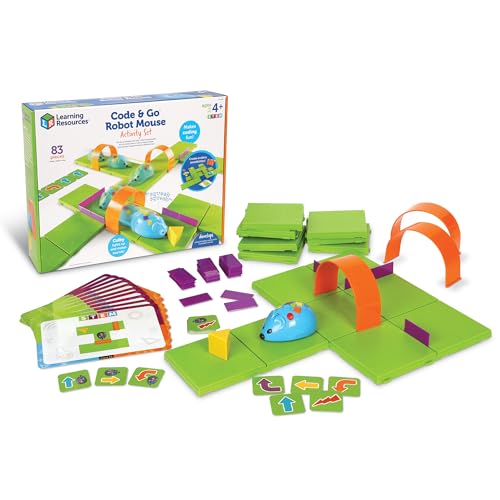
- Screen-free button-based coding
- Maze grids, walls, tunnels, and cards
- Designed for ages 4 and up
Best For: Young learners practicing sequencing through mazes
Best for Preschool Storytelling

- Screen-free coding for ages 3–5
- Recording and interactive storytelling play
- Teaches commands, sequences, and loops
Best For: Preschoolers learning through stories and multisensory play
Storytime Coding Companion
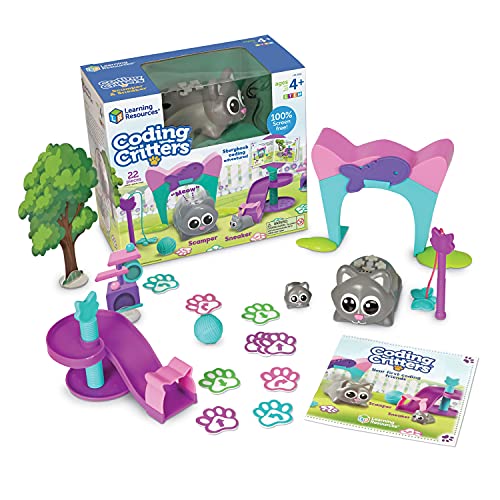
- Screen-free coding with directional cards
- Includes storybook, pets, and 22-piece playset
- Builds early sequencing and logic skills
Best For: Young beginners who learn through imaginative story play
Progressive STEM Path

- Includes 27 guided coding and engineering activities
- Starts screen-free and advances to Blockly
- Includes charging cable and protective case
Best For: Homeschoolers wanting structured, growing challenges
Remote-Controlled Coding Starter

- Completely screen-free remote programming
- Includes coding cards, remote, and robot
- Designed for early STEM and problem-solving
Best For: Elementary beginners learning through active robot play
Advanced Builder Pick
TinkRbot AI Robot Building Kit

- Builds and programs an autonomous robot
- Includes multiple sensors and a programmable microcontroller
- Supports block coding and simple AI lessons
Best For: Ages 12+, solo builders, and small robotics groups
Screen-Free Preschool Pick
Apitor Robot Panda Coding Robot

- Uses physical buttons instead of a device
- Includes coding and activity cards
- Teaches sequencing, loops, and obstacle sensing
Best For: Preschool beginners ages 4 to 6
Growth-Minded Starter
Apitor Robot Wheels Coding Kit
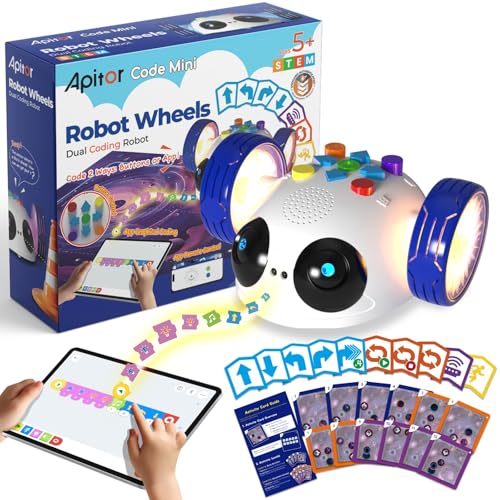
- Begins with cards and buttons, then adds app coding
- Includes guided activities and a themed map
- Teaches patterns, sequencing, and obstacle sensing
Best For: Ages 5 to 8 progressing from screen-free to app coding
Best Screen-Free Starter – Botley 2.0 Coding Robot
For families looking for coding robot toys for home learning, Botley 2.0 offers a screen-free, remote-controlled introduction to sequencing and problem-solving. Its coding cards, boards, and obstacles let children build routes and gradually try more complex challenges.
Best For: Children ages 5–10 who are beginning to explore coding through hands-on, screen-free play.
Pros:
- Includes 78 pieces for building mazes and custom challenges.
- Supports multi-step sequences, 45-degree turns, and object-sensing reactions.
- Lights, sounds, music, and 16 secret code combinations add variety.
Cons:
- Requires five AAA batteries, which are not listed as included.
- Designed for one player at a time.
Botley 2.0 is a practical choice when you want an expandable coding activity without requiring an app or screen. The included accessories provide enough flexibility for repeated maze-building and route-planning activities.
Best App-Enabled Option – Wonder Workshop Dash Robot
Among coding robot toys for home learning, Dash is suited to children ready for app-supported STEM activities. It arrives assembled and can sing, dance, navigate obstacles, respond to voice commands, and introduce concepts such as sequencing, loops, algorithms, and variables.
Best For: Children ages 6 and up who want interactive coding activities with a rechargeable robot and compatible apps.
Pros:
- Works with five apps for iOS, Android, and Fire OS.
- Supports voice commands, obstacle navigation, and programmable behaviors.
- Rechargeable battery provides up to five hours of active play.
- No assembly is required, and two building-brick connectors are included.
Cons:
- App-enabled learning requires a compatible device.
- The package includes fewer physical accessories than maze-focused kits.
Dash is a stronger fit for families seeking a more interactive and expandable digital coding experience. Its rechargeable design and broad app support make it convenient for recurring home-learning sessions.
Best for Maze Practice – Code & Go Robot Mouse
The Code & Go Robot Mouse is one of the most straightforward coding robot toys for home learning, using buttons and coding cards instead of a screen. Children program Colby to travel through customizable mazes while practicing sequencing, direction, and trial-and-error problem-solving.
Best For: Preschool and early elementary learners ages 4 and up, including small-group or classroom STEM activities.
Pros:
- Includes grids, walls, tunnels, coding cards, and activity cards.
- Provides a repeatable structure for maze-based coding practice.
- Introduces programming concepts through simple physical controls.
- Supports individual play and group STEM-center activities.
Cons:
- Requires three AAA batteries, not included.
- Its activities focus primarily on maze navigation rather than app-based programming.
This set is a good starting point for children who benefit from concrete visual routes and repeatable challenges. The large collection of maze components makes it especially useful for guided practice at home or in learning centers.
Best for Preschool Storytelling – TaleBot Pro Coding Robot
TaleBot Pro combines early coding with storytelling, making it a distinctive choice among coding robot toys for home learning. Children use touch-based command buttons to make the robot move, draw, sing, dance, speak, and record stories on its interactive map.
Best For: Children ages 3–5 who learn well through multisensory play, storytelling, and simple screen-free commands.
Pros:
- Introduces commands, sequences, and loops with up to 256 commands.
- Includes a double-sided interactive map and a 14-mission challenge booklet.
- Recording features encourage language development and imaginative play.
- Supports 10 languages and works with Lego blocks for added building play.
Cons:
- The included set has limited physical accessories compared with larger maze kits.
- Additional activity boxes are recommended for more learning materials.
TaleBot Pro is particularly appealing when coding practice needs to feel like creative play rather than a technical exercise. Its tactile controls, voice feedback, and storytelling functions can also support varied sensory and communication needs.
Storytime Coding Companion – Scamper & Sneaker
For families seeking coding robot toys for home learning with a gentle, imaginative introduction, Scamper & Sneaker combines screen-free play with a coding storybook. Children use directional coding cards to guide Scamper through playful activities while practicing sequencing and problem-solving.
Best For: Preschool and early elementary learners who enjoy story-led, hands-on coding activities.
Pros:
- Screen-free format supports early sequencing, logic, and problem-solving skills.
- Includes Scamper, Sneaker, a 22-piece playset, accessories, coding cards, and a storybook.
- Story-based activities can fit homeschool, classroom, after-school, or rainy-day play.
Cons:
- Requires 3 AAA batteries, which are not included.
- Its manual, card-based coding may be less suitable for children seeking app-based programming.
Scamper & Sneaker is a strong choice when the goal is to make first coding concepts feel like pretend play. It offers a particularly approachable starting point for younger children who benefit from stories and tangible accessories.
Progressive STEM Path – Ozo at Home
Ozo at Home is one of the more structured coding robot toys for home learning, offering 27 guided activities that move from color-code play and magnetic paths toward Ozobot Blockly. The staged format gives families a practical way to build skills from beginner concepts to more advanced challenges.
Best For: Homeschool families and children ages 5 and up who want a guided progression from screen-free coding to Blockly.
Pros:
- Includes 27 activities across color codes, magnetic boards, Blockly, and engineering challenges.
- Supports sequencing, logic, direction, speed, loops, problem-solving, and design thinking.
- Short activities ranging from about 10 to 30 minutes suit flexible home lessons.
- Includes a charging cable and protective case.
Cons:
- Blockly activities require a computer or tablet, so the full progression is not entirely screen-free.
- Some children may need adult support as activities become more advanced.
Ozo at Home stands out for its breadth and clear learning progression. It is a good fit for families that want more than a single introductory activity and appreciate repeatable lessons with increasing complexity.
Remote-Controlled Coding Starter – Botley 2.0 Coding Robot
Botley 2.0 offers an accessible introduction to coding robot toys for home learning through screen-free command sequences. Children use the remote programmer and included cards to send instructions, explore code games, and practice critical thinking, logic, and problem-solving.
Best For: Elementary-age beginners who want an easy, screen-free robot coding experience.
Pros:
- Works without a phone or tablet through its remote programmer.
- Ready to use after installing batteries, with cards, remote, and robot included.
- Encourages critical thinking, engineering, logic, and problem-solving through play.
Cons:
- Requires five AAA batteries and a Phillips screwdriver; batteries are not included.
- The coding experience is centered on remote commands rather than an app or block-based interface.
Botley 2.0 is a straightforward pick for families prioritizing active, screen-free coding. Its remote-controlled setup makes the first steps approachable, while the included cards provide a foundation for guided practice and games.
Advanced Builder Pick – TinkRbot AI Robot Building Kit
For older learners seeking coding robot toys for home learning, the TinkRbot AI combines hands-on construction with programmable robotics. Builders assemble the chassis, wire sensors and motors, then use block coding and simple AI lessons to create behaviors such as line following, obstacle avoidance, and maze solving.
Best For: Ages 12 and up, independent builders, small groups, and classroom-style robotics projects.
Pros:
- Includes multiple sensors, DC and servo motors, RGB pixels, and a programmable microcontroller.
- Supports repeated rebuilding and programming for new robot behaviors.
- Offers real-time sensor visualization and an online lesson library with block coding and simple AI model training.
- Can accommodate solo work or groups of two to four learners.
Cons:
- Its recommended 12+ age range makes it unsuitable for younger children.
- Assembly, wiring, and programming require more time and patience than introductory coding toys.
- Small parts require careful handling.
This is the strongest fit for a serious home-learning setup where the goal is to explore engineering, sensors, coding, and introductory AI rather than simply play with a finished robot.
Screen-Free Preschool Pick – Apitor Robot Panda Coding Robot
The Apitor Robot Panda is a gentle entry point for families comparing coding robot toys for home learning. Children use physical buttons, coding cards, and activity cards to practice sequencing, loops, and problem-solving without a phone or tablet.
Best For: Preschool learners ages 4 to 6 who benefit from screen-free, guided coding activities.
Pros:
- Requires no phone or tablet, keeping early coding practice screen-free.
- Includes 36 coding cards and 12 activity cards for structured learning.
- Uses smart sensing to detect and avoid obstacles.
- Introduces loops through lights and sound routines.
Cons:
- Physical-button programming is designed for beginners and may feel limited as skills grow.
- The manufacturer recommends it for ages 4 to 5, so older children may outgrow it sooner.
- The set is focused on indoor floor play.
Robot Panda works well as a first coding experience, especially when parents or teachers want tangible sequencing practice with clear activity prompts and minimal setup.
Growth-Minded Starter – Apitor Robot Wheels Coding Kit
Robot Wheels gives families a gradual way to use coding robot toys for home learning, starting with screen-free cards and buttons before introducing app-based programming. Its activities connect sequencing, patterns, directions, and problem-solving to hands-on robot movement.
Best For: Children ages 5 to 8 who are ready to move from physical coding commands to simple drag-and-drop app programming.
Pros:
- Offers both screen-free coding cards and optional wireless app control.
- Includes 48 coding cards, 12 activity cards, and a themed map for guided challenges.
- Teaches sequencing, color and pattern recognition, directions, and computational thinking.
- Infrared sensing lets the robot detect obstacles and respond with lights and sounds.
Cons:
- Requires three AA batteries, which are not included.
- App programming requires access to a compatible device.
- Its beginner-focused controls may provide limited depth for advanced coders.
This is a practical choice for early elementary learners because it supports a screen-free start while leaving room to explore drag-and-drop programming as confidence develops.
How We Picked the Best Coding Robot Toys for Home Learning
We focused on coding robots that support meaningful learning at home without requiring a classroom setup. Our criteria included age suitability, programming method, activity variety, setup time, durability, expandability, and how clearly each toy teaches sequencing, logic, problem-solving, or robotics.
We also considered different learning styles. Some children benefit from screen-free cards and button controls, while others are ready for Blockly, color coding, artificial-intelligence concepts, or hands-on construction. Because the selected products cover a wide age range, parents should always check the recommended age and skill level before buying.
Quick Comparison
| Best For | Look For |
|---|---|
| Preschool beginners | Large controls, simple commands, and guided play |
| Screen-free learning | Command buttons, coding cards, mazes, or color markers |
| Creative programming | Blockly, app support, sound, lights, and open-ended challenges |
| Future robotics skills | Building components, sensors, motors, and advanced coding |
| Sibling or family play | Multiple activities and adjustable difficulty levels |
Key Buying Factors for Coding Robot Toys for Home Learning
Age and Learning Curve
Choose a toy that offers an achievable first challenge but leaves room to progress. Preschool models should make cause and effect obvious, while older children may enjoy debugging, designing routes, building mechanisms, or writing longer programs.
Screen-Free Versus App-Based Coding
Screen-free robots are useful for introducing sequencing and logic with less device time. App-based systems can offer more programming flexibility, visual feedback, and advanced lessons, but they may require a compatible tablet, phone, or computer.
Activity Depth and Replay Value
Look for challenge cards, maze pieces, missions, or construction options that encourage repeated use. A robot with open-ended play is generally a better long-term choice than one with only a few scripted demonstrations.
Build Quality and Practical Requirements
Check whether the set includes batteries, a charging cable, markers, cards, or building parts. Consider storage, floor space, controller size, and whether the robot can handle the surfaces available in your home.
Who Should Buy Which Coding Robot Toys for Home Learning?
For young children beginning with coding concepts, choose a simple screen-free robot with tactile controls and guided activities. Families seeking structured practice should prioritize sets with coding cards, mazes, and progressive challenges. Children who enjoy drawing, experimentation, or digital creativity may prefer a color-coding or Blockly-compatible robot.
For older learners, a programmable robot with sensors, app support, or construction elements offers more room to explore. Choose a buildable robotics kit when the child is interested in how mechanisms work and is comfortable following assembly instructions. If several children will share the toy, favor versatile activity sets with adjustable difficulty and enough components for collaborative play.