The best coding robot toys turn abstract programming concepts into hands-on challenges children can build, test, and improve. This roundup compares 10 options across age ranges, control methods, construction styles, and learning goals.
Whether you want a screen-free introduction or a more advanced Arduino-compatible project, the right robot should match the child’s experience, patience, and interest in building.
Best 10 Coding Robot Toys for STEM Projects Picks for 2026
Best Overall

- Quick build with guided instructions
- Scratch and Arduino programming
- Expandable with modules and LEGO parts
Best For: Beginners seeking an expandable robotics platform
Best Advanced Car Kit

- Arduino-programmable UNO R3 platform
- FPV camera, sensors, and Wi-Fi module
- Rechargeable battery included
Best For: Older learners exploring sensor-based robot cars
Best Multi-Model Build

- 560-piece construction set
- Three rebuildable robot or vehicle models
- Remote, app, and programming play
Best For: Kids who enjoy mechanical builds and repeat projects
Best Screen-Free Option

- No-screen programming activities
- Supports sequences, loops, and if/then logic
- Includes cards, tiles, and obstacles
Best For: Young learners beginning coding through hands-on play
Most Versatile Build-and-Code Set

- Rebuilds into five robot configurations
- Remote and app control with coding modes
- 600+ pieces and rechargeable power
Best For: Kids seeking repeatable building and beginner coding projects
Best Screen-Free Starter
Botley Coding Robot Activity Set
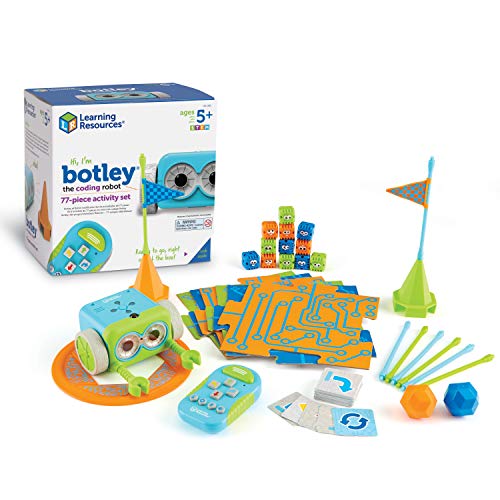
- No phone or tablet required
- Includes 77 pieces and coding challenges
- Supports paths, loops, and obstacle play
Best For: Young beginners learning foundational coding concepts
Best App-Based Building Option

- Builds six models with 480 blocks
- App teaches loops and variables
- Four Bluetooth control modes and 360° stunts
Best For: Kids ready for app-guided robotics and graphical coding
Best Multi-Language Kit

- Supports Scratch, Arduino, and Python
- Includes guided tutorials and no-solder assembly
- Offers mobile app and IR remote control
Best For: Kids and teens progressing from beginner coding to robotics projects
Best Heavy-Duty Pick
My Robotic Pet Coding Chameleon

- Programs through physical color action cards
- Includes three interactive play modes
- Combines assembly with sensors and robotic movement
Best For: Screen-free coding and animal-themed STEM learning
Best Mechanical Coding Build

- Uses a mechanical coding wheel
- Performs throwing, lifting, kicking, and drawing actions
- Includes a multi-hour hands-on assembly project
Best For: Future engineers learning mechanical coding through building
Best Overall – Makeblock mBot
The Makeblock mBot is a strong all-around choice among coding robot toys for STEM projects. Its guided build, Scratch and Arduino support, coding cards, and multiple driving modes give kids ages 8 and up a practical introduction to robotics, electronics, and programming.
Best For: Beginners who want a buildable robot with room to expand into more advanced projects.
Pros:
- Can be assembled in about 15 minutes with clear instructions.
- Supports Scratch and Arduino programming through Makeblock software and apps.
- Offers line-following, obstacle-avoidance, and remote-control play.
- Compatible with more than 100 electronic modules, 500 parts, and LEGO components.
Cons:
- Four AA batteries and a CR2025 battery for the remote are not included.
- You may need add-on packs to access the broadest range of configurations.
With its approachable construction process and expandable open-source design, mBot is a versatile starting point for home learning, clubs, or classroom STEM activities.
Best Advanced Car Kit – ELEGOO Smart Robot Car V4
The ELEGOO UNO R3 Smart Robot Car V4 turns coding robot toys for STEM projects into a hands-on engineering challenge. Kids can assemble the car, program it with Arduino IDE, and experiment with camera-based FPV video, line tracking, obstacle avoidance, and app or IR control.
Best For: Older beginners, coding clubs, and families looking for a more feature-rich robot car project.
Pros:
- Includes a camera and Wi-Fi module for live FPV video.
- Supports line tracking, obstacle avoidance, auto-follow, app control, and IR control.
- Keyed connectors and an illustrated tutorial help reduce wiring mistakes.
- Includes a rechargeable 2000 mAh lithium-ion battery.
Cons:
- Manufacturer recommends it for ages 12 and up, with adult guidance for first-time builders.
- The larger feature set may be more involved than a basic entry-level robot.
This kit is a good fit when the goal is to move beyond simple assembly and explore sensors, movement logic, wireless control, and Arduino programming.
Best Multi-Model Build – Kyanio 3-in-1 Robot Kit
The Kyanio 3-in-1 kit combines block construction, remote-control play, app programming, and mechanical engineering in one of the more varied coding robot toys for STEM projects. Its 560 pieces can be used to create three models while introducing gears, building techniques, and basic robot coding.
Best For: Kids ages 8 and up who enjoy rebuilding, mechanical designs, and multiple ways to play.
Pros:
- Includes 560 building pieces and three different vehicle or robot models.
- Offers remote, app, and programming-based interaction.
- Color-coded blocks and step-by-step instructions support the building process.
- Includes a rechargeable battery and 2.4GHz remote-control technology.
Cons:
- The product emphasizes block building and mechanical play as much as coding.
- Its many pieces and model options may require more organization during assembly.
For children who prefer variety over a single fixed robot, this set provides repeatable construction projects and a tangible way to explore gears, logic, coordination, and STEM concepts.
Best Screen-Free Option – Botley Coding Robot
Botley is a screen-free introduction to coding robot toys for STEM projects, using a remote programmer, coding cards, tiles, and obstacles instead of a computer or tablet. It helps younger learners practice sequencing, loops, and if/then logic through obstacle courses and black-line paths.
Best For: Young beginners ages 5 and up, homeschool activities, classrooms, and screen-free coding practice.
Pros:
- Teaches coding concepts without requiring a screen.
- Can be programmed for up to 80 steps and supports loops and if/then logic.
- Includes Botley, remote programmer, detachable arms, coding cards, tiles, and obstacles.
- Works well for obstacle-course and black-line-path activities.
Cons:
- Requires five AAA batteries, which are not listed as included.
- It is designed for introductory coding rather than Scratch or Arduino programming.
Botley is the most accessible choice in this group for early learners, offering structured, hands-on practice with core programming ideas before children move to screen-based coding platforms.
Most Versatile Build-and-Code Set – 5-in-1 STEM Robot Kit
For shoppers comparing coding robot toys for STEM projects, this kit combines hands-on construction with app-based and remote-control play. Its 600-plus interlocking pieces can be rebuilt into five robot configurations, giving kids repeated opportunities to build, test, and modify their designs.
Best For: Kids ages 8-16 who want a building-focused robot with several models and beginner coding modes.
Pros:
- Builds five different robot models from more than 600 pieces.
- Offers both 2.4 GHz remote control and mobile-app control.
- Includes drive, path, gravity, and beginner coding modes.
- Rechargeable battery provides up to 90 minutes of play per charge.
Cons:
- App-based features require a compatible mobile device.
- The kit is a substantial building project, so younger children may need guidance.
This is a strong choice when you want one kit to support construction, driving, and introductory coding. The multiple rebuild options add replay value beyond a single robot design.
Best Screen-Free Starter – Botley Coding Robot Activity Set
Botley is a practical entry point for families looking for coding robot toys for STEM projects without screens. Children program the robot with a handheld remote, then use coding cards, tiles, and obstacle pieces to practice sequences, loops, paths, and problem solving.
Best For: Younger beginners ages 5 and up who need screen-free, guided coding activities.
Pros:
- Works without a phone or tablet.
- Includes 40 coding cards, tiles, obstacle pieces, and a starter guide.
- Detects objects, avoids obstacles, follows black-line paths, and supports looping commands.
- Ready to code after installing five AAA batteries.
Cons:
- Five AAA batteries are required and not included.
- It focuses on coding activities rather than building multiple robot models.
Botley’s physical challenges make programming concepts approachable for early learners. It is especially useful for structured practice at home or in a classroom where screen-free play is a priority.
Best App-Based Building Option – Apitor 6-in-1 Coding Robot
For kids who enjoy both construction and digital programming, the Apitor Robot J is one of the more feature-rich coding robot toys for STEM projects. The 480-block kit creates six models, while its app provides graphical coding activities involving loops, variables, and problem solving.
Best For: Kids ages 7-12 who want app-guided building, multiple robot designs, and dynamic movement.
Pros:
- Builds six different models from 480 colorful blocks.
- App includes step-by-step instructions and an icon-based coding interface.
- Offers dual-motor, single-motor, gyro, and path control modes.
- Robot moves in multiple directions and performs 360-degree stunts.
Cons:
- Requires the Apitor Kit app and Bluetooth-compatible device for app control.
- Three AA batteries are required and not included.
Apitor Robot J is a good fit for children ready to move beyond simple remote control. Its six builds and graphical programming activities create a flexible platform for experimenting with movement and coding logic.
Best Multi-Language Kit – ACEBOTT Smart Robot Car
The ACEBOTT Smart Robot Car is a flexible choice for coding robot toys for STEM projects, combining hands-on assembly with Scratch, Arduino, and Python programming. Its ESP32 controller, story-based tutorials, app control, and mobile-device support make it suitable for learners who want to progress from block coding to text-based programming.
Best For: Kids and teens ages 8–16 exploring robotics, coding, classroom projects, or guided home learning.
Pros:
- Supports Scratch, Arduino, and Python for multiple skill levels.
- Includes 16 story-based tutorials plus illustrated and video assembly guidance.
- Works with computers, tablets, smartphones, and iPads, with app and IR remote control.
- No soldering is required for assembly.
Cons:
- Batteries are not included.
- Younger children may need help with assembly and programming.
This is a strong long-term learning kit for families or classrooms that want one robot to support several programming languages. Its mobile-friendly design adds convenience, while the guided build and tutorials provide structure for beginners.
Best Heavy-Duty Pick – My Robotic Pet Coding Chameleon
Thames & Kosmos My Robotic Pet: Coding Chameleon offers a screen-free approach to coding robot toys for STEM projects. Children use physical color action cards and onboard sensors to program movements, while the build introduces robotics, engineering, and nature-inspired design through an interactive chameleon model.
Best For: Children ages 8+ who enjoy unplugged coding, creative building, and interactive animal-themed STEM activities.
Pros:
- Uses color cards, a color sensor, infrared sensor, and RGB LEDs for screen-free coding.
- Provides Coding, Wild, and Pet modes for different types of play and exploration.
- Features articulated movements, color changing, touch reactions, and automatic tongue action.
- Includes a 48-page guide covering assembly and engineering concepts.
Cons:
- Assembly requires adult help for ages 8+; independent play is suggested for ages 12+.
- Requires four AAA batteries.
- Its physical-card system may offer less programming depth than computer-based kits.
The Coding Chameleon is particularly appealing when the goal is to introduce programming logic without screens. Its three modes keep the experience playful, while the manual adds enough structure for a focused STEM activity.
Best Mechanical Coding Build – TEACH TECH Mech-5
TEACH TECH Mech-5 stands out among coding robot toys for STEM projects because it teaches programming through a mechanical coding wheel rather than an app or computer. After assembly, users snap coding buttons onto the wheel to direct the robot to throw, lift, kick, draw, and perform other actions.
Best For: Future engineers ages 10+ who want an in-depth, hands-on introduction to mechanical engineering and coding basics.
Pros:
- The coding wheel controls several visible mechanical actions.
- Provides a mission-based introduction to coding and mechanical engineering.
- Offers a substantial build with detailed step-by-step instructions and multiple hours of assembly.
- Supports hands-on problem solving without requiring software or programming devices.
Cons:
- It is a lengthy building project rather than a quick-to-use toy.
- The supplied notes list two AAA batteries but do not specify that they are included.
- Instruction materials are listed as being in English.
Mech-5 is best suited to children who enjoy taking time to build and troubleshoot. Its physical coding system makes cause and effect easy to observe, although the deeper construction process may require patience and adult support.
How We Picked the Best Coding Robot Toys for STEM Projects
We focused on kits that combine meaningful building or programming with clear STEM value. Our comparison considers recommended age, coding accessibility, construction quality, control options, expandability, included activities, and the likelihood that a child can keep learning after completing the first project.
We also separated beginner-friendly screen-free robots from programmable vehicles and modular building systems. That distinction matters: a five-year-old learning sequencing needs a different experience from an older child experimenting with sensors, motors, Arduino, or Scratch.
Quick Comparison
- Best for first coding lessons: Botley models, especially for screen-free sequencing and simple challenges.
- Best for structured robotics learning: Makeblock mBot, with a guided path from visual coding toward more advanced concepts.
- Best for building variety: Apitor’s 6-in-1 kit and Kyanio’s multi-function set.
- Best for Arduino-style projects: ELEGOO and ACEBOTT kits, which suit older or technically confident learners.
- Best for creative experiments: Thames & Kosmos My Robotic Pet: Coding Chameleon.
- Best for mechanical construction: TEACH TECH Mech-5 and remote-controlled building kits.
Key Buying Factors for Coding Robot Toys for STEM Projects
Age and Coding Level
Check both the listed age and the child’s actual experience. Screen-free command cards and simple remotes are more approachable for beginners, while Arduino, app, and Scratch compatibility typically rewards older children or adult-supported projects.
Programming Method
Visual block coding helps children understand logic without syntax frustration. App-based controls offer convenience, whereas Arduino-compatible hardware provides greater flexibility but may require troubleshooting, a computer, and additional setup.
Build Quality and Project Depth
Look for durable parts, reliable motors, clear instructions, and enough activities to go beyond one construction. Multi-build kits can offer excellent value, but only if the instructions are understandable and the parts are easy to sort.
Sensors and Real Feedback
Features such as cameras, color sensors, obstacle detection, and line following make programming more engaging because children can observe how code changes the robot’s behavior. Confirm which functions require an app or separate device.
Screen-Free Versus Connected Play
Screen-free robots are useful for early computational thinking and independent play. Connected kits are usually better for deeper programming, data, and robotics concepts, but they may need a compatible phone, tablet, or computer.
Who Should Buy Which Coding Robot Toys for STEM Projects?
Choose Botley for a young beginner who benefits from tactile, screen-free activities. Pick mBot for a child ready for a more structured progression from building to coding. Apitor or Kyanio makes sense for children who enjoy rebuilding and trying multiple robot designs.
For older makers interested in electronics and software, ELEGOO or ACEBOTT offers a stronger route into Arduino- or Scratch-based experimentation. Choose the Thames & Kosmos chameleon for a themed, sensor-focused science experience, or Mech-5 for children most motivated by mechanical construction. Before buying, verify device compatibility, battery requirements, included tools, and whether adult help will be needed during assembly.