The best coding robot toys turn programming concepts into hands-on challenges children can see, test, and improve. This lineup includes screen-free robots, buildable kits, app-connected platforms, and creative STEM projects for a range of ages.
Use the guide below to compare coding methods, construction requirements, connectivity, and learning value before choosing the right robot for your child.
Best 10 Coding Robot Toys Picks for 2026
Best Screen-Free Starter
Botley Coding Robot Activity Set
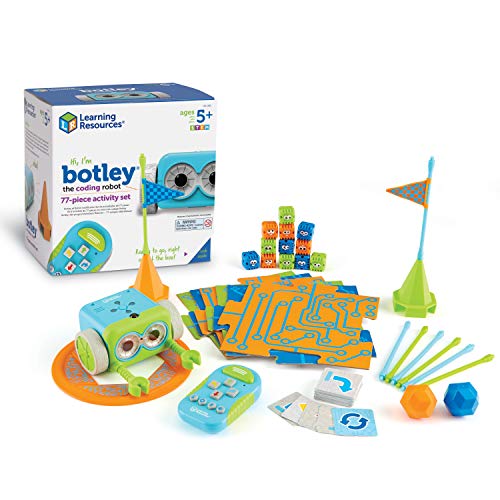
- 77-piece screen-free coding activity set
- Includes cards, tiles, and obstacle pieces
- Teaches loops, sequencing, and problem-solving
Best For: Young beginners ages 5 and up
Best Build-and-Code Kit

- Build six models from 480 blocks
- App teaches loops and variables
- Includes four Bluetooth control modes
Best For: Builders ages 7–12 learning graphical coding
Best for Preschool Coders
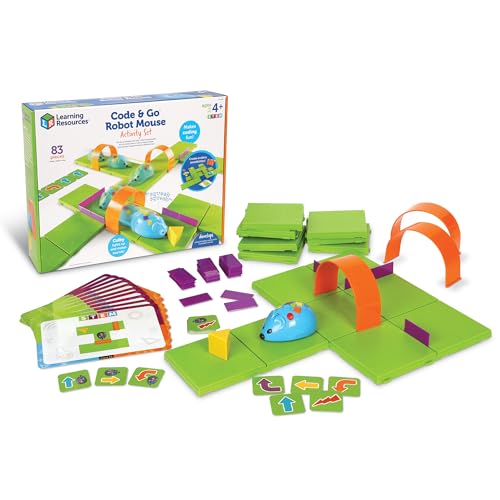
- Built for children ages 4 and up
- Includes a large customizable maze
- Uses screen-free button-based coding
Best For: Early learners and classroom STEM centers
Best for Growing Programmers

- Teaches Scratch and Arduino programming
- Builds in about 15 minutes
- Expandable with Makeblock modules and parts
Best For: Kids ages 8 and up ready for deeper robotics
Best for Easy Setup

- Screen-free remote coding
- Includes cards and programmer
- Designed for ages 5–8
Best For: Young beginners learning coding fundamentals
Best Hands-On Build
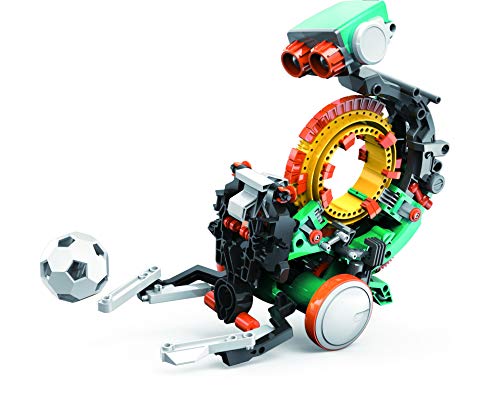
- Build-it-yourself STEM project
- Mechanical coding wheel
- Performs multiple physical actions
Best For: Ages 10+ who enjoy engineering and assembly
Best App-Enabled Option

- Learns through five compatible apps
- Voice, movement, and obstacle features
- Rechargeable battery lasts up to 5 hours
Best For: Kids 6+ ready for interactive app-based coding
Advanced Builder Pick

- Builds a programmable autonomous robot
- Includes multiple sensors, motors, and a microcontroller
- Supports block coding and simple AI lessons
Best For: Ages 12+, robotics clubs, and classroom groups
Best Compact Starter
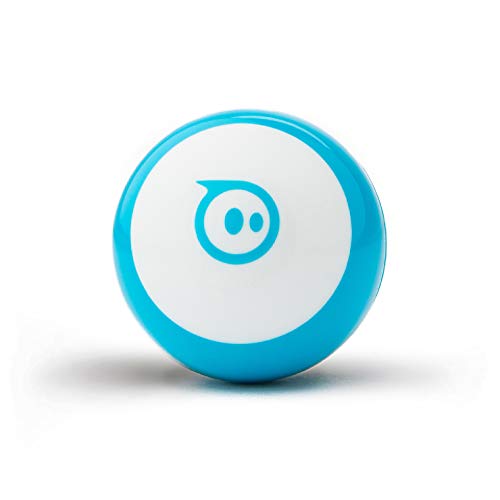
- Tiny programmable robot with colorful LEDs
- Offers drawing, block, and JavaScript coding
- Includes driving modes, games, cones, and pins
Best For: Beginner coders ages 8+ and small spaces
Best Screen-Free Option

- Builds a color-changing robotic chameleon
- Uses physical action cards for unplugged coding
- Adds coding, camouflage, and pet modes
Best For: Ages 8+ and screen-free STEM play
Best Screen-Free Starter – Botley Coding Robot Activity Set
Botley is one of the most approachable coding robot toys for children who are just beginning to learn programming. This screen-free activity set uses a remote programmer, coding cards, tiles, and obstacle pieces to turn sequencing and problem-solving into hands-on play.
Best For: Children ages 5 and up who want screen-free coding activities and guided challenges.
Pros:
- Includes 77 pieces, including coding cards, tiles, and obstacle-building parts.
- Supports obstacle avoidance, looping commands, and black-line path following.
- Works without a phone or tablet.
Cons:
- Requires three AAA batteries for Botley and two AAA batteries for the remote programmer.
- Does not include batteries.
Botley is a strong choice for younger learners because the activities provide structure while leaving room for creative obstacle courses. Its screen-free design also makes it practical for homes and classrooms limiting device use.
Best Build-and-Code Kit – Apitor Robot J 6-in-1 Kit
For children who enjoy construction as much as programming, the Apitor Robot J combines 480 snap-together blocks with app-based coding. Among coding robot toys, it stands out for offering six buildable models and several control modes for progressively more interactive play.
Best For: Kids ages 7–12 who like building robots and learning graphical coding through an app.
Pros:
- Provides six models from 480 colorful building blocks.
- Uses an icon-based app to introduce loops, variables, and problem-solving.
- Offers dual-motor, single-motor, gyro, and path control modes.
Cons:
- Requires the free Apitor Kit app and Bluetooth-enabled device for app control.
- Requires three AA batteries, which are not included.
Robot J is a flexible option for children ready to move beyond simple commands. The combination of rebuilding, app control, lights, and movement gives it strong replay value, though it is better suited to families comfortable using an app.
Best for Preschool Coders – Code & Go Robot Mouse Set
The Code & Go Robot Mouse Activity Set is an accessible introduction to coding robot toys for children ages 4 and up. Kids program Colby with simple buttons, then guide the mouse through a customizable maze using cards, walls, tunnels, and activity challenges.
Best For: Early learners, classrooms, and families seeking simple screen-free sequencing activities.
Pros:
- Designed for young coders ages 4 and up.
- Includes 16 maze grids, 22 walls, three tunnels, and coding cards.
- Builds sequencing, directional understanding, logic, and problem-solving skills.
Cons:
- Requires three AAA batteries, which are not included.
- Programming is intentionally introductory rather than advanced.
This set works especially well when the goal is to make early programming physical and easy to understand. Its repeatable maze activities also make it useful for classroom STEM centers and small-group practice.
Best for Growing Programmers – Makeblock mBot Robot Kit
The Makeblock mBot is a strong next step for children ready to explore electronics, robotics, and programming together. This coding robot toy can be assembled in about 15 minutes and supports learning through Scratch, Arduino, Makeblock apps, and mBlock software.
Best For: Kids ages 8 and up who want a buildable robot with room for more advanced projects.
Pros:
- Combines hands-on assembly with Scratch and Arduino programming.
- Supports line-following, obstacle avoidance, and remote-control play.
- Open-source design works with over 100 electronic modules and 500 Makeblock parts.
Cons:
- Requires four AA batteries for the robot and a CR2025 battery for the remote controller.
- Additional add-on packs and parts expand the system but are not part of the basic kit.
mBot offers more depth than many introductory coding robot toys, making it a practical choice for children likely to continue experimenting. Its metal-and-plastic construction and expandable platform support projects beyond the initial build.
Best for Easy Setup – Botley 2.0 The Coding Robot
Botley 2.0 is a practical introduction to coding robot toys for younger children. Its screen-free remote programmer lets kids practice sequencing, logic, and problem solving through coding games and hands-on play.
Best For: Children ages 5–8 who are beginning to explore coding and STEM concepts without a phone or tablet.
Pros:
- Screen-free play supports early coding, critical thinking, and problem-solving skills.
- Includes the robot, remote programmer, and coding cards for varied activities.
- Ready to use after adding the required AAA batteries.
Cons:
- Requires five AAA batteries and a Phillips screwdriver.
- Offers manual, remote-based operation rather than app-based programming.
Botley 2.0 is a strong choice when simplicity and screen-free learning matter most. It is less suitable for older children seeking a more advanced building or app-coding experience.
Best Hands-On Build – Mech-5 STEM Coding Robot Kit
For older children who want more than a ready-made toy, Mech-5 brings coding robot toys into a hands-on construction project. Kids assemble the robot, then use its mechanical coding wheel to program actions such as throwing, lifting, kicking, and drawing.
Best For: Future engineers ages 10 and up who enjoy detailed building projects and mechanical STEM activities.
Pros:
- Combines mechanical engineering principles with introductory coding.
- Can be programmed to perform several physical actions.
- Provides multiple hours of building and learning activity.
Cons:
- Requires careful assembly rather than offering immediate play.
- Detailed construction may be challenging for younger or less patient builders.
- Requires two AAA batteries.
Mech-5 is a good fit for children who value the building process as much as the finished robot. Choose another option if you want a no-assembly toy or app-enabled lessons.
Best App-Enabled Option – Wonder Workshop Dash Robot
Dash is an interactive choice among coding robot toys, pairing hands-on play with app-based learning. Children can use compatible iOS, Android, and Fire OS apps to explore sequencing, loops, algorithms, and variables while making the robot sing, dance, navigate, and respond to voice commands.
Best For: Children ages 6 and up who are ready for app-supported coding activities at home, with friends, or in classroom settings.
Pros:
- Supports coding concepts including sequencing, loops, algorithms, and variables.
- Offers interactive features such as obstacle navigation, voice commands, singing, and dancing.
- Arrives assembled and includes building-brick connectors plus a USB charging cable.
- Rechargeable battery provides up to five hours of active play.
Cons:
- Requires a compatible mobile device for app-enabled learning.
- App-based play may be less suitable for families seeking a completely screen-free toy.
Dash stands out for children who want a responsive robot with room to grow into more advanced coding concepts. Its app dependence is the main consideration compared with simpler screen-free alternatives.
Advanced Builder Pick – TinkRbot AI Robot Kit
The TinkRbot AI is a serious option for older kids, teens, and classroom groups seeking coding robot toys with hands-on engineering depth. Builders assemble the chassis, wire sensors and motors, then program autonomous behaviors such as line following, obstacle avoidance, and maze solving.
Best For: Ages 12 and up, independent makers, robotics clubs, and classroom groups of two to four.
Pros:
- Includes multiple sensors, motors, RGB pixels, and a programmable microcontroller.
- Supports block coding, real-time sensor visualization, and simple AI model training.
- Designed for repeated rebuilding and reprogramming rather than one-time play.
- Includes an online lesson library and classroom-ready components.
Cons:
- Recommended for ages 12 and up, so it may be too advanced for younger children.
- Small parts and wiring make adult or instructor support useful for some builders.
- Its engineering-focused setup requires more time and effort than a ready-to-play robot.
Choose this kit when the goal is genuine robotics practice and long-term experimentation. Its rebuildable hardware and online lessons give it more staying power than a simple coding toy, particularly in group learning settings.
Best Compact Starter – Sphero Mini Coding Robot
Sphero Mini is a compact entry point for families looking for coding robot toys that fit easily into small spaces. The ping-pong-ball-sized robot connects through its apps, offering screen-based drawing, drag-and-drop blocks, JavaScript coding, driving modes, and built-in games.
Best For: Beginners ages 8 and up who want a portable robot for coding, games, and short STEM activities.
Pros:
- Small, lightweight design is easy to use on a tabletop or take on the go.
- Sphero Edu supports drawing, block coding, and JavaScript.
- Sphero Play adds joystick, slingshot, tilt, and arcade-style game modes.
- Includes three cones and six bowling pins for obstacle-course play.
Cons:
- Battery playtime is listed at about one hour.
- Requires a compatible mobile device and app-based interaction for coding and games.
- Its small ball form may offer less building and hardware experimentation than a robotics kit.
Sphero Mini is a practical choice when ease of entry and portability matter most. It combines playful driving with several coding pathways, making it approachable for beginners without requiring a large workspace.
Best Screen-Free Option – Coding Chameleon Robot Kit
Thames & Kosmos My Robotic Pet: Coding Chameleon brings coding robot toys into screen-free play. Children build a color-changing chameleon and use physical action cards to program movements and reactions, while separate modes introduce camouflage behavior and touch-responsive pet play.
Best For: Children ages 8 and up who enjoy building, animals, and unplugged STEM activities with adult help as needed.
Pros:
- Uses physical colored action cards instead of screens, devices, or software.
- Three play modes cover coding, camouflage, and touch-responsive pet interactions.
- Features a color sensor, infrared sensor, RGB LEDs, articulated movement, and an automatic tongue.
- The 48-page guide connects assembly and play with engineering concepts inspired by nature.
Cons:
- Assembly is recommended with adult help for ages 8 and up; independent play is suggested at 12+.
- Requires four AAA batteries.
- Its single-player tabletop format may be less suitable for group competition.
This chameleon is a strong fit for families wanting tactile coding without app time. It offers more imaginative interaction than a conventional programmable vehicle, while the guide provides structure for learning during assembly and experimentation.
How We Picked the Best Coding Robot Toys
We compared these Coding Robot Toys by age suitability, programming approach, build complexity, educational value, included activities, and room for continued experimentation. We also considered whether each kit works independently, requires a tablet or computer, or grows with a child’s developing skills.
A strong choice should make cause and effect easy to understand while offering enough challenges to remain interesting after the first few sessions. Screen-free options are useful for younger learners, while app-based and programmable building kits often provide greater depth for older children.
Quick Comparison
| Best For | Look For |
|---|---|
| First coding experiences | Simple buttons, directional commands, and guided activities |
| Building and engineering | Modular parts, motors, sensors, and multiple designs |
| Advanced programming | Block-based or text-based coding, app support, and expandability |
| Creative play | Open-ended challenges, games, lights, sounds, or interactive movement |
| Screen-free learning | Physical controls, activity cards, and onboard programming |
Key Buying Factors for Coding Robot Toys
Age and Learning Curve
Check the recommended age, but also consider patience, reading ability, and prior building experience. A younger child may benefit from immediate results and visual instructions, whereas an older beginner may enjoy assembling a more complex robot.
Coding Method
Screen-free command buttons provide an approachable introduction to sequencing. Apps can add tutorials, games, and visual block coding. Kits that support more advanced programming languages are better suited to children who want to move beyond guided activities.
Build Complexity and Durability
Building kits offer valuable engineering practice but may require sorting many small pieces and adult help. Look for clear instructions, sturdy connections, and replacement-part availability if the robot will receive frequent use.
Connectivity and Required Devices
Confirm whether the robot needs Bluetooth, a compatible mobile device, or a computer. If independent play or classroom use matters, a screen-free model may be more convenient than a connected robot.
Long-Term Play Value
Activity cards are excellent for structured learning, while programmable platforms and expandable kits usually provide more open-ended play. Consider whether the child prefers following challenges, constructing projects, competing in games, or inventing original behaviors.
Who Should Buy Which Coding Robot Toys?
Choose a simple screen-free activity robot for young beginners who are learning sequencing and directional logic. A coding mouse or entry-level programmable robot can make an especially gentle first step.
For children who enjoy construction, select a building kit with multiple configurations, motors, and sensors. These are a good fit for hands-on learners who want coding combined with mechanical design.
Older children and teens who already understand basic programming should consider an app-connected or expandable platform. Models with visual coding, robotics challenges, and broader programming support offer more room to progress.
Finally, choose a creative interactive robot for children motivated by games, movement, lights, or personality. The best Coding Robot Toys are the ones a child will repeatedly use, test, rebuild, and customize.