The best coding robot toys for students turn abstract programming concepts into hands-on challenges. By building, programming, and troubleshooting a robot, learners can practice sequencing, logic, problem-solving, and engineering in a motivating format.
This roundup includes screen-free activity sets for younger children, app-connected robots for guided learning, and more advanced kits for students ready to explore sensors, robotics, and open-source hardware.
Best 10 Coding Robot Toys for Students Picks for 2026
Best App-Enabled Pick

- Arrives assembled for immediate play
- Teaches coding through multiple apps
- Up to five hours of active play
Best For: Students ages 6 and up learning coding through interactive app-based activities
Best Screen-Free Starter
- No screen required for coding play
- Includes a large maze-building set
- Designed for ages 4 and up
Best For: Young learners and classroom centers practicing basic sequencing
Best Build-and-Code Kit

- Combines assembly with programming
- Supports Scratch and Arduino
- Expandable with many add-on parts
Best For: Students ages 8 and up exploring robotics, electronics, and coding
Best Creative Screenless Option
- Starts with screen-free color cards
- Supports creative maze building
- Includes a rechargeable battery
Best For: Young learners ages 4 and up developing early computational thinking
Best for Easy Setup
Botley Coding Robot Activity Set
- Screen-free remote coding
- 77-piece activity set
- Obstacle and looping challenges
Best For: Young beginners learning early coding and STEM skills
Best for Advanced Projects
miniArm Arduino 5DOF Robotic Arm

- Arduino-compatible platform
- Open-source programming support
- Expandable sensor connections
Best For: Learners ages 17 and up building robotics projects
Best for Growing Coders
Botley 2.0 Coding Robot Activity Set

- Screen-free remote learning
- 78-piece robotics activity set
- Multi-step and sensory challenges
Best For: Elementary learners ages 5 to 10
Best Classroom-Ready Pick

- Screen-free Color Codes and app-based Blockly
- Five coding levels for growing skills
- Includes access to 700+ free lessons
Best For: Classrooms and learners who want multiple coding formats
Best Compact App-Based Pick
- Supports blocks, drawing, and JavaScript
- Includes games and obstacle-course accessories
- Compact design for small spaces
Best For: Students ages 8+ who enjoy game-based coding
Best Hands-On Building Project
TEACH TECH Mech-5 Coding Robot
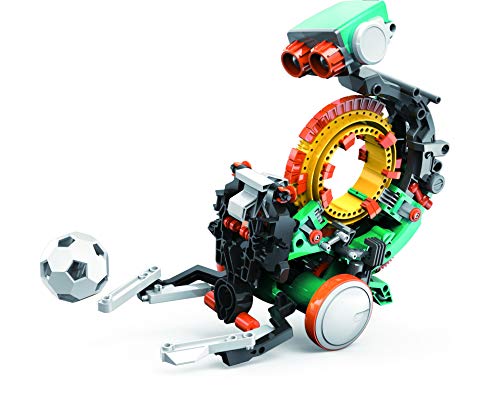
- Build-it-yourself STEM robot for ages 10+
- Mechanical wheel programs physical actions
- Multi-hour engineering and coding activity
Best For: Future engineers who enjoy assembling projects
Best App-Enabled Pick – Dash Coding Robot
For students ready to move beyond introductory coding robot toys for students, Dash combines interactive play with app-based programming. It arrives assembled and can teach sequencing, loops, algorithms, and variables through hands-on activities.
Best For: Students ages 6 and up who want an app-enabled robot for home, classroom, or group STEM activities.
Pros:
- Works with five iOS, Android, and Fire OS apps, including Blockly, Wonder, and Path.
- Supports voice commands and activities such as singing, dancing, and obstacle navigation.
- Offers up to five hours of active play and requires no assembly.
- Includes building-brick connectors for added creative projects.
Cons:
- App-enabled learning requires a compatible device.
- It is designed for indoor use and does not include a camera.
- Additional accessories may be needed for more building options.
Dash is a versatile choice for learners who want coding concepts introduced through an expressive, programmable robot rather than a screen-only lesson. Its school use and rechargeable battery add practical appeal for repeated activities.
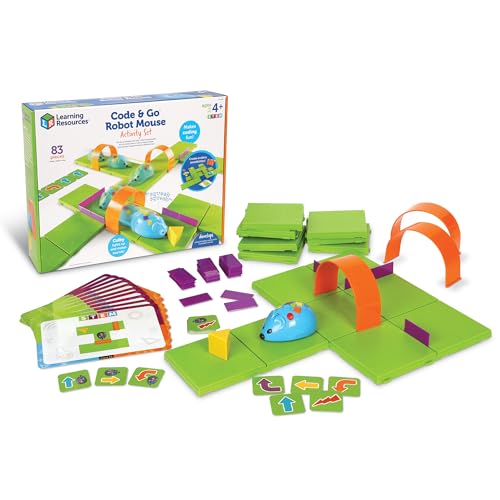
Best Screen-Free Starter – Code & Go Robot Mouse
The Code & Go Robot Mouse is a hands-on option for younger students beginning with coding robot toys for students. Children program Colby with directional buttons and coding cards, then test sequences by guiding the mouse through a physical maze.
Best For: Early learners ages 4 and up, classroom STEM centers, and screen-free small-group activities.
Pros:
- Builds sequencing, logic, problem-solving, and directional understanding without a screen.
- Includes 16 maze grids, 22 walls, three tunnels, and coding and activity cards.
- Maze components support repeatable classroom activities and custom layouts.
- Offers an approachable introduction to programming through trial and error.
Cons:
- Requires three AAA batteries, which are not included.
- Manual button programming may be less advanced for older students.
- The set is primarily designed for one learner at a time.
This activity set keeps the focus on planning and testing commands, making it a strong first step before students move to app-based or build-your-own robots. Its extensive maze accessories are especially useful for structured practice.
Best Build-and-Code Kit – Makeblock mBot
For students who want to understand what is inside a robot, the Makeblock mBot adds construction to coding robot toys for students. Learners assemble the robot, explore electronics and mechanics, and progress from Scratch to Arduino programming.
Best For: Students ages 8 and up who want a programmable building project with room to expand.
Pros:
- Can be built in about 15 minutes with the supplied instructions.
- Supports Scratch and Arduino programming through Makeblock software and apps.
- Offers line-following, obstacle-avoidance, remote-control, and programming activities.
- Open-source design works with more than 100 electronic modules and 500 parts from the platform.
Cons:
- Four AA batteries for the robot are not included.
- The remote controller requires a CR2025 battery, also not included.
- Assembly and programming may require more guidance than simpler starter robots.
mBot is a practical bridge between toy play and structured robotics learning. Its metal-and-plastic construction, tutorials, and expandable platform make it suitable for students who may want progressively more complex projects.
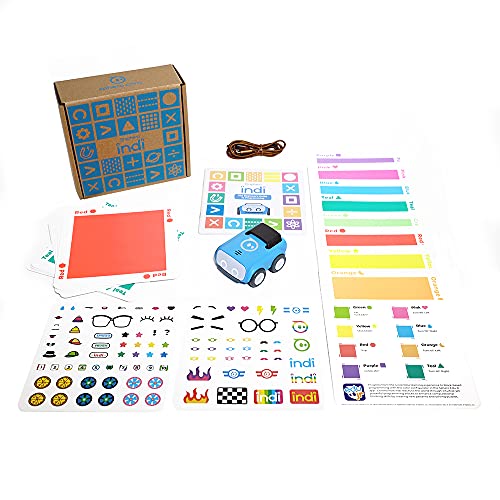
Best Creative Screenless Option – Sphero indi Coding Robot
Sphero indi offers an approachable entry into coding robot toys for students through color-based, screenless play. Children design mazes, place color cards, and observe how the robot responds before advancing to drag-and-drop blocks in the Sphero Edu Jr app.
Best For: Young learners ages 4 and up who benefit from visual, exploratory STEM activities.
Pros:
- Teaches cause and effect, pattern recognition, directions, and basic programming logic.
- Color cards allow children to begin coding without reading or a screen.
- Customizable mazes encourage creative design and problem-solving.
- Includes a rechargeable battery and supports optional app-based learning.
Cons:
- Advanced drag-and-drop programming requires a compatible app device.
- Color-based controls may offer less direct coding depth for older students.
- The kit focuses on exploratory maze play rather than robot construction.
indi is a gentle starting point for computational thinking, particularly when students are not yet ready for text or block-based coding. Its color sensor and open-ended maze activities make learning feel like creative play.
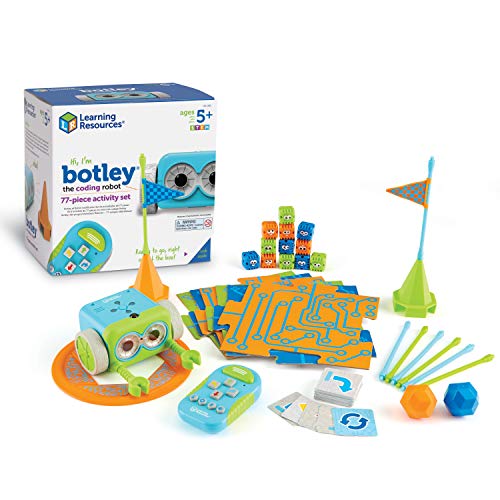
Best for Easy Setup – Botley Coding Robot Activity Set
For younger students beginning with coding robot toys for students, Botley offers a screen-free introduction to sequencing, logic, and problem solving. Its remote programmer, coding cards, tiles, and obstacle pieces provide structured activities without requiring a phone or tablet.
Best For: Children ages 5 and up who are starting to explore coding and early STEM skills through hands-on play.
Pros:
- Screen-free operation with a simple remote programmer.
- Includes 40 coding cards, tiles, and obstacle-building pieces.
- Supports obstacle avoidance, looping commands, and black-line paths.
- Ready to use after adding five AAA batteries and a Phillips screwdriver.
Cons:
- Batteries are not included.
- Its focus on early coding may be less challenging for advanced students.
Botley is a practical entry-level choice when the goal is accessible, screen-free coding practice. The included activity materials make it easier to begin with guided challenges and progress toward creative obstacle courses.
Best for Advanced Projects – miniArm Arduino 5DOF Robotic Arm
Students looking beyond introductory coding robot toys for students may prefer this Arduino-compatible 5DOF robotic arm. The miniArm combines open-source programming with hardware controls, Bluetooth, digital servos, and expansion ports for more technical robotics projects.
Best For: Older students and adult learners ages 17 and up who want to study programming, robotics, and engineering through an expandable project kit.
Pros:
- Compatible with Arduino programming on the Atmega328 platform.
- Open-source programs, tutorials, and development examples support customization.
- Offers knob control, app control, and offline action editing.
- Multiple ports allow sensor and module expansion.
Cons:
- Recommended for ages 17 and up, so it is not intended for young children.
- The Starter Kit does not include the listed sensors, ESP32 Cam module, or Type-C data cable.
- Its engineering-focused design may require more technical setup than a beginner robot.
The miniArm is suited to learners who want an open-ended robotics platform rather than a simple classroom toy. Its Arduino compatibility and expansion support provide room for secondary development, although the starter configuration leaves some accessories for separate purchase.
Best for Growing Coders – Botley 2.0 Coding Robot Activity Set
Botley 2.0 is one of the more approachable coding robot toys for students who are ready to move from basic commands to longer sequences. Its remote programmer, coding cards, boards, and stackable obstacles support hands-on practice with planning, logic, and sequencing.
Best For: Children ages 5 to 10 learning coding at home, in elementary classrooms, or through homeschool activities.
Pros:
- Uses remote-controlled, screen-free learning play.
- Includes 40 coding cards, six double-sided boards, and obstacle pieces.
- Supports multi-step paths, 45-degree turns, and object sensing.
- Lights, sounds, music, and 16 secret code combinations add variety.
Cons:
- Requires five AAA batteries.
- Designed for younger learners and may not satisfy advanced programmers.
- Intended for indoor use and one player.
Botley 2.0 makes a strong choice for students who benefit from progressively more complex challenges without screens. Compared with a basic starter robot, its turns, sensory responses, and secret combinations offer more ways to extend play within the early-elementary age range.
Best Classroom-Ready Pick – Ozobot Evo Coding Robot Kit
For students who need flexible coding robot toys for students, the Ozobot Evo offers both screen-free and app-based learning. Kids can draw Color Codes or progress through five Ozobot Blockly skill levels, making it suitable for beginners and advancing learners.
Best For: Classrooms, homeschoolers, and students who benefit from both hands-on and screen-based coding activities.
Pros:
- Supports Color Code markers and Ozobot Blockly.
- Five skill levels can accommodate growing abilities.
- Includes access to more than 700 free STEAM and computer science lessons.
- Includes a zip case and durable classroom-ready accessories.
Cons:
- The included kit contains one robot, so group activities may require additional units.
- The broad lesson library may be more than a casual user needs.
Ozobot Evo is a strong long-term choice when structured lessons, multiple skill levels, and screen-free coding are priorities.
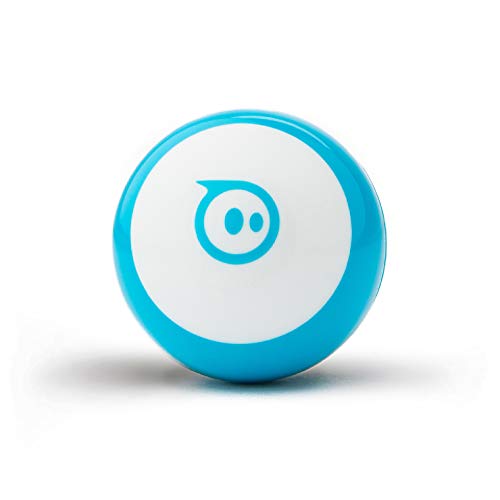
Best Compact App-Based Pick – Sphero Mini Coding Robot Ball
Sphero Mini is a compact option among coding robot toys for students, combining beginner-friendly driving with programmable activities. Through the Sphero Edu app, students can draw commands, use block coding, or write JavaScript, while the included cones and pins support obstacle-course play.
Best For: Students ages 8 and up who want a small robot for coding, games, and limited-space play.
Pros:
- Offers drawing, drag-and-drop blocks, and JavaScript coding.
- Compact ping-pong-ball-sized design is easy to use in small spaces.
- Includes driving modes, arcade-style games, cones, and bowling pins.
- Rechargeable battery provides about one hour of playtime.
Cons:
- Its approximately one-hour playtime may require frequent recharging.
- The small ball form may be easier to misplace than a larger robot.
Sphero Mini works well for students who are motivated by games and want a gradual path from remote control to text-based coding.
Best Hands-On Building Project – TEACH TECH Mech-5 Coding Robot
For students who prefer building before coding, the TEACH TECH Mech-5 is a hands-on alternative to typical coding robot toys for students. Learners assemble the robot and snap coding buttons onto its mechanical coding wheel to program actions such as throwing, lifting, kicking, and drawing.
Best For: Future engineers ages 10 and up who want a multi-hour mechanical engineering and coding project.
Pros:
- Combines robot assembly with introductory coding concepts.
- Mechanical coding wheel controls several physical actions.
- Provides a multi-hour, learn-by-doing STEM activity.
- Supports problem-solving and programming objectives.
Cons:
- It is not pre-assembled and requires careful step-by-step construction.
- The instructions are supplied in English.
- It requires two AAA batteries.
Mech-5 is best suited to patient learners who value the construction process as much as the robot’s programmed movements.
How We Picked the Best Coding Robot Toys for Students
We compared these kits by age suitability, programming options, learning progression, setup requirements, durability, and the type of STEM skills they support. We also considered whether each robot works well for independent play, classroom activities, or collaborative projects.
A strong educational robot should offer more than novelty. It should give students clear challenges, useful feedback, and enough flexibility to encourage experimentation. Screen-free kits emphasize sequencing and computational thinking, while app- and computer-connected models can introduce block coding, text-based programming, electronics, and robotics engineering.
Quick Comparison
| Best For | Recommended Type | What to Look For |
|---|---|---|
| Early learners | Screen-free activity robot | Simple commands, visual cues, and guided challenges |
| Elementary students | App-enabled coding robot | Block coding, interactive lessons, and manageable setup |
| Middle school beginners | Build-and-code robotics kit | Motors, sensors, construction projects, and progression |
| Advanced students | Arduino or open-source robot | Expandable hardware, programming access, and documentation |
Key Buying Factors for Coding Robot Toys for Students
Age and Learning Curve
Start with the student’s current ability rather than choosing solely by the highest listed age. Younger children often benefit from tactile command cards and short challenges, while older students may prefer building, sensor integration, and programmable behaviors.
Programming Method
Screen-free robots are useful for introducing algorithms without requiring a tablet or computer. Bluetooth and app-based robots can provide visual block coding, games, and progressions. Advanced kits may support Arduino, Python, or other programming environments, but they usually require more setup and adult guidance.
Build Quality and Expandability
Look for sturdy parts, dependable connections, and replacement or expansion options. A robot that can be rebuilt or upgraded is more likely to remain useful as the student’s skills develop.
Learning Environment
For classrooms, prioritize repeatable activities, easy resets, group compatibility, and teacher resources. At home, consider storage, charging, required devices, and whether an adult must supervise assembly or troubleshooting.
Included Materials
Check whether the package includes activity cards, coding mats, batteries, cables, software access, and building components. A lower-cost robot may require additional accessories before it is ready for meaningful projects.
Who Should Buy Which Coding Robot Toys for Students?
Choose a screen-free activity set for a young learner who is beginning to understand directions, sequencing, and cause and effect. App-connected options are a better fit for students who enjoy games and are ready to connect coding commands with robot movement.
Students interested in engineering and construction should consider a buildable robotics kit with motors and sensors. For older learners, an Arduino-based or open-source robot arm offers the most room for experimentation, though it is best suited to students who have patience for assembly, wiring, and debugging.
When choosing among Coding Robot Toys for Students, match the robot’s programming depth and setup demands to the learner’s current skills. The best choice is the one that provides an approachable first success while leaving enough room for increasingly complex challenges.