Choosing the right storage setup can make or break a fast-moving workflow. For editors, photographers, and small teams, professional RAID storage enclosures offer the capacity, redundancy, and transfer speeds needed to keep projects moving.
This roundup focuses on practical options for 2026, from compact 2-bay and 4-bay units to high-capacity 8- and 10-bay enclosures for heavier workloads.
Best 10 Professional RAID Storage Enclosures Picks for 2026
High-Speed 4-Bay RAID
ORICO 4 Bay RAID Hard Drive Enclosure

- USB 3.2 Gen 2x2 with JMS591 chipset
- RAID 0/1/5/10, JBOD, and Normal modes
- Supports up to 104TB across 4 drives
Best For: fast 4-bay DAS for editing and enterprise storage
Thunderbolt 8-Bay Storage
OWC ThunderBay 8 32TB Thunderbolt RAID

- Eight universal bays for SSDs or HDDs
- Dual Thunderbolt ports for daisy-chaining
- SoftRAID Premium supports multiple RAID types
Best For: high-capacity Thunderbolt workflows and creative work
10-Bay Large-Volume RAID
CENMATE Aluminum 10 Bay RAID Enclosure

- Ten bays with up to 200TB capacity
- Supports 8 RAID modes including RAID50
- USB 3.0 and eSATA with dual fans
Best For: large local storage pools with lots of bays
QNAP Backup RAID DAS
QNAP TR-004 4 Bay USB-C DAS RAID

- Hardware RAID with RAID 0/1/5/JBOD
- USB-C DAS for Windows, macOS, and Linux
- Lockable bays and NAS backup support
Best For: NAS backup and simple desktop RAID expansion
Thunderbolt RAID Workhorse
ThunderBay 4 Thunderbolt 40Gb/s Four-Bay SATA Enclosure w/ SoftRAID

- Dual Thunderbolt 3 ports
- Up to 1527MB/s sustained performance
- Includes SoftRAID Premium
Best For: Creators and pros needing fast Thunderbolt RAID with flexible configuration
High-Capacity USB RAID Bay
ORICO RAID 5 Bay RAID HDD Enclosures

- Eight modes including RAID 5 and 10
- Up to 110TB total capacity
- 80mm fan and 150W power supply
Best For: High-capacity USB storage with flexible RAID mode options
Fast USB 5-Bay RAID Box
ORICO 5 Bay RAID Hard Drive Enclosure,JMS591 Chip, 20Gbps USB 3.2 Gen2X2
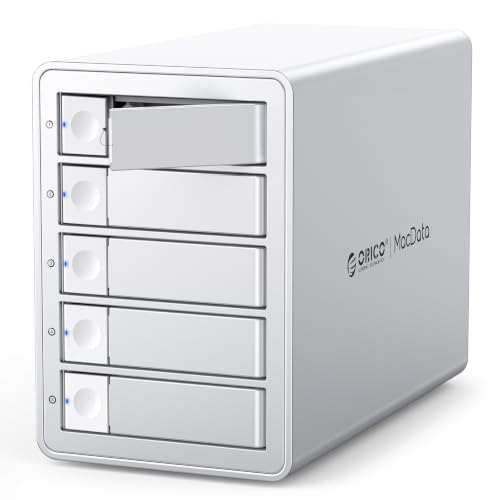
- 20Gbps USB 3.2 Gen 2x2 interface
- RAID 0/1/5/10 plus JBOD and Normal
- Up to 130TB capacity with hot-swapping
Best For: Data-heavy users who want fast USB RAID with large capacity and hot-swap support
Compact 2-Bay Performance RAID
TerraMaster D2-320 USB RAID Enclosure

- USB 3.2 Gen2 up to 10Gbps
- RAID 0, 1, JBOD, and SINGLE support
- Tool-free trays with temperature-controlled fan
Best For: Two-drive direct-attached RAID storage with fast transfers
Flexible 5-Bay Workflow RAID
Yottamaster 5 Bay RAID Hard Drive Enclosure

- RAID 0/1/3/5/10/JBOD/CLONE support
- Five bays and up to 110TB capacity
- Aluminum body with 80mm intelligent fan
Best For: Large, flexible DAS setups with multiple RAID options
Rackmount Backup RAID
QNAP TR-004U-US 1U 4 Bay Hard Drive Enclosure

- USB Type-C direct-attached storage
- RAID 0/1/5/10/JBOD and individual disks
- Works with Windows, macOS, Linux, and QNAP NAS
Best For: Rackmount users needing four-bay RAID expansion or backup
High-Speed 4-Bay RAID – ORICO 4 Bay RAID Hard Drive Enclosure
If you need professional RAID storage enclosures for editing, research, or IT data handling, this ORICO 4-bay model is built around speed and flexibility. Its USB 3.2 Gen 2×2 connection and JMS591 chipset are aimed at faster large-file transfers, while the enclosure supports multiple RAID layouts so you can balance redundancy, capacity, or performance as needed.
Best For: Video producers, enterprise IT teams, and professionals who want a fast 4-bay DAS with flexible RAID modes.
Pros:
- Supports RAID 0, 1, 5, 10, JBOD, and Normal modes.
- USB 3.2 Gen 2×2 interface is designed for high-speed transfers, especially over USB4.
- Built-in 150W power supply and low-noise fan help keep multi-drive use stable.
- Works with 2.5-inch and 3.5-inch SATA drives on Windows, macOS, and Linux.
Cons:
- Thunderbolt connections are limited to around 10Gbps, not the full 20Gbps.
- Changing RAID modes erases drive contents, so backups are required.
- Only supports up to 4 drives, which may be limiting for larger arrays.
Overall, this is a strong option if you want a compact RAID enclosure with modern connectivity and broad RAID support. It leans more toward performance-focused desktop storage than simple archive use.
Thunderbolt 8-Bay Storage – OWC ThunderBay 8 32TB Thunderbolt RAID
Among professional RAID storage enclosures, the OWC ThunderBay 8 stands out for users who need a larger desktop array with Thunderbolt connectivity. It offers eight universal drive bays, dual Thunderbolt ports for daisy-chaining, and bundled SoftRAID software for flexible RAID setup on Mac or Windows.
Best For: Creative professionals and power users who need a high-capacity, Thunderbolt-connected 8-bay RAID enclosure.
Pros:
- Eight 2.5-inch or 3.5-inch drive bays provide lots of expansion room.
- Dual Thunderbolt ports support daisy-chaining with other Thunderbolt devices.
- Includes SoftRAID Premium for RAID 0/1/4/5/1+0 support.
- Thunderbolt certified for Mac and Windows with a 3-year limited warranty.
Cons:
- Diskless enclosure, so drives must be purchased separately.
- Best performance and compatibility depend on Thunderbolt-based workflows.
This is a strong fit when capacity, expansion, and Thunderbolt integration matter more than compact size. It is especially appealing if you want a desktop RAID system you can build out over time.
10-Bay Large-Volume RAID – CENMATE Aluminum 10 Bay RAID Enclosure
If your priority is raw drive count in a desktop RAID enclosure, this CENMATE 10-bay unit offers a lot of space for the money. It supports 2.5-inch and 3.5-inch SATA HDDs/SSDs, provides multiple RAID modes, and includes both USB 3.0 and eSATA connectivity for straightforward DAS use.
Best For: Users who want a 10-bay direct-attached RAID enclosure for large local storage pools.
Pros:
- Ten drive bays support up to 200TB total capacity.
- Eight RAID modes, including RAID0, RAID5, RAID50, and clone.
- Includes dual fans and aluminum construction for cooling.
- Comes with USB A/C 3.0 and eSATA cables for broad compatibility.
Cons:
- Maximum transfer rate is 5Gbps, which is slower than newer USB 3.2 options.
- Noise from the fans is listed around 40-50 decibels.
- RAID setup and drive testing require careful step-by-step handling.
This enclosure makes sense when drive capacity and bay count matter more than top-end speed. It is better suited to large local datasets than high-bandwidth production pipelines.
QNAP Backup RAID DAS – QNAP TR-004 4 Bay USB-C DAS RAID
QNAP TR-004 4 Bay USB Type-C Direct Attached Storage (DAS) with hardware RAID (Diskless)
Check Price On AmazonThe QNAP TR-004 is a practical choice in professional RAID storage enclosures when you want a dependable direct-attached unit for backup or NAS expansion. It connects over USB Type-C, supports hardware RAID modes, and is designed to work with Windows, macOS, Linux, and compatible QNAP NAS systems.
Best For: NAS backup, desktop expansion, and users who want a straightforward hardware RAID DAS.
Pros:
- Hardware RAID supports RAID 0, 1, 5, JBOD, and individual disks.
- USB Type-C connection includes a Type-C to Type-A cable.
- Lockable drive bays add a practical security touch.
- Works as external storage for NAS backup and QNAP capacity expansion.
Cons:
- Not compatible with several older QNAP NAS models.
- NAS applications cannot be installed on the TR-004.
- Drive migrations are limited and data recognition rules are strict.
For users already in the QNAP ecosystem or anyone wanting a no-frills hardware RAID box, the TR-004 is a sensible pick. Its value is in simple, compatible storage expansion rather than advanced standalone features.
Thunderbolt RAID Workhorse – ThunderBay 4 Thunderbolt 40Gb/s Four-Bay SATA Enclosure w/ SoftRAID
If you want professional RAID storage enclosures with Thunderbolt performance, the OWC ThunderBay 4 is built for fast workstation use on Mac or Windows systems with Thunderbolt support. It holds up to four 3.5-inch or 2.5-inch SATA drives, includes dual Thunderbolt 3 ports, and can be configured in RAID 0/1/4/5/1+0 (10) or JBOD depending on your storage goals.
Best For: Creators and pros who need a fast four-bay Thunderbolt enclosure with flexible RAID options and included management software.
Pros:
- Dual Thunderbolt 3 ports with up to 1527MB/s sustained performance
- Supports 3.5-inch or 2.5-inch SATA drives without adapters
- RAID 0/1/4/5/1+0 (10) and JBOD support for flexible setups
- Includes a 3-year SoftRAID Premium subscription for RAID creation and monitoring
Cons:
- Only supports SATA drives, not NVMe
- Requires Thunderbolt-compatible computers for best performance
This is the most performance-oriented option in the group, especially if you value Thunderbolt connectivity and enterprise-style RAID management in one enclosure. It is a strong fit for users who want a serious desktop storage solution rather than a basic backup bay.
High-Capacity USB RAID Bay – ORICO RAID 5 Bay RAID HDD Enclosures
This ORICO unit is a practical choice if you want professional RAID storage enclosures with broad mode support and straightforward USB connectivity. It supports eight modes including 0, 1, 3, 5, 10, JBOD, CLONE, and CLEAR, and it is designed for 3.5-inch SATA disks with up to 22TB per drive and up to 110TB total capacity.
Best For: Users who need a high-capacity USB RAID enclosure with multiple RAID modes and simple day-to-day storage management.
Pros:
- Eight RAID-related modes, including RAID 0/1/3/5/10, JBOD, CLONE, and CLEAR
- Supports up to 22TB per drive and 110TB total capacity
- 80mm silent fan plus front and rear vents for heat dissipation
- 150W power supply and lock mechanism for added stability and drive security
Cons:
- USB 3.0 speed tops out at up to 235MB/s
- Configured for 3.5-inch SATA drives only
- Mode switching requires caution and a backup first
Compared with Thunderbolt alternatives, this enclosure is more about capacity, flexibility, and easy USB compatibility than top-end transfer speed. It makes sense for users who need centralized storage and multiple RAID options without moving to a more expensive interface.
Fast USB 5-Bay RAID Box – ORICO 5 Bay RAID Hard Drive Enclosure,JMS591 Chip, 20Gbps USB 3.2 Gen2X2
If you need professional RAID storage enclosures for large-file workflows, this ORICO 5-bay model pairs a JMS591 chip with USB 3.2 Gen 2×2 for faster transfers and broader RAID support. It offers RAID 0, RAID 1, RAID 5, RAID 10, JBOD, and Normal modes, supports up to 26TB per drive, and can hold as much as 130TB in total.
Best For: Video producers, IT users, and data-heavy professionals who want a high-speed 5-bay RAID enclosure with broad compatibility.
Pros:
- USB 3.2 Gen 2×2 interface with 20Gbps bandwidth on compatible USB4 ports
- Supports RAID 0/1/5/10, JBOD, and Normal modes
- Up to 130TB total capacity with 26TB drives
- Built-in 150W power supply, hot-swapping, and low-noise cooling
Cons:
- Full 20Gbps speed requires a USB4 connection; Thunderbolt is limited to around 10Gbps here
- Configured for SATA drives rather than NVMe storage
- RAID mode changes erase data, so backups are required
This model stands out for balancing speed, capacity, and RAID flexibility in a desktop-friendly design. It is especially appealing if your workflow involves large media files, corporate storage tasks, or ongoing data management and you want more headroom than a basic USB enclosure provides.
Compact 2-Bay Performance RAID – TerraMaster D2-320 USB RAID Enclosure
If you want professional RAID storage enclosures for a desktop setup without moving to a full NAS, the TerraMaster D2-320 is a practical two-bay DAS option. It supports hardware RAID 0, RAID 1, JBOD, and SINGLE, and its USB 3.2 Gen2 interface is built for fast direct-attached storage use.
Best For: Users who want a compact, high-speed two-drive RAID enclosure for backup, mirroring, or fast working storage.
Pros:
- USB 3.2 Gen2 connection supports up to 10Gbps transfer speeds.
- Hardware RAID modes include RAID 0, RAID 1, JBOD, and SINGLE.
- Tool-free trays and a push-lock design make drive swaps easy.
- Intelligent temperature-controlled fan helps manage heat and noise.
Cons:
- Only two bays, so total capacity is limited versus larger enclosures.
- It is a DAS, not a NAS, so it is meant for direct attachment rather than network access.
The D2-320 focuses on straightforward performance and simple RAID setup, making it a solid fit for users who value speed and mirror backup in a smaller enclosure. Its support for both HDDs and SSDs adds flexibility for different storage needs.
Flexible 5-Bay Workflow RAID – Yottamaster 5 Bay RAID Hard Drive Enclosure
For buyers comparing professional RAID storage enclosures, the Yottamaster PS500RU3 stands out as a five-bay DAS with broad RAID support and room for large-capacity drives. It is designed for 2.5-inch and 3.5-inch SATA HDDs and SSDs, making it useful for storage-heavy home or office workflows.
Best For: Users who need a versatile 5-bay enclosure for mixed-drive storage and flexible RAID layouts.
Pros:
- Supports RAID 0, 1, 3, 5, 10, JBOD, and CLONE modes.
- Up to 110TB capacity with five 22TB drives.
- Aluminum shell and 80mm temperature-controlled fan help cooling.
- Push design and removable trays simplify drive installation and replacement.
Cons:
- USB 3.0 / 5Gbps performance is slower than newer 10Gbps enclosures.
- New drives may need formatting and partitioning before use.
This enclosure is a strong choice when flexibility matters more than raw interface speed. Its wider RAID menu and five-bay layout make it especially appealing for users building a storage pool for media, backup, or multi-drive projects.
Rackmount Backup RAID – QNAP TR-004U-US 1U 4 Bay Hard Drive Enclosure
The QNAP TR-004U-US is a rackmount-style option in the category of professional RAID storage enclosures, built for direct-attached storage over USB Type-C. With four bays and hardware RAID support, it is a straightforward way to expand storage for a workstation or to add external backup capacity for a QNAP NAS.
Best For: Users who want a 1U, four-bay enclosure for backup, expansion, or direct-attached RAID storage.
Pros:
- USB Type-C direct-attached storage works with Windows, macOS, and Linux.
- Supports up to four 2.5-inch or 3.5-inch SATA drives.
- Hardware RAID modes include RAID 0, 1, 5, 10, JBOD, and individual disks.
- Can also be used to expand QNAP NAS capacity or as NAS backup storage.
Cons:
- Only supports drives up to 3Gbps in the supplied notes.
- Best suited to rackmount or desktop environments that can accommodate a 1U unit.
Because it combines rackmount form factor with broad hardware RAID support, the TR-004U-US is a practical pick for users who need a more structured storage expansion path. It is especially useful when you want local RAID protection and the option to repurpose the unit for NAS backup.
How We Picked These Professional RAID Storage Enclosures
We focused on enclosures that balance performance, expandability, and reliability. Priority went to models with solid build quality, sensible cooling, modern connectivity, and RAID support that suits real-world backup and editing needs. We also considered bay count, drive compatibility, and whether the enclosure is better suited to desktop, rackmount, or direct-attached storage use.
Quick Comparison: What Matters Most
In this category, the biggest tradeoffs are capacity versus speed and portability versus expandability. 2-bay and 4-bay models are easier to place on a desk and often fit smaller budgets, while 5-bay, 8-bay, and 10-bay units are better for larger media libraries and more robust redundancy. Thunderbolt models generally target higher-throughput creative workflows, while USB-based options are often more flexible and cost-conscious.
Key Buying Factors for Professional RAID Storage Enclosures
RAID Level Support
Look for the RAID modes you actually need. RAID 1 is useful for mirroring and basic protection, RAID 5 is a popular balance of usable capacity and fault tolerance, and RAID 0 is only appropriate when speed matters more than redundancy.
Drive Compatibility and Capacity
Check whether the enclosure supports 2.5-inch SSDs, 3.5-inch HDDs, or both. If you plan to scale over time, make sure the enclosure can handle the total capacity you expect, not just the number of bays.
Connection Type
USB 3.2 Gen 2×2, USB-C, eSATA, and Thunderbolt all serve different use cases. For Professional RAID Storage Enclosures, Thunderbolt is often preferred for sustained high-bandwidth work, while USB models are easier to deploy across a wider range of systems.
Cooling and Build Quality
More bays mean more heat. Aluminum construction, active fans, and sensible airflow design help maintain performance and drive health during long sessions.
Who Should Buy Which Professional RAID Storage Enclosures?
If you need a compact backup or scratch solution, a 2-bay enclosure is usually the simplest choice. For most creators and small offices, 4-bay models offer the best blend of cost, capacity, and RAID flexibility. If you manage large video libraries, shared archives, or multi-drive redundancy, a 5-bay, 8-bay, or 10-bay enclosure makes more sense. Choose Thunderbolt when speed is the priority, and choose USB when compatibility and value matter more.
In short, the best option depends on how much data you need to protect, how fast you need to move it, and how much room you have to grow.