The right dock can turn a laptop into a dependable office workstation, connecting monitors, storage, networking, and peripherals through one streamlined setup.
We compare 10 Thunderbolt docking stations for small businesses in 2026, covering budget-friendly dual-display models, high-power business docks, and premium Thunderbolt 5 options.
Best 10 Thunderbolt Docking Stations for Small Businesses Picks for 2026
Best Compact Surface Dock
Microsoft Surface Thunderbolt 4 Dock

- Dual 4K monitor support
- 2.5G Ethernet and six USB ports
- Rapid laptop charging
Best For: Surface-based offices needing a compact dual-monitor dock
Best Port Selection
CalDigit TS4 Thunderbolt 4 Dock
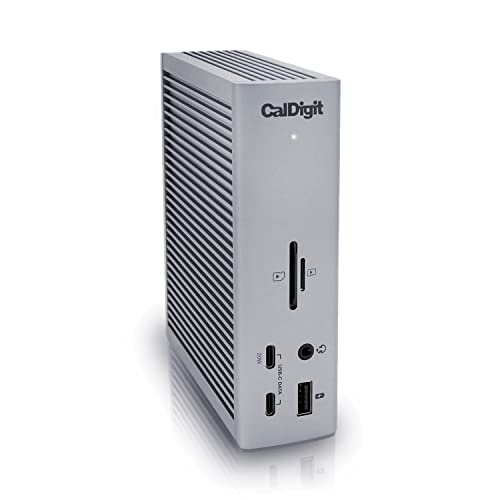
- 18-port workstation connectivity
- 98W charging and 2.5GbE
- Up to dual 6K display support
Best For: Mixed-platform teams with demanding peripheral setups
Best for Multi-Monitor Rollouts

- Driverless macOS and Windows setup
- Up to four Windows 4K displays
- 140W Power Delivery and security slots
Best For: Hot-desking teams deploying high-resolution multi-monitor workstations
Best Managed Business Dock
Dell Pro Thunderbolt 4 Smart Dock

- Supports up to four 4K displays
- 130W Dell charging and 96W for others
- Remote Wi-Fi management and security controls
Best For: Dell-focused organizations with managed, multi-monitor workstations
Best for Triple Displays

- Up to three extended 4K 60Hz monitors on compatible systems
- 96W power delivery and 40Gbps Thunderbolt 4 speeds
- 2.5Gb Ethernet, daisy chaining, and 14 total ports
Best For: Multi-monitor workstations with demanding wired networking needs
Best for Windows Display Expansion

- Up to four 4K 60Hz displays on qualifying Windows laptops
- 98W power delivery and 40Gbps Thunderbolt/USB4 performance
- 16-port design with driverless cross-platform compatibility
Best For: Windows deployments requiring high-density multi-monitor setups
Best for Multi-Display Workstations

- Up to three 4K displays on compatible Windows systems
- 140W power delivery with 2.5Gbps Ethernet
- SD and Micro SD 4.0 readers plus 13 total ports
Best For: Creative and multi-monitor business workstations
Best for Flexible Office Expansion
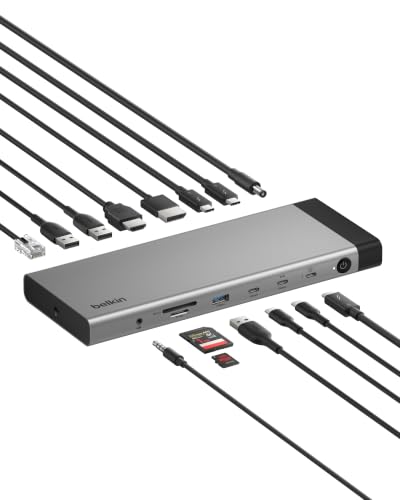
- 14 ports with up to 140W power delivery
- Supports triple 4K displays at 144Hz
- 2.5Gb Ethernet and daisy chaining for up to six devices
Best For: Mixed-device offices and expandable workstations
Best for High-Speed Networked Offices

- 20 ports with 10Gb Ethernet and three Thunderbolt 5 ports
- 140W dedicated host charging with a 330W power supply
- Dual USB controllers help reduce peripheral bottlenecks
Best For: Large-file workflows and 10GbE office networks
Best Compact Surface Dock – Microsoft Surface Thunderbolt 4 Dock
For small businesses standardizing on Surface devices, this Microsoft dock provides fast Thunderbolt 4 connectivity in a compact, straightforward setup. It combines USB-C and USB-A expansion, 2.5G Ethernet, rapid charging, and support for two 4K monitors.
Best For: Surface-based offices that need dependable everyday connectivity and dual-monitor support.
Pros:
- Supports up to two 4K monitors.
- Includes three USB-C, three USB-A, and 2.5G Ethernet ports.
- Charges a laptop in approximately 2.5 hours.
- Raised tactile port indicators help with identification.
Cons:
- Compatibility is specifically listed for Microsoft Surface devices.
- Offers fewer total ports than some larger business docks.
This is a practical choice for teams seeking Thunderbolt docking stations for small businesses without an especially large or complex port array. Its tactile labeling and recycled-plastic construction add useful everyday touches.
Best Port Selection – CalDigit TS4 Thunderbolt 4 Dock
The CalDigit TS4 is designed for small businesses with demanding deskside workflows. Its 18-port layout combines Thunderbolt 4, USB, audio, card readers, 2.5GbE, DisplayPort, and up to 98W laptop charging through one host connection.
Best For: Mixed Mac, Windows, and Chrome OS teams that need extensive peripheral connectivity.
Pros:
- Provides 18 ports, including three Thunderbolt 4 ports and eight USB ports.
- Delivers up to 98W charging for compatible host devices.
- Supports one 8K display or dual 6K displays on supported systems.
- Works with Thunderbolt 4, Thunderbolt 3, USB4, USB-C, Mac, Windows, and Chrome OS devices.
Cons:
- Display support varies by operating system and Mac hardware.
- Maximum performance requires a Thunderbolt 4 or fully featured USB4 host and certified cable.
- Its broad feature set may be more than a basic office desk requires.
For teams comparing Thunderbolt docking stations for small businesses, the TS4 stands out when flexibility and expansion matter more than minimalism. It is particularly well suited to workstations using storage, networking, displays, audio gear, and memory cards at the same time.
Best for Multi-Monitor Rollouts – StarTech Thunderbolt 5 Dock
For small businesses deploying shared desks or high-resolution workstations, this StarTech Thunderbolt 5 dock emphasizes driverless setup and extensive display support. It is designed for macOS and Windows environments, with up to four extended 4K displays on Windows and flexible Apple Silicon configurations.
Best For: Hot-desking environments and teams that need high-end multi-monitor support across platforms.
Pros:
- Uses driverless plug-and-play operation across macOS and Windows.
- Supports up to four extended 4K 60Hz displays on Windows.
- Offers up to 140W Power Delivery charging.
- Includes K-slot and Nano lock slots plus lifetime weekday technical assistance.
Cons:
- Apple display capabilities depend on the MacBook Pro model.
- Its advanced display features may exceed the needs of ordinary office setups.
- The supplied notes list five total USB ports.
This dock is a strong fit for businesses where consistent deployment and display flexibility can reduce setup friction. Its driverless design and security slots are useful considerations for shared workspaces and managed equipment.
Best Managed Business Dock – Dell Pro Thunderbolt 4 Smart Dock
The Dell Pro SD25TB4 is aimed at businesses that need more than basic port expansion. Along with four-display support and 130W charging for Dell systems, it adds Wi-Fi-based remote management, security controls, and a sustainable enclosure for managed office deployments.
Best For: Dell-centered organizations that prioritize remote administration, security, and multi-display productivity.
Pros:
- Supports up to four 4K monitors through HDMI, DisplayPort, USB-C, and Thunderbolt 4.
- Provides up to 130W charging for Dell devices and up to 96W for others.
- Enables remote Wi-Fi management through Dell Console and Intel AMT.
- Includes WPA3, PXE boot, MAC filtering, DMA protection, and a secure enclosure.
Cons:
- Its most advanced management features are especially relevant to managed Dell environments.
- Offers fewer total ports than the 18-port CalDigit TS4.
- Charging levels differ between Dell and non-Dell devices.
Among Thunderbolt docking stations for small businesses, this Dell model is the most operations-focused option in the group. It makes the strongest case when IT teams value centralized oversight and security alongside high-resolution display support.
Best Overall – Plugable Thunderbolt 4 Dock
For small businesses standardizing workstations across Windows and Mac laptops, the Plugable Thunderbolt 4 Dock combines 40Gbps performance, 100W-class charging, and a practical 13-port layout. It supports dual 4K displays on compatible systems while keeping common office peripherals connected through one dock.
Best For: Mixed-device offices that need a dependable, driverless Thunderbolt 4 workstation hub.
Pros:
- Supports dual 4K 60Hz HDMI displays or one 8K display on compatible Thunderbolt 4, Thunderbolt 5, and USB4 systems.
- Provides 96W certified power delivery and a downstream Thunderbolt 4 port with 15W charging.
- Offers 13 ports, including HDMI, USB, USB-C, SD and microSD, Gigabit Ethernet, audio, and a K-lock slot.
Cons:
- Display support varies by laptop; Thunderbolt 3, non-Thunderbolt USB-C, and base M1/M2 Macs support only one external display.
- Dual display support on some base Mac models requires clamshell mode.
The Plugable is a strong all-purpose choice when an IT team wants broad port coverage and straightforward deployment. Verify each laptop’s Thunderbolt, USB4, and display capabilities before purchasing, especially in a mixed Mac fleet.
Best for Triple Displays – Belkin Thunderbolt 4 Dock
The Belkin Thunderbolt 4 Dock is aimed at small businesses that need substantial expansion from a single USB-C connection. With 14 ports, up to three extended 4K monitors, 96W power delivery, and 2.5Gb Ethernet, it is built for demanding desk-based productivity setups.
Best For: Multi-monitor offices that prioritize fast wired networking and broad connectivity.
Pros:
- Supports up to three extended 4K 60Hz monitors on compatible systems.
- Delivers up to 40Gbps Thunderbolt 4 data speeds and 96W laptop power delivery.
- Includes 2.5Gb Ethernet, daisy chaining, a Kensington lock, and six-point safety protection.
- Provides 14 ports for video, data, storage, networking, and accessories.
Cons:
- Triple-display capability depends on the connected computer and display configuration.
- Its listed video connectivity includes one HDMI port, so additional monitor connections may require other supported outputs or cables.
Choose the Belkin when a three-screen workflow and faster-than-gigabit networking are more important than keeping the dock minimal. Confirm your laptop’s display support and the required cable types before deploying it across the business.
Best for Windows Display Expansion – StarTech Thunderbolt 4 Dock
For small businesses with Windows-heavy teams and varied laptop hardware, the StarTech Thunderbolt 4 Dock offers unusually broad display expansion. It can drive up to four 4K 60Hz monitors on qualifying Windows systems, while also providing 16-port connectivity, 40Gbps performance, and 98W power delivery.
Best For: Windows offices planning high-density multi-monitor workstations and larger laptop deployments.
Pros:
- Supports up to four 4K 60Hz monitors on qualifying Windows laptops with Intel 12th Gen or later CPUs and DP 1.4 with DSC.
- Offers dual extended 4K 60Hz display support on compatible Macs, with stated model and clamshell requirements.
- Includes 98W power delivery, a fully specified power adapter, and 40Gbps Thunderbolt 4/USB4 performance.
- Provides 16 ports and driverless compatibility across Windows and macOS, including Intel, Apple Silicon, AMD, and Snapdragon X systems.
Cons:
- Quad-display support is limited to specific Windows hardware and display capabilities.
- Mac display support varies by chip generation and may require clamshell mode.
- The 16-port specification includes a USB 2.0 port, which is better suited to basic peripherals or charging than high-speed storage.
The StarTech dock is the most capable option here for Windows teams that genuinely need four screens and a wide compatibility target. Its display requirements are more specific, so IT buyers should validate laptop CPU, graphics, and DSC support before standardizing on it.
Best for Multi-Display Workstations – Kensington SD5010T5
For small businesses building demanding creative or productivity workstations, the Kensington SD5010T5 is one of the most capable Thunderbolt docking stations for small businesses. It combines Thunderbolt 5 connectivity, up to 140W power delivery, fast networking, card readers, and flexible multi-monitor support in a 13-port design.
Best For: Creative teams and power users who need fast media transfers, multiple displays, and high-wattage laptop charging.
Pros:
- Supports up to three 4K displays at up to 144Hz or dual 8K displays on compatible Windows systems.
- Provides up to 140W dynamic power delivery and includes KonstantCharge for charging connected devices while the laptop is undocked.
- Includes 2.5Gbps Ethernet, SD and Micro SD 4.0 readers, two HDMI ports, and Thunderbolt 5 connectivity.
- Offers a zero-footprint mounting option, security lock slots, DockWorks software, and a three-year limited warranty.
Cons:
- Some display configurations vary substantially between Windows and Mac systems.
- The mounting bracket and Kensington security cable are sold separately.
- Maximum Thunderbolt 5 performance requires compatible hardware and supported operating systems.
The SD5010T5 is a strong fit when a small business needs one dock to handle displays, wired networking, storage cards, and demanding laptop charging. Its broad port selection and business-friendly support features make it especially practical for shared or specialized workstations.
Best for Flexible Office Expansion – Belkin Thunderbolt 5 Dock
The Belkin 140W Thunderbolt 5 Dock is a practical choice for small businesses that want a clean, expandable desk setup. Among Thunderbolt docking stations for small businesses, it stands out with 14 ports, support for up to three 4K displays at 144Hz, 2.5Gb Ethernet, and daisy chaining for additional Thunderbolt devices.
Best For: Mixed-device offices that need broad compatibility, multi-monitor support, fast wired networking, and a streamlined single-cable connection.
Pros:
- Supports up to three extended 4K displays at 144Hz or 8K at 60Hz on compatible systems.
- Delivers up to 140W through one USB-C connection while supporting displays, storage, and peripherals.
- Provides 2.5Gb Ethernet and daisy chaining for up to six Thunderbolt devices.
- Works with Windows, Mac, Chrome OS, and USB-C-enabled laptops, tablets, and smartphones.
Cons:
- The dock lists only one HDMI port, so other display connections may require compatible Thunderbolt or USB-C hardware.
- Display capabilities depend on the host device and operating system.
- Its three-year coverage is limited to up to $2,500 in U.S. coverage.
The Belkin dock is well suited to growing offices where employees use different platforms and need a reliable expansion point. Its safety features, broad compatibility, and daisy-chain support help keep desks organized as the workspace evolves.
Best for High-Speed Networked Offices – CalDigit TS5 Plus
The CalDigit TS5 Plus is designed for small businesses that need exceptional connectivity and very fast local networking. It is a standout among Thunderbolt docking stations for small businesses with 20 ports, 10Gb Ethernet, multiple Thunderbolt 5 connections, dual USB controllers, and 140W dedicated host charging.
Best For: Media teams, engineering groups, and offices moving large files to 10GbE networks or NAS storage.
Pros:
- Offers 20 ports, including three Thunderbolt 5 ports, five USB-A ports, five USB-C ports, DisplayPort 2.1, card readers, and audio connections.
- Includes PCIe-based 10Gb Ethernet for much faster transfers than traditional 1Gb Ethernet.
- Provides 140W dedicated host charging and uses a 330W power supply for sustained power delivery.
- Dual USB controllers help reduce bottlenecks when multiple high-speed devices are connected.
Cons:
- Maximum performance requires a Thunderbolt 5 or USB4 v2 host connection; Thunderbolt 3 and 4 hosts have reduced functionality.
- Ethernet requires a Thunderbolt-based host or a USB4 host with PCIe support.
- Its two-year warranty is shorter than the three-year coverage offered by some competing docks.
The TS5 Plus is the strongest option here for businesses with high-throughput storage and networking needs. Its extensive port selection and controller design are particularly valuable when several fast peripherals must operate simultaneously.
How We Picked the Best Thunderbolt Docking Stations for Small Businesses
We focused on the features that matter most in a shared office or home-work setup: port selection, charging capacity, display support, networking, operating-system compatibility, and the ability to support a growing workstation. We also considered whether a dock suits everyday productivity, creative workloads, IT-managed fleets, or demanding multi-monitor environments.
Specifications such as USB and Thunderbolt speeds, display resolution, power delivery, Ethernet capability, and card-reader availability can vary by computer and operating system. Confirm your laptop’s USB-C or Thunderbolt capabilities before buying.
Quick Comparison
| Best For | What to Look For |
|---|---|
| Everyday office work | Dual-display support, reliable charging, USB-A, USB-C, and Ethernet |
| Large monitor setups | Three or four display support, sufficient video outputs, and strong bandwidth |
| Powerful laptops | At least 96W to 140W power delivery, depending on the computer |
| Fast storage and networking | 40Gbps or 80Gbps Thunderbolt, 2.5GbE or 10GbE, and fast USB ports |
| Mixed-device offices | Broad Windows and macOS compatibility plus practical legacy ports |
Key Buying Factors for Thunderbolt Docking Stations for Small Businesses
Display Support
Count the monitors and check their resolution and refresh-rate requirements. A dock that supports multiple 4K screens may still have different limits on Windows and macOS. Also verify whether your laptop supports the desired number of external displays.
Power Delivery
Higher-wattage docks can charge demanding business laptops while they are in use. A 96W or 100W dock suits many systems, while newer mobile workstations may benefit from 130W or 140W support. The laptop must also accept the advertised charging level.
Ports and Connectivity
Prioritize the ports your team uses daily. USB-A remains useful for keyboards, scanners, and security keys, while USB-C and Thunderbolt are better for fast drives and newer accessories. Ethernet is often more consistent than Wi-Fi for fixed desks; 2.5GbE or 10GbE is valuable for large file transfers and shared storage.
Management, Compatibility, and Reliability
For a small business, dependable firmware support and easy deployment can matter as much as raw speed. Check operating-system requirements, included power supplies, warranty coverage, and whether the dock fits your company’s laptop fleet before standardizing on a model.
Who Should Buy Which Thunderbolt Docking Stations for Small Businesses?
Choose a compact dual-monitor dock for straightforward email, documents, video calls, and accounting work. Businesses supporting several displays should consider a quad-monitor model, but should first confirm graphics and operating-system limitations. Teams handling video, design, engineering, or large datasets should prioritize Thunderbolt 5, high-speed storage connections, and faster Ethernet. If a dock will serve powerful laptops or replace separate chargers, select a model with higher power delivery. For mixed fleets and frequent desk sharing, broad compatibility, plenty of USB ports, and a stable wired network connection are usually the best long-term priorities.