Choosing the right RAID enclosure can make a big difference in speed, redundancy, and desk space. For compact workspaces, the best options balance capacity, cooling, and simple setup.
Below, we focus on RAID storage enclosures for compact setups that are practical for backups, media libraries, and small creative rigs without taking over your desk.
Best 10 RAID Storage Enclosures for Compact Setups Picks for 2026
Compact RAID Backup
TERRAMASTER D2-320 2-Bay USB RAID Enclosure

- 10Gbps USB 3.2 Gen 2 connection
- RAID 0, RAID 1, JBOD, and SINGLE support
- Tool-free trays with temperature-controlled fan
Best For: Compact direct-attached backup and mirrored storage
Budget Dual-Bay Pick
VANGREE Dual Bay 2.5/3.5 SATA RAID Enclosure

- RAID 0, RAID 1, Normal, and JBOD modes
- USB 3.0 with UASP up to 5Gbps
- Aluminum shell with fan and 48W adapter
Best For: Compact RAID storage on a tighter budget
Mac Mini Expansion Hub
ORICO MiniTower 2-Bay RAID Enclosure with Hub

- 2-bay RAID enclosure with 10Gbps USB 3.2 Gen 2
- Adds USB-A, USB 2.0, and TF/SD expansion ports
- Aluminum shell with low-noise fan
Best For: Mac mini setups needing storage and hub expansion
High-Capacity Compact RAID
Yottamaster 5-Bay 110TB RAID Enclosure

- Up to 110TB across five bays
- RAID 0/1/3/5/10/JBOD/CLONE support
- Aluminum shell with 80mm intelligent fan
Best For: Large local backups and multi-drive creative workflows
Pro-Grade 4-Bay RAID

- 4-bay enclosure with RAID 0/1/5/10, JBOD, and Normal modes
- USB 3.2 Gen 2x2 up to 20Gbps on USB4 connections
- 150W power, hot-swap support, and quiet cooling fan
Best For: High-capacity creators and IT users who want fast, flexible RAID storage
Flexible 5-Bay DAS
UGREEN 5-Bay USB-C RAID Enclosure

- 8 RAID and storage modes, including RAID 0/1/5/10 and Clone
- Up to five 2.5/3.5-inch SATA drives for 160TB total capacity
- Smart cooling with S.M.A.R.T. monitoring and drive-status LEDs
Best For: People who want a roomy, flexible RAID box for backups and drive consolidation
Portable Dual-Bay RAID
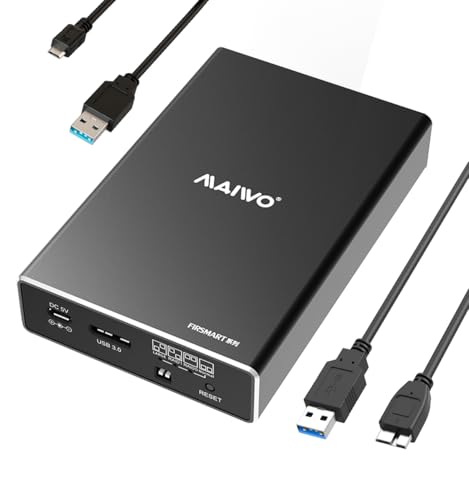
- Compact 2-bay enclosure for 2.5-inch SATA SSDs and HDDs
- RAID 0/1/JBOD/PM modes with tool-free, hot-swappable bays
- Lightweight aluminum case with up to 16TB total capacity
Best For: Portable laptop users who need a small RAID enclosure for 2.5-inch drives
Compact 2-Bay RAID Starter

- 4 RAID modes: RAID 0, RAID 1, Normal, JBOD
- Supports 2.5-inch and 3.5-inch SATA drives
- Aluminum build with built-in cooling fan
Best For: small desks and users who want a simple dual-bay RAID enclosure
Budget Dual-Bay Workhorse

- RAID 0, RAID 1, LARGE(JBOD), and NORMAL(PM)
- Up to 48TB total capacity
- Aluminum case with built-in fan
Best For: compact workstations that need flexible RAID modes and higher capacity
High-Capacity Compact Quad-Bay

- Four-drive setup built from two 2-bay units
- RAID 0, RAID 1, Normal, and JBOD modes
- Up to 80TB total capacity with dual fans
Best For: compact users who need four-drive RAID storage without a bulky chassis
Compact RAID Backup – TERRAMASTER D2-320 2-Bay USB RAID Enclosure
If you want RAID storage enclosures for compact setups, the TERRAMASTER D2-320 is a straightforward 2-bay DAS built for fast local storage and simple redundancy. It uses USB 3.2 Gen 2 for up to 10Gbps transfer, supports RAID 0, RAID 1, JBOD, and SINGLE, and works with both 3.5-inch and 2.5-inch SATA drives.
Best For: Users who want a compact dual-bay enclosure for fast desktop storage or mirrored backups.
Pros:
- USB 3.2 Gen 2 connection with up to 10Gbps throughput
- Supports RAID 0, RAID 1, JBOD, and SINGLE modes
- Tool-free tray design with push-lock drive retention
- Intelligent temperature-controlled fan for quieter cooling
Cons:
- It is a DAS, not a NAS, so it is meant for direct connection
- Diskless, so drives must be purchased separately
- Two-bay design limits total capacity compared with larger enclosures
For a compact setup, this model balances speed, flexibility, and easy drive swapping. It is especially practical if you want RAID 1 protection without moving to a larger multi-bay unit.
Budget Dual-Bay Pick – VANGREE Dual Bay 2.5/3.5 SATA RAID Enclosure
For RAID storage enclosures for compact setups, the VANGREE dual-bay model offers a simple way to combine two SATA drives in one desktop-friendly unit. It supports RAID 0, RAID 1, Normal, and JBOD modes, connects over USB 3.0 with UASP, and includes active cooling plus a 48W power adapter for stable use.
Best For: Users who want an affordable two-bay enclosure for backups, media work, or everyday external storage.
Pros:
- Four RAID modes: RAID 0, RAID 1, Normal, and JBOD
- USB 3.0 with UASP and up to 5Gbps transfer speed
- Aluminum shell with built-in fan for heat control
- Includes cable, adapter, screwdriver, screws, and manual
Cons:
- RAID mode changes require powering off first
- Switching RAID modes erases data, so backups are essential
- Fan noise is listed around 40-50dB
This is a practical compact enclosure if you want basic RAID flexibility without a complicated setup. Just keep the mode-change warning in mind before reorganizing your drives.
Mac Mini Expansion Hub – ORICO MiniTower 2-Bay RAID Enclosure with Hub
If you want RAID storage enclosures for compact setups with extra desktop utility, the ORICO MiniTower combines a 2-bay SATA RAID enclosure with hub-style expansion. It supports RAID 0, RAID 1, single-disk, and JBOD modes, runs over USB 3.2 Gen 2 at up to 10Gbps, and also adds USB-A, USB 2.0, and TF/SD slots for a Mac mini-oriented workspace.
Best For: Mac mini users who want storage expansion plus extra hub ports in one compact unit.
Pros:
- 2-bay SATA RAID enclosure with RAID 0, RAID 1, single, and JBOD modes
- 10Gbps USB 3.2 Gen 2 data transfer
- Extra hub ports including USB-A, USB 2.0, and TF/SD slots
- Aluminum shell and low-noise fan for better airflow
Cons:
- RAID controls operate in reverse order from bottom to top
- One of the main selling points is Mac mini compatibility, so it is niche by design
- Hybrid layout is more specialized than a simple dual-bay enclosure
This is a smart pick when you want more than just storage from a small enclosure. The added hub functions make it especially appealing for a tidy Mac mini desk setup.
High-Capacity Compact RAID – Yottamaster 5-Bay 110TB RAID Enclosure
Among RAID storage enclosures for compact setups, the Yottamaster 5-bay unit stands out when you need a lot of local capacity in a single desktop enclosure. It supports up to 110TB across five SATA drives, includes RAID 0, 1, 3, 5, 10, JBOD, and CLONE modes, and uses an aluminum shell with an 80mm intelligent fan to manage heat.
Best For: Power users who need a dense multi-drive enclosure for large backups or video work.
Pros:
- Up to 110TB total capacity with five 22TB drives
- Broad RAID support including RAID 0, 1, 3, 5, 10, JBOD, and CLONE
- Aluminum body with 80mm temperature-controlled fan
- Works with 2.5-inch and 3.5-inch SATA HDDs and SSDs
Cons:
- 5Gbps USB 3.1 transfer speed is lower than some 10Gbps options
- Power consumption must stay within the enclosure’s limits
- Larger five-bay design takes more desk space than smaller units
If your priority is maximizing storage in one enclosure, this model delivers a lot of capacity without moving to a full server. It is best suited to users who care more about volume and RAID flexibility than raw connection speed.
Pro-Grade 4-Bay RAID – ORICO 4 Bay 20Gbps Enclosure
For compact setups that still need serious capacity, this RAID storage enclosure for compact setups brings four-bay expansion, multiple RAID options, and a fast USB 3.2 Gen 2×2 connection. It is built for users who want to move large files efficiently while keeping storage flexible for editing, backup, or mixed workstation use.
Best For: Video producers, enterprise users, and advanced creators who need high-capacity storage in a relatively compact 4-bay unit.
Pros:
- Supports RAID 0, 1, 5, 10, JBOD, and Normal modes for flexible storage planning.
- USB 3.2 Gen 2×2 interface supports up to 20Gbps on USB4, with strong large-file transfer performance.
- Built-in 150W power supply, hot-swapping support, and a low-noise fan help keep multi-drive use stable.
- Works with 2.5-inch and 3.5-inch SATA drives on Windows, macOS, and Linux.
Cons:
- Changing RAID modes erases drive contents, so setup requires careful backups.
- Thunderbolt connections are limited to around 10Gbps, not the full 20Gbps.
- Best suited to SATA drives only, so it is not for NVMe storage.
This is the strongest choice here if your priority is maximum capacity and RAID flexibility in a compact desktop enclosure. The tradeoff is that it is more of a serious storage appliance than a simple plug-and-play dock.
Flexible 5-Bay DAS – UGREEN 5-Bay USB-C RAID Enclosure
If you want RAID storage enclosures for compact setups with a larger drive count, this UGREEN 5-bay DAS offers plenty of room without moving into a full server chassis. It combines multiple RAID and storage modes with aluminum cooling, making it practical for backups, shared work drives, and drive consolidation.
Best For: Users who want five-drive expansion, flexible RAID modes, and easy drive reuse in a desktop-friendly enclosure.
Pros:
- Offers 8 storage and RAID modes, including PM, RAID 0, RAID 1, RAID 3, RAID 5, RAID 10, Large, and Clone.
- Supports up to five 2.5/3.5-inch SATA HDDs or SSDs for up to 160TB total capacity.
- Smart cooling adjusts fan speed using S.M.A.R.T. temperature readings and can stop the fan in PM sleep mode.
- Clear LED indicators help track drive presence, mode issues, and RAID rebuilding status.
Cons:
- USB 3.2 Gen 1 tops out at 5Gbps, so it is not the fastest option in this group.
- Changing RAID modes requires reformatting, so backups are essential.
- Its 5-bay footprint is still desktop hardware, not something designed for ultra-tiny setups.
This enclosure makes sense when capacity and flexibility matter more than raw interface speed. It is a strong fit for users who want a manageable multi-drive box with room to grow.
Portable Dual-Bay RAID – MAIWO 2.5-Inch RAID Enclosure
For truly compact setups, this MAIWO dual-bay enclosure is the smallest-style option in the group and suits users who only need portable RAID storage for 2.5-inch drives. It keeps the feature set focused on basic RAID protection, fast-enough USB 3.0 performance, and a lightweight aluminum design.
Best For: Laptop users and travelers who want a small RAID enclosure for 2.5-inch SATA SSDs or HDDs.
Pros:
- Supports RAID 0, RAID 1, JBOD/LARGE, and Normal (PM) modes for simple storage setups.
- Compact 2-bay design with tool-free installation and hot swapping for easier drive changes.
- Aluminum alloy case keeps the enclosure light and portable.
- Can support up to 16TB total capacity with two 8TB 2.5-inch drives.
Cons:
- Only works with 2.5-inch SATA drives, so it is not an option for 3.5-inch disks.
- Requires extra power via the included Micro USB power cable.
- USB 3.0 performance is modest compared with higher-end multi-bay enclosures.
This is the most space-conscious pick here, especially if you are building around portable SSDs or small laptop backups. It gives you the basics cleanly, but it is not meant for heavy multi-drive throughput or large desktop arrays.
Compact 2-Bay RAID Starter – Aluminum 2 Bay RAID Enclosure
If you want RAID storage enclosures for compact setups, this CENMATE 2-bay model is a practical fit for a small desk or workstation. It supports 2.5-inch and 3.5-inch SATA HDDs/SSDs, offers four RAID modes, and keeps the footprint manageable while still giving you room for up to 20TB per drive.
Best For: Users who want a space-saving dual-bay enclosure with simple RAID options and broad device compatibility.
Pros:
- Supports RAID 0, RAID 1, Normal, and JBOD modes.
- Works with 2.5-inch and 3.5-inch SATA HDDs/SSDs.
- Aluminum body plus a built-in fan for better heat control.
- USB A/C 3.0 cable included for flexible connections.
Cons:
- Fan noise is listed at around 40-50 decibels.
- RAID setup can cause data loss if not handled carefully.
- Mac OS has no RAID software support noted in the listing.
For compact RAID storage on a desk, this enclosure balances flexibility, cooling, and plug-and-play convenience. It is not the quietest choice, but it covers the basics well for personal or small office storage.
Budget Dual-Bay Workhorse – MAIWO 2-Bay RAID Enclosure
This MAIWO model is a straightforward option in the category of RAID storage enclosures for compact setups, especially if you want a small desktop unit with multiple RAID choices. It supports 2.5-inch and 3.5-inch SATA drives, uses USB 3.0 for up to 5Gbps transfer, and keeps the form factor portable enough for a tight workspace.
Best For: Buyers who need a compact dual-bay enclosure with strong capacity and flexible RAID modes.
Pros:
- Supports RAID 0, RAID 1, LARGE(JBOD), and NORMAL(PM).
- Up to 48TB total capacity across the two slots.
- Full aluminum body with built-in two-speed cooling fan.
- USB 3.0 with UASP support on compatible Windows systems.
Cons:
- 2.5-inch drives may need an additional mounting bracket.
- RAID changes require backing up data first.
- Best speed claims depend on system and UASP support.
For compact setups that still need room to grow, this enclosure offers a good mix of capacity, cooling, and mode flexibility. It is a sensible choice if you want a no-frills dual-bay RAID box with broad OS support.
High-Capacity Compact Quad-Bay – CENMATE 4-Bay RAID Enclosure
For RAID storage enclosures for compact setups that need more drive slots without jumping to a large tower, this CENMATE 4-bay unit is a strong fit. It combines two 2-bay RAID units into one enclosure, supports 2.5-inch and 3.5-inch SATA drives, and delivers up to 80TB of total storage while still keeping the design desktop-friendly.
Best For: Users who want a compact four-drive RAID enclosure with more expansion room than a standard 2-bay box.
Pros:
- Effectively combines two 2-bay RAID units into one enclosure.
- Supports RAID 0, RAID 1, Normal, and JBOD modes.
- Up to 80TB total capacity, or 20TB per drive.
- Aluminum-alloy build with two built-in fans.
Cons:
- Fan noise is listed at around 40-50 decibels.
- RAID setup can lead to data loss if misconfigured.
- Mac OS RAID software is not supported in the notes.
This is the pick for compact users who need more bays, not just more speed. It gives you a larger footprint than a standard dual-bay unit, but it still stays far smaller than many full-size multi-bay storage systems.
How We Picked the Best RAID Storage Enclosures for Compact Setups
For RAID Storage Enclosures for Compact Setups, the most important factors are physical size, drive support, RAID flexibility, transfer speed, and thermal design. We favored models that make it easier to add storage without needing a full tower or rack.
We also looked at everyday usability: tool-free access, USB-C or fast USB 3.2 connections, broad HDD/SSD compatibility, and whether the enclosure offers sensible RAID modes for backup or performance.
Quick Comparison: What Matters Most
If you want the simplest setup, a 2-bay enclosure is usually the best starting point. It keeps the footprint small and works well for mirrored backups or a fast two-drive array. If you need more capacity for video, photo, or archive storage, 4-bay and 5-bay designs offer better expansion, though they take up more space.
Speed also matters. USB 3.0 is fine for many backup jobs, but USB-C and higher-bandwidth interfaces are better if you regularly move large media files or edit directly from the array.
Key Buying Factors for RAID Storage Enclosures for Compact Setups
Bay Count and Capacity
Choose bay count based on your growth plan. Two bays are ideal for a compact desk or portable backup station. Four and five bays make more sense if you want room for expanding libraries or multiple mirrored drives.
Drive Type Support
Check whether the enclosure supports 2.5-inch SSDs, 3.5-inch HDDs, or both. Mixed compatibility is useful if you are reusing older hard drives or building a quieter SSD-based setup.
RAID Modes
Not every user needs every mode. RAID 1 is best for redundancy, RAID 0 for speed, and JBOD or Individual mode for flexible storage. Make sure the enclosure offers the mode that matches your workflow.
Cooling and Noise
Compact enclosures can run warm, especially with multiple 3.5-inch drives. Aluminum bodies, active fans, and good venting help protect drives and keep performance consistent.
Connection Speed
A fast enclosure is only useful if your computer connection can keep up. Look for USB-C, UASP support, or newer USB 3.2 implementations when faster transfers matter.
Who Should Buy Which RAID Storage Enclosures for Compact Setups?
If you mainly need a backup mirror for a laptop or desktop, a 2-bay model is usually the best fit. Content creators and power users who need more room for archives or working files should lean toward 4-bay or 5-bay options. SSD users should prioritize compact, cooler designs with high-speed USB connectivity, while bulk-storage buyers should focus on airflow, capacity, and support for 3.5-inch drives.
In short, the best choice depends on whether you value portability, redundancy, speed, or expansion. For most buyers, a well-cooled 2-bay or 4-bay enclosure offers the best mix of size and practicality.