Choosing the right RAID enclosure can make home backups, video editing, and shared storage far easier to manage. The best options balance simple setup, flexible RAID modes, and reliable cooling without adding unnecessary complexity.
In this roundup, we focus on beginner-friendly RAID storage enclosures that are practical for first-time buyers, small offices, and creators who want dependable direct-attached storage.
Best 10 Beginner-Friendly RAID Storage Enclosures Picks for 2026
Top Pick for Flexible RAID
TERRAMASTER D2-320 2-Bay USB RAID Enclosure

- RAID 0, RAID 1, JBOD, and SINGLE support
- USB 3.2 Gen2 up to 10Gbps
- Tool-free trays with push-lock drive mounting
Best For: Beginners who want fast, flexible two-bay DAS storage
Best 2.5-Inch SSD Option
Vantec Nexstar GX Dual Bay RAID Enclosure

- Supports Individual, RAID 0, and RAID 1
- Auto RAID 1 rebuild for mirrored drives
- Aluminum housing with front vents
Best For: Compact two-drive SSD or 2.5-inch HDD setups
Best 4-Bay Upgrade Pick
QNAP TR-004 4-Bay USB Type-C DAS

- Four bays with hardware RAID support
- RAID 5, RAID 1, RAID 0, JBOD, and individual disks
- USB Type-C connection with lockable bays
Best For: Buyers ready for a larger four-bay RAID enclosure
Best Budget-Friendly Dual Bay
CENMATE Aluminum 2-Bay RAID Enclosure

- Supports 2.5-inch and 3.5-inch SATA drives
- RAID 0, RAID 1, Normal, and JBOD modes
- Tool-free design with USB A/C 3.0 cables
Best For: Users who want a simple, low-friction dual-bay RAID enclosure
Easy-Use 5-Bay Choice
TERRAMASTER D5-310 5-Bay Hardware RAID Enclosure
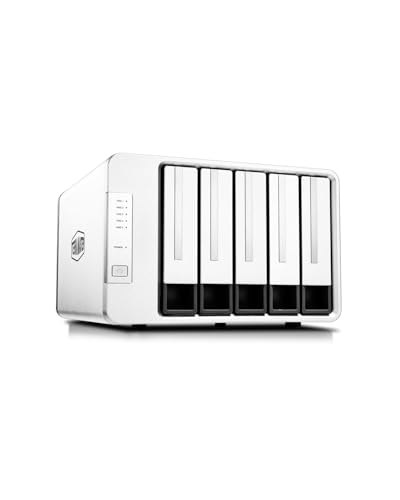
- Rear knob switches RAID modes easily
- Works with Windows, macOS, and Linux
- Tool-free bays plus hot spare support
Best For: Users who want a simple hardware RAID enclosure with wide compatibility
Fast 4-Bay Pro Pick
ORICO 4-Bay 20Gbps RAID Enclosure

- Up to 20Gbps with USB4 support
- Six RAID modes plus Normal/JBOD
- Cooling fan and aluminum alloy build
Best For: Users who want a high-speed 4-bay RAID enclosure with broad RAID support
Flexible Budget Builder
MAIWO 4-Bay SATA RAID Enclosure

- Seven RAID-related modes plus Clone
- Includes both USB-C cable types
- Dual fans and up to 96TB capacity
Best For: Users who need a flexible 4-bay enclosure for backups and media storage
Flexible 4-Bay RAID Expansion
ORICO 4 Bay 8-Mode Aluminum Enclosure

- 8 RAID modes for flexible setup
- Up to 88TB with 22TB per drive
- Aluminum body with 80mm cooling fan
Best For: Users who want a simple 4-bay RAID enclosure for backup and expansion.
Simple Dual-Unit RAID Setup
CENMATE 2x2 Bay Tool-Free Enclosure

- Supports 2.5-inch and 3.5-inch SATA drives
- RAID 0, RAID 1, Normal, and JBOD modes
- Tool-free design with USB A/C 3.0
Best For: Users who want a straightforward RAID enclosure with easy installation.
High-Capacity USB-C RAID Storage
Yottamaster 5-Bay USB-C RAID Enclosure

- Up to 110TB across 5 bays
- RAID 0/1/3/5/10, JBOD, and CLONE
- USB-C with aluminum shell and smart fan
Best For: Users who need a larger-capacity RAID enclosure with flexible modes and USB-C.
Top Pick for Flexible RAID – TERRAMASTER D2-320 2-Bay USB RAID Enclosure
If you want a beginner-friendly RAID storage enclosure that still leaves room to grow, the TERRAMASTER D2-320 is a strong place to start. It supports RAID 0, RAID 1, JBOD, and SINGLE, uses tool-free trays, and connects over USB 3.2 Gen2 for up to 10Gbps transfers.
Best For: Users who want an easy two-bay DAS with multiple RAID options and fast USB-C-class performance.
Pros:
- Hardware RAID support for RAID 0, RAID 1, JBOD, and SINGLE
- Tool-free tray design with push-lock hard drive mounting
- USB 3.2 Gen2 connectivity rated up to 10Gbps
- Supports 2.5-inch and 3.5-inch SATA drives, plus SSDs
Cons:
- It is a DAS, not a NAS, so it will not replace network storage
- Only two bays, so expansion is limited compared with larger units
This enclosure stands out if you want simple setup, flexible RAID choices, and higher-speed transfers in a compact two-drive design. The temperature-controlled fan and large capacity support make it practical for everyday storage and backup use.
Best 2.5-Inch SSD Option – Vantec Nexstar GX Dual Bay RAID Enclosure
Vantec Nexstar GX USB 3.0 Dual 2.5" SATA SSD/HDD RAID Enclosure, Black (NST-272S3-BK)
Check Price On AmazonThe Vantec Nexstar GX is a practical beginner-friendly RAID storage enclosure for 2.5-inch SSDs or HDDs, especially if you want a simple dual-drive setup. It supports Individual, RAID 0, and RAID 1 modes, adds auto RAID 1 rebuild, and uses USB 3.0 with UASP for a straightforward performance boost.
Best For: Users building a compact two-drive SSD or 2.5-inch HDD enclosure for basic RAID backup or speed.
Pros:
- Supports Individual, RAID 0, and RAID 1 modes
- Auto RAID 1 rebuild adds convenience for mirrored setups
- USB 3.0 with UASP for faster and smoother data handling
- Aluminum housing with front vents for heat dissipation
Cons:
- Only supports 2.5-inch SATA drives
- Requires the included AC adapter for power
If your goal is a simple, compact enclosure for two 2.5-inch drives, this model keeps the feature set focused and approachable. It is a good fit for SSDs where its small size, RAID 1 rebuild support, and plug-in power make setup easy.
Best 4-Bay Upgrade Pick – QNAP TR-004 4-Bay USB Type-C DAS
QNAP TR-004 4 Bay USB Type-C Direct Attached Storage (DAS) with hardware RAID (Diskless)
Check Price On AmazonThe QNAP TR-004 is a beginner-friendly RAID storage enclosure for users who want more bays and more RAID choices without moving to a full NAS. It connects by USB Type-C, supports RAID 0, 1, 5, JBOD, and individual disks, and works with Windows, macOS, and Linux as direct-attached storage.
Best For: Users who want a four-bay hardware RAID enclosure for backup, expansion, or a first step beyond a basic two-bay unit.
Pros:
- Four 3.5-inch SATA bays with hardware RAID support
- RAID 0, RAID 1, RAID 5, JBOD, and individual disk modes
- USB Type-C connection with Type-C to Type-A cable included
- Lockable drive bays for added physical security
Cons:
- Diskless enclosure, so drives must be purchased separately
- Not all older QNAP NAS models are supported
For buyers who want an easier path to larger storage, the TR-004 offers a lot of flexibility in one box. Its four-bay design and RAID 5 support make it especially appealing when you want room to expand and still keep setup relatively simple.
Best Budget-Friendly Dual Bay – CENMATE Aluminum 2-Bay RAID Enclosure
The CENMATE 2-bay unit is a straightforward beginner-friendly RAID storage enclosure for users who want dual-drive support without a complicated setup. It accepts 2.5-inch and 3.5-inch SATA HDDs or SSDs, offers RAID 0, RAID 1, Normal, and JBOD, and connects over USB 3.0 at up to 5Gbps.
Best For: Buyers who want a simple dual-bay enclosure with multiple RAID modes and broad drive compatibility.
Pros:
- Supports 2.5-inch and 3.5-inch HDDs and SSDs
- Four operating modes: RAID 0, RAID 1, Normal, and JBOD
- Tool-free, plug-and-play design with USB A/C 3.0 cables included
- Aluminum body and built-in fan for cooling
Cons:
- Fan noise is listed around 40 to 50 decibels
- Mac OS does not support RAID software according to the notes
This is a practical choice if you want broad drive support and a simple RAID feature set at the dual-bay level. The cooling fan and tool-free design make it easy to live with, though noise-sensitive users may want to take the fan level into account.
Easy-Use 5-Bay Choice – TERRAMASTER D5-310 5-Bay Hardware RAID Enclosure
If you’re looking for beginner-friendly RAID storage enclosures, the TERRAMASTER D5-310 keeps setup straightforward with a rear RAID knob that lets you switch modes without software complexity. It offers hardware RAID, broad OS compatibility, and tool-free bays, making it a practical option for users who want flexible storage without a steep learning curve.
Best For: Users who want a simple hardware RAID enclosure with easy mode switching and wide OS support.
Pros:
- Hardware RAID knob supports RAID 5, 0, 1, 10, and Single modes.
- Works with Windows, macOS, and Linux without additional drivers.
- Tool-free bays and hot spare support make drive handling easier.
- Includes temperature-controlled fans, sleep mode, and power-on recovery.
Cons:
- USB 3.1 Gen 1 limits transfers to 5Gbps rather than faster modern interfaces.
- Best suited to 3.5-inch and 2.5-inch SATA drives rather than NVMe storage.
Overall, the D5-310 is a solid pick if you want a larger-capacity RAID enclosure that emphasizes ease of use and dependable hardware-based protection. It balances flexibility and simplicity well for home and small office storage expansion.
Fast 4-Bay Pro Pick – ORICO 4-Bay 20Gbps RAID Enclosure
Among beginner-friendly RAID storage enclosures, the ORICO 4-bay model stands out for users who want a fast, feature-rich setup without giving up RAID flexibility. Its upgraded JMS591 chip, multiple RAID modes, and wide OS support make it a strong match for people managing large files or expanding a serious desktop storage setup.
Best For: Users who want a high-speed 4-bay RAID enclosure with broad RAID mode support and strong cooling.
Pros:
- Supports RAID 0, 1, 5, 10, JBOD, and Normal modes.
- USB 3.2 Gen 2×2 connection can reach 20Gbps with a USB4 port.
- Built-in cooling fan, aluminum alloy body, and grille help manage heat.
- Compatible with Windows, macOS, and Linux, with hot-swapping support.
Cons:
- Full 20Gbps performance depends on using USB4; Thunderbolt is limited to around 10Gbps.
- Configured RAID modes will erase drive contents, so setup requires caution.
This enclosure is a good choice if you want faster transfers and more RAID options than basic beginner units usually offer. It leans toward advanced home users and professionals who still want a relatively straightforward external RAID experience.
Flexible Budget Builder – MAIWO 4-Bay SATA RAID Enclosure
If you want beginner-friendly RAID storage enclosures with a lot of configuration choices, the MAIWO 4-bay model offers a very flexible feature set for 3.5-inch SATA drives. It combines multiple RAID modes, included cables, and dual fans, making it a practical entry point for users who want to build a larger DAS setup without overcomplicating the basics.
Best For: Users who need a flexible 4-bay enclosure for backups, media libraries, or surveillance storage.
Pros:
- Supports Normal, RAID 0, 1/10, 3, 5, Clone, and Large (JBOD) modes.
- Includes USB-A to USB-C and USB-C to USB-C cables in the box.
- Dual cooling fans help keep 3.5-inch SATA drives at stable temperatures.
- Up to 96TB capacity supports large backup and media collections.
Cons:
- Transfers top out at 5Gbps, which is slower than newer high-speed RAID enclosures.
- Designed for 3.5-inch SATA drives, so it is not a universal storage solution.
The MAIWO enclosure is appealing if you value RAID flexibility and included accessories more than peak transfer speed. It is especially sensible for users building a dependable storage box for long-term data, rather than chasing maximum throughput.
Flexible 4-Bay RAID Expansion – ORICO 4 Bay 8-Mode Aluminum Enclosure
If you want beginner-friendly RAID storage enclosures with plenty of room to grow, this ORICO 4-bay model gives you a straightforward path into hardware RAID. It supports 8 modes, accepts 3.5-inch SATA drives, and offers a trayless design that makes drive swaps and setup easier to manage.
Best For: Users who want a simple 4-bay RAID enclosure for backup, expansion, and flexible RAID mode options.
Pros:
- Supports 8 RAID modes, including RAID 0, 1, 3, 5, 10, JBOD, CLONE, and CLEAR
- Up to 88TB total capacity with support for 22TB per drive
- Built-in 150W power supply helps support multi-drive operation
- Aluminum shell with 80mm silent fan and front/rear vents for cooling
Cons:
- Works with 3.5-inch SATA drives only, so it is not a universal SSD/HDD enclosure
- USB 3.0 transfer speed is limited compared with faster modern interfaces
- RAID setup may take some learning for first-time users
Overall, this is a practical entry point if you want a RAID enclosure that balances capacity, cooling, and mode flexibility. It is especially appealing for users who need a stable desktop storage box rather than a compact portable drive dock.
Simple Dual-Unit RAID Setup – CENMATE 2×2 Bay Tool-Free Enclosure
The CENMATE enclosure is a practical pick if you’re looking for beginner-friendly RAID storage enclosures with a simpler feature set. It combines two 2-bay RAID units into one design, supports 2.5-inch and 3.5-inch SATA drives, and keeps setup approachable with plug-and-play USB connectivity.
Best For: Users who want a straightforward RAID enclosure with easy installation and basic RAID choices.
Pros:
- Supports 2.5-inch and 3.5-inch HDDs and SSDs
- Tool-free design and USB A/C 3.0 connections keep setup easy
- Offers RAID 0, RAID 1, Normal, and JBOD modes
- Aluminum-alloy build with built-in fans for heat management
Cons:
- Only 4 RAID modes, so it is less flexible than some larger enclosures
- Fan noise is noted at around 40-50 decibels
- Requires the reset button process after RAID array changes
This model makes sense for users who value simple operation more than advanced RAID customization. It is a good fit for desktop storage where easy access and broad drive compatibility matter.
High-Capacity USB-C RAID Storage – Yottamaster 5-Bay USB-C RAID Enclosure
For buyers comparing beginner-friendly RAID storage enclosures with more room to scale, this Yottamaster 5-bay unit stands out for capacity and flexibility. It supports 2.5-inch and 3.5-inch SATA HDDs and SSDs, offers multiple RAID choices, and uses USB-C for a cleaner modern connection.
Best For: Users who need a larger-capacity RAID enclosure with flexible mode options and USB-C connectivity.
Pros:
- Up to 110TB total capacity with support for 22TB per drive
- RAID 0, 1, 3, 5, 10, JBOD, and CLONE modes
- USB 3.1 Type-C connection with up to 5Gbps transfer speed
- Aluminum body and 80mm intelligent temperature-control fan
Cons:
- Five-bay design may be more than some beginners need
- New drives may need formatting and partitioning before use
- Total drive power draw must stay within the stated 78W limit
This enclosure is a strong choice if you want a future-proof desktop RAID setup with room for large projects and backups. It offers a lot of flexibility, but the extra capacity also means a slightly more involved setup than a basic two-bay unit.
How We Picked These Beginner-Friendly RAID Storage Enclosures
We prioritized enclosures that are easy to set up, clearly documented, and useful for buyers who may be new to RAID. That means looking for straightforward control options, broad drive support, dependable cooling, and a design that makes day-to-day use less intimidating.
We also considered bay count, interface speed, hardware RAID support, and whether the enclosure is better suited to SSDs, 2.5-inch drives, or larger 3.5-inch HDDs. The result is a balanced group of Beginner-Friendly RAID Storage Enclosures for different budgets and storage goals.
Quick Comparison: What Stands Out
Two-bay models are usually the simplest starting point and are ideal if you want redundancy without a large upfront cost. Four-bay options offer a more flexible mix of capacity and RAID modes, while five-bay enclosures are better for users who need room to grow and want a stronger long-term archive setup.
Interface speed matters too. USB 3.x models are fine for general file storage and backups, while faster USB-C and 20Gbps designs are more appealing for larger media libraries and heavier transfer workloads.
Key Buying Factors for Beginner-Friendly RAID Storage Enclosures
RAID Modes and Ease of Setup
For first-time buyers, RAID 1, RAID 5, and JBOD are the most useful options to understand. RAID 1 is simple redundancy, RAID 5 is a stronger balance of usable space and protection, and JBOD is best when you just want separate drives in one box. Choose an enclosure with clearly labeled controls or software that makes mode changes less confusing.
Drive Type and Capacity
Make sure the enclosure matches your drive size before you buy. Some models are designed for 2.5-inch SSDs and HDDs, while others are built for 3.5-inch desktop drives. If you expect your storage needs to grow, check the maximum supported capacity so you do not outgrow the enclosure too quickly.
Cooling, Noise, and Build Quality
Cooling is especially important in multi-bay RAID enclosures because sustained drive temperatures can affect reliability. Aluminum bodies, built-in fans, and well-ventilated layouts are all helpful. If the enclosure will sit on a desk, also consider fan noise and overall footprint.
Connection Speed and Compatibility
Use a connection that matches your workflow. USB-C is convenient for newer laptops and desktops, while USB A/C compatibility is useful if you switch between systems. Faster ports help most when you regularly move large video, photo, or backup files.
Who Should Buy Which Beginner-Friendly RAID Storage Enclosures?
If you want the easiest entry point, a compact two-bay enclosure is often the best choice. If you need a better balance of speed, protection, and expansion, a four-bay model is usually the sweet spot. Users building larger media libraries or backup repositories should look at five-bay options for more headroom.
In short, the best Beginner-Friendly RAID Storage Enclosures are the ones that match your drive type, storage plan, and comfort level with RAID. Start simple, choose enough bays for your next one to two years of use, and prioritize cooling and compatibility over features you are unlikely to use.