Need dependable, high-capacity storage for editing, backups, or shared project work? The right enclosure can deliver fast transfers, redundancy, and room to grow without committing to a full server.
This roundup focuses on RAID storage enclosures for demanding projects, with picks that balance speed, bay count, compatibility, and long-term value.
Best 10 RAID Storage Enclosures for Demanding Projects Picks for 2026
High-Capacity RAID Workhorse
ORICO 5-Bay RAID Enclosure, 20Gbps USB-C
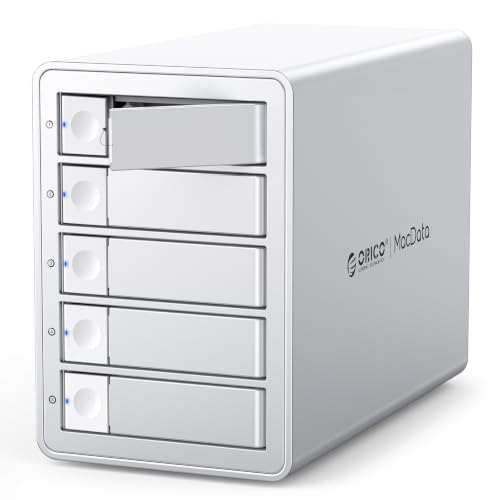
- 6 RAID modes including RAID 5 and RAID 10
- Up to 130TB total capacity with 26TB drives
- Built-in fan, aluminum body, and hot-swap support
Best For: Users who need a flexible 5-bay RAID enclosure for large projects
Pro Thunderbolt RAID Station
OWC ThunderBay 8 Thunderbolt RAID Storage

- Eight bays with dual Thunderbolt ports
- SoftRAID Premium supports RAID 0/1/4/5/10 and JBOD
- Daisy-chain support for expanded desktop storage
Best For: Pros who need an eight-bay Thunderbolt RAID workstation
Flexible Mixed-Drive DAS
UGREEN 5-Bay USB-C RAID DAS, 160TB

- 8 modes including RAID 0, 1, 5, 10, Large, and Clone
- Supports up to 160TB across five SATA drives
- Smart cooling and drive-status LEDs aid daily use
Best For: Users who want versatile 5-bay RAID storage with simple local expansion
Compact RAID Backup Pick
TerraMaster D2-320 2-Bay USB RAID Enclosure

- USB 3.2 Gen2 with up to 10Gbps speeds
- RAID 0, RAID 1, JBOD, and SINGLE modes
- Tool-free trays and intelligent cooling
Best For: Users who need a compact two-bay RAID enclosure for backup and mirroring
High-Speed 4-Bay Choice
ORICO 4 Bay RAID Hard Drive Enclosure

- USB 3.2 Gen 2x2 with upgraded JMS591 chip
- RAID 0/1/5/10, JBOD, and Normal modes
- Up to 104TB with built-in cooling fan
Best For: Fast, high-capacity 4-bay storage for large-file projects
Thunderbolt RAID Workhorse
OWC ThunderBay 4 with SoftRAID

- Dual Thunderbolt 3 ports with up to 1527MB/s
- RAID 0/1/4/5/1+0 support
- Includes 3-year SoftRAID Premium subscription
Best For: Professional users wanting Thunderbolt RAID with included management software
Large-Capacity 5-Bay Pick
ORICO RAID 5 Bay RAID HDD Enclosures

- Eight RAID modes including 0, 1, 3, 5, 10
- Up to 110TB total capacity with 22TB drives
- 150W internal power supply and silent cooling fan
Best For: Large project storage with flexible RAID modes and five bays
Compact 4-Bay Value RAID

- 4-bay DAS for 2.5/3.5-inch SATA HDDs and SSDs
- 8 RAID modes including RAID 0/1/3/5/10 and CLONE
- Aluminum body, fan cooling, USB A/C 3.0 plus eSATA
Best For: Users needing a compact multi-bay RAID enclosure for desktop storage expansion
High-Capacity 5-Bay Workhorse

- 5-bay hardware RAID enclosure with multiple RAID and JBOD modes
- Up to 110TB capacity for SATA HDDs and SSDs
- Built-in 150W power supply and active cooling for stability
Best For: Workstation backups, video projects, and large desktop storage setups
Flexible USB-C RAID Storage

- 5-bay USB-C RAID enclosure for 2.5/3.5-inch SATA drives
- Supports hardware and software RAID, including JBOD and CLONE
- Up to 110TB capacity with aluminum shell and 80mm smart fan
Best For: Creators and backups that need flexible RAID control with USB-C connectivity
High-Capacity RAID Workhorse – ORICO 5-Bay RAID Enclosure, 20Gbps USB-C
If you need RAID storage enclosures for demanding projects, this ORICO 5-bay model is built for large transfers, flexible array setup, and long-running use. Its JMS591 chipset, USB 3.2 Gen 2×2 connection, and support for 6 RAID modes make it a practical fit for users handling big media libraries, research data, or enterprise file sets.
Best For: Video producers, IT teams, and technical users who want a high-capacity 5-bay enclosure with multiple RAID options.
Pros:
- Supports RAID 0, 1, 5, 10, JBOD, and Normal modes for different storage needs.
- High-capacity design supports up to 130TB with 26TB drives.
- Built-in 45dB fan, aluminum housing, and cooling grille help with heat management.
- Compatible with Windows, macOS, and Linux, plus 2.5-inch and 3.5-inch SATA drives.
Cons:
- Changing RAID mode erases drive contents, so backup is required first.
- Thunderbolt connections will not reach the full 20Gbps rating.
- Best performance depends on using USB4 to access full bandwidth.
For users who need a flexible, high-capacity enclosure rather than a basic external drive dock, this ORICO delivers strong RAID coverage and a cooling setup suited to sustained workloads.
Pro Thunderbolt RAID Station – OWC ThunderBay 8 Thunderbolt RAID Storage
For demanding projects that need desktop-class throughput, this OWC ThunderBay 8 is a strong contender in RAID storage enclosures for demanding projects. With eight bays, dual Thunderbolt ports, and bundled SoftRAID Premium, it is aimed at users building a serious storage workspace on Mac or Windows.
Best For: Editors, creators, and power users who want an eight-bay Thunderbolt RAID enclosure with pro-grade RAID software.
Pros:
- Eight drive bays support 2.5-inch or 3.5-inch SSDs/HDDs.
- Dual Thunderbolt ports allow daisy-chaining multiple devices.
- Includes SoftRAID Premium with RAID 0/1/4/5/1+0 (10) and JBOD support.
- Thunderbolt certified for Mac and Windows, with cable included.
Cons:
- Large and heavy compared with smaller desktop enclosures.
- Thunderbolt-focused design may be more than casual users need.
- Capacity shown in the bundle is 32TB, so drive upgrades may be needed for bigger projects.
This model stands out when you want a reliable multi-bay Thunderbolt setup with mature RAID tooling and room to scale through daisy chaining.
Flexible Mixed-Drive DAS – UGREEN 5-Bay USB-C RAID DAS, 160TB
This UGREEN unit is a versatile choice if your RAID storage enclosures for demanding projects need to balance capacity, cloning, and easy drive management. It supports multiple RAID and storage modes, works across major desktop operating systems, and offers a straightforward USB-C DAS approach for expanding local storage.
Best For: Users who want a 5-bay USB-C DAS with broad RAID mode support and simple multi-drive storage.
Pros:
- Offers 8 storage modes, including RAID 0, RAID 1, RAID 3, RAID 5, RAID 10, Large, Clone, and PM.
- Up to 160TB capacity with support for five 2.5/3.5-inch SATA HDDs or SSDs.
- Smart cooling adjusts fan speed based on S.M.A.R.T. temperatures.
- Independent LEDs help show drive status and RAID issues.
Cons:
- USB 3.2 Gen 1 tops out at 5Gbps, which is slower than higher-end enclosures.
- It is a DAS, not a NAS, so it cannot join a NAS storage pool.
- Changing RAID modes requires reformatting, so backups are essential.
It is best suited to users who want wide RAID flexibility and large local capacity more than maximum interface speed.
Compact RAID Backup Pick – TerraMaster D2-320 2-Bay USB RAID Enclosure
The TerraMaster D2-320 is a compact option for RAID storage enclosures for demanding projects when you do not need a huge chassis. It uses USB 3.2 Gen2 for up to 10Gbps connectivity, supports both HDDs and SSDs, and offers RAID 0, RAID 1, JBOD, and SINGLE modes for everyday backup and performance needs.
Best For: Users who want a smaller two-bay RAID enclosure for fast backups, mirroring, or lightweight editing storage.
Pros:
- USB 3.2 Gen2 interface supports up to 10Gbps transfer speeds.
- RAID 0, RAID 1, JBOD, and SINGLE modes cover common use cases.
- Tool-free trays and push-lock design make drive installation easier.
- Intelligent fan control helps keep drive temperatures in check.
Cons:
- Only two drive bays, so expansion is limited.
- Maximum total capacity is 44TB, which is lower than larger multi-bay enclosures.
- Does not include the drives, since it is diskless.
If your project needs are centered on a dependable two-drive RAID setup rather than maximum bay count, this TerraMaster offers a practical mix of speed, flexibility, and simple setup.
High-Speed 4-Bay Choice – ORICO 4 Bay RAID Hard Drive Enclosure
If you need RAID storage enclosures for demanding projects, this ORICO 4-bay model is built for fast transfers, larger capacities, and flexible array setups. Its USB 3.2 Gen 2×2 connection and upgraded JMS591 chip are aimed at users moving large files regularly, especially in video, AI, and research workflows.
Best For: Users who need a high-capacity 4-bay enclosure with multiple RAID options and strong cooling for large-file workloads.
Pros:
- Supports RAID 0, 1, 5, 10, JBOD, and Normal modes for flexible storage planning.
- Upgraded JMS591 chip and USB 3.2 Gen 2×2 interface are designed to improve large-file transfer efficiency.
- Up to 104TB total capacity with support for 26TB per drive.
- Built-in 45dB fan, aluminum body, and large cooling grille help with long-term thermal stability.
Cons:
- Full 20Gbps performance is only achievable on a USB4 port; Thunderbolt connections are limited to around 10Gbps.
- Changing or setting up RAID modes erases drive contents, so backup is required.
- Hot-swapping and enterprise-focused features may be more than casual users need.
This is a strong pick if your priority is speed, capacity, and RAID flexibility in a desktop enclosure. It makes the most sense when you regularly handle large media or data sets and want a cooler, more scalable four-bay setup.
Thunderbolt RAID Workhorse – OWC ThunderBay 4 with SoftRAID
For users comparing RAID storage enclosures for demanding projects, the OWC ThunderBay 4 stands out for its Thunderbolt 3 connectivity and included SoftRAID software. It is designed for dependable multi-drive storage with strong sustained performance and straightforward RAID management.
Best For: Creative and professional users who want a Thunderbolt RAID enclosure with included RAID software and flexible drive support.
Pros:
- Dual Thunderbolt 3 ports and up to 1527MB/s sustained performance.
- Supports 3.5-inch or 2.5-inch drives without an adapter.
- Configurable in RAID 0/1/4/5/1+0 (10) for different performance and redundancy needs.
- Includes a 3-year SoftRAID Premium subscription for creating, monitoring, and managing arrays.
Cons:
- It is a four-bay enclosure, so it is not ideal if you need higher drive counts.
- Thunderbolt-focused design may not suit users prioritizing USB-centric setups.
- The included software adds value, but it also places more emphasis on software-managed RAID.
This model makes sense when software support and Thunderbolt performance matter as much as raw enclosure capacity. It is a solid fit for projects that need a reliable, professionally managed RAID setup rather than a budget storage box.
Large-Capacity 5-Bay Pick – ORICO RAID 5 Bay RAID HDD Enclosures
If your workload calls for RAID storage enclosures for demanding projects, this ORICO 5-bay unit focuses on capacity, backup options, and practical desktop management. It is built for large engineering files, high-resolution video, and other storage-heavy jobs that benefit from centralized disk handling.
Best For: Users who need a 5-bay enclosure with multiple RAID modes and strong capacity for large project archives.
Pros:
- Supports eight modes: 0, 1, 3, 5, 10, JBOD, CLONE, and CLEAR.
- Holds 22TB per disk for up to 110TB total capacity.
- USB 3.0 transfer speeds up to 235MB/s for backups and file transfers.
- Includes an 80mm silent fan, front and rear vents, and a 150W internal power supply.
Cons:
- USB 3.0 is slower than newer high-speed enclosure interfaces.
- Changing RAID modes can erase data, so backups are necessary before switching.
- Designed for 3.5-inch SATA disks only, which limits drive-format flexibility.
This enclosure is best when you value capacity and RAID variety more than cutting-edge interface speed. It is a practical choice for users who want a larger bay count and straightforward cooling for long-running storage tasks.
Compact 4-Bay Value RAID – CENMATE 4-Bay Aluminum DAS
If you want RAID storage enclosures for demanding projects without jumping to a larger workstation chassis, this 4-bay CENMATE unit is a practical entry point. It supports 2.5/3.5-inch SATA HDDs and SSDs, offers multiple RAID options, and includes both USB A/C 3.0 and eSATA for flexible desktop setups.
Best For: Personal users or small teams that need a compact DAS with multiple RAID modes and straightforward external storage expansion.
Pros:
- Supports RAID 0/1/3/5/10 plus CLONE, LARGE, and NORMAL modes.
- Handles up to 80TB total capacity with 2.5/3.5-inch SATA drives.
- Aluminum-alloy build and built-in fan help keep drives cool during use.
- Includes USB A/C 3.0 and eSATA cable options for broad connectivity.
Cons:
- Fan noise is listed around 40-50 dB, which may bother noise-sensitive users.
- RAID mode changes require a manual switch process and can cause data loss if handled incorrectly.
- Mac OS does not have RAID software support noted in the product details.
Overall, this is a solid budget-minded RAID DAS for users who need a simple multi-drive enclosure with usable mode flexibility. It is less about premium refinement and more about giving you dependable external storage in a compact desktop box.
High-Capacity 5-Bay Workhorse – ORICO 5-Bay Hardware RAID
For demanding projects that need more drive bays and stronger power delivery, this ORICO model is built like a proper desktop RAID expansion box. It supports hardware RAID switching, high-capacity 2.5/3.5-inch SATA drives, and a built-in power supply that keeps five drives running more cleanly in one setup.
Best For: Video editing, large backups, and workstation-style storage needs that benefit from a 5-bay hardware RAID enclosure.
Pros:
- Hardware RAID controller supports RAID 0, 1, 3, 5, 10, JBOD, Clone, and Clear modes.
- Up to 110TB total capacity with support for 2.5-inch and 3.5-inch SATA HDDs/SSDs.
- Built-in 150W power supply reduces cable clutter and supports five drives more reliably.
- Aluminum shell, 80mm fan, and airflow vents are designed for long-term cooling.
Cons:
- Transfer speed is listed up to 230MB/s over USB 3.0, which is stable but not class-leading.
- This is a large desktop unit, so it is less suitable for minimal setups or portable use.
- The focus is on hardware RAID simplicity rather than advanced software-based tuning.
As a demanding-project enclosure, this ORICO unit stands out for capacity, power, and cooling. It is a strong fit when you need a dependable 5-bay storage station that can handle heavier daily workloads.
Flexible USB-C RAID Storage – Yottamaster 5-Bay USB-C DAS
If you need RAID storage enclosures for demanding projects and want USB-C connectivity, this Yottamaster 5-bay model is a versatile DAS option. It supports both hardware and software RAID configuration, works with 2.5/3.5-inch SATA drives, and is designed to handle large media libraries and backup sets up to 110TB.
Best For: Photographers, video editors, and users who want a flexible 5-bay RAID enclosure with USB-C and multiple RAID modes.
Pros:
- Supports RAID 0/1/3/5/10, JBOD, and CLONE modes.
- Offers both hardware RAID and software RAID management options.
- Provides up to 110TB total capacity with 5x22TB drive support.
- 80mm intelligent fan and aluminum alloy shell help with heat management.
Cons:
- Total drive power consumption should not exceed 78W for normal operation.
- Brand-new drives may need formatting and partitioning before recognition.
- USB 3.1 Type-C speed is listed up to 5Gbps, which is standard rather than exceptional.
This Yottamaster enclosure is a strong all-around choice when flexibility matters as much as capacity. It gives demanding users a practical USB-C RAID platform with enough cooling and configuration options for serious desktop workflows.
How We Picked These RAID Storage Enclosures for Demanding Projects
We prioritized enclosure types that make sense for intensive workflows: strong host connectivity, support for multiple RAID levels or modes, sensible cooling, and broad drive compatibility. We also looked for practical features such as diskless flexibility, manageable noise and thermals, and capacities that scale with larger SATA HDDs or SSDs.
Quick Comparison
In short, choose more bays if you need capacity and redundancy, and choose faster connectivity if your workflow moves large files every day. Thunderbolt models are typically the best fit for high-throughput editing and content creation, while USB-C and USB 3.2 options are often better value for general storage, backups, and small-team use.
Key Buying Factors for RAID Storage Enclosures for Demanding Projects
RAID Modes and Data Protection
Look for the RAID levels you actually need. RAID 0 improves speed, RAID 1 favors mirroring, RAID 5 and RAID 6 improve the balance of usable capacity and fault tolerance, and JBOD or individual-disk modes can be useful for mixed workloads. Make sure the enclosure’s controller and software support the mode you plan to use.
Interface Speed and Real-World Throughput
The connection matters as much as the drives. Thunderbolt 40Gb/s models are generally the strongest choice for large video projects, while USB 3.2 Gen 2 and Gen 2×2 can still be excellent for fast backups, photo libraries, and general media work. For saturated multi-drive arrays, a slower host connection can become the bottleneck.
Capacity, Bay Count, and Drive Size Support
More bays usually mean more flexibility, especially when you need both redundancy and room to expand. Check maximum supported capacity, compatibility with 2.5-inch and 3.5-inch drives, and whether the enclosure is tuned for HDDs, SSDs, or both.
Cooling, Noise, and Build Quality
Higher-density arrays generate heat. Aluminum construction, active fans, and decent airflow help protect drive health during long renders, backups, and transfers. If the enclosure will sit near your desk, noise level may matter as much as raw speed.
Who Should Buy Which RAID Storage Enclosures for Demanding Projects?
If you want the best performance for creative work, choose a Thunderbolt-based model. If you want the most value for large-capacity storage, a USB-C multi-bay enclosure is often the sweet spot. If your priority is simple backup or shared local storage, a two-bay unit can be enough. For RAID Storage Enclosures for Demanding Projects, the best choice is the one that matches your workload, not just the largest spec sheet.