Professional all-in-one computers are a smart choice when you want a clean desk, fewer cables, and reliable performance in one streamlined system.
From compact office setups to polished client-facing workstations, the best options in 2026 balance speed, display quality, and business-ready features.
Best 10 Professional All-In-One Computers Picks for 2026
Business-Ready 27-inch AIO
Dell 27 All-in-One Desktop with Core 7 and 1TB SSD
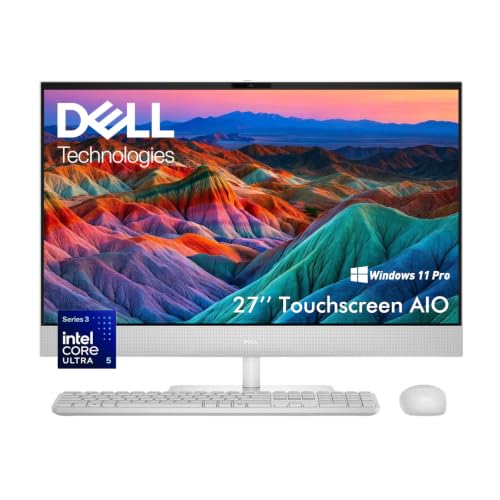
- Core 7 CPU and 16GB DDR5 RAM for smooth everyday multitasking
- 27-inch FHD IPS screen with 99% sRGB and ComfortView Plus
- 5MP pop-up privacy camera, Dolby Atmos audio, Wi-Fi 6E
Best For: Small business owners and remote workers who want a larger productivity display
Renewed Professional Value Pick
Acer Aspire C27 Professional 27-inch Ryzen 7 AIO

- Ryzen 7 5825U with 8 cores and 16 threads
- 27-inch IPS FHD 120Hz display for a roomy workspace
- Renewed unit with 90-day warranty and included accessories
Best For: Budget-minded professionals who want a renewed 27-inch all-in-one
High-Performance Office AIO
Lenovo 27 IdeaCentre i7 with 32GB RAM

- 10-core Core i7-13620H and 32GB DDR5 for heavy multitasking
- 27-inch IPS display with 99% sRGB and 100Hz refresh rate
- Windows 11 Pro with HDMI in/out, USB-C, and Wi-Fi 6
Best For: Power users who want a fast, business-ready 27-inch all-in-one
Compact Pro Touchscreen
Dell 24 All-in-One Touchscreen with Core 7

- Core 7 150U, 16GB RAM, and 512GB SSD for everyday work
- 24-inch FHD touchscreen in a compact all-in-one design
- Dolby Atmos speakers, HDR webcam, and privacy camera
Best For: People who want a smaller professional AIO with touch input
Premium Business Workhorse
Dell OptiPlex 7420 23.8" FHD All-in-One

- 14-core Core i5-14500T
- 32GB DDR5 and 1TB SSD
- Wi-Fi 6, Ethernet, DP, USB-C
Best For: Offices needing a fast, space-saving business AIO
Touchscreen Collaboration Pick
HP 27" FHD Touchscreen All-in-One

- 27-inch Full HD touchscreen
- Core Ultra 7 155U processor
- USB-C dock included
Best For: Teams wanting a roomy touchscreen AIO for business use
Value-Focused Office Choice
Dell OptiPlex 7420 23.8" Business AIO
- 14-core Core i5-14500T
- 16GB DDR5 and 1TB SSD
- FHD IPS display with webcam
Best For: Dependable office users who need a practical business AIO
Compact Home Office
Lenovo IdeaCentre 24" FHD All-in-One Desktop Computer

- Intel N100 with 16GB RAM for daily work
- 512GB NVMe SSD for quick boot and load times
- 23.8" FHD IPS panel with 99% sRGB
Best For: Home offices, students, and small businesses
Business Workhorse
Dell OptiPlex 7420 24 Business All-in-One
- 14th Gen Core i5-14500T for business multitasking
- 32GB DDR5 RAM and 1TB PCIe SSD
- Windows 11 Pro with USB-C, DisplayPort, and Ethernet
Best For: Business users needing a fast, space-saving office desktop
Touchscreen Professional
Dell 24" Touchscreen All-in-One

- Core 7 150U with 16GB DDR5 RAM
- 1TB PCIe SSD for quick storage access
- 24" FHD touchscreen with Windows 11 Pro
Best For: Professionals wanting a touch-enabled business all-in-one
Business-Ready 27-inch AIO – Dell 27 All-in-One Desktop with Core 7 and 1TB SSD
If you want professional all-in-one computers that can handle everyday business work without feeling cramped, this Dell 27-inch model is a strong fit. Its Core 7 Processor 150U, 16GB DDR5 RAM, and 1TB SSD give it enough speed and storage for spreadsheets, video calls, multitasking, and a large project library.
Best For: Small business owners, remote workers, and users who want a roomy 27-inch display for productive daily work.
Pros:
- Core 7 Processor 150U and 16GB DDR5 RAM support smooth multitasking.
- 27-inch FHD IPS display covers 99% sRGB with ComfortView Plus for easier long sessions.
- 5MP pop-up IR privacy camera with HDR helps video calls look crisp and secure.
- Wi-Fi 6E, dual HDMI, and included wireless keyboard and mouse keep the desk organized.
Cons:
- Integrated graphics are better for business and media use than demanding creative workloads.
- The 27-inch footprint may be larger than some compact desks can comfortably handle.
This Dell AIO is built as a practical workstation first, with enough performance and connectivity to cover work, meetings, and light creative tasks. For buyers who value a clean setup and a bigger screen, it checks the right boxes.
Renewed Professional Value Pick – Acer Aspire C27 Professional 27-inch Ryzen 7 AIO
Among professional all-in-one computers, this renewed Acer Aspire C27 stands out for buyers who want stronger processing power at a value-oriented price point. The Ryzen 7 5825U, 27-inch IPS FHD display, and 512GB SSD make it suitable for office work, multitasking, and day-to-day professional use.
Best For: Budget-conscious professionals who want a renewed 27-inch all-in-one with solid everyday performance.
Pros:
- Ryzen 7 5825U with 8 cores and 16 threads supports responsive multitasking.
- 27-inch IPS FHD 120Hz display offers a smooth, usable workspace.
- Wi-Fi 6E, Bluetooth 5.3, webcam, keyboard, and mouse are included.
- Renewed, tested, and backed by a 90-day warranty for extra peace of mind.
Cons:
- 8GB RAM is modest for heavier professional workloads.
- 512GB storage is adequate, but may fill up faster for media-heavy users.
- Windows 11 Home is less business-focused than Pro editions.
This Acer makes sense if you want capable hardware and a large screen without paying for a premium configuration. It is a practical renewed option for standard office productivity and general professional use.
High-Performance Office AIO – Lenovo 27 IdeaCentre i7 with 32GB RAM
If your version of professional all-in-one computers needs more headroom for heavy multitasking, this Lenovo IdeaCentre is the strongest configuration in the group. The 10-core Intel Core i7-13620H, 32GB DDR5 RAM, and 1TB SSD are well suited to demanding office workflows, large files, and frequent app switching.
Best For: Power users, office professionals, and multitaskers who want a fast 27-inch Windows 11 Pro desktop.
Pros:
- 10-core Intel Core i7-13620H with up to 4.9 GHz turbo delivers strong performance.
- 32GB DDR5 RAM and 1TB SSD provide plenty of room for multitasking and storage.
- 27-inch IPS display has 99% sRGB, 100Hz refresh rate, and anti-glare coating.
- Windows 11 Pro, HDMI in/out, USB-C, and Wi-Fi 6 add business-friendly flexibility.
Cons:
- Higher-spec hardware may be more than casual users need.
- Integrated display setup limits upgradability compared with a traditional desktop tower.
This Lenovo is the best fit if you want a polished all-in-one that feels closer to a true workstation. It offers the strongest blend of speed, memory, and professional connectivity in this roundup.
Compact Pro Touchscreen – Dell 24 All-in-One Touchscreen with Core 7
For buyers comparing professional all-in-one computers in a smaller footprint, this Dell 24-inch touchscreen model is a practical choice. It combines an Intel Core 7 150U, 16GB RAM, and 512GB SSD with a clean all-in-one design that fits well in home offices, reception areas, and everyday workspaces.
Best For: Users who want a compact professional AIO with touch input and easy everyday performance.
Pros:
- Intel Core 7 150U and 16GB RAM handle routine work and multitasking.
- 24-inch FHD touchscreen adds a convenient hands-on input option.
- Dual speakers with Dolby Atmos and a webcam with HDR support meetings and media.
- ComfortView Plus, privacy camera design, and easy-access ports add practical usability.
Cons:
- 512GB SSD offers less storage than larger-capacity alternatives in this roundup.
- 24-inch screen is more compact, so it is not ideal if you want maximum workspace.
This Dell makes sense when desk space is limited but you still want a polished, capable all-in-one for work. It balances convenience, security, and everyday performance in a smaller package.
Premium Business Workhorse – Dell OptiPlex 7420 23.8" FHD All-in-One
For shoppers comparing professional all-in-one computers, this Dell OptiPlex 7420 is built for a clean desk and reliable everyday business performance. It pairs a 23.8-inch Full HD IPS display with a 14th Gen Intel Core i5-14500T, 32GB of DDR5 memory, and a 1TB PCIe NVMe SSD, so it has the specs to handle multitasking, office apps, and fast storage access.
Best For: Offices and professionals who want a space-saving all-in-one with stronger memory and fast, practical business connectivity.
Pros:
- 14-core Intel Core i5-14500T with up to 4.8GHz P-core boost
- 32GB DDR5 RAM and 1TB PCIe NVMe SSD for smooth multitasking
- 23.8" FHD IPS display with pop-up webcam and dual speakers
- Wi-Fi 6, Bluetooth 5.2, Ethernet, and DisplayPort/USB-C output options
Cons:
- Integrated Intel UHD Graphics 770 limits graphics-heavy workloads
- 23.8-inch screen may feel small for users who prefer a larger workspace
Overall, this OptiPlex 7420 is a strong fit if you want a professional all-in-one computer that prioritizes responsiveness, tidy cable management, and business-ready features over flashy extras.
Touchscreen Collaboration Pick – HP 27" FHD Touchscreen All-in-One
This HP model stands out among professional all-in-one computers for teams that want a larger, touch-friendly workspace. Its 27-inch Full HD touchscreen, Intel Core Ultra 7 155U processor, 16GB DDR5 memory, and 1TB SSD give it a balanced setup for multitasking, presentations, and day-to-day office use.
Best For: Business users who want a roomy touchscreen all-in-one with simple expansion through the included USB-C dock.
Pros:
- 27-inch FHD touchscreen for easier navigation and presentation use
- Intel Core Ultra 7 155U designed for multitasking and business apps
- 1TB SSD and 16GB DDR5 memory for quick boot times and everyday responsiveness
- USB-C docking station included for expanded connectivity
Cons:
- 16GB RAM is solid, but lighter than the 32GB option in some competing business AIOs
- Third-party USB-C dock is included, rather than an integrated docking solution
In practical terms, this HP all-in-one is a good fit if you value a larger display and touchscreen interaction more than maximum memory capacity. It keeps the setup simple while still covering the essentials for professional work.
Value-Focused Office Choice – Dell OptiPlex 7420 23.8" Business AIO
If you want professional all-in-one computers that keep the same business-friendly core but trim the memory footprint, this Dell OptiPlex 7420 is a straightforward option. It uses the same 14th Gen Intel Core i5-14500T platform, a 23.8-inch Full HD IPS display, and a 1TB PCIe SSD, making it a practical fit for office tasks, meetings, and general productivity.
Best For: Buyers who want a dependable business all-in-one with solid performance and a lower memory configuration.
Pros:
- 14-core Core i5-14500T for responsive everyday business performance
- 1TB PCIe NVMe SSD for fast storage and quick access to files
- 23.8-inch FHD IPS display with pop-up webcam
- Wi-Fi 6, Bluetooth 5.2, Ethernet, and multiple USB/DisplayPort connections
Cons:
- 16GB DDR5 is less roomy for heavy multitasking than higher-memory configurations
- Integrated graphics are best suited to office and productivity use
This version of the OptiPlex 7420 makes sense when you want the same polished all-in-one layout and business features without paying for extra memory you may not need. It is a sensible office purchase for standard productivity workloads.
Compact Home Office – Lenovo IdeaCentre 24" FHD All-in-One Desktop Computer
If you want a practical entry in the professional all-in-one computers category, this Lenovo IdeaCentre focuses on everyday speed, a clean desk setup, and easy setup. The Intel N100, 16GB of RAM, and 512GB NVMe SSD make it a sensible choice for web work, documents, video calls, and light multitasking.
Best For: Students, home offices, and small businesses that want a space-saving all-in-one for daily productivity.
Pros:
- 16GB DDR4 RAM and a 512GB PCIe NVMe SSD help keep apps and files responsive.
- 23.8-inch FHD IPS display with 99% sRGB offers sharp visuals and wide viewing angles.
- WiFi 6, Bluetooth 5.2, and a wide set of ports support modern office setups.
- Includes Windows 11 Home, keyboard, mouse, HD camera, and dual speakers.
Cons:
- Intel N100 is aimed at everyday computing, not demanding professional workloads.
- Windows 11 Home may be less ideal than Pro for some business environments.
This is a straightforward all-in-one for buyers who value simplicity, solid basic performance, and a tidy footprint over high-end power.
Business Workhorse – Dell OptiPlex 7420 24 Business All-in-One
For buyers comparing professional all-in-one computers, this Dell OptiPlex 7420 stands out as a serious business-first option. Its 14th Gen Core i5-14500T, 32GB of DDR5 memory, and 1TB PCIe SSD are built for fast multitasking, while the height-adjustable stand and 23.8-inch FHD display help it fit a productive office setup.
Best For: Business users who want a space-saving desktop with strong multitasking headroom and Windows 11 Pro.
Pros:
- 14th Gen Intel Core i5-14500T delivers strong business-class performance.
- 32GB DDR5 RAM and 1TB PCIe NVMe SSD provide plenty of speed and storage.
- Windows 11 Pro and Dell’s business-focused design suit professional workflows.
- Includes Wi-Fi 6, USB-C, DisplayPort, Ethernet, and a height-adjustable stand.
Cons:
- Integrated graphics are fine for office tasks, but not for heavier creative work.
- It is more expensive than basic all-in-one options aimed at casual use.
This model is a strong pick when reliability, connectivity, and workstation-style responsiveness matter more than low cost.
Touchscreen Professional – Dell 24" Touchscreen All-in-One
This Dell belongs on a shortlist of professional all-in-one computers for buyers who want touch input and a business-ready feature set. The Core 7 150U, 16GB DDR5 RAM, and 1TB PCIe SSD support responsive multitasking, while the 24-inch FHD touchscreen adds convenience for daily navigation and presentations.
Best For: Professionals and business users who want a touchscreen all-in-one with Windows 11 Pro and a large fast SSD.
Pros:
- 24-inch FHD touchscreen with narrow bezels and anti-glare finish.
- Core 7 150U processor is designed for responsive work and background tasks.
- 16GB DDR5 RAM and 1TB PCIe SSD offer solid everyday performance.
- Includes Windows 11 Pro, Wi-Fi 6E, HDR FHD camera, and Office 365 for one year.
Cons:
- Integrated graphics are suitable for business use, not graphics-heavy workloads.
- The unit ships with an upgraded SSD seal opened by the seller for upgrade purposes.
It is a good fit if you value touch interaction, office-ready software, and a polished all-in-one design for the desk.
How We Picked These Professional All-In-One Computers
We focused on systems that make sense for everyday business use: solid processor performance, enough memory for multitasking, fast SSD storage, and practical connectivity such as Wi-Fi 6 or Wi-Fi 6E, USB-C, HDMI, and Ethernet. We also looked at display size, touchscreen availability, and whether each model fits a real office workflow rather than just looking good on a desk.
For Professional All-In-One Computers, the best choices should feel responsive in meetings, spreadsheets, browser-heavy work, and office apps without adding clutter.
Quick Comparison: What Stands Out
Not every all-in-one serves the same buyer. Some models are better for front-desk reception, others for managers or creators who need stronger multitasking, and a few are simple, budget-friendly systems for light office tasks. In this roundup, higher-core CPUs and 32GB RAM options are the best fit for heavier multitasking, while 16GB systems are a strong middle ground for most teams.
Display and Form Factor
Twenty-four-inch models usually suit smaller desks and shared spaces, while 27-inch systems offer more room for side-by-side windows and better comfort for long work sessions.
Key Buying Factors for Professional All-In-One Computers
Processor: Choose a newer Intel Core, Core Ultra, or Ryzen 7 class chip if you plan to keep many tabs open or run business tools all day. Entry-level processors are fine for email, documents, and basic browsing, but they are not ideal for demanding multitasking.
Memory and storage: 16GB RAM is the practical minimum for a professional setup, while 32GB is worth it for heavier workloads. A 512GB SSD is acceptable for lighter use, but 1TB gives you more breathing room for files, apps, and updates.
Display: Look for a sharp FHD panel, good brightness, and a size that matches the workspace. Touchscreen support can help in reception, retail, or shared-use environments, though it is less important for traditional desk work.
Ports and networking: Business users should check for HDMI, USB-C, Ethernet, and strong wireless support. These details matter if you connect to external monitors, docks, printers, or conference gear.
Security and manageability: For office environments, features like Windows 11 Pro, webcam privacy controls, and serviceable hardware can be just as important as raw specs.
Who Should Buy Which Professional All-In-One Computers?
If you want a polished all-purpose office machine, choose a balanced midrange model with 16GB RAM and a modern Core or Ryzen processor. If your workday includes many apps, large files, or heavier multitasking, step up to 32GB RAM and a stronger CPU. If you need a simple system for email, scheduling, and light productivity, a more affordable configuration can still be a good fit.
For most buyers, the best Professional All-In-One Computers are the ones that match the workload first and the screen size second. That approach helps you avoid overspending while still getting a clean, reliable desktop that is easy to live with every day.