All-in-one PCs can be a smart choice for creators who want a clean desk, a built-in display, and enough horsepower for everyday editing work. The best options balance CPU speed, memory, storage, and screen quality.
This roundup focuses on all-in-one computers for video editing that make sense for cutting timelines, handling 1080p or lighter 4K projects, and keeping your workflow simple.
Best 10 All-In-One Computers for Video Editing Picks for 2026
Creator-Ready QHD Pick
MSI Modern AM273Q AI 27-inch QHD All-in-One

- 27-inch QHD IPS-grade display
- 32GB DDR5 RAM and 1TB NVMe SSD
- Core 7-155H with Intel Arc graphics
Best For: Video editors who want a sharper QHD screen and strong everyday performance
Practical Editing Pick
Dell 27 Core 7 All-in-One Desktop
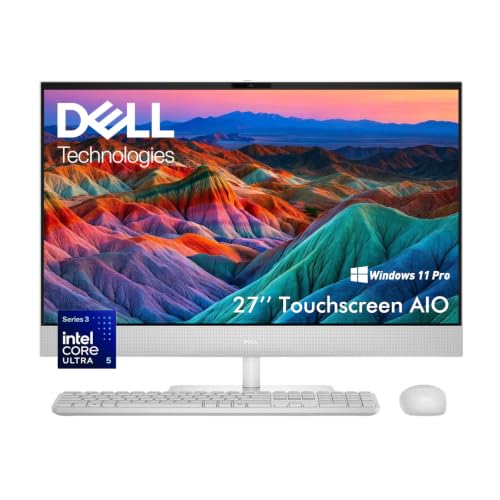
- 27-inch IPS screen with 99% sRGB
- Core 7 processor and 16GB DDR5 RAM
- 1TB SSD with Wi-Fi 6E and dual HDMI
Best For: Editors who want a dependable all-in-one with a strong display and easy multitasking
Touchscreen Office Creator Pick
HP 27 FHD Touchscreen All-in-One

- 27-inch FHD touchscreen display
- Core Ultra 7 with 16GB DDR5 and 1TB SSD
- USB-C docking station included
Best For: Business users who want a tidy touchscreen AIO for editing and multitasking
Budget-Friendly Starter Pick
Lenovo IdeaCentre 24 All-in-One Desktop

- 23.8-inch FHD display with 99% sRGB
- 16GB RAM and 512GB SSD
- Includes keyboard, mouse, and Office 365 access
Best For: Students and families needing a basic AIO for light editing and everyday use
Premium Creator Pick
Dell 27 All-in-One Desktop ec27250

- 27-inch FHD IPS panel with 99% sRGB
- 32GB DDR5 RAM and 1TB SSD
- NVIDIA GeForce MX570A discrete graphics
Best For: Editors who want a roomy display and strong everyday editing performance
Budget-Friendly Multimedia Choice

- Up to QHD display with low blue light tech
- Customizable up to 64GB RAM and 2TB SSD
- Quiet Intel Core performance for multitasking
Best For: Light editing and everyday home use
Balanced Performance Pick

- Intel Core Ultra 7 processor for content creation
- 1TB NVMe SSD for fast load times
- WiFi 7 and Bluetooth 6.0 for modern connectivity
Best For: Creators who want a balanced workstation for editing and productivity
Premium Touchscreen Pick

- Intel Core 7 150U with 10 cores
- 16GB DDR5 RAM and 512GB NVMe SSD
- 23.8-inch FHD touchscreen with Windows 11 Pro
Best For: Creators who want a touch-enabled all-in-one with stronger multitasking hardware
Storage-Heavy Value Pick

- 1TB PCIe NVMe SSD for large files
- 23.8-inch IPS panel with 99% sRGB
- 16GB RAM plus Wi-Fi 6 and Bluetooth 5.2
Best For: Users who want a roomy 1TB SSD and color-accurate display for light editing
Budget Everyday Pick

- Intel N100 with 16GB RAM
- 512GB NVMe SSD and Wi-Fi 6
- 23.8-inch IPS display with 99% sRGB
Best For: Light editing, web-based creative work, and everyday productivity
Creator-Ready QHD Pick – MSI Modern AM273Q AI 27-inch QHD All-in-One
If you want an all-in-one computer for video editing that feels more like a compact creator station than a basic desktop, the MSI Modern AM273Q AI is worth a close look. Its 27-inch QHD IPS-grade display gives you more room and sharper detail than standard Full HD models, while the Core 7-class processor, 32GB of DDR5 memory, and 1TB NVMe SSD provide a strong foundation for editing, media management, and everyday multitasking.
Best For: Video editors who want a roomy QHD screen, fast memory, and a clean all-in-one setup for creative work.
Pros:
- 27-inch QHD 2560 x 1440 display offers more workspace for timelines and previews.
- 32GB DDR5 RAM and 1TB NVMe SSD support smooth multitasking and fast file access.
- Core 7-155H processor and Intel Arc graphics provide a capable platform for everyday editing tasks.
- Includes webcam, speakers, keyboard, mouse, Wi-Fi 6E, and Bluetooth 5.3 for a tidy setup.
Cons:
- Integrated graphics may not suit users who need a dedicated GPU for heavier editing workloads.
- Windows 11 Home is installed, while MSI notes Windows 11 Pro is recommended for business use.
Overall, this MSI stands out for creators who value a sharper 27-inch QHD panel and strong everyday responsiveness in one space-saving system. It looks especially appealing if your video editing workflow benefits from a larger display and lots of memory rather than workstation-grade graphics.
Practical Editing Pick – Dell 27 Core 7 All-in-One Desktop
The Dell 27 All-in-One is a practical choice if you want all-in-one computers for video editing without overcomplicating the setup. Its 27-inch IPS display covers 99% sRGB, which is useful when you want more dependable color for photos, mockups, and lighter editing work, while the Core 7 processor, 16GB DDR5 memory, and 1TB SSD keep the system responsive for everyday creative tasks.
Best For: Home editors, students, and small business users who want a clean desktop with solid display quality and upgrade headroom.
Pros:
- 27-inch Full HD IPS display with 99% sRGB color coverage.
- Core 7 Processor 150U and 16GB DDR5 RAM help with multitasking and creative apps.
- 1TB SSD provides fast boot times and plenty of room for projects.
- Wi-Fi 6E, dual HDMI, and included wireless keyboard and mouse simplify the workspace.
Cons:
- Integrated graphics mean it is better suited to lighter editing than demanding effects work.
- Base configuration starts at 16GB RAM, so heavier 4K workflows may benefit from upgrades up to the supported maximum.
This Dell makes sense if your editing needs are real but not extreme, and you want a straightforward AIO with a good screen and enough speed for multiple apps. The upgrade options also help it stay relevant if your project demands grow over time.
Touchscreen Office Creator Pick – HP 27 FHD Touchscreen All-in-One
The HP 27-inch touchscreen All-in-One is a clean, productivity-focused option for buyers comparing all-in-one computers for video editing in a business or office environment. It pairs a Core Ultra 7 processor with 16GB DDR5 memory and a 1TB SSD, so it has the speed for editing, multitasking, and large files, while the touchscreen and included USB-C docking station make it easy to build a flexible desk setup.
Best For: Business users and creators who want a touchscreen AIO with simple one-cable expandability.
Pros:
- Intel Core Ultra 7 155U supports responsive multitasking and modern business workloads.
- 27-inch FHD touchscreen adds direct interaction for navigation and presentations.
- 1TB SSD and 16GB DDR5 RAM provide fast storage and solid everyday performance.
- USB-C docking station included for easier monitor and peripheral expansion.
Cons:
- Full HD resolution is less detailed than QHD options for timeline-heavy editing.
- Integrated graphics limit its appeal for more demanding video effects work.
- Maximum RAM is listed at 32GB, which leaves less headroom than some creator-focused systems.
For a professional desk that stays tidy, this HP is appealing because it combines a touchscreen, business-friendly features, and easy connectivity in one package. It is best suited to users whose editing needs lean toward efficient everyday work rather than heavy post-production.
Budget-Friendly Starter Pick – Lenovo IdeaCentre 24 All-in-One Desktop
If you are looking at all-in-one computers for video editing on a tighter budget, the Lenovo IdeaCentre 24 is the most modest option here. Its Intel N100 processor, 16GB RAM, and 512GB SSD are aimed at everyday computing, but the 23.8-inch FHD display with 99% sRGB, plus the included keyboard, mouse, and Office 365 access, make it a sensible choice for light editing, school projects, and basic content work.
Best For: Students and families who need a simple AIO for light editing, documents, and streaming.
Pros:
- 23.8-inch FHD display with 99% sRGB color accuracy and anti-glare technology.
- 16GB RAM and 512GB SSD offer enough speed for everyday multitasking.
- Wi-Fi 6, Bluetooth 5.1, HD webcam, and dual microphones support video calls and connectivity.
- Includes wired keyboard and mouse plus lifetime Office 365 access.
Cons:
- Intel N100 processor is geared more toward basic tasks than intensive editing.
- 512GB storage is smaller than the 1TB options in this roundup.
- Integrated graphics and entry-level hardware make it a better fit for light workloads.
The Lenovo is best viewed as a value-focused family or student desktop rather than a serious creator machine. It can handle simple editing jobs, but buyers planning larger projects will likely want more processing power and storage.
Premium Creator Pick – Dell 27 All-in-One Desktop ec27250
If you want one of the more capable all-in-one computers for video editing, this Dell 27 AIO brings a strong mix of display quality, memory, and discrete graphics. The 27-inch FHD IPS panel with 99% sRGB support is a useful fit for color-sensitive timelines, while the Intel Core 7 processor, 32GB of DDR5 RAM, and 1TB SSD give you the headroom to juggle apps and media files smoothly.
Best For: Editors who want a roomy display, dedicated graphics, and plenty of RAM for everyday content work.
Pros:
- 27-inch FHD IPS display with 99% sRGB and strong contrast for vivid viewing
- NVIDIA GeForce MX570A discrete graphics adds extra help for editing workflows
- 32GB DDR5 RAM and 1TB SSD support multitasking and fast file access
- Windows 11 Pro and 1-year onsite service add business-friendly value
Cons:
- Only 2GB of dedicated graphics memory
- FHD resolution is solid, but not as detailed as higher-resolution panels
- All-in-one design limits internal upgrade flexibility
Overall, this Dell stands out as a practical creator-focused AIO if you want a cleaner desk setup without giving up essential performance. It is especially appealing when display quality and multitasking matter more than raw workstation power.
Budget-Friendly Multimedia Choice – Lenovo 24 FHD All-in-One
The Lenovo 24″ AIO is better suited to light creative work than heavy post-production, but it still fits the all-in-one computers for video editing conversation if your needs are modest. Its sharp display, quiet Intel Core processor, and customizable memory and storage options make it a sensible option for trimming clips, organizing media, and handling smaller projects.
Best For: Light editors and home users who want a simple, quiet all-in-one for basic creative tasks.
Pros:
- Up to QHD display with smooth refresh rate and lifelike colors
- Whisper-quiet Intel Core performance for multitasking and editing
- 5MP webcam, IR camera option, and Smart Noise Cancelling improve calls
- Upgradeable options up to 64GB RAM and 2TB SSD on supported configurations
Cons:
- Base configuration shown includes Intel Processor N100, which is modest for editing
- No dedicated graphics listed in the supplied details
- Office 365 for the web depends on internet access
This Lenovo makes the most sense if your editing is occasional and you value a quiet, clean all-in-one over raw horsepower. For demanding timelines or effects work, you would likely want to step up to a stronger machine.
Balanced Performance Pick – HP OmniStudio 27 Inch AIO
The HP OmniStudio 27 is a well-rounded choice if you want all-in-one computers for video editing with a modern processor and fast storage in a streamlined desktop. Its Intel Core Ultra 7 chip, 16GB of DDR5 RAM, and 1TB NVMe SSD offer responsive performance for editing, while the 27-inch display and WiFi 7 support make it a capable everyday workstation.
Best For: Creators who want a balanced AIO for editing, productivity, and clean desk setups.
Pros:
- Intel Core Ultra 7 processor is aimed at content creation and multitasking
- 1TB PCIe NVMe SSD supports fast booting and file transfers
- 27-inch FHD display with micro-edge glass and 300 nits brightness
- Pop-up 1080p IR camera, WiFi 7, and Bluetooth 6.0 add modern convenience
Cons:
- Integrated Intel Xe graphics are not as powerful as a dedicated GPU
- 16GB RAM is adequate, but heavier editing workflows may want more
- Display is listed as FHD in the notes, despite the QHD line in the description
For buyers who want a sleek AIO with current-gen connectivity and enough speed for everyday editing, the HP OmniStudio is an appealing middle ground. It is strongest as a versatile productivity machine that can also handle creative work.
Premium Touchscreen Pick – Dell 24" FHD Touch AIO
If you’re shopping for all-in-one computers for video editing and want a tidy desk setup, this Dell 24-inch model is built around a fast Intel Core 7 150U, 16GB of DDR5 RAM, and a 512GB NVMe SSD. The 23.8-inch FHD touchscreen, Wi-Fi 6, and Windows 11 Pro make it a practical choice for editing timelines, moving files, and handling everyday creative work without adding a tower to your workspace.
Best For: Creators who want a touch-enabled all-in-one with stronger multitasking hardware and Windows 11 Pro.
Pros:
- Intel Core 7 150U with 10 cores and up to 5.4 GHz boost for responsive performance
- 16GB DDR5 RAM and 512GB NVMe SSD support smooth multitasking and quick loading
- 23.8-inch FHD touchscreen adds hands-on control during editing and review
- Dual speakers with Dolby Atmos and HDR webcam improve media playback and calls
Cons:
- Integrated Intel UHD Graphics may be limiting for heavier video effects or exports
- 512GB storage can fill up quickly with large project files and footage
- FHD resolution is practical, but not as spacious as higher-resolution editing displays
This Dell is the strongest option here if you value a faster processor and touchscreen convenience in a compact all-in-one. It looks especially well suited to light-to-moderate editing, review work, and general creative productivity.
Storage-Heavy Value Pick – Lenovo 24" FHD AIO
For buyers comparing all-in-one computers for video editing on a budget-conscious desk setup, this Lenovo brings a 24-inch FHD IPS display, 16GB of RAM, and a roomy 1TB PCIe NVMe SSD. The Intel Core i3-N305 is aimed at everyday responsiveness, while the 99% sRGB panel, Wi-Fi 6, and included keyboard and mouse make it a convenient all-in-one for light creative work and general productivity.
Best For: Users who want a roomy 1TB SSD and color-accurate display for light editing and everyday tasks.
Pros:
- 1TB PCIe NVMe SSD gives you more room for projects, media, and apps
- 23.8-inch IPS anti-glare display with 99% sRGB is useful for color-conscious work
- 16GB RAM supports smooth multitasking for editing, browsing, and streaming
- Wi-Fi 6, Bluetooth 5.2, and multiple USB ports improve connectivity
Cons:
- Core i3-N305 is more entry-level than the higher-powered options in this roundup
- Integrated Intel UHD Graphics is best for light editing rather than demanding effects
- 1080p display is practical, but not ideal if you want extra vertical workspace
This Lenovo stands out when storage and display quality matter more than raw processor power. It’s a sensible fit for light editing, file-heavy workloads, and users who want a clean all-in-one without sacrificing capacity.
Budget Everyday Pick – Lenovo IdeaCentre 24" AIO
If you want a straightforward option among all-in-one computers for video editing, this Lenovo IdeaCentre keeps the formula simple: Intel N100, 16GB RAM, and a 512GB NVMe SSD. Its 23.8-inch FHD IPS display with 99% sRGB is a nice bonus for color-sensitive viewing, while Wi-Fi 6, Bluetooth 5.2, and the included keyboard and mouse make it ready for a home office or student setup.
Best For: Light editing, web-based creative work, and everyday productivity on a compact budget-friendly desktop.
Pros:
- 16GB RAM and 512GB NVMe SSD provide a solid baseline for multitasking and storage
- 23.8-inch IPS anti-glare display with 99% sRGB supports clear, accurate viewing
- Wi-Fi 6, Bluetooth 5.2, and multiple ports give you flexible connectivity
- Includes a keyboard, mouse, HD camera, speakers, and microphone for immediate use
Cons:
- Intel N100 is best for everyday use rather than heavier editing workloads
- Integrated Intel UHD Graphics is not designed for demanding creative tasks
- 512GB storage may be modest if you keep lots of video footage locally
This is the most modest pick here, but it still covers the basics well for light editing and general use. It makes the most sense if you want an affordable all-in-one with a good display and enough memory to stay comfortable.
How We Picked These All-In-One Computers for Video Editing
We focused on the specs that matter most for editing: modern multi-core processors, at least 16GB of RAM, fast SSD storage, and displays large enough to comfortably manage timelines and previews. We also considered whether each model offers enough headroom for creative work beyond basic office tasks.
Quick Comparison
When comparing All-In-One Computers for Video Editing, the biggest split is between entry-level systems that are fine for trims and social content, and stronger configurations that are better suited to longer projects, effects, and multitasking. Higher-core CPUs and 32GB RAM are the clearest upgrades if you plan to edit more often.
Key Buying Factors for All-In-One Computers for Video Editing
Processor
Look for a recent Intel Core Ultra or Core 7-class CPU, or similar. Video editing benefits from strong single-core speed for responsiveness and multiple cores for exports and background tasks.
Memory
16GB is the practical minimum. If you work with larger files, multiple apps, or heavier effects, 32GB is a better target and helps the system stay smoother over time.
Storage
A 1TB SSD is ideal for creators because video files fill up space quickly. 512GB can work if you rely on external drives or cloud storage, but you may outgrow it fast.
Display
Screen size matters in All-In-One Computers for Video Editing, especially if you spend hours trimming clips or adjusting color. A 27-inch model gives more room to work, while 24-inch models are better for smaller spaces. Resolution also matters: QHD is preferable to FHD when available.
Graphics
Most all-in-ones use integrated graphics, which is fine for lighter editing and basic effects. If you want a bit more visual processing help, a model with discrete graphics is worth a look.
Who Should Buy Which All-In-One Computers for Video Editing?
Choose a 27-inch, higher-spec all-in-one if you want the best editing experience, more workspace, and stronger long-term performance. Pick a 24-inch model if you need a compact, tidy setup for simpler projects, school work, or occasional content creation. If your workflow is mostly web-based or very light, an entry-level configuration may be enough, but serious editors should prioritize more RAM, a faster CPU, and larger SSD capacity.