Need a compact PC that keeps your desk clear without slowing you down? The best mini desktop computers for home offices now offer strong everyday performance, fast SSD storage, and easy dual- or triple-display support.
In this roundup, we focus on practical picks for email, documents, video calls, light creative work, and multitasking—so you can choose the right small desktop with confidence.
Best 10 Mini Desktop Computers for Home Offices Picks for 2026
Core i3 Office Value Pick
- Core i3-10110U for everyday office speed
- 16GB RAM and 512GB SSD
- Dual HDMI with WiFi 6 and 2.5GbE
Best For: home office multitasking and dual-monitor work
Budget Triple-Display Pick

- Ryzen 5 3501U for everyday tasks
- Triple display support for more workspace
- WiFi 6 and Bluetooth 5.3
Best For: light home office work with compact multi-monitor setups
Quiet Business Compact
Lenovo ThinkCentre Mini Desktop

- 16GB RAM with 512GB SSD
- Windows 11 Pro for work features
- Quiet, compact design with dual DisplayPort
Best For: quiet business-style home office setups
Entry-Level Dual-4K Pick

- Intel N95 for routine office tasks
- Dual HDMI 2.0 with 4K@60Hz support
- 8GB RAM and 256GB SSD
Best For: basic home office use with two monitors
Business-Class Compact Workhorse

- 6-core i5-9500T for office multitasking
- 16GB RAM with 256GB NVMe SSD
- Dual DisplayPort and Windows 11 Pro
Best For: Home offices needing stable, business-focused performance
Flexible Triple-Display Pick

- Ryzen 5 3501U with 16GB RAM
- 512GB NVMe SSD with upgrade options
- Dual HDMI plus USB-C for triple displays
Best For: Home offices that want more storage and multi-monitor flexibility
Renewed Space-Saver
Lenovo ThinkCentre M720Q Mini PC
- Hexa-core i5 with 16GB RAM
- 500GB NVMe SSD and Windows 11 Pro
- WiFi and Bluetooth adapter included
Best For: Space-conscious home offices that want a renewed business PC
Business-Grade Home Office Pick
GEEKOM IT12 Mini PC, Intel i3-12300HE

- 8C/12T Intel i3-12300HE for smooth office multitasking
- Dual USB4 + dual HDMI support up to 4 displays
- 16GB RAM, 512GB SSD, and upgrade-friendly design
Best For: Busy home offices needing reliability and future expansion
Value Triple-Monitor Choice
Glorlin Ryzen 5 Mini PC for Home Office

- Ryzen 5 3501U with 4C/8T for everyday work
- Triple 4K display support for multitasking
- WiFi 6, Bluetooth 5.3, 16GB RAM, 512GB SSD
Best For: Compact home offices that need triple-monitor support
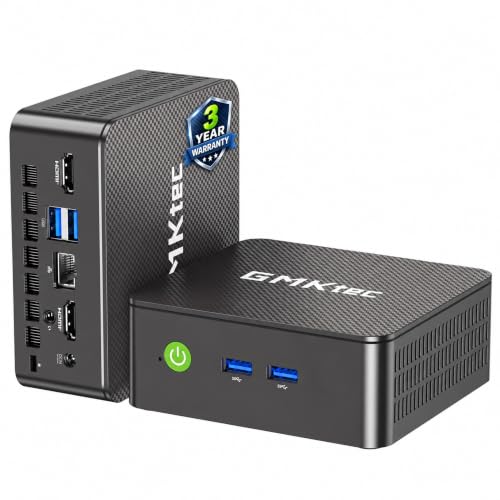
Core i3 Office Value Pick – GMKtec G3 PRO Mini PC
If you want mini desktop computers for home offices that can handle everyday productivity without taking up much room, this GMKtec model is built around a stronger-than-basic Core i3 setup. It pairs 16GB dual-channel RAM with a 512GB SSD, so it should feel responsive for browsing, documents, video calls, and multiple tabs.
Best For: Home office users who want quick multitasking, dual-display support, and flexible wired or wireless connectivity.
Pros:
- Core i3-10110U offers strong single-core performance for office apps and browsing.
- 16GB DDR4 dual-channel memory and 512GB storage help with fast startup and multitasking.
- Dual HDMI supports two 4K@60Hz displays for a more productive desk setup.
- WiFi 6, Bluetooth 5.2, and 2.5GbE add modern connectivity options.
Cons:
- Built for productivity rather than demanding creative or gaming workloads.
- The compact design may not be ideal if you need extensive internal expansion.
Overall, this is a practical choice if your home office needs a compact PC with better-than-entry-level responsiveness and plenty of connection options. The dual-screen support and 2.5GbE make it especially appealing for a tidy, efficient workspace.
Budget Triple-Display Pick – Glorlin Ryzen 5 Mini PC
For shoppers comparing mini desktop computers for home offices, this Glorlin system focuses on simple everyday performance in a very small footprint. The Ryzen 5 3501U, 8GB RAM, and 256GB SSD are aimed at web browsing, office work, and video calls, while the triple-display support adds extra workspace flexibility.
Best For: Light office users who want a compact PC with multi-monitor support and easy desk placement.
Pros:
- Ryzen 5 3501U is positioned for daily computing tasks like browsing and office work.
- Triple display support helps expand your workspace for productivity.
- WiFi 6 and Bluetooth 5.3 provide current wireless connectivity.
- Compact size makes it easy to fit into tight home office setups.
Cons:
- 8GB RAM and 256GB SSD are modest if you keep many apps or files open.
- Designed for light office and streaming use, not heavy workloads.
In short, this is a sensible pick if you need a small, uncomplicated desktop for everyday work and don’t require a lot of storage out of the box. Its triple-display capability is the standout feature for productivity-minded buyers.
Quiet Business Compact – Lenovo ThinkCentre Mini Desktop
If you want mini desktop computers for home offices from a well-known business line, this Lenovo ThinkCentre option emphasizes quiet, space-saving computing. With 16GB DDR4 RAM, a 512GB SSD, and Windows 11 Pro, it is set up for daily work, web browsing, online meetings, and light entertainment.
Best For: Buyers who want a compact, quiet, business-ready desktop with essential ports and included accessories.
Pros:
- 16GB RAM and 512GB SSD support smoother multitasking and fast startup.
- Windows 11 Pro adds business-focused features like Remote Desktop support.
- Dual DisplayPort outputs, WiFi, Bluetooth, USB, and RJ-45 offer practical connectivity.
- Compact and quiet design helps preserve desk space in a home office.
Cons:
- The listed AMD A4-9120C processor is aimed at daily tasks, not demanding workloads.
- Best suited to office use rather than performance-heavy applications.
This Lenovo makes sense if your priority is a tidy, dependable work machine with a professional feature set. It is less about raw power and more about efficient, low-fuss home office use.
Entry-Level Dual-4K Pick – GMKtec G3S Mini PC
Among mini desktop computers for home offices, this GMKtec G3S is aimed at routine productivity with a compact footprint and straightforward setup. Its Intel N95 processor, 8GB RAM, and 256GB SSD are a practical fit for office work, browsing, streaming, and other everyday tasks.
Best For: Home office users who want an affordable compact PC with dual 4K display support.
Pros:
- Intel N95 is designed for routine tasks and light home office use.
- 8GB RAM and a 256GB SSD support quick startup and basic multitasking.
- Dual HDMI 2.0 outputs support two 4K@60Hz displays.
- WiFi 5, Bluetooth 5.0, and Gigabit Ethernet cover core connectivity needs.
Cons:
- Memory is capped at 8GB in the supplied specs, which limits future growth.
- Storage capacity is modest if you keep many local files or apps.
For users who mainly need a small desktop for office basics and dual monitors, this is a straightforward option. It balances everyday usefulness with a low-profile design and useful display support.
Business-Class Compact Workhorse – HP Mini PC with i5, 16GB RAM
For shoppers comparing mini desktop computers for home offices, this HP mini PC is built around straightforward productivity. Its Intel Core i5-9500T, 16GB of DDR4 memory, and 256GB NVMe SSD give it the kind of responsive everyday performance that suits multitasking, video calls, spreadsheets, and general office work.
Best For: Home office users who want a compact, business-class PC with dual-monitor support and reliable wired/wireless connectivity.
Pros:
- 6-core Intel Core i5-9500T is suited to multitasking and business applications
- 16GB DDR4 RAM and PCIe NVMe SSD help keep boot and app load times quick
- Dual DisplayPort outputs make multi-monitor setups easy
- Includes USB-C, multiple USB 3.1 ports, Gigabit Ethernet, Wi‑Fi, and Bluetooth
Cons:
- 256GB storage is modest if you keep large files locally
- DisplayPort-only video output may require adapters for some monitor setups
This HP model is a practical pick if your priority is dependable office performance in a very small footprint. It leans more toward productivity than flash, but the port selection and Windows 11 Pro make it a strong fit for a tidy home workspace.
Flexible Triple-Display Pick – Getorli Ryzen 5 Mini PC
If you want mini desktop computers for home offices with a little more storage headroom, the Getorli Mini PC is a well-rounded option. It pairs an AMD Ryzen 5 3501U processor with 16GB of RAM and a 512GB NVMe SSD, which should handle office apps, streaming, online learning, and day-to-day computing smoothly.
Best For: Home office setups that need triple-display support, solid storage, and flexible expansion.
Pros:
- Ryzen 5 3501U offers responsive everyday performance
- 512GB SSD provides more built-in storage than many compact PCs
- Supports up to three displays via dual HDMI and USB-C
- WiFi 6, Bluetooth 5.3, and Gigabit Ethernet add modern connectivity
Cons:
- Base processor is aimed at daily use rather than heavy workloads
- Memory speed is listed at 2400 MHz, which is not especially fast by current standards
The expansion options are a real advantage here, especially if you expect your storage or memory needs to grow. For a compact home office PC that balances size, outputs, and practicality, this Getorli model is easy to recommend.
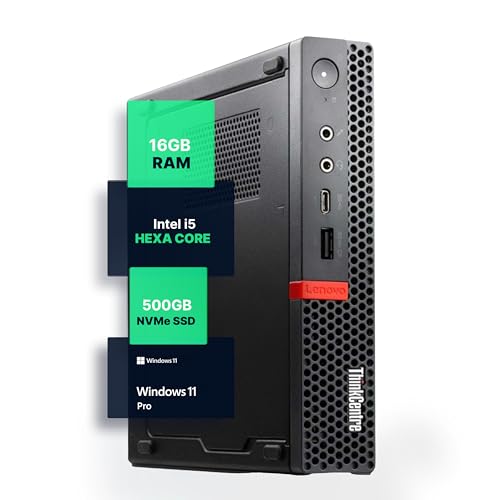
Renewed Space-Saver – Lenovo ThinkCentre M720Q Mini PC
This Lenovo ThinkCentre M720Q is a classic choice among mini desktop computers for home offices when desk space matters most. With an Intel Core i5 8th Gen hexa-core processor, 16GB of DDR4 RAM, and a 500GB NVMe SSD, it is set up for smooth everyday productivity and quick access to files and apps.
Best For: Users who want a compact renewed office PC with Windows 11 Pro and solid storage.
Pros:
- Compact ThinkCentre design is ideal for tight desks and minimal setups
- 16GB RAM and 500GB NVMe SSD support responsive multitasking
- Windows 11 Pro adds business-friendly features and security tools
- Includes WiFi and Bluetooth adapter for flexible wireless use
Cons:
- Renewed condition may not appeal to buyers wanting brand-new hardware
- Single HDMI and DisplayPort-focused output may limit some display configurations
Its low-power, quiet design makes it especially appealing for home offices where noise and space are concerns. If you want a proven small-form-factor system with practical specs and a business-ready software package, the M720Q fits the brief well.
Business-Grade Home Office Pick – GEEKOM IT12 Mini PC, Intel i3-12300HE
If you want one of the more capable mini desktop computers for home offices, the GEEKOM IT12 is built for steady multitasking, quiet 24/7 operation, and room to grow. Its Intel i3-12300HE, 16GB RAM, and 512GB SSD make it a practical fit for daily productivity, heavy browser work, and multi-monitor setups.
Best For: Professionals who want a reliable, upgradeable mini PC for a busy home office or shared workspace.
Pros:
- Intel i3-12300HE with 8 cores and 12 threads for responsive office performance
- Dual USB4 and dual HDMI support up to 4 displays for flexible productivity setups
- 16GB DDR4 RAM is expandable up to 96GB, with storage expansion options
- Full-metal chassis and 3-year support add confidence for longer-term use
Cons:
- More features than a basic everyday PC may need for light-use buyers
- Expansion-focused design may be overkill if you only need simple web and email tasks
The IT12 stands out if you value long-term reliability and expansion over the lowest possible price. For a home office that may grow into heavier multitasking, it offers a solid balance of speed, ports, and durability.
Value Triple-Monitor Choice – Glorlin Ryzen 5 Mini PC for Home Office
The Glorlin mini desktop computer is a straightforward fit for home offices that need solid everyday speed without taking up much desk space. With a Ryzen 5 3501U, 16GB RAM, and a 512GB SSD, it is positioned for web browsing, media streaming, and normal work tasks while staying quiet.
Best For: Home office users who want a compact, quiet PC with triple-monitor support and modern wireless features.
Pros:
- Ryzen 5 3501U delivers 4-core, 8-thread performance for daily computing
- Supports three 4K displays through Type-C and dual HDMI connections
- WiFi 6 and Bluetooth 5.3 provide modern wireless convenience
- 16GB RAM and 512GB SSD offer a comfortable baseline for multitasking
Cons:
- RAM maxes out at 32GB, so it has less headroom than some higher-end minis
- Best suited to everyday work rather than demanding creative or workstation loads
This is a practical pick if your priority is a compact home office machine with easy setup and enough ports for multiple screens. It is especially appealing for buyers who want a quiet, space-saving desktop for standard productivity.
Best Simple Pick – Intel 6500Y Mini PC with 16GB RAM
For shoppers comparing mini desktop computers for home offices, this Intel 6500Y model focuses on core productivity features in a very compact footprint. It is aimed at remote work, online classes, streaming, and routine business apps, with enough ports and display support to build an efficient desk setup.
Best For: Buyers who want an affordable, space-saving mini PC for everyday work and a triple-monitor desk.
Pros:
- Intel Pentium Gold 6500Y is designed for smooth daily computing
- Triple 4K display output supports USB-C, HDMI 2.0, and DisplayPort 1.4
- 16GB dual-channel RAM and 256GB NVMe SSD provide a responsive starting point
- Dual SSD slots and upgradeable memory make future expansion possible
Cons:
- 256GB storage is modest if you keep large media libraries or many projects locally
- Best for routine workloads rather than heavier multitasking or demanding apps
This model makes sense when you want the essentials done well: compact size, multiple display outputs, and upgrade room later. It is a sensible home office choice for users who value practicality over raw performance.
How We Picked These Mini Desktop Computers for Home Offices
We focused on the features that matter most in real home-office use: responsive processors, enough memory for browser tabs and office apps, SSD storage for fast boot times, and dependable wireless connectivity. We also favored models that support at least one external display, since Mini Desktop Computers for Home Offices are often used with larger monitors for comfort and productivity.
Value also mattered. A strong home-office mini PC should balance performance, size, and price without forcing you to overbuy for basic work.
Quick Comparison: What Sets Them Apart
Some options here are best for basic productivity and web-based work, while others are better suited to heavier multitasking or multi-monitor setups. Entry-level chips can handle email, spreadsheets, and video meetings well, but users who keep many apps open at once will benefit more from stronger Intel Core or Ryzen-based systems with 16GB RAM and a larger SSD.
Key Buying Factors for Mini Desktop Computers for Home Offices
Processor and Real-World Speed
For most home offices, look for a modern Intel Core or Ryzen processor if you want smoother multitasking. Lower-power chips can still work for light use, but they are better for basic browsing and office suites than demanding workflows.
Memory and Storage
16GB of RAM is the sweet spot for many buyers because it helps when juggling spreadsheets, browser tabs, and video calls. For storage, 512GB SSDs offer more breathing room than 256GB models, especially if you keep local files, cached work data, or a few larger apps installed.
Display Support and Ports
If you use two monitors, check for dual-display output such as HDMI or DisplayPort; some models even support triple displays. This matters a lot for Mini Desktop Computers for Home Offices because better display support can improve comfort and workflow more than raw benchmark numbers.
Wireless and Expansion
Wi-Fi 6 and Bluetooth are useful for stable connections and clean desk setups. If you plan to add more storage later, check whether the mini PC allows upgrades or at least easy service access.
Who Should Buy Which Mini Desktop Computers for Home Offices?
Choose an entry-level mini PC if your work is mostly email, web apps, video meetings, and document editing. Go with a midrange Core i5 or Ryzen 5 model if you want snappier multitasking and more room to grow. If your home office uses multiple monitors or you prefer a more polished business-grade experience, a Lenovo or HP system may be the better fit.
For most buyers, the best choice is the model that gives you 16GB RAM, an SSD of at least 512GB, and the right display outputs for your desk setup.