Choosing the right desktop for school should be simple: reliable performance, a clean setup, and enough storage for assignments, apps, and video calls.
These best all-in-one computers for students balance space-saving design with the everyday features that matter most for studying at home or in a dorm.
Best 10 All-In-One Computers for Students Picks for 2026
Budget-Friendly Student Pick
HP 21.5" FHD All-in-One with Docking Hub

- 21.5-inch anti-glare 1080p display
- Intel N100 with 8GB DDR5 RAM
- Includes keyboard, mouse, and docking hub
Best For: students wanting a compact, easy-to-set-up desktop
Balanced Everyday Performer
Lenovo IdeaCentre 24" FHD All-in-One

- 23.8-inch FHD anti-glare display
- 16GB RAM and 512GB SSD
- Includes Office 365 access and accessories
Best For: students who need a larger screen for daily schoolwork
Study-Ready Pick
Lenovo 24-inch FHD AIO with 16GB RAM
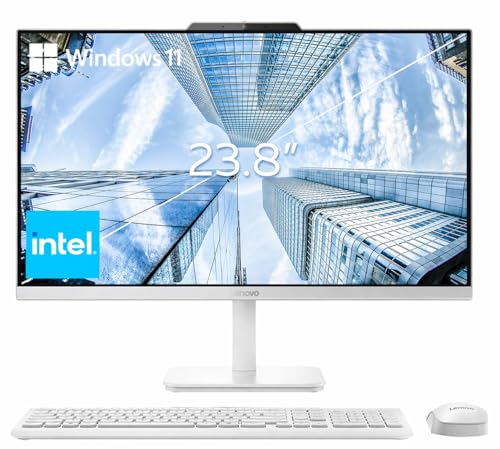
- 16GB RAM for smoother multitasking
- 23.8-inch FHD IPS anti-glare display
- Wi-Fi 6, Bluetooth 5.2, and SSD storage
Best For: Students who want a tidy, reliable desk computer for schoolwork
Budget-Friendly Student Pick – HP 21.5" FHD All-in-One with Docking Hub
If you want all-in-one computers for students that keep the desk simple without giving up everyday essentials, this HP model is a practical entry point. Its 21.5-inch Full HD anti-glare display, Windows 11 Home, and included keyboard, mouse, and 8-in-1 docking hub make it easy to set up for classwork, browsing, and video calls.
Best For: Students who need a compact, ready-to-use desktop for school tasks and basic multitasking.
Pros:
- 21.5-inch 1080p anti-glare display helps keep text sharp and readable.
- Intel N100, 8GB DDR5 RAM, and SSD storage support smooth everyday use.
- Includes keyboard, mouse, webcam, Wi-Fi 6, and Bluetooth for quick setup.
- Adjustable stand and compact all-in-one design fit small study spaces.
Cons:
- Intel N100 is aimed at basic computing, not demanding workloads.
- Smaller 21.5-inch screen may feel tight for split-screen work.
- Storage is a mixed setup, so the listed total capacity is less straightforward than a single SSD.
This HP is a sensible choice if your priority is a straightforward student desktop that saves space and covers the essentials. It is best treated as a study and productivity machine rather than a performance-heavy system.
Balanced Everyday Performer – Lenovo IdeaCentre 24" FHD All-in-One
Among all-in-one computers for students, this Lenovo IdeaCentre stands out for balancing screen size, memory, and storage in a clean desktop package. The 23.8-inch Full HD display, 16GB RAM, and 512GB SSD make it a strong fit for homework, research, video calls, and general family use.
Best For: Students who want a roomy screen and more memory for everyday multitasking.
Pros:
- 23.8-inch Full HD display with 99% sRGB and anti-glare coating.
- 16GB RAM and 512GB SSD deliver responsive everyday performance.
- WiFi 6, Bluetooth 5.1, HD webcam, and dual microphones support online classes.
- Includes keyboard, mouse, and lifetime Office 365 access.
Cons:
- Intel N100 is fine for schoolwork, but not built for heavy creative tasks.
- Display is not as compact as a smaller dorm-friendly model.
- Graphics are integrated, so it is not meant for gaming-focused use.
This Lenovo is a well-rounded option if you want a student desktop that feels a little more comfortable for long study sessions. The larger screen and extra memory help it handle daily tasks with less friction.
ChromeOS Classroom Option – BlairTech 24" ChromeOS Flex All-in-One
If your priority is a streamlined setup for web-based schoolwork, this BlairTech model is a distinctive pick in the all-in-one computers for students category. It runs ChromeOS Flex instead of Windows, pairing an Intel Core i5, 8GB RAM, and 128GB SSD with a 24-inch monitor, wireless peripherals, and built-in WiFi and Bluetooth.
Best For: Students who mainly use Google Docs, Drive, Gmail, and other cloud tools.
Pros:
- ChromeOS Flex is designed for simple, secure, web-based computing.
- Intel Core i5 and 8GB RAM offer responsive everyday performance.
- 24-inch monitor, RGB speakers, keyboard, and mouse are included.
- Clean behind-the-display mounting keeps the desk uncluttered.
Cons:
- Does not run traditional Windows programs.
- 128GB SSD is modest for users who store lots of files locally.
- Renewed system may not appeal to buyers seeking a brand-new desktop.
This BlairTech is a smart fit if your school workflow lives in the browser and you want a ready-made desktop setup. Just be sure ChromeOS Flex matches the software your classes require before choosing it.
Well-Rounded Value Choice – Lenovo Flagship 24" FHD All-in-One
For students who want a practical desktop that feels a step up from the bare minimum, this Lenovo all-in-one offers a strong mix of display quality, connectivity, and everyday performance. It combines an Intel Core i3-N305, 8GB RAM, and 512GB NVMe SSD with a 23.8-inch IPS Full HD screen and modern wireless support.
Best For: Students who need a dependable all-around computer for homework, virtual classes, and media.
Pros:
- Core i3-N305 with 8 cores provides solid everyday multitasking.
- 23.8-inch IPS display with 99% sRGB and anti-glare coating looks sharp.
- 512GB NVMe SSD gives fast boot times and good storage space.
- WiFi 6, Bluetooth 5.2, webcam, microphone, and speakers support online learning.
Cons:
- 8GB RAM is enough for basics, but not ideal for heavier multitasking.
- Integrated graphics limit it to general-use computing.
- RAM maximum is listed at 16GB, so future headroom is somewhat limited.
This Lenovo is a strong middle-ground pick if you want a student desktop that covers most needs without feeling overly basic. It is especially appealing when display quality and reliable day-to-day performance matter more than raw power.
Student-Ready Everyday AIO – Lenovo 24" Full HD Space-Saver
If you’re comparing all-in-one computers for students, this Lenovo 24-inch model makes a strong case with a space-saving design, Full HD IPS display, and a practical mix of RAM, storage, and connectivity. It’s built for everyday schoolwork, video calls, and home use without taking over a desk.
Best For: Students who want a tidy desktop setup for classes, web browsing, documents, and light multitasking.
Pros:
- 23.8-inch FHD IPS anti-glare display with 99% sRGB and 3-side thin bezels
- Intel N100 processor, 16GB RAM, and 256GB SSD plus 512GB external storage
- Wi-Fi 6, Bluetooth 5.2, Ethernet, HDMI out, and 4 total USB ports
- Includes wireless keyboard and mouse for a cleaner setup
Cons:
- Integrated graphics are suited to everyday use rather than demanding creative work
- The non-touch display may not suit users who prefer touch input
Overall, this Lenovo AIO is a straightforward pick for students who value simplicity, desk efficiency, and reliable basics. The included peripherals and broad port selection make setup easy, while the display and SSD help keep daily work moving smoothly.
Quiet Study All-in-One – Lenovo 24" IPS FHD Home & Office
For shoppers focused on all-in-one computers for students, this Lenovo 24-inch desktop leans into comfort and simplicity. It combines a 3-side thin-bezel IPS screen, quiet day-to-day performance, and Windows 11 Pro in a clean setup that fits homework, browsing, and online learning.
Best For: Students and households that want a low-noise desktop for schoolwork, video calls, and everyday productivity.
Pros:
- 24-inch IPS FHD display with 3-side thin bezels and low blue light features
- Whisper-quiet everyday performance for routine multitasking
- Fast memory and PCIe M.2 SSD for quicker startup and app loading
- Includes wired keyboard and mouse for an easy out-of-box setup
Cons:
- Storage and RAM figures in the listing vary across the supplied details
- Some webcam and noise-canceling features are described as select or optional
This is a practical option if you want a student desktop that stays neat, quiet, and easy to live with. It prioritizes everyday responsiveness and comfortable viewing over flashy extras, which is often exactly what a study setup needs.
Smart Student Pick – Lenovo IdeaCentre 24" AIO
Among all-in-one computers for students, this Lenovo IdeaCentre stands out for its balanced mix of a Full HD IPS display, 16GB memory, and practical connectivity. It’s designed for schoolwork, web browsing, video calls, and everyday computing in a compact format that keeps the desk clear.
Best For: Students who want a well-rounded AIO for coursework, online classes, and shared family use.
Pros:
- 23.8-inch FHD IPS anti-glare display with 99% sRGB coverage
- 16GB DDR4 memory and 512GB PCIe SSD for smoother everyday multitasking
- HD camera, dual 2W speakers, and mono microphone for video calls
- HDMI-In and HDMI-Out plus 4 USB ports for flexible setup options
Cons:
- Integrated Intel UHD graphics are intended for everyday tasks, not heavy graphics work
- Wired keyboard and mouse may be less convenient than wireless accessories
As a student desktop, this IdeaCentre keeps the formula focused on the essentials: a sharp display, enough memory for multitasking, and useful ports for school and home. If you want an all-in-one that feels practical rather than overbuilt, this is a strong contender.
Study-Ready Pick – Lenovo 24-inch FHD AIO with 16GB RAM
If you want one of the more capable all-in-one computers for students, this Lenovo 24-inch model balances a space-saving design with enough everyday performance for schoolwork, browsing, and video calls. The 23.8-inch FHD IPS anti-glare display, 16GB RAM, and Wi-Fi 6 make it a practical pick for a busy desk setup.
Best For: Students who want a tidy, reliable all-in-one for homework, online classes, and general multitasking.
Pros:
- 16GB DDR4 RAM supports smooth multitasking across school apps, browsers, and documents.
- 256GB PCIe SSD offers quick boot times and responsive file access.
- 23.8-inch FHD IPS anti-glare screen is well suited to long study sessions.
- Wi-Fi 6, Bluetooth 5.2, and a wide port selection add flexible connectivity.
Cons:
- 256GB storage may feel limited if you keep lots of large media files locally.
- Intel N100 is built for everyday productivity, not heavy creative workloads.
Overall, this Lenovo AIO looks best for students who value a clean setup and dependable basics over raw power. It covers the essentials well, with enough memory and modern connectivity to handle typical academic use.
Storage-Smart Choice – Lenovo A100 AIO with 512GB SSD
For students who need a simple setup, this Lenovo all-in-one computer for students keeps the desk uncluttered while offering the storage and features most people need for daily work. Its 23.8-inch FHD IPS display, 512GB SSD, and built-in webcam with privacy cover make it a solid everyday option.
Best For: Students who want a neat all-in-one with extra storage and a built-in webcam for classes.
Pros:
- 512GB SSD provides more room for documents, apps, and media than smaller drives.
- Built-in 720P webcam with physical privacy cover is useful for remote classes and meetings.
- 23.8-inch FHD IPS screen offers crisp visuals and wide viewing angles.
- Windows 11 Pro and included wired keyboard/mouse make it ready to use out of the box.
Cons:
- 8GB RAM is fine for everyday use, but not ideal for heavier multitasking.
- Intel N100 processor is meant for basic productivity rather than demanding workloads.
This model stands out if you want a student-friendly AIO with better storage headroom and useful privacy features. It keeps things practical and efficient for study, video calls, and everyday browsing.
Compact Bundle – Lenovo A100 Student AIO Bundle
This Lenovo A100 bundle is a straightforward option among all-in-one computers for students, especially if you want a compact setup for homework, streaming, and video calls. The 23.8-inch FHD anti-glare display, 8GB RAM, 256GB SSD, and included wired keyboard and mouse cover the basics without taking over your desk.
Best For: Students who need a compact, affordable-feeling all-in-one for everyday school tasks.
Pros:
- Compact all-in-one design helps keep student desks clean and organized.
- 23.8-inch FHD anti-glare screen is suited to classes, documents, and media.
- Wi-Fi 6, Bluetooth 5.2, and multiple USB/HDMI/LAN ports improve flexibility.
- Included wired keyboard and mouse mean you can start using it right away.
Cons:
- 8GB RAM and 256GB SSD are practical, but not expansive.
- Intel N100-class performance is aimed at daily tasks rather than intensive work.
As a student desktop, this Lenovo bundle is all about convenience and simplicity. It makes sense if you want a tidy, ready-to-go PC for schoolwork and everyday use rather than a machine for heavy workloads.
How We Picked the Best All-In-One Computers for Students
We focused on the features students actually use every day: responsive multitasking, comfortable display size, dependable storage, webcam and Wi-Fi support, and a compact footprint that fits small desks. We also looked for models that make sense for schoolwork, online classes, and light entertainment without pushing buyers toward unnecessary extras.
Quick Comparison
For most students, the sweet spot is an all-in-one with 8GB to 16GB of RAM, a Full HD display, and at least 256GB of SSD storage. If you keep lots of files locally or use heavier creative apps, 512GB or 1TB is easier to live with. ChromeOS Flex can be a smart choice for basic browsing and docs, while Windows models offer broader software compatibility.
Key Buying Factors for All-In-One Computers for Students
Performance and RAM
Look for enough memory to handle browser tabs, documents, video calls, and streaming at the same time. 8GB is acceptable for lighter workloads, while 16GB is better for students who multitask often or want more room to grow.
Storage
SSD storage matters more than a large slow drive. A 256GB SSD works for many students, but 512GB is a safer target if you save photos, class recordings, or school projects locally. Hybrid storage setups can offer extra space, but make sure the SSD portion is large enough for apps and system responsiveness.
Display and Comfort
A 23.8-inch or 24-inch Full HD panel is usually the best balance of clarity and desk space. Anti-glare or IPS displays are especially helpful for long study sessions and shared rooms with changing light.
Connectivity and School Features
Wi-Fi 6, HDMI, USB ports, a built-in webcam, and wireless accessories can make setup easier for remote classes and presentations. If the computer will stay in one place, a wired Ethernet port can add stability.
Who Should Buy Which All-In-One Computers for Students?
Choose an entry-level model if you mainly need email, notes, browsing, and video classes. Step up to a 16GB, 512GB configuration if you want smoother multitasking and more storage headroom. If your student needs a simple, low-maintenance setup, ChromeOS Flex is worth considering. For business, software compatibility, or future-proofing, Windows 11 models are the safer all-around pick.
In short, the best All-In-One Computers for Students are the ones that stay fast, fit the desk, and match the workload without overcomplicating the setup.