If you need a desktop that keeps your files close without cluttering your desk, an all-in-one can be a smart fit. The best models pair a clean display-first design with enough storage for photos, videos, backups, and work projects.
In this roundup, we focus on all-in-one computers for large file storage that balance capacity, speed, and everyday usability, so you can choose a system that matches how you actually store and access your data.
Best 10 All-In-One Computers for Large File Storage Picks for 2026
Storage-Ready Performance
HP 27" FHD Touchscreen AIO with Ryzen 7

- 2TB PCIe SSD plus 500GB external drive
- Up to 64GB RAM support
- 27-inch Full HD touchscreen
Best For: Home office or small business users needing lots of file storage
Balanced Family Storage Pick

- 1TB SSD for everyday file storage
- 32GB RAM for smooth multitasking
- 27-inch FHD display with privacy camera
Best For: Families and home users wanting solid storage in a clean AIO
Compact Value Storage Option
HP 22" All-in-One with 640GB Storage

- 640GB total storage plus 512GB external drive
- 21.5-inch FHD IPS anti-glare display
- Wi-Fi 6 and Bluetooth 5.2
Best For: Users who want a compact AIO with extra external storage
Storage-First Dell 27
Dell 27 All-in-One Desktop, Core 7
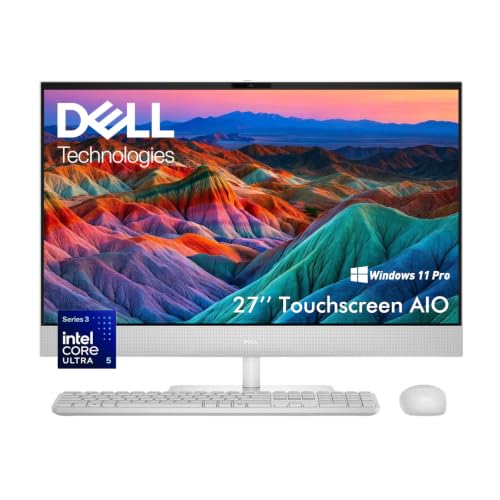
- 1TB SSD suits large file libraries and quick access
- Upgradeable to 2TB SSD and 64GB RAM
- 27-inch FHD IPS display with Wi-Fi 6E
Best For: Users who want fast storage and future upgrade room
Budget Bundle Storage
Lenovo A100 23.8" FHD All-in-One

- 2TB total storage with 1TB SSD plus 1TB docking station
- 16GB DDR5 RAM handles everyday multitasking
- Includes keyboard, mouse, and extra accessories
Best For: Budget buyers who want lots of storage in one package
Power Storage Pick

- Up to 4TB SSD support for large libraries
- 32GB RAM and Ryzen 7 improve multitasking
- 27-inch IPS panel with Wi-Fi 6E and DisplayPort
Best For: Power users who want the most storage expansion potential
Compact Home Office AIO
Lenovo 24" IdeaCentre for Everyday Storage

- 16GB RAM helps with multitasking
- 512GB PCIe SSD boots and loads quickly
- 24-inch FHD IPS display suits daily work
Best For: Home office, students, and everyday productivity
Big Storage Touch Pick

- 2TB total storage for large file libraries
- 27-inch FHD IPS touchscreen
- 16GB DDR5 memory for smooth multitasking
Best For: Users who need lots of file space and a large touchscreen
High-Capacity Workhorse
Lenovo IdeaCentre 27" 1.5TB AIO

- 1.5TB storage offers plenty of room for large files
- Core i5-13420H supports responsive multitasking
- 27-inch FHD IPS anti-glare display is easy to view
Best For: Performance-minded buyers who need extra storage
Storage-Ready Performance – HP 27" FHD Touchscreen AIO with Ryzen 7
If you want one of the more capable all-in-one computers for large file storage, this HP 27-inch model stands out with a strong Ryzen 7 processor and a storage setup built for busy workdays. The 2TB PCIe SSD plus included 500GB external drive gives you plenty of room for documents, media, and project files without cluttering your desk.
Best For: Users who want a roomy storage setup in a clean, space-saving AIO for home offices, remote work, or small business use.
Pros:
- 2TB SSD plus 500GB external drive for generous file storage
- Up to 64GB RAM support for smoother multitasking
- 27-inch Full HD touchscreen for easy navigation
- Wi-Fi 6, USB-C, HDMI, and LAN for flexible connectivity
Cons:
- Full HD resolution may feel modest on a 27-inch display
- External drive adds an extra component to manage
Overall, this is a practical pick if storage capacity matters as much as everyday responsiveness. It combines a large screen, modern ports, and a strong internal drive with extra external space for an organized all-in-one setup.
Business Storage Powerhouse – Lenovo IdeaCentre 27" i7 AIO
For buyers comparing all-in-one computers for large file storage, this Lenovo IdeaCentre leans heavily into capacity and business-ready performance. It starts with 1TB SSD storage and can be professionally upgraded to up to 4.5TB SSD, making it a strong fit for people who keep large document libraries, media folders, and client files close at hand.
Best For: Business users and power multitaskers who need fast access to lots of stored files and a polished office AIO.
Pros:
- Upgradeable to up to 4.5TB SSD storage
- Up to 64GB DDR5 RAM for demanding multitasking
- Intel Core i7-13620H offers strong business performance
- Windows 11 Pro adds business-focused security and management tools
Cons:
- Starts with 1TB SSD before upgrades
- Integrated graphics are aimed more at productivity than heavy creative work
This is one of the most storage-forward options in the group, especially if you want room to grow over time. It balances large potential capacity with a premium 27-inch display and a very business-friendly feature set.
Balanced Family Storage Pick – HP 27-inch Ryzen 7 AIO
This HP 27-inch all-in-one is a balanced choice for shoppers who want dependable storage without overcomplicating the setup. With a 1TB SSD, it offers plenty of room for photos, videos, documents, and everyday apps, while the Ryzen 7 7730U keeps the system responsive for work and school tasks.
Best For: Families, students, and home-office users who want a simple AIO with solid everyday storage.
Pros:
- 1TB SSD provides ample room for personal files and media
- 32GB RAM supports smooth multitasking
- Ryzen 7 7730U is well suited to daily productivity
- Pop-up privacy camera and noise reduction help with calls
Cons:
- 1TB storage is smaller than the most storage-heavy alternatives here
- Windows 11 Home lacks business-class management tools
As an all-in-one for large file storage, it is more of a practical middle ground than a capacity champion. Still, the 1TB SSD and strong memory make it a sensible everyday choice for users who want a neat desk setup.
Compact Value Storage Option – HP 22" All-in-One with 640GB Storage
If you are shopping all-in-one computers for large file storage on a tighter footprint, this HP 22-inch model offers a compact, practical setup. Its listed 640GB storage total, plus an included 512GB external storage device, gives you a workable space for everyday files, schoolwork, and light media libraries without needing a separate tower.
Best For: Buyers who want a smaller, desk-saving AIO with extra external storage included.
Pros:
- Includes 512GB external storage for added capacity
- 21.5-inch FHD IPS display with anti-glare coating
- Wi-Fi 6 and Bluetooth 5.2 for modern connectivity
- Built-in webcam, microphone, and speakers for calls
Cons:
- Base storage is smaller than the larger 27-inch AIOs here
- 8GB RAM is more limited for heavy multitasking
This model makes the most sense if you value a smaller desktop footprint and included external storage over raw internal capacity. It is best treated as a compact everyday machine rather than a high-capacity file vault.
Storage-First Dell 27 – Dell 27 All-in-One Desktop, Core 7
If you want all-in-one computers for large file storage with room to grow, this Dell 27 gives you a strong starting point. The included 1TB SSD is already good for thousands of high-resolution photos, tax records, and a large media library, and higher configurations can scale up to 2TB SSD and 64GB RAM for heavier workloads.
Best For: Small business users, students, and families who want a clean desktop with fast storage and upgrade headroom.
Pros:
- 1TB PCIe SSD stores a large library of files while keeping access fast.
- Upgradeable to 2TB SSD and 64GB RAM for bigger archives and creative projects.
- 27-inch FHD IPS display is useful for long work sessions and media viewing.
- Wi-Fi 6E, HDMI-in/out, and included wireless keyboard and mouse help keep the desk organized.
Cons:
- The base configuration starts at 16GB RAM, so power users may want to plan on upgrades.
- Storage is fast, but the included 1TB may still feel tight for very large video collections without expanding later.
Overall, this Dell is a practical pick if you want a sleek all-in-one that can hold plenty of files now and scale later. Its best advantage is the combination of fast SSD storage, upgradeability, and a large display in one tidy package.
Budget Bundle Storage – Lenovo A100 23.8" FHD All-in-One
For shoppers comparing all-in-one computers for large file storage on a tighter budget, the Lenovo A100 stands out for sheer bundled capacity. It pairs a 1TB SSD with a 1TB docking station, giving you a total of 2TB of space for documents, photos, downloads, and media while keeping the desktop footprint simple.
Best For: Home users, students, and light business tasks that need lots of storage without a complicated setup.
Pros:
- 2TB total storage includes a 1TB SSD plus a 1TB docking station.
- 16GB DDR5 RAM supports smooth multitasking for office work and browsing.
- Includes extras like a 32GB MicroSD card, docking station, cables, keyboard, and mouse.
- Wi-Fi 6, Bluetooth 5.2, and multiple USB ports make everyday use convenient.
Cons:
- The Intel N100 processor is built for efficiency, not heavy creative or demanding workloads.
- Maximum RAM is listed at 16GB, so upgrade headroom is limited.
This Lenovo is a sensible storage-focused pick if your files matter more than raw performance. It offers plenty of space out of the box and a straightforward all-in-one layout for everyday computing.
Power Storage Pick – Acer Aspire 27" All-in-One
If you need all-in-one computers for large file storage and more demanding day-to-day work, this Acer Aspire is the most performance-ready option here. The 1TB SSD gives you fast access to documents and media, and the system supports up to 4TB of PCIe M.2 SSD storage plus up to 64GB RAM for heavier multitasking.
Best For: Users who want a faster all-in-one with strong storage expansion potential for work or media libraries.
Pros:
- Up to 4TB SSD support provides the most storage expansion room in this group.
- 32GB RAM on the configured model is well suited to multitasking.
- Ryzen 7 5825U offers responsive everyday performance.
- 27-inch IPS display, Wi-Fi 6E, HDMI, and DisplayPort add flexibility.
Cons:
- The base included storage is still 1TB, so the bigger capacity depends on future expansion.
- Office 365 for the Web is included, not a full desktop office suite.
This Acer is the strongest choice if you want storage growth potential without giving up speed and multitasking. It combines a roomy upgrade ceiling with a more capable processor and memory setup than the other options.
Compact Home Office AIO – Lenovo 24" IdeaCentre for Everyday Storage
If you want all-in-one computers for large file storage without giving up desk space, this Lenovo IdeaCentre is a practical entry-level option. It pairs a 24-inch Full HD IPS display with 16GB of memory and a 512GB PCIe SSD, making it a good fit for documents, media, browsing, and routine office tasks.
Best For: Home office users, students, and everyday productivity with a space-saving design.
Pros:
- 16GB DDR4 memory supports smoother multitasking across apps and browser tabs
- 512GB PCIe SSD offers fast boot times and reliable everyday file storage
- 23.8-inch Full HD IPS anti-glare display is well-suited to work and media
- Includes HDMI-in, HDMI-out, 4 USB ports, Ethernet, keyboard, and mouse
Cons:
- Storage capacity is smaller than other AIOs built specifically for larger libraries
- Intel N100 processor is aimed at practical everyday computing, not heavy workloads
This model works best when your storage needs are moderate and you value a clean all-in-one setup over maximum capacity. It is a solid choice for keeping common files close at hand while maintaining simple day-to-day performance.
Big Storage Touch Pick – HP 27" Mega Storage AIO
Among all-in-one computers for large file storage, this HP model stands out for its stated 2TB total storage and 27-inch Full HD touchscreen. It combines a fast SSD setup with a roomy display and 16GB of DDR5 memory, making it a strong fit for users who want plenty of room for files, photos, and programs in one clean desktop.
Best For: Users who want a roomy touchscreen AIO with lots of storage for files, photos, and software.
Pros:
- 2TB total storage gives you generous room for large file collections
- 27-inch FHD IPS touchscreen adds flexibility for work and browsing
- 16GB DDR5 memory supports smooth multitasking
- Pop-up privacy camera and noise-reduction microphones help with video calls
Cons:
- Ryzen 5 7520U is positioned for productivity rather than demanding creative work
- All-in-one design offers less upgrade flexibility than a traditional desktop tower
If storage capacity is your top priority, this HP is the strongest match in the group. It balances a large-screen touchscreen experience with enough space for extensive personal files and everyday applications.
High-Capacity Workhorse – Lenovo IdeaCentre 27" 1.5TB AIO
This Lenovo IdeaCentre is a smart option for all-in-one computers for large file storage if you want a balance of strong performance and expanded capacity. It combines an Intel Core i5-13420H processor, 1.5TB of storage, and a 27-inch FHD IPS anti-glare display, giving it a more work-ready profile for multitasking and handling bigger personal or office file collections.
Best For: Users who want a performance-focused AIO with extra storage for large files and everyday work.
Pros:
- 1.5TB storage setup provides substantial room for large files and data
- Intel Core i5-13420H offers responsive multitasking with 8 cores and 12 threads
- 27-inch IPS anti-glare display is bright and comfortable for long sessions
- Includes wireless keyboard and mouse, Wi-Fi 6, webcam, and multiple ports
Cons:
- 8GB RAM is fine for daily use but less generous than some storage-focused rivals
- Storage is split between a 512GB SSD and 1TB docking station set, not a single large internal drive
For buyers who care about both storage capacity and everyday responsiveness, this Lenovo is well-rounded. It is especially appealing if you want a bigger file library without stepping up to a bulky tower PC.
How We Picked the Best All-In-One Computers for Large File Storage
We prioritized storage capacity first, then looked at the type of storage included, system memory, processor class, and connectivity. For All-In-One Computers for Large File Storage, a fast SSD matters just as much as raw capacity, especially if you open large media libraries or move files often. We also favored models with enough RAM to keep multitasking smooth and enough ports for external drives, cards, and accessories.
Quick Comparison: What Matters Most
Some buyers need maximum onboard space, while others need the best mix of speed and expandability. A 1TB SSD is a solid baseline for general use, but 2TB or hybrid setups are better for photo archives, local video storage, and family backups. If you plan to keep older files offline, check whether the system includes external or dock-based storage you can use right away.
Key Buying Factors for All-In-One Computers for Large File Storage
Storage Type
Choose SSDs for speed and reliability. If a model includes external storage or a docking station, that can boost usable capacity, but make sure your most important files live on the internal drive or a well-managed backup setup.
Capacity
For general productivity, 1TB is usually enough. For creative work, large document archives, or shared household storage, 2TB or more is a better long-term choice.
Memory and Processor
Large file storage is easier to manage on systems with 16GB RAM or more and a capable processor. That combination helps with indexing, transfers, browsing large folders, and running cloud sync tools without lag.
Ports and Connectivity
Look for USB-A, USB-C, HDMI, Wi-Fi 6, and any card readers or display outputs you may need. These features make it easier to add external drives, extra screens, and backup devices.
Who Should Buy Which All-In-One Computers for Large File Storage?
If you want the most headroom for media libraries and heavy multitasking, choose a higher-RAM, higher-capacity model. If you mostly store documents, photos, and everyday backups, a midrange 1TB all-in-one is often the best value. If you need flexible expansion, favor systems with external storage bundles or strong port selection. For smaller spaces and lighter workloads, compact All-In-One Computers for Large File Storage can still be a practical choice as long as the storage plan matches your needs.