If your desk is short on space, a well-chosen all-in-one can replace both a monitor and a tower without clutter. The best models keep cables down, fit comfortably in tight setups, and still handle everyday work smoothly.
Below, we focus on all-in-one computers for small desks that make sense for home offices, student spaces, and shared rooms in 2026.
Best 10 All-In-One Computers for Small Desks Picks for 2026
Compact Everyday AIO
Lenovo IdeaCentre 24" Intel N100

- 23.8-inch FHD IPS anti-glare display
- 16GB DDR4 RAM and 512GB NVMe SSD
- Wi-Fi 6 with a compact all-in-one footprint
Best For: Small desks, home offices, and everyday multitasking
Budget Desk Saver

- 21.5-inch FHD anti-glare display
- 8GB DDR5 memory with 128GB UFS storage
- Wi-Fi 6, Bluetooth 5.3, USB-C, and Ethernet
Best For: Dorms, homework, and light everyday use
Color-Accurate Compact Pick

- 23.8-inch FHD IPS panel with 99% sRGB
- 16GB DDR4 RAM and 512GB NVMe SSD
- Compact design with Wi-Fi 6 and Bluetooth 5.2
Best For: Work, streaming, and light creative use on a small desk
Business-Ready Compact AIO

- Windows 11 Pro with privacy-shutter webcam
- 21.5-inch FHD anti-glare display
- Wi-Fi 6, Bluetooth 5.3, USB-C, and Ethernet
Best For: Home offices and small businesses needing a tidy Pro setup
Budget Convenience
HP 22-inch AIO with Webcam and Office Web

- 21.5-inch FHD anti-glare display
- HD webcam with privacy shutter
- 8GB DDR5 RAM, Wi‑Fi 6, Bluetooth 5.3
Best For: Compact everyday use with video calling
Work-Ready Upgrade
Lenovo 24-inch AIO with 16GB RAM
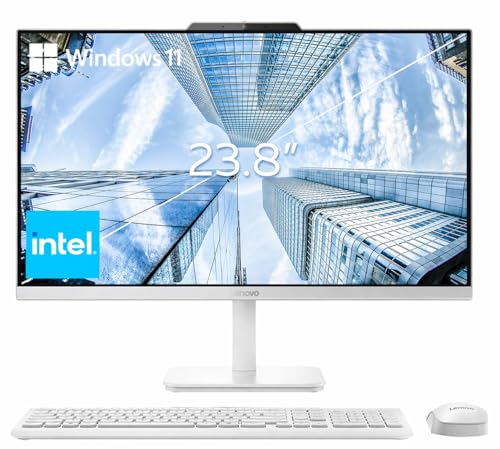
- 23.8-inch FHD IPS anti-glare display
- 16GB RAM with 256GB PCIe SSD
- Wi‑Fi 6, Bluetooth 5.2, wireless KB and mouse
Best For: School or office multitasking on a compact desk
Compact Everyday PC
HP 22″ All-in-One Desktop Computer

- 21.5-inch FHD IPS panel with anti-glare coating
- Wi-Fi 6, Bluetooth 5.2, HDMI-out, and USB ports
- Includes webcam, mic, speakers, keyboard, and mouse
Best For: Small desks, basic home office work, and video calls
Lean Business-Style Pick
Lenovo IdeaCentre 24 23.8" AIO

- 23.8-inch FHD IPS display with anti-glare finish
- 512GB PCIe NVMe SSD and 8GB DDR4 memory
- Wi-Fi 6, Bluetooth 5.2, HDMI-out, and Ethernet
Best For: Daily productivity, study spaces, and casual home use
Compact Everyday AIO – Lenovo IdeaCentre 24" Intel N100
If you want all-in-one computers for small desks, this Lenovo IdeaCentre 24 keeps the footprint tidy while giving you a full 23.8-inch FHD IPS display, 16GB of RAM, and a 512GB NVMe SSD for everyday use. It’s a straightforward fit for browsing, office work, streaming, and light multitasking without the clutter of a separate tower.
Best For: Home users, students, and small workspace setups that need a compact desktop with strong everyday responsiveness.
Pros:
- 23.8-inch 1080p IPS anti-glare display helps maximize screen space without adding desk clutter
- 16GB DDR4 memory and 512GB PCIe NVMe SSD support smooth everyday performance and quick boot times
- Wi-Fi 6, Bluetooth 5.2, and multiple ports make it easy to connect accessories and a wired network
- Compact 21.23 x 7.3 x 16.65-inch design suits smaller desks well
Cons:
- Intel N100 processor is aimed at everyday tasks rather than demanding workloads
- Integrated graphics are fine for basic use but not for heavier creative or gaming needs
This model stands out as a practical space-saver for people who want a larger screen than a typical compact monitor setup, but still need a clean all-in-one format. Its strongest appeal is the balance of memory, storage, and desk-friendly dimensions.
Budget Desk Saver – HP 22" White All-in-One
For all-in-one computers for small desks, this HP 22-inch model focuses on a minimal footprint and simple everyday use. The 21.5-inch Full HD display, 8GB DDR5 memory, and 128GB UFS storage are aimed at light productivity, browsing, homework, and streaming in a tidy setup.
Best For: Students, dorm rooms, and budget-conscious buyers who want a compact PC with modern wireless features.
Pros:
- Space-saving all-in-one design helps reduce cable and desk clutter
- 21.5-inch FHD anti-glare screen is a comfortable size for tight work areas
- 8GB DDR5 memory and 128GB UFS storage are suitable for basic everyday tasks
- Wi-Fi 6, Bluetooth 5.3, USB-C, HDMI, and Ethernet add useful connectivity
Cons:
- 128GB internal storage is modest if you keep lots of files locally
- N100 processor and integrated graphics are best for light workloads only
This HP is a sensible fit when desk space matters more than raw power. It offers the core features most people need for school or light home use, but the smaller storage capacity means it’s better for cloud-first or low-demand setups.
Color-Accurate Compact Pick – Lenovo IdeaCentre 24 IPS AIO
This Lenovo IdeaCentre 24 is a strong option among all-in-one computers for small desks because it combines a space-saving chassis with a 23.8-inch FHD IPS panel and 99% sRGB coverage. With 16GB of RAM and a 512GB PCIe NVMe SSD, it’s built for smooth everyday work while keeping your desk organized.
Best For: Users who want a compact all-in-one with a sharper display for work, streaming, or light creative tasks.
Pros:
- 23.8-inch IPS display with 99% sRGB offers better color accuracy than basic office AIOs
- 16GB DDR4 RAM and 512GB NVMe SSD provide responsive day-to-day performance
- Wi-Fi 6, Bluetooth 5.2, Ethernet, and multiple USB ports give flexible connectivity
- Compact 21.23 x 7.3 x 16.65-inch dimensions help preserve desk space
Cons:
- Intel N100 processor is designed for light computing rather than heavy workloads
- Integrated graphics limit it to basic visual tasks and media use
If display quality matters as much as size, this Lenovo is one of the more compelling compact AIO choices here. It keeps the footprint manageable while adding a more color-capable panel than many entry-level all-in-ones.
Business-Ready Compact AIO – HP 22" Win11 Pro
For shoppers comparing all-in-one computers for small desks, this HP 22-inch desktop offers a clean footprint with business-friendly features. It pairs a 21.5-inch FHD anti-glare display with Windows 11 Pro, 8GB DDR5 memory, and 128GB UFS storage, making it a neat option for basic work and everyday productivity.
Best For: Home offices, small business users, and buyers who want Windows 11 Pro in a compact all-in-one.
Pros:
- Windows 11 Pro adds business-oriented features and remote desktop support
- 21.5-inch FHD anti-glare display fits well on smaller desks
- Wi-Fi 6, Bluetooth 5.3, USB-C, HDMI, and Ethernet improve connectivity options
- Built-in HD webcam with privacy shutter is useful for meetings and calls
Cons:
- 128GB internal storage may fill quickly if you save many files locally
- Integrated graphics and N100-class performance are suited to basic tasks, not demanding work
This HP is strongest when you need a tidy workspace and business-ready software more than high-end hardware. The combination of a compact design, Pro edition Windows, and practical ports makes it a good fit for routine office tasks.
Compact Pick – Lenovo 23.8-inch FHD AIO with 512GB SSD
If you want all-in-one computers for small desks, this Lenovo V100 keeps the footprint simple while still covering everyday work, browsing, and streaming. The 23.8-inch FHD IPS screen, anti-glare finish, and built-in Wi‑Fi 6 make it a practical fit for tighter workspaces where you want fewer cables and a cleaner setup.
Best For: Home users, students, or anyone who wants a tidy everyday PC for a compact desk.
Pros:
- 23.8-inch FHD IPS display with anti-glare coating and 99% sRGB
- 512GB PCIe NVMe SSD for faster boot and storage responsiveness
- Wi‑Fi 6 and Bluetooth 5.2 for modern wireless connectivity
- Windows 11 Home included
Cons:
- Intel N100 and 8GB RAM are aimed at everyday tasks, not heavy workloads
- Non-touch display may not suit users wanting touch input
Overall, this is a straightforward small-desk AIO that prioritizes space-saving design and dependable basic performance. It makes the most sense if you value a neat setup and don’t need high-end processing power.
Budget Convenience – HP 22-inch AIO with Webcam and Office Web
For shoppers comparing all-in-one computers for small desks, this HP 22-inch model focuses on convenience in a compact size. It pairs a 21.5-inch Full HD anti-glare display with an HD webcam, privacy shutter, and a built-in software bundle, making it a sensible fit for day-to-day home or office use.
Best For: Light productivity, video calls, and users who want a compact AIO with extra convenience features.
Pros:
- Compact 21.5-inch FHD anti-glare display suits smaller work areas
- Built-in HD webcam with privacy shutter for calls and meetings
- 8GB DDR5 RAM plus 512GB external storage and 128GB UFS storage
- Wi‑Fi 6, Bluetooth 5.3, and a useful mix of ports including USB-C and HDMI-out
Cons:
- Intel N100 is designed for everyday computing rather than demanding tasks
- USB Type-C is data-transfer only, so it does not add video output
This HP is a practical pick if you want a tidy desktop with built-in meeting-ready features. It leans toward convenience and basic efficiency instead of raw performance.
Work-Ready Upgrade – Lenovo 24-inch AIO with 16GB RAM
If you need all-in-one computers for small desks but want a little more headroom, this Lenovo 24-inch model stands out for its 16GB RAM. The 23.8-inch FHD IPS anti-glare screen, 256GB PCIe SSD, and wireless keyboard and mouse make it a clean, office-friendly setup for home or shared workspaces.
Best For: Users who want a compact AIO for school, office work, and smoother multitasking.
Pros:
- 16GB RAM provides more multitasking room than basic entry-level AIOs
- 23.8-inch FHD IPS anti-glare display is well suited to desk use
- 256GB PCIe SSD for quick boot and reliable everyday storage
- Wi‑Fi 6, Bluetooth 5.2, HDMI-out, Ethernet, and included wireless keyboard and mouse
Cons:
- 256GB storage is smaller than some alternatives
- Intel N100 is still an efficiency-focused processor, not a high-performance chip
This model is the most balanced option here if multitasking matters more than sheer storage capacity. It keeps the desk footprint simple while adding extra RAM and a strong mix of connectivity.
Compact Everyday PC – HP 22″ All-in-One Desktop Computer
If you’re shopping for all-in-one computers for small desks, this HP 22-inch model is built to keep the footprint tight while still covering everyday work, browsing, and video calls. The 21.5-inch FHD IPS panel, anti-glare coating, and included keyboard and mouse help create a tidy setup without sacrificing the basics.
Best For: Home office users, students, and anyone who wants a compact AIO for routine daily tasks.
Pros:
- Space-saving all-in-one design with a tilt stand and bundled keyboard/mouse
- 21.5-inch FHD IPS display with 99% sRGB and anti-glare coating
- Wi-Fi 6, Bluetooth 5.2, HDMI-out, and multiple USB ports for flexible connections
- Built-in HD webcam, mono microphone, and dual speakers for calls and meetings
Cons:
- 8GB memory is fine for everyday use, but it is not aimed at heavy multitasking
- Intel N100 platform is best suited to basic productivity rather than demanding workloads
Overall, this HP is a practical small-desk choice if you want a clean all-in-one setup for standard home or office tasks. Its strength is balance: a compact display, modern wireless, and a useful set of built-in collaboration features.
Lean Business-Style Pick – Lenovo IdeaCentre 24 23.8" AIO
The Lenovo IdeaCentre 24 is a sensible pick if you want all-in-one computers for small desks with a slightly larger screen but still a compact footprint. Its 23.8-inch FHD IPS display, 512GB SSD, and Wi-Fi 6 support make it a straightforward fit for everyday browsing, office work, and student use.
Best For: Users who want a neat, dependable AIO for daily productivity, study, and casual entertainment.
Pros:
- 23.8-inch FHD IPS display with anti-glare coating and 99% sRGB coverage
- 512GB PCIe NVMe SSD plus 8GB DDR4 for responsive everyday performance
- Wi-Fi 6, Bluetooth 5.2, HDMI-out, Ethernet, and multiple USB ports
- Built-in webcam and wired keyboard/mouse included for a ready-to-use setup
Cons:
- 8GB RAM is adequate for light multitasking, but not ideal for heavier workloads
- Intel N100 is designed for efficiency and everyday use, not demanding applications
This Lenovo makes sense if your priority is a tidy desk and smooth day-to-day use rather than raw power. The larger screen is helpful for multitasking, while the storage and connectivity keep it practical for home or small-office routines.
Feature-Rich Desk Saver – Lenovo NEW 24" IPS FHD AIO
For shoppers comparing all-in-one computers for small desks, this Lenovo stands out with a clean 24-inch design and a strong focus on everyday comfort. The 3-side thin bezels, low blue light features, and bundled keyboard and mouse make it easy to build a simple home or office setup without clutter.
Best For: Home and office users who want a tidy AIO with a larger display and practical productivity features.
Pros:
- 24-inch IPS FHD display with three-side thin bezels
- 1TB total storage combining a 512GB SSD and 500GB HDD
- Harman-enhanced speakers and low blue light features for comfortable use
- Windows 11 Pro plus wired keyboard and mouse for a ready workstation
Cons:
- 8GB RAM may feel limited if you regularly keep many apps open
- Processor details are presented as everyday-capable rather than high-performance
This model is a strong fit if you want a small-desk computer that still feels complete and organized. The bigger storage pool and polished display extras give it an advantage for users who split time between work, study, and streaming.
How We Picked the Best All-In-One Computers for Small Desks
For All-In-One Computers for Small Desks, we prioritized compact footprints, display sizes that won’t overwhelm a tight workspace, and hardware that fits common daily tasks. We also looked for practical features such as Wi‑Fi 6, SSD storage, enough RAM for multitasking, and designs that reduce cable clutter.
Quick Comparison
Smaller 22-inch models usually win on footprint and affordability, while 23.8-inch and 24-inch options offer a more comfortable viewing area for spreadsheets, browser tabs, and video calls. If you want a cleaner desk and the easiest setup, an all-in-one is often simpler than a separate monitor-and-PC combo.
Key Buying Factors for All-In-One Computers for Small Desks
Display Size and Desk Depth
Check both screen size and stand depth. A 24-inch model can still work on a small desk if the stand is compact, but a 22-inch version is often easier to place in narrow spaces.
Performance for Everyday Tasks
For web browsing, documents, streaming, and light multitasking, efficient entry-level Intel chips can be enough. If you keep many tabs open or use office apps heavily, aim for at least 8GB of RAM and prefer 16GB when possible.
Storage Type and Capacity
SSD storage improves boot speed and responsiveness far more than large slow drives. For most buyers, 256GB to 512GB is a practical range unless you store lots of photos, videos, or work files locally.
Ports, Wireless, and Webcam Use
Look for Wi‑Fi 6, Bluetooth support, and enough USB ports for peripherals. If the computer will handle meetings, make sure the built-in camera and audio are suitable for your expectations.
Who Should Buy Which All-In-One Computers for Small Desks?
Choose a 22-inch all-in-one if your desk is especially tight or you want a simpler, lower-cost setup. Go with a 23.8-inch or 24-inch model if you value a roomier screen for work and don’t mind a slightly larger footprint. Buyers who want better multitasking should lean toward higher RAM and SSD-equipped models, while budget-focused shoppers can prioritize basic everyday performance and a compact design.
In short, the best choice depends on how much space you have, how demanding your tasks are, and whether you care more about screen size or maximum desk efficiency.