The best smart home control panels for scheduled routines make everyday automation easier to see, adjust, and trigger. Whether you want timed lights, sunrise and sunset schedules, whole-home scenes, or a dedicated wall interface, the right panel can reduce dependence on phone apps and voice commands.
This roundup covers simple in-wall timers, smart switches, scene keypads, and advanced touchscreen hubs. Compare compatibility, wiring requirements, automation support, and control options before choosing a panel for your home.
Best 10 Smart Home Control Panels for Scheduled Routines Picks for 2026
Best Touchscreen Scene Panel

- Touchscreen scenes and dual-switch control
- Scheduled thermostat automation
- Works with Alexa and Google Home
Best For: SONOFF-focused homes wanting wall-mounted routine and temperature control
Best Dedicated Lighting Scheduler
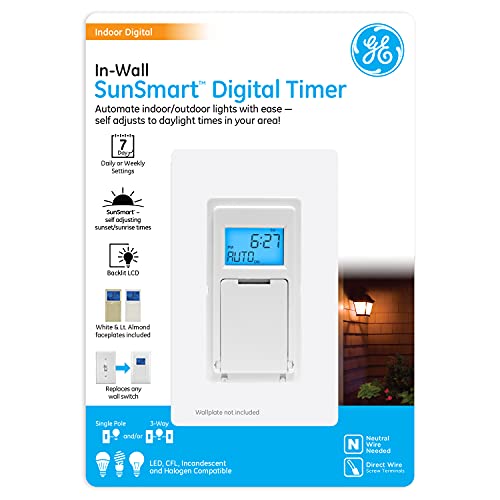
- Seven weekly ON/OFF programs
- Automatic sunrise and sunset adjustment
- Supports several common lighting loads
Best For: Recurring schedules for compatible lights and installed fixtures
Best Whole-Home Automation Hub

- Home Assistant preinstalled
- Advanced cross-device automations
- Local data storage and USB expansion
Best For: Custom scheduled routines across a growing smart home
Best Scene Button Controller
Leviton Decora Smart Controller

- Three customizable lighting scenes
- Broad app and voice compatibility
- Optional wired or wire-free three-way control
Best For: Physical room-level scene control with Wi-Fi automation
Best Wall-Mounted Panel
Fabater 8-Inch Tuya Control Panel
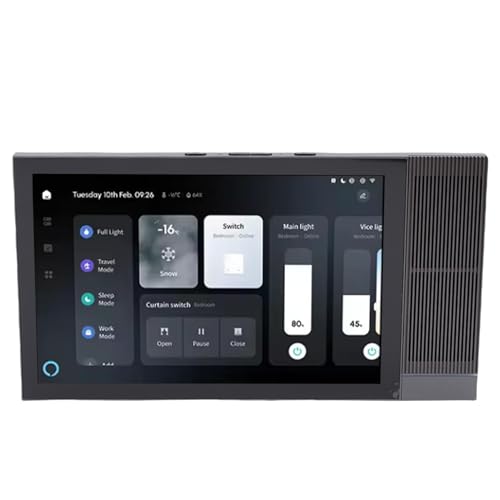
- 8-inch touchscreen with voice control
- Works with Tuya and Smart Life devices
- Wall-mounted design for centralized scenes
Best For: Tuya households wanting a dedicated touch-and-voice control point
Best Portable Controller
Amazon Basics Alexa Routine Remote

- Battery-powered and portable
- Triggers multi-device Alexa automations
- No wiring; Echo device required
Best For: Alexa users needing handheld control of routines around the home
Best Scene Keypad
Insteon 6-Button Scene Controller

- Six programmable in-wall buttons
- Controls Insteon scenes without a hub for basic use
- Hub 2 adds scheduling and remote access
Best For: Insteon homes prioritizing tactile, one-press scene control
Flexible Tuya Scene Hub

- Three physical switch controls with touchscreen scenes
- Tuya and Smart Life app customization
- Neutral wire and 2.4GHz Wi-Fi required
Best For: Tuya-based homes needing three in-wall controls
Connected Home Touchscreen

- One in-wall touchscreen switch
- Alexa built in for voice control
- Broad compatibility across smart-home platforms
Best For: Users wanting centralized control for one switch
Thermostat Scene Controller
SONOFF NSPanel Smart Control Panel
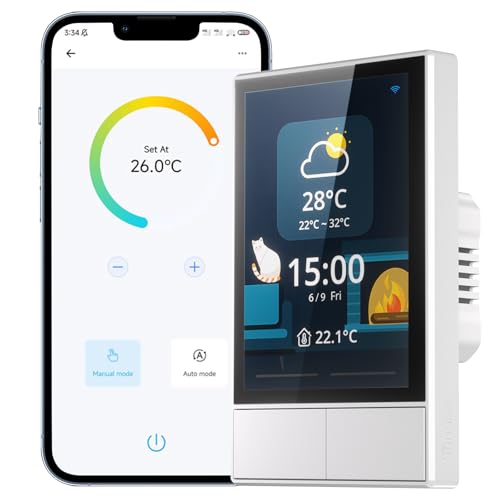
- Schedules different temperatures by time of day
- Two-channel touchscreen scene control
- Works with SONOFF devices and major voice assistants
Best For: SONOFF homes combining climate and scene routines
Best Touchscreen Scene Panel – NSPanel Smart Home Control
The SONOFF NSPanel is a practical choice for smart home control panels for scheduled routines, combining a wall-mounted touchscreen, dual-switch control, temperature monitoring, and scene activation in one unit. Its built-in thermostat can trigger heating or cooling based on time-period temperature settings, while eWeLink, Alexa, Google Home, and Siri Shortcuts provide additional control options.
Best For: Homes using SONOFF devices that want touchscreen scenes and scheduled temperature control from a central wall panel.
Pros:
- Combines touchscreen scenes, two switch channels, temperature control, and weather information.
- Supports time-based temperature settings that can automatically trigger heating or cooling equipment.
- Works with eWeLink, Alexa, Google Home, and Siri Shortcuts.
- Offers multiple control methods through the panel, app, and voice assistants.
Cons:
- Requires a 2.4GHz Wi-Fi connection and eWeLink setup.
- Its strongest integration is with the SONOFF ecosystem.
- Wall installation and electrical compatibility should be checked before purchase.
Choose the NSPanel when you want routines and climate settings presented on a dedicated touchscreen rather than managed only through a phone app. It is especially useful for SONOFF-centered installations.
Best Dedicated Lighting Scheduler – GE 7-Day In-Wall Timer
The GE 7-Day in-Wall Digital Timer is a focused option among smart home control panels for scheduled routines, particularly when the goal is dependable lighting or fixture scheduling. It supports up to seven weekly ON/OFF programs and automatically adjusts sunrise and sunset settings for the region.
Best For: Homeowners who need recurring schedules for compatible lights, fans, heaters, or other permanently installed fixtures.
Pros:
- Supports up to seven ON/OFF programs across the week.
- SunSmart technology adjusts sunrise and sunset timing throughout the year.
- Random security mode can vary settings by up to 30 minutes.
- Works with LED, CFL, incandescent, and halogen bulbs, plus listed fixtures such as fans and heaters.
Cons:
- Designed primarily for scheduled fixture control rather than broad smart-home coordination.
- Requires a neutral wire and is intended for compatible single-pole or three-way installations.
- Its 120-volt, 10-amp rating limits which loads can be connected.
This timer is a good fit when scheduled control matters more than touchscreen scenes or ecosystem integration. Its sunrise/sunset adjustment is useful for exterior or security lighting that changes with the seasons.
Best Whole-Home Automation Hub – Home Assistant Green
Home Assistant Green | Smart Home hub with Advanced Automation | Official Home Assistant Hardware
Check Price On AmazonHome Assistant Green is a strong foundation for smart home control panels for scheduled routines when you want one central hub to coordinate devices across the home. Home Assistant comes preinstalled, and the hub supports advanced automations such as changing lights for activities or turning off heat when you are away.
Best For: Users who want centralized, customizable automation with local data storage and the option to expand connectivity.
Pros:
- Home Assistant is preinstalled for a simpler setup.
- Can coordinate devices and automations across the whole home.
- Stores home data locally on the hub.
- Compact, silent, low-power design with 4GB RAM and 32GB storage.
Cons:
- Requires Ethernet for network connectivity.
- Additional Zigbee, Z-Wave, or Thread connectivity requires USB expansion devices.
- Its broad automation capabilities may require more setup than a dedicated timer.
Home Assistant Green is the most flexible option here for users building detailed routines across multiple smart-home devices. It is less of a wall-mounted control panel and more of the central automation engine behind one.
Best Scene Button Controller – Leviton Decora Smart Controller
The Leviton Decora Smart Controller is a useful choice for smart home control panels for scheduled routines when you prefer physical buttons for scenes and app-based configuration. Its buttons can control connected lights, assign activities such as “Movie Time” or “All Off,” and work with My Leviton, Apple HomeKit, IFTTT, and supported voice assistants.
Best For: Homes that want convenient physical scene controls alongside Wi-Fi-based app, voice, and HomeKit automation.
Pros:
- Provides ON/OFF control plus three custom lighting scenes.
- Supports My Leviton, Apple HomeKit, IFTTT, Alexa, Google Assistant, and SmartThings.
- Can control multiple Decora Smart Wi-Fi devices from one wall location.
- Supports optional wire-free or wired three-way configurations.
Cons:
- Requires a neutral wire and 2.4GHz Wi-Fi.
- Apple Home setup requires an Apple Home Hub and compatible iOS device.
- It is a scene controller rather than a full standalone home automation hub.
The Decora Smart Controller works well where household members want tactile buttons for recurring scenes while retaining app and voice control. Consider it for room-level routine access, with broader automation handled by the connected ecosystem.
Best Wall-Mounted Panel – Fabater 8-Inch Tuya Control Panel
For shoppers comparing smart home control panels for scheduled routines, the Fabater panel provides a fixed, touchscreen-based way to manage Tuya devices, lights, switches, and scenes. Its wall-mounted design, voice control, and 8-inch display make it suited to everyday room-by-room automation.
Best For: Tuya or Smart Life households wanting a dedicated wall control panel with touch and voice operation.
Pros:
- Works with Tuya devices through the Tuya 3.0 and Smart Life apps.
- Supports touch and voice control with dual microphones.
- 8-inch 1280×800 display, 2GB RAM, and 16GB ROM are designed for responsive navigation.
- Includes wall-mount hardware and supports standard electrical-box installation.
Cons:
- Compatibility is centered on Tuya-compatible devices.
- Wall installation is less flexible than a portable controller.
- Its IP20 rating does not indicate protection for wet locations.
The Fabater is the most screen-focused option here, making it a practical choice when you want scheduled scenes and device controls visible from a central wall location rather than relying only on a phone or voice assistant.
Best Portable Controller – Amazon Basics Alexa Routine Remote
For smart home control panels for scheduled routines that do not require permanent installation, this Amazon Basics handheld remote offers portable physical control. It uses an Echo device as the smart hub and can trigger Alexa-enabled devices and multi-device automations from around the house.
Best For: Alexa households wanting a battery-powered, no-wiring controller for routines and everyday device commands.
Pros:
- Can control Alexa-enabled lights, blinds, locks, thermostats, fans, air purifiers, and more.
- Supports automations involving multiple Alexa-enabled devices.
- Portable, battery-powered design requires no wiring.
- Setup is guided through the Alexa app using an Echo device.
Cons:
- Works with Alexa only and requires a compatible Echo device.
- It is a handheld remote rather than a wall-mounted touchscreen panel.
- Operation depends on the Alexa ecosystem and Bluetooth connectivity.
This remote is a convenient fit for renters, multi-room homes, or anyone who wants physical access to Alexa routines without adding another wired wall control. It is less suitable if you want an always-visible scheduling display.
Best Scene Keypad – Insteon 6-Button Scene Controller
For shoppers seeking smart home control panels for scheduled routines with dependable physical scene buttons, the Insteon 6-Button Keypad offers dedicated in-wall control. Five programmable scene buttons can operate linked Insteon devices or groups, while an Insteon Hub 2 adds scheduling, remote access, and voice control.
Best For: Insteon users who want a permanent, button-based scene controller and can add the hub for schedules and remote features.
Pros:
- Six independently programmable buttons provide direct access to Insteon devices or scenes.
- Basic scene control does not require a hub or Wi-Fi.
- Backlit LEDs show the status of connected lights and devices.
- Supports linked scenes with programmable brightness levels and fade speeds.
Cons:
- Scheduling, remote access, and voice control require the separately sold Insteon Hub 2.
- Designed for Insteon devices rather than broad cross-platform compatibility.
- Requires in-wall installation.
The Insteon keypad is a strong fit when one-press scenes matter more than a touchscreen interface. Its hub-free basic operation is useful locally, but scheduled routines require the additional Hub 2 and Director app.
Flexible Tuya Scene Hub – 3-Switch WiFi Control Panel
For shoppers comparing smart home control panels for scheduled routines, the TONGOU DIY panel combines three physical switch controls with a touchscreen for Tuya or Smart Life scenes. It requires a neutral wire, connects on 2.4GHz Wi-Fi, and should be checked against your existing switch box before purchase.
Best For: Homeowners who want three in-wall switch positions plus customizable Tuya or Smart Life scenes.
Pros:
- Controls three circuits with physical buttons and touchscreen access.
- Supports scenes, shortcuts, device status, weather, time, and temperature views.
- Works with compatible switches, bulbs, cameras, locks, alarms, and sensors.
- Offers app, voice, manual, IR, and Sigmesh pairing options.
Cons:
- Requires a neutral wire and 2.4GHz Wi-Fi for connection.
- May not fit every switch box, so compatibility must be checked first.
- Has a 6A maximum current rating and specified load limits.
This is a versatile choice for building scheduled scenes across a Tuya-based home, provided the electrical installation and box dimensions are compatible.
Connected Home Touchscreen – Brilliant 1-Switch Panel
The Brilliant Smart Home Control is a one-switch in-wall touchscreen designed to bring lighting, music, and compatible smart-home controls into one interface. For scheduled routines, its main appeal is centralized control alongside broad compatibility with platforms and devices such as Alexa, Ring, Sonos, Hue, Google Nest, Wemo, SmartThings, and Apple HomeKit.
Best For: Users who want a premium-feeling touchscreen control point for one switch and a range of connected platforms.
Pros:
- Combines one in-wall switch with touchscreen control.
- Alexa is built in.
- Compatible with several major smart-home ecosystems, including Alexa, Ring, Sonos, Hue, Google Nest, Wemo, SmartThings, and Apple HomeKit.
- Touch and voice control support convenient daily operation.
Cons:
- Controls a single switch position.
- The supplied notes provide limited detail about routine scheduling features.
- Installation uses a panel-mounted design, so fit should be confirmed.
The Brilliant panel is best considered a centralized interface for a compatible ecosystem rather than a multi-switch solution. Its broad platform support may make it useful for coordinating everyday smart-home actions.
Thermostat Scene Controller – SONOFF NSPanel Smart Control Panel
The SONOFF NSPanel is a strong fit for smart home control panels for scheduled routines because its built-in thermostat can set different temperatures for different times of day. It also combines two-channel switching, touchscreen scenes, grouped SONOFF-device control, weather information, and app or voice operation.
Best For: SONOFF households that want scheduled temperature changes and scene control from one wall panel.
Pros:
- Built-in thermostat supports different temperatures at different times of day.
- Offers one-tap scene modes and grouped SONOFF-device control.
- Supports dual-channel switches, touchscreen, eWeLink, Alexa, Google Home, and Siri Shortcuts.
- Displays time, date, weather, and indoor and outdoor temperatures.
Cons:
- Requires 2.4GHz Wi-Fi for pairing.
- SmartThings devices are not compatible.
- Its strongest device-integration features are centered on SONOFF products.
Choose the NSPanel when temperature schedules are as important as lighting scenes. It offers a practical all-in-one interface, but ecosystem compatibility should be confirmed before purchase.
How We Picked the Best Smart Home Control Panels for Scheduled Routines
We selected products across several levels of smart-home control, from straightforward timers and single-circuit switches to touchscreen panels and dedicated automation hubs. Our comparison emphasizes scheduled routines, including recurring time-based actions, sunrise and sunset adjustments, scene activation, and integration with larger smart-home platforms.
We also considered installation requirements, control methods, ecosystem compatibility, screen and button usability, local versus cloud-dependent automation, and whether a product is best suited to one room or an entire home. Always verify electrical compatibility and platform support before installation.
Quick Comparison
- Basic scheduled switching: The GE 7-Day In-Wall Digital Timer is the simplest choice for recurring schedules and automatic sunrise or sunset adjustments.
- Smart wall switches: Leviton, Amazon Basics, TONGOU, and SONOFF options add app, voice, scene, or multi-switch control, depending on the model.
- Scene control: The Insteon keypad is designed for quickly triggering predefined lighting or home scenes.
- Touchscreen control: SONOFF and Fabater panels provide a more visual wall-mounted interface for devices, status information, and routines.
- Advanced automation: Home Assistant Green is the strongest fit for users who want broad device compatibility and detailed automation logic.
- Premium unified interface: Brilliant is aimed at households wanting a polished touchscreen controller with built-in voice control and support for multiple ecosystems.
Key Buying Factors for Smart Home Control Panels for Scheduled Routines
Automation Platform and Compatibility
Check whether the panel works with Alexa, Google Home, Apple Home, Home Assistant, SmartThings, Insteon, or a proprietary app. Compatibility determines which devices can participate in routines and whether scenes can combine products from different brands.
Wiring and Installation
Many in-wall controls require a neutral wire, while some installations may need a compatible electrical box, network connection, or professional electrician. Confirm switch type, load rating, gang-box space, and whether the panel replaces a single-pole or multi-way switch.
Schedule Flexibility
Look for recurring schedules, weekday and weekend settings, countdowns, vacation modes, sunrise and sunset offsets, and conditional automations. A basic timer may be sufficient for one light, while a hub is better for routines involving sensors, thermostats, locks, and multiple rooms.
Interface and Reliability
Touchscreens are useful for visual status and scene access, but physical buttons can be faster and more dependable for everyday use. Consider screen size, brightness, responsiveness, Wi-Fi stability, local control, and what happens if the internet or cloud service is unavailable.
Who Should Buy Which Smart Home Control Panels for Scheduled Routines?
Choose the GE timer if you need dependable time-based control without a complex smart-home ecosystem. Pick a Leviton, Amazon Basics, TONGOU, or SONOFF switch when you want app and voice control for specific circuits. The Insteon keypad suits households already using Insteon scenes and physical multi-button access.
Choose Home Assistant Green for maximum automation flexibility and broad device integration. Fabater and Brilliant are better for users who want a dedicated touchscreen mounted on the wall, with Brilliant offering a more polished all-in-one experience and Fabater appealing to shoppers building around Home Assistant. Before buying, prioritize ecosystem compatibility and wiring requirements over screen size alone.