The best smart home control panels for multiple users make everyday automation easier for everyone in the household—not just the person who set up the system. A wall-mounted touchscreen can combine lighting, scenes, climate information, security controls, and voice-assistant access in one convenient location.
This roundup includes panels with Zigbee hubs, Wi-Fi control, touchscreen switches, multi-platform compatibility, and different installation requirements. Use the guide below to compare the features that matter most before choosing a panel for your home.
Best 10 Smart Home Control Panels for Multiple Users Picks for 2026
Best Alexa-Ready Hub

- 5-inch touchscreen for device and scene control
- Built-in Alexa and integrated Zigbee gateway
- Wired or wireless networking with flexible power options
Best For: Smart Life users wanting touch, voice, and Zigbee control in one panel
Best for Monitoring

- 4.7-inch display for centralized home control
- Security modes with alarms and phone notifications
- Camera viewing and weekly energy-use tracking
Best For: Households wanting security, camera, thermostat, and energy controls together
Best White Smart Home Panel

- 4.7-inch touchscreen with broad control functions
- Security alerts, camera viewing, and energy monitoring
- White AC-powered design with saved webpage access
Best For: Shared homes wanting a visible multifunction control and monitoring panel
Best Shared Lighting Upgrade
2-Gang WiFi Glass Touch Switch

- Family device sharing via Tuya or Smart Life
- Alexa and Google Home voice control
- Timers and custom smart scenes
Best For: Households seeking shared control of two lighting circuits
Best Whole-Home Touch Hub

- 3.5-inch screen for devices and scenes
- Room, multi-room, or whole-home views
- Three physical buttons plus app and voice control
Best For: Tuya-based homes needing shared multi-device access
Best Scene and Climate Panel

- Dual-channel switch with touchscreen control
- Built-in thermostat and temperature automation
- Scenes, weather, and voice-assistant support
Best For: SONOFF homes prioritizing scenes and climate control
Flexible ZigBee Hub
4-Inch Touchscreen Scene Controller

- Centralizes compatible ZigBee and Bluetooth devices
- Supports touch scenes, schedules, and voice control
- Compact wall-mount design with 100V–240V compatibility
Best For: TUYA-focused homes needing shared wall-mounted control
Family Sharing Pick
Glass Panel Wi-Fi Light Switch

- Shares access with family members
- Works with TUYA, Smart Life, Alexa, and Google Home
- Adds timers and condition-based lighting scenes
Best For: Shared control of one smart lighting circuit
Thermostat Control Choice
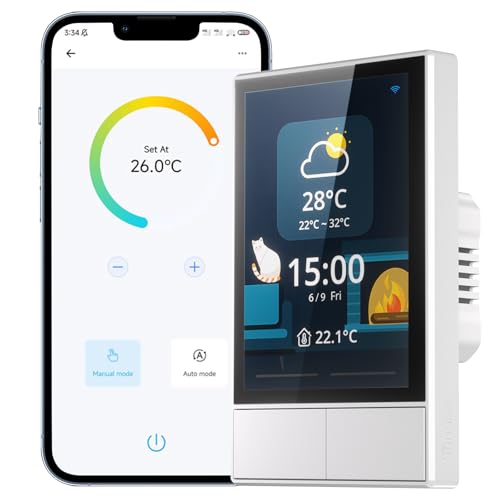
- Combines dual-channel switching with touchscreen control
- Includes thermostat scheduling and temperature information
- Supports grouped SONOFF devices, scenes, apps, and voice control
Best For: SONOFF users wanting lighting and climate controls together
Best Alexa-Ready Hub – MOES Smart Home Control Panel
The MOES Smart Home Control Panel is a practical option for households seeking smart home control panels for multiple users. Its 5-inch touchscreen, built-in Alexa, and integrated Zigbee gateway bring compatible devices and scenes into one central interface.
Best For: Smart Life households that want touch, voice, and Zigbee control from one wall-mounted-style panel.
Pros:
- Works with a broad range of Smart Life devices, including lights, switches, cameras, sockets, and locks.
- Built-in Alexa supports hands-free control of devices, scenes, and voice skills.
- Integrated Zigbee gateway can eliminate the need for a separate hub.
- Supports wired or wireless networking and Type-C or circuit-connected power.
Cons:
- Its broad compatibility is specifically centered on Smart Life devices and ecosystems.
- The supplied notes do not specify advanced multi-user account features.
Choose this panel when centralized control and Alexa integration matter most. The combination of Zigbee hub functionality and flexible installation makes it a capable starting point for a connected home.
Best for Monitoring – SONOFF NSPanel Pro 120
The SONOFF NSPanel Pro 120 suits shoppers comparing smart home control panels for multiple users who want more than lighting control. Its 4.7-inch display combines device management with energy tracking, camera viewing, thermostat adjustments, security modes, and saved webpages.
Best For: Homes that want a compact touchscreen for security alerts, cameras, energy statistics, and everyday controls.
Pros:
- Provides access to lighting, thermostat, cameras, energy use, and other controls from one display.
- Supports three customizable security modes with alarms and phone notifications.
- Can display live feeds from supported cameras.
- Tracks daily energy consumption over a week for devices with energy-statistics functions.
Cons:
- Camera monitoring depends on supported camera types.
- Energy tracking applies to devices that provide energy statistics.
- The supplied notes do not identify specific multi-user permissions.
This is a strong fit for shared spaces where users benefit from visible security, camera, and energy information. Its web-browsing feature also makes the panel more versatile than a basic control screen.
Best Whole-House Lighting Option – LANBON LCD Magic Panel
The LANBON LCD Magic Panel is a lighting-focused choice among smart home control panels for multiple users. It combines touch controls, app access, Alexa and Google Assistant support, scheduling, and Wi-Fi Mesh connectivity for whole-house lighting setups.
Best For: Homes needing customizable smart light switches with app, touch, and voice control across multiple locations.
Pros:
- LCD interface supports personalized names, icons, button colors, and edge-light colors.
- Wi-Fi Mesh technology is designed to help maintain connectivity throughout the house.
- Supports app scheduling, remote access, Alexa, and Google Assistant voice control.
- Can configure wireless three-way control through the app.
Cons:
- Requires a neutral wire and a regular single-pole gang box.
- Works with the Smart Living app, not Smart Life, Tuya, or HomeKit.
- Requires 2.4GHz Wi-Fi and does not offer dimming.
Consider this panel when shared lighting control is the priority rather than whole-home device management. Its customizable LCD and app-based three-way configurations are useful, but installation and ecosystem requirements should be checked first.
Best White Smart Home Panel – SONOFF NSPanel Pro 120 White
The white SONOFF NSPanel Pro 120 is a flexible option for buyers seeking smart home control panels for multiple users in a shared household. Its 4.7-inch touchscreen centralizes lighting, thermostat, camera, security, and energy-related functions in a compact AC-powered design.
Best For: Users who want a white touchscreen panel for visible home monitoring and centralized everyday controls.
Pros:
- Combines home controls, camera viewing, thermostat adjustments, and energy monitoring.
- Offers three configurable security modes with alarm and phone-notification support.
- Supports live monitoring from compatible cameras.
- Includes a webpage feature for saving and quickly opening addresses.
Cons:
- Live camera support depends on compatible camera types.
- Energy statistics require devices with supported energy-monitoring functions.
- The supplied information does not detail separate user profiles or permissions.
The white finish makes this version a natural choice for rooms where appearance matters alongside functionality. It is best viewed as a multifunction control and monitoring display, not simply a conventional light switch.
Best Shared Lighting Upgrade – 2-Gang WiFi Glass Touch Switch
This 2-gang wall switch is a straightforward option for households comparing smart home control panels for multiple users. It combines touch control with Tuya or Smart Life app access, Alexa and Google Home voice control, scheduling, scenes, and device sharing for family members.
Best For: Families that mainly need shared, remote, and voice control of two lighting circuits.
Pros:
- Supports family sharing through the Tuya or Smart Life app.
- Offers app, touch, voice, timer, and scene-based control.
- Includes Alexa and Google Home compatibility.
- Uses a tempered-glass panel with stated fire and overload protection.
Cons:
- It is primarily a two-gang light switch rather than a full touchscreen home hub.
- The notes do not specify whether a neutral wire is required.
- It connects on 2.4GHz Wi-Fi.
Choose this model if shared lighting control is the priority and you prefer a clean glass touch surface. Its app sharing and automation features are useful for multiple household members, but shoppers wanting an at-a-glance control screen for many device types may prefer a dedicated panel.
Best Whole-Home Touch Hub – TONGOU 3-Switch Control Panel
The TONGOU panel is designed for shoppers seeking smart home control panels for multiple users and multiple device categories. Its 3.5-inch touchscreen can display and control devices and scenes in the Tuya or Smart Life ecosystem, while three physical buttons provide local switching.
Best For: Tuya or Smart Life homes that want room-based touchscreen access to lights, scenes, cameras, sensors, and other compatible devices.
Pros:
- Controls compatible switches, bulbs, cameras, door locks, alarms, and sensors from one panel.
- Supports manual buttons, touchscreen customization, app control, and voice commands.
- Can show devices by single room, multiple rooms, or the entire home.
- Supports on-screen pairing for Sigmesh sub-devices.
Cons:
- A neutral wire is required.
- It only supports 2.4GHz Wi-Fi during connection.
- Fit may depend on the existing switch box dimensions.
This is the most panel-oriented choice in the group, especially for homes where several users need quick access to different device types. Confirm the neutral-wire requirement and box compatibility before buying, then use its area partitioning to keep each user’s view focused.
Best Scene and Climate Panel – SONOFF NSPanel Smart Switch
The SONOFF NSPanel combines a two-channel wall switch with a touchscreen, thermostat functions, and scene control. For shoppers comparing smart home control panels for multiple users, it offers several ways to operate compatible devices through the panel, eWeLink app, Alexa, Google Home, and Siri Shortcuts.
Best For: SONOFF users who want shared wall-based scene control plus temperature-aware heating or cooling automation.
Pros:
- Combines dual-channel switching, touchscreen control, and eWeLink app access.
- Supports one-tap scenes and central control groups for compatible SONOFF devices.
- Built-in thermostat can trigger heating or cooling according to scheduled conditions.
- Displays time, date, weather, and indoor and outdoor temperature information.
Cons:
- Its broad central-control features are described primarily around SONOFF devices.
- Pairing requires a 2.4GHz Wi-Fi connection.
- The notes do not identify a family-sharing feature comparable to the first product.
Consider the NSPanel when climate automation and SONOFF scene control matter as much as lighting. It provides a more informative wall interface than a basic switch, though households using a mixed-brand ecosystem should verify device compatibility before committing.
Flexible ZigBee Hub – 4-Inch Touchscreen Scene Controller
For households comparing smart home control panels for multiple users, this wall-mounted controller offers centralized touch and voice access to compatible ZigBee and Bluetooth devices. Its scene-focused interface can reduce the need to manage lights, sensors, and other accessories across separate apps.
Best For: Homes using TUYA-compatible ZigBee or Bluetooth accessories that want wall-mounted scene control.
Pros:
- Supports centralized management of compatible lights, sensors, curtains, sockets, and other devices.
- 4-inch touchscreen enables one-tap scenes, schedules, and automation routines.
- Works with voice control and is designed for 100V–240V residential use.
- Compact wall-mount design fits standard concealed junction boxes.
Cons:
- Compatibility is centered on ZigBee, Bluetooth, and TUYA-related devices.
- Installation requires wall mounting and electrical setup.
This is a practical choice when multiple household members need a shared, always-available control point. Confirm device compatibility and installation requirements before buying.
Family Sharing Pick – Glass Panel Wi-Fi Light Switch
This 1-gang Wi-Fi wall switch is a straightforward option for smart home control panels for multiple users, especially when family members need shared app access. It combines touch control with TUYA or Smart Life app operation, voice commands, timers, and scene automation.
Best For: Families seeking shared control of a single lighting circuit through an app, touch panel, or voice assistant.
Pros:
- Sharing functionality lets family members access the device without repeating setup.
- Supports TUYA Intelligent or Smart Life app control over Wi-Fi or mobile data.
- Compatible with Alexa and Google Home voice control.
- Timers and custom scenes can automate lighting based on schedules or conditions.
Cons:
- Designed as a 1-gang, 1-way switch rather than a broader multi-device control panel.
- Listed operating voltage is 120 volts, so electrical compatibility should be checked.
Choose this model when shared access and convenient lighting automation matter more than controlling a wide range of smart-home device types from one screen. Its glass touch panel also provides a clean wall appearance.
Thermostat Control Choice – SONOFF NSPanel Smart Switch
SONOFF NSPanel is suited to households looking for smart home control panels for multiple users, with dual-channel switching, touchscreen access, app control, and voice support in one wall-mounted unit. Its integrated thermostat features make it more capable than a basic smart light switch.
Best For: SONOFF households wanting shared scene, lighting, appliance, and temperature control from one panel.
Pros:
- Combines dual-channel switching, touchscreen control, eWeLink app access, and voice operation.
- Supports grouped SONOFF devices and one-tap scene modes.
- Built-in thermostat can schedule temperatures and trigger heating or cooling systems.
- Displays time, date, weather, and indoor and outdoor temperature information.
Cons:
- Requires a 2.4GHz Wi-Fi connection for pairing.
- SmartThings devices are not supported according to the supplied notes.
- Broader compatibility is focused on SONOFF devices and listed voice platforms.
NSPanel is the strongest fit here for users who want lighting and home climate information together. It is worth considering if your household already uses SONOFF and eWeLink, but less suitable for a SmartThings-centered setup.
How We Picked the Best Smart Home Control Panels for Multiple Users
We focused on the features that affect shared household use: straightforward wall control, touchscreen visibility, smart-home ecosystem compatibility, scene support, multi-switch layouts, and installation requirements. The selection includes dedicated control panels, touchscreen wall switches, and models with built-in Zigbee gateways or Alexa compatibility.
Because compatibility varies between products, we also considered whether each panel is best suited to a simple lighting setup, a broader smart-home system, or a home where different users need convenient local controls. Features such as neutral-wire requirements, Wi-Fi band support, app dependence, and display size can have a greater practical impact than a long list of advertised integrations.
Quick Comparison
| Feature | What to look for | Best suited to |
|---|---|---|
| Built-in hub | Zigbee gateway or broader device integration | Homes expanding beyond Wi-Fi devices |
| Touchscreen | Clear display, responsive controls, useful scenes | Shared, glanceable wall control |
| Multi-gang layout | Two- or three-switch configurations | Rooms with several lighting circuits |
| Voice compatibility | Alexa or other supported platforms | Hands-free control alongside wall controls |
| Installation needs | Neutral wire, gang-box depth, wiring type | DIY buyers and retrofit projects |
Key Buying Factors for Smart Home Control Panels for Multiple Users
Compatibility and Ecosystem
Check support for the devices already installed in your home. A panel that works with Alexa may not directly control every Zigbee, Bluetooth, Matter, or proprietary device. If you want one interface for sensors, lights, and security accessories, a model with an appropriate built-in hub may be more useful than a basic Wi-Fi switch.
Controls and Visibility
Physical touch areas are often quicker for guests and children than opening an app. Look for a screen size and layout that can be read from the room, plus clearly labeled scenes or controls. Temperature displays, energy information, and security monitoring can add value, but only if the connected devices support those functions.
Wiring and Installation
Confirm whether the panel requires a neutral wire and whether its dimensions fit the existing electrical box. Also verify Wi-Fi requirements, especially when a product supports only 2.4GHz networks. Turn off power and use a qualified electrician if the wiring or installation is unfamiliar.
Shared Access and Reliability
Multiple users benefit from dependable local controls even when an app, cloud service, or phone is unavailable. Consider account permissions, guest access, offline behavior, startup time, and whether the panel can run important routines without relying entirely on voice commands.
Who Should Buy Which Smart Home Control Panels for Multiple Users?
Choose a panel with a Zigbee hub if you are building a larger mixed-device system and want fewer separate bridges. A touchscreen scene controller is a strong fit for households that want quick access to several routines from one wall location. Multi-gang smart switches make more sense when replacing a conventional switch controlling multiple circuits, while a single-gang glass panel is better for a focused lighting upgrade.
For renters or retrofit shoppers, verify wiring and installation limitations before prioritizing advanced features. Buyers who already use Alexa should favor models with confirmed Alexa support, while platform-flexible households should check every required integration rather than relying on general compatibility claims. Finally, place shared panels where people naturally enter or gather—such as an entryway, kitchen, or main hallway—so the controls are useful to everyone.