Managing household energy is easier when consumption data, automation, and device controls are available in one place. The best smart home control panels for energy management can help you identify waste, track circuits, coordinate connected devices, and respond to changing energy use.
This roundup includes dedicated energy monitors, touchscreen control panels, Zigbee hubs, local-control systems, and DIN-rail hardware. The right option depends on your electrical setup, smart-home platform, installation comfort, and how much control you want over your data.
Best 10 Smart Home Control Panels for Energy Management Picks for 2026
Whole-Home Visibility

- Tracks whole-home, solar, and net-metering usage
- Includes 16 branch-circuit sensors
- UL Listed with app-based automation
Best For: Detailed circuit-level monitoring and solar-aware energy management
Touchscreen Command Center

- 4.7-inch display for centralized control
- Tracks compatible devices' daily energy use
- Adds cameras, security, lighting, and thermostat control
Best For: Touchscreen smart-home control with basic energy statistics
Private Local Automation

- Local web UI, Open API, and MQTT access
- Native Home Assistant and solar automation support
- Monitors two mains and up to 16 branch circuits
Best For: Privacy-focused Home Assistant and solar households
Dynamic Load Balancing

- Coordinates connected residential electrical loads
- Helps support high-demand appliances without upgrades
- Uses wired Ethernet and the ReliaHome app
Best For: Managing expanding electrical loads within a ReliaHome Flex system
Most Detailed Circuit-Level Monitor
Refoss Smart Home Energy Monitor
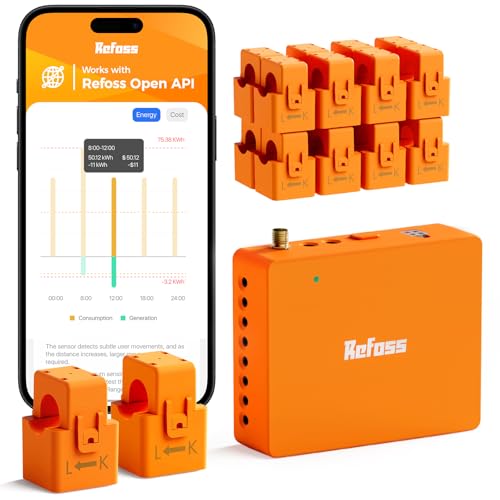
- Tracks 18 circuits with stated ±1% precision
- Provides local API, MQTT, and Home Assistant support
- Stores five years of daily data with CSV export
Best For: Private, circuit-by-circuit energy monitoring and automation
Best Touchscreen Smart Home Hub

- Combines a 5-inch touchscreen with built-in Alexa
- Includes an integrated Zigbee gateway
- Supports Smart Life devices and flexible networking
Best For: Centralized Smart Life device and scene control
Best App-Based Whole-Home Monitor
Emporia Vue 3 Home Energy Monitor

- Provides real-time electricity, solar, and net-metering data
- Uses UL- and CE-listed clamp-on monitoring hardware
- Supports app-based time-of-use and excess-solar management
Best For: App-centered whole-home and solar energy monitoring
Best Integrated Touchscreen
NSPanel Pro Energy Control Panel

- 4.7-inch touchscreen with Zigbee gateway
- Tracks selected devices' daily energy use
- Also controls security, cameras, lighting, and thermostat
Best For: Households wanting one touchscreen for energy visibility and smart-home control
Best Whole-Home Monitoring
Emporia Energy Monitor Super Bundle

- Tracks whole-home use and up to 16 circuits
- Includes four energy-monitoring smart plugs
- Supports solar, peak-demand, and time-of-use automation
Best For: Homeowners seeking detailed circuit-level monitoring and energy-saving control
Best DIN-Rail Load Control
SONOFF BASIC-ZB1GSP Smart Switch

- DIN-rail Zigbee switch rated up to 32A
- Adds energy monitoring, schedules, and automation
- Works with Home Assistant, Alexa, and SmartThings
Best For: Panel installations needing centralized Zigbee load control
Whole-Home Visibility – Emporia Vue 3
For shoppers comparing smart home control panels for energy management, the Emporia Vue 3 is a circuit-panel energy monitor focused on detailed, real-time usage data. Its included sensors track whole-home consumption, solar or net metering, and up to 16 branch circuits through the Emporia app.
Best For: Homeowners who want whole-home and appliance-level energy monitoring with solar support.
Pros:
- Includes sixteen 50A branch sensors for monitoring major appliances and circuits.
- Supports automation for time-of-use pricing, peak demand, excess solar, and rewards programs.
- UL Listed, with sensors rated for accuracy within ±2%.
- Provides live reporting, notifications, and exportable cloud data.
Cons:
- Requires 2.4 GHz Wi-Fi and an internet connection.
- Installation takes place inside the circuit panel and may require an appropriate electrical professional.
- One-second data is available only while the app is open and retained for three hours.
The Vue 3 is a strong choice when detailed circuit-level information matters more than having a wall-mounted touchscreen. Verify panel compatibility and installation requirements before buying.
Touchscreen Command Center – SONOFF NSPanel Pro 120
The SONOFF NSPanel Pro 120 takes a more traditional smart home control panel approach, combining a 4.7-inch touchscreen with energy-statistics monitoring. It can also provide camera viewing, thermostat and lighting control, security modes, and saved web pages from one central display.
Best For: Smart-home users who want an accessible touchscreen for energy statistics and broader device control.
Pros:
- Offers a larger 4.7-inch display for tap-based control.
- Tracks daily energy consumption over a week for selected compatible devices.
- Supports live viewing from four types of cameras.
- Combines energy, lighting, thermostat, security, and web functions.
Cons:
- Energy tracking depends on devices with energy-statistics functions.
- The supplied notes do not specify whole-home circuit monitoring or solar/net-metering support.
- Its many functions may be more than needed if energy monitoring is the only goal.
This panel is best viewed as a convenient interface for an existing smart-home ecosystem rather than a dedicated electrical monitor. Choose it when visible, room-level control and multiple smart-home features are priorities.
Private Local Automation – Refoss EM16P Energy Monitor
The Refoss EM16P is designed for smart home control panels for energy management where local access and automation are important. It offers a built-in web interface, Open API, MQTT, native Home Assistant integration, circuit-level monitoring, and solar-surplus automation without requiring cloud services.
Best For: Home Assistant users, privacy-focused households, and solar owners seeking local, programmable energy control.
Pros:
- Provides local data access through its web UI, Open API, and MQTT.
- Works with Home Assistant without firmware flashing or complex coding.
- Supports solar self-consumption automation for loads such as EV chargers and water heaters.
- Monitors two main circuits and up to 16 branch circuits, with up to five years of daily data storage.
Cons:
- Panel installation is required, so setup may be more involved than a plug-in monitor.
- Advanced API, MQTT, and Home Assistant features may appeal less to users seeking a simple display.
- Accuracy varies by current level, with ±2% accuracy at low current.
The EM16P stands out for users who want ownership of their energy data and flexible automation. Its local-first design and solar features make it particularly compelling for technically minded households.
Dynamic Load Balancing – ABB ReliaHome Flex Hub
The ABB ReliaHome Flex Hub FXH1W is a wired coordination unit for residential load management. Rather than serving primarily as a consumer energy dashboard, it works with the ReliaHome Flex system to balance connected loads, monitor electrical demand, and help accommodate high-demand appliances without a costly panel upgrade.
Best For: Homes planning higher electrical loads that need coordinated management across connected panels and appliances.
Pros:
- Enables dynamic load balancing across connected residential panels.
- Can help support high-demand appliances without an electrical service upgrade.
- Uses Ethernet for a reliable internet connection.
- ReliaHome monitoring is designed to avoid unnecessary mid-cycle appliance shutdowns.
Cons:
- Requires the broader ReliaHome Flex system for its intended load-management role.
- Ethernet connectivity may be less flexible than a wireless hub.
- The supplied notes do not specify detailed circuit-level energy history or measurement accuracy.
The Flex Hub is a specialized infrastructure component rather than a standalone energy-monitoring display. It makes the most sense when load balancing and avoiding panel upgrades are central to the project.
Most Detailed Circuit-Level Monitor – Refoss Smart Home Energy Monitor
For shoppers comparing smart home control panels for energy management, the Refoss stands out as a circuit-level monitoring system rather than a traditional touchscreen panel. It tracks 18 circuits with stated ±1% precision, supports local integrations, and is designed for detailed audits of household electricity use.
Best For: Homeowners who want private, circuit-by-circuit energy data, solar optimization tools, and Home Assistant integration without a subscription.
Pros:
- Monitors two main circuits plus up to 16 branch circuits, supporting single-phase, split-phase, and 3-phase 4-wire Wye systems.
- Offers local web access, Open API, MQTT, WebSocket, and Home Assistant integration through Refoss_RPC.
- Stores daily data for up to five years and supports CSV export without a subscription.
- Includes energy alerts, solar self-consumption features, ETL certification, and a two-year warranty.
Cons:
- Installation involves working with a breaker panel and current-transformer sensors.
- Its extensive circuit coverage may be more than needed for basic whole-home monitoring.
The Refoss is a strong choice when granular data, local control, and long-term analytics matter most. It is better suited to technically confident buyers than to anyone seeking a simple plug-and-play display.
Best Touchscreen Smart Home Hub – MOES Smart Home Control Panel
The MOES Smart Home Control Panel is a practical option for shoppers seeking smart home control panels for energy management alongside broader device control. Its 5-inch touchscreen, built-in Alexa, and integrated Zigbee gateway let you manage compatible Smart Life devices, scenes, and connected home equipment from one wall-mounted-style interface.
Best For: Smart Life users who want a central touchscreen hub with voice control and Zigbee connectivity.
Pros:
- Works with a broad range of Smart Life devices, including switches, bulbs, sockets, cameras, and door locks.
- Built-in Alexa supports hands-free control of devices, scenes, and voice skills.
- Integrated Zigbee gateway eliminates the need for a separate Zigbee hub.
- Supports wired or wireless networking and Type-C or circuit-connected power.
Cons:
- The supplied notes do not identify dedicated electricity measurement or circuit-monitoring features.
- Compatibility is centered on Smart Life devices and may not cover every smart-home ecosystem.
Choose the MOES when the priority is convenient, centralized control of smart-home devices rather than detailed energy analytics. It can serve as an accessible control interface, but it is not a substitute for a dedicated circuit-level energy monitor.
Best App-Based Whole-Home Monitor – Emporia Vue 3 Home Energy Monitor
The Emporia Vue 3 is a strong fit for buyers comparing smart home control panels for energy management who prefer app-based monitoring. Installed in the circuit panel, it provides real-time electricity data, solar and net-metering monitoring, and app-based automation for time-of-use, peak-demand, and excess-solar settings.
Best For: Homeowners who want UL-certified whole-home monitoring with mobile, web, and solar-management features.
Pros:
- UL and CE listed, with clamp-on sensors for installation in the circuit panel.
- Supports real-time monitoring, solar and net-metering views, and automated energy-management settings.
- Works with iPhone, Android, and web apps and reports sensor accuracy of ±2%.
- Supports single-phase, split-phase, and qualifying 2-wire systems.
Cons:
- Requires 2.4 GHz Wi-Fi and an internet connection.
- Some three-phase, four-wire Wye installations require an additional 200A sensor sold separately.
- Data retention varies: one-second data is limited, while minute and hour data are stored in the cloud.
The Vue 3 offers a balanced route to whole-home energy visibility, especially for households using solar or time-of-use pricing. Its app and cloud dependency may be less appealing to buyers seeking fully local data control.
Best Integrated Touchscreen – NSPanel Pro Energy Control Panel
For shoppers comparing smart home control panels for energy management, the SONOFF NSPanel Pro combines energy-use tracking with broader household controls on a 4.7-inch touchscreen. It can display energy statistics for selected compatible devices while also handling lighting, thermostat adjustments, security modes, and camera viewing.
Best For: Households wanting a wall-style touchscreen for energy visibility and everyday smart-home controls.
Pros:
- Tracks daily energy consumption for selected devices over a week.
- Combines energy monitoring, thermostat, lighting, security, and camera functions.
- Includes a 4.7-inch display and Zigbee gateway functionality.
Cons:
- Energy tracking depends on devices with compatible energy-statistics functions.
- The notes do not specify detailed circuit-level monitoring.
The NSPanel Pro is a versatile choice when you want energy information alongside a central touchscreen for other home functions. It is less focused on whole-home electrical measurement than dedicated monitoring equipment.
Best Whole-Home Monitoring – Emporia Energy Monitor Super Bundle
The Emporia bundle is a strong option for smart home control panels for energy management when detailed electrical visibility matters more than a dedicated wall display. Its monitor tracks whole-home usage and up to 16 circuits, while four smart plugs add outlet-level monitoring, remote control, and scheduling through the Emporia app.
Best For: Homeowners who want circuit-level energy tracking, smart-plug control, and automation for usage or savings goals.
Pros:
- Monitors whole-home electricity use plus up to 16 individual circuits.
- Includes four smart plugs with outlet-level energy data and schedules.
- Supports solar net metering, time-of-use settings, peak-demand management, and excess-solar automation.
Cons:
- Energy data and controls are centered on the Emporia app rather than a supplied touchscreen panel.
- Installation of the whole-home monitor may require appropriate electrical expertise.
With second-by-second visibility, cloud access, and automation features, this bundle is the most measurement-focused option in the group. It is especially useful for identifying circuit-level savings opportunities and controlling connected plug-in devices.
Best DIN-Rail Load Control – SONOFF BASIC-ZB1GSP Smart Switch
For a more installation-focused approach to smart home control panels for energy management, the SONOFF BASIC-ZB1GSP adds Zigbee control and energy monitoring inside a 35mm DIN-rail electrical panel. It supports loads up to 32A and enables app-based remote control, schedules, timers, and automation scenes.
Best For: Residential or commercial installations that need centralized Zigbee switching and monitoring for electrical loads.
Pros:
- Designed for 35mm DIN-rail electrical panels and loads up to 32A.
- Provides energy monitoring, remote control, timers, schedules, and automation scenes.
- Works with Home Assistant, Alexa, SmartThings, and compatible Zigbee hubs.
- Includes overload and overvoltage protection.
Cons:
- Requires electrical-panel installation rather than simple plug-in setup.
- Its IP20 rating is intended for suitable indoor panel environments.
- It is a switch and controller, not a complete whole-home monitoring bundle.
The BASIC-ZB1GSP is a practical building block for centralized load control, particularly in Zigbee-based systems. Choose it when panel-mounted switching and automation are priorities, and plan for proper installation within its electrical specifications.
How We Picked These Smart Home Control Panels for Energy Management
We focused on products that combine energy visibility with practical smart-home control or automation potential. The selection includes whole-home monitors, circuit-level systems, touchscreen hubs, Zigbee controllers, and panel-mounted equipment. We considered measurement coverage, sensor capacity, real-time reporting, local versus cloud operation, integration support, installation requirements, and compatibility with platforms such as Home Assistant, Alexa, and Zigbee.
Because these products serve different roles, features should be compared by use case rather than by price alone. A dedicated monitor may provide better electrical data, while a touchscreen hub may offer a simpler way to control lights, sensors, and scenes.
Quick Comparison
- Best for detailed whole-home tracking: Choose a monitor with multiple current sensors and circuit-level expansion.
- Best for local automation: Look for open API support, Home Assistant compatibility, and no-cloud operation.
- Best for touchscreen control: A wall-mounted panel with Zigbee or Alexa support offers an accessible interface for everyday commands.
- Best for electrical-panel integration: DIN-rail switches and dedicated control units suit structured installations but may require professional help.
- Best for flexible expansion: Select systems that support additional sensors, smart plugs, scenes, and third-party devices.
Key Buying Factors
Measurement Coverage and Accuracy
Decide whether you need whole-home usage, individual circuit data, appliance-level readings, or all three. Sensor count matters in larger homes, while smart plugs can fill gaps for individual devices. Verify that the monitor supports your electrical service and installation method before buying.
Integration and Data Privacy
For a broad ecosystem, check compatibility with Alexa, Zigbee, Home Assistant, or your preferred automation platform. Local APIs and local control reduce dependence on remote servers and can improve reliability, but they may require more setup. Cloud-connected systems are often easier to configure and use remotely.
Control Interface and Automation
Touchscreen panels are convenient for household members who do not want to use an app. Look for schedules, scenes, alerts, load monitoring, and automation triggers. If the panel is mainly a display, confirm whether it can actually control compatible devices.
Installation and Electrical Safety
Current transformers, circuit sensors, and DIN-rail equipment interact with household wiring. Follow the manufacturer’s instructions and use a qualified electrician when installation involves opening a service panel or connecting line-voltage equipment.
Who Should Buy Which Smart Home Control Panels for Energy Management?
Choose a whole-home energy monitor if your priority is understanding consumption, solar production, or major circuit loads. These systems are particularly useful for finding high-use appliances and measuring progress after efficiency improvements.
Choose a touchscreen smart-home panel if you want a shared wall control for scenes, sensors, lights, and selected energy information. This is often the most approachable choice for households that prefer physical controls over phone apps.
Choose an open, local-control monitor if you already use Home Assistant or want automations that continue working without a cloud service. Expect more configuration and troubleshooting than with a closed ecosystem.
Choose DIN-rail or professional control hardware for a planned electrical-system installation, centralized load control, or integration into a larger residential automation setup. These products are best suited to users comfortable with structured wiring or working with an installer.