Finding dependable internet in a dorm, apartment, or shared house can be harder than it should be. The right mesh system helps eliminate dead zones, keep video calls stable, and support multiple devices without constant troubleshooting.
This roundup of the best mesh Wi-Fi systems for students focuses on easy setup, strong coverage, and value for money so you can choose a system that fits your space and budget.
Best 10 Mesh Wi-Fi Systems for Students Picks for 2026
Campus-Ready Whole-Home Coverage
TP-Link Deco X55 AX3000 WiFi 6 Mesh System (3-Pack)

- Wi‑Fi 6 AX3000 mesh with up to 6,500 sq. ft. coverage
- Supports up to 150 devices and wired Ethernet backhaul
- Deco app setup plus HomeShield security tools
Best For: Student apartments and shared homes needing broad, stable Wi‑Fi
Speed-Heavy Mesh for Busy Networks
Cudy AX3000 Wi‑Fi 6 Mesh System (3-Pack)

- AX3000 Wi‑Fi 6 with 160 MHz channels and fast roaming
- 2.5G WAN port plus support for 200+ clients
- Includes VPN server/client features and app control
Best For: Students with faster internet plans and advanced networking needs
Budget-Friendly Student Mesh
TP-Link Deco S4 AC1900 Mesh System (3-Pack)

- Affordable AC1900 mesh with up to 5,500 sq. ft. coverage
- Supports up to 100 devices and seamless roaming
- Easy app setup with wired backhaul support
Best For: Students who want reliable mesh Wi‑Fi on a tighter budget
Future-Proof Dorm and Apartment Mesh

- Wi‑Fi 7 mesh with speeds up to 4324 Mbps on 5 GHz
- Covers up to 6,600 sq. ft. and over 150 devices
- Supports wired/wireless backhaul with app setup
Best For: Students who want the newest mesh standard and long-term flexibility
Budget-friendly gigabit coverage for student housing
Amazon eero 6+ mesh wifi system

- Gigabit-capable mesh at a lower price point
- TrueMesh helps reduce dead spots
- App-guided setup and remote management
Best For: Students who want simple, reliable whole-home coverage
Future-ready speed for busy campuses
TP-Link Deco 7 BE23 WiFi 7 Mesh System

- Wi-Fi 7 with MLO and 4K-QAM
- 2.5G ports and wired backhaul support
- Covers up to 4,500 sq. ft. and 150 devices
Best For: Students who want Wi-Fi 7 and multi-gig flexibility
Simple mesh coverage on a student budget
Tenda Nova MW5G Mesh WiFi System

- Covers up to 3,500 sq. ft.
- Supports up to 80 devices
- Easy app-based setup and management
Best For: Budget-conscious students who need basic whole-home coverage
Top Pick for Heavy Student Networks
TP-Link Deco XE70 Pro Tri-Band WiFi 6E Mesh

- Wi‑Fi 6E adds a 6 GHz band for lower congestion
- Supports up to 200 devices with tri-band mesh
- Includes 2.5 Gbps ports and wired backhaul support
Best For: Larger student homes or shared apartments with lots of devices
Best Value for Shared Dorms
TP-Link Deco X15 AX1500 WiFi 6 Mesh 3-Pack
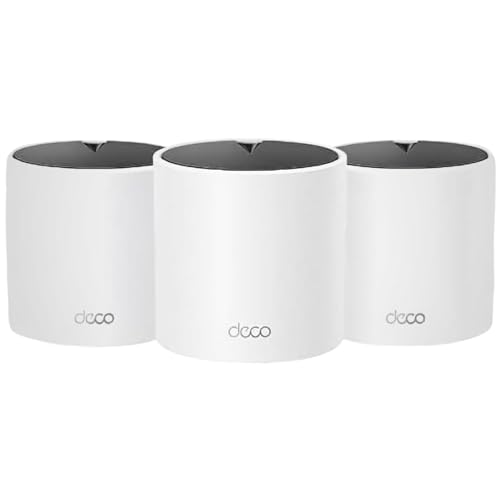
- Wi‑Fi 6 AX1500 dual-band mesh system
- Covers up to 5,600 sq. ft. and 120 devices
- Two Gigabit ports per unit with Ethernet backhaul
Best For: Shared student homes that need broad coverage on a budget
Compact Choice for Smaller Student Spaces
TP-Link Deco X15 AX1500 WiFi 6 Mesh 2-Pack

- Wi‑Fi 6 AX1500 dual-band mesh system
- Covers up to 3,900 sq. ft. with 2 units
- Two Gigabit ports per unit with Ethernet backhaul
Best For: Smaller student apartments or suites
Campus-Ready Whole-Home Coverage – TP-Link Deco X55 AX3000 WiFi 6 Mesh System (3-Pack)
If you’re comparing mesh Wi-Fi systems for students, the TP-Link Deco X55 is built for busy households that need strong, consistent coverage across multiple rooms. It uses Wi‑Fi 6, supports wired Ethernet backhaul, and is designed to handle lots of connected devices without turning every study session into a buffering problem.
Best For: Student apartments, shared houses, or dorm-style setups that need reliable whole-home Wi‑Fi with plenty of device support.
Pros:
- Wi‑Fi 6 AX3000 speeds with coverage up to 6,500 sq. ft.
- Supports up to 150 devices, which is useful for laptops, phones, tablets, and smart gear.
- Each unit includes 3 Gigabit Ethernet ports and supports wired backhaul.
- Deco app setup, AI-driven mesh, and HomeShield security features.
Cons:
- Requires a separate modem for most internet providers.
- Security features and parental controls are strongest through TP-Link’s software ecosystem.
Overall, the Deco X55 is a strong all-around pick if you want a student-friendly mesh system that favors coverage, stability, and easy management over fancy extras.
Speed-Heavy Mesh for Busy Networks – Cudy AX3000 Wi‑Fi 6 Mesh System (3-Pack)
For mesh Wi‑Fi systems for students who stream, game, and work across several rooms, the Cudy AX3000 stands out for speed and flexibility. It combines Wi‑Fi 6, a 2.5G WAN port, and wired or wireless mesh backhaul, making it a practical choice when your network has to keep up with a lot of traffic.
Best For: Students who want faster wired internet support, strong device handling, and built-in VPN options.
Pros:
- AX3000 Wi‑Fi 6 with 160 MHz channels and fast roaming.
- 1x 2.5G WAN plus 1x Gigabit LAN for higher-speed internet plans.
- Supports 200+ clients and includes wired/wireless backhaul.
- Built-in VPN server/client support and app-based management.
Cons:
- Coverage is listed as 2,900 sq. ft. for the 3-pack, which is less than some larger mesh kits.
- Advanced VPN and network controls may be more than casual users need.
The Cudy M3000 is a good fit if you want a student mesh system that leans toward performance, wired speed, and advanced networking features rather than the simplest possible setup.
Budget-Friendly Student Mesh – TP-Link Deco S4 AC1900 Mesh System (3-Pack)
If you want mesh Wi‑Fi systems for students without jumping to the newest standards, the TP-Link Deco S4 is a straightforward, budget-friendly option. It focuses on reliable whole-home coverage, simple app setup, and seamless roaming, which is often exactly what a student apartment or shared house needs.
Best For: Students looking for an affordable mesh system with easy setup and dependable coverage.
Pros:
- Covers up to 5,500 sq. ft. with a 3-pack.
- Supports up to 100 devices, enough for typical student households.
- Simple app setup and one network name/password for roaming.
- Includes 2 Gigabit Ethernet ports per unit and wired backhaul support.
Cons:
- Uses AC1900 Wi‑Fi instead of Wi‑Fi 6 or Wi‑Fi 7.
- Doesn’t include the newer advanced networking features found on pricier systems.
The Deco S4 keeps the focus on practical coverage and easy daily use, so it makes sense when the priority is stable student Wi‑Fi at a lower entry cost.
Future-Proof Dorm and Apartment Mesh – Deco 7 Wi‑Fi 7 Mesh System
For students who want one of the newest mesh Wi‑Fi systems available, the Deco 7 brings Wi‑Fi 7 performance to a whole-home setup. It’s aimed at heavy use cases like 4K/8K streaming, gaming, and lots of connected devices, while still keeping setup simple through the Deco app.
Best For: Students who want a newer Wi‑Fi 7 mesh system with strong coverage and room to expand later.
Pros:
- Wi‑Fi 7 mesh with speeds up to 4324 Mbps on 5 GHz.
- Covers up to 6,600 sq. ft. and supports over 150 devices.
- Supports wired and wireless backhaul for stable whole-home coverage.
- Deco app setup, AI roaming, and TP-Link HomeShield security features.
Cons:
- Wi‑Fi 7 features may be overkill for basic student internet plans.
- All Wi‑Fi routers require a separate modem.
Deco 7 is the most forward-looking option in this group, so it makes the most sense if you want a student mesh system that can handle heavier traffic now and newer devices later.
Budget-friendly gigabit coverage for student housing – Amazon eero 6+ mesh wifi system
If you want mesh Wi-Fi systems for students that balance speed, simplicity, and coverage, the eero 6+ is a practical pick. It supports internet plans up to a gigabit, covers up to 4,500 sq. ft. with the 3-pack, and uses TrueMesh to help reduce dead spots in apartments, dorm-style setups, or shared houses.
Best For: Students who want easy setup, reliable whole-home coverage, and gigabit-capable performance without paying a premium.
Pros:
- Supports internet speeds up to a gigabit.
- TrueMesh technology helps reduce drop-offs and dead spots.
- Setup is guided through the eero app and can be managed from anywhere.
- Built-in smart home hub supports compatible Thread and Zigbee devices.
Cons:
- Advanced security and some network management features require a separate subscription.
- Best value depends on whether you actually need gigabit-level service.
The eero 6+ is strongest when you want a straightforward mesh system that can handle busy student routines like streaming, video calls, and multiple devices at once. It is a solid fit for shared living spaces where reliable coverage matters more than complex networking features.
Future-ready speed for busy campuses – TP-Link Deco 7 BE23 WiFi 7 Mesh System
For students who want a more future-ready option among mesh Wi-Fi systems for students, the Deco 7 BE23 brings Wi-Fi 7 features, strong coverage, and wired-backhaul flexibility. It covers up to 4,500 sq. ft. in the 2-pack, supports up to 150 devices, and includes 2.5G ports for faster wired connections.
Best For: Students in larger homes or shared spaces who want Wi-Fi 7, multi-gig support, and strong network flexibility.
Pros:
- Wi-Fi 7 features include MLO, Multi-RUs, and 4K-QAM.
- Two 2.5 Gbps WAN/LAN ports per unit support wired backhaul and multi-gig gear.
- Coverage reaches up to 4,500 sq. ft. with support for 150 devices.
- AI-Roaming and a single network name help keep connections seamless while moving around.
Cons:
- Wi-Fi 7 benefits are most noticeable with newer compatible devices.
- More advanced than many students may actually need for basic schoolwork and streaming.
The Deco 7 BE23 is a strong choice if you want to buy once and stay ahead of your network needs. It stands out for students who split time between classes, gaming, streaming, and heavy device use in one shared network.
Simple mesh coverage on a student budget – Tenda Nova MW5G Mesh WiFi System
If you need mesh Wi-Fi systems for students on a tighter budget, the Tenda Nova MW5G focuses on the basics: broad coverage, simple roaming, and easy setup. It covers up to 3,500 sq. ft., supports up to 80 devices, and uses a single network name so devices can move around the home more smoothly.
Best For: Budget-conscious students who need simple whole-home Wi-Fi for everyday use.
Pros:
- Covers up to 3,500 sq. ft. and supports up to 80 devices.
- Single network name helps make roaming simpler.
- MU-MIMO and beamforming are included for better device handling.
- The Tenda app makes setup, monitoring, and management easy.
Cons:
- AC1200 is more modest than faster gigabit-class or Wi-Fi 7 systems.
- Security is WPA2-PSK rather than newer WPA3-based protection.
The MW5G makes sense when you want dependable coverage without paying for features you may not use. It is a straightforward fit for students who mainly need stable internet for homework, streaming, and everyday browsing.
Top Pick for Heavy Student Networks – TP-Link Deco XE70 Pro Tri-Band WiFi 6E Mesh
If you need mesh Wi-Fi systems for students that can handle lots of devices, the TP-Link Deco XE70 Pro is built for busy households and shared living spaces. Its Wi‑Fi 6E design adds a congestion-free 6 GHz band, while tri-band networking and AI roaming help keep laptops, phones, consoles, and streaming devices connected smoothly.
Best For: Students in larger homes or shared apartments who need fast, reliable coverage for many connected devices.
Pros:
- Wi‑Fi 6E with a 6 GHz band for less interference
- Up to 4.9 Gbps speeds and support for up to 200 devices
- 2.5 Gbps WAN/LAN ports plus wired backhaul support
- Deco app setup and remote management are built in
Cons:
- Three-pack coverage may be more than some small student spaces need
- Best features are geared toward users with many devices or faster internet plans
Overall, this is the strongest option here if your student network needs room to grow and you want fewer slowdowns during classes, gaming, and streaming.
Best Value for Shared Dorms – TP-Link Deco X15 AX1500 WiFi 6 Mesh 3-Pack
For students who want dependable mesh Wi-Fi systems for students without stepping up to Wi‑Fi 6E, the TP-Link Deco X15 is a practical dual-band choice. It covers up to 5,600 sq. ft., supports up to 120 devices, and uses mesh roaming to keep connections steady across rooms and floors.
Best For: Student houses, shared apartments, or dorm-style setups that need broad coverage and simple management.
Pros:
- Dual-band Wi‑Fi 6 AX1500 with mesh roaming
- Up to 5,600 sq. ft. coverage and support for 120 devices
- Two Gigabit ports per unit with Ethernet backhaul support
- Deco app setup plus Alexa and Google Assistant compatibility
Cons:
- Does not include the 6 GHz band found on higher-end models
- Three-pack size may be more than needed for smaller spaces
This is a solid middle-ground pick if you want simple setup, strong whole-home coverage, and wired backhaul flexibility for a student network.
Compact Choice for Smaller Student Spaces – TP-Link Deco X15 AX1500 WiFi 6 Mesh 2-Pack
If your priority is keeping a smaller student apartment or suite covered, this two-pack version of the TP-Link Deco X15 is a straightforward mesh Wi-Fi option. It uses the same Wi‑Fi 6 AX1500 dual-band design, AI roaming, and app-based setup as the larger kit, but with coverage sized for more compact spaces.
Best For: Students in smaller apartments, suites, or dorm-adjacent homes who want easy mesh coverage without overbuying.
Pros:
- Wi‑Fi 6 AX1500 dual-band mesh performance
- Covers up to 3,900 sq. ft. with a 2-pack
- Two Gigabit ports per unit and Ethernet backhaul support
- Works with the Deco app, Alexa, and Google Assistant
Cons:
- Lower coverage than the 3-pack version
- Still lacks the 6 GHz band of Wi‑Fi 6E systems
This is the most space-conscious pick in the group, making it a better fit when you want mesh reliability for studying, streaming, and everyday use without a large-scale setup.
How We Picked the Best Mesh Wi-Fi Systems for Students
We prioritized systems that are easy to install, reliable under everyday student workloads, and flexible enough for small rooms or shared housing. That means strong whole-home coverage, solid device capacity, and features that reduce network headaches, such as app-based management and straightforward port layouts.
We also considered value. For students, the best option is not always the fastest one on paper; it is the one that stays stable for classes, streaming, gaming, and group projects without overspending.
Quick Comparison
Among Mesh Wi-Fi Systems for Students, dual-band models usually offer the best budget value, while tri-band and Wi-Fi 6E/7 options make more sense for larger homes, heavier device loads, or future-proofing. Compact setups work well for dorms and one-bedroom apartments, while higher-coverage kits suit shared homes where rooms are farther apart.
Best Fit by Use Case
Budget: AC or AX dual-band systems
Best balance: Wi-Fi 6 mesh kits with gigabit ports
Best for busy networks: Tri-band or Wi-Fi 6E systems
Best for future-proofing: Wi-Fi 7 mesh systems
Key Buying Factors for Mesh Wi-Fi Systems for Students
Coverage: Match the rated square footage to your actual living space, but leave some margin for walls, floors, and awkward layouts.
Speed and standard: Wi-Fi 6 is a strong baseline for most students. Wi-Fi 6E and Wi-Fi 7 can help if many devices are active at once or if you want more headroom for the future.
Device support: If you share internet with roommates, check how many connected devices the system can handle comfortably.
Ports and wired backhaul: Ethernet ports matter for consoles, desktop PCs, or a printer. Faster multi-gig ports can also help if your internet plan is above gigabit speed.
Setup and app controls: A simple app, guest network tools, and parental controls can make daily use much easier.
Who Should Buy Which Mesh Wi-Fi Systems for Students?
If you live in a dorm or small apartment, a simpler dual-band kit is often enough. If you are in a shared house with several heavy internet users, step up to a stronger Wi-Fi 6, 6E, or 7 system for better consistency. Students with gaming PCs, large file transfers, or lots of smart devices should look closely at models with more ports and higher throughput. In short, the best mesh Wi-Fi system is the one that fits your space, your roommates, and your monthly budget.