The best educational robot kits for advanced learners turn coding concepts into hands-on projects involving sensors, motors, controllers, and mechanical design. The right kit should challenge the builder without creating unnecessary setup frustration.
We selected 10 options spanning Arduino-compatible platforms, programmable robot arms, tank cars, walking robots, and multi-build STEM systems. Use the guide below to match each kit’s programming support, project depth, and age suitability to your learner.
Best 10 Educational Robot Kits for Advanced Learners Picks for 2026
Advanced Tank Lab
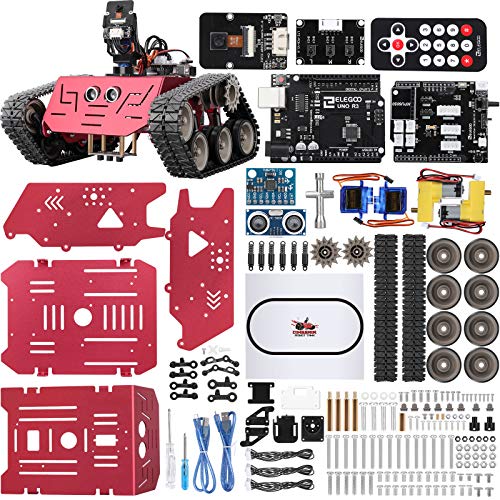
- Metal tracked chassis with UNO R3 control
- Five driving and autonomous modes
- Progresses from block coding to Arduino IDE
Best For: Arduino navigation, FPV, and robotics experiments
Expandable Coding Starter

- Quick, approximately 15-minute assembly
- Scratch-to-Arduino learning path
- Supports extensive Makeblock add-ons
Best For: Foundational coding and expandable robotics projects
Multi-Project Electronics Workshop
Butterfly EduFields 10-in-1 Kit

- More than 100 electronic components
- Ten guided STEM robotics projects
- Includes line-following and obstacle-avoidance activities
Best For: Broad introductory electronics and robotics exploration
Best for App-Based Building

- 600+ blocks and 12 robot designs
- Drag-and-drop coding with sensors
- Compatible with major building blocks
Best For: Kids 8+ exploring construction and app-based coding
Best for Advanced Robotics Projects

- ESP32 platform with Arduino, Python, and Blockly
- Five-degree-of-freedom robotic arm
- Mecanum wheels and sensor-based navigation
Best For: Teens 12+ and adults pursuing technical robotics projects
Best for Hands-On Mechanical Coding
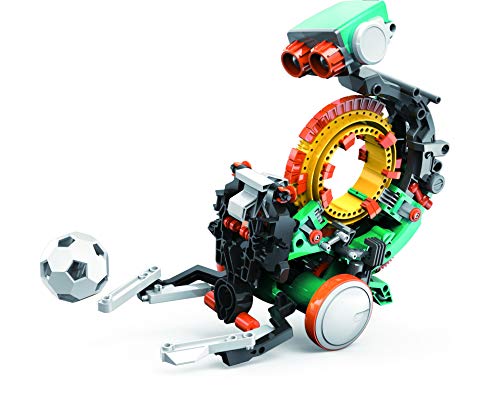
- Mechanical coding wheel controls actions
- Builds, throws, lifts, kicks, and draws
- Detailed multi-hour STEM assembly project
Best For: Ages 10+ learning mechanical engineering through building
Best Modular Pick

- Four robot configurations for varied builds
- 5DOF arm with ESP32 control
- Arduino and Scratch support with tutorials
Best For: Teens and advanced builders exploring mechanical robotics and coding
Best Multi-Model Build

- 757 pieces create five robot models
- Four app and remote control modes
- Illustrated instructions support independent building
Best For: Families and students who prioritize construction variety and experimentation
Best for Coding Progression
ACEBOTT Multi-Language Robot Car

- Scratch, Arduino, and Python support
- Mobile, tablet, and computer coding
- Guided assembly with no soldering
Best For: Learners progressing from block coding to Arduino and Python
Advanced Tank Lab – Conqueror Robot Tank Kit
For learners ready to move beyond basic educational robot kits for advanced learners, the ELEGOO Conqueror combines a metal tracked chassis, UNO R3 control, sensors, and Wi-Fi FPV video. It supports visual programming through the ElegooKit app before progressing to Arduino IDE projects involving motor speed, sensor thresholds, servos, and navigation logic.
Best For: Advanced beginners and coding clubs exploring Arduino robotics, autonomous navigation, and FPV control.
Pros:
- Metal tracked chassis with suspension, sensors, and UNO R3 controller.
- Five interactive modes include FPV driving, obstacle avoidance, line tracking, and auto follow.
- Supports a progression from block coding to Arduino IDE programming.
- Includes the camera, battery, tools, and components for a no-solder build.
Cons:
- The build is more involved and substantial than a simple starter robot.
- A compatible phone is needed for live FPV video.
- Recommended for ages 10 and up, so younger learners may need supervision.
This is the strongest choice here for learners who want a substantial vehicle platform with multiple sensing and programming challenges. Its expandable control logic makes it suitable for repeated experiments rather than a one-project build.
Expandable Coding Starter – Makeblock mBot
The Makeblock mBot is a more approachable entry point among educational robot kits for advanced learners, offering a clear path from Scratch to Arduino. Its quick assembly, coding cards, apps, and compatibility with additional Makeblock modules let learners begin with guided activities and gradually create more ambitious projects.
Best For: Younger learners building foundational programming, electronics, and robotics skills with room to expand.
Pros:
- Designed to assemble in about 15 minutes with clear instructions.
- Supports Scratch and Arduino programming through Makeblock software and apps.
- Includes line-following and obstacle-avoidance functions.
- Compatible with more than 100 electronic modules and 500 parts from the Makeblock platform.
Cons:
- Requires four AA batteries, which are not included.
- The remote controller requires a CR2025 battery, also not included.
- Its 8–12 positioning may make it less challenging for experienced programmers without add-ons.
mBot works well when the priority is a gentle, structured introduction that can grow with the learner. The open-source platform and add-on compatibility provide a useful bridge from guided lessons to custom builds.
Programmable Motion Project – ACEBOTT ESP8266 Spider Robot
The ACEBOTT ESP8266 Spider Robot adds a different challenge to educational robot kits for advanced learners: programming coordinated movement in a six-legged design. Its eight lessons, ESP8266 motherboard, metal servos, app control, and six movement modes create a guided route from assembly and electronics principles to interactive motion experiments.
Best For: Learners ages 12 and up who want hands-on programming practice with walking mechanisms and servo-based movement.
Pros:
- Uses an ESP8266 controller and customized rudder for programmable motion.
- Offers six movement modes and nine preset actions.
- Includes a paper manual, eight lessons, and electronic tutorial materials.
- Pre-burned programming allows operation after assembly without downloading the tutorial.
Cons:
- A flat-top battery is required but not included.
- The walking mechanism may require more careful assembly than a wheeled robot.
- The supplied age information is inconsistent, listing both 8+ and a design focus of 12+.
This spider platform is a good fit when mechanical motion is more appealing than standard car-style robotics. Its lessons and preset actions reduce the starting barrier while leaving room to study servos, control, and movement sequencing.
Multi-Project Electronics Workshop – Butterfly EduFields 10-in-1 Kit
The Butterfly EduFields 10-in-1 kit is a broad hands-on option among educational robot kits for advanced learners who want to sample robotics, electronics, and mechanics. With more than 100 components, illustrated instructions, and projects involving line following and obstacle avoidance, it offers a project-based introduction rather than one fixed robot design.
Best For: Children ages 8–12 exploring multiple STEM builds and basic electronic components through guided activities.
Pros:
- Includes more than 100 components, including wires, switches, connectors, and LEDs.
- Provides 10-in-1 robotics and science project activities.
- Step-by-step illustrated instructions support independent building.
- Includes sensor-control functions such as line following and obstacle avoidance.
Cons:
- It is oriented toward introductory STEM exploration rather than advanced programming.
- The supplied notes do not specify a programming environment or controller platform.
- The broad assortment may provide less depth in any single robotics project.
This kit is most useful as a varied electronics workshop for learners who benefit from short, guided builds. Choose it over a programmable platform when component exploration and project variety matter more than Arduino-level coding.
Best for App-Based Building – Apitor Robot X 12-in-1
The Apitor Robot X is a versatile option for families looking for educational robot kits for advanced learners who enjoy building and experimenting. Its 600+ blocks, sensors, motors, and graphical coding app support 12 different robot builds and progressively challenging projects.
Best For: Kids ages 8 and up who want a reusable building kit with app-based programming and multiple robot designs.
Pros:
- Builds and rebuilds into 12 robot models using more than 600 blocks.
- Includes infrared and color sensors, three motors, and multicolor LED lights.
- Drag-and-drop app programming supports line following, obstacle avoidance, distance detection, and LED control.
- Works with major building block toys for expanded creations.
Cons:
- Requires a compatible iOS or Android phone or tablet, which is not included.
- Requires three AA batteries, also not included.
- The manufacturer recommends building the first robot with parent assistance.
Robot X offers a strong balance of construction variety and accessible coding. It is especially appealing when the learner wants open-ended building without immediately moving to a more advanced hardware platform.
Best for Advanced Robotics Projects – ACEBOTT 5DOF Robot Arm Car
The ACEBOTT Smart Robot Arm Car is aimed at older learners seeking educational robot kits for advanced learners with a more technical project scope. Its ESP32 controller, Arduino/Python/Blockly compatibility, Mecanum wheels, sensors, and five-degree-of-freedom arm create a platform for assembly, programming, and motion experiments.
Best For: Teens 12 and up, adults, and programming enthusiasts interested in robotic arms, omnidirectional movement, and expandable control projects.
Pros:
- Five-degree-of-freedom arm supports grabbing, lifting, and placing objects.
- Mecanum wheels enable forward, sideways, diagonal, and rotational movement.
- Supports Arduino, Python, and Blockly programming with an ESP32 controller.
- Includes ultrasonic and infrared sensors plus remote and app control.
Cons:
- Batteries are not included.
- Its metal, multi-function design may be more demanding than beginner robot kits.
- The supplied notes describe it as an assembly project, so learners should allow time for construction.
This kit is the most technically ambitious choice in the group. The robotic arm and omnidirectional chassis give advanced learners meaningful mechanical and programming challenges beyond simple driving or block-based assembly.
Best for Hands-On Mechanical Coding – TEACH TECH Mech-5
The TEACH TECH Mech-5 is a focused choice among educational robot kits for advanced learners who prefer mechanical engineering over app-based programming. Learners assemble the robot and place coding buttons on its mechanical coding wheel to control actions such as throwing, lifting, kicking, and drawing.
Best For: Future engineers ages 10 and up who want a structured, hands-on introduction to mechanical coding and robot assembly.
Pros:
- Mechanical coding wheel provides a tangible way to sequence robot actions.
- Can throw, lift, kick, draw, and perform other hands-on movements.
- Detailed assembly makes it a substantial STEM building project with multiple hours of build time.
- Introduces mechanical engineering principles and coding basics without requiring an app.
Cons:
- It is an entry-level mechanical coding robot rather than a programmable sensor platform.
- Assembly requires careful attention to the step-by-step instructions.
- Requires two AAA batteries, which are not listed as included.
Mech-5 is a good fit for learners who understand concepts best by physically building and sequencing mechanisms. Its mission-based design keeps the project approachable while still providing a substantial assembly experience.
Best Modular Pick – ACEBOTT 4-in-1 Robot Arm Tank
For advanced learners seeking educational robot kits for advanced learners, the ACEBOTT 4-in-1 combines mechanical building, programming, and hands-on experimentation. Its ESP32 controller, 5DOF arm, Arduino and Scratch compatibility, and 16 guided tutorials provide a practical path from guided projects to more independent robotics challenges.
Best For: Teens and experienced builders who want multiple robot configurations, a programmable arm, and all-terrain tank functionality.
Pros:
- Supports four build configurations, including a robot arm car, tank robot, and combined arm tank.
- 5DOF programmable arm introduces gripping, lifting, and object placement.
- Works with Arduino and Scratch and includes 16 story-based tutorials plus assembly videos.
- Tank treads are designed for grass, gravel, slopes, and carpet.
Cons:
- The broad feature set may require more time and patience than a simpler starter kit.
- Its recommended age is 12 and up, making it less suitable for younger beginners.
This is the strongest choice here for learners who want to explore both robotics mechanics and coding in a flexible, expandable format. App and IR remote control also make it approachable before moving into more complex programming.
Best Multi-Model Build – HPROMOT 5-in-1 Coding Robot
The HPROMOT is one of the more substantial educational robot kits for advanced learners who enjoy construction as much as coding. With 757 pieces, five robot models, app and remote control, and four operating modes, it offers a broad project platform for children and teens developing engineering and problem-solving skills.
Best For: Families and students who want a large building set that can progress from guided assembly to programming and multi-mode control.
Pros:
- 757 pieces allow five distinct robot builds.
- Offers remote, path, gravity, and programming modes through the app or remote.
- Supports 360-degree rotation and all-direction movement.
- Colorful illustrated instructions are designed to support independent or family building.
Cons:
- The remote controller needs two AAA batteries, which are not included.
- A 757-piece build may be time-consuming and potentially challenging for younger users.
- App setup requires Bluetooth and location permissions for pairing.
Choose this kit when variety and construction depth matter most. It is less focused on a particular advanced programming language, but its multiple models and control modes create plenty of room for iterative building and experimentation.
Best for Coding Progression – ACEBOTT Multi-Language Robot Car
The ACEBOTT QD106 is a flexible option among educational robot kits for advanced learners because it supports Scratch, Arduino, and Python. Beginners can start with block coding, while older students can move toward text-based programming using an ESP32-controlled robot car and 16 story-based tutorials.
Best For: Learners who want one robot platform that can support beginner-friendly Scratch projects and more advanced Arduino or Python practice.
Pros:
- Three programming options—Scratch, Arduino, and Python—support skill progression.
- Can be programmed on computers, tablets, smartphones, and iPads.
- Includes HD videos and illustrated instructions with no soldering required.
- App and IR remote control provide immediate feedback during projects.
Cons:
- Batteries are not included.
- The product details list a 12-plus manufacturer recommendation, despite describing use for ages 8–16.
- Its vehicle format may offer less mechanical variety than a multi-configuration kit.
This is the best fit for learners whose main goal is coding progression rather than building several robot types. Broad device compatibility also makes it practical for classroom, training-center, and at-home learning environments.
How We Picked These Educational Robot Kits for Advanced Learners
We focused on kits that offer more than simple assembly or remote control. Important considerations included programmable controllers, sensor or motor variety, construction flexibility, documented learning paths, and support for platforms such as Arduino, Scratch, Blockly, Python, or dedicated mobile apps. We also considered whether a kit can support repeated projects instead of becoming a one-build novelty.
Because “advanced” varies by age and experience, this roundup includes both approachable systems with room to grow and more technically demanding kits involving robot arms, multi-axis movement, wireless control, or several build configurations.
Quick Comparison
- Best for Arduino experimentation: Choose an Arduino-compatible tank, car, spider, or robot-arm kit.
- Best for visual coding: Look for Scratch, Blockly, or app-based programming with clear project instructions.
- Best for mechanical variety: Multi-build kits provide more ways to explore drive systems, linkages, and sensors.
- Best for structured STEM learning: Kits with guided lessons and age-specific activities are easier to use in classrooms or supervised home projects.
- Best for ambitious builders: Robot arms and kits with Python or Arduino support offer greater control and customization.
Key Buying Factors for Educational Robot Kits for Advanced Learners
Programming and Controller Support
Check which languages and boards are actually supported. Arduino compatibility is useful for expanding beyond included examples, while Python may suit learners moving toward more advanced automation. Scratch, Blockly, and app controls can provide a smoother starting point without limiting future experimentation.
Build Complexity and Documentation
A high parts count does not automatically mean deeper learning. Prioritize clear assembly instructions, wiring diagrams, code examples, and troubleshooting help. Advanced learners benefit from kits that explain why a mechanism works, not just where each part goes.
Sensors, Motion, and Project Range
Motors, ultrasonic or infrared sensors, wireless modules, grippers, and multiple drive modes create more meaningful programming challenges. Consider whether the kit supports obstacle avoidance, line following, remote operation, autonomous routines, or custom attachments.
Compatibility and Replacement Parts
Verify operating-system, app, battery, and cable requirements before buying. Standard components and widely available replacement parts can make an inexpensive kit more valuable over time, especially when learners modify the design or make wiring mistakes.
Who Should Buy Which Educational Robot Kits for Advanced Learners?
Choose a guided visual-coding kit for younger learners or beginners who need quick successes before tackling hardware logic. An Arduino-compatible car or tank is a strong choice for learners ready to study sensors, motor drivers, and autonomous navigation. Robot-arm kits suit builders interested in precision, servos, inverse movement concepts, and Python or block-based control. Multi-build systems are best for families, clubs, or classrooms that want several projects from one purchase.
Before ordering, match the kit to the learner’s current programming level, available workspace, and willingness to troubleshoot. The most useful Educational Robot Kits for Advanced Learners are those that leave room for experimentation after the first successful build.