The best educational robot kits for home learning turn coding, electronics, and engineering into hands-on projects children can see and control. The right choice depends on age, guidance needed, build complexity, and whether the child prefers screen-free play or programmable robotics.
We compared 10 popular kits across those factors to help families choose a practical STEM activity that matches a child’s interests, confidence, and available learning space.
Best 10 Educational Robot Kits for Home Learning Picks for 2026
Best Programmable Starter

- Scratch and Arduino learning path
- Line-following and obstacle avoidance
- Expandable with Makeblock and LEGO parts
Best For: Ages 8-12 beginning coding and robotics
Best Hands-On Preschool Build

- Screen-free take-apart robot activity
- Builds fine-motor and engineering skills
- Includes screwdriver, bolts, and stickers
Best For: Ages 3-7 learning through construction play
Best Multi-Project Electronics Kit

- More than 100 electronic components
- Ten guided robotics projects
- Includes LED, switch, and sensor activities
Best For: Ages 8-12 exploring DIY electronics and robotics
Best Screen-Free Coding Play

- Screen-free remote coding activities
- Includes 78 pieces for maze building
- Teaches sequencing and problem-solving
Best For: Ages 5-10 starting early programming
Best for Hands-On STEM Variety

- 40+ projects with 100+ components
- Plug-and-play, no soldering required
- Includes reusable sensors and project manuals
Best For: Kids seeking varied, hands-on STEM projects at home
Best for Screen-Free Beginners
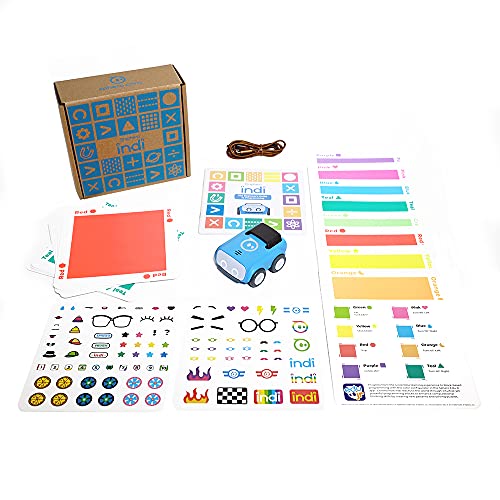
- Designed for learners ages 4 and up
- Teaches coding with color cards and mazes
- Optional app adds drag-and-drop blocks
Best For: Young children beginning coding through play
Best for Build-and-Collect Fun

- Build 36 robots, including 14 motorized models
- Includes sorting tray for organized storage
- Full-color instructions and video tutorials
Best For: Ages 8–13 who enjoy repeat mechanical builds
Best Screen-Free Starter

- Screen-free coding with remote programming
- Includes cards, tiles, arms, and obstacles
- Builds sequencing, loops, and logic skills
Best For: Young beginners and homeschool coding activities
Best Multi-Project Value

- Includes six different build projects
- Encourages construction and problem solving
- Comes with screwdriver and detailed instructions
Best For: Hands-on builders ages 8–12 and family STEM time
Best Programmable Build
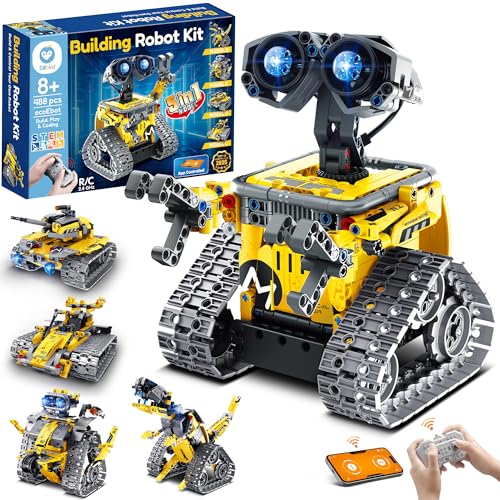
- Builds five progressive robot models
- Offers remote and Bluetooth app control
- Includes 488 pieces and rechargeable play
Best For: Older builders seeking construction and programming
Best Programmable Starter – Makeblock mBot
The Makeblock mBot is a strong choice among educational robot kits for home learning when children are ready to move from simple construction into coding and robotics. Designed for ages 8 and up, it can be assembled in about 15 minutes and supports Scratch and Arduino programming.
Best For: Kids ages 8-12 who want a reusable robot platform for coding, electronics, and hands-on building.
Pros:
- Supports step-by-step learning with Scratch, Arduino, coding cards, lessons, and Makeblock software.
- Includes interactive features such as line-following and obstacle avoidance.
- Metal construction and compatibility with more than 100 electronic modules, 500 parts, and LEGO components support expansion.
- Clear building instructions make initial assembly approachable.
Cons:
- AA batteries for the robot and a CR2025 battery for the remote controller are not included.
- Its programming features may be more advanced than necessary for younger beginners.
Choose the mBot if you want a starter robot that can grow with a child’s interests. Its combination of guided lessons and an open-source, expandable design gives home learners room to progress beyond the first project.
Best Hands-On Preschool Build – Design & Drill Robot
The Educational Insights Design & Drill Robot is a simple, screen-free option among educational robot kits for home learning. Rather than programming, children assemble and take apart the robot with a kid-friendly screwdriver, practicing early construction and problem-solving skills.
Best For: Young builders ages 3-7 who are developing fine-motor control, creativity, and basic engineering skills.
Pros:
- Includes a robot with swiveling head, arms, and upper body for hands-on assembly play.
- Colorful bolts and decorative stickers add variety to the building activity.
- The screwdriver activity supports eye-hand coordination, fine-motor skills, and problem-solving.
- No batteries are required for operation.
Cons:
- It is a manual construction toy, not a programmable or electronically interactive robot.
- The kit is designed for younger children, so older learners may outgrow its activities.
This is a practical pick for introducing robotics-themed building without screens or coding. It works best as an early STEM construction activity rather than as a traditional electronic robot kit.
Best Multi-Project Electronics Kit – Butterfly EduFields 10-in-1
The Butterfly EduFields 10-in-1 kit offers a broad introduction to electronics, mechanics, and robotics for home learners. With more than 100 components, step-by-step instructions, and projects involving features such as sensors, LEDs, and switches, it is suited to children who enjoy building several different models.
Best For: Ages 8-12 seeking varied DIY STEM projects and an introduction to electronic components.
Pros:
- Provides 10-in-1 robotics projects with more than 100 components, including wires, switches, connectors, and LED lights.
- Illustrated, step-by-step instructions support independent project work.
- Encourages exploration of robotics, engineering, electronics, mechanics, and logical thinking.
- Some builds offer line-following and obstacle-avoidance functions.
Cons:
- The large number of components may require careful organization between projects.
- The supplied notes do not specify included batteries or a programming platform.
This kit is a good fit when variety matters more than a single polished robot. It gives children repeated opportunities to assemble working models and explore core electronics concepts through guided activities.
Best Screen-Free Coding Play – Botley 2.0 Coding Robot
Botley 2.0 is a friendly, screen-free choice among educational robot kits for home learning, especially for children who are new to programming concepts. Kids use a remote programmer and coding cards to create command sequences, then build routes with boards and obstacles.
Best For: Children ages 5-10 learning sequencing, planning, and early coding through physical play.
Pros:
- Uses a remote control and coding cards to introduce programming without a screen.
- Includes 40 coding cards, six double-sided boards, and stackable obstacle pieces for custom challenges.
- Supports multi-step paths, 45-degree turns, and object-sensing reactions.
- Lights, sounds, music, and 16 secret code combinations add variety to play.
Cons:
- Five AAA batteries are required and are not listed as included.
- It is focused on remote coding play rather than robot assembly or electronics construction.
Botley 2.0 is particularly useful for families wanting an accessible introduction to coding logic. Its reusable maze materials make it easy to create progressively more challenging activities at home or in a homeschool setting.
Best for Hands-On STEM Variety – 40-in-1 Robotics Kit
For families comparing educational robot kits for home learning, the ButterflyEdufields kit offers a broad, hands-on introduction to electronics, sensors, and robotics. Children ages 8–12 can build more than 40 projects, including a line-following car, drawing robot, fan controller, and flame extinguisher robot.
Best For: Kids who want a large selection of screen-free STEM and home-automation projects.
Pros:
- Includes more than 100 components and supports 40+ projects.
- Uses plug-and-play parts without requiring soldering, special tools, or prior coding knowledge.
- Includes sensors for detecting flame, touch, motion, light changes, and magnetic objects.
- Detailed instructions and concept manuals support guided learning.
Cons:
- Recommended for children roughly ages 8–17, so it may be too advanced for younger learners.
- Requires AA batteries, and the supplied battery holder is not suitable for Duracell batteries.
Choose this kit when variety matters most and your child is ready to explore multiple electronics-based builds. Its reusable sensors and large parts assortment provide substantial project range for homeschooling or extended home activities.
Best for Screen-Free Beginners – Sphero indi Learning Kit
Among educational robot kits for home learning, Sphero indi is a strong entry point for younger children. Designed for ages 4 and up, it teaches colors, directions, patterns, cause and effect, and basic programming through custom mazes and color cards, with an optional app for drag-and-drop coding.
Best For: Preschool and early-elementary learners who need an approachable, screen-free introduction to coding.
Pros:
- Children can begin playing and learning without reading or using a screen.
- Color cards and the onboard color sensor introduce programming logic and cause and effect.
- Customizable mazes encourage creativity, exploratory play, and problem solving.
- Optional Sphero Edu Jr app provides simplified drag-and-drop blocks for additional practice.
Cons:
- Its entry-level design may be less suitable for older children seeking advanced robotics or electronics.
- The app-enabled learning option requires access to a compatible device.
Sphero indi is best when independent, play-based learning is the priority. The color-card system keeps the first steps accessible, while the optional app provides a gradual path toward more structured coding.
Best for Build-and-Collect Fun – 36-in-1 Motor Robotics Kit
For shoppers seeking educational robot kits for home learning, the JOVA Klever Kits set emphasizes repeated building and mechanical exploration. Recommended for ages 8–13, it lets children make 36 different robots, including 14 motorized models such as walking machines and racing cars.
Best For: Kids who enjoy constructing multiple mechanical models and sharing screen-free projects with family or friends.
Pros:
- Offers 36 robot builds, including 14 motorized designs.
- Supports learning in science, engineering, mechanics, problem solving, and logical thinking.
- Sorting tray keeps components organized and simplifies cleanup.
- Includes a full-color instruction booklet and video tutorials.
Cons:
- Recommended age range is 8–13, limiting its fit for younger children.
- The focus is on building models rather than sensor-based electronics projects.
This kit suits children who are motivated by variety and tangible mechanical builds. The organized parts tray and video guidance can make multi-model projects easier to manage, while family play adds a collaborative option.
Best Screen-Free Starter – Botley the Coding Robot
For families seeking educational robot kits for home learning, Botley offers an approachable screen-free introduction to sequencing, logic, and programming. Children can use the remote programmer to create paths, obstacle courses, and commands of up to 80 steps.
Best For: Young learners ages 5 and up who are beginning coding activities at home or in a homeschool setting.
Pros:
- Screen-free format supports hands-on coding practice.
- Includes Botley, remote programmer, coding cards, tiles, detachable arms, and obstacles.
- Introduces sequencing, loops, and if/then logic.
Cons:
- Requires 5 AAA batteries.
- Its recommended age range is primarily younger children, so advanced learners may outgrow it.
Botley is a practical choice when you want a ready-to-use coding robot without requiring a tablet or app. Its included activity pieces make it especially convenient for structured lessons and independent play.
Best Multi-Project Value – 6-in-1 Robotics STEM Set
This six-project set gives families exploring educational robot kits for home learning several hands-on builds in one package. Children assemble projects such as a reptile robot, balance car, bubble machine, fiber lamp, and sliding plane while practicing construction and problem-solving skills.
Best For: Children roughly ages 8–12 who enjoy building multiple electronic and science-project models with family support.
Pros:
- Offers six separate robot and STEM projects.
- Supports construction, concentration, coordination, and problem-solving practice.
- Includes a screwdriver and step-by-step instruction manuals.
- Works well for family bonding, classroom activities, or gift giving.
Cons:
- Assembly-based projects may require adult guidance for younger builders.
- The supplied notes do not identify a rechargeable power system or app control.
This kit is a strong value for children who prefer making and experimenting over repeatedly programming one robot. Its variety can also help maintain interest across multiple home-learning sessions.
Best Programmable Build – Sillbird 5-in-1 Robot Kit
For older children who want educational robot kits for home learning with both construction and control, the Sillbird set combines 488 building pieces with programmable play. Kids can create five models, including a robot, dinosaur, car, and tank, then operate them through a remote or Bluetooth app.
Best For: Builders ages 8 and up who are ready for progressive models, app-assisted control, and screen-free hands-on construction.
Pros:
- Five buildable models offer different difficulty levels.
- Supports remote control, Bluetooth app control, path functions, and basic programming.
- Includes 488 pieces and clear, colorful step-by-step instructions.
- Rechargeable battery provides up to 40 minutes of play per charge.
Cons:
- Assembly and programming may be challenging for younger children without help.
- App-based control means some features depend on a compatible device.
- The listed battery information is inconsistent, so buyers should verify power requirements.
This is the most feature-rich option of the three for children who want to build, rebuild, and control their creations. Its progressive designs make it a better fit for sustained interest than a single-model beginner robot.
How We Picked the Best Educational Robot Kits for Home Learning
We focused on kits that support meaningful STEM learning through building, coding, electronics, problem-solving, or robotics projects. Our selection includes screen-free coding robots, beginner construction toys, multi-project electronics kits, and programmable platforms. We considered recommended age ranges, project variety, included components, setup demands, control methods, and how well each kit can support independent or guided learning at home.
Because children learn differently, no single kit is best for every family. A simple activity robot may be more useful for a young beginner than a technically advanced set that requires extensive adult assistance.
Quick Comparison
- Best for screen-free coding: Botley and Sphero Indi offer accessible programming activities without requiring a traditional coding setup.
- Best for structured building: The Design & Drill Robot provides a straightforward construction experience for younger children.
- Best for expanding projects: The 10-in-1 and 36-in-1 kits offer multiple builds for children who enjoy experimenting.
- Best for coding progression: Makeblock mBot provides a clearer path from basic assembly to programmable robotics.
- Best for remote-control play: The Sillbird robot kit combines construction with hands-on vehicle control.
Key Buying Factors for Educational Robot Kits for Home Learning
Age and Skill Level
Check whether the recommended age matches the child’s patience, fine-motor skills, and previous STEM experience. Younger beginners generally benefit from larger parts, visual instructions, and short activities. Older children may prefer sensors, motors, reusable components, and open-ended builds.
Screen-Free or App-Based Learning
Screen-free robots are useful when parents want unplugged activities or simpler setup. App- or computer-compatible kits can introduce block coding and more advanced programming, but they may require a compatible device and additional troubleshooting.
Project Variety and Reusability
Multi-project kits can maintain interest longer, especially when children enjoy rebuilding designs. However, a kit with fewer projects may provide a better learning experience if its instructions are clearer and the core activities are easier to extend.
Adult Involvement and Parts Management
Consider how much assembly, calibration, and supervision the kit requires. Small electronic components, batteries, and tools can make a project more rewarding, but they also increase the need for adult guidance and organized storage.
Who Should Buy Which Educational Robot Kits for Home Learning?
Choose a screen-free coding robot for a child beginning to learn sequencing, commands, and problem-solving. Pick a drill-and-build or remote-control kit when construction and physical play are the main priorities. For children who want to explore circuits, motors, and multiple robot designs, a larger electronics set is likely the better fit.
Families seeking a longer-term learning path should consider a programmable platform such as mBot, while parents prioritizing quick, low-friction activities may prefer a ready-to-use coding robot. Before buying, verify the current age recommendation, required batteries or devices, included tools, and whether replacement parts are available.