OLED gaming monitors can make long sessions feel easier on the eyes while delivering fast response times and stunning contrast. But the best choice depends on your space, resolution preference, and how you play.
Below, we focus on the features that matter most for marathon gaming: smooth motion, sensible screen sizes, strong brightness handling, and the right protection for extended use.
Best 10 OLED Gaming Monitors for Long Sessions Picks for 2026
Glossy Speed Pick
LG 27GX704A-B 27-inch 240Hz QHD OLED

- 240Hz refresh with 0.03ms response time
- UL anti-glare, flicker-free, low blue light
- Up to 1300 nits peak brightness
Best For: Long-session players who want a bright glossy OLED with comfort features
High-Refresh Value Pick

- 280Hz refresh rate with 0.03ms response time
- QD-OLED color with 99% DCI-P3 and Delta E ≤2
- OLED Care 2.0 plus graphene heatsink
Best For: Competitive gamers who want top-end speed and panel care features
Balanced Performance Pick

- 240Hz refresh with 0.03ms response time
- QD-OLED with 99% DCI-P3 color
- OLED Care 2.0 and adjustable stand
Best For: Gamers wanting a balanced OLED with strong ergonomics and care features
Ultra-Bright Dual-Mode OLED
LG 32GX870A-B 32-inch 4K OLED Gaming Monitor
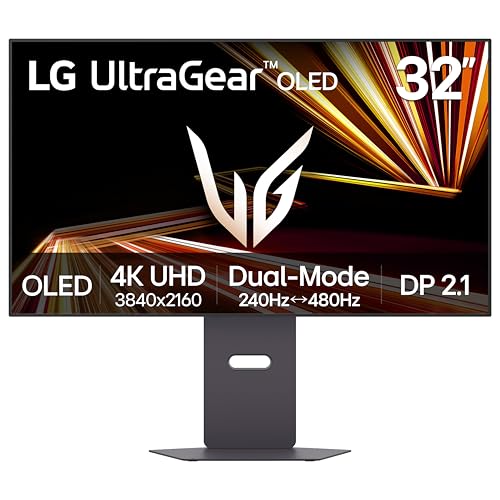
- 4K 240Hz or Full HD 480Hz dual mode
- 0.03ms response time with anti-glare OLED
- Peak brightness up to 1300 nits
Best For: Gamers who want one large OLED for both immersive and competitive play
Glossy Dual-Mode 4K Pick
Samsung 32" Odyssey OLED G7 G73SH

- 4K 165Hz or Full HD 330Hz dual mode
- Glossy OLED with VESA True Black 400
- Height-adjustable stand with pivot and swivel
Best For: Players who want a 32-inch OLED with strong contrast and a simple dual-mode setup
Comfort-Focused QD-OLED
ASUS ROG XG27UCDMG 27-inch 4K 240Hz

- 4K 240Hz QD-OLED with 0.03ms response
- OLED Anti-Flicker 2.0 for more comfortable viewing
- Neo Proximity Sensor and burn-in coverage
Best For: Gamers who want comfort-focused OLED features and strong panel protection
LG UltraGear Pick

- 32-inch 4K UHD glossy OLED panel
- Dual Mode: 4K 165Hz or Full HD 330Hz
- 0.03ms response time with UL eye-comfort certifications
Best For: Gamers who want a large OLED for both immersive play and high-speed sessions
Alienware Ultrawide Choice

- 34-inch UWQHD QD-OLED panel
- 280Hz refresh rate for fluid motion
- 0.03ms response time with G-SYNC support
Best For: Players who want a fast ultrawide OLED for immersive long sessions
ASUS Protection-Focused Pick
27-inch 1440p 240Hz Glossy OLED

- 26.5-inch QHD glossy WOLED panel
- 240Hz refresh rate and 0.03ms response time
- OLED Care Pro with Neo Proximity Sensor and burn-in coverage
Best For: Gamers who want a smaller OLED with strong protection for long sessions
Glossy Speed Pick – LG 27GX704A-B 27-inch 240Hz QHD OLED
If you want an OLED gaming monitor for long sessions that still feels fast and comfortable, the LG 27GX704A-B is built around that balance. Its 27-inch QHD OLED panel pairs 240Hz gaming with 0.03ms response time, while the UL-certified anti-glare, flicker-free, and low blue light design helps reduce distractions during extended play.
Best For: Players who want a bright, glossy OLED with strong eye-comfort features for long gaming sessions.
Pros:
- 240Hz refresh rate and 0.03ms response time for very smooth, responsive gameplay
- UL certifications for anti-glare, flicker-free, and low blue light support extended use
- Up to 1300 nits peak brightness and 98.5% DCI-P3 for vivid, detailed visuals
- HDMI 2.1, DisplayPort, and G-SYNC Compatible plus FreeSync Premium Pro support
Cons:
- Glossy finish may not suit every lighting setup
- 27-inch screen size may feel compact for users wanting a larger desktop display
- OLED care settings may require occasional attention to manage retention risk
Overall, this LG model stands out if you want OLED punch and high refresh speed without giving up comfort-focused features. It is a practical fit for players who game for hours and still want a clean, sharp image.
High-Refresh Value Pick – MSI MAG 271QP QD-OLED X28
For OLED gaming monitors for long sessions, the MSI MAG 271QP QD-OLED X28 offers a strong mix of speed, color, and built-in panel care. Its 280Hz refresh rate and 0.03ms response time are aimed at fast competitive play, while OLED Care 2.0 and the fanless graphene heatsink help support the panel over time.
Best For: Competitive gamers who want a very fast QD-OLED panel with software support for long-term use.
Pros:
- 280Hz refresh rate and 0.03ms response time for ultra-smooth motion
- QD-OLED panel with 99% DCI-P3 and Delta E ≤2 accuracy for rich color
- OLED Care 2.0 and graphene heatsink are built to help with durability and burn-in prevention
- USB-C with 15W power delivery plus HDMI 2.1 and DisplayPort 1.4a add flexible connectivity
Cons:
- 27-inch 1440p format may not appeal to buyers who want a larger screen
- USB-C power delivery is limited to 15W
- Like most OLED displays, long-term image retention management still matters
This MSI display is a strong pick if you want premium motion clarity and color without sacrificing long-session features. It leans especially well toward players who want aggressive refresh rates and practical OLED maintenance tools.
Glare-Free Comfort Pick – Samsung Odyssey OLED G5 27-inch QD-OLED
If your priority is comfort during long sessions, this Samsung Odyssey OLED G5 focuses on reducing distractions while keeping OLED image quality intact. The 27-inch QD-OLED QHD panel is paired with Glare Free technology, OLED Safeguard thermal protection, and a matte screen finish, making it easier to settle in for extended desktop gaming.
Best For: Gamers who play in bright rooms and want an OLED screen that stays easier on the eyes.
Pros:
- Glare Free matte finish helps reduce reflections in brighter rooms
- OLED Safeguard with Thermal Modulation System is designed to help prevent burn-in
- 180Hz refresh rate and 0.03ms response time keep gameplay responsive
- Pantone Validated color and HDR10 add accurate, vibrant image quality
Cons:
- 180Hz is lower than some competing OLED gaming monitors
- Single HDMI port may be limiting for multi-device setups
- Brightness is listed at 280 cd/m², which may not match the peak output of some rivals
As an OLED gaming monitor for long sessions, this Samsung is especially appealing if reflections and eye comfort matter as much as speed. It offers a balanced mix of practical protection features and solid gaming responsiveness.
Balanced Performance Pick – MSI MAG 274QP QD-OLED X24
The MSI MAG 274QP QD-OLED X24 is a well-rounded choice for OLED gaming monitors for long sessions when you want speed, color, and panel care without chasing the absolute highest refresh rate. Its 240Hz QD-OLED panel, 0.03ms response time, and MSI OLED Care 2.0 are aimed at players who want consistent gaming comfort and reliable image quality.
Best For: Gamers who want a fast QD-OLED display with practical burn-in prevention and flexible mounting.
Pros:
- 240Hz refresh rate and 0.03ms response time deliver smooth gameplay
- QD-OLED panel with 99% DCI-P3 and Delta E ≤2 supports strong color accuracy
- OLED Care 2.0 and AI Crosshair/Game Assistance add useful gaming tools
- 4-way adjustable stand and HDMI 2.1 plus DisplayPort 1.4a improve setup flexibility
Cons:
- Peak brightness is listed up to 400 nits, lower than some higher-tier options
- 27-inch screen size may be modest for users who want a more immersive panel
- Fanless heatsink and OLED care tools help, but OLED maintenance is still part of ownership
This MSI model is a sensible middle ground if you want a premium OLED feel without overcomplicating the buying decision. It combines useful long-session features with strong gaming performance and adaptable ergonomics.
Ultra-Bright Dual-Mode OLED – LG 32GX870A-B 32-inch 4K OLED Gaming Monitor
If you want one of the more versatile OLED gaming monitors for long sessions, the LG 32GX870A-B is built to cover both cinematic single-player games and high-speed competitive play. Its dual-mode setup lets you run 4K at up to 240Hz or switch to Full HD at up to 480Hz, while the anti-glare OLED panel and ergonomic stand help keep the experience comfortable over extended play.
Best For: Players who want a large 32-inch OLED with flexible performance for both story-driven games and fast FPS sessions.
Pros:
- Dual-mode operation switches between 4K 240Hz and Full HD 480Hz.
- 0.03ms response time helps reduce lag and ghosting.
- Micro Lens Array+ boosts OLED brightness, with up to 1300 nits peak brightness.
- Anti-glare panel and adjustable stand support longer viewing comfort.
Cons:
- 4K 240Hz and 480Hz modes are aimed at different use cases, so you won’t use both at once.
- The 32-inch size may be more monitor than some desk setups need.
This LG makes a strong case for long-session gaming because it combines high brightness, deep blacks, and flexible refresh-rate options in one display. The added OLED care tools and 2-year limited warranty also make it easier to consider for everyday use.
Glossy Dual-Mode 4K Pick – Samsung 32" Odyssey OLED G7 G73SH
The Samsung 32″ Odyssey OLED G7 is a practical choice for OLED gaming monitors for long sessions if you want 4K detail with an easy switch to high-refresh competitive play. It offers 4K at 165Hz or Full HD at 330Hz, plus a glossy OLED panel, VESA DisplayHDR True Black 400, and an ergonomic stand to keep the image sharp and the setup adjustable.
Best For: Gamers who want a 32-inch 4K OLED with a simple dual-mode option for mixed gaming styles.
Pros:
- Dual mode supports 4K 165Hz and Full HD 330Hz.
- Glossy OLED panel delivers vivid 4K visuals.
- VESA DisplayHDR True Black 400 adds deeper contrast and black levels.
- Height-adjustable stand can pivot, tilt, and swivel.
Cons:
- 165Hz in 4K is lower than some other premium 32-inch OLED options.
- Glossy screen finish may be less ideal in brighter rooms.
Overall, this Odyssey model focuses on clear image quality, flexible refresh rates, and comfortable positioning for extended play. It is a straightforward monitor to consider if you want a premium 32-inch OLED without extra complexity.
Comfort-Focused QD-OLED – ASUS ROG XG27UCDMG 27-inch 4K 240Hz
For OLED gaming monitors for long sessions, the ASUS ROG XG27UCDMG stands out with features aimed at comfort and panel longevity as much as speed. It combines 4K at 240Hz and 0.03ms response with OLED Anti-Flicker 2.0, a custom heatsink, and ASUS OLED Care Pro with a Neo Proximity Sensor that helps protect the panel when you step away.
Best For: Gamers who want a smaller 27-inch 4K OLED with comfort features and burn-in protection built in.
Pros:
- 240Hz refresh rate and 0.03ms response time for smooth gameplay.
- OLED Anti-Flicker 2.0 is designed to reduce flicker for more comfortable viewing.
- ASUS OLED Care Pro with Neo Proximity Sensor helps reduce burn-in risk.
- Custom heatsink supports thermal management during extended gaming sessions.
Cons:
- 27-inch screen is smaller than the 32-inch options in this group.
- Its premium feature set may be more than casual players need.
This ASUS is the most clearly session-friendly option here because it pairs fast QD-OLED performance with tools meant to reduce flicker and protect the panel over time. The 3-year warranty with burn-in coverage adds extra reassurance for long-term use.
LG UltraGear Pick – 32-inch 4K/330Hz Glossy OLED
If you’re comparing OLED gaming monitors for long sessions, this LG UltraGear is built to balance image quality, speed, and eye comfort. Its 32-inch glossy 4K OLED panel gives you sharp detail for story games and cinematic play, while Dual Mode lets you switch to 165Hz at 4K or 330Hz at Full HD when you want a faster competitive setup.
Best For: Players who want a large 32-inch OLED with flexible refresh options for both immersive and competitive gaming.
Pros:
- 32-inch 4K UHD glossy OLED panel with strong color and deep blacks.
- Dual Mode supports 4K 165Hz or Full HD 330Hz for different game types.
- 0.03ms response time helps reduce ghosting in fast motion.
- Three UL certifications for anti-glare, flicker-free, and low blue light support eye comfort.
Cons:
- Glossy screen finish may reflect more light than matte alternatives.
- 4K resolution at 32 inches may be overkill if you mainly play esports titles.
Overall, this model stands out if you want one monitor that can handle both long, detailed RPG sessions and quick-reflex shooters. The mix of brightness improvements, OLED contrast, and ergonomic adjustments makes it a strong all-around pick for extended use.
Alienware Ultrawide Choice – 34-inch UWQHD 280Hz QD-OLED
For OLED gaming monitors for long sessions, this Alienware 34-inch ultrawide is aimed at players who want a fast panel with a wide field of view. The UWQHD QD-OLED setup and 280Hz refresh rate make it a strong fit for smooth motion, while the 0.03ms response time helps keep rapid action crisp.
Best For: Gamers who want an ultrawide OLED with very high refresh speed for fluid, extended play.
Pros:
- 34-inch UWQHD QD-OLED panel for an immersive ultrawide experience.
- 280Hz refresh rate supports very fluid gameplay.
- 0.03ms response time helps minimize motion blur in fast games.
- G-SYNC support is included for smoother synchronized gameplay.
Cons:
- No burn-in or eye-comfort feature details are provided in the supplied notes.
- Ultrawide format may not suit every desk or game genre.
This is a straightforward pick if your priority is speed plus screen space. It keeps the focus on core gaming specs, making it appealing for players who want a highly responsive OLED without extra complexity.
ASUS Protection-Focused Pick – 27-inch 1440p 240Hz Glossy OLED
If you’re shopping for OLED gaming monitors for long sessions, this ASUS ROG model leans hard into protection and comfort. Its 27-inch QHD glossy WOLED panel runs at 240Hz with a 0.03ms response time, and the OLED Care Pro system with Neo Proximity Sensor is designed to help reduce burn-in risk when you step away.
Best For: Gamers who want a compact high-refresh OLED with built-in protection features for extended use.
Pros:
- 26.5-inch QHD glossy WOLED panel with 240Hz refresh rate.
- 0.03ms response time for sharp motion clarity.
- OLED Care Pro and Neo Proximity Sensor help protect the panel when you’re away.
- Includes 3-year warranty with ARR and burn-in coverage.
Cons:
- 27-inch size may feel small if you prefer a larger immersive display.
- High-end protection features may add cost versus simpler OLED options.
Among compact OLED gaming monitors, this one is especially practical for long-term ownership. It combines speed, HDR-focused color support, and panel-protection tools that matter if you plan to game heavily over time.
How We Picked These OLED Gaming Monitors for Long Sessions
We prioritized monitors that combine low response times, high refresh rates, and panel quality that supports comfortable extended play. For OLED Gaming Monitors for Long Sessions, that means balancing sharp motion handling with practical features like adaptive sync, good HDR performance, and screen sizes that don’t feel fatiguing after hours at the desk.
We also favored models with varied use cases in mind: 27-inch 1440p options for competitive play, 32-inch 4K picks for sharper single-player visuals, and ultrawide displays for immersion. Comfort-related details such as glossy versus matte finishes, dual-mode behavior, and burn-in mitigation features also mattered.
Quick Comparison
In simple terms, 27-inch 1440p OLEDs are usually the easiest recommendation for fast-paced gaming and a balanced pixel density. 32-inch 4K OLEDs deliver more detail and are better suited to story-driven games, content creation, and mixed-use setups. Ultrawide OLED monitors offer the most cinematic field of view, but they need more desk space and may suit immersion-focused buyers more than competitive players.
Key Buying Factors for OLED Gaming Monitors for Long Sessions
Refresh Rate and Response Time
A higher refresh rate helps motion look smoother, while OLED’s near-instant response time reduces blur in fast scenes. If you play competitive titles, prioritize 240Hz or higher. For slower-paced games, 165Hz to 240Hz can still feel excellent.
Resolution and Screen Size
Pair resolution to your viewing distance and GPU power. 27-inch QHD is a strong sweet spot. 32-inch 4K models are ideal if you want more detail and cleaner text. Ultrawide QD-OLED panels are best if immersion matters more than pure esports speed.
Comfort and Panel Behavior
For long sessions, brightness consistency, coating preference, and anti-burn-in features matter more than many shoppers expect. Consider how often you leave static HUDs on-screen, whether you use the monitor for work, and whether a glossy panel will suit your lighting conditions.
Connectivity and Features
Look for HDMI 2.1, DisplayPort support, Adaptive-Sync, G-SYNC compatibility, or FreeSync Premium Pro depending on your GPU and console setup. Extra USB ports, ergonomic stands, and firmware features can also improve daily use.
Who Should Buy Which OLED Gaming Monitors for Long Sessions?
Competitive players should lean toward 27-inch 1440p OLEDs with 240Hz-plus refresh rates. Immersion-first gamers and single-player fans may prefer 32-inch 4K or ultrawide QD-OLED models for richer detail and a more cinematic feel. If you want one display for both gaming and general desktop use, choose a model that balances resolution, size, and text clarity without pushing your system too hard.
If your priority is truly comfortable OLED Gaming Monitors for Long Sessions, the best pick is usually the one that matches your room, GPU, and game library—not just the highest spec sheet numbers.