Choosing the right tablet for remote work is about more than screen size. The best options balance battery life, keyboard support, multitasking speed, video call quality, and enough storage for your daily workflow.
Below, we’ve rounded up 10 strong choices for different work styles, from lightweight travel tablets to Windows-ready 2-in-1 models and larger displays built for split-screen productivity.
Best 10 Tablet Computers for Remote Work Picks for 2026
Family-Friendly Performance
Samsung Galaxy Tab A11+ 8GB RAM, 256GB Storage

- 8GB RAM and 256GB storage for multitasking
- 11-inch screen with up to 90Hz refresh rate
- Quad speakers with Dolby Atmos and fast charging
Best For: Remote workers who also want a flexible family tablet
Workhorse Windows Tablet
Microsoft Surface Pro 6 12-inch i7 16GB 512GB

- Core i7, 16GB RAM, and 512GB SSD
- 12-inch Windows tablet with laptop-like versatility
- Up to 13.5 hours of video playback
Best For: Remote professionals needing strong Windows productivity
Study-to-Work Hybrid
Lenovo Idea Tab 11-inch 2.5K with Pen and Case
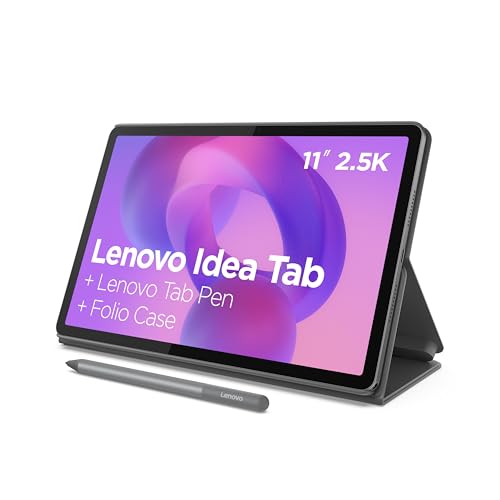
- 11-inch 2.5K IPS display with 90Hz refresh
- Includes Tab Pen and folio case
- 8GB RAM plus Smart Connect and Circle to Search
Best For: Remote workers and students who value pen support
Flexible Desktop Replacement
Fusion5 10.1-inch Windows 11 Tablet PC 12GB/256GB

- 12GB RAM and 256GB SSD for multitasking
- USB-C, USB-A, micro HDMI, and SSD expansion
- 2-year warranty with accidental damage cover
Best For: Remote workers who need lots of ports and Windows
AI Study and Travel Tablet

- 12.7-inch 3K LCD display
- Includes pen and folio case
- Wi-Fi 6E and 11-hour battery life
Best For: Remote workers who want a roomy Android tablet for notes and light productivity
Convertible Office Tablet
2-in-1 Laptop/Tablet with Office 365

- Detachable keyboard and Windows 11
- 1-year Office 365 plus 1TB OneDrive storage
- 8 GB RAM, 256 GB SSD, and multiple ports
Best For: Remote workers who need a compact Windows 2-in-1 for everyday office tasks
Rugged Field Work Tablet

- IP68/IP69K water and dust resistance
- 11-inch 90Hz FHD display at 480 nits
- Helio G99, 16 GB RAM, and 8000mAh battery
Best For: Remote workers in rugged outdoor or field-service environments
Premium lightweight pick
Lenovo Idea Tab Plus 12.1" 2.5K
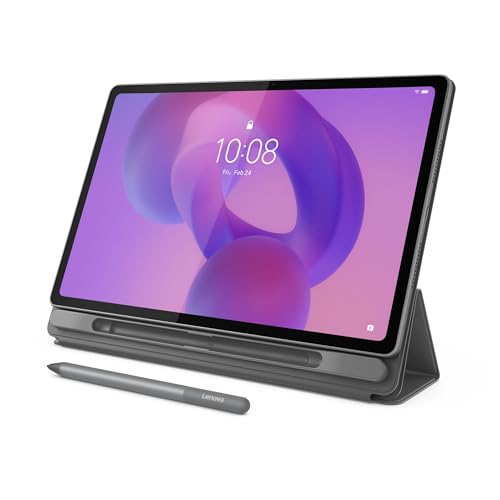
- 12.1-inch 2.5K IPS display
- Includes Tab Pen and folio case
- Light 1.2-pound design with up to 13-hour streaming
Best For: Portable remote work and study with a larger screen
Productivity-focused 2-in-1
TABWEE T90 11" Android 16 bundle

- 11-inch FHD laminated display
- 24GB RAM total with up to 2TB TF expansion
- Keyboard, mouse, and stylus included
Best For: Multitasking, notes, and light remote office work
Family-Friendly Performance – Samsung Galaxy Tab A11+ 8GB RAM, 256GB Storage
If you want tablet computers for remote work that can also handle household use, the Samsung Galaxy Tab A11+ is built around speed, storage, and a large 11-inch display. Its upgraded chipset, 8GB of memory, and 256GB of storage make it a practical pick for multitasking, large files, video calls, and after-hours streaming.
Best For: Remote workers who want a responsive Android tablet with plenty of storage and a bright screen for work and entertainment.
Pros:
- 8GB RAM and 256GB storage support smooth multitasking and bigger files.
- 11-inch display with up to 90Hz refresh rate for fluid scrolling and viewing.
- Quad speakers with Dolby Atmos add strong audio for meetings and media.
- Long-lasting battery with fast charging helps keep downtime short.
Cons:
- Positioned more as a family tablet than a dedicated work machine.
- No keyboard or stylus is included in the supplied notes.
Overall, the Galaxy Tab A11+ is a straightforward choice if you need a roomy, quick Android tablet that can move between remote work, browsing, and entertainment without feeling cramped.
Workhorse Windows Tablet – Microsoft Surface Pro 6 12-inch i7 16GB 512GB
Microsoft Surface Pro 6 Tablet, 12-inch, Intel Core i7, 16GB RAM, 512GB SSD, Black (Renewed)
Check Price On AmazonFor tablet computers for remote work, the Surface Pro 6 stands out as the most laptop-like option here. With an Intel Core i7, 16GB of RAM, and a 512GB SSD, it is aimed at users who need strong performance in a slim 12-inch Windows tablet with all-day battery life.
Best For: Remote professionals who want a powerful Windows tablet with laptop-style versatility.
Pros:
- Intel Core i7 and 16GB RAM support demanding productivity tasks.
- 512GB SSD offers fast storage and ample room for work files.
- Ultra-slim, light design starts at just 1.70 pounds.
- Up to 13.5 hours of video playback for long work sessions.
Cons:
- It is a renewed unit, so condition may vary versus new models.
- Details on accessories and included keyboard are not provided in the notes.
If you want a proven Windows tablet for remote work, this Surface Pro 6 offers the strongest productivity hardware in the group and the kind of portability that makes commuting or moving between workspaces easier.
Study-to-Work Hybrid – Lenovo Idea Tab 11-inch 2.5K with Pen and Case
The Lenovo Idea Tab is a strong fit for tablet computers for remote work when you want a lightweight Android device that can also handle note-taking and light productivity. Its 11-inch 2.5K display, 8GB of memory, included Tab Pen, and folio case make it especially practical for meetings, annotations, and moving between work and study.
Best For: Remote workers and students who want a pen-ready tablet with useful productivity extras included.
Pros:
- 11-inch 2.5K IPS touchscreen with 90Hz refresh rate looks sharp and smooth.
- Tab Pen and folio case are included, adding value for note-taking and transport.
- 8GB RAM and MediaTek Dimensity 6300 support multitasking.
- Smart Connect and Circle to Search add convenience across tasks and devices.
Cons:
- Best suited to everyday productivity rather than heavy desktop-class workloads.
- Battery life is listed around 12 hours of YouTube, which is useful but not class-leading.
For buyers who want a balanced Android tablet with pen support already in the box, the Idea Tab makes remote work feel more organized without adding extra accessory costs.
Flexible Desktop Replacement – Fusion5 10.1-inch Windows 11 Tablet PC 12GB/256GB
The Fusion5 Windows 11 tablet is built for tablet computers for remote work when port selection and desktop-style flexibility matter. With 12GB of RAM, a 256GB SSD, USB-C, USB-A, micro HDMI, and laptop mode support, it is designed for users who want a compact Windows tablet that can plug into more setups.
Best For: Remote workers who need a port-rich Windows tablet for office-style tasks and video calls.
Pros:
- 12GB RAM and 256GB SSD provide solid multitasking and fast storage.
- Windows 11 Home and Intel 13th Gen N100 are suited to productivity work.
- USB-C, USB-A, micro HDMI, headphone jack, and SSD expansion add flexibility.
- 2-year full warranty with accidental damage cover offers extra peace of mind.
Cons:
- 10.1-inch screen is smaller than the 11- to 12-inch rivals here.
- Docking keyboard is sold separately.
As a compact Windows option, the Fusion5 is the most connectivity-focused pick in this roundup and should appeal to remote workers who want to hook into different peripherals and display setups.
AI Study and Travel Tablet – Lenovo Idea Tab Pro with Pen
For tablet computers for remote work, the Lenovo Idea Tab Pro stands out if you want a large, portable screen with strong multitasking potential and helpful AI tools. Its 12.7-inch 3K display, MediaTek Dimensity 8300 processor, Wi-Fi 6E, and included pen and folio case make it a practical pick for working, note-taking, and staying organized on the move.
Best For: Remote workers who want a roomy Android tablet for notes, reading, and light productivity.
Pros:
- 12.7-inch 3K LCD display is well suited to reading, split-view work, and media.
- Includes a Tab Pen Plus and folio case for note-taking and everyday portability.
- MediaTek Dimensity 8300, 8 GB memory, and Wi-Fi 6E support smooth multitasking.
- 11-hour battery life and 45W quick charge help it last through long work sessions.
Cons:
- Android tablet app support may not replace a full desktop setup for heavy office tasks.
- 128 GB storage is modest if you keep lots of large files offline.
- Its focus is balanced more toward study and productivity than laptop-style work.
Overall, this is a strong choice if you want tablet computers for remote work that feel lightweight yet capable. The larger display and bundled accessories add real convenience, while the AI and reading features make it especially appealing for mobile productivity.
Convertible Office Tablet – 2-in-1 Laptop/Tablet with Office 365
If you want tablet computers for remote work that can also behave like a compact laptop, this 2-in-1 is built around that flexibility. It includes a detachable magnetic keyboard, Windows 11, 1-year Office 365, and 1TB OneDrive storage, so it’s aimed at everyday typing, cloud files, and basic office productivity.
Best For: Remote workers who need a budget-friendly Windows 2-in-1 for documents, email, and video calls.
Pros:
- Detachable keyboard lets you switch between laptop and tablet modes quickly.
- Includes 1-year Office 365 and 1TB cloud storage for work files.
- 8 GB RAM and 256 GB SSD support everyday productivity and fast app loading.
- Multiple ports, including USB-C, USB 3.0, and Micro HDMI, add useful connectivity.
Cons:
- Intel Pentium Gold 6500Y is suited to light productivity, not demanding workloads.
- 10.1-inch screen is compact for extended multitasking.
- Wi-Fi 5 is less advanced than newer wireless standards.
This model makes sense if your remote workflow centers on Office apps, online meetings, and portable typing rather than heavy computing. Its included accessories and cloud storage give it a ready-to-work setup right out of the box.
Rugged Field Work Tablet – AGM PAD P2 Active
For tablet computers for remote work in demanding environments, the AGM PAD P2 Active is built to handle rough conditions while still offering modern Android features. With IP68/IP69K water resistance, 1.8-meter drop resistance, an 11-inch 90Hz FHD display, and a bright 480-nit panel, it’s geared toward field use, travel, and outdoor work.
Best For: Remote workers in construction, field service, outdoor, or rugged-use settings.
Pros:
- IP68/IP69K protection and 1.8-meter drop resistance add serious durability.
- 11-inch 90Hz FHD display with 480 nits should be easier to view outdoors.
- Helio G99 processor, 16 GB RAM, and 256 GB storage support multitasking.
- 8000mAh battery, GPS, compass, and OTG make it useful for field work.
Cons:
- Its rugged build makes it less of a slim, casual tablet option.
- Android 14 and media features are useful, but it’s not a laptop replacement.
- Large feature set may be more than needed for standard home office use.
This is the most specialized option in the group, but that focus is the point. If your remote job takes you outdoors or into rough conditions, the AGM PAD P2 Active offers the durability and visibility that standard tablets often lack.
Premium lightweight pick – Lenovo Idea Tab Plus 12.1" 2.5K
If you want tablet computers for remote work that feel easy to carry but still offer a large, sharp screen, the Lenovo Idea Tab Plus is a strong fit. Its 12.1-inch 2.5K display, included Tab Pen, and folio case make it practical for note-taking, document review, and everyday productivity without adding much weight to your bag.
Best For: Users who want a lightweight Android tablet with a bigger display and included pen/case for work, study, and travel.
Pros:
- 12.1-inch 2.5K IPS display with up to 800 nits brightness for clearer viewing.
- Included Lenovo Tab Pen and folio case add value for notes and handheld use.
- 8GB memory, MediaTek Dimensity 6400 processor, and quad Dolby Atmos speakers support smooth everyday use.
- Light 1.2-pound design and up to 13 hours of YouTube streaming for portability.
Cons:
- Android-focused setup may not suit users who need a full desktop operating system.
- 128GB storage is modest if you plan to keep many large files locally.
Overall, this Lenovo model stands out as a polished option for remote workers who value portability, a spacious screen, and bundled accessories. It is especially appealing if you want a tablet that can move between meetings, reading, and light productivity with minimal fuss.
Budget 2-in-1 bundle – Android 16 10.1" work tablet bundle
For shoppers comparing tablet computers for remote work on a budget, this 10.1-inch Android 16 tablet offers a lot in one package. The included keyboard, stylus, case, and mouse turn it into a compact mini-laptop setup for email, light document work, video calls, and study sessions at home or on the go.
Best For: Budget-minded buyers who want a full accessory bundle for light office tasks, online classes, and portable use.
Pros:
- Includes keyboard, stylus, case, and mouse for a ready-to-use work bundle.
- 12GB RAM and expandable storage up to 512GB help with multitasking and file space.
- 7000mAh battery is rated for up to 8 hours of learning or 10 hours of video playback.
- Lightweight 1.21 lb build and dual cameras support travel and video calls.
Cons:
- 10.1-inch 1280 x 800 display is modest compared with higher-resolution work tablets.
- 64GB built-in storage is limited before using a memory card.
This SUNTUNG bundle is best viewed as an affordable productivity starter rather than a premium workstation. Still, if your remote work is mostly browsing, meetings, notes, and basic office tasks, the included accessories make it an easy value pick.
Productivity-focused 2-in-1 – TABWEE T90 11" Android 16 bundle
If you want tablet computers for remote work with stronger multitasking and a more laptop-like setup, the TABWEE T90 is worth a close look. It combines Android 16, Gemini AI 3.5, an 11-inch FHD display, and included keyboard, mouse, and stylus accessories for managing documents, calls, notes, and web work more efficiently.
Best For: Users who want a feature-rich Android tablet bundle for productivity, study, and everyday remote tasks.
Pros:
- 11-inch FHD laminated display offers sharper detail than basic HD tablets.
- 24GB RAM total and 128GB storage with up to 2TB TF expansion support heavier everyday multitasking.
- Android 16 with Gemini AI 3.5 adds tools for search, translation, summaries, and task planning.
- 8000mAh battery, dual smart speakers, and included keyboard/mouse/stylus improve versatility.
Cons:
- Still an Android tablet, so it is not a replacement for a full laptop OS.
- 3.5 Mbps referenced only as Gemini AI version detail; performance will still depend on app demands and workflow.
This model is the most productivity-oriented of the three, especially if you like bundled accessories and AI-assisted features. It should suit remote workers who need a flexible device for notes, calls, and lighter office tasks rather than heavyweight desktop software.
How We Picked These Tablet Computers for Remote Work
We focused on practical remote-work priorities: responsive performance, comfortable display sizes, long-term usability, and features that make everyday tasks easier. That includes enough RAM for multitasking, storage for files and apps, and form factors that work well with keyboards, styluses, and video meetings.
We also considered platform variety. Some buyers need full desktop-style Windows compatibility, while others will be better served by Android tablets with better battery life, lighter weight, and simpler mobile workflows.
Quick Comparison: Which Type Fits Your Workflow?
If you want a true laptop replacement, a Windows 2-in-1 or Surface-style tablet is usually the best fit. If you mostly use browser-based tools, messaging apps, cloud storage, and note-taking, an Android tablet may be more portable and easier to live with. Larger displays are better for split-screen work, while smaller tablets are easier to carry between meetings or while traveling.
Key Buying Factors for Tablet Computers for Remote Work
Performance and RAM
For smooth multitasking, prioritize at least 8GB of RAM, with 12GB or more being a stronger choice if you regularly juggle video calls, documents, and multiple browser tabs. Faster processors matter most when you use office apps, editing tools, or heavy web apps.
Display Size and Resolution
A 10- to 11-inch tablet is the most portable, but 12-inch and larger screens are easier on the eyes and better for spreadsheets, presentations, and split-screen work. Higher-resolution panels also make text sharper during long work sessions.
Keyboard, Pen, and Accessories
For Tablet Computers for Remote Work, accessory support can matter as much as the tablet itself. A reliable keyboard case, stylus compatibility, and good stand options can turn a tablet into a much more practical work device.
Battery Life and Connectivity
Look for all-day battery life if you work away from a desk. Fast Wi-Fi, Bluetooth accessory support, and enough ports or expansion options can also improve day-to-day convenience.
Who Should Buy Which Tablet Computers for Remote Work?
Choose a Windows tablet if you need desktop software, stronger file management, or a familiar PC environment. Choose an Android tablet if you want lower cost, lighter weight, and easy mobile productivity. If your work happens mostly in email, docs, video calls, and cloud apps, a midrange tablet with a keyboard may be all you need. If you travel often or work in varied environments, prioritize durability, battery life, and a compact design.
For most buyers, the best choice is the one that matches how you actually work, not just the one with the biggest specs. The right tablet should make remote work faster, simpler, and easier to carry every day.