Choosing tablet computers for students is about more than screen size. The best options balance battery life, app support, storage, and enough performance for classwork, note-taking, and light multitasking.
Below, we focus on versatile tablets that make studying easier, whether you need a simple budget device or a stronger pick for lectures, research, and split-screen productivity.
Best 10 Tablet Computers for Students Picks for 2026
Campus-Ready Performance
Lenovo Idea Tab for Study and Streaming

- 11-inch 2.5K display with 90Hz refresh rate
- Includes Tab Pen and folio case
- Up to 12 hours of YouTube battery life
Best For: students who want an included pen-and-case bundle for notes and class work
Budget AI Bundle
Jeazans Android 16 Tablet with Dock

- Android 16 with expandable storage up to 1TB
- Includes AI smart speaker dock and wireless charging
- WiFi 6 and Bluetooth 5.4 for solid connectivity
Best For: budget-minded students who want a bundled tablet and dock
Samsung School Companion
Galaxy Tab S10 Lite with S Pen
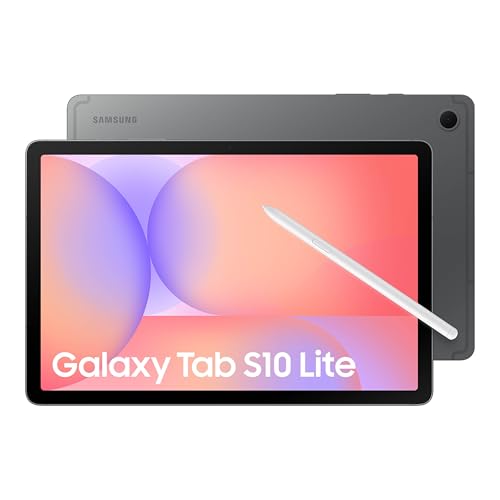
- 10.9-inch display with Vision Booster
- Includes S Pen for notes and drawing
- Up to 16 hours of battery life
Best For: students who want a polished Android tablet with stylus support
Editor’s Pick
Lenovo Idea Tab Pro Student Tablet with Pen & Case

- 12.7-inch 3K LCD display
- Includes pen and folio case
- 11-hour battery with 45W quick charge
Best For: students who want a larger Android tablet for study sessions and media
Budget 2-in-1
ECOPAD Android 15 Tablet with Keyboard and Mouse

- Keyboard and mouse included
- 12GB RAM with microSD expansion up to 1TB
- Android 15 with Wi‑Fi 6 support
Best For: students wanting a low-cost tablet bundle for light school tasks
Study-Friendly Pick
Lenovo Idea Tab 11" Student Tablet with Pen

- 11-inch 2.5K IPS display with 90Hz
- Includes Tab Pen and folio case
- Up to 12 hours of YouTube battery life
Best For: students who want a balanced tablet for notes, reading, and everyday use
Pink 2-in-1 Student Bundle
CUPEISI Android 16 Tablet 10 Inch

- Includes keyboard, mouse, stylus, and case
- 20GB RAM, 128GB storage, up to 2TB expandable
- Android 16, Wi‑Fi 6, Widevine L1
Best For: Students who want an all-in-one 2-in-1 bundle for classwork and note-taking
All-in-One Classroom Bundle
Jeazans Android 16 10.1-Inch Tablet

- Keyboard, mouse, stylus, and leather case included
- 24GB RAM claim with 64GB storage and 1TB expansion
- Wi‑Fi 6, Android 16, and PD fast charging
Best For: Students who want a portable tablet-and-keyboard bundle for classes and video calls
11-Inch Study Assistant

- 11-inch 1920 x 1200 FHD IPS display
- Gemini AI 3.5 helps summarize and organize notes
- 24GB RAM claim, 128GB storage, 8000mAh battery
Best For: Students who prioritize a bigger display and AI-assisted study tools
Campus-Ready Performance – Lenovo Idea Tab for Study and Streaming
If you’re comparing tablet computers for students, the Lenovo Idea Tab is built around a strong mix of portability, speed, and study-focused extras. Its 11-inch 2.5K IPS display, 8GB memory, and included Tab Pen and folio case make it a practical pick for note-taking, reading, and multitasking between class apps and entertainment.
Best For: Students who want an included pen-and-case bundle for notes, sketching, and everyday campus use.
Pros:
- 11-inch 2.5K IPS touchscreen with 90Hz refresh rate for smooth scrolling and clearer text.
- Includes Lenovo Tab Pen and folio case, which adds value for students right away.
- Built-in learning apps plus Circle to Search with Google support productivity and quick research.
- Up to 12 hours of YouTube battery life helps it last through classes and downtime.
Cons:
- Uses integrated graphics, so it is not aimed at heavy gaming or creative workloads.
- Android tablet workflow may still feel less full-featured than a laptop for some assignments.
Overall, this is a well-rounded student tablet if you want a sharp display, pen support, and a ready-to-use accessory bundle. It looks especially appealing for note-taking, reading, and everyday school tasks without needing extra purchases.
Budget AI Bundle – Jeazans Android 16 Tablet with Dock
For tablet computers for students on a budget, this Jeazans model focuses on value and extras rather than premium-brand pricing. It pairs Android 16, an 8-core processor, expandable storage, and a smart speaker dock, making it a flexible option for homework, streaming, and basic everyday use.
Best For: Budget-minded students who want a bundled tablet, charging dock, and expandable storage.
Pros:
- Android 16 with 36GB combined RAM and up to 1TB TF card expansion for more room.
- Included AI Smart Speaker Dock adds charging, speaker, clock, and photo frame functions.
- WiFi 6 and Bluetooth 5.4 help with faster, more stable connections.
- 6000mAh battery and wireless charging via the dock add convenience for daily use.
Cons:
- 10.1-inch 800×1280 display is HD rather than high-resolution.
- Much of the appeal comes from the dock and bundle, not just the tablet alone.
This is a practical pick if you want a feature-packed, budget-friendly tablet for light student work and media. The bundled dock makes it stand out for anyone who values convenience and extra functionality in one package.
Samsung School Companion – Galaxy Tab S10 Lite with S Pen
If you want tablet computers for students with a more polished experience, the Samsung Galaxy Tab S10 Lite brings a strong display, S Pen support, and helpful AI tools. Its 10.9-inch screen, Exynos 1380 processor, and expandable storage make it a versatile choice for notes, reading, and media between classes.
Best For: Students who want a premium-feeling Android tablet with S Pen support and long battery life.
Pros:
- 10.9-inch LCD with Vision Booster for easier viewing in different lighting.
- S Pen is included for notes, drawing, and math work.
- Up to 16 hours of battery life supports long study days.
- Up to 2TB microSD expansion gives lots of room for files and media.
Cons:
- 6GB RAM is solid, but not as high as some bundle-focused competitors.
- Uses Wi-Fi only, so it depends on available wireless networks.
As a student tablet, this model stands out for its balance of display quality, battery life, and Samsung’s ecosystem features. It is a strong option if you want something dependable for schoolwork that also feels ready for everyday entertainment.
Productivity Bundle Choice – Jeazans 2-in-1 Tablet Laptop Mode
This Jeazans 2-in-1 is aimed at students who want a tablet that can shift closer to laptop-style use. With a keyboard, mouse, stylus, and leather case included, it is set up for typing assignments, virtual classes, and general productivity without needing extra accessories.
Best For: Students who want a full accessory bundle for typing, note-taking, and online classes.
Pros:
- Includes keyboard, wireless mouse, stylus pen, and protective leather case.
- Android 16 and 24GB RAM are positioned for smoother multitasking.
- Dual HD cameras support video calls and virtual classroom use.
- WiFi 6 and PD fast charging improve connectivity and daily convenience.
Cons:
- 10.1-inch 1280×800 display is basic compared with sharper premium tablets.
- Designed as a productivity bundle, so it is less focused on premium media features.
For students who need a portable work setup more than a pure entertainment tablet, this bundle is easy to justify. The included keyboard and mouse make it a practical pick for assignments, classwork, and travel.
Editor’s Pick – Lenovo Idea Tab Pro Student Tablet with Pen & Case
For tablet computers for students, the Lenovo Idea Tab Pro is built to handle note-taking, reading, and streaming in one lightweight package. Its 12.7-inch 3K display, bundled pen, and included folio case make it especially practical for classwork and campus use, while the MediaTek Dimensity 8300 and Wi‑Fi 6E help keep multitasking moving smoothly.
Best For: Students who want a larger, more capable Android tablet for studying, media, and all-day campus use.
Pros:
- 12.7-inch 3K LCD display for sharp reading and lecture viewing
- Includes Lenovo Tab Pen Plus and folio case
- MediaTek Dimensity 8300 with 8GB RAM for smoother multitasking
- 11-hour battery life with 45W quick charge support
Cons:
- Larger size may be less convenient for tiny backpacks
- 128GB storage may be limiting for users with lots of media
- Focused on Android productivity rather than laptop-level work
This is the most complete student-oriented option in the group if you value screen size, stylus support, and a strong bundle. It looks well suited to note-taking, studying, and entertainment without needing extra accessories right away.
Budget 2-in-1 – ECOPAD Android 15 Tablet with Keyboard and Mouse
If you’re comparing tablet computers for students on a tighter budget, the ECOPAD Android 15 tablet offers a basic 2-in-1 setup with a keyboard and mouse included. It’s aimed at light productivity, web browsing, and media use, with expandable storage and Wi‑Fi 6 for everyday convenience.
Best For: Students who want an inexpensive tablet-and-keyboard bundle for light schoolwork and browsing.
Pros:
- Keyboard and mouse included for a laptop-style setup
- 12GB RAM with expandable storage up to 1TB via microSD
- Android 15 with Google Play access and GMS certification
- Wi‑Fi 6 and Bluetooth 5.0 for modern connectivity
Cons:
- 10.1-inch 1280 x 800 display is modest for detailed work
- 6-hour battery life is shorter than some student tablets
- Best suited to basic tasks rather than heavy multitasking
This ECOPAD set is more about convenience than premium performance. It makes sense if you want a simple starter tablet for note-taking, browsing, and casual assignments without buying extras separately.
Study-Friendly Pick – Lenovo Idea Tab 11" Student Tablet with Pen
For tablet computers for students, the Lenovo Idea Tab focuses on the essentials that matter most: a sharp 11-inch 2.5K screen, included pen, and long battery life. It’s designed for writing, organizing, and casual streaming, with tools like Lenovo AI Note, Squid, Nebo, and MyScript Calculator built around study workflows.
Best For: Students who want a balanced, study-first tablet with a good display and pen support.
Pros:
- 11-inch 2.5K IPS display with 90Hz refresh rate
- Includes Tab Pen and folio case
- Built-in study apps for notes, sketches, and calculations
- Up to 12 hours of YouTube battery life
Cons:
- 4GB RAM is modest for heavy multitasking
- 128GB storage may fill up faster with large files
- Smaller screen than the Idea Tab Pro
This is the most straightforward student tablet in the lineup if you want strong display quality without moving up to a larger, more expensive model. It should work well for classes, reading, and everyday campus use.
Pink 2-in-1 Student Bundle – CUPEISI Android 16 Tablet 10 Inch
If you want tablet computers for students that can double as a lightweight laptop setup, this CUPEISI 10.1-inch Android 16 model is built around convenience. It pairs the tablet with a keyboard, mouse, stylus, and foldable case, while the 2 GHz octa-core processor, 20GB RAM, and 128GB storage are aimed at everyday classwork, browsing, and media use.
Best For: Students who want an all-in-one 2-in-1 bundle for note-taking, homework, and portable study sessions.
Pros:
- Includes keyboard, mouse, stylus, and foldable protective case for laptop-style use.
- 20GB RAM and 128GB ROM, with microSD expansion support up to 2TB.
- Android 16 with Google GMS certification and Widevine L1 support.
- 5G Wi‑Fi 6 support and a 6000mAh battery rated for up to 6–8 hours.
Cons:
- 1280 x 800 resolution is basic for an 10.1-inch screen.
- Battery life is moderate compared with larger-capacity tablets.
This is a practical pick if you value an included accessory bundle more than premium display specs. It looks especially useful for students who need a simple, portable workstation for class, assignments, and streaming in one package.
All-in-One Classroom Bundle – Jeazans Android 16 10.1-Inch Tablet
For tablet computers for students, this Jeazans 10.1-inch Android 16 tablet focuses on a complete study setup right out of the box. The bundle includes a keyboard, wireless mouse, stylus, and leather case, while the 24GB RAM claim and 64GB storage are positioned for smooth multitasking, online lessons, and everyday school apps.
Best For: Students who want a portable tablet-and-keyboard bundle for classes, note-taking, and video meetings.
Pros:
- Comes with keyboard, mouse, stylus, and protective leather case.
- Android 16 with privacy controls and support for educational apps and streaming.
- 24GB RAM claim and 64GB storage with expansion support up to 1TB.
- Wi‑Fi 6 and PD fast charging for easier daily use and quicker top-ups.
Cons:
- 1280 x 800 display resolution is modest for a 10.1-inch screen.
- Built-in storage starts at 64GB, so expansion may be important for heavier users.
This model makes sense if the main goal is getting a ready-to-use student bundle rather than building a setup piece by piece. The included accessories and fast-charging support are the standout practical features for school and travel.
11-Inch Study Assistant – TABWEE T90 Android 16 Tablet
If you’re comparing tablet computers for students and want a larger screen for reading, note-taking, and online classes, the TABWEE T90 is the most study-focused option here. Its 11-inch 1920 x 1200 FHD IPS display, Gemini AI 3.5 tools, and included keyboard, mouse, and stylus make it geared toward organization and everyday productivity.
Best For: Students who prioritize a bigger, clearer display and AI-assisted study tools.
Pros:
- 11-inch FHD IPS display with 1920 x 1200 resolution and Widevine L1.
- Gemini AI 3.5 for searching, translating, summarizing notes, and planning tasks.
- 24GB RAM claim, 128GB storage, and microSD expansion up to 2TB.
- 8000mAh battery rated for up to 11 hours of video playback.
Cons:
- Larger screen size may be less compact for very small bags.
- Virtual memory and AI features may not matter if you only need basic school apps.
This tablet stands out most for students who read a lot, split time between classes and homework, or want help organizing notes and tasks. The bigger display and battery make it the strongest all-around pick for study-heavy use.
How We Picked the Best Tablet Computers for Students
We prioritized student-friendly tablets that are practical for everyday academic use. That means responsive displays, solid battery potential, reliable Wi-Fi, enough storage for course files, and performance that can handle browser tabs, PDF notes, video lectures, and writing apps without constant lag.
We also favored models that offer strong value across different budgets. For Tablet Computers for Students, a great spec sheet only matters if it translates into a smoother study routine.
Quick Comparison: What Matters Most
If you mainly take notes and read textbooks, a lighter tablet with a sharp display and good battery life is usually enough. If you run lots of apps at once, choose more RAM and a faster processor. If you plan to use the tablet for years, prioritize storage and expansion options.
Key Buying Factors for Tablet Computers for Students
Display and Size
An 10- to 11-inch tablet is often the sweet spot for portability and comfort. Larger screens are better for split-screen studying, annotation, and video classes, but they can be less convenient to carry.
Performance and RAM
For basic schoolwork, 4GB to 6GB RAM can work. For smoother multitasking, look for 8GB or more. Students who keep many apps open or use productivity features should lean toward stronger chipsets and higher memory.
Storage
Course downloads, offline lectures, and note apps add up quickly. 128GB is a safer starting point than 64GB, and expandable storage is helpful if you plan to keep large files on the device.
Accessories and Productivity
Keyboards, styluses, and protective cases can turn a tablet into a lightweight study machine. If you write a lot, these extras matter as much as core specs.
Connectivity and Battery
Fast Wi-Fi, modern Bluetooth, and long battery life are important for campus life. A tablet that stays connected and lasts through classes reduces friction during the day.
Who Should Buy Which Tablet Computers for Students?
Budget shoppers should focus on dependable basics: a usable screen, decent battery life, and enough storage for school apps. Students who want a laptop replacement should look for bundled keyboards and stronger performance. Those who split time between notes, entertainment, and multitasking should choose a premium tablet with a better display, more RAM, and room to grow.
In short, the best Tablet Computers for Students are the ones that match your workload, commute, and study habits—not just the highest specs on paper.