Pen display monitors can make digital drawing feel far more natural than a standard tablet or mouse. They let you sketch directly on the screen, which is a big advantage for artists, illustrators, and editors.
In this roundup, we focus on 10 options for different workflows, from portable models to larger studio-ready displays, so you can match the right screen, stylus, and feature set to your budget.
Best 10 Pen Display Monitors Picks for 2026
Pro Studio Pick
Wacom Cintiq 22, Full HD Screen & Pro Pen 2

- 22-inch Full HD pen display
- Pro Pen 2 with 8192 pressure levels
- Relaxed parallax for natural drawing
Best For: Artists and students who want a larger, dependable pen display
Portable Color Pick
14" 4K OLED Portable Monitor with Stylus

- 4K OLED with 100% DCI-P3 color
- Includes active stylus and 10-point touch
- Lightweight 1.3 lb portable design
Best For: Traveling creators who need a compact, color-accurate display
Workflow Upgrade
HUION Kamvas 13 (Gen 3) 13.3" Pen Display

- Fully laminated 13.3-inch screen
- PenTech 4.0 with 16,384 pressure levels
- Dual dials and 5 shortcut keys
Best For: Compact creative setups that prioritize color accuracy and controls
Starter Value Pick
XP-PEN Artist12 11.6" FHD Pen Display

- 11.6-inch Full HD IPS screen
- Battery-free pen with eraser
- 6 shortcut keys plus touch bar
Best For: Beginners who want a compact, affordable drawing display
Editor’s Pick
XPPen Artist Ultra 14 2.8K OLED Touchscreen

- 2.8K OLED with 90Hz refresh and <1 ms response
- 99% Adobe RGB, sRGB, and Display P3 coverage
- Dual 16K styli plus multi-point touch control
Best For: Professional illustration, photo retouching, and animation
Portable Pro Choice
ASUS ProArt PA169CDV 4K USB-C Display

- 15.6-inch 4K IPS panel with anti-glare finish
- Wacom EMR pen and 10-point multitouch
- Factory pre-calibrated, Calman Verified, 100% sRGB
Best For: Mobile creatives and designers who need portable color accuracy
Large Canvas Value
XPPen Artist 24 Pro 2.5K QHD Display

- 23.8-inch 2.5K QHD screen with anti-glare film
- 20 shortcut keys and dual dial wheels
- 8192-pressure stylus with 60° tilt support
Best For: Large-desktop workflows for illustration, animation, and editing
Portable Dual-Touch 2.5K Pick
EHOMEWEI X2 Air 2.5K Portable Dual Touchscreen Monitor

- 2.5K IPS panel with 100% sRGB and 90Hz refresh rate
- 10-point touch plus stylus support for Mac and other devices
- USB-C, HDMI, and Thunderbolt-compatible portable design
Best For: Travel-friendly second-screen use with touch and stylus support
Creator Workflow Pick
XPPen Artist 16 3rd Drawing Tablet with Screen
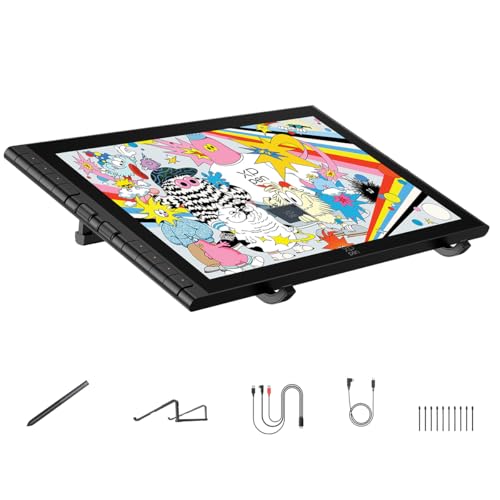
- 16K pressure stylus with low activation force and near-zero lag
- Full lamination, anti-glare glass, and minimal parallax
- 2 scroll wheels, 8 hotkeys, and wide software/device support
Best For: Artists who want shortcut controls and accurate drawing feedback
Budget Touch Pen Display
Portable Monitor Touchscreen 15.6" with MPP Stylus Pen

- 15.6-inch FHD IPS screen with 10-point touch
- Included MPP-compatible stylus for Windows Ink tasks
- Lightweight portable design with stand, sleeve, and cables
Best For: Windows note-taking, markup, and light sketching on the go
Pro Studio Pick – Wacom Cintiq 22, Full HD Screen & Pro Pen 2
If you want pen display monitors with a larger workspace and a proven pen feel, the Wacom Cintiq 22 is built for drawing, animation, and detailed creative work. Its Full HD LCD and Pro Pen 2 focus on natural control, making it a practical choice for artists who want a screen-first setup at home, in the studio, or on campus.
Best For: Creative hobbyists, students, and enthusiasts who want a larger drawing display with reliable pen performance.
Pros:
- Pro Pen 2 includes tilt recognition, 8192 pressure levels, and two customizable switches.
- 22-inch Full HD display is designed for true-to-life color and uniform brightness.
- Relaxed parallax and fingertip control help the pen feel more natural on screen.
- Includes replacement nibs, nib remover, cable, and power accessories.
Cons:
- Requires connection to a computer to work.
- Bigger size is less portable than compact pen displays.
This is a straightforward pick if you want a larger pen display monitor with a trusted drawing experience rather than a travel-friendly format.
Portable Color Pick – 14" 4K OLED Portable Monitor with Stylus
Among pen display monitors, this 14-inch OLED model stands out for creators who want strong color and portability in a compact package. The 4K UHD OLED panel, 100% DCI-P3 coverage, and included active stylus make it a flexible option for sketching, photo work, and editing when you need a travel-ready second screen.
Best For: Travelers and creative professionals who want a lightweight 4K OLED pen display for color-sensitive work.
Pros:
- 4K OLED panel with 100% DCI-P3 and 100,000:1 contrast for vivid image quality.
- Includes a 10-point touch system and active stylus for drawing and note-taking.
- Very lightweight at 1.3 pounds with a thin aluminum design and kickstand.
- Dual USB-C and HDMI support broad device compatibility.
Cons:
- Touch and stylus support is limited on some Mac and iPad/iPhone setups.
- Best performance may require PD 30W power and an extra power connection in some cases.
If portability and panel quality matter more than a traditional artist-tablet form factor, this is a strong compact display to consider.
Workflow Upgrade – HUION Kamvas 13 (Gen 3) 13.3" Pen Display
The HUION Kamvas 13 (Gen 3) is a compact option in pen display monitors for artists who want a laminated screen, strong color accuracy, and a streamlined desk setup. Its Canvas Glass 2.0, PenTech 4.0, and dual dial controls make it well suited to illustration, design, and everyday creative production.
Best For: Artists and designers who want a compact pen display with strong color accuracy and shortcut controls.
Pros:
- Fully laminated 13.3-inch screen with anti-sparkle Canvas Glass 2.0.
- PenTech 4.0 offers 16,384 pressure levels and 2g initial activation force.
- Enhanced color accuracy with Avg. ΔE<1.5, 99% sRGB, and Rec.709 coverage.
- Includes 5 shortcut keys, dual dials, and USB-C single-cable workflow support.
Cons:
- Must be connected to a computer or laptop to work.
- Native resolution is 1980×1080, so it is not a 4K display.
For creators who value precision controls and calibrated-looking color in a smaller footprint, this Kamvas is a practical daily driver.
Starter Value Pick – XP-PEN Artist12 11.6" FHD Pen Display
If you’re shopping for pen display monitors on a tighter budget or want a smaller desk footprint, the XP-PEN Artist12 is a practical entry point. Its 11.6-inch IPS screen, anti-reflective protector, and battery-free stylus make it a useful choice for drawing, editing, remote work, and online teaching.
Best For: Beginners, students, and home users who want an affordable compact pen display.
Pros:
- 11.6-inch 1920×1080 IPS display with 72% NTSC and 100% sRGB color gamut.
- Battery-free P06 pen includes an eraser and comfortable hexagonal grip.
- Six customizable shortcut keys plus a programmable touch bar for workflow control.
- Works with Windows, Mac, and Linux, and supports common creative apps.
Cons:
- Must be connected to a computer to work.
- Smaller display may feel limiting for larger canvases or multi-window workflows.
This model focuses on the essentials: a compact screen, solid compatibility, and a simple pen setup that can suit first-time display tablet users.
Editor’s Pick – XPPen Artist Ultra 14 2.8K OLED Touchscreen
If you want pen display monitors with a more premium feel in a compact size, the XPPen Artist Ultra 14 stands out for its 2.8K OLED touchscreen, fast 90Hz refresh rate, and full-laminated anti-glare glass. It is built for creators who want accurate color, touch navigation, and a paper-like drawing response in a portable 14-inch format.
Best For: Professional illustrators, photo retouchers, animation artists, and creators who want touchscreen control plus strong color accuracy.
Pros:
- 2.8K OLED panel with 90Hz refresh rate and <1 ms response time
- Calman-verified color with 99% Adobe RGB, 99% sRGB, and 99% Display P3 coverage
- X-Touch multi-point touch support for zooming, rotating, and canvas navigation
- Includes dual 16K styli with tilt support and an ACK05 shortcut remote
Cons:
- Touch function is limited to Windows 10+ for touchscreen use
- Smaller 14-inch workspace may feel compact for users who prefer larger displays
This is a strong choice if you value color precision, touch convenience, and a very responsive pen display in a travel-friendly size.
Portable Pro Choice – ASUS ProArt PA169CDV 4K USB-C Display
Among pen display monitors, the ASUS ProArt PA169CDV is a practical pick for artists who want a portable 4K screen with professional-grade color accuracy. Its 15.6-inch IPS panel, bundled Wacom EMR ProArt Pen, and productivity tools like ASUS Dial and Virtual Control Panel make it well suited to focused creative work on the go.
Best For: Designers, illustrators, and mobile creatives who want a portable 4K pen display with calibrated color and shortcut tools.
Pros:
- 15.6-inch 4K UHD IPS display with anti-glare finish
- Wacom EMR ProArt Pen for pen-on-paper-like input
- 100% sRGB, Calman Verified, and factory pre-calibrated to Delta E < 2
- ASUS Dial and Virtual Control Panel add useful workflow shortcuts
Cons:
- Smaller screen size may not suit users who prefer a full desktop drawing area
- Productivity features depend on compatible creative software
If portability and verified color accuracy matter more than screen size, this ASUS ProArt model is one of the more polished pen display monitors to consider.
Large Canvas Value – XPPen Artist 24 Pro 2.5K QHD Display
If you want pen display monitors with a larger workspace, the XPPen Artist 24 Pro is built around a 23.8-inch 2.5K QHD screen and a workflow-friendly control layout. Its dual dial wheels, 20 shortcut keys, and adjustable stand make it a capable fit for long creative sessions where comfort and speed matter.
Best For: Illustrators, animators, video editors, and designers who want a large drawing area with lots of shortcut control.
Pros:
- 23.8-inch 2.5K QHD display with anti-glare film and 178° viewing angle
- 20 customizable shortcut keys plus dual red dial wheels
- PA2 stylus offers 8192 pressure levels and 60° tilt support
- Includes a 90° adjustable stand and VESA mount support
Cons:
- Larger size is less portable than compact pen displays
- Best suited to users with desk space for a full-size setup
This model makes sense if you want a spacious screen and hands-on shortcut control, especially for detailed artwork and editing work.
Portable Dual-Touch 2.5K Pick – EHOMEWEI X2 Air 2.5K Portable Dual Touchscreen Monitor
If you want a portable option among pen display monitors that can also work as a second screen, the EHOMEWEI X2 Air stands out for its 14.2-inch dual-touch setup, 2.5K resolution, and stylus support. It is built for users who need a sharper panel than basic FHD portable displays, along with touch navigation and Mac-compatible input for productivity or light creative work.
Best For: Users who want a premium portable pen display monitor for travel, office multitasking, and Mac-friendly touch input.
Pros:
- 2.5K IPS panel with 100% sRGB, 400 nits brightness, and 90Hz refresh rate
- Supports 10-point touch and stylus input for navigation, writing, and creative tasks
- USB-C, HDMI, and Thunderbolt-compatible connectivity for wide device support
- Ultra-slim aluminum build with built-in stand and matte anti-glare screen
Cons:
- Smaller 14.2-inch size may feel limited for detailed drawing workflows
- Portable design is less workstation-focused than larger dedicated drawing displays
Overall, this is a strong pick if you need pen display monitors that prioritize portability, color quality, and flexible use as a second screen. It is especially appealing for users who want a travel-friendly display with touch and stylus support in one package.
Creator Workflow Pick – XPPen Artist 16 3rd Drawing Tablet with Screen
For buyers comparing pen display monitors for illustration and animation, the XPPen Artist 16 3rd is built around precision and workflow control. Its 15.4-inch laminated display, 16K pressure stylus, anti-glare etched glass, and dual scroll wheels make it a focused choice for artists who want a more traditional drawing display experience.
Best For: Digital artists who want a feature-rich pen display monitor with strong color coverage and shortcut controls.
Pros:
- 16,384 levels of pressure sensitivity with low activation force and minimal retraction
- Anti-glare etched glass and full lamination reduce glare and parallax
- 99% sRGB, 98% Adobe RGB, and 97% Display P3 color coverage
- 2 scroll wheels, 8 hotkeys, and included foldable stand improve workflow
Cons:
- FHD resolution is lower than some premium portable monitors
- Designed more for art workflows than general-purpose travel use
This is a well-rounded option if your priority is drawing accuracy, color control, and shortcut-heavy productivity. Among pen display monitors, it offers one of the more creator-focused feature sets for Mac, Windows, Android, and more.
Budget Touch Pen Display – Portable Monitor Touchscreen 15.6" with MPP Stylus Pen
If you need pen display monitors for note-taking, annotation, and light sketching without stepping into a dedicated art tablet, this 15.6-inch portable touchscreen is a practical pick. It combines a 10-point touchscreen, an included MPP-compatible stylus, and FHD IPS visuals in a lightweight form factor that works well for everyday productivity.
Best For: Windows users who want an affordable portable pen display monitor for notes, markup, and everyday work.
Pros:
- 15.6-inch FHD IPS panel with 100% sRGB and wide viewing angles
- Includes an active stylus with Windows Ink and MPP 2.0 compatibility
- 10-point touch support for gestures like swipe, pinch-to-zoom, and drag-and-drop
- Lightweight design includes a built-in stand, sleeve, and cables in the box
Cons:
- Mac touch and stylus support requires installing the UPDD driver
- Touch and stylus do not work on iPhone, iPad, or game consoles
For buyers who want a portable, pen-enabled display mainly for work tasks, this model offers a solid balance of convenience and included accessories. It is less specialized than a true drawing tablet, but it covers the basics well for writing, sketching, and on-the-go screen extension.
How We Picked These Pen Display Monitors
We focused on the features that matter most in real creative work: screen size, panel quality, pen responsiveness, color coverage, portability, and ergonomic comfort. We also looked for models that offer useful extras such as tilt support, customizable controls, lamination, touchscreen input, and USB-C connectivity.
Because Pen Display Monitors are used in different ways, we favored a mix of compact travel-friendly options and larger desktop models. That helps buyers compare setups for sketching, concept art, photo retouching, annotation, and classroom or office use.
Quick Comparison: Which Type Fits Your Workflow?
Smaller 11- to 14-inch displays are best if you need a lightweight setup, travel often, or work at a desk with limited space. Mid-size 15- to 16-inch models offer a strong balance of comfort and portability, making them a popular sweet spot for most artists. Larger 22- to 24-inch screens are better for long sessions, detailed illustration, and users who want a more monitor-like workspace.
If color accuracy matters, prioritize wide-gamut coverage and a well-calibrated panel. If speed and control matter more, look for higher pen pressure sensitivity, low latency, and quick-access dials or shortcut buttons.
Key Buying Factors for Pen Display Monitors
Screen Size and Resolution
A bigger screen gives you more room to draw, but it also takes up more space and is less portable. Resolution affects sharpness, especially on smaller displays. For most buyers, Full HD is fine at compact sizes, while 2.5K or 4K is more appealing for larger panels or color-sensitive work.
Stylus Performance
Check for battery-free pens, high pressure sensitivity, tilt support, and good palm rejection. These features help Pen Display Monitors feel closer to traditional media and reduce friction during long sessions.
Color and Panel Quality
If you create content for print, social media, or client work, look for strong sRGB or DCI-P3 coverage and consistent brightness. Anti-glare glass and laminated screens can also improve visibility and reduce parallax.
Connectivity and Ergonomics
USB-C single-cable setups are convenient, but some systems still need separate power or HDMI support. Adjustable stands, VESA compatibility, and shortcut controls can make a big difference in comfort over time.
Who Should Buy Which Pen Display Monitors?
Choose a compact pen display if you want portability, a mid-size model if you want the best all-around value, and a large display if you need a desktop replacement for serious art or editing sessions. If you work across devices, pay close attention to compatibility with Windows, macOS, Android, and laptop USB-C output. The right Pen Display Monitors should feel stable, responsive, and comfortable enough to support your creative process every day.