Choosing the right display can make a major difference in a video editing workflow, especially when precision and color confidence matter. The best pen display monitors for video editing combine accurate visuals with direct pen input for faster, more intuitive editing.
Below, we’ve rounded up 10 strong options across portable, mid-size, and professional-grade displays to help you find the right fit for your desk, budget, and post-production needs.
Best 10 Pen Display Monitors for Video Editing Picks for 2026
Portable Color-Accurate Pick
ASUS ProArt PA169CDV 15.6" 4K USB-C Monitor

- 15.6-inch 4K IPS panel
- 100% sRGB, Calman Verified, PANTONE Validated
- Includes ProArt Pen with Wacom EMR
Best For: Travel-friendly editing and color-critical pen work
OLED Touch Creative Display
XPPen Artist Ultra 14 2.8K OLED Touch Tablet

- 14-inch 2.8K OLED touchscreen
- 99% Adobe RGB / sRGB / Display P3
- Includes dual stylies and shortcut remote
Best For: Compact, high-contrast creative editing and illustration
Large Desktop Touch Pick
ViewSonic ID2456-4K 24" 4K Touch Pen Display
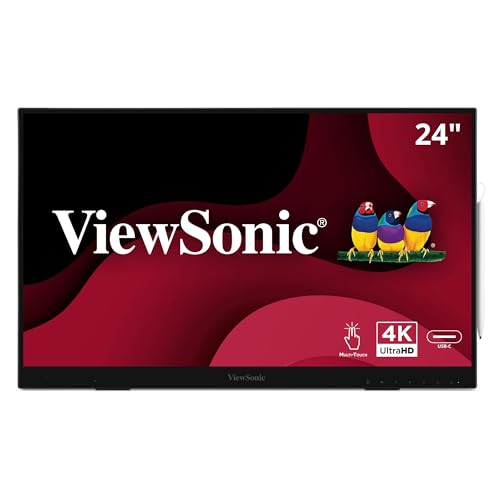
- 24-inch 4K IPS touch display
- 8192-level active stylus included
- USB-C, HDMI, DisplayPort, and USB hub
Best For: Desktop editing with extra screen space and touch input
Professional Desktop Workspace
Wacom Cintiq 24 QHD Pen Tablet

- 23.8-inch QHD IPS display
- Pro Pen 3 with 8192 pressure levels
- 100% sRGB and adjustable stand
Best For: Studio editors who want a large, precise pen workspace
Premium Portable OLED Choice

- 4K OLED with 100% DCI-P3 and Delta E < 1
- 16:10 screen adds room for editing controls
- MPP/USI stylus and 10-point touch support
Best For: Editors needing a color-accurate portable OLED pen display
Large Studio Pen Display

- 18.4-inch 4K screen suits detailed editing work
- Delta E < 1.3 and Adobe RGB for color accuracy
- 16,384-level stylus and 10-point touch support
Best For: Editors who want a larger desktop pen display with accurate color
Dual-Screen Productivity Pick
Foldable 14.2"×2 Touch Extender

- Two 14.2-inch 2.8K touchscreens for extra workspace
- 100% sRGB with 90Hz and 400-nit brightness
- MPP 2.0 stylus and foldable metal build
Best For: Traveling editors who prefer a dual-screen portable workflow
Flagship 4K Pro Pen Display

- 27-inch 4K UHD panel with 10-bit color
- 99% Adobe RGB and 98% DCI-P3 coverage
- 120 Hz refresh rate with Pro Pen 3
Best For: Professional creators who want a large, color-accurate pen display
Portable Touch Editing Display

- 15.6-inch 1080p IPS touchscreen
- Includes active stylus and built-in stand
- Lightweight 2.4 lb portable design
Best For: Mobile editors who want a portable pen-enabled second display
Color-Managed Creative Display

- 23.8-inch 4K UHD screen with 1.07 billion colors
- Calman Ready calibration support and presets
- 44 customizable Quick Keys plus two battery-free pens
Best For: Color-focused editors who want calibration and shortcut control
Portable Color-Accurate Pick – ASUS ProArt PA169CDV 15.6" 4K USB-C Monitor
If you want pen display monitors for video editing that also travel well, the ASUS ProArt PA169CDV is built around a sharp 15.6-inch 4K panel, strong color validation, and USB-C convenience. It’s aimed at creative work where accurate color, touch input, and a compact footprint matter more than raw screen size.
Best For: Editors and creators who need a portable, color-accurate pen display for travel or secondary workstation use.
Pros:
- 4K UHD IPS screen with 100% sRGB and factory calibration to Delta E < 2
- Bundled ProArt Pen uses Wacom EMR technology for natural pen input
- PANTONE Validated and Calman Verified for professional color confidence
- USB-C connectivity, built-in speakers, and dual kickstands add flexibility
Cons:
- 15.6-inch size is compact compared with full desktop pen displays
- 60Hz refresh rate and 5ms response time are standard rather than premium
- Best suited to editing workflows, not large multi-window timelines
The PA169CDV makes sense if you prioritize portability and image accuracy over sheer workspace. For color-sensitive video editing on the go, it offers a focused, polished feature set.
OLED Touch Creative Display – XPPen Artist Ultra 14 2.8K OLED Touch Tablet
For pen display monitors for video editing where contrast and color depth matter, the XPPen Artist Ultra 14 stands out with a 2.8K OLED touchscreen and wide-gamut coverage. Its touch gestures, dual stylus support, and slim design make it a compact creative display for detailed finishing work.
Best For: Editors, illustrators, and motion creatives who want an OLED pen display with touch controls and strong color coverage.
Pros:
- 2.8K OLED panel with 90Hz refresh rate and <1 ms response time
- 99% Adobe RGB, 99% sRGB, and 99% Display P3 with Delta E<1
- Touch controls support gestures like zoom, rotate, and canvas navigation
- Includes two stylus options and an ACK05 shortcut remote with 40 customizable keys
Cons:
- 14-inch size is compact for timeline-heavy video editing
- Touch and compatibility features vary by operating system
- OLED-focused design may be more specialized than a standard work monitor
This is a strong fit if you want a smaller pen display with premium image quality and interactive control. It is especially appealing for creators who value deep blacks, fast response, and precise color matching.
Large Desktop Touch Pick – ViewSonic ID2456-4K 24" 4K Touch Pen Display
If you are comparing pen display monitors for video editing and want a larger desktop canvas, the ViewSonic ID2456-4K delivers a 24-inch 4K IPS touch display with pen support and flexible connectivity. It is set up like a practical production tool, with USB-C single-cable use, a built-in kickstand, and a USB hub for workstation setups.
Best For: Editors who want a larger 4K touch display for desktop editing and annotation tasks.
Pros:
- 24-inch 4K UHD IPS panel provides more room for editing and touch use
- Includes a stylus with 8192 pressure levels for more controlled input
- USB-C supports touch recognition and power over a single cable
- Built-in kickstand, USB hub, and multiple inputs suit desk setups
Cons:
- 60Hz refresh rate and 14ms response time are modest for motion work
- Not as color-focused in the supplied specs as some creator-first rivals
- Heavier and less portable than compact pen displays
This model works well when you want a larger, practical screen for detailed editing and quick on-screen input. It favors convenience and workspace size over ultrapremium creative specs.
Professional Desktop Workspace – Wacom Cintiq 24 QHD Pen Tablet
Among pen display monitors for video editing, the Wacom Cintiq 24 is the most workstation-oriented option here, with a spacious 23.8-inch QHD panel and Wacom’s Pro Pen 3. It is designed for creators who want a larger canvas, dependable pen performance, and simple color handling for digital-first workflows.
Best For: Professional editors and creators who want a larger pen display with Wacom pen precision and a roomy workspace.
Pros:
- 23.8-inch 2560 x 1440 IPS display gives ample room for timelines and tools
- Pro Pen 3 includes 8192 pressure levels and tilt support
- 100% sRGB and 8-bit color depth support digital-first color consistency
- Adjustable stand and VESA mount option make setup flexible
Cons:
- QHD resolution is lower than 4K alternatives in this roundup
- No touch features are listed in the supplied details
- Single-year manufacturer warranty is shorter than some rivals
If you want the most expansive drawing-and-editing surface in this group, the Cintiq 24 is the straightforward pro choice. It is best treated as a serious desktop production display rather than a portable companion.
Premium Portable OLED Choice – 16" 4K OLED Touch MPP Display
If you want pen display monitors for video editing that prioritize color and portability, this 16-inch 4K OLED model is built for detail-heavy work. Its 3840 x 2400 resolution, 100% DCI-P3 gamut, Delta E < 1 color accuracy, and 400-nit brightness make it a strong fit for timelines, preview windows, and precise touch-based adjustments on the go.
Best For: Editors and creators who want a lightweight OLED touchscreen with pen support for highly detailed portable editing.
Pros:
- 4K OLED panel with 100% DCI-P3 and Delta E < 1 for accurate color work
- 16:10 aspect ratio gives extra vertical space for editing tools and timelines
- 10-point touch support plus MPP and USI stylus compatibility
- Lightweight 2 lb design with integrated stand and VESA 75 x 75 mm support
Cons:
- 60Hz refresh rate is fine for editing, but not aimed at fast-motion use
- Glossy OLED finish may be less ideal in bright environments
- Portable form factor means smaller screen area than full-size studio displays
Overall, this is a polished portable option for video editors who care most about image quality, touch control, and easy transport. It leans more toward accurate, vibrant monitoring than desktop-scale workspace, but that balance is exactly what many mobile creators need.
Large Studio Pen Display – 18.4" 4K UHD 16K Pressure
For pen display monitors for video editing, this 18.4-inch 4K UHD model is aimed at creators who want a larger workspace and dependable color accuracy. Its factory calibration to Delta E < 1.3, wide Adobe RGB gamut, 10-point touch, and 16,384-level pressure stylus support make it useful for detailed adjustments, retouching, and timeline-heavy editing.
Best For: Video editors and digital creators who want a large, color-accurate pen display for detailed desktop workflows.
Pros:
- 18.4-inch 4K screen provides a larger canvas for precise editing
- Factory-calibrated Delta E < 1.3 and wide Adobe RGB gamut support color-sensitive work
- 16,384-level pressure stylus offers fine stroke control for marking and annotation
- USB-C one-cable design helps keep the desktop clean and organized
Cons:
- Less portable than smaller travel-friendly displays
- No explicit mention of standalone battery operation
- Touch and stylus features may be more than casual editors need
This is the most workspace-oriented option in the group, with the size and calibration features to support serious editing sessions. If you want a pen display that feels closer to a desktop creative monitor, it makes a compelling case.
Dual-Screen Productivity Pick – Foldable 14.2"×2 Touch Extender
If your video editing setup needs more screen space rather than a single large panel, this foldable dual-display design is a practical alternative among pen display monitors for video editing. The two 14.2-inch 2.8K IPS touchscreens offer 90Hz fluidity, 100% sRGB color, and MPP 2.0 stylus support, making it useful for keeping preview, timeline, and tool panels separate while still staying portable.
Best For: Editors who want a foldable dual-screen touchscreen setup for multitasking and travel.
Pros:
- Dual 14.2-inch 2.8K screens expand workspace without a large single monitor
- 100% sRGB, 400 nits brightness, and 1500:1 contrast support everyday creative work
- MPP 2.0 stylus with 4096 pressure levels enables precise touch and annotation control
- Foldable metal body, built-in kickstand, and carry case improve portability
Cons:
- Smaller individual screens may feel cramped for some editing layouts
- Resolution is below 4K per panel
- Dual-screen format may take more setup time than a single monitor
This model stands out when workflow flexibility matters more than raw screen size. For editors who like extra screens for bins, previews, and controls, it offers an efficient and portable way to work.
Flagship 4K Pro Pen Display – Wacom Cintiq Pro 27
If you want pen display monitors for video editing that also double as a premium creative workspace, the Wacom Cintiq Pro 27 is built for color-focused, detail-heavy work. Its 27-inch 4K UHD panel, 10-bit color, 99% Adobe RGB, and 98% DCI-P3 coverage make it a strong fit when accurate visuals matter, while the 120 Hz refresh rate helps keep pen movement feel smooth and responsive.
Best For: Editors and creators who want a large, color-accurate pen display with a highly responsive pen experience.
Pros:
- 27-inch 4K UHD display with 10-bit color and wide Adobe RGB / DCI-P3 coverage
- 120 Hz refresh rate for smoother on-screen interaction
- Pro Pen 3 offers 8,192 pressure levels, 3 side switches, and adjustable balance/grips
- 8 customizable ExpressKeys plus improved multi-touch and pen gestures
Cons:
- Designed as a premium desktop display, so it is not a compact pick
- Best suited to users who will take advantage of its advanced customization and color features
The Cintiq Pro 27 stands out when you need a professional-grade display that supports detailed timelines, precise marking, and color-sensitive review work. If your workflow benefits from a large screen and a refined pen surface, this is one of the strongest all-around options in the category.
Portable Touch Editing Display – 15.6" FHD Pen Monitor
For buyers comparing pen display monitors for video editing on the go, this 15.6-inch portable touchscreen is a practical budget-friendly option. It uses a 1080p IPS panel with 10-point touch, includes an active stylus, and keeps setup simple with USB-C connectivity on Windows, making it useful for quick markups, navigation, and secondary-screen workflows.
Best For: Mobile editors, students, and remote workers who want a lightweight pen-enabled second display.
Pros:
- 15.6-inch FHD IPS display with 10-point touch
- Included active stylus supports note-taking, sketching, and annotation
- Windows Ink compatibility with no extra drivers needed on Windows
- Light 2.4 lb design with built-in stand and included sleeve
Cons:
- Not a 4K panel, so it is less detailed than larger premium pen displays
- On Mac, touch and stylus features require the UPDD driver
- Not all devices support touch or stylus input, even if video output works
This monitor makes the most sense if portability and simplicity matter more than top-end color specs. It is especially appealing as a grab-and-go editing companion for quick edits, annotations, and everyday productivity.
Color-Managed Creative Display – Xencelabs Pen Display 24+
If your priority is precision work on a larger screen, this 24-inch-class option fits well among pen display monitors for video editing and color-critical review. The 4K UHD panel, optically bonded etched surface, and low-parallax design are made for controlled pen input, while Calman Ready support and factory-calibrated color presets add a serious calibration angle for visual accuracy.
Best For: Color-conscious editors and digital artists who want calibration tools, shortcut control, and a polished pen feel.
Pros:
- 4K UHD 23.8-inch display with 1.07 billion colors
- Calman Ready hardware calibration support with factory color presets
- Etched, optically bonded screen with low parallax and reduced reflections
- Includes 44 customizable Quick Keys and two battery-free pens
Cons:
- Calman Ready calibration requires compatible software and a colorimeter
- Calibration functionality is currently unavailable for macOS users
- More feature-rich than basic setups, so it may be more than casual users need
The Pen Display 24+ is aimed at users who want both workflow control and visual confidence. With shortcut tools, two pen styles, and color-focused features, it is a strong fit for long editing sessions where consistency matters.
How We Picked These Pen Display Monitors for Video Editing
We focused on the features that matter most in editing: resolution, panel quality, touch support, pen responsiveness, screen size, and connectivity. For Pen Display Monitors for Video Editing, strong color handling and a comfortable working area are just as important as stylus performance.
We also considered portability, operating system compatibility, and whether the display is better suited for timeline work, color checks, or full-time editing sessions.
Quick Comparison
Smaller portable models are best for mobile editors and secondary screens. Mid-size 24-inch displays usually offer the best balance of workspace and desk footprint. Larger premium options are more comfortable for long sessions, advanced color work, and detailed grading.
Key Buying Factors for Pen Display Monitors for Video Editing
Resolution and Screen Size
Higher resolution helps you judge sharpness, interface detail, and preview accuracy. A 4K display is ideal for serious editing, while 2.8K and QHD models can still be excellent for many creators.
Color Accuracy
Look for wide color coverage, factory calibration, and calibration support if you do color-critical work. If you edit for clients or delivery standards, color accuracy should rank near the top of your checklist.
Pen and Touch Input
Responsive stylus pressure, low latency, and stable palm rejection make trimming, masking, and annotation easier. Touch support can speed up navigation, but some editors prefer pen-only control for cleaner precision.
Connectivity and Ergonomics
USB-C simplifies setup, while HDMI and USB hubs can help in multi-device studios. Adjustable stands, VESA support, and larger viewing angles improve comfort during long edit sessions.
Who Should Buy Which Pen Display Monitors for Video Editing?
If you travel or edit in tight spaces, choose a portable touchscreen model. If you want the most practical all-around setup, a 24-inch class display is often the best compromise for Pen Display Monitors for Video Editing. If you do professional finishing, grading, or long-form editing, step up to a larger premium model with stronger color tools and more workspace.
For creators who value speed and direct manipulation, pen displays can streamline rough cuts, retouching, and timeline work. For editors who mainly need a clean preview screen, a simpler smaller model may be enough.