Professional tablet computers have become a serious business tool, not just a convenience. The best models now combine laptop-like performance, touch-first mobility, and the durability professionals need on the move.
Whether you want a rugged field tablet, a polished 2-in-1 for office work, or a Windows tablet that can handle real productivity apps, this roundup highlights the strongest options for 2026.
Best 10 Professional Tablet Computers Picks for 2026
USA-Assembled Windows Pick
Fusion5 10.1" Windows 11 Tablet PC

- 12GB RAM and 256GB SSD
- Windows 11 Home with Intel N100
- USB-C, USB-A, micro HDMI, SSD expansion
Best For: U.S.-assembled Windows tablet buyers who want practical productivity and strong warranty coverage
Renewed Surface Choice
- Sharp 12.3-inch PixelSense touchscreen
- Core i5, 8GB RAM, 128GB SSD
- Useful ports and front/rear cameras
Best For: Portable Windows users who want a familiar Surface design and sharp screen
Budget 2-in-1 Workhorse

- 1-year Office 365 and 1TB OneDrive
- Detachable keyboard for laptop mode
- 8GB RAM and 256GB SSD
Best For: Students and remote workers who want an affordable Windows 2-in-1 with Office included
Rugged Field Tablet
Dell Latitude 7220 Rugged Extreme
- MIL-STD-810G rugged build
- 1000-nit outdoor-readable 11.6" display
- Core i7, 16GB RAM, 512GB SSD
Best For: Field and industrial users who need a durable Windows tablet with outdoor visibility
Premium Productivity Tablet
Fusion5 12" 2K Windows Tablet PC
- 12-inch 2K display with stylus support
- 12GB DDR5 RAM and 512GB SSD
- Built-in fan and fast charging
Best For: office work, study, and multitasking
Best for Everyday Use

- MIL-STD-810G and IP65 rugged design
- Daylight-readable 10.1-inch WUXGA display
- 4G LTE plus Windows 11 Pro
Best For: field work, industrial use, and mobile teams
Protected Work Tablet
Fusion5 10.1" Rugged Windows 11 Pro

- Rugged, shockproof, and dustproof build
- 12GB RAM with 256GB SSD
- 2-year warranty with accidental damage cover
Best For: rugged everyday work and school use
Premium 2-in-1 Work Tablet

- 13-inch PixelSense touchscreen
- 16GB RAM, 256GB SSD
- Windows 11 Pro with Thunderbolt 4
Best For: Mobile professionals needing a flexible tablet-laptop hybrid
Budget-Friendly Windows Slate

- 10.1-inch FHD IPS touchscreen
- 8GB RAM and 256GB SSD
- Micro HDMI and USB-C connectivity
Best For: Value-focused users needing a compact Windows tablet
Best Simple Pick
- 11.6-inch FHD rugged touchscreen
- Core i7 with 16GB RAM
- Designed for harsh field conditions
Best For: Military, field, and industrial users
USA-Assembled Windows Pick – Fusion5 10.1" Windows 11 Tablet PC
If you want professional tablet computers that feel more like compact PCs, this Fusion5 model is built around Windows 11, a 13th Gen Intel N100 CPU, and 12GB of RAM for everyday multitasking. Its 10.1-inch Full HD IPS display, SSD storage, and broad port selection make it a practical option for office work, video calls, and light productivity on the move.
Best For: Buyers who want a Windows tablet with strong multitasking, full-size productivity features, and a U.S.-assembled build.
Pros:
- 12GB RAM and 256GB SSD support responsive multitasking and quick app launches.
- Windows 11 Home and Intel N100 processor suit everyday work tasks.
- 10.1-inch 1920×1080 IPS screen with 500 nits brightness is easy to use indoors.
- USB-C, USB-A, micro HDMI, headphone jack, and SSD expansion add flexibility.
Cons:
- Docking keyboard is sold separately.
- 10.1-inch size may feel compact for heavy desktop-style work.
The appeal here is practicality: a well-connected Windows tablet with enough memory and storage for work, plus a warranty package that includes accidental damage coverage. For buyers comparing professional tablet computers, it stands out most when U.S. assembly, port variety, and supported productivity matter more than premium brand cachet.
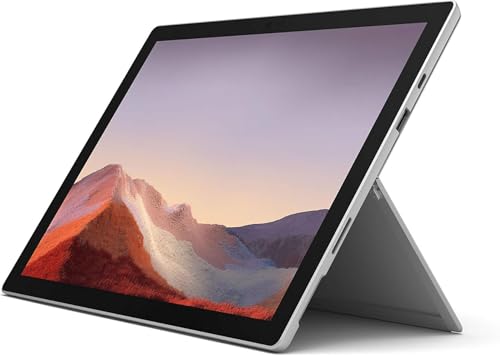
Renewed Surface Choice – Microsoft Surface Pro 7 12.3"
Microsoft Surface Pro 7 12.3in Intel Core i5 10th Gen 8GB RAM 128GB SSD Platinum (Renewed)
Check Price On AmazonAmong professional tablet computers, the Surface Pro 7 remains a familiar option for buyers who want a slim Windows device with a higher-resolution touchscreen and proven Microsoft hardware. This renewed configuration pairs an Intel Core i5 processor, 8GB of RAM, and 128GB SSD storage with a 12.3-inch PixelSense display, making it a sensible fit for note-taking, remote work, and light office use.
Best For: Buyers who want a compact Surface with a sharp display and Windows portability at a renewed price point.
Pros:
- 12.3-inch PixelSense touchscreen offers 2736 x 1824 resolution.
- Intel Core i5-1035G4 and 8GB RAM handle everyday productivity tasks.
- Includes useful ports such as USB 3.0, microSD, Mini DisplayPort, and headphone jack.
- Front and rear cameras plus Dolby Audio-enhanced stereo speakers improve calls and media.
Cons:
- Renewed unit comes with a 90-day limited warranty.
- 128GB storage is modest for larger files and media libraries.
This is a balanced pick if you prioritize the Surface form factor and a crisp display over the latest hardware. For shoppers evaluating professional tablet computers, it makes the most sense when portability, display quality, and Microsoft ecosystem familiarity are the deciding factors.
Budget 2-in-1 Workhorse – QAZIPO 10.1" Laptop/Tablet
This 2-in-1 is aimed at buyers who want professional tablet computers that can switch from typing to touch use without much fuss. With Windows 11, Office 365 for one year, 1TB OneDrive storage, an Intel Pentium Gold 6500Y, and a detachable keyboard case, it is set up for documents, classes, video calls, and everyday work on a budget.
Best For: Students, remote workers, and casual productivity users who want a lightweight Windows 2-in-1 with Office apps included.
Pros:
- Includes 1-year Office 365 and 1TB OneDrive storage.
- Detachable magnetic keyboard makes switching modes simple.
- 10.1-inch FHD IPS touchscreen is suitable for work and media.
- 8GB RAM and 256GB SSD provide solid baseline performance for office tasks.
Cons:
- Pentium Gold 6500Y is better suited to productivity than heavy workloads.
- USB-C port setup is mixed between charging and full-featured use.
The value proposition is straightforward: useful software, a carry-friendly design, and the core hardware needed for basic daily productivity. If you are comparing professional tablet computers for school or remote work, this model is most compelling when included Office tools matter as much as the device itself.
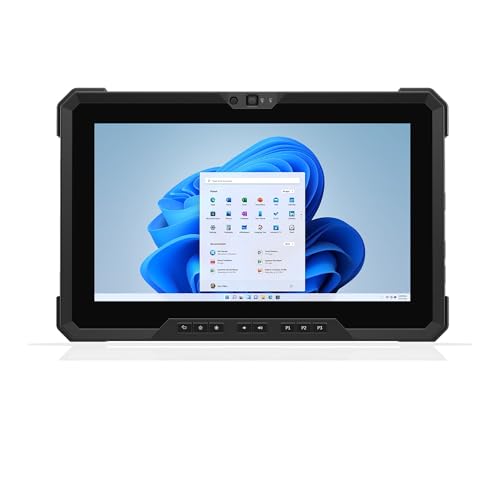
Rugged Field Tablet – Dell Latitude 7220 Rugged Extreme
For professional tablet computers used in demanding environments, the Dell Latitude 7220 Rugged Extreme is built around durability as much as performance. It combines an Intel Core i7-8665U vPro processor, 16GB of RAM, 512GB SSD storage, and a 1000-nit 11.6-inch outdoor-readable display, making it suitable for fieldwork, industrial settings, and mobile teams that need a tougher device.
Best For: Field professionals and industrial users who need a rugged Windows tablet with strong visibility outdoors.
Pros:
- MIL-STD-810G design is built for tougher working conditions.
- 1000-nit FHD display with glove-capable, anti-glare touch improves outdoor use.
- Core i7 vPro, 16GB RAM, and 512GB SSD support demanding multitasking.
- Includes GPS, smart card reader, fingerprint support, and multiple I/O options.
Cons:
- Heavier than consumer tablets at about 2.93 lbs starting weight.
- Stylus is not included.
This model is less about entertainment and more about dependable field use, secure access, and readability in bright conditions. Among professional tablet computers, it is the clearest fit when ruggedness, connectivity, and outdoor visibility matter more than slimness or consumer polish.
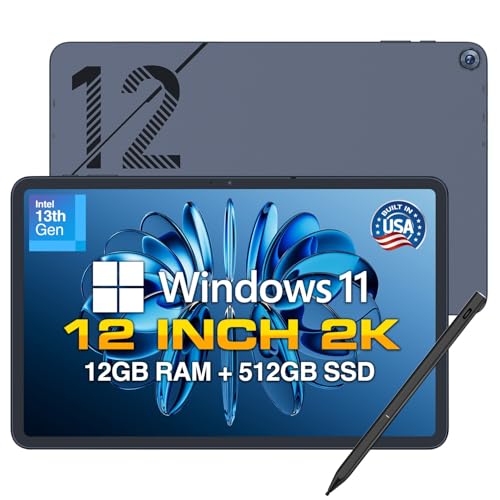
Premium Productivity Tablet – Fusion5 12" 2K Windows Tablet PC
If you’re comparing professional tablet computers for everyday work, the Fusion5 12-inch Windows tablet stands out for its large 2K display, fast storage, and desktop-style Windows 11 experience. It’s built for multitasking, note-taking, media, and general productivity, while the active cooling fan helps it stay steady during longer sessions.
Best For: Users who want a well-equipped Windows tablet for office work, study, creative tasks, and light business use.
Pros:
- 12-inch 2000×1200 touchscreen gives extra screen space for documents and multitasking
- 12GB DDR5 RAM and 512GB SSD support smooth performance and quick boot times
- Built-in fan helps prevent overheating during heavier workloads
- Includes stylus pen plus multiple ports, including two full-function USB-C connections
Cons:
- Windows tablets can be bulkier than simple media-focused tablets
- Battery size is modest compared with some larger productivity devices
This Fusion5 model is a practical pick if you want a tablet computer that feels more like a compact workstation. The metal body, fast charging, and Windows 11 compatibility make it especially appealing for users who need flexibility without giving up core productivity features.
Best for Everyday Use – Panasonic Toughbook FZ-G1 MK5
Among professional tablet computers built for harsh environments, the Panasonic Toughbook FZ-G1 is clearly aimed at field use rather than casual entertainment. Its rugged magnesium alloy chassis, sealed design, and daylight-readable display make it a strong option when durability and visibility matter more than thin-and-light styling.
Best For: Field teams, technicians, and mobile workers who need a rugged Windows tablet for demanding environments.
Pros:
- MIL-STD-810G certified and IP65 sealed for rugged, all-weather use
- 10.1-inch WUXGA display is daylight-readable with anti-glare treatment
- 4G LTE, Wi-Fi 5, Bluetooth 4.2, HDMI, and USB 3.0 provide broad connectivity
- Includes Windows 11 Pro, stylus, and cameras for data capture and communication
Cons:
- Renewed unit may not suit buyers who want brand-new hardware
- Older DDR3L memory and 7th-gen processor are not the newest specs
If your priority is surviving drops, dust, weather, and long workdays, this Toughbook is built for that job. It may not be the newest tablet on the list, but its rugged credentials and field-ready connectivity make it a serious work tool.
Protected Work Tablet – Fusion5 10.1" Rugged Windows 11 Pro
This Fusion5 model is a strong fit if you want professional tablet computers with a rugged design, modern Windows 11 Pro software, and useful business-friendly extras. It combines a compact 10.1-inch Full HD display with a protective build, fast wireless connectivity, and a two-year warranty that includes accidental damage cover.
Best For: Workers, students, and home users who need a rugged Windows tablet with warranty protection.
Pros:
- Rugged, shockproof, and dustproof build for harder use cases
- 12GB RAM and 256GB SSD with expandable MicroSD storage
- Windows 11 Professional with Intel 13th Gen N100 processor
- Two-year full warranty includes protection for up to two accidental damage incidents
Cons:
- 10.1-inch screen is smaller than some productivity-focused tablets
- Designed more for durability and reliability than premium display size
For buyers who want a tablet that can handle daily wear and less predictable conditions, this Fusion5 is easy to justify. The combination of rugged construction, practical performance, and coverage makes it a sensible work-first choice.
Premium 2-in-1 Work Tablet – Surface Pro 8
If you want professional tablet computers that can also step in as a laptop, the Surface Pro 8 is built for that kind of flexible workday. Its 13-inch PixelSense touchscreen, 16GB RAM, and 11th Gen Core i5 make it a strong fit for productivity, note-taking, and on-the-go use.
Best For: Professionals who want a lightweight Windows tablet that can switch between tablet and laptop modes.
Pros:
- 13-inch 2880 x 1920 touchscreen with up to 120Hz refresh rate
- 16GB RAM and 256GB SSD for smooth everyday productivity
- Windows 11 Pro with TPM and BitLocker support for business use
- Two USB-C ports with USB 4.0/Thunderbolt 4 support
Cons:
- Surface Pen is sold separately
- Keyboard cover is not included in the notes
- Renewed condition may not suit buyers wanting brand-new hardware
The Surface Pro 8 stands out if you value portability, a high-quality display, and business-friendly Windows features in one device. It is a practical pick for mobile work, especially when you need a tablet that still feels like a real PC.
Budget-Friendly Windows Slate – Fusion5 10.1" Pro N5
For buyers comparing professional tablet computers on a tighter budget, the Fusion5 10.1-inch Windows tablet focuses on essentials without a lot of bulk. It pairs an N100 CPU, 8GB RAM, and 256GB SSD storage with a Full HD IPS display, giving you a compact Windows device for everyday productivity and light multitasking.
Best For: Users who want a compact Windows tablet with decent performance and expandability.
Pros:
- 10.1-inch 1920 x 1200 FHD IPS touchscreen
- Intel N100 CPU with 8GB LPDDR5 RAM
- 256GB SSD plus microSD expansion up to 512GB
- Micro HDMI, USB 3.0, and USB-C for flexible connectivity
Cons:
- Runs Windows 11 Home, not Pro
- Docking keyboard is sold separately
- Smaller screen may feel cramped for heavy desktop-style work
The Fusion5 Pro N5 is a sensible choice if you want a small Windows tablet that can handle daily tasks and connect to external displays or accessories. It is more about value and versatility than high-end performance.
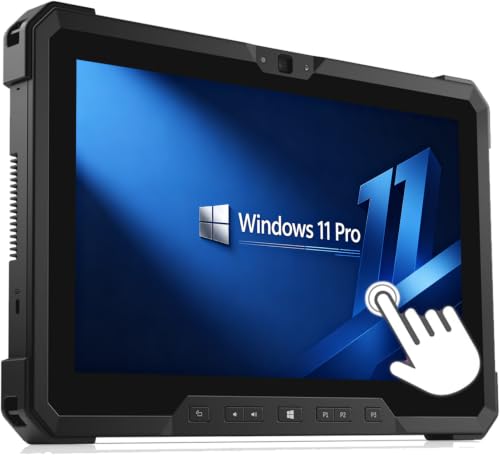
Best Simple Pick – Dell Latitude 7212 Rugged
When your search for professional tablet computers includes harsh environments and mission-critical work, the Dell Latitude 7212 Rugged Extreme is the clearly specialized option here. It combines an i7-8650U processor, 16GB RAM, and a 256GB SSD with an 11.6-inch Full HD touchscreen designed for durability and better readability in direct sunlight.
Best For: Field workers, military users, and business teams that need a rugged Windows tablet.
Pros:
- Rugged design intended for harsh conditions and field use
- Intel Core i7-8650U with 16GB RAM for demanding tasks
- 11.6-inch 1920 x 1080 touchscreen that is readable in sunlight
- Multiple ports including USB-C, USB 3.1, micro-SD, and micro-SIM
Cons:
- Renewed unit may ship with a non-original compatible charger
- No keyboard is included
- 30-day warranty is shorter than many buyers may prefer
This is the right pick if ruggedness matters more than slim design or consumer-style extras. For work in the field, it offers the toughness, port selection, and Windows Pro environment that many professional deployments require.
How We Picked These Professional Tablet Computers
We focused on models that make sense for real work: dependable performance, usable screen sizes, strong battery and mobility potential, and operating systems that support mainstream business software. We also weighed storage, RAM, processor class, ruggedness, and whether the tablet is better suited to office, travel, or field environments.
Quick Comparison: What These Tablets Are Best for
Not every tablet is built for the same job. Convertible 2-in-1 designs are best if you want a lighter laptop replacement for documents, meetings, and light multitasking. Windows tablets with stronger CPUs and more memory suit demanding productivity and multitasking. Rugged tablets are the right call for warehouses, service teams, inspections, logistics, and outdoor use where drop resistance and daylight visibility matter most.
Key Buying Factors for Professional Tablet Computers
Performance and RAM
For professional use, 8GB RAM is a practical minimum, while 12GB to 16GB is better for heavier multitasking, larger files, and longer device lifespan. Processor generation matters too; newer chips generally improve speed, efficiency, and app responsiveness.
Display and Input
Look for a display size that matches your workflow. Around 10 to 11 inches is highly portable, while 12 to 13 inches offers more room for spreadsheets, note-taking, and content review. If you write often, pen support and a high-resolution panel can make a major difference.
Storage and Connectivity
Fast SSD storage helps with boot times and file access, and 256GB is a comfortable baseline for most business users. Also check for USB-C, LTE or 4G support if you work away from Wi-Fi, and any needed accessory compatibility such as docks, keyboards, or barcode scanners.
Ruggedness and Security
If the tablet will be used in warehouses, vehicles, job sites, or public-facing service roles, rugged construction should be a priority. Business buyers should also consider Windows Pro features, biometric login options, and support for device management.
Who Should Buy Which Professional Tablet Computers?
Choose a rugged tablet if your job takes you outdoors or into harsh environments. Choose a 2-in-1 or Surface-style device if you need a refined everyday work tablet that can also serve as a light laptop. Choose a higher-spec Windows tablet if you want the most balanced mix of portability, speed, and software compatibility from your Professional Tablet Computers.