When you’re gearing up for a VR gaming session, the last thing you want is a dead headset. Choosing the right charging dock can make all the difference in keeping your Meta Quest 2 or Quest 3 powered up and ready to go. From rapid charging to compact designs, there’s a lot to take into account. Let’s explore the top options available that can enhance your gaming experience while ensuring your headset is always charged.
VR Headset Charging Dock for Meta Quest 3/Quest 2

If you own a Meta Quest 2 or Quest 3, the VR Headset Charging Dock is an essential accessory that simplifies your gaming experience. This dock’s compatibility with both models means you can easily charge your headset using a TYPE-C cable in just 3-5 hours. It neatly holds your controllers and accommodates third-party accessories, keeping your gaming area tidy. Plus, its durable design guarantees stability with non-slip pads, preventing any wobbling. Assembly is a breeze, and disassembling for storage is quick and hassle-free, making this dock a perfect fit for your VR setup.
Best For: VR enthusiasts who own a Meta Quest 2 or Quest 3 and want a convenient charging solution for their headset and controllers.
Pros:
- Compatible with multiple models and supports various accessories, enhancing usability.
- Durable design with non-slip pads ensures stability and prevents wobbling during use.
- Easy assembly and disassembly allow for quick setup and storage, making it user-friendly.
Cons:
- Controllers are not charged while docked, requiring separate charging solutions.
- Limited to specific power adapter requirements for optimal charging speed.
- Design may not accommodate all third-party accessories perfectly, leading to potential compatibility issues.
Lampelc VR Headset Charging Dock for Meta Quest 3S/3/2

The Lampelc VR Headset Charging Dock is an excellent choice for Meta Quest 3S/3/2 users seeking a reliable and organized charging solution. This dock features LED indicators that show charging status, with a quick 3-5 hour charge time. It’s compatible with various VR headsets and accessories, including touch controllers and headphones. The non-slip silicone tray protects your lenses, while the rotatable controller holder adds versatility. Its widened base and non-slip design guarantee stability and prevent tipping. Plus, with a 30-day risk-free trial and 24/7 support, you can trust Lampelc to keep your VR gear powered and ready.
Best For: Users of Meta Quest 3S/3/2 looking for a reliable, organized charging solution for their VR headsets and accessories.
Pros:
- Versatile Compatibility: Supports a wide range of VR headsets and accessories, making it suitable for various users.
- Stable and Secure Design: The widened base and non-slip features ensure stability and prevent tipping during use.
- Convenient Charging: Quick 3-5 hour charging time with clear LED indicators for easy monitoring of charging status.
Cons:
- Limited to Specific Models: Primarily designed for Meta Quest 3S/3/2, which may not cater to users of other VR brands.
- Space Requirement: The dock’s compact design may still take up considerable space depending on the user’s setup.
- Non-removable Charging Cables: Users may need to manage cables carefully as they are integrated into the dock.
PRISMXR Charging Dock for Meta Quest 3

Looking for a reliable charging solution for your Meta Quest 3? The PRISMXR Charging Dock (Carina D1) stands out with its innovative magnetic and flexible pin charging system, allowing for easy alignment. It fully charges your headset in about 1 hour and 50 minutes, while controllers take 2.5 hours. Its compact, nest-inspired design keeps everything organized and charging simultaneously. With safety features like over-charge protection and a sleep-friendly LED indicator, you can rest easy. Plus, with a 4.4-star rating and responsive customer support, you’re making a solid choice for your VR setup.
Best For: VR enthusiasts looking for a fast, organized, and safe charging solution for their Meta Quest 3 headset and controllers.
Pros:
- Innovative magnetic and flexible pin charging for easy alignment and stability.
- Rapid charging times: headset in 1 hour and 50 minutes, controllers in 2.5 hours.
- Compact, nest-inspired design for organized storage and simultaneous charging.
Cons:
- Battery strap cannot be charged by the dock, limiting charging options for some users.
- Slightly heavier at 2.64 pounds compared to some other charging docks.
- LED indicators may be distracting for light-sensitive users, despite the option to turn them off.
G-STORY Charging Dock for Quest 3/Quest 2 VR Headset and Controllers

For VR enthusiasts seeking a reliable and efficient charging solution, the G-STORY Charging Dock stands out with its intelligent chip that guarantees thorough protection for your Quest 3 or Quest 2 headset. This dock features a fast charger and a Type-C cable, ensuring quick power-ups. Its high-quality ABS plastic construction, combined with anti-slip silicone, gives it stability, preventing any accidental slips. You’ll appreciate the LED indicators that easily show your charging status. Plus, it’s compatible with many standard VR headsets, and you can assemble it in under a minute without any tools. Keep your VR gear charged and ready to go!
Best For: VR enthusiasts looking for a reliable and efficient charging solution for their Quest 3 or Quest 2 headsets.
Pros:
- Fast charging capabilities with included Type-C cable for quick power-ups.
- Intelligent chip for comprehensive safety protection, enhancing battery life.
- Easy assembly in under a minute without tools, making it user-friendly.
Cons:
- Only charges the headset, not the controllers.
- May not be as portable due to its added weight for stability.
- Compatibility may vary with some non-standard VR headsets.
TechKen Charging Stand for Meta Quest 2

If you’re a VR enthusiast seeking an efficient and organized charging solution, the TechKen Charging Stand for Meta Quest 2 stands out with its thoughtful design. Compatible with various VR headsets, it features a rotatable hanger for your controllers and an organizer for cables and earphones. You’ll appreciate the increased silicon buffer that protects your headset lenses from scratches. With an LED charging indicator and a safety chip, you can charge securely in just 3–5 hours. Weighing only 1.04 pounds, it’s easy to set up and store, making it a great addition to your gaming setup.
Best For: VR enthusiasts looking for an efficient and organized charging solution for their headsets and controllers.
Pros:
- Compatible with multiple VR headsets, enhancing versatility.
- Features a rotatable hanger and cable organizer for efficient storage.
- Includes safety features like an LED charging indicator and protective chip.
Cons:
- Some users report concerns regarding material durability.
- May not fit well with certain head strap setups.
- Assembly might be challenging for some users.
Kinwin Magnetic Charging Dock for Meta Quest 3S/3

The Kinwin Magnetic Charging Dock for Meta Quest 3S/3 stands out as the perfect choice for VR enthusiasts who want a hassle-free charging experience. This dock charges your headset and two controllers simultaneously, ensuring everything’s powered up quickly—about three hours for the headset and four for the controllers. Its magnetic USB-C interface minimizes wear and simplifies alignment, making charging seamless. Plus, the customizable RGB ambient lighting adds a personal touch while indicating charging status. Eco-friendly features like rechargeable batteries reduce waste, keeping your game room tidy and organized. It’s an ideal gift for VR lovers, complete with all necessary accessories and customer support.
Best For: VR enthusiasts looking for a convenient and efficient charging solution for their Meta Quest 3S/3 headset and controllers.
Pros:
- Charges headset and two controllers simultaneously, saving time.
- Magnetic USB-C interface enhances durability and simplifies the charging process.
- Customizable RGB ambient lighting adds a personal touch and indicates charging status.
Cons:
- Charging dock design may not appeal to all aesthetics.
- Requires space on a gaming desk or shelf for setup.
- Limited to compatibility with Meta Quest 3S/3, not suitable for other devices.
Bioherm Charging Dock for Oculus Quest 2 VR Headset & Controllers
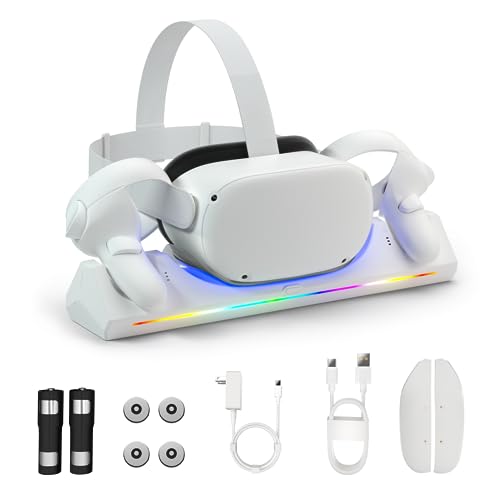
Designed specifically for Oculus Quest 2 users, the Bioherm Charging Dock stands out with its magnetic charging capability, allowing you to power up your headset and controllers simultaneously in just 4-5 hours. This dock includes two rechargeable 2100mAh batteries, a USB-C charger, and a cable, making it a complete solution. LED indicators show charging status, while an adjustment button lets you turn off the lights. Not only does it reduce battery waste with reusable batteries, but it also keeps your gaming area organized and clutter-free. With a solid 4.6-star rating, users appreciate its convenience and aesthetic design.
Best For: Oculus Quest 2 users looking for a convenient and eco-friendly charging solution for their headset and controllers.
Pros:
- Magnetic charging allows for simultaneous powering of headset and controllers in 4-5 hours.
- Includes reusable batteries that can be used over 1000 times, reducing battery waste and costs.
- LED indicators provide clear charging status and the ability to turn off lights for a less distracting environment.
Cons:
- Some users reported charging issues with controllers, indicating potential compatibility problems.
- Battery covers may slip during gameplay, causing inconvenience.
- Customer feedback suggests a need for additional support or warranty inquiries regarding charging status.
Meta Quest Compact Charging Dock for Meta Quest 3/3S
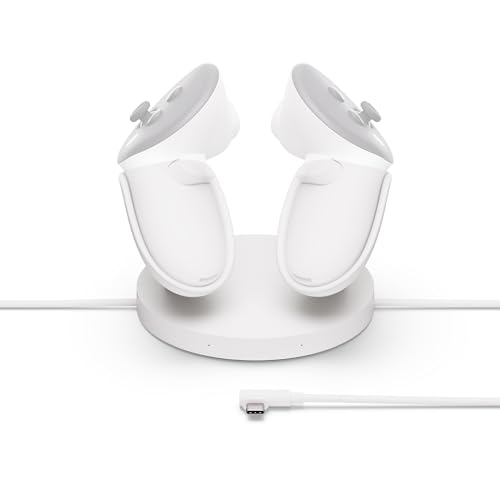
For those who own a Meta Quest 3 or 3S, the Meta Quest Compact Charging Dock stands out as the ideal choice for keeping your gear powered up and ready to go. This dock offers convenient drop-in charging for your Touch Plus Controllers and includes built-in overheating protection for safety. You’ll appreciate the extended cable for charging your headset too. With two rechargeable lithium-ion batteries, you can easily monitor controller battery levels directly within your headset. Its compact design guarantees easy storage and accessibility, making it a perfect addition to your VR setup while seamlessly integrating with the Quest ecosystem.
Best For: Those seeking a reliable and efficient charging solution for their Meta Quest 3 or 3S and Touch Plus Controllers.
Pros:
- Convenient drop-in charging with built-in overheating protection for safety.
- Includes two rechargeable lithium-ion batteries for easy monitoring of controller battery levels.
- Compact design allows for easy storage and accessibility, enhancing the overall VR setup.
Cons:
- May not be compatible with other VR headsets outside the Meta Quest ecosystem.
- Limited to charging only Touch Plus Controllers, excluding other controller types.
- The compact design might not accommodate larger headsets or accessories comfortably.
ZYBER Charging Dock for Meta Quest 2

If you’re a Meta Quest 2 enthusiast looking to keep your headset and accessories powered up, the ZYBER Charging Dock is an excellent choice. This dock charges your headset, elite strap with battery, and controllers simultaneously, ensuring everything’s ready when you are. With charging times of 2.5 to 3.5 hours for the headset and 4 hours for controllers, it’s efficient, though charging all devices might take a bit longer. The strong magnetic attraction simplifies placement, while built-in protections guarantee safety. Plus, the LED indicators keep you updated on charging status, making it a smart addition to your VR setup.
Best For: Meta Quest 2 enthusiasts who want a convenient and efficient way to charge their headset and accessories simultaneously.
Pros:
- Simultaneous Charging: Charges headset, elite strap with battery, and controllers at the same time, reducing downtime.
- Magnetic Design: Strong magnetic attraction and battery covers make it easy to place devices securely.
- Safety Features: Built-in charging protections and automatic battery repair enhance safety and reliability.
Cons:
- Longer Charging Time: Charging all devices at once may increase the overall charging time.
- Compatibility Limitation: Specifically designed for Meta Quest 2, limiting use with other devices.
- Additional Weight: The dock may add bulk to your gaming setup, which some users might find cumbersome.
YOGES Charging Dock for Meta Quest 3S and Quest 3 Accessories

The YOGES Charging Dock for Meta Quest 3S and Quest 3 Accessories is the perfect solution for VR enthusiasts who want fast and efficient charging for their equipment. This 2-in-1 charging station fully charges your headset in about 2.5 hours and controllers in 3-3.5 hours. It supports various battery straps and features a stylish vertical design to keep your space organized. The dock also includes LED atmosphere lights, enhancing your gaming setup, with indicators showing charging status. With 24-hour customer support and all necessary components included, you’ll have everything you need to keep your VR gear powered up and ready to go.
Best For: VR enthusiasts looking for an efficient charging solution for their Meta Quest 3 and Quest 3S equipment.
Pros:
- Fast charging capabilities, with the headset fully charged in about 2.5 hours.
- Stylish vertical design that minimizes space and organizes the gaming area.
- Includes LED atmosphere lights and charging status indicators for an enhanced user experience.
Cons:
- Requires an 18W fast charging adapter, which is not included in the package.
- Compatibility limited to only Quest 3 and Quest 3S headsets.
- The magnetic charging ports may not be suitable for all users’ preferences.
Factors to Consider When Choosing VR Charging Docks
When choosing a VR charging dock, you’ll want to take into account several key factors. Think about compatibility with your headset, charging speed, and overall design. Safety features and storage solutions can also make a big difference in your setup.
Compatibility With Headsets
Choosing a VR charging dock that fits your specific headset model is essential for ensuring peak performance and convenience. Always check that the dock explicitly states compatibility with your headset, like the Meta Quest 2 or Quest 3. Many docks also support various head strap types, so confirm it accommodates your preferred strap for maximum charging.
If you want to keep your gaming area organized, look for docks that can store and charge your controllers alongside the headset, ensuring they’re compatible with your controller model too. Additionally, consider whether the dock supports extra accessories, like headphones and cables. Finally, some docks allow you to charge your controllers with silicone sleeves or battery straps attached, making your setup even easier.
Charging Speed and Efficiency
While exploring VR charging docks, it’s crucial to take into account charging speed and efficiency, as these factors greatly affect your overall experience. Charging times can vary considerably; some docks fully charge your headset in just 1 hour and 50 minutes, while others may take up to 5 hours. Many utilize fast charging technology, allowing controllers to recharge in approximately 2.5 to 4 hours. Pay attention to the power adapter’s specifications—higher voltage options, like 12V-3A, typically offer faster charging. Innovative designs, such as magnetic connections, enhance efficiency by simplifying alignment and reducing connection issues. Finally, LED indicators keep you informed about charging status, ensuring you’re always aware of your headset’s power level.
Design and Aesthetics
Designing a VR charging dock goes beyond functionality; it also plays an essential role in enhancing your gaming setup’s overall aesthetic. You want a compact and organized layout that reduces clutter while providing dedicated spaces for your headset and controllers. Look for aesthetic features like LED indicators and customizable ambient lights that can create an immersive feel. It’s also important to choose docks made from non-slip and anti-scratch materials, ensuring your VR headset stays protected during charging. Consider the design’s ergonomics for easy access, allowing quick interactions without disrupting your gaming. A stylish charging dock can serve as an attractive display piece, appealing to those who appreciate aesthetics alongside practicality.
Safety Features and Protection
When enhancing your VR setup, safety features shouldn’t be overlooked. Look for charging docks that offer essential protections like over-current, over-voltage, overheat, and overcharge safeguards. These features not only guarantee safe charging but also extend your headset’s battery life. Many docks incorporate intelligent chip technology to manage the power supply effectively, preventing battery damage. You’ll also appreciate LED indicators that display charging status, providing visual feedback and preventing overcharging. A stable design with non-slip bases can help avoid tipping or accidents during charging, keeping your devices secure. Additionally, some docks let you customize features, such as turning off LED indicators during sleep, minimizing distractions while still maintaining functionality. Prioritize safety for a worry-free VR experience.
Organization and Storage Solutions
A quality VR charging dock should prioritize organization and storage solutions to keep your gaming area tidy and free of clutter. Look for a compact design that minimizes cable mess and provides dedicated spaces for your headset and controllers. This prevents tangling and guarantees easy access to all components when you’re ready to play. Some docks even feature rotatable or adjustable holders, allowing you to customize the setup based on your preferences. Additionally, non-slip materials can stabilize devices during charging, reducing the risk of accidental tipping. Consider options that include extra storage for headphones, cables, and other accessories, enhancing your overall gaming experience while keeping everything organized and within reach.
Ease of Assembly
While you’re keen to plunge into your virtual reality adventures, the last thing you want is a complicated charging dock setup. Many VR charging docks are designed for easy assembly, often requiring no tools, which means you can get everything up and running in under a minute. If you value efficiency, this feature is a game-changer. Most docks have a compact design, making them easy to store when you’re not using them, saving valuable space. Additionally, some models include rotatable components to accommodate different controller types, enhancing usability during assembly. User feedback frequently highlights the simplicity of these designs as a significant advantage, ensuring a hassle-free experience so you can focus on what matters—your VR fun!