If you’re serious about enhancing your gaming setup, you’ve probably considered investing in VR pedals for simulators. These pedals can greatly improve your control and immersion, whether you’re racing on a track or piloting a plane. From customizable features to ergonomic designs, the right choice can elevate your experience. But with so many options available, which ones truly stand out? Let’s explore the top contenders that could transform your gameplay.
Logitech G920 Driving Force Racing Wheel and Floor Pedals for Xbox and PC

If you’re looking to elevate your racing game experience, the Logitech G920 Driving Force Racing Wheel and Floor Pedals are a top choice for Xbox and PC gamers. This sleek black wheel offers precision steering and pressure-sensitive pedals, simulating real car driving for an immersive experience. You’ll appreciate the helical gearing that provides smooth, quiet steering, while the hand-stitched leather cover adds a touch of realism. With customizable brake pedals and a sturdy base for better control, the 900-degree rotation guarantees you handle every turn like a pro. Plus, it’s eco-friendly, made from 52% recycled materials, showing Logitech’s commitment to sustainability.
Best For: Racing enthusiasts and gamers looking for an immersive and realistic driving simulation experience on Xbox and PC.
Pros:
- High-quality build with a hand-stitched leather cover for enhanced realism.
- Customizable pressure-sensitive brake pedals for precise braking control.
- Eco-friendly design made from 52% recycled materials, demonstrating sustainability.
Cons:
- May require additional accessories, like the Driving Force Shifter, for a complete racing experience.
- Initial setup and calibration may take some time for optimal performance.
- The size and weight may not be suitable for all desk setups, potentially requiring special mounts.
Turtle Beach VelocityOne Universal Rudder Pedals for Xbox and Windows PCs
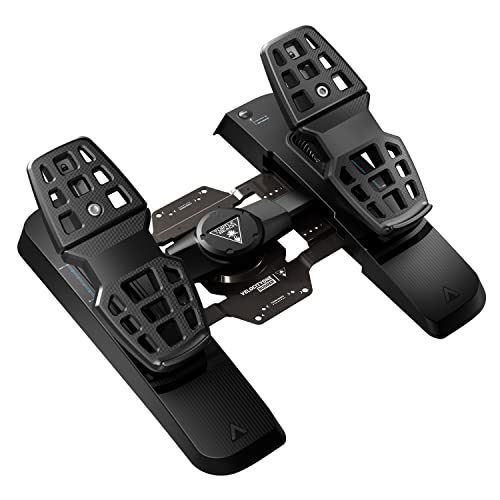
The Turtle Beach VelocityOne Universal Rudder Pedals are an ideal choice for gamers who demand precision and control in their flight simulations. Designed for Xbox Series X, S, and Windows PCs, these pedals feature an ultra-smooth rudder axis with swappable springs, allowing you to customize your experience. With differential brakes and adjustable pedal width, you’ll achieve peak performance tailored to your style. The non-contact Hall Effect sensor guarantees accuracy across all axes. Plus, the stable, non-slip base enhances your gameplay, while the sleek black design fits seamlessly into your setup. Elevate your flight simulations with these reliable, high-quality rudder pedals!
Best For: The Turtle Beach VelocityOne Universal Rudder Pedals are best for gamers seeking precision and customization in their flight simulation experience on Xbox and Windows PCs.
Pros:
- Ultra-smooth rudder axis with customizable swappable springs for personalized control.
- Non-contact Hall Effect sensor ensures accurate performance across all axes.
- Stable, non-slip base enhances gameplay stability and comfort.
Cons:
- Requires the VelocityOne Flight Control System for Xbox compatibility, limiting standalone use.
- May not be suitable for casual gamers who do not prioritize advanced features.
- Limited color options, only available in black, which may not match all setups.
Thrustmaster TPR Pedals (Compatible with PC)

For serious flight simulation enthusiasts, the Thrustmaster TPR Pedals are an exceptional choice, thanks to their advanced Thrustmaster Pendul_r Technology that delivers smooth, fluid movements. You’ll appreciate the ultra-precise, frictionless action from H.E.A.R.To HallEffect Technology, ensuring accurate readings for even the smallest adjustments. With adjustable spring positions, you can easily customize resistance to match your preference. These all-metal pedals offer realistic rudder and braking actions, greatly enhancing your simulation experience. Users rave about their build quality and quiet operation. Though they come at a higher price, the investment is well worth it for serious simmers seeking immersion and control.
Best For: Serious flight simulation enthusiasts looking for high-quality, realistic control options for their PC.
Pros:
- High precision and smooth operation thanks to advanced technologies like Pendul_r and H.E.A.R.To HallEffect.
- Customizable resistance with adjustable spring positions for personalized feel.
- Durable all-metal construction ensures longevity and enhanced realism in flight simulations.
Cons:
- Higher price point may be a barrier for casual users or beginners.
- Heavier weight (20 pounds) may limit portability or ease of setup.
- Limited compatibility as they are designed specifically for PC use.
Thrustmaster TFRP Flight Rudder Pedals for Flight Simulators

Designed with flight enthusiasts in mind, the Thrustmaster TFRP Flight Rudder Pedals offer an ergonomic setup that caters to both casual gamers and serious sim pilots. You’ll appreciate the smooth steering provided by the S.M.A.R.T slide rails system and the self-centering rudder axis for precise maneuvers. Compatible with PC, Xbox One, and PlayStation 5, these pedals feature two differential brake pedals and a large base for stability. Plus, the T.A.R.G.E.T software lets you customize settings easily. While some users mention pedal spacing issues, the overall positive feedback on performance makes these pedals a great choice for any flight simulation experience.
Best For: Casual gamers and serious sim pilots seeking an ergonomic and reliable flight control experience.
Pros:
- Smooth and precise steering thanks to the S.M.A.R.T slide rails system.
- Customizable settings with T.A.R.G.E.T software for enhanced user experience.
- Stable and sturdy design with a large base for added comfort during use.
Cons:
- Some users report discomfort due to the spacing of the pedals, especially larger individuals.
- Concerns about long-term durability and potential yaw control irregularities over time.
- Limited to compatibility with specific gaming platforms and may not suit all flight simulation preferences.
Logitech G PRO Flight Yoke System for PC

Crafted specifically for both new and experienced pilots, the Logitech G PRO Flight Yoke System offers realistic controls that greatly enhance aircraft simulation. Its stainless steel yoke shaft guarantees robust and smooth handling, while the POV hat and 14 button controls provide over 54 programmable functions. With a 5.9 ft USB connector for the yoke and a 4.92 ft PS/2 cable for the throttle quadrant, it’s compatible with various Windows versions. The adjustable desk clamp allows flexible mounting, assuring stability during intense flights. Plus, with 75 programmable controls, you can customize your experience to suit your flying style perfectly.
Best For: The Logitech G PRO Flight Yoke System is best for both new and experienced pilots looking to enhance their aircraft simulation experience.
Pros:
- Realistic yoke controls provide an immersive flying experience.
- Durable stainless steel yoke shaft ensures smooth and reliable handling.
- Extensive customization options with 75 programmable controls for tailored functionality.
Cons:
- Requires optional software download for full compatibility with certain flight simulators.
- Limited to Windows operating systems, which may exclude some users.
- The PS/2 connection for the throttle quadrant may not be as common in modern setups.
Logitech G29 Driving Force Racing Wheel and Floor Pedals for PS5, PS4, PC, Mac
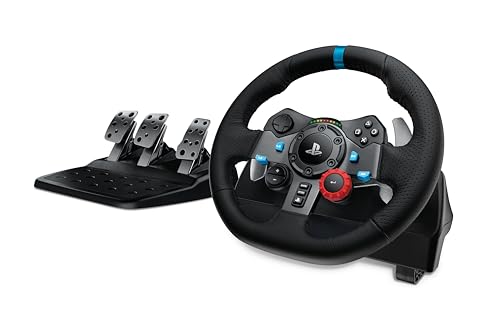
The Logitech G29 Driving Force Racing Wheel and Floor Pedals stand out as an excellent choice for gamers who crave an authentic racing experience across multiple platforms, including PS5, PS4, PC, and Mac. With immersive force feedback and a 900-degree rotation, you’ll feel every turn and terrain. The hand-stitched leather cover and durable construction guarantee comfort and longevity. Customize the pressure-sensitive pedals for precise control, and easily mount the system with built-in clamps. The G HUB software lets you adjust sensitivity and button functions. Ideal for racing enthusiasts, the G29 offers realism without breaking the bank, making it a top pick.
Best For: Racing enthusiasts seeking a high-quality and realistic driving experience without spending excessively.
Pros:
- Immersive Experience: Provides realistic force feedback and 900-degree rotation for an authentic racing feel.
- Durable Construction: Built with hand-stitched leather and solid steel components for longevity and comfort.
- Customizable Pedals: Features adjustable pedals for enhanced control and precision in gameplay.
Cons:
- Brake Pedal Adjustment Needed: Some users may find the brake pedal’s feel requires personal adjustment for optimal performance.
- Not Compatible with PlayStation 3: Limited compatibility may exclude users with older gaming systems.
- Additional Accessory Costs: The Driving Force Shifter is sold separately, adding to the overall investment.
Logitech G PRO Racing Pedals for Racing Simulators

If you’re serious about racing simulations, the Logitech G PRO Racing Pedals stand out with their impressive 100kg load cell brake, delivering peak braking power and enhancing your muscle memory. You can customize these pedals with swappable gas and clutch springs, allowing you to fine-tune your experience. The modular design lets you adjust the spacing or remove pedals as needed. Thanks to contactless Hall effect sensors, these pedals promise durability and consistent performance. Pair them with the Logitech PRO Racing Wheel for the ultimate setup, and enjoy the precision that users rave about, especially in cornering ability.
Best For: Serious racing simulation enthusiasts looking for customizable and high-performance pedals.
Pros:
- Customizable: Swappable gas and clutch springs allow for fine-tuning to fit personal preferences.
- Durable Design: Built with contactless Hall effect sensors for longevity and consistent performance.
- Enhanced Performance: The 100kg load cell brake improves braking power and muscle memory, leading to better precision in cornering.
Cons:
- Setup Confusion: Some users have reported issues with incomplete packages or confusion during setup.
- Compatibility Requirement: Older Logitech wheels require a G Racing adapter for proper connection.
- Price Point: Higher investment compared to standard racing pedals may not suit all budgets.
Thrustmaster T16000M FCS Flight Pack (Compatible with PC)

For those seeking precision and versatility in flight simulation, the Thrustmaster T16000M FCS Flight Pack stands out as an ideal choice. Compatible with PC via USB, it utilizes H.E.A.R.T technology for unmatched accuracy that lasts. The fully ambidextrous design allows you to customize it for left or right-handed use, featuring three removable components. With 16 action buttons, an 8-way hat switch, and four independent axes including a twist rudder, you’ll have complete control at your fingertips. Plus, T.A.R.G.E.T software lets you create personalized mapping profiles for any game, enhancing your overall simulation experience.
Best For: Flight simulation enthusiasts looking for a highly precise and customizable joystick experience.
Pros:
- Superior Precision: Utilizes H.E.A.R.T technology for consistent accuracy over time.
- Ambidextrous Design: Fully customizable for both left-handed and right-handed users with removable components.
- Extensive Controls: Features 16 action buttons, an 8-way hat switch, and four independent axes for complete control.
Cons:
- PC Only Compatibility: Only compatible with PC systems via USB, limiting use on other platforms.
- Learning Curve: May require time to fully master all controls and software features.
- Limited Physical Feedback: Some users may prefer a joystick with more tactile feedback during operation.
Logitech G X56 H.O.T.A.S Flight Simulator Game Controller Bundle

Designed for serious flight simulation enthusiasts, the Logitech G X56 H.O.T.A.S Flight Simulator Game Controller Bundle combines advanced joystick and throttle controls with realistic rudder pedals, making it an ideal choice for those seeking an immersive virtual flying experience. With military-grade precision and customizable controls, you’ll find it easy to navigate both small aircraft and heavy jets. The RGB backlighting adds a personal touch while the smooth self-centering rudder pedals enhance realism. Plus, the adjustable tension dial and differential toe brakes guarantee precise control during landing and taxiing, elevating your overall flight simulation experience to new heights.
Best For: Serious flight simulation enthusiasts seeking an immersive and realistic flying experience.
Pros:
- Military-grade precision for accurate control in flight simulations.
- Customizable RGB backlighting for a personalized gaming setup.
- Realistic rudder pedals with adjustable tension and differential toe brakes enhance landing and taxiing.
Cons:
- May have a steep learning curve for beginners not familiar with flight simulation controls.
- Higher price point compared to basic flight controllers.
- Requires adequate space for setup due to the size of the throttle and joystick bundle.
Logitech G Farm Simulator Heavy Equipment Bundle (2nd Generation)

The Logitech G Farm Simulator Heavy Equipment Bundle (2nd Generation) stands out with its 900-degree rotation steering wheel, making it an ideal choice for anyone looking to immerse themselves in farm simulation. This bundle includes a wheel, pedals, and a vehicle side panel control deck, enhancing your gaming experience on PC and consoles. With 37 programmable buttons and integrated dual analog sticks, you can manage your farm efficiently. While some users find the setup complex, the high-quality build and realistic operation make it worth it. If you want a practical, immersive experience, this bundle is a solid investment for farm simulation enthusiasts.
Best For: Farm simulation enthusiasts looking for an immersive and realistic gaming experience with extensive control options.
Pros:
- High-quality build with realistic features, including a 900-degree rotation steering wheel.
- 37 programmable buttons and integrated dual analog sticks for comprehensive farm management.
- Compatible with multiple platforms including PC, PlayStation 4/5, and Xbox, enhancing versatility.
Cons:
- Complex setup process requiring manual key binding, which may be challenging for some users.
- Limited functionality on non-PC platforms, reducing usability for console gamers.
- Documentation lacks detail, making configuration and troubleshooting more difficult.
Factors to Consider When Choosing VR Pedals for Simulators
When choosing VR pedals for your simulator setup, you should consider several key factors. Compatibility with your favorite games, precision and sensitivity of the pedals, and adjustable resistance can make a big difference in your experience. Also, don’t forget to weigh build quality against price to find the best value for your needs.
Compatibility With Simulator Games
Choosing the right VR pedals for your simulator game hinges on compatibility, so you should first confirm they work with your specific platform, whether it’s PC, Xbox, or PlayStation. Make certain the pedals align with your simulator game since some models only support certain platforms. Check if you need any additional hardware or software, like flight control systems or drivers, to get the most out of your setup. Look for pedals that offer advanced programming software, allowing you to customize mappings for different games. It’s also wise to reflect on the range of compatible games; versatile pedals can enhance your experience across various genres like racing and flight simulation. Finally, verify they integrate seamlessly with your existing gear for a truly immersive experience.
Pedal Precision and Sensitivity
Precision and sensitivity in VR pedals can make or break your simulation experience. High-quality pedals often utilize Hall Effect sensors, providing frictionless action and enhanced accuracy, allowing for better control. You’ll also appreciate customizable sensitivity settings, especially with pressure-sensitive brakes that let you tailor the response to your unique driving or flying style. Load cell technology is another feature to take into account; it measures the force applied for superior braking feel and muscle memory retention. This guarantees consistent performance in intense scenarios. Additionally, smooth and linear operation is vital for maintaining control during complex maneuvers. By focusing on these elements, you can elevate your immersion and overall enjoyment in your simulations.
Adjustable Resistance and Customization
To enhance your simulation experience, adjustable resistance and customization in VR pedals play an important role. With adjustable resistance, you can tailor the feel and feedback of the pedals, improving your comfort and control during simulations. Many pedals offer swappable springs and elastomers, allowing you to fine-tune the response based on your personal preferences and simulation needs. Customization options also include adjustable pedal spacing and configurations, which cater to different foot sizes and driving styles for better ergonomics. Modifying the load cell brake pressure can greatly impact your muscle memory and braking precision, vital for realistic driving or flying experiences. Overall, enhanced adjustability lets you replicate real-world vehicle dynamics for a truly immersive simulation.
Build Quality and Durability
When considering VR pedals for simulators, the build quality and durability greatly impact your overall experience. Higher-end models often use metal and durable plastics that can withstand intense usage without wear and tear. Features like contactless Hall effect sensors enhance durability by providing frictionless action, reducing the chance of mechanical failures over time. You’ll appreciate adjustable components, such as spring positions and pedal spacing, which allow you to customize the pedals for your comfort and control. Additionally, heavier pedals with a non-slip base prevent movement during use, boosting stability and performance. User feedback consistently highlights how solid build quality delivers a realistic and immersive simulation experience, ensuring your investment pays off in consistent, long-lasting performance.
Price and Value Considerations
Solid build quality is just one piece of the puzzle in your search for the right VR pedals. Consider the price-to-performance ratio carefully; higher-priced models often boast advanced technology and enhanced durability that elevate your gaming experience. Mid-range options, priced between $100 and $300, strike a balance between performance and affordability, making them perfect for casual users. If you’re serious about simulation, premium pedals—ranging from $300 to over $600—offer features like load cells and customizable resistance. Don’t forget to evaluate long-term value, as quality pedals tend to retain their worth better over time. Check user reviews and ratings to confirm you’re making a smart investment tailored to your simulation needs.