Long workdays can expose the limits of a conventional mouse. The right ergonomic design can reduce wrist rotation, improve control, and make everyday tasks more comfortable without slowing you down.
We compared 10 professional ergonomic computer mice across shape, connectivity, tracking, controls, battery convenience, and compatibility to help you choose a dependable fit for your desk and workflow.
Best 10 Professional Ergonomic Computer Mice Picks for 2026
Best Overall Vertical Mouse

- 57-degree vertical design with thumb rest
- 4000 DPI sensor with speed switch
- Wireless use across major operating systems
Best For: Right-handed professionals wanting a precise vertical mouse
Best Simple Wireless Vertical Mouse
Logitech MX Vertical 910-005448

- Bluetooth and USB receiver connectivity
- 4000 DPI optical tracking
- Approximately four months of battery life
Best For: Office users seeking straightforward wireless vertical control
Best for Small to Medium Hands
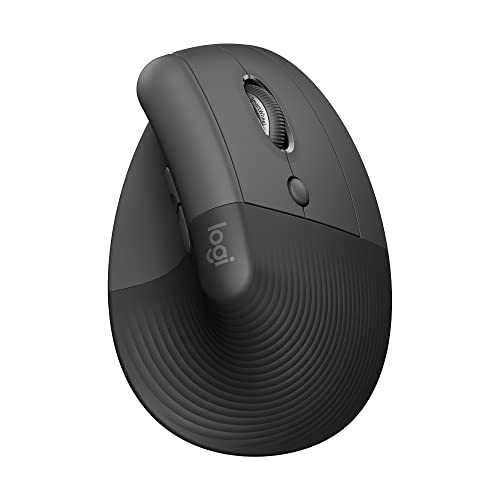
- 57-degree vertical posture design
- Quiet clicks and six customizable buttons
- Up to two years of AA battery life
Best For: Right-handed users with small to medium hands
Simple Ergonomic Essential
Microsoft Sculpt Wireless Ergonomic Mouse
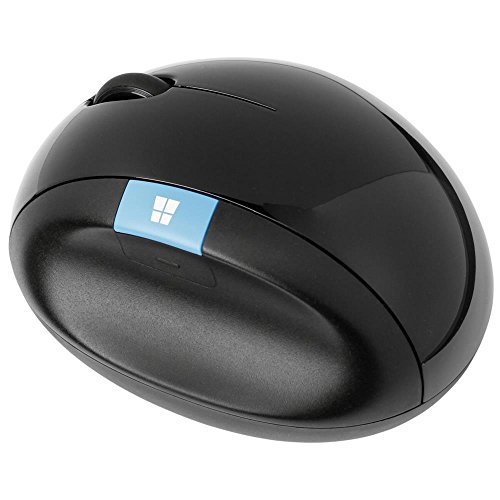
- Wireless USB connection with up to 10-meter range
- Ambidextrous design for flexible use
- Optical tracking with a simple four-button layout
Best For: Everyday users wanting a basic ambidextrous wireless mouse
Quiet Multi-Device Comfort
TECKNET Ergonomic Vertical Mouse

- Bluetooth and 2.4GHz connectivity for up to three devices
- Six DPI levels from 800 to 4800
- Vertical right-handed design with quiet left and right clicks
Best For: Right-handed multi-device users who prefer quiet clicking
Advanced Productivity Pick
Logitech MX Master 4 Ergonomic Wireless Mouse

- Haptic controls and customizable Actions Ring
- MagSpeed scrolling with thumb wheel and ergonomic tilt
- Bluetooth or USB-C dongle connectivity with up to 8000 DPI
Best For: Right-handed professionals with demanding productivity workflows
Best Rechargeable Vertical Pick

- Vertical grip encourages a neutral wrist position
- Rechargeable battery with USB-C charging
- Three DPI settings and page navigation buttons
Best For: Right-handed users with medium or large hands who want rechargeable wireless comfort
Best Business-Ready Choice

- 57-degree vertical angle with a contoured grip
- Secure Logi Bolt and Bluetooth connectivity
- Quiet clicks and up to two years of battery life
Best For: Right-handed professionals and IT-managed workplace environments
Best Budget Vertical Mouse
Anker 2.4G Wireless Ergonomic Mouse

- Vertical design supports a neutral handshake position
- Three DPI settings for adjustable tracking
- Dedicated next and previous browsing buttons
Best For: Right-handed users wanting an affordable USB-receiver vertical mouse
Best Overall Vertical Mouse – Logitech MX Vertical
For shoppers comparing professional ergonomic computer mice, the Logitech MX Vertical combines a 57-degree vertical design with a high-precision sensor and wireless connectivity. Its contoured, textured shape is designed for right-handed users and supports a more natural handshake position.
Best For: Right-handed professionals seeking a vertical mouse with precise tracking and multiple operating-system options.
Pros:
- 57-degree angle and thumb rest support a more natural wrist posture.
- 4000 DPI optical tracking and a cursor-speed switch help reduce hand movement.
- Works with Windows, macOS, Linux, Chrome OS, iPadOS, and Android.
- Rechargeable battery provides an average life of up to four months.
Cons:
- Designed for right-handed use only.
- Its tall vertical shape may require an adjustment period.
- It has four buttons, offering fewer controls than some productivity-focused mice.
The MX Vertical is a strong all-around choice when wrist posture and accurate cursor control matter more than a conventional mouse shape.
Best Simple Wireless Vertical Mouse – Logitech MX Vertical 910-005448
This Logitech MX Vertical variant is a practical option for professionals shopping for ergonomic computer mice with straightforward wireless connectivity. It supports Bluetooth and USB receiver connections, offers 4000 DPI optical tracking, and is compatible with both Windows and macOS.
Best For: Office users who want a basic wireless vertical mouse with Bluetooth and USB connectivity.
Pros:
- Vertical layout and adjustable angle are designed to reduce hand and wrist strain.
- Supports both Bluetooth and radio-frequency USB connectivity.
- 4000 DPI optical sensor provides precise movement.
- Battery life is listed at approximately four months.
Cons:
- The supplied details identify it as ambidextrous, while vertical mice may not suit every hand position.
- Compatibility details are more limited than some competing models.
- It has four buttons for customization.
Choose this model if you want the core vertical-mouse concept with flexible wireless pairing and no need for an extensive button layout.
Best Multi-Device Productivity Mouse – Philips SPK7858
The Philips SPK7858 stands out among professional ergonomic computer mice for its multi-device design, quiet buttons, and dual-scroll controls. Its right-handed shell includes a thumb rest, while adjustable DPI and rechargeable power suit varied office workflows.
Best For: Professionals switching among multiple computers and working with spreadsheets, documents, or wide timelines.
Pros:
- Connects with Bluetooth or the included USB-A/USB-C receiver to up to three devices.
- Horizontal thumb-side scroll wheel is useful for wide spreadsheets and timelines.
- Quiet left and right buttons are suited to shared workspaces.
- Rechargeable battery supports a listed 25-day heavy-workload runtime and quick emergency charging.
Cons:
- Designed for right-handed users.
- Requires Philips software for custom macro assignments.
- Listed operating-system requirements include macOS 14 Sonoma and Windows 11.
This is the most feature-focused option in the group for multitasking professionals who value silent operation, device switching, and horizontal scrolling.
Best for Small to Medium Hands – Logitech Lift Vertical Mouse
The Logitech Lift is a compact right-handed choice among professional ergonomic computer mice, with a 57-degree vertical shape, soft textured grip, and thumb rest. It also adds quiet clicks, customizable buttons, Bluetooth or Logi Bolt connectivity, and a long claimed battery life.
Best For: Right-handed users with small to medium hands who want a comfortable vertical mouse for long workdays.
Pros:
- Vertical 57-degree design promotes a more natural forearm posture.
- Soft grip, thumb rest, whisper-quiet clicks, and SmartWheel support comfortable daily use.
- Six buttons offer more customization than the four-button Logitech models listed here.
- Connects through Bluetooth Low Energy or Logi Bolt and offers up to two years of battery life.
Cons:
- Designed for right-handed users and specifically sized for small to medium hands.
- Uses a replaceable AA battery rather than a rechargeable battery.
- Its vertical shape may feel unfamiliar to users accustomed to standard mice.
The Lift is a compelling ergonomic pick when hand fit, quiet operation, and exceptionally long battery life are higher priorities than a rechargeable design.
Simple Ergonomic Essential – Microsoft Sculpt Wireless Ergonomic Mouse
The Microsoft Sculpt Wireless Ergonomic Mouse is a straightforward option for shoppers comparing professional ergonomic computer mice for everyday laptop or desktop use. Its wireless USB connection, optical tracking, and ambidextrous design make it a practical fit for general Windows 8 setups.
Best For: Everyday computer users who want a simple, ambidextrous wireless mouse.
Pros:
- Wireless USB connectivity with a listed range of up to 10 meters.
- Ambidextrous hand orientation suits left- or right-handed users.
- Optical movement detection and compatibility with laptops and personal computers.
Cons:
- Listed operating-system compatibility is limited to Windows 8.
- Uses replaceable batteries rather than a rechargeable power source.
- Four-button layout is less feature-rich than many productivity-focused models.
The Sculpt is best viewed as a no-frills ergonomic wireless mouse. It covers the basics well, but users seeking extensive customization or modern multi-device support may prefer a more advanced model.
Quiet Multi-Device Comfort – TECKNET Ergonomic Vertical Mouse
The TECKNET Ergonomic Mouse is designed for shoppers seeking professional ergonomic computer mice with a more upright hand position. It supports Bluetooth and 2.4GHz wireless connections, switches among three devices, and offers six DPI settings for flexible work across compatible systems.
Best For: Right-handed professionals who switch between multiple devices and value quiet primary clicks.
Pros:
- Connects with Bluetooth 5.0/3.0 or 2.4GHz USB, with support for up to three devices.
- Vertical ergonomic shape is intended to reduce wrist pressure from prolonged inverted use.
- Six adjustable DPI levels from 800 to 4800 support different tasks and surfaces.
- Left- and right-click buttons are designed for quiet operation.
Cons:
- Designed for right-handed users only.
- Side buttons are not compatible with macOS.
- Requires two AAA batteries, which are not included.
With multi-device connectivity, adjustable sensitivity, and a vertical profile, the TECKNET is a strong productivity-oriented choice. Its right-hand-only design and macOS side-button limitation are important considerations before buying.
Advanced Productivity Pick – Logitech MX Master 4 Ergonomic Wireless Mouse
The Logitech MX Master 4 is a premium-looking option among professional ergonomic computer mice, combining a natural tilt, thumb scroll wheel, programmable controls, and advanced scrolling. Its haptic feedback, Actions Ring, Bluetooth, and USB-C dongle connectivity are aimed at demanding creative and office workflows.
Best For: Right-handed professionals who want extensive productivity features, precise scrolling, and rechargeable wireless performance.
Pros:
- Haptic Sense Panel and customizable Actions Ring provide shortcuts and feedback.
- MagSpeed wheel supports fast scrolling and precise stopping.
- Natural tilt, thumb scroll wheel, intuitive buttons, and Quiet Clicks support comfortable focused work.
- Works through Bluetooth or the included USB-C dongle and supports up to 8000 DPI.
Cons:
- Designed for right-handed users only.
- Its extensive feature set may be more than casual users need.
- Listed minimum operating-system requirement includes Windows 10, while compatibility varies by platform.
The MX Master 4 is the most feature-rich choice in this selection for workflow-heavy use. Its customizable controls and scrolling tools can be valuable for productivity, though its right-handed shape and advanced feature set may not suit everyone.
Best Rechargeable Vertical Pick – Lekvey Ergonomic Mouse
For shoppers comparing professional ergonomic computer mice, the Lekvey stands out with a right-handed vertical design intended to encourage a neutral handshake wrist position. It connects through a 2.4G USB receiver, offers three DPI settings, and uses a rechargeable battery.
Best For: Right-handed users with medium or large hands who want a rechargeable vertical mouse for office or home work.
Pros:
- Vertical ergonomic shape is designed to reduce wrist and arm strain.
- Rechargeable 600mAh battery can last about 3–4 weeks with regular daily use, according to the supplied notes.
- Includes page back and forward buttons, three DPI levels, USB-C charging, and a 36-month warranty.
Cons:
- Recommended for medium or large hands and right-handed use only.
- Uses a USB receiver rather than Bluetooth, and its buttons are non-programmable.
- The vertical shape may require a 3–5 day adjustment period.
The Lekvey is a practical choice when rechargeable power and an aggressively vertical grip matter most. Its broad operating-system compatibility and long warranty add value, though users who prefer Bluetooth or a compact design may want another option.
Best Business-Ready Choice – Logitech Lift for Business
The Logitech Lift for Business is a polished option among professional ergonomic computer mice, combining a 57-degree vertical angle with a softly textured grip and thumb rest. It supports Bluetooth Low Energy or the included Logi Bolt USB receiver, making it suitable for individual and managed workplace setups.
Best For: Right-handed professionals and IT departments seeking a comfortable, secure, and easily deployable wireless mouse.
Pros:
- 57-degree vertical design, contoured grip, and thumb rest support day-long comfort.
- Logi Bolt provides encrypted wireless connections, with Bluetooth as an additional option.
- Whisper-quiet clicks, a SmartWheel, customizable buttons, and up to two years of battery life.
Cons:
- Designed for right-handed use.
- Runs on an AA battery rather than a rechargeable internal battery.
- Includes three buttons, which may offer less direct control than mice with more dedicated buttons.
The Lift for Business is the strongest fit for workplaces that prioritize wireless security, deployment support, and refined ergonomics. Its dual connectivity and long battery life also make it flexible for hybrid work, while the right-handed layout limits its audience.
Best Budget Vertical Mouse – Anker 2.4G Wireless Ergonomic Mouse
The Anker 2.4G Wireless Ergonomic Mouse is a straightforward choice for shoppers seeking professional ergonomic computer mice without extra connectivity features. Its vertical structure promotes a neutral handshake position, while 800/1200/1600 DPI tracking and dedicated browsing buttons support everyday office tasks.
Best For: Right-handed laptop and desktop users who want an affordable vertical USB mouse for browsing and general work.
Pros:
- Ergonomic vertical shape is designed to reduce wrist and arm strain.
- Three DPI settings provide adjustable tracking sensitivity.
- Next and previous buttons simplify webpage navigation, and power-saving mode activates after eight minutes of inactivity.
Cons:
- Requires two AAA batteries, which are not included.
- Uses a 2.4G USB receiver and does not support Bluetooth.
- Click sounds are unavoidable, so it may not suit quiet environments.
The Anker is a sensible basic pick for users who want the benefits of a vertical grip and simple wireless operation. It lacks rechargeable power and Bluetooth, but its adjustable DPI, browsing buttons, and 18-month warranty cover the essentials.
How We Picked the Best Professional Ergonomic Computer Mice
We focused on features that matter during sustained office, creative, and professional computer use rather than treating an unusual shape as sufficient evidence of comfort. Our comparison considers hand orientation, grip support, sensor performance, button placement, scrolling, wireless connectivity, operating-system compatibility, and power design.
The selection includes vertical mice for users seeking less forearm rotation, more traditional ergonomic shapes for an easier transition, and productivity-focused models with extra controls. We also considered multi-device pairing, silent operation, rechargeable batteries, and options suitable for shared or business environments.
Quick Comparison
| Best For | Look For |
|---|---|
| Maximum wrist-neutral positioning | Vertical shape with a supportive thumb rest |
| Office productivity | Comfortable palm support and programmable controls |
| Multiple computers | Bluetooth plus USB connectivity or multi-device pairing |
| Quiet workplaces | Silent-click switches and controlled scroll operation |
| Portable workstations | Compact design, reliable wireless range, and USB-C charging |
Key Buying Factors for Professional Ergonomic Computer Mice
Shape and Hand Position
Vertical mice place the hand in a handshake-like position and can reduce the amount of forearm twisting required. They may take several days to feel natural and are often best for right-handed users. If you frequently switch between devices or need faster cursor movements, a less vertical ergonomic design may be easier to adapt to.
Size, Grip, and Control Layout
Check the manufacturer’s dimensions against your hand size. A mouse that is too small can encourage finger tension, while one that is too large may make the buttons difficult to reach. Thumb rests, textured surfaces, a well-positioned back button, and a responsive scroll wheel can make a bigger difference than a high maximum DPI rating.
Connectivity and Compatibility
Bluetooth is convenient for laptops and tablets, while a USB receiver can provide simple plug-and-play reliability. Multi-device models are useful if you move between a work computer, personal computer, and mobile setup. Confirm compatibility with your operating system and check whether the included receiver uses USB-A, USB-C, or an adapter.
Battery and Tracking
Rechargeable models reduce disposable-battery waste and are convenient when charging is easy. Replaceable batteries can be preferable for long periods away from a charger. For professional work, prioritize consistent tracking, adjustable sensitivity, and dependable performance on your actual desk surface over extreme DPI numbers.
Who Should Buy Which Professional Ergonomic Computer Mice?
Choose a vertical model if wrist-neutral posture is your main priority and you are willing to learn a different grip. Choose a conventional ergonomic mouse if you want comfort with minimal adjustment. A multi-device option suits hybrid workers, while a silent model is better for shared offices and meeting spaces. Productivity-focused mice are the strongest choice for users who rely on side buttons, horizontal scrolling, or frequent application switching. Finally, compare left- or right-hand compatibility carefully: most ergonomic designs in this category are made specifically for right-handed use.