Choosing the right telephoto setup can make a live stream look sharper, more intentional, and easier to frame from a distance. The best option depends on your camera connection, available lighting, working distance, and whether you need manual or automatic control.
We selected 10 telephoto camera lenses and camera systems for creators, educators, presenters, small studios, and mobile streamers. The lineup includes USB and HDMI models, smartphone lenses, 4K options, and versatile zoom ranges for close-up streaming.
Best 10 Telephoto Camera Lenses for Live Streaming Picks for 2026
Best 4K Long-Range Pick
SVPRO 4K 60fps Telephoto Camera

- 4K video up to 60fps
- 5-50mm lens with 10x optical zoom
- HDMI and USB 3.0 outputs
Best For: Professional long-distance streams and fixed installations
Best Phone Option

- 10x clip-on telephoto view
- Includes an 8-inch macro lens
- Lightweight 5.12-ounce design
Best For: Portable smartphone streaming and concert coverage
Best Full HD Value

- 1080p streaming with high-frame-rate modes
- 5-50mm 10x optical zoom lens
- Plug-and-play USB UVC compatibility
Best For: Full HD classes, calls, and controlled streaming setups
Best Dual-Output Setup

- 4K USB video at 30fps
- 5-50mm lens with 10x optical zoom
- Simultaneous USB and HDMI output
Best For: Teaching, conferencing, and dual-display streaming
Best Pocket Telephoto

- 28X reach for distant subjects
- Universal smartphone clip
- Compact design with monocular use
Best For: Mobile creators filming concerts, sports, and outdoor scenes
Best HDMI/USB Zoom Camera

- 4X optical zoom lens
- Simultaneous USB and HDMI output
- Manual zoom and focus controls
Best For: Technical streaming, teaching, and Raspberry Pi projects
Best Dual-Camera Webcam
EMEET C60E 4K Streaming Camera
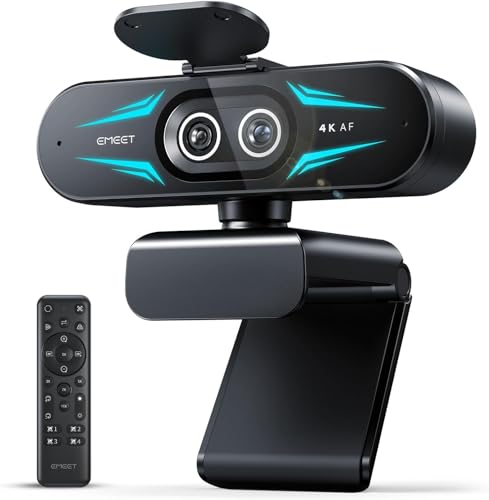
- Wide-angle and telephoto cameras
- Up to 11X hybrid zoom
- Remote control and PDAF autofocus
Best For: Streaming, teaching, and product demonstrations
Best HDMI Telephoto Webcam
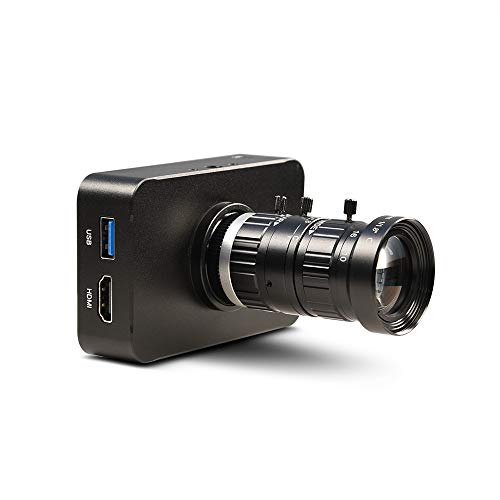
- 4K/30fps HDMI output
- 10-50mm manual optical zoom
- Works with HDMI capture cards
Best For: HDMI streaming and teaching setups needing adjustable telephoto framing
Best 4K60 USB Telephoto Camera
IEights 5-50mm Manual Zoom Webcam
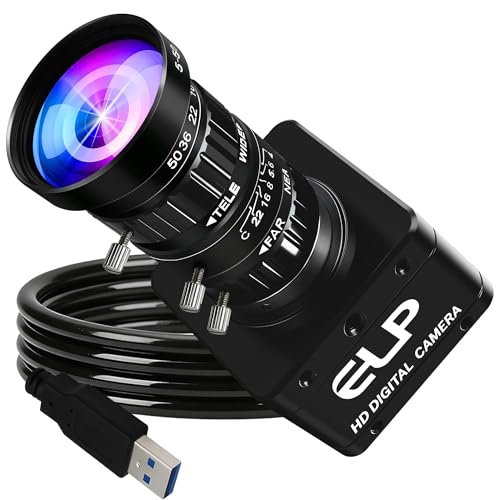
- 4K at up to 60fps via USB 3.0
- 5-50mm 10X manual varifocal lens
- UVC plug-and-play compatibility
Best For: High-frame-rate USB streaming and fixed computer-camera installations
Best Dual-Output Streaming Camera

- Simultaneous USB and HDMI output
- 4K/30fps video capture
- 2.8-12mm 4X manual zoom
Best For: Teaching and streaming workflows using both computer and HDMI connections
Best 4K Long-Range Pick – SVPRO 4K 60fps Telephoto Camera
For creators who need telephoto camera lenses for live streaming, this SVPRO camera combines a 5-50mm manual zoom lens with 4K video at up to 60fps. Its HDMI and USB 3.0 outputs make it practical for computer-based streaming, monitor viewing, and long-distance or close-up shots.
Best For: Professional streams, online teaching, events, church services, studios, and industrial or Raspberry Pi setups requiring detailed 4K footage.
Pros:
- Records and outputs 4K video at up to 60fps with H.264, MJPEG, or YUYV formats.
- 5-50mm manual telephoto lens provides 10x optical zoom and 2x digital zoom.
- USB 3.0 and HDMI can support computer use and simultaneous monitor display.
- Works with Windows, macOS, Linux, Android, and Raspberry Pi without extra drivers.
Cons:
- Manual focus and zoom require hands-on adjustment during setup or shooting.
- It is not water resistant.
This is the strongest option here for demanding long-distance streaming where 4K60 detail and flexible connectivity matter. The aluminum body and tripod thread also suit more permanent installations.
Best Phone Option – APEXEL 10X Tele-Macro Lens
If you want telephoto camera lenses for live streaming without carrying a dedicated camera, the APEXEL 10X Tele-Macro lens adds a clip-on telephoto view to compatible smartphones. It is designed for mobile creators covering concerts, travel, and outdoor subjects.
Best For: Smartphone livestreamers and content creators who prioritize portability and occasional distant-stage or outdoor footage.
Pros:
- 10x telephoto lens helps bring distant concert and stage moments closer.
- Dual-lens design also includes a macro lens with an approximately 8-inch focus distance.
- 12-element, multilayer-coated optics are designed to reduce glare and distortion.
- Lightweight 5.12-ounce clip-on design works with many iPhone and Samsung Galaxy models.
Cons:
- It has no image stabilization, so steady handling or support may be important.
- Compatibility depends on aligning the universal clip with the phone camera.
- It is a phone accessory rather than a standalone streaming camera.
This is the most travel-friendly choice, but its usefulness for live streaming depends on your phone, mounting stability, and lighting. Choose it when convenience matters more than dedicated-camera connectivity.
Best Full HD Value – SVPRO 1080P 5-50mm Webcam
This SVPRO webcam is a practical pick for telephoto camera lenses for live streaming when Full HD is sufficient. Its interchangeable CS-mount 5-50mm varifocal lens offers manual zoom, focus, and aperture control, while USB connectivity keeps the setup straightforward.
Best For: Full HD streaming, video calls, online classes, studio recording, machine vision, and Raspberry Pi projects needing adjustable framing.
Pros:
- 5-50mm lens provides 10x optical zoom for close-up and longer-distance shots.
- Supports 1080p at 30fps, 720p at 60fps, and VGA at 100fps.
- USB 2.0 UVC plug-and-play operation works with OBS, Zoom, YouTube, Facebook Live, and similar software.
- CS mount allows the lens to be changed for other applications.
Cons:
- Maximum output is Full HD rather than 4K.
- USB 2.0 provides less bandwidth than the USB 3.0 models in this roundup.
- Manual controls may take more setup time than an autofocus webcam.
For budget-conscious users, this model balances telephoto reach and broad software compatibility. It is especially sensible for fixed, controlled streaming environments where 1080p is adequate.
Best Dual-Output Setup – IFWATER 4K HDMI USB Camera
For telephoto camera lenses for live streaming with simultaneous viewing, this IFWATER camera pairs a 5-50mm manual zoom lens with USB and HDMI outputs. It supports 4K USB output at 30fps and can display on a PC and HDMI monitor at the same time.
Best For: Online teaching, training, video conferencing, research, and long-distance projects such as bird-feeder or outdoor monitoring.
Pros:
- 5-50mm lens provides 10x optical zoom with manual focus and zoom control.
- USB and HDMI can output simultaneously for computer capture and monitor display.
- Supports up to 3840×2160 video at 30fps through USB, with H.264, MJPEG, and YUY2 options.
- UVC plug-and-play operation supports computers, Android devices, and Raspberry Pi systems.
Cons:
- The HDMI output is limited to 1080p according to the supplied notes.
- There is no image stabilization, so long-range shots may benefit from a tripod.
- The 30-day warranty is shorter than the one-year warranty listed for the SVPRO 1080p model.
This camera stands out when your workflow needs both a computer feed and a direct HDMI display. Its manual 10x optical zoom is useful for subjects that stay at a known distance, provided the camera is securely mounted.
Best Pocket Telephoto – MIAO LAB 28X Smartphone Lens
The MIAO LAB 28X is a compact smartphone add-on for shoppers seeking telephoto camera lenses for live streaming at concerts, sports events, or outdoor locations. Its universal clip works with many iPhone, Samsung, and Android phones, while the manual-focus design is better suited to deliberate framing than fast-moving, fully automated shooting.
Best For: Mobile creators who need substantial reach for distant subjects and occasional monocular viewing.
Pros:
- 28X magnification helps bring distant subjects closer.
- Wider field of view is designed to make framing easier.
- Universal clip supports many popular smartphone brands.
- Lightweight, portable design works well for travel and outdoor use.
Cons:
- Manual focus requires more setup than an integrated autofocus camera.
- Results and edge-darkening performance may vary by phone model.
- As a clip-on lens, it depends on precise phone alignment.
This is a practical choice when portability and high magnification matter more than a dedicated streaming-camera workflow. For live broadcasts, check your phone’s mounting stability and framing before going on air.
Best HDMI/USB Zoom Camera – IFWATER 4K Streaming Camera
The IFWATER camera is a flexible option for shoppers comparing telephoto camera lenses for live streaming in a desk, research, or hobby setup. Its 2.8–12mm manual zoom lens provides 4X optical zoom, while simultaneous USB and HDMI output supports computer streaming and direct display workflows.
Best For: Streamers and project builders who want manual zoom, USB connectivity, and HDMI output in one compact camera.
Pros:
- 4X optical zoom helps capture closer details without relying only on digital enlargement.
- USB and HDMI can output simultaneously.
- Supports 4K USB video at up to 30FPS and multiple video formats.
- UVC plug-and-play compatibility covers Windows, Linux, macOS, Android, and selected Raspberry Pi setups.
Cons:
- Manual focus and zoom require hands-on adjustments.
- Image stabilization is not included.
- HDMI output is listed as 1080P, while the USB output provides the higher stated resolution.
This camera fits technical streaming environments where flexible connections and controlled zoom are priorities. It is less convenient for presenters who need automatic focus or stabilization during movement.
Best Dual-Camera Webcam – EMEET C60E 4K Streaming Camera
The EMEET C60E takes a streamlined approach to telephoto camera lenses for live streaming by combining wide-angle and telephoto cameras in one 4K webcam. It can switch between a broad scene and close-up views, with hybrid zoom, PDAF autofocus, remote control, and EMEET STUDIO adjustments for presentations, lessons, product demonstrations, and meetings.
Best For: Streamers who need quick transitions between room-wide framing and detailed close-ups without repositioning the camera.
Pros:
- Dual-camera design supports both wide-angle and telephoto views.
- Up to 11X hybrid zoom and PDAF autofocus help maintain close-up clarity.
- Remote and software controls allow zoom, brightness, focus, and color adjustments.
- Includes two omnidirectional microphones and RGB lighting.
Cons:
- Zoom is not supported in 4K, 60FPS, or YUY2 modes.
- Telephoto camera performance is recommended from about 13.8 inches.
- USB 2.0 connectivity may limit setup flexibility compared with HDMI-equipped cameras.
For studio-style streaming, the C60E is the most convenient of these options because its integrated cameras and controls reduce the need for separate equipment. Confirm that your preferred resolution and frame-rate mode supports the zoom features you plan to use.
Best HDMI Telephoto Webcam – MOKOSE 10-50mm 4K Camera
MOKOSE 4K HDMI Industry Camera C/CS-Mount Teaching Webcam with 10-50MM Telephoto Zoom Manual Lens
Check Price On AmazonFor live streaming setups that need HDMI connectivity and adjustable reach, the MOKOSE combines 4K video with a 10-50mm manual telephoto zoom lens. It can connect to a capture card for streaming or to an HDMI monitor for teaching and demonstrations.
Best For: HDMI-based live streaming, teaching, and webcast setups that need manual telephoto framing.
Pros:
- Records 4K at 30fps over HDMI and supports 1080p up to 60fps.
- 10-50mm optical zoom offers an 8°-32° field of view for distant subjects.
- Supports HDMI monitor output and HDMI capture-card streaming.
- Includes a solid aluminum shell, 3-meter USB cable, and dual 1/4-inch mounting threads.
Cons:
- Manual focus, exposure, and zoom require hands-on adjustment.
- HDMI live streaming requires a separate compatible capture card.
- Its 4K HDMI output is limited to 30fps.
The MOKOSE is a practical choice when a live stream benefits from long framing flexibility and direct HDMI output. Its manual controls suit fixed installations, though users wanting autofocus or a simpler USB-only setup may prefer another option.
Best 4K60 USB Telephoto Camera – IEights 5-50mm Manual Zoom Webcam
The IEights USB camera is a strong fit for telephoto camera setups for live streaming when high frame rates and direct computer connectivity matter. Its 5-50mm 10X manual zoom lens and USB 3.0 interface support detailed, adjustable framing from a PC or laptop.
Best For: USB live streaming, sports or activity tracking, and computer-based setups requiring 4K at up to 60fps.
Pros:
- Supports 4K video at up to 60fps through USB 3.0.
- 5-50mm 10X varifocal lens allows manual zoom, focus, and brightness adjustment.
- 1/1.8-inch IMX678 sensor and 0.1-lux minimum illumination support detailed imaging.
- UVC plug-and-play compatibility works with Windows, Mac, Linux, Ubuntu, and Android.
Cons:
- Manual lens controls are less convenient than autofocus for changing subjects.
- USB 3.0 is needed for the stated 4K/60fps performance.
- The camera is not water resistant.
With 4K/60fps capability, a low-light-oriented sensor, and broad UVC compatibility, this IEights model is well suited to computer-centered streaming. Its compact design is convenient, but the manual lens rewards a carefully positioned, pre-focused setup.
Best Dual-Output Streaming Camera – IFWATER 4K HDMI USB Webcam
The IFWATER camera suits telephoto camera setups for live streaming that need both computer and HDMI workflows. Its 2.8-12mm 4X manual zoom lens, 4K/30fps capture, and simultaneous USB-C and HDMI output make it adaptable for streaming, teaching, and conferencing.
Best For: Live streaming and education setups that need simultaneous USB and HDMI video output.
Pros:
- Provides simultaneous USB and HDMI output for flexible monitoring and streaming.
- 4K/30fps video uses a 1/2.8-inch IMX415 CMOS sensor.
- 2.8-12mm manual varifocal lens provides adjustable zoom, focus, and aperture.
- Supports H.264, H.265, MJPEG, and YUY2 formats with broad operating-system compatibility.
Cons:
- The 4X zoom range is shorter than the telephoto reach of the other listed cameras.
- Manual lens adjustments require setup before streaming.
- HDMI streaming requires a separate capture card.
The IFWATER stands out for output flexibility rather than maximum telephoto reach. Choose it when a single camera must feed a computer and HDMI display or capture workflow, especially for online teaching and fixed-position broadcasts.
How We Picked the Best Telephoto Camera Lenses for Live Streaming
We focused on the features that have the greatest effect on real-world streaming: optical or variable zoom, resolution, frame-rate support, connection options, focusing control, compatibility, and setup flexibility. USB models are generally easier for computers and streaming software, while HDMI cameras can integrate with capture cards, switchers, and professional production systems.
We also considered whether each option suits a specific use case rather than treating maximum magnification as the only measure of quality. A long zoom is useful only when the lens can maintain a clear image, focus reliably, and work with your lighting and streaming hardware.
Quick Comparison
- Best for computer streaming: USB webcams with plug-and-play compatibility and broad operating-system support.
- Best for production setups: HDMI/USB cameras with simultaneous output, manual controls, or C/CS-mount compatibility.
- Best for mobile creators: Smartphone telephoto lenses designed for iPhone, Samsung, or other compatible phones.
- Best for detail work: Tele-macro or close-focus designs that prioritize small subjects and demonstrations.
- Best for flexible framing: 4K cameras with variable or optical zoom rather than fixed-focus webcams.
Key Buying Factors for Telephoto Camera Lenses for Live Streaming
Zoom and Working Distance
Choose the focal range based on how far you sit from the camera. A 5–50mm lens can provide substantially more framing flexibility than a fixed webcam, while smartphone attachments are more portable but may depend on precise alignment with the phone camera.
Resolution and Frame Rate
4K gives you more room to crop or reframe, but it requires greater bandwidth and processing power. For many streams, clean 1080p at 30 or 60 frames per second is more practical. Confirm that your computer, capture device, software, and platform support the desired output.
Focus and Exposure Control
Manual focus and zoom are valuable when the camera stays in one position, such as a classroom, church, studio, or product-demo desk. Autofocus is more convenient for presenters who move around, but it can hunt or shift during a live broadcast.
Connections and Compatibility
Check whether the camera uses USB, HDMI, or both, and verify the required cable, capture card, mounting system, and operating-system support. HDMI output is not automatically compatible with a computer without suitable capture hardware.
Who Should Buy Which Telephoto Camera Lenses for Live Streaming?
Choose a USB telephoto webcam if you want the simplest computer-based setup. Choose an HDMI/USB model if you may add a switcher, capture card, or multiple cameras later. Choose a manual-zoom industrial camera for controlled environments where precise framing matters more than convenience. Choose a smartphone telephoto lens for lightweight mobile streaming, travel, or occasional long-distance shots.
Before buying, measure your camera-to-subject distance, identify your available ports, and decide whether you need optical zoom, close-focus capability, or simple digital cropping. Those checks will narrow the list more effectively than resolution alone.