A useful computer accessory can make a familiar desk feel more comfortable, organized, or ready for a new creative project. This guide brings together practical gift ideas for women who work, study, create, or unwind at a computer.
Computer Accessory Christmas Gifts to Explore
1. HUANUO Adjustable Dual Monitor Arm
A More Flexible Two-Screen Setup
HUANUO Adjustable Dual Monitor Arm

- Positions two 13–32-inch monitors with tilt, swivel, rotation, and height adjustment.
- Raises screens to free desk space and includes cable management along the arms.
- Requires compatible VESA monitors and a suitable wooden desk for clamp or grommet mounting.
Best For: Someone with two compatible monitors who wants adjustable positioning and more desk space.
2. tounee Height-Adjustable Swivel Laptop Stand
A Laptop Desk That Moves With Her
tounee Height-Adjustable Swivel Laptop Stand

- Adjusts from 2.1 to 21 inches for seated or standing laptop use.
- The base swivels 360 degrees for repositioning or face-to-face use.
- Folds for storage and supports laptops from 10 to 17 inches.
Best For: A laptop user who wants more flexibility at a home or office desk.
3. HUION Keydial Mini Bluetooth Keypad
Shortcuts for Creative Flow
HUION Keydial Mini Bluetooth Keypad

- Offers 18 customizable shortcut keys and a dial with up to three assigned functions.
- Connects over Bluetooth and works with Windows and Mac OS.
- Designed for digital art, image and video editing, design, gaming, and media control.
Best For: A digital creator who wants shortcuts close at hand.
4. Acer 11-in-1 USB-C Hub
More Connections for Her Laptop

- Combines HDMI, VGA, USB ports, Ethernet, and SD and microSD card slots.
- Supports HDMI output up to 4K at 60Hz on compatible USB-C devices.
- Display and charging functions require a device with DP Alt Mode; charger is not included.
Best For: Someone with a compatible USB-C laptop who connects displays, storage, or other peripherals.
5. Nulea M501 Wireless Trackball Mouse
A Mouse for Compact Workspaces
Nulea M501 Wireless Trackball Mouse

- Uses thumb-controlled trackball movement instead of sliding the mouse across a surface.
- Can connect to up to three devices through Bluetooth or a USB receiver.
- Has adjustable DPI, six buttons, and a rechargeable battery.
Best For: A computer user who prefers trackball navigation or has limited desk space.
6. ProtoArc EM11 NL Vertical Mouse
A Different Grip for Daily Work
ProtoArc EM11 NL Vertical Mouse

- Its vertical shape is designed to keep the wrist in a more natural position.
- Connects to up to three devices using Bluetooth or a USB-A receiver.
- Made for small to medium hands; the listing notes a learning period for the shape.
Best For: A right-handed user with small to medium hands interested in trying a vertical mouse.
7. YEELIGHT Monitor Light Bar
Focused Light Above the Screen

- Provides adjustable brightness and color temperature from 2700K to 6500K.
- The retractable clip fits monitors 0.3 to 1.1 inches thick, including flat and curved screens.
- USB powered, with a low-profile design intended to avoid blocking a webcam.
Best For: Someone who works, studies, or reads at a computer and wants a desk light that clips to the monitor.
8. Aothia 36-by-17-Inch Desk Pad
A Smoother Surface for Her Desk

- The 36-by-17-inch PU leather mat fits a laptop, keyboard, and mouse.
- Its water-resistant surface can be wiped clean with a damp cloth or paper.
- A suede-style backing helps the mat stay in place on the desktop.
Best For: Someone who wants a broad, easy-to-clean surface for a keyboard and mouse.
9. Plugable Thunderbolt 4 Dock
10. Philips 27-Inch 4K USB-C Monitor
A Bigger Canvas for Work and Projects
Philips 27-Inch 4K USB-C Monitor
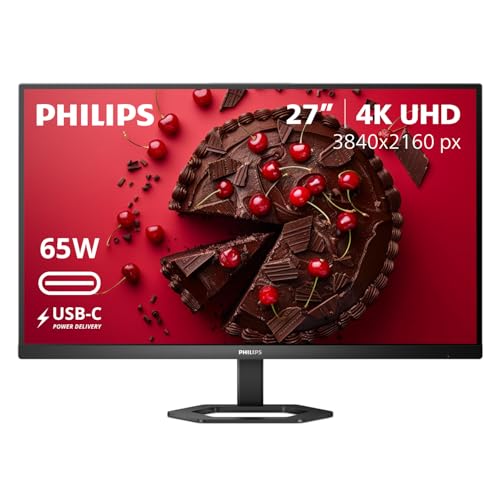
- Pairs a 27-inch IPS screen with 3840 × 2160 4K UHD resolution.
- USB-C supports video, data, and up to 65W laptop power delivery on compatible devices.
- The stand offers height adjustment, pivot, and tilt; HDMI and DisplayPort are also available.
Best For: Someone who wants more screen space for work, study, or creative projects.
11. Logitech Blue Yeti USB Microphone
Clearer Audio for Calls and Creations
Logitech Blue Yeti USB Microphone

- Connects by USB to Mac or PC and includes a desktop stand.
- Offers cardioid, omni, bidirectional, and stereo pickup patterns.
- Onboard controls include headphone volume, pattern selection, mute, and mic gain.
Best For: A podcaster, streamer, musician, or frequent video-call participant.
12. Dual-Monitor USB-C KVM Switch
One Desk for Two Computers
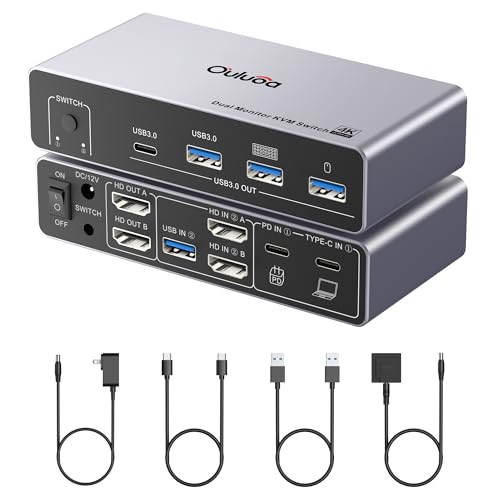
- Shares a keyboard, mouse, and other USB peripherals between one desktop and one laptop.
- Supports two HDMI monitors, with display modes and resolutions depending on the computer.
- Includes a wired remote, USB cables, and a 12V power adapter.
Best For: Someone who switches between a work laptop and desktop at the same desk.
13. Audio-Technica ATH-M50X Studio Headphones
Focused Listening at Her Desk
Audio-Technica ATH-M50X Studio Headphones

- Over-ear circumaural design provides sound isolation for listening in louder environments.
- The earcups swivel 90 degrees for one-ear monitoring.
- Includes a detachable cable and is compatible with computers, tablets, and phones.
Best For: A computer user who listens closely, edits audio, or wants focused work time.
14. Crucial X9 2TB Portable SSD
Room for Projects and Memories

- Provides 2TB of portable storage and connects over USB-C or USB-A.
- The listing gives transfer speeds up to 1050MB/s and compatibility with Windows, Mac, Android, and other devices.
- Its compact drive is rated IP55 for water and dust resistance and drop resistant up to 7.5 feet.
Best For: Someone who keeps photos, creative projects, games, or backups across devices.
15. Logitech Ergo K860 Wireless Keyboard
A More Comfortable Typing Gift
Logitech Ergo K860 Wireless Keyboard

- The curved split layout and pillowed wrist rest are designed for a more natural typing posture.
- Connects by Bluetooth or USB receiver and has adjustable palm lift with three tilt positions.
- Works with Windows, macOS, Linux, and Chrome OS.
Best For: Someone who types for long stretches and wants an ergonomic keyboard.
Choosing Computer Accessories for Her
Start with the way she uses her computer. A writer, analyst, or student may appreciate an ergonomic keyboard, a monitor that adds screen space, or a laptop stand that adjusts between seated and standing work. A digital artist or editor may get more day-to-day use from the programmable keypad, studio headphones, or a portable SSD for project files. For frequent calls, a microphone is a practical upgrade; for a desk shared between personal and work computers, a KVM switch may simplify the setup.
Think about the shape of the gift as well as its function. Desk mats and monitor lights are visible additions that can refresh a workspace without changing how someone works. A dock, monitor arm, or new display can make a larger change, but depends on the devices and desk already in use. If you are unsure about a big setup upgrade, a portable accessory such as a mouse, headphones, or storage drive may be easier to fit into her routine.
Set a Budget That Matches the Upgrade
A useful budget can be built around the size of the change. Smaller accessories such as a desk mat, monitor light bar, or shortcut keypad add a focused improvement. Mice, headphones, stands, and portable storage can be considered mid-sized gifts, depending on the model and current pricing. A new monitor, Thunderbolt dock, or dual-monitor mount is a bigger workstation investment.
You do not need to assemble a whole desk makeover for a thoughtful Christmas gift. Choose one item that addresses a daily annoyance or supports something she enjoys. If you want the gift to feel more complete, pair a single accessory with a note explaining the use you had in mind, such as keeping creative files together or making a laptop setup more flexible. Avoid assuming the recipient needs a bundle of extra items; the products here are complete gift options on their own.
Check Compatibility and Personalization
Compatibility matters most for hubs, docks, mounts, and displays. Before choosing a USB-C hub or docking station, check the laptop’s port capabilities and whether it supports the relevant display mode. Display output and multi-monitor support can vary across computer models, particularly between Mac configurations. For the dual monitor arm, confirm monitor size, weight, and VESA mounting pattern, along with desk material and thickness. A monitor or laptop stand should also match the available space and how she prefers to work.
Personal fit matters for input devices. The vertical mouse is designed for small to medium right hands, while the trackball uses thumb control and is right-handed. Ergonomic shapes can feel unfamiliar at first, so consider whether she enjoys trying a different grip. For the keypad, shortcut customization depends on the software she uses. For headphones and microphones, think about whether she needs wired listening, recording controls, or a particular connection for her computer.
Timing and Last-Minute Decisions
For an early purchase, you have more time to confirm model compatibility or discreetly check the computer and desk setup. A quick look at the laptop model, monitor mounting holes, or desk dimensions can prevent a mismatched gift. For a last-minute decision, choose something with a simpler fit: a desk mat, headphones, or portable storage may require fewer changes to the workstation. Still check the connection type and device compatibility before ordering.
Christmas gifts do not need seasonal styling to feel special. A well-chosen computer accessory can make the workday smoother, open up space for creative projects, or make a familiar setup more comfortable. Let her habits guide the choice, then focus on the one practical improvement she is most likely to notice and enjoy.