When your projects involve large files, multi-drive redundancy, or long transfer sessions, the enclosure matters as much as the drives inside it.
This roundup of RAID storage enclosures for detailed work focuses on speed, capacity, RAID flexibility, and practical desktop features that support serious creative and technical workflows.
Best 10 RAID Storage Enclosures for Detailed Work Picks for 2026
4-Bay High-Speed Option
ORICO 4 Bay RAID Hard Drive Enclosure

- USB 3.2 Gen 2x2 with JMS591 chip
- 6 RAID modes including RAID 5 and 10
- Up to 104TB with active cooling
Best For: Creators and IT users needing a flexible 4-bay RAID enclosure
Backup and NAS Expansion Pick
QNAP TR-004 4 Bay USB Type-C DAS

- Hardware RAID with RAID 0/1/5 and JBOD
- Works with Windows, macOS, and Linux
- Lockable bays for practical storage use
Best For: NAS backups and cross-platform direct-attached storage
Thunderbolt Performance Choice
OWC ThunderBay 4 Thunderbolt Enclosure

- Dual Thunderbolt 3 ports and 1527MB/s
- SoftRAID Premium included for 3 years
- RAID 0/1/4/5/10 plus JBOD
Best For: Thunderbolt workflows that need fast RAID performance
Higher-Capacity 5-Bay Pick
ORICO 5 Bay RAID Hard Drive Enclosure
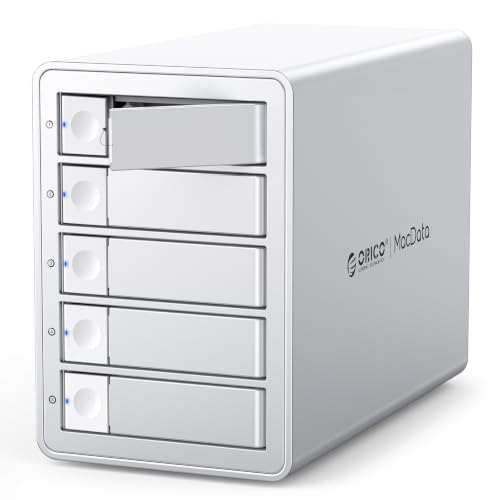
- 5 bays and up to 130TB capacity
- 6 RAID modes with JMS591 chip
- Quiet cooling with hot-swapping support
Best For: Large projects that need extra bays and more total storage
Large-Format RAID Workhorse
G-RAID Shuttle 8-Bay Thunderbolt 3 RAID Array
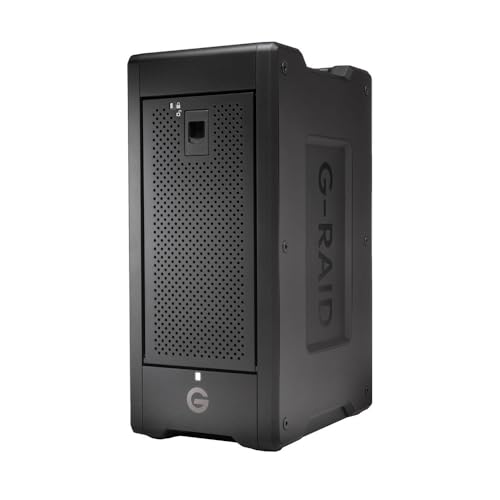
- 160TB transportable 8-bay design
- Thunderbolt 3 with up to 2000MB/s writes
- RAID 5 plus multiple RAID modes
Best For: Large media teams and detailed 4K/8K editing
Compact Two-Bay RAID Enclosure
TERRAMASTER D2-320 USB RAID Enclosure

- Diskless 2-bay design
- USB 3.2 Gen 2 10Gbps connection
- Supports RAID 0, 1, Single, and JBOD
Best For: Simple desktop backup and mirrored storage
Versatile Five-Bay DAS Option
UGREEN 5-Bay USB-C DAS Enclosure

- Eight RAID and storage modes
- Up to five SATA HDDs or SSDs
- Smart cooling with status LEDs
Best For: Flexible storage expansion and multi-drive workflows
Flexible RAID Expansion
ORICO 4-Bay 8-Mode 3.5" DAS Enclosure

- 8 RAID modes including RAID 0/1/5/10
- Up to 88TB capacity for 3.5-inch drives
- 150W PSU with aluminum body and silent fan
Best For: Detailed work that needs flexible RAID setups and large-capacity backup storage
Dual-Interface Value
CENMATE 4-Bay 2.5/3.5" RAID Box

- Supports 2.5-inch and 3.5-inch SATA drives
- 8 RAID modes plus USB A/C 3.0 and eSATA
- Up to 80TB capacity with aluminum cooling
Best For: Mixed-drive users who want flexible ports and hardware RAID in a 4-bay DAS
High-Capacity Workflows
Yottamaster 5-Bay USB-C RAID DAS

- 5 bays with up to 110TB total capacity
- RAID 0/1/3/5/10, JBOD, and CLONE support
- USB-C 5Gbps with aluminum shell and smart fan
Best For: Creators and pros needing a bigger DAS for media, backups, and active projects
4-Bay High-Speed Option – ORICO 4 Bay RAID Hard Drive Enclosure
If you need RAID storage enclosures for detailed work, this ORICO 4-bay model is built for fast transfers, flexible RAID setup, and dependable long-term storage. Its JMS591 chip, USB 3.2 Gen 2×2 support, and 6 RAID modes make it a practical fit for creators and teams handling large files.
Best For: Video producers, enterprise IT teams, and technical users who want a high-capacity 4-bay enclosure with flexible RAID options.
Pros:
- Supports RAID 0, 1, 5, 10, JBOD, and Normal modes.
- Up to 104TB total capacity with 26TB per drive support.
- Built-in 45dB low-noise fan, aluminum alloy body, and large cooling grille.
- Compatible with Windows, macOS, and Linux, plus 2.5-inch and 3.5-inch SATA drives.
Cons:
- Thunderbolt connections are limited to around 10Gbps, not the full 20Gbps.
- Changing RAID modes erases drive contents, so backups are required.
This is a strong choice if you want a 4-bay enclosure that balances speed, RAID flexibility, and cooling. It is especially appealing for users who need substantial storage without moving to a more complex system.
Backup and NAS Expansion Pick – QNAP TR-004 4 Bay USB Type-C DAS
QNAP TR-004 4 Bay USB Type-C Direct Attached Storage (DAS) with hardware RAID (Diskless)
Check Price On AmazonThis QNAP option is one of the more straightforward RAID storage enclosures for detailed work when you want direct-attached storage over USB Type-C. It is designed for Windows, macOS, and Linux, and it also works well as external storage for NAS backup or capacity expansion.
Best For: NAS backup users and desktop workflows that need a lockable 4-bay DAS with hardware RAID.
Pros:
- Hardware RAID supports RAID 0, 1, 5, JBOD, and individual disks.
- Compatible with Windows, macOS, and Linux.
- Includes a USB Type-C to Type-A cable.
- Lockable drive bays add a practical physical security touch.
Cons:
- Does not support several older QNAP NAS models.
- NAS applications cannot be installed on the TR-004.
- Storage pools on the TR-004 cannot be combined into the connected NAS.
The TR-004 is best viewed as a reliable DAS and backup expansion tool rather than a deeply integrated NAS component. If you want simple hardware RAID and cross-platform support, it stays focused on the essentials.
Thunderbolt Performance Choice – OWC ThunderBay 4 Thunderbolt Enclosure
For detailed work that benefits from strong sustained throughput, this OWC enclosure is built around Thunderbolt 3 and a four-bay RAID design. It supports 2.5-inch or 3.5-inch drives without adapters and includes SoftRAID Premium for managing arrays.
Best For: Mac and Windows Thunderbolt users who want a fast 4-bay enclosure with included RAID management software.
Pros:
- Dual Thunderbolt 3 ports for high-speed connectivity.
- Up to 1527MB/s sustained performance.
- Supports RAID 0, 1, 4, 5, 1+0 (10), and JBOD.
- Includes SoftRAID Premium with a 3-year subscription.
Cons:
- Requires Thunderbolt-equipped computers for use.
- Lower 4TB listed storage capacity out of the box since it is diskless.
This is the most performance-oriented option in the group, especially if your workflow already centers on Thunderbolt. It makes sense for users who value speed, software support, and a polished RAID experience.
Higher-Capacity 5-Bay Pick – ORICO 5 Bay RAID Hard Drive Enclosure
If your detailed work is growing beyond a four-bay setup, this ORICO 5-bay enclosure gives you more headroom without changing the same RAID-focused feature set. It combines the JMS591 chip, USB 3.2 Gen 2×2, and six RAID modes with a larger total capacity for demanding file libraries.
Best For: Users who need more drive bays and higher total capacity for large media or data projects.
Pros:
- 5-bay design with up to 130TB total capacity.
- Supports RAID 0, 1, 5, 10, JBOD, and Normal modes.
- USB 3.2 Gen 2×2 connectivity with JMS591 chip.
- Built-in 45dB low-noise fan, aluminum alloy construction, and hot-swapping support.
Cons:
- Thunderbolt connections are limited to around 10Gbps instead of full 20Gbps.
- RAID changes erase drives, so new drives or backups are recommended.
This model is a practical step up when capacity matters as much as flexibility. It keeps the same enterprise-friendly features while giving you room for larger storage sets.
Large-Format RAID Workhorse – G-RAID Shuttle 8-Bay Thunderbolt 3 RAID Array
If you need RAID storage enclosures for detailed work in a studio or on location, this G-RAID Shuttle is built for heavy media projects. Its 160TB capacity, hardware RAID options, and Thunderbolt 3 performance make it a strong fit for editing multi-stream 4K, 8K, and VR footage without constantly shuffling drives.
Best For: High-volume video editors, DITs, and teams working with large camera files and detailed timelines.
Pros:
- Up to 160TB of storage in a transportable 8-bay design
- Up to 1900MB/s read and 2000MB/s write speeds over Thunderbolt 3
- Pre-configured RAID 5, with support for RAID 0, 1, 6, 10, 50, 60, and JBOD
- Eight removable enterprise-class Ultrastar hard drives for mission-critical use
Cons:
- Built around HDDs, so it is not as compact or quiet as smaller SSD-based options
- Best suited to users who need very large capacity and high-end workflow support
This is a serious storage solution for people who value capacity, flexibility, and speed in one enclosure. If your workflow depends on reliable access to large, detailed media libraries, the Shuttle is designed to keep up.
Compact Two-Bay RAID Enclosure – TERRAMASTER D2-320 USB RAID Enclosure
For RAID storage enclosures for detailed work that stay straightforward, the TERRAMASTER D2-320 keeps the setup compact and practical. This diskless 2-bay enclosure supports RAID 0, RAID 1, Single, and JBOD over USB 3.2 Gen 2, making it a useful fit when you want flexible desktop storage without a complicated build.
Best For: Users who want a simple two-drive RAID enclosure for backup, mirrored storage, or a modest speed boost.
Pros:
- Supports RAID 0, RAID 1, Single, and JBOD
- USB 3.2 Gen 2 connection with 10Gbps throughput
- Diskless design lets you choose your own drives
- Compact two-bay format for desktop use
Cons:
- No drives are included, so you must supply your own storage
- Two-bay capacity is more limited than larger RAID enclosures
This enclosure makes sense if you want a focused, no-frills RAID box for everyday work files or backups. It is less about maximum capacity and more about keeping a small setup organized and adaptable.
Versatile Five-Bay DAS Option – UGREEN 5-Bay USB-C DAS Enclosure
When you want RAID storage enclosures for detailed work with more flexibility, this UGREEN 5-bay DAS gives you a lot of configuration options. It supports multiple RAID and storage modes, accepts up to five SATA HDDs or SSDs, and is built to handle larger local libraries, backups, and drive reuse in a single desktop enclosure.
Best For: Users who need a configurable five-drive enclosure for storage expansion, backups, or working with multiple drive modes.
Pros:
- 8 RAID and storage modes, including RAID 0, 1, 3, 5, 10, PM, Large, and Clone
- Holds up to five 2.5/3.5-inch SATA HDDs or SSDs with 160TB total capacity
- Smart cooling with automatic fan control based on drive temperature
- Independent drive LEDs help show status and RAID rebuilding activity
Cons:
- USB 3.2 Gen 1 is limited to 5Gbps, so it is slower than faster USB-C RAID options
- Changing RAID modes requires reformatting, so backups are essential
This is a good choice if you want a versatile enclosure that can grow with different workflows. The mix of storage modes, thermal management, and five-bay capacity makes it practical for organized, high-volume local storage.
Flexible RAID Expansion – ORICO 4-Bay 8-Mode 3.5" DAS Enclosure
If you need RAID storage enclosures for detailed work, this ORICO 4-bay model gives you a lot of configuration flexibility in a compact direct-attached storage setup. It supports 3.5-inch SATA drives with up to 88TB total capacity, and its USB 3.0 connection is rated for up to 235 MB/s, making it a practical option for backups, file transfers, and centralized project storage.
Best For: Users who want a 4-bay RAID enclosure with multiple hardware RAID options for large media, engineering, or backup workloads.
Pros:
- Supports 8 RAID modes, including RAID 0, 1, 3, 5, 10, JBOD, CLONE, and CLEAR.
- Handles up to 88TB total capacity with support for 22TB single drives.
- Includes a 150W power supply for stable multi-drive operation.
- Aluminum build with an 80mm silent fan and front/rear vents for cooling.
Cons:
- Works with 3.5-inch HDDs only, not 2.5-inch drives or SSDs.
- USB 3.0 transfer speeds are useful, but not the fastest in this category.
Overall, this enclosure is strongest when you want versatile RAID choices and solid thermal management without moving up to a larger rack-style system. It is especially appealing for users who need dependable storage expansion for large files and regular backups.
Dual-Interface Value – CENMATE 4-Bay 2.5/3.5" RAID Box
This CENMATE enclosure is a practical choice if you want RAID storage enclosures for detailed work with flexible drive support and multiple connection options. It accepts both 2.5-inch and 3.5-inch SATA HDDs or SSDs, offers up to 80TB capacity, and includes USB A/C 3.0 plus eSATA for more connection flexibility on Windows, Mac, and Linux systems.
Best For: Users who want a budget-friendly 4-bay RAID enclosure with USB and eSATA options for mixed-drive setups.
Pros:
- Supports both 2.5-inch and 3.5-inch SATA HDDs/SSDs.
- Offers 8 RAID modes, including RAID 0, 1, 3, 5, 10, CLONE, LARGE, and NORMAL.
- Includes USB A/C 3.0 and eSATA cables for broader connectivity.
- Aluminum body, internal fan, and 12V adapter help support stable operation.
Cons:
- Fan noise is listed around 40-50 decibels, which may bother noise-sensitive users.
- RAID mode changes require a reset process and can cause data loss if handled incorrectly.
For mixed-drive users who want a straightforward DAS enclosure with hardware RAID options, this model covers the essentials well. The added eSATA support is a useful bonus if you need connection flexibility beyond standard USB.
High-Capacity Workflows – Yottamaster 5-Bay USB-C RAID DAS
The Yottamaster 5-bay unit is built for RAID storage enclosures for detailed work where capacity and flexibility matter. It supports up to 110TB total storage across 5 SATA drives, works with both 2.5-inch and 3.5-inch HDDs or SSDs, and uses USB-C with 5Gbps transfer rates for direct-attached storage workflows in the studio or on location.
Best For: Creators and professionals who need a 5-bay RAID enclosure for large media libraries, backups, and editable project storage.
Pros:
- Up to 110TB total capacity with support for 5 drives.
- Supports RAID 0/1/3/5/10, JBOD, and CLONE modes.
- Works with 2.5-inch and 3.5-inch SATA HDDs/SSDs.
- Aluminum shell and 80mm intelligent fan help manage heat quietly.
Cons:
- Total drive power consumption should not exceed 78W.
- New drives may need formatting and partitioning before use.
This is the strongest pick in the group for users who need more bays and more total room for growing projects. The combination of USB-C, hardware RAID options, and broad drive compatibility makes it especially well suited to demanding storage workflows.
How We Picked These RAID Storage Enclosures for Detailed Work
We looked for enclosures that balance performance, RAID flexibility, and dependable day-to-day use. Priority went to models with strong host connectivity, sensible bay counts, hardware or software RAID support, and compatibility with common 2.5-inch and 3.5-inch SATA drives. Cooling, build quality, and expansion headroom also mattered because detailed work often means sustained transfers rather than short bursts.
Quick Comparison
For maximum throughput, Thunderbolt-based options are usually the best fit. For broad compatibility and better value, USB 10Gbps and 20Gbps enclosures are often enough for editing, backups, and archive projects. Two-bay units suit smaller mirrored setups, four-bay models hit the sweet spot for many professionals, and five- or eight-bay enclosures are better when capacity or multi-disk redundancy comes first.
Key Buying Factors for RAID Storage Enclosures for Detailed Work
Connection Speed
Match the enclosure to your computer’s ports. Thunderbolt 3 or 40Gb/s options are ideal for heavier workloads, while USB 3.2 Gen 2 or Gen 2×2 can still deliver excellent performance for most direct-attached storage use cases.
RAID Modes
Look for the RAID levels you actually need. RAID 1 is useful for mirroring important files, RAID 0 favors speed, and larger arrays can improve a mix of capacity and redundancy. Some users only need single-disk mode for simple storage, while others need hardware RAID for easier management.
Bay Count and Drive Support
More bays usually mean more flexibility, but also higher cost and physical size. Choose two bays for compact mirrored storage, four bays for a balanced workstation setup, and five or eight bays if your projects regularly exceed a few drives’ worth of capacity. Confirm support for both HDDs and SSDs if you may upgrade later.
Cooling and Noise
Sustained work can push drives hard, so active cooling and an aluminum chassis can help maintain stability. If the enclosure will sit near your desk, noise levels may matter just as much as temperature control.
Who Should Buy Which RAID Storage Enclosures for Detailed Work?
Editors, designers, and data-heavy professionals who need a practical all-rounder should favor four-bay enclosures. Users who want straightforward mirrored storage and a smaller footprint can choose a two-bay unit. If you need the highest capacity for archives, multi-project libraries, or large media collections, a five- or eight-bay enclosure is the better long-term choice. For RAID Storage Enclosures for Detailed Work, the right pick comes down to whether your priority is speed, redundancy, or room to grow.