The best educational robot kits for classrooms turn abstract coding and STEM concepts into engaging, hands-on lessons. The right kit can support everything from screen-free sequencing and engineering challenges to block-based programming and collaborative projects.
This roundup compares 10 options across age ranges, classroom formats, build complexity, coding features, and value. Whether you need a durable class set or a flexible kit for small-group instruction, these picks make it easier to match a robot to your curriculum and students.
Best 10 Educational Robot Kits for Classrooms Picks for 2026
Best Screen-Free Coding Pick

- Screen-free programming with a remote programmer
- Includes cards, tiles, arms, and obstacles
- Teaches sequencing, loops, and logic
Best For: Introductory coding centers for ages 5 and up
Best Multi-Project Build Set

- Includes six separate science and robotics projects
- Builds construction and creative problem-solving skills
- Comes with a screwdriver and step-by-step manuals
Best For: Project stations and partner engineering activities
Best Classroom Set
Cooper STEM Robot Classroom Pack

- Includes four rechargeable coding robots
- Provides lesson plans, USB cords, and storage
- Designed for screen-free group STEM lessons
Best For: Teacher-led rotations and small-group coding labs
Best Hands-On Engineering Starter

- Includes a child-friendly drill and building tools
- Uses bolts, gears, and interchangeable robot pieces
- Develops fine-motor and early engineering skills
Best For: Early-childhood construction and STEM centers
Best for Easy Setup
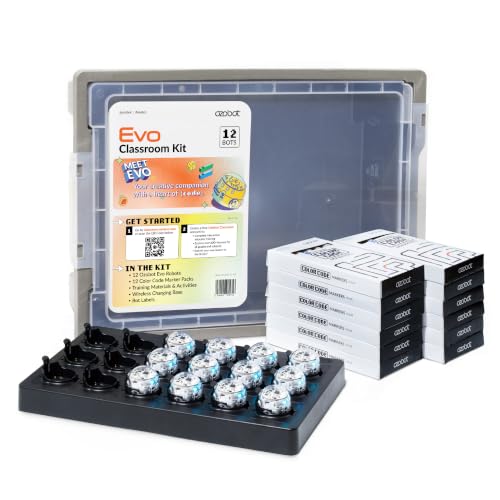
- 12 Evo robots for group activities
- Screen-free and Blockly coding modes
- 700+ free STEAM and CS lessons
Best For: Classrooms needing a complete multi-student coding setup
Best Hands-On Build

- Four DIY robot-building sets
- Combines engineering with drawing
- Designed for ages 8 and up
Best For: Small-group STEM construction and creative classroom projects
Best Single-Student Starter

- One Evo robot with five Blockly levels
- Color Code and online coding options
- 700+ free educational lessons
Best For: Beginners, learning stations, and small-group instruction
Hands-On Variety

- Five separate robot-car projects
- Encourages building and problem-solving
- Designed for ages 8–13
Best For: Classrooms wanting multiple introductory robotics builds
Mechanical Coding Challenge
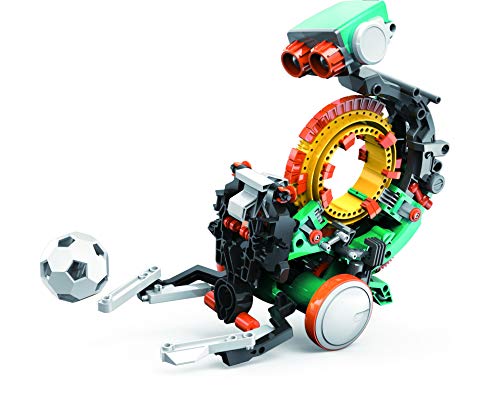
- Programs actions with a coding wheel
- Combines mechanical engineering and coding
- Recommended for ages 10 and up
Best For: Older students tackling an extended robotics build
Early Coding Foundations
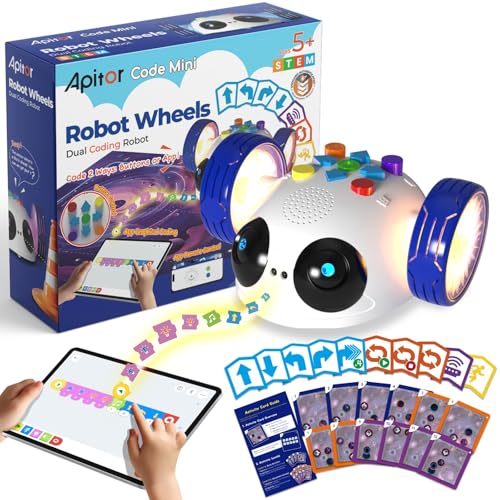
- Starts with screen-free coding cards
- Adds app-based block programming
- Designed for ages 5–8
Best For: Young learners building sequencing and computational-thinking skills
Best Screen-Free Coding Pick – Botley the Coding Robot
Botley is a practical choice for classrooms seeking educational robot kits for classrooms without relying on tablets or computers. Its remote programmer, coding cards, tiles, and obstacles support hands-on lessons in sequencing, loops, and if/then logic for young learners.
Best For: Screen-free coding activities, introductory programming lessons, homeschool groups, and STEM centers serving children ages 5 and up.
Pros:
- Supports programming sequences of up to 80 steps, including loops and if/then logic.
- Includes a remote programmer, detachable arms, coding cards, tiles, and obstacles.
- Works with obstacle courses and black-line paths for flexible classroom challenges.
- Encourages coding, critical thinking, problem-solving, and logical thinking.
Cons:
- Requires five AAA batteries, which are not included in the supplied details.
- The manufacturer-recommended age is 5–8, so activities may need adaptation for older students.
- No manufacturer warranty is listed.
Botley stands out when the goal is accessible, screen-free programming practice. The ready-to-use accessories make it easier to create small-group challenges, although teachers should plan for battery management and age-appropriate extensions.
Best Multi-Project Build Set – 6-in-1 Robotics STEM Kit
This six-project set gives classrooms a way to use educational robot kits for classrooms in hands-on building and experimentation stations. Students assemble different projects, follow instructions, and practice construction, coordination, creative thinking, and problem-solving.
Best For: Upper-elementary STEM projects, partner work, family-supported activities, and classrooms that want several build challenges in one kit.
Pros:
- Offers six separate projects, including a reptile robot, balance car, bubble machine, fiber lamp, and sliding plane.
- Provides practice with construction, hand-eye coordination, motor skills, and logical thinking.
- Includes a screwdriver and step-by-step instruction manuals.
- Designed around reusable building and electronic motor craft activities.
Cons:
- Assembly may require more teacher guidance than a ready-to-run coding robot.
- The supplied notes do not specify classroom storage or charging features.
- The broad listed age range may require teachers to differentiate activities.
With six distinct builds, this kit is useful for rotating project stations and collaborative engineering work. It is a stronger fit for making and assembly than for formal programming instruction, so teachers should match projects to students’ reading and construction skills.
Best Classroom Set – Cooper STEM Robot Classroom Pack
Cooper is purpose-built for educators who need educational robot kits for classrooms that support group instruction. The pack includes four rechargeable robots, lesson plans, accessories, USB charging cords, and built-in storage for STEM rotations and collaborative coding challenges.
Best For: Elementary STEM rotations, group coding labs, after-school programs, maker spaces, and teachers working with beginner coders ages 5–7.
Pros:
- Includes four rechargeable robots for small-group classroom use.
- Comes with lesson plans and accessories for structured coding activities.
- USB cords and built-in storage simplify charging and classroom management.
- Supports sequencing, logic, problem-solving, and early robot coding without screens.
Cons:
- Teachers may need additional units for larger groups working simultaneously.
- The supplied details do not identify the full accessory list or lesson count.
- It is designed for foundational coding, so advanced students may need extension activities.
Cooper is the most classroom-oriented option in this roundup, thanks to its four-robot format, rechargeable power, storage, and lesson support. It should reduce setup friction for teachers, particularly during rotations and collaborative beginner activities.
Best Hands-On Engineering Starter – Design & Drill Robot Workshop
The Design & Drill Robot Workshop is a construction-focused option among educational robot kits for classrooms. Rather than teaching programmable coding, it lets young students assemble and take apart robots while practicing tool use, fine-motor control, and early engineering concepts.
Best For: Early-childhood STEM centers, independent building stations, and learners ages 3–6 developing construction and fine-motor skills.
Pros:
- Includes a kid-friendly drill, screwdriver, gear socket bit, bolts, gears, interchangeable pieces, and stickers.
- Supports creative construction, problem-solving, and fine-motor practice.
- Take-apart play encourages repeated building and experimentation.
- Offers a manageable one-player activity for independent workstations.
Cons:
- It is manually assembled and does not provide programmable coding activities.
- Requires two AA batteries, which are not included in the supplied details.
- The recommended age range limits its usefulness for older elementary students.
This workshop is best viewed as an introductory engineering and tool-use activity rather than a coding robot. Its simple, tactile format can work well in early-learning centers where students are building confidence with components, gears, and controlled assembly.
Best for Easy Setup – Ozobot Evo 12-Bot Kit
The Ozobot Evo 12 Bot Classroom Kit is a strong choice for schools seeking educational robot kits for classrooms. With 12 robots, screen-free Color Code programming, Ozobot Blockly, and access to more than 700 lessons, it is designed for group-based coding and STEAM instruction.
Best For: Classrooms that need a complete multi-student coding setup for ages 5 and up.
Pros:
- Includes 12 Evo robots for collaborative classroom activities.
- Supports both screen-free Color Code programming and online Ozobot Blockly.
- Includes more than 700 free lessons covering STEAM, computer science, and core subjects.
- Charging cradle, labels, and durable accessories support classroom organization.
Cons:
- The 12-bot classroom kit may be more equipment than a small group or individual learner needs.
- Online Blockly activities require access to a compatible device and online resources.
Choose this kit when shared use, lesson variety, and flexible coding modes matter more than minimizing the initial kit size. Its included charging and labeling accessories also make it practical for regular classroom management.
Best Hands-On Build – 4-Pack STEM Doodling Robots
For educators looking for educational robot kits for classrooms with a creative construction focus, this four-pack offers a simple group project. Students assemble drawing robots, then explore how construction and movement can produce doodling designs.
Best For: Classroom activities, science experiments, and small-group STEM projects for children ages 8 and up.
Pros:
- Includes four robot-building sets for shared or individual projects.
- Combines construction, creative skills, problem-solving, and spatial thinking.
- Doodling robots connect engineering concepts with art and creative play.
- Uses materials described as non-toxic and durable.
Cons:
- It is primarily a hands-on building and doodling activity rather than a programmable coding robot.
- The supplied notes do not indicate included digital lessons or software.
This pack fits teachers who want an accessible build-and-create activity instead of a screen-based coding curriculum. Four sets make it suitable for small groups, classroom stations, or STEM event activities.
Best Single-Student Starter – Ozobot Evo Entry Kit
The Ozobot Evo Entry Kit is a compact starting point for educational robot kits for classrooms, especially when a teacher wants to introduce coding one learner or small group at a time. It combines screen-free Color Codes with Ozobot Blockly and includes five skill levels for progression from beginner to master.
Best For: Beginners, learning stations, and teachers who need one versatile coding robot.
Pros:
- Offers both screen-free marker coding and online Blockly programming.
- Five Blockly skill levels support gradual learning progression.
- Includes access to more than 700 free lessons across STEAM, computer science, and core subjects.
- Charging cable, markers, zip case, and starter activities support organized use.
Cons:
- Includes only one robot, so larger classes would need multiple kits for simultaneous use.
- Blockly activities require access to a compatible device and online resources.
This is a practical entry point for coding instruction when the classroom does not need a full fleet. Its dual modes and tiered Blockly levels let teachers begin with simple activities and increase complexity as students gain confidence.
Hands-On Variety – 5-in-1 Robot STEM Kit
For classrooms seeking educational robot kits for classrooms with flexible, hands-on activities, this five-project set offers several ways to explore basic robotics and engineering. Students can build a solar-powered car, wind-powered car, obstacle-avoidance robot, tank, and wire-controlled car.
Best For: Elementary and early middle-school learners, especially ages 8–13, working with an adult or in small groups.
Pros:
- Includes five distinct robot-car projects.
- Supports motor skills, problem-solving, creativity, and STEM exploration.
- Instructions are designed to guide assembly.
- Useful for collaborative classroom or family STEM activities.
Cons:
- May be challenging for children under age 8.
- Some builds may require adult assistance.
- The set focuses on assembly and basic experimentation rather than advanced coding.
This is a strong choice when variety matters and an instructor wants multiple build activities from one kit. Its project range can help keep learners engaged, though younger students may need close guidance during construction.
Mechanical Coding Challenge – TEACH TECH Mech-5
TEACH TECH Mech-5 is one of the more involved educational robot kits for classrooms, combining mechanical construction with hands-on coding. Students snap coding buttons onto a wheel to program actions such as throwing, lifting, kicking, and drawing.
Best For: Learners ages 10 and up who are ready for a multi-hour engineering and introductory coding project.
Pros:
- Teaches mechanical engineering principles and coding basics.
- Performs several programmable physical actions.
- Provides a substantial, hands-on building experience.
- Mission-based design supports problem-solving and experimentation.
Cons:
- Assembly can take multiple hours.
- Detailed construction may require patient instruction and supervision.
- Requires two AAA batteries, which are not included.
Mech-5 suits classrooms that want a deeper build rather than a quick activity. Its mechanical coding wheel makes programming tangible, but the longer assembly time is best planned as a dedicated project sequence.
Early Coding Foundations – Apitor Robot Wheels
Apitor Robot Wheels is designed for younger learners and provides a structured entry point into educational robot kits for classrooms. Children can begin with physical coding buttons and 48 coding cards before progressing to wireless app control and drag-and-drop programming.
Best For: Preschool through early elementary learners ages 5–8 exploring sequencing, patterns, directions, and computational thinking.
Pros:
- Supports screen-free coding with physical buttons and activity cards.
- Offers app-based drag-and-drop programming as a next step.
- Includes guided challenges plus opportunities for open-ended play.
- Infrared sensing demonstrates how robots detect obstacles.
Cons:
- Requires three AA batteries, which are not included.
- Designed for one player at a time.
- The learning content is intended for early learners rather than advanced robotics.
This kit is a practical choice for introducing coding concepts without requiring a device at the outset. Its cards and physical controls can support guided lessons, while the app adds room for continued exploration as students gain confidence.
How We Picked the Best Educational Robot Kits for Classrooms
We focused on kits that offer clear educational value, practical classroom use, and an appropriate challenge level for their recommended ages. Key considerations included coding access, construction or problem-solving opportunities, durability, setup requirements, power options, and whether the kit supports individual, partner, or group activities.
We also looked for variety. Some classrooms need screen-free introductory robots, while others benefit from programmable platforms, engineering builds, or multi-unit packs. A strong choice should be engaging without creating unnecessary preparation or maintenance work for teachers.
Quick Comparison
- Best for early coding: Botley and other screen-free introductory robots.
- Best for class sets: Multi-pack offerings such as the Cooper and Ozobot classroom kits.
- Best for creative STEM projects: Design-and-drill and doodling robot kits.
- Best for advanced building: Mech-5 and other construction-focused programmable robots.
- Best for younger learners: Simple wheel-based kits with guided activities and straightforward controls.
Key Buying Factors for Educational Robot Kits for Classrooms
Age and Skill Level
Choose a kit that matches students’ fine-motor skills, reading ability, and prior coding experience. Younger learners often benefit from physical controls, visual instructions, and short challenge cards. Older students may prefer robots that require assembly, debugging, and increasingly complex programs.
Number of Students and Robots
One robot can work for teacher demonstrations, but pairs or small groups need enough hands-on time to stay engaged. Multi-unit classroom packs can simplify distribution and reduce waiting, while individual kits may be more economical for rotating stations or take-home programs.
Coding and Lesson Compatibility
Check whether the robot uses screen-free commands, an app, block-based coding, or another programming method. Confirm device compatibility and consider how easily the activities connect to lessons on sequencing, loops, algorithms, sensors, geometry, or engineering design.
Durability, Charging, and Storage
Classroom equipment must withstand frequent handling. Look for sturdy components, replaceable or rechargeable batteries where appropriate, simple pairing, and storage that keeps small parts organized. Account for charging time and accessories before committing to a full class set.
Teacher Support
Guided challenges, printable materials, curriculum links, and clear setup instructions can make a major difference. A kit with fewer features but better instructional support may be more useful than a technically advanced robot that requires extensive preparation.
Who Should Buy Which Educational Robot Kits for Classrooms?
Teachers introducing coding to early elementary students should prioritize simple, screen-free robots with immediate feedback. For stations, clubs, and mixed-ability groups, flexible kits with multiple activities allow students to progress at different speeds.
Schools planning collaborative STEM units should consider classroom packs or four-unit bundles so students can work in teams without long turn-taking delays. Creative teachers may prefer doodling or drill-based robots for design challenges, while technology and engineering classes should look for buildable robots with programmable movement and more opportunities for iteration.
Before buying, map each kit to a specific lesson goal, class size, and storage plan. The best Educational Robot Kits for Classrooms are not necessarily the most advanced; they are the ones students can use repeatedly, teachers can manage efficiently, and schools can connect to meaningful learning outcomes.