A dynamic microphone can help keep your voice front and center when you stream from a room with keyboard clicks, fans, or other background noise. The right choice also depends on how you connect it: USB makes setup easier, while XLR gives you more flexibility as your audio gear grows.
These 10 picks cover ready-to-use gaming kits, versatile USB/XLR microphones, and XLR-only broadcast options. Use the guide below to narrow them down by connection, placement, and budget.
Best 10 Dynamic Microphones for Streaming Picks for 2026
Best for Software Control

- USB/XLR connectivity
- Boom arm and shock mount included
- USB-mode EQ, compression, and RGB controls
Best For: Streamers seeking an adjustable kit and sound customization
Best for RGB Setups

- RGB mic and boom arm
- USB/XLR outputs
- USB-mode audio mix control
Best For: Gamers building a coordinated, illuminated streaming setup
Best for a No-Frills Setup

- Metal build with USB/XLR outputs
- Windscreen and shock mount included
- Stand and XLR cable sold separately
Best For: Creators who already own mounting hardware
Best for White Desks

- White finish with USB-mode RGB
- USB/XLR connectivity
- Desktop stand and windscreen included
Best For: White-themed streaming desks needing a compact mic
Broadcast XLR Pick

- Speech-tuned cardioid capsule
- Built-in pop filter and shock mounting
- Requires an XLR interface or mixer
Best For: Streamers with an existing XLR setup
Studio Vocal Pick
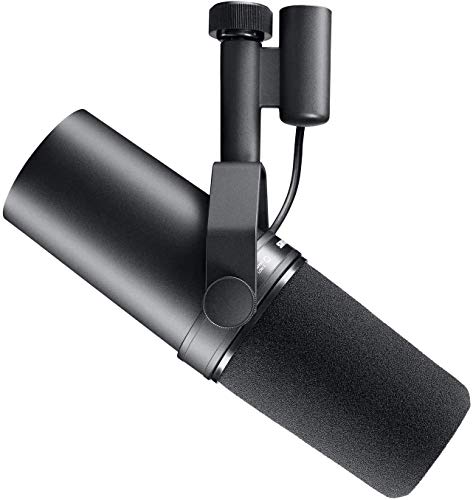
- Warm, balanced vocal response
- Pop filtering and shock isolation
- XLR setup needs ample gain
Best For: Creators with an XLR setup offering at least 60 dB of gain
Flexible Kit Pick

- USB and XLR connectivity
- Boom arm, windscreen, and shock mount included
- On-mic controls work only over USB
Best For: Streamers seeking a USB/XLR microphone and boom-arm kit
Best XLR-Only Pick

- XLR connection for interfaces and mixers
- Cardioid pickup and integrated shock mount
- All-metal body with adjustable yoke
Best For: Streamers who already use an XLR interface or mixer
Best RGB Boom-Arm Kit

- USB and XLR connection options
- Boom arm and clamp included
- Controllable RGB and onboard controls
Best For: Gaming streams that need a mic-and-arm kit
Best Onboard Processing

- USB-C and XLR outputs
- Auto Level Mode and real-time denoising
- LED panel with level display and tap-to-mute
Best For: Streamers who want flexible connections and onboard controls
Best for Software Control – MAONO PD200XS Boom Arm Kit
Among dynamic microphones for streaming, the MAONO PD200XS is a practical choice if you want a boom arm in the box and room to customize your sound. Its cardioid dynamic capsule, USB/XLR connections, and MAONO Link controls suit a setup that may grow beyond plug-and-play recording.
Best For: Streamers who want an included boom arm and USB-based sound customization.
Pros:
- Includes an adjustable boom arm, shock mount, and USB cable.
- USB and XLR outputs accommodate direct computer use or an audio interface.
- MAONO Link offers EQ, compression, limiter, and RGB adjustments in USB mode.
- On-mic mute, gain/headphone-volume control, and a monitoring jack simplify USB sessions.
Cons:
- Software features are available only in USB mode.
- XLR cable is not included.
The included mounting gear makes this a more complete starting kit than a standalone mic. Choose USB for its convenient controls; use XLR when you are ready to connect through separate audio equipment.
Best for RGB Setups – FIFINE AmpliGame AM8PROT Kit
If your shortlist of dynamic microphones for streaming includes lighting as well as audio controls, the FIFINE AmpliGame AM8PROT stands out with RGB on both the mic and boom arm. It also pairs USB/XLR connectivity with a USB-mode mix control for balancing your mic and computer audio.
Best For: Gamers who want a coordinated RGB mic-and-arm kit with hands-on stream controls.
Pros:
- Includes a boom arm, foam windscreen, and 8.2-foot USB cable.
- USB plug-and-play supports PC, Mac, and listed PlayStation consoles.
- USB-mode mix control, monitoring, mute, and gain/headphone adjustment aid live use.
- FIFINE Genie desktop software provides EQ, mix-channel, and lighting options.
Cons:
- Mix and multifunction-knob controls are available only over USB.
- RGB lighting requires a USB connection.
This is the most visually focused kit here, but its lighting and onboard mixing are reasons to use USB. The XLR output remains an option if you prefer an interface-based setup.
Best for a No-Frills Setup – FIFINE AmpliTank K688
The FIFINE AmpliTank K688 suits shoppers comparing dynamic microphones for streaming who prioritize a metal build and straightforward USB/XLR flexibility over RGB lighting. Its cardioid pickup, included windscreen, and shock mount address common room and desk noise concerns.
Best For: Streamers and podcasters who already have a stand or boom arm and want a simple dual-output mic.
Pros:
- USB connects directly to Windows or Mac computers; XLR works with a suitable mixer or interface.
- Cardioid pickup helps limit background noise from sources such as computer fans.
- Includes a windscreen and shock mount to help manage plosives and vibration.
- USB mode provides tap-to-mute, gain control, and headphone monitoring.
Cons:
- Stand, boom arm, and XLR cable are not included.
- On-mic function keys work only with USB.
The K688 is a sensible pick if your mounting hardware is already sorted. Budget for a stand or arm if you are starting from scratch, and expect its direct controls to be USB-only.
Best for White Desks – FIFINE AmpliGame AM8W
For a white-themed desk, the FIFINE AmpliGame AM8W adds a matching option to the list of dynamic microphones for streaming. This compact mic includes a desktop stand and windscreen, with USB for direct PC use and XLR for a mixer or audio interface.
Best For: Streamers who want a white desktop mic with RGB lighting and basic USB controls.
Pros:
- White finish and adjustable RGB lighting suit a coordinated gaming setup.
- USB and XLR connections allow direct computer use or an interface-based setup.
- USB mode provides tap-to-mute, gain and headphone-volume controls, and a monitoring jack.
- Includes a desktop stand, windscreen, and USB cable.
Cons:
- RGB and onboard controls are available only through USB.
- XLR cable is not included.
The AM8W makes most sense when its white finish and included desk stand fit your setup. Speak toward the top of its end-address capsule and keep it close, as the supplied guidance recommends.
Broadcast XLR Pick – RØDE PodMic
Among dynamic microphones for streaming, the RØDE PodMic suits creators who already have an XLR audio interface or mixer. Its speech-tuned cardioid capsule helps keep your voice prominent while reducing room noise.
Best For: Streamers with an XLR setup who want a durable, speech-focused microphone.
Pros:
- Dynamic cardioid capsule is tuned for speech and rejects room noise.
- Internal pop filter and shock mounting help tame plosives and desk thumps.
- All-metal body includes an integrated swing mount.
Cons:
- Requires an XLR interface or mixer; it does not connect over USB.
The PodMic is a practical choice if your streaming setup already has an XLR input. If you need a direct computer connection, look for a USB-capable model instead.
Studio Vocal Pick – Shure SM7B
The Shure SM7B is one of the dynamic microphones for streaming worth considering when vocal tone and XLR control matter more than plug-and-play convenience. Its cardioid pattern, air-suspension shock isolation, and pop filtering support close-mic speech.
Best For: Streamers and podcasters building an XLR setup with ample microphone gain.
Pros:
- Wide-range response is designed for warm, balanced vocals.
- Air-suspension isolation and built-in pop filtering help control vibrations and plosives.
- All-metal construction and electromagnetic shielding help limit interference.
Cons:
- Needs an XLR interface or mixer rather than a direct USB connection.
- Shure recommends at least 60 dB of gain for its characteristic vocal sound.
The SM7B rewards a carefully matched signal chain, but its gain recommendation makes your interface or mixer an important part of the purchase decision.
Flexible Kit Pick – FIFINE AmpliTank K688CT
For shoppers comparing dynamic microphones for streaming, the FIFINE AmpliTank K688CT offers both USB and XLR connections in a kit with a metal boom arm. USB provides direct computer connectivity, while XLR leaves room to use an audio interface or mixer.
Best For: Streamers who want a boom-arm kit and the flexibility to switch between USB and XLR.
Pros:
- USB and XLR outputs accommodate different streaming setups.
- Included boom arm, windscreen, and shock mount help manage placement, plosives, and vibrations.
- USB mode provides tap-to-mute, gain control, and headphone monitoring controls.
Cons:
- On-mic function keys do not work over XLR; controls move to your interface or mixer.
- The included C-clamp fits desks under 2 inches thick.
The K688CT is a convenient starting point if you want mounting hardware now and XLR as an option later. Check your desk thickness and remember that its on-mic controls are USB-only.
Best XLR-Only Pick – Shure MV7X
Among dynamic microphones for streaming, the Shure MV7X suits creators who already use an audio interface or mixer. Its cardioid pickup, voice-isolating design, and integrated shock mount help keep speech focused while reducing room noise and vibrations.
Best For: Streamers with an XLR audio interface or mixer who want a dedicated spoken-word microphone.
Pros:
- Focused voice capture with an integrated shock mount.
- All-metal construction and adjustable yoke mount.
- Includes a thread adapter for stand and boom-arm compatibility.
Cons:
- XLR-only output requires an audio interface or mixer; there is no direct USB connection.
The MV7X is a practical choice if your streaming setup already has XLR hardware and you value straightforward vocal capture over onboard digital controls.
Best RGB Boom-Arm Kit – FIFINE AmpliGame AM8TW
If you want dynamic microphones for streaming that can connect by USB now and XLR later, the FIFINE AmpliGame AM8TW offers both in a gaming-focused kit. It pairs cardioid pickup with controllable RGB lighting and an included boom arm.
Best For: Gamers who want a USB/XLR microphone with an included arm and customizable lighting.
Pros:
- USB and XLR connections accommodate different setups.
- Includes a boom arm, clamp, windscreen, and USB cable.
- Controllable RGB lighting, mute control, and gain adjustment.
Cons:
- The listed kit contents do not include an XLR cable.
- RGB styling may not suit a minimal or understated setup.
The AM8TW makes the most sense when setup accessories and connection flexibility matter as much as voice capture.
Best Onboard Processing – Shure MV7+
The Shure MV7+ stands out among dynamic microphones for streaming with USB-C and XLR outputs plus built-in tools for managing your voice. Auto Level Mode adjusts gain based on distance and volume, while real-time denoising helps reduce background noise.
Best For: Streamers who want flexible connections and onboard voice-processing features.
Pros:
- USB-C and XLR outputs support direct and interface-based setups.
- Auto Level Mode and real-time denoising help manage changing recording conditions.
- Color LED touch panel offers level monitoring and tap-to-mute control.
- Built-in Plate, Hall, and Studio reverb modes.
Cons:
- The listed box contents include a USB-C cable but no XLR cable.
- Its extra controls and effects may be unnecessary if you want a basic XLR microphone.
Choose the MV7+ if you expect to switch between USB-C and XLR workflows and will use its level, noise, and touch-panel controls.
How We Picked the Best Dynamic Microphones for Streaming
We focused on dynamic models that suit spoken voice, then compared their connection options, included accessories, and setup requirements. The lineup includes USB/XLR microphones for streamers who want a simple start and a possible upgrade path, plus XLR-only choices for setups built around an audio interface or mixer. We also considered practical differences between a standalone microphone and a kit with mounting accessories. No single mic eliminates room noise: placement and input settings still matter.
Quick Comparison: Find Your Starting Point
For a first streaming setup, start with the USB/XLR group: the MAONO PD200XS, FIFINE AM8PROT, K688, AM8W, K688CT, AM8TW, and Shure MV7+ offer connection flexibility. Check the exact package contents before comparing prices; a kit may save a separate accessory purchase, but only if you need what it includes.
If you already have an audio interface or mixer, the XLR-only RØDE PodMic, Shure MV7X, and Shure SM7B are worth comparing. Factor the interface, stand or boom arm, cable, and any needed gain into the total cost—not just the microphone price.
Key Buying Factors for Dynamic Microphones for Streaming
Connection and Controls
USB lets you connect directly to a computer; XLR requires compatible audio hardware. A dual-connection mic can make sense if you want USB convenience now and an XLR workflow later. If you expect to adjust sound during a live stream, check whether your chosen model provides the monitoring and on-mic controls you want rather than assuming every microphone does.
Distance, Mounting, and Room Noise
Dynamic microphones generally work best close to your mouth. A boom arm can make that position easier to maintain without placing the mic in front of your keyboard. A cardioid pickup pattern can reduce sound from some directions, but it will not completely remove loud fans, room echo, or desk bumps. Mic position, a stable mount, and sensible gain settings usually matter more than a long list of processing features.
Total Setup Cost
Compare complete setups, not bare microphones. A USB/XLR kit may include accessories you would otherwise buy separately, while an XLR-only mic needs an interface or mixer and an XLR cable. Before choosing an SM7B or another XLR model, confirm that your audio hardware can provide adequate clean gain for the levels you need.
Who Should Buy Which Dynamic Microphones for Streaming?
Choose a USB/XLR model if you want to stream with a direct computer connection today while keeping the option to use an interface later. Choose a kit if you also need its included mounting gear and it fits your desk. Pick the PodMic or MV7X if you are building an XLR-first setup; consider the SM7B if your budget and audio chain support a higher-cost broadcast-style choice. The MV7+ is a strong fit for buyers who specifically want both USB-C and XLR connectivity. Whichever you choose, prioritize a comfortable close-mic position and a connection that fits the equipment you already own.