Building a multi-monitor workspace? The right 4K display setup can make text sharper, windows easier to manage, and long work sessions noticeably more comfortable.
Below, we focus on the best 4K computer monitors for multiple monitors, with an eye on bezel size, stand flexibility, USB-C and DisplayPort options, and overall value for mixed work, creative, and light gaming use.
Best 10 4K Computer Monitors for Multiple Monitors Picks for 2026
Premium 4K IPS Pick

- 120Hz IPS panel with FreeSync Premium
- 99% sRGB and 4K detail
- Ultra-thin bezels for multi-monitor setups
Best For: Color-accurate productivity and polished dual-monitor desks
Office Productivity Pick

- 4K IPS panel with sharp text clarity
- Eye Saver Mode and flicker reduction
- Split-screen, KVM, and PIP/PBP support
Best For: Productivity setups that need calm, reliable 4K clarity
Large-Canvas Value Pick

- 32-inch 4K panel for more workspace
- 100% sRGB IPS display
- Dual HDMI, DisplayPort, and built-in speakers
Best For: Budget-conscious multitaskers who want one big 4K screen
Gaming-Friendly Multi-Display Pick

- Zero-frame 27-inch design
- 4K at up to 72Hz, 144Hz at 1080p
- FreeSync, HDR10, and ergonomic adjustments
Best For: Mixed work-and-play desks that need cleaner monitor borders
Creator-Friendly 27-inch 4K Hub
LG UltraFine 27UP850K-W for Productive Stacks

- 27-inch 4K IPS display with up to 95% DCI-P3
- USB-C with up to 90W power delivery
- Switch App supports splits into up to 6 sections
Best For: Clean laptop docks and multitasking-heavy desk setups
Compact Dual-Display Companion
LG UltraFine 27US500-W for Clean Desk Builds

- 27-inch 4K IPS panel with wide viewing angles
- Borderless design suits multi-monitor layouts
- Onscreen Control and Reader Mode improve comfort
Best For: Simple, space-saving dual-screen productivity
Large-screen productivity pick

- 32-inch 4K canvas for side-by-side windows
- IPS with 100% sRGB and slim bezels
- HDMI 2.0, DP 1.4, and VESA support
Best For: Productivity-focused dual-monitor desks
Business-minded 4K workspace display
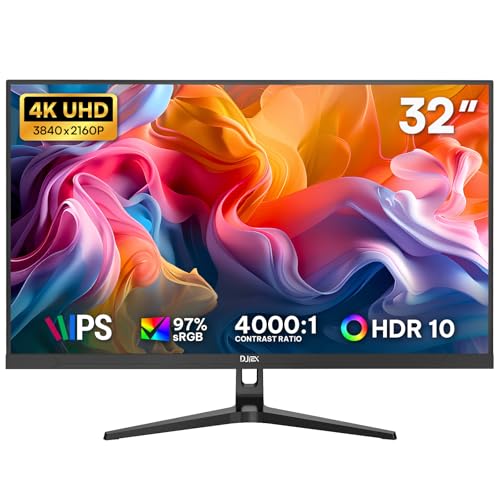
- 32-inch 4K UHD for office multitasking
- IPS with 97% sRGB and HDR10
- Dual HDMI, dual DP, and VESA mount support
Best For: Business and home office multi-monitor setups
Premium 4K IPS Pick – Dell 27 S2725QS
If you want one of the better 4K computer monitors for multiple monitors, the Dell S2725QS is a strong fit for a clean, color-accurate side-by-side setup. Its 27-inch 4K IPS panel, 99% sRGB coverage, and ultra-thin bezels make it easy to build a polished multi-screen workstation for business, editing, or general desktop use.
Best For: Users who want a sharp, modern 27-inch 4K display for productive multi-monitor desks.
Pros:
- 120Hz refresh rate with AMD FreeSync Premium for smoother motion.
- 99% sRGB and IPS technology for vivid, consistent color.
- Ultra-thin bezels help create a seamless multi-monitor look.
- ComfortView Plus reduces blue light without sacrificing color accuracy.
Cons:
- 27-inch size may feel compact if you want maximum workspace per display.
- No USB-C connectivity mentioned in the supplied specs.
Overall, this Dell is a well-rounded option if your priority is visual quality plus a tidy dual- or triple-monitor layout. It combines strong panel quality with faster-than-typical refresh for a 4K productivity monitor.
Office Productivity Pick – Samsung ViewFinity S7 27"
The Samsung ViewFinity S7 is built for straightforward productivity and is a sensible choice if you’re comparing 4K computer monitors for multiple monitors. Its 27-inch 4K IPS panel, HDR10 support, and 178-degree viewing angle make it a practical fit for side-by-side work where consistent image quality matters more than high refresh rate.
Best For: Office users and creators who want a dependable 4K display for a dual-monitor workstation.
Pros:
- 4K UHD resolution with high pixel density for crisp text and detail.
- IPS panel and 178-degree viewing angle support consistent visuals.
- Eye Saver Mode and flicker reduction help with long work sessions.
- Display Manager adds split-screen, KVM, and PIP/PBP options.
Cons:
- 60Hz refresh rate is more basic than gaming-oriented alternatives.
- Only one HDMI port is listed in the supplied specs.
If you want a practical 4K monitor that emphasizes clarity and workflow tools, this Samsung makes a lot of sense. It is especially appealing for desks where the goal is efficient multitasking rather than fast-paced motion.
Large-Canvas Value Pick – Sceptre U325W-UPT 32-inch
The Sceptre U325W-UPT is a smart budget-friendly choice if you want 4K computer monitors for multiple monitors but also like the idea of a larger single screen to reduce bezel breaks. Its 32-inch 4K IPS panel gives you a roomy workspace for multiple windows, while the included ports, built-in speakers, and VESA support make it easy to adapt into a flexible desk setup.
Best For: Buyers who want a spacious 32-inch 4K monitor for multitasking and mixed work use.
Pros:
- 32-inch 4K screen offers plenty of room for side-by-side windows.
- 100% sRGB and IPS technology support solid color performance.
- Built-in speakers reduce desk clutter.
- DisplayPort and dual HDMI inputs add convenient connectivity.
Cons:
- 70Hz refresh rate is only modestly above standard.
- No height adjustment is listed in the supplied details.
This Sceptre is best viewed as a practical large-format 4K monitor rather than a premium display. If your goal is more workspace with simple setup flexibility, it delivers a lot of screen for the money.
Gaming-Friendly Multi-Display Pick – Acer Nitro VG270K L1
The Acer Nitro VG270K L1 is a versatile option if you need 4K computer monitors for multiple monitors and also want stronger gaming features. Its zero-frame 27-inch IPS design makes side-by-side placement cleaner, while FreeSync, HDR10, and the high-response panel help it work well for both desktop productivity and fast-moving content.
Best For: Users who want a near-borderless 4K monitor that can handle work and gaming.
Pros:
- Zero-frame design is well suited to multi-monitor arrangements.
- Up to 144Hz at 1080p and 72Hz at 4K provide flexible performance.
- FreeSync and HDR10 add smoother, more dynamic visuals.
- Built-in ergonomic adjustments help dial in the desk setup.
Cons:
- 4K refresh tops out at 72Hz, not 144Hz.
- High refresh and 4K are not available simultaneously at the top listed spec.
For buyers who want a monitor that can bridge work and play, the Acer Nitro stands out with its bezel-light design and flexible refresh behavior. It is a strong pick if you value a cleaner multi-monitor layout and occasional gaming performance.
Immersive 32-inch 4K Value Pick – ViewSonic VX3276-4K-MHD for Multi-Screen Setups
If you want one of the more affordable 4K computer monitors for multiple monitors, the ViewSonic VX3276-4K-MHD is a straightforward 32-inch option that gives you plenty of screen space without adding a lot of complexity. Its 4K UHD resolution, HDR10 support, and wide connectivity make it a practical fit for mixed work and media use.
Best For: Users who want a large 32-inch 4K display for side-by-side productivity, general office work, and home entertainment.
Pros:
- 32-inch 4K UHD panel provides a large, detailed workspace for multitasking.
- HDMI, DisplayPort, and Mini DisplayPort inputs make it flexible for different PCs and Macs.
- Flicker-Free and Blue Light Filter features help reduce eye fatigue during long sessions.
- ViewMode presets let you switch quickly between Game, Movie, Web, Text, and Mono modes.
Cons:
- 60Hz refresh rate is aimed at standard productivity and media use, not high-end gaming.
- MVA panel and 300 cd/m2 brightness are solid, but not premium-class for color-critical work.
- Large 32-inch size may take up more desk space in a multi-monitor layout.
This ViewSonic model stands out if you want a bigger 4K screen that can serve as a main display or anchor one side of a dual-monitor setup. It focuses on flexibility, comfort, and screen real estate rather than premium creator features.
Creator-Friendly 27-inch 4K Hub – LG UltraFine 27UP850K-W for Productive Stacks
The LG 27UP850K-W is a strong choice if you’re shopping for 4K computer monitors for multiple monitors and want a compact screen that still feels polished and capable. Its 27-inch 4K IPS panel, HDR400 support, USB-C with up to 90W power delivery, and extra ports make it especially useful for clean, modern desk setups.
Best For: Professionals and multitaskers who want a versatile 27-inch 4K monitor with strong connectivity and a premium-feeling work setup.
Pros:
- 4K IPS panel with up to 95% DCI-P3 coverage delivers crisp detail and vivid color.
- USB-C with up to 90W power delivery reduces cable clutter for laptop-based setups.
- Two HDMI ports, DisplayPort, and USB ports make it easy to connect multiple devices.
- Switch App can split the screen into up to 6 sections for multitasking.
Cons:
- 27-inch size is more compact than a 32-inch option if you want maximum screen area.
- 60Hz refresh rate is fine for productivity but not tuned for fast-paced gaming.
- Built-in speakers are convenient, though not a replacement for dedicated audio.
Overall, this LG model is a smart pick when you want a refined 4K monitor that supports a tidy desktop and flexible daily workflows. It works well as a primary screen or as part of a dual-monitor setup for work, streaming, and light gaming.
Compact Dual-Display Companion – LG UltraFine 27US500-W for Clean Desk Builds
If you want a compact option among 4K computer monitors for multiple monitors, the LG 27US500-W is built around a simple 27-inch IPS panel with a borderless design and practical workspace tools. It focuses on sharp 4K clarity, comfortable viewing, and easy connectivity for straightforward productivity setups.
Best For: Users who want a no-fuss 27-inch 4K monitor for office work, creative viewing, and side-by-side screen layouts.
Pros:
- 27-inch 4K UHD IPS display offers sharp detail and wide viewing angles.
- Borderless design fits neatly into multi-monitor arrangements.
- Onscreen Control makes it easy to split the display and adjust settings.
- Flicker-Free support and Reader Mode add comfort for long work sessions.
Cons:
- 60Hz refresh rate is geared toward productivity rather than high-refresh gaming.
- 1000:1 contrast ratio is solid, but not as strong as some higher-contrast alternatives.
- Connectivity is practical, though it lacks the USB-C convenience of some premium competitors.
This LG is a sensible pick if you value clean styling and easy everyday use over extra premium features. It should fit well as a second screen or as part of a matching dual 4K setup.
Compact 4K desk companion – Sceptre Prime 27" IPS 4K
If you’re building 4K computer monitors for multiple monitors, this 27-inch Sceptre is a straightforward fit for a compact, side-by-side desk layout. The IPS panel helps keep color and clarity consistent across different viewing angles, while the 4K resolution gives you plenty of room for windows, spreadsheets, and reference panels.
Best For: Users who want a 27-inch 4K monitor with IPS viewing angles and simple multi-monitor flexibility.
Pros:
- 4K UHD resolution adds sharp detail for workspaces with multiple windows.
- IPS panel supports strong color and visibility from different angles.
- DisplayPort can push refresh rate up to 70+Hz for smoother everyday motion.
- Built-in speakers and audio out add simple desk-friendly convenience.
Cons:
- 27-inch size offers less total screen space than 32-inch options.
- Not positioned as a high-refresh gaming display.
- Speaker quality is not detailed, so audio needs are best kept basic.
Overall, this Sceptre makes sense if you want a clean, affordable-style 4K panel that can sit alongside another monitor without overwhelming the desk. It prioritizes clear 4K visuals, solid viewing angles, and practical connectivity over premium extras.
Large-screen productivity pick – 32" 4K IPS Monitor
For 4K computer monitors for multiple monitors, this 32-inch IPS display stands out when you want one large canvas that pairs well with another screen. The 3840×2160 resolution makes it easy to place two full-size windows side by side, while the slim bezel design helps it blend into a multi-monitor desk without feeling bulky.
Best For: People who want a large 32-inch 4K monitor for side-by-side work, casual gaming, and a clean dual-display desk.
Pros:
- 32-inch 4K screen gives plenty of room for multitasking and split windows.
- IPS panel with 100% sRGB keeps text and colors looking accurate from the side.
- HDMI 2.0 and DisplayPort 1.4 make it easy to keep a laptop and console connected.
- VESA-ready slim bezel design fits neatly into multi-monitor setups.
Cons:
- 60Hz refresh rate is not aimed at high-refresh competitive gaming.
- 32-inch size may feel large if desk depth is limited.
- Best text scaling may require Windows or Mac adjustment for comfort.
This is a practical pick if your priority is workspace efficiency rather than speed. Its big 4K panel, dual-device connectivity, and multi-monitor-friendly design make it a strong fit for productivity-focused desks.
Business-minded 4K workspace display – DJiEX 32" UHD IPS
If you’re comparing 4K computer monitors for multiple monitors in a work setup, this 32-inch DJiEX model is built around straightforward productivity. The IPS panel and 4K resolution provide room for spreadsheets, reports, and browsers, while dual HDMI and dual DisplayPort inputs make it easier to keep several devices connected.
Best For: Office users who want a budget-friendly 32-inch 4K monitor for everyday multitasking and cleaner desk organization.
Pros:
- 32-inch 4K UHD panel creates more space for documents and multitasking.
- 97% sRGB IPS display delivers consistent color from different angles.
- Dual HDMI and dual DisplayPort inputs support multiple connected devices.
- 75x75mm VESA mounting helps keep a multi-monitor workspace tidy.
Cons:
- 60Hz refresh rate is basic for gaming-focused buyers.
- USB-C devices may need a separate adapter.
- Stand details are simple, so more advanced ergonomics may rely on a monitor arm.
As a business-oriented 4K monitor, this DJiEX focuses on usable screen space, easy connectivity, and a cleaner setup. It is a sensible choice when your multi-monitor arrangement needs function first and extras second.
How We Picked the Best 4K Computer Monitors for Multiple Monitors
For 4K Computer Monitors for Multiple Monitors, we prioritized models that make side-by-side use practical: slim bezels, consistent panel quality, reliable 4K scaling, and enough ports for simple daisy-chaining or easy source switching. We also favored monitors with good text clarity, stable stands, and sensible screen sizes that work well in pairs or triples.
Quick Comparison
In general, 27-inch 4K monitors deliver the sharpest text for productivity, while 32-inch models make windows feel larger and are easier to read at a glance. IPS panels are usually the safest choice for multi-monitor setups because they tend to offer better viewing angles and more even color across adjacent screens. Higher refresh rates are a nice bonus, but for most office and creative workflows, connectivity and ergonomics matter more.
Key Buying Factors for 4K Computer Monitors for Multiple Monitors
Screen Size and Density
Choose 27 inches if you want maximum sharpness and compact desktop spacing. Choose 32 inches if you prefer a more comfortable visual scale and a larger working area without increasing the number of monitors.
Bezels and Alignment
Thin borders help reduce the visual gap between screens. If you plan to use two or three displays, consistent bezel thickness matters almost as much as image quality.
Ports and Workflow
Look for HDMI and DisplayPort at minimum. USB-C can simplify laptop connections, while extra video inputs make it easier to mix desktop, laptop, and console use. If you are shopping for 4K Computer Monitors for Multiple Monitors, easy connectivity can save a lot of setup time.
Ergonomics and Mounting
Height, tilt, swivel, and VESA support are especially valuable in multi-screen layouts. Matching monitor stands or using a dual-arm mount helps align screens cleanly and improves posture.
Color and Refresh Rate
For office, study, and content work, focus on IPS consistency and decent factory tuning. For gaming or motion-heavy use, a higher refresh rate can be worthwhile, but it should not come at the expense of basic sharpness and usable inputs.
Who Should Buy Which 4K Computer Monitors for Multiple Monitors?
Choose a 27-inch 4K monitor if you want the best balance of sharpness and desk efficiency. Choose a 32-inch model if you want a larger, easier-to-read workspace across multiple screens. Creators should lean toward models with better color coverage and adjustable stands, while mixed-use buyers should prioritize value, simple connectivity, and a clean bezel design. For laptop users, USB-C is a strong convenience feature; for desktop users, DisplayPort and dual-HDMI flexibility often matter more.