Choosing the right label printer can speed up receiving, picking, packing, and shipping without adding extra supplies or maintenance.
Here are 10 of the best thermal label printers for warehouse inventory, selected for speed, compatibility, label size support, and day-to-day reliability.
Best 10 Thermal Label Printers for Warehouse Inventory Picks for 2026
Space-Saving Wireless Pick
Bluetooth 4x6 Label Printer with Bin

- Built-in bin holds up to 250 labels
- Bluetooth and USB support
- 203 DPI at 72 labels per minute
Best For: Compact shipping and inventory stations
Warehouse Classic Pick
Zebra GX420D 4-Inch Barcode Printer

- Direct thermal, no ink or ribbons
- Prints 4-inch shipping and barcode labels
- USB and Ethernet for desktop workflows
Best For: High-volume warehouse and logistics teams
Warehouse-Friendly Starter
Westinghouse 4x6 USB Thermal Shipping Label Printer

- Direct thermal printing with no ink or toner
- USB and Ethernet support for desktop workflows
- Includes starter labels and label holder
Best For: Small warehouses and ecommerce sellers needing a simple 4x6 label printer
Premium Barcode Pick
Brother TD-4550DNWB 4-inch Barcode and Label Printer
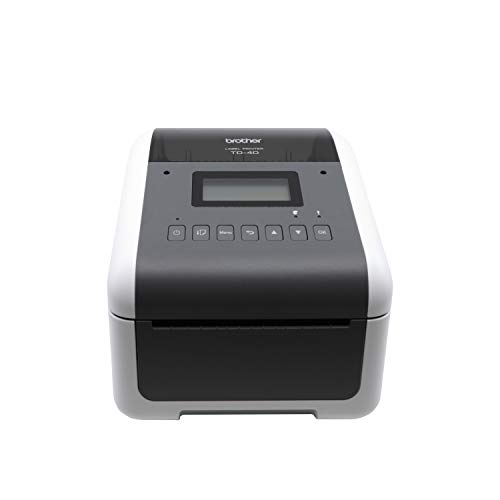
- 300 dpi output for crisp text and small barcodes
- USB, Ethernet, Wi-Fi, and Bluetooth connectivity
- Spindle-less design for easier media changes
Best For: Teams that need high-accuracy barcode labels and flexible connectivity
Fast Desktop Option
Rollo USB Thermal Shipping and Warehouse Label Printer

- Fast 150mm/s direct thermal printing
- Works with Windows and Mac via USB
- Supports shipping, barcode, and custom labels
Best For: Small businesses that need a speedy USB label printer for daily warehouse use
Wireless Startup Pick
JADENS Bluetooth Thermal Shipping Label Printer

- 203 DPI direct thermal printing with no ink or toner
- Supports fanfold and roll labels up to 4.1" wide
- Bluetooth/USB compatibility for Windows, Mac, Android, and iPhone
Best For: Small businesses needing a budget-friendly shipping and inventory label printer
High-Duty Precision Choice
MUNBYN Bluetooth Thermal Label Printer RW403B

- Auto-calibrates to reduce label misalignment
- Durable design rated for up to 970,000 labels
- Bluetooth and USB support with quiet 60 dB operation
Best For: High-volume teams that want durable, precise warehouse labeling
Compact Dual-Connection Pick
NULLTONEX 4x6 Bluetooth Label Printer

- Bluetooth and USB support for flexible setup
- 203 DPI direct thermal printing up to 72 labels per minute
- Works with major carriers and e-commerce platforms
Best For: Small businesses wanting a compact, app-friendly shipping and inventory printer
Industrial Speed Pick – High-Speed 4.25" Thermal Label Printer
If you need thermal label printers for warehouse inventory that can keep up with a busy workstation, the iDPRT iD880 is built for speed and straightforward daily use. It prints direct thermal labels at up to 6 inches per second at 203 DPI, supports 4.25-inch-wide media, and handles shipping, barcode, inventory, and receipt jobs without needing ribbons or ink.
Best For: Busy warehouses, logistics desks, and inventory stations that need fast, reliable label printing on a USB-connected desktop setup.
Pros:
- Up to 6 IPS printing helps move through high-volume label jobs quickly.
- Supports 4.25-inch-wide labels and a range of formats, including barcodes and inventory tags.
- Direct thermal printing means no ribbons or ink to replace.
- Includes power adapter, cord, USB cable, and quick start guide for setup.
Cons:
- USB-focused setup is best for a fixed desktop location.
- Driver installation is needed via QR code or the iDPRT website.
Overall, this is a practical pick for teams that value speed and broad label compatibility over wireless extras. The large-memory hardware and easy print-head removal also make it more suited to sustained business use than a casual home label maker.
Space-Saving Wireless Pick – Bluetooth 4×6 Label Printer with Bin
For warehouse inventory workflows where desk space matters, this thermal label printer adds a built-in label bin and wireless convenience in one compact body. The D450BT handles 4×6 labels, supports Bluetooth and USB, and works with major desktop and mobile systems for shipping, barcode, and product labeling.
Best For: Small warehouses, shipping stations, and inventory setups that want a compact Bluetooth printer with built-in label storage.
Pros:
- Built-in label compartment holds up to 250 4×6 labels and saves space.
- Bluetooth and USB support make it flexible across phones and computers.
- 203 DPI output with 72 labels per minute suits routine shipping work.
- Compatible with major platforms and shipping services like UPS, USPS, FedEx, and Amazon.
Cons:
- Best suited to 1-4.6 inch media widths, so it is not for wider industrial labels.
- Wireless pairing may not be necessary if you only need a simple wired desktop printer.
This model stands out when you want to reduce clutter without giving up label capacity. It is a strong practical option for teams that print constantly but still want a compact footprint.
Budget-Friendly Roll Pick – 1"-3.35" Thermal Label Maker
If you want thermal label printers for warehouse inventory without getting locked into proprietary supplies, the iDPRT SP310 is a smart desktop option. It supports 1-inch to 3.35-inch labels, uses direct thermal printing at 203 DPI, and is designed for barcodes, SKU tags, file labels, mailing jobs, and other routine inventory tasks.
Best For: Small businesses and office inventory workflows that need a versatile USB label printer with open media compatibility.
Pros:
- Accepts 1″ to 3.35″ wide labels for flexible everyday use.
- Unlocked open system supports third-party thermal label rolls.
- USB plug-and-play connection is stable for uninterrupted printing.
- Smart sensors and calibration help align barcode and inventory labels accurately.
Cons:
- No wireless printing is listed, so it is built around a wired workstation.
- Label width tops out at 3.35 inches, which is narrower than 4-inch shipping printers.
For inventory teams that print lots of barcodes and internal labels, this model offers a useful mix of speed, media flexibility, and lower operating cost. It is especially appealing if you prefer non-proprietary supplies and a straightforward USB setup.
Warehouse Classic Pick – Zebra GX420D 4-Inch Barcode Printer
When you need thermal label printers for warehouse inventory in a proven business format, the renewed Zebra GX420D is a classic desktop barcode printer. It uses direct thermal printing, supports 4-inch shipping and barcode labels, and is aimed at high-volume retail, healthcare, logistics, and warehouse workflows.
Best For: Teams that want a straightforward 4-inch Zebra barcode printer for shipping labels, asset tracking, and inventory tags.
Pros:
- Direct thermal printing avoids ink, toner, and ribbons.
- Supports 4-inch labels for shipping, barcode, product, and asset labels.
- Rated for fast, high-volume use in warehouse and logistics environments.
- USB and Ethernet connectivity work well for desktop business setups.
Cons:
- Renewed unit comes with a 90-day limited warranty.
- PC-focused compatibility may be less convenient for mixed-device environments.
This is the most traditional warehouse-oriented option in the group, with the kind of straightforward capabilities many operations still rely on. If you need a known 4-inch barcode printer for repetitive label work, it fits that role well.
Warehouse-Friendly Starter – Westinghouse 4×6 USB Thermal Shipping Label Printer
If you need thermal label printers for warehouse inventory that can also handle shipping tasks, the Westinghouse WHTP203e is built around simple USB and Ethernet printing with direct thermal output. It supports Windows, macOS, and Linux, works with ZPL software, and is designed for 4×6 labels, warehouse use, and ecommerce workflows.
Best For: Small businesses and warehouse teams that want a straightforward 4×6 thermal printer for inventory and shipping labels.
Pros:
- Direct thermal printing eliminates ink ribbons and toner.
- Prints at up to 6 inches per second with 203 DPI resolution.
- Supports USB and Ethernet connectivity for desktop setups.
- Works with fanfold labels or label rolls and includes starter supplies.
Cons:
- Not Bluetooth-capable.
- Best suited to 4×6 label workflows rather than broader label formats.
Overall, this is a practical commercial-style printer for teams that want a dependable, no-ink option for warehouse inventory and shipping labels. Its setup support, included accessories, and broad OS compatibility make it a solid entry point for everyday label printing.
Premium Barcode Pick – Brother TD-4550DNWB 4-inch Barcode and Label Printer
For buyers comparing thermal label printers for warehouse inventory, the Brother TD-4550DNWB stands out with 300 dpi output, 6 ips print speed, and a design aimed at labels, barcodes, receipts, and tags. It also offers USB, serial, Ethernet, Wi-Fi, and Bluetooth connectivity, which makes it easier to fit into existing shipping and supply chain workflows.
Best For: Warehouse and operations teams that need crisp barcode labels and flexible connectivity.
Pros:
- 300 dpi resolution helps produce clean text and mini barcodes.
- Prints up to 6 ips for faster label runs.
- Built-in Wi-Fi and Bluetooth add flexible deployment options.
- Spindle-less design makes media replacement easier.
Cons:
- More specialized than a basic shipping-only printer.
- Uses Brother label cartridges for the TD-4550DNWB model.
This is a strong choice when accuracy and workflow integration matter more than bare-bones simplicity. If your warehouse needs sharp barcodes, multiple connection options, and support for scaling label volume, the Brother is built for that use case.
Fast Desktop Option – Rollo USB Thermal Shipping and Warehouse Label Printer
The Rollo USB is a straightforward pick for thermal label printers for warehouse inventory if you want a fast, inkless desktop printer that handles shipping labels, warehouse labels, barcode labels, and custom stickers. It connects by USB to Windows or Mac systems and pairs with Rollo Ship for access to ecommerce shipping workflows and discounted rates.
Best For: Small businesses that want a fast, easy USB thermal printer for shipping and warehouse labels.
Pros:
- Prints at 150mm/s, or about one 4×6 label per second.
- 203 DPI output keeps labels clear and easy to scan.
- Supports labels from 1.57 inches to 4.1 inches wide.
- Compatible with major shipping platforms and marketplaces.
Cons:
- USB-only connection limits placement flexibility.
- Best suited to label printing rather than multi-function office use.
Rollo is built for buyers who value speed, broad software compatibility, and simple setup over extra hardware features. For warehouse inventory and shipping label printing, it offers a clean direct-thermal approach with enough flexibility for both standard and custom label tasks.
Wireless Startup Pick – JADENS Bluetooth Thermal Shipping Label Printer
For warehouses and small shops looking for thermal label printers for warehouse inventory, the JADENS Bluetooth Thermal Shipping Label Printer is a simple direct-thermal option that keeps labeling fast and low-mess. It prints 4×6 shipping labels plus smaller inventory and warehouse labels, works with fanfold or roll labels, and supports Windows, Mac, Android, and iPhone through its app or Bluetooth/USB setup.
Best For: Small businesses that want an affordable, easy-to-set-up printer for shipping and warehouse labels.
Pros:
- 203 DPI thermal printing with no ink or toner needed
- Supports both fanfold and roll labels from 1.57″ to 4.1″ wide
- Works with major platforms like Amazon, Shopify, Etsy, USPS, and ShipStation
- Includes one-year warranty and setup support materials
Cons:
- Phone printing requires the Jadens Printer app rather than direct Bluetooth
- Max media size is 4 x 6 inches, so it is not built for larger labels
- You need to recalibrate when changing labels
Overall, this is a practical warehouse-friendly label printer if you want straightforward shipping output and basic inventory labeling without ongoing ink costs.
High-Duty Precision Choice – MUNBYN Bluetooth Thermal Label Printer RW403B
If you need thermal label printers for warehouse inventory that can handle steady daily use, the MUNBYN RW403B stands out for durability and label precision. It supports Bluetooth and USB, auto-calibrates to reduce label misalignment, and prints crisp monochrome labels for shipping, return slips, inventory tags, and organization stickers.
Best For: Busy operations that want a durable, low-jam label printer with precise output.
Pros:
- Auto-calibration helps reduce label misalignment
- Built for long-term use with a claim of up to 970,000 labels
- Very low jam rate and quiet 60 dB operation
- Compatible with Android, iPhone, Windows, Mac, and Chromebook
Cons:
- Bluetooth indicator behavior on Mac/Windows may be confusing during transfer
- Monochrome printing only
- Higher-end feature set may be more than a light-use buyer needs
For warehouse teams that care about clean labels, fewer errors, and dependable throughput, this model offers one of the strongest durability profiles in the group.
Compact Dual-Connection Pick – NULLTONEX 4×6 Bluetooth Label Printer
For teams comparing thermal label printers for warehouse inventory, the NULLTONEX 4×6 Bluetooth Label Printer is a compact direct-thermal option with both Bluetooth and USB connectivity. It prints sharp 203 DPI labels, supports common shipping platforms, and adds app-based template editing for teams that want quick label creation from a phone or computer.
Best For: Small businesses that want a lightweight printer with app editing and dual connectivity.
Pros:
- Bluetooth and USB dual connectivity for flexible setup
- 203 DPI output with speeds up to 72 labels per minute
- Supports Amazon, Shopify, Etsy, USPS, UPS, FedEx, and DHL
- Includes offline template storage and a reusable label-design app
Cons:
- Prints in black and white only
- Best suited to standard 4×6 labels and sizes up to 4.3″ wide
- Package bundle is smaller than some alternatives
This is a good pick if you want a compact label printer that balances convenience, platform compatibility, and warehouse-ready direct thermal printing without extra supplies.
How We Picked These Thermal Label Printers for Warehouse Inventory
We focused on printers that make sense for real warehouse work: dependable output, practical label widths, straightforward setup, and compatibility with common shipping and inventory workflows. We prioritized models that can handle frequent use, work with major operating systems and shipping platforms, and offer enough speed for busy packing stations.
Because warehouse environments vary, the list includes both desktop and commercial-grade options, plus wired and wireless models. That gives you flexibility whether you need a fixed station for barcode labels or a more mobile setup for shipping desks and small stockrooms.
Quick Comparison
For high-volume operations, look first at faster, wider-format printers with wired connections and stronger durability. For smaller teams, Bluetooth and USB models can be a better fit if you mainly print 4×6 shipping labels or occasional barcode tags. If label quality matters for dense barcodes or asset tags, a higher-resolution printer can be worth the extra cost.
Key Buying Factors for Thermal Label Printers for Warehouse Inventory
Label Width and Media Support
Match the printer to the labels you use most. Many warehouses rely on 4×6 shipping labels, but inventory labels, bin tags, and barcode labels may require narrower formats. Check the maximum width, core compatibility, and whether the printer supports direct thermal labels only or multiple media types.
Speed and Duty Cycle
In a warehouse, slow printing can create bottlenecks. A faster printer helps during peak shipping windows, but the real win is consistent performance over long runs. If multiple people will print throughout the day, choose a model built for frequent, repetitive output.
Resolution and Print Quality
203 dpi is usually enough for standard shipping labels, while 300 dpi is better for small text, logos, and dense barcodes. If you print lot codes, product IDs, or compact labels, higher resolution can improve scan reliability.
Connectivity and Software
USB is the simplest choice for a fixed workstation, while Ethernet helps shared environments. Bluetooth adds convenience for smaller teams or flexible setups. Also confirm support for your shipping and inventory software, along with your operating system and label-design tools.
Who Should Buy Which Thermal Label Printers for Warehouse Inventory?
Large warehouses and logistics teams should lean toward industrial or commercial-grade models with higher speed and stronger wired connectivity. Small businesses and lighter warehouse operations may prefer compact USB or Bluetooth printers that are easier to set up and maintain.
If your workflow is mostly shipping labels, a 4×6-focused printer is usually the most efficient choice. If you also need barcode labels, tags, or internal inventory labels, pick a model with better resolution and broader media flexibility.