Monochrome laser printers are a smart fit for home offices that need sharp black-and-white pages, low running costs, and dependable everyday performance.
In this roundup, we focus on compact models that balance speed, connectivity, duplex printing, and easy setup so you can choose the right printer for your workflow.
Best 10 Monochrome Laser Printers for Home Offices Picks for 2026
Best All-in-One Pick
Brother DCP-L2640DW Wireless Compact Monochrome MFP

- 3-in-1 print, scan, copy
- 36 ppm with auto duplex
- Dual-band Wi‑Fi and Ethernet
Best For: Home offices that want a compact all-in-one
Fastest Simple Printer
HP LaserJet M209dw Wireless Printer

- Print-only monochrome laser
- Up to 30 ppm, auto duplex
- Compact with dual-band Wi‑Fi
Best For: Small home offices that only need fast printing
Compact Home Pick
Canon imageCLASS LBP122dw Monochrome Duplex Printer

- Compact print-only laser
- 30 ppm with auto duplex
- Mobile-ready with Wi‑Fi
Best For: Small home offices and schoolwork printing
Best for Small Teams
HP LaserJet Pro 3001dw Wireless Black & White Printer

- Up to 35 ppm printing
- Auto duplex with security features
- Wi‑Fi, Ethernet, and Bluetooth
Best For: Busy home offices and small teams
Compact Wireless Pick

- Compact design for tight spaces
- Wireless printing from compatible mobile devices
- 19 ppm print speed with 150-sheet tray
Best For: Small home offices needing a simple wireless print-only laser printer
Fast Duplex Runner

- 30 ppm speed with automatic duplex
- Compact wired printer for home offices
- 150-sheet tray with USB cable included
Best For: Frequent home-office printing with a need for fast two-sided output
Best Connected Option

- Dual-band Wi-Fi plus USB connectivity
- 30 ppm speed with mobile printing
- 250-sheet tray for fewer refills
Best For: Home offices that want flexible connectivity and a bigger paper tray
Ultra-Compact Everyday Pick
HP LaserJet M110w Wireless Black & White Printer
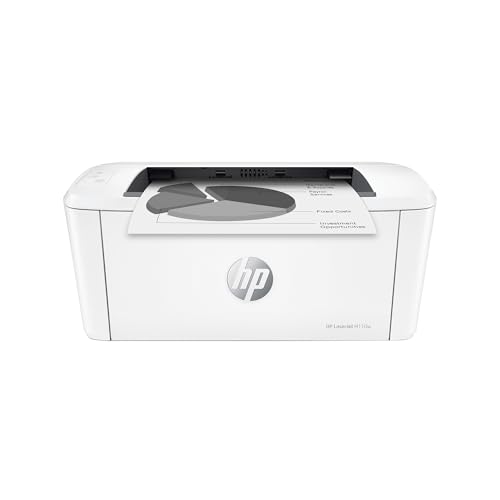
- Tiny footprint for tight home office spaces
- Up to 21 ppm black-and-white printing
- Wireless printing from many devices and platforms
Best For: Small home offices that need a compact, wireless print-only laser
Most Versatile Office Hub
Brother HL-L2480DW Wireless Compact Monochrome Multi-Function Laser Printer

- Print, scan, and copy in one compact machine
- Up to 36 ppm with automatic duplexing
- Dual-band Wi-Fi, Ethernet, and USB connectivity
Best For: Busy home offices that want a compact all-in-one laser
Best Value Duplex Choice
Brother HL-L2460DW Wireless Compact Monochrome Laser Printer

- Print-only model with automatic duplexing
- Up to 36 ppm and a 250-sheet tray
- Dual-band Wi-Fi, Ethernet, and USB
Best For: Home offices that want fast, duplex black-and-white printing
Best All-in-One Pick – Brother DCP-L2640DW Wireless Compact Monochrome MFP
If you want monochrome laser printers for home offices that can do more than just print, the Brother DCP-L2640DW is a practical 3-in-1 choice. It combines printing, scanning, and copying in a compact body, while adding fast speeds, automatic duplexing, and flexible Wi‑Fi or Ethernet connectivity.
Best For: Home office users who need a compact black-and-white all-in-one with fast output and easy scanning.
Pros:
- Prints up to 36 ppm with automatic two-sided printing.
- 50-page automatic document feeder helps with multi-page scan and copy jobs.
- Built-in dual-band Wi‑Fi, Ethernet, and USB support flexible setup.
- Mobile Connect app lets you print, scan, and manage toner from a phone.
Cons:
- Monochrome output only, so it is not for color printing needs.
- Starter toner is included, so replacement costs will matter over time.
- Larger and heavier than a basic print-only unit.
This model stands out if your home office needs one machine to cover everyday document tasks without taking over your desk. It offers a strong balance of speed, scanning convenience, and connectivity.
Fastest Simple Printer – HP LaserJet M209dw Wireless Printer
The HP LaserJet M209dw is a straightforward choice among monochrome laser printers for home offices when you mainly want fast, reliable black-and-white printing. It keeps the focus on print speed, two-sided output, and simple wireless setup, with no extra scanning or copying features to slow it down.
Best For: Home offices and small teams that want a compact print-only laser printer with strong speed and easy wireless use.
Pros:
- Up to 30 ppm single-sided and up to 19 ipm two-sided.
- Automatic duplex printing helps save paper.
- Dual-band Wi‑Fi with self-reset is designed to handle connection issues.
- Very compact and light for a desktop laser printer.
Cons:
- Print-only design means no scan or copy functions.
- Lower paper capacity than some larger office models.
- Best suited to black-and-white document work only.
If your priority is fast document printing in a small footprint, this HP is easy to recommend. It is a clean fit for users who want dependable output without extra multifunction hardware.
Compact Home Pick – Canon imageCLASS LBP122dw Monochrome Duplex Printer
For buyers comparing monochrome laser printers for home offices, the Canon imageCLASS LBP122dw is a compact print-only option with wireless duplex support. It is built for everyday home and schoolwork printing, and its small footprint makes it easier to place in tighter spaces.
Best For: Home users who want a compact black-and-white printer for everyday document and schoolwork printing.
Pros:
- Fast print speeds up to 30 ppm.
- Automatic duplex printing helps reduce paper use.
- Compact design fits well in smaller home office spaces.
- Canon PRINT app support makes mobile printing easier.
Cons:
- Print-only model with no scanning or copying.
- Paper capacity is limited to 150 sheets.
- Best for plain-paper document output rather than broader office tasks.
This Canon is a sensible choice if you want a simple, space-saving printer for regular black-and-white jobs. It focuses on the essentials and keeps setup and operation uncomplicated.
Best for Small Teams – HP LaserJet Pro 3001dw Wireless Black & White Printer
HP Laserjet Pro 3001dw Wireless Black & White Printer, Best-for-Office (3G65OF)
Check Price On AmazonIf you need monochrome laser printers for home offices that can also handle a small household or team, the HP LaserJet Pro 3001dw is built for that kind of workload. It offers fast black-and-white printing, automatic two-sided output, and multiple connection options, including Wi‑Fi, Ethernet, USB, and Bluetooth.
Best For: Busy home offices and small teams that want fast, secure, wireless black-and-white printing.
Pros:
- Up to 35 ppm with automatic duplex printing.
- Intelligent Wi‑Fi is designed to stay connected.
- HP Wolf Pro Security adds extra protection for printer data.
- Works with many device types, including Mac, AirPrint, Android, and Chromebook.
Cons:
- Print-only design means no scan or copy functions.
- Uses HP cartridges with original HP chips or circuitry only.
- More office-oriented than a basic personal printer.
This HP makes sense if you print frequently and want strong connectivity and security in a compact laser device. It is especially appealing for users who value speed and dependable network printing over multifunction features.
Compact Wireless Pick – Canon imageCLASS LBP6030w
If you want a simple monochrome laser printer for home offices, the Canon imageCLASS LBP6030w keeps the focus on speed and space savings. It prints up to 19 pages per minute, connects over Wi‑Fi, and uses a compact footprint that can fit easily on a desk or shelf.
Best For: Home office users who want a small, wireless print-only laser printer for everyday black-and-white documents.
Pros:
- Compact design fits well in small workspaces.
- Wireless printing adds flexibility from compatible mobile devices.
- Prints up to 19 pages per minute with quick 8-second initial page output.
- Low energy use in Energy Saver mode.
Cons:
- Print-only model with no scanning or copying.
- 150-sheet paper capacity is modest.
- No automatic duplex printing.
Overall, this Canon is a practical pick if you mainly print basic documents and want a straightforward, space-conscious machine. It is best viewed as a reliable wireless mono laser for light home-office use rather than a feature-rich all-in-one.
Fast Duplex Runner – HP LaserJet M209d
For monochrome laser printers for home offices, the HP LaserJet M209d stands out when you want quick document output and automatic two-sided printing. It delivers up to 30 ppm, includes a 150-sheet input tray, and uses a compact design that helps save desk space.
Best For: Home office users who print a lot of text documents and want fast automatic duplexing over USB.
Pros:
- Fast 30 ppm print speed.
- Automatic duplex printing saves paper and time.
- Compact footprint suits smaller office setups.
- USB cable is included for wired setup.
Cons:
- Wired-only connectivity; no Wi‑Fi.
- Print-only model with no scanning or copying.
- Uses HP chips/circuitry cartridges only.
This HP is a strong fit if your home office prints stacked reports, forms, or everyday black-and-white pages and you value speed over wireless convenience. Its automatic duplexing and clean laser output make it especially practical for frequent document printing.
Best Connected Option – Brother HL-L2405W
The Brother HL-L2405W is built for monochrome laser printers for home offices where reliable connectivity and higher paper capacity matter. It prints up to 30 ppm, supports dual-band wireless plus USB, and includes a 250-sheet tray for fewer refills.
Best For: Home and at-home office users who want a connected black-and-white laser printer with a larger paper tray.
Pros:
- Dual-band Wi‑Fi and USB give flexible connection choices.
- 30 ppm print speed handles everyday documents quickly.
- 250-sheet tray reduces reloads.
- Mobile printing and Alexa compatibility add convenience.
Cons:
- Manual duplex only, not automatic two-sided printing.
- Print-only design with no scan or copy functions.
- Larger and heavier than some compact rivals.
Overall, this Brother is the most connection-friendly option here and a sensible choice if you print from multiple devices at home. The larger tray and mobile-app support make it well suited to steady everyday use without a lot of fuss.
Ultra-Compact Everyday Pick – HP LaserJet M110w Wireless Black & White Printer
If you want one of the most compact monochrome laser printers for home offices, the HP LaserJet M110w focuses on the basics: fast black-and-white output, wireless printing, and a small footprint that fits tight spaces. It’s built for simple document printing from phones, tablets, PCs, and Macs without adding extra bulk.
Best For: Home office users or small teams that need a tiny, straightforward black-and-white printer for everyday documents.
Pros:
- World’s smallest laser in its class, so it’s easy to place on a desk or shelf
- Prints up to 21 black-and-white pages per minute for quick everyday jobs
- Wireless printing works with Microsoft, Mac, AirPrint, Android, Chromebook, and more
- HP Smart app adds mobile printing plus cloud-related workflow options
Cons:
- Print-only design means no built-in copier or scanner functions
- Single-sided printing only, so it lacks automatic duplexing
- Best suited to lighter-duty use than larger multifunction office models
For a compact, no-fuss printer, the M110w is a practical fit for home offices that value size and wireless convenience over advanced features. It keeps the focus on black-and-white document printing and should suit users who want something simple and space-saving.
Most Versatile Office Hub – Brother HL-L2480DW Wireless Compact Monochrome Multi-Function Laser Printer
Among monochrome laser printers for home offices, the Brother HL-L2480DW stands out if you want one device that can print, copy, and scan. It combines fast black-and-white output, automatic duplex printing, and broad wireless connectivity in a compact multifunction design.
Best For: Home offices and small offices that need a compact all-in-one black-and-white laser printer.
Pros:
- 3-in-1 design includes printing, scanning, and copying in one unit
- Fast output up to 36 pages per minute with automatic duplex printing
- Dual-band wireless, Ethernet, and USB give you flexible connection options
- 250-sheet tray and manual feed slot support heavier document use
Cons:
- Larger and heavier than the most basic compact laser printers
- Uses Brother Genuine TN830/TN830XL toner, so replacement choice matters
- Multifunction features add complexity if you only need simple printing
If you need a more complete document station for a work-from-home setup, this Brother model is easy to recommend. It balances speed, duplexing, and scanning features well, making it a strong fit for busy home office routines.
Best Value Duplex Choice – Brother HL-L2460DW Wireless Compact Monochrome Laser Printer
If you’re comparing monochrome laser printers for home offices and want strong performance without paying for scan and copy functions, the Brother HL-L2460DW is a smart middle ground. It delivers fast black-and-white printing, automatic duplexing, and flexible wireless or wired connections in a compact footprint.
Best For: Home offices and small teams that want a fast, print-only monochrome laser with duplexing.
Pros:
- Print-only design keeps the focus on document output and simplicity
- Up to 36 pages per minute with automatic two-sided printing
- Dual-band wireless, Ethernet, and USB provide flexible setup options
- 250-sheet tray supports regular home office printing needs
Cons:
- No built-in scanning or copying
- Starter toner is rated for about 700 pages, so early replacement may be needed
- Uses Brother Genuine TN830/TN830XL cartridges for replacements
For users who mainly print and want duplexing plus dependable connectivity, this model is an efficient choice. It gives you the speed and paper-saving features many home offices need, while skipping extras that raise cost and complexity.
How We Picked the Best Monochrome Laser Printers for Home Offices
We prioritized models that suit real home-office use: small footprints, reliable wireless printing, quick first-page output, and manageable toner costs. We also looked at whether a printer offers duplex printing, mobile support, and, where useful, scan or copy functions.
For Monochrome Laser Printers for Home Offices, the best choices are usually the ones that minimize hassle. That means straightforward setup, stable Wi-Fi, enough paper capacity for routine work, and features you’ll actually use every week.
Quick Comparison: What Matters Most
If you print mostly documents, invoices, forms, or shipping labels, a simple single-function printer may be enough. If you also need to scan receipts, copy paperwork, or handle occasional multi-page tasks, a multifunction model is often the better buy.
Duplex printing is a strong value feature for anyone who wants to save paper. Wireless and mobile printing matter most if your home office includes laptops, phones, or tablets. Wired USB-only models can still be a good fit if you print from one desktop and want a simpler connection.
Key Buying Factors for Monochrome Laser Printers for Home Offices
Print Speed and Volume
Look at pages per minute, but also consider how often you print. A faster printer helps during busy workdays, but a more modest model can be perfectly fine for lighter household use.
Connectivity
Wireless printing is convenient for mixed-device homes, while Wi-Fi Direct and mobile app support can make setup easier. If you only print from one computer, USB may be enough.
Duplex and Paper Handling
Automatic two-sided printing is one of the most useful features for saving paper and keeping documents compact. Also check tray capacity if you regularly print longer documents.
Function Type
Single-function printers are best when your main job is printing. Multifunction units are better for shared spaces or remote work setups where scanning and copying are part of the routine.
Running Costs
Consider toner yield, replacement cartridge pricing, and whether the model uses a subscription or standard supply model. The lowest sticker price is not always the lowest total cost.
Who Should Buy Which Monochrome Laser Printers for Home Offices?
Choose a single-function model if you want a compact, no-frills printer for documents only.
Choose a multifunction model if you need scan and copy tools for receipts, forms, and admin tasks.
Choose wireless models if multiple devices or rooms are part of your home-office setup.
Choose a wired model if you want simple, stable printing from one primary computer and do not need wireless features.
For most buyers, the best Monochrome Laser Printers for Home Offices are the ones that match your daily workflow, not just the ones with the highest speed rating. Focus on the features you’ll use most, and you’ll end up with a printer that stays useful for years.