If your office needs fast, reliable black-and-white documents without the upkeep of ink, an all-in-one monochrome laser printer is the practical choice. These machines handle printing, scanning, copying, and often faxing in one compact package.
Below, we focus on the best models for small teams and busy workspaces in 2026, with an emphasis on speed, paper handling, wireless convenience, and everyday cost control.
Best 10 All in One Monochrome Laser Printers for Offices Picks for 2026
Compact Office Pick
HP LaserJet Pro MFP 3101sdw wireless mono AIO

- 35 ppm black-and-white printing
- Auto duplex, 250-sheet tray, 50-sheet ADF
- Wireless, Ethernet, USB, AirPrint, Mopria
Best For: Small teams needing reliable everyday monochrome printing
Feature-Rich Workhorse
Canon MF462dw II 37 ppm monochrome office AIO
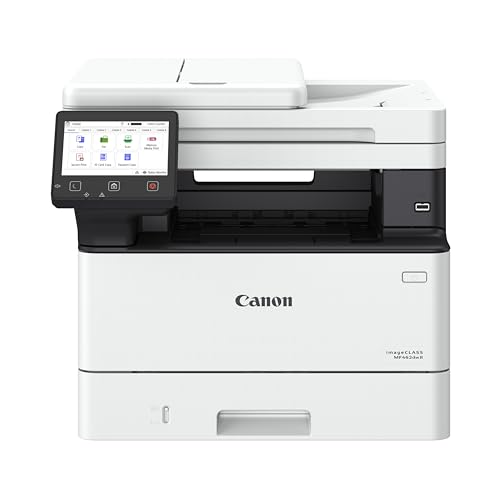
- Print, copy, scan, and fax in one device
- 37 ppm with about 5-second first print
- Expandable paper capacity up to 800 sheets
Best For: Busy offices that need fax and expandable paper capacity
Security-Focused Team Choice
HP LaserJet Pro 3101fdw secure monochrome AIO

- Print, scan, copy, and fax for small teams
- Auto duplexing, ADF, and wireless connectivity
- HP Wolf Pro Security for document protection
Best For: Small offices that prioritize security and fax capability
High-Speed Office Runner
Canon MF465dw II 42 ppm monochrome office AIO
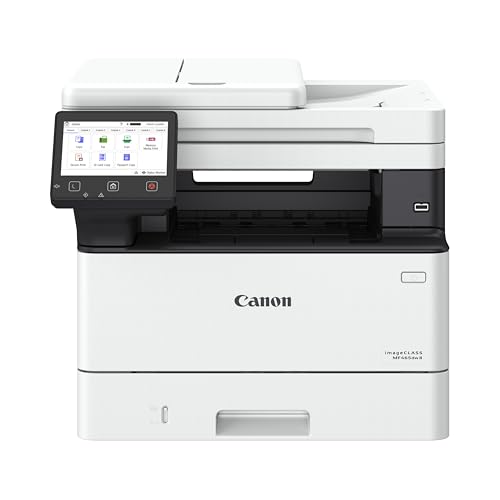
- Fastest here at up to 42 ppm
- Print, scan, copy, and fax support
- Wi-Fi, Ethernet, USB, and auto duplex
Best For: Busy offices that need the fastest monochrome all-in-one
Brother Pro
36 ppm Monochrome All-in-One for Small Business

- 36 ppm printing with automatic duplex
- Single-pass two-sided scanning
- Wi-Fi, Ethernet, USB, and cloud access
Best For: Small businesses needing fast, connected monochrome document handling
HP Office MFP

- Up to 28 ppm printing
- Automatic duplex and scan/copy support
- Dual-band Wi-Fi with Ethernet
Best For: Small offices needing a compact, secure black-and-white MFP
Brother Compact 3-in-1
Compact 3-in-1 Monochrome Laser Printer

- 36 ppm printing with 50-page ADF
- Automatic duplex printing
- Dual-band Wi-Fi, Ethernet, and USB
Best For: Small businesses wanting a compact, fast monochrome workhorse
Office Workhorse

- 35 ppm black-and-white printing
- Print, copy, scan, and fax support
- Automatic duplex and mobile printing
Best For: Offices needing a fast, connected monochrome all-in-one
Compact Team Pick

- Up to 36 ppm print speed
- 50-page ADF with fax, scan, and copy
- Wi-Fi, Ethernet, USB, and touchscreen
Best For: Small offices wanting a compact, connected all-in-one
Value Toner Pick

- Up to 4,200 pages of in-box toner
- 36 ppm printing with duplex support
- Compact all-in-one with touchscreen
Best For: Small businesses wanting more toner included up front
Compact Office Pick – HP LaserJet Pro MFP 3101sdw wireless mono AIO
If you’re comparing all in one monochrome laser printers for offices, the HP LaserJet Pro MFP 3101sdw is a straightforward choice for small teams that mainly need fast black-and-white printing, scanning, and copying. It adds auto 2-sided printing, a 250-sheet tray, and a 50-sheet ADF, so it covers day-to-day office workflows without a lot of fuss.
Best For: Small teams that want a reliable monochrome all-in-one for everyday office documents.
Pros:
- Prints up to 35 ppm with automatic duplexing for efficient office output.
- Includes scan and copy functions plus a 50-sheet automatic document feeder.
- 250-sheet input tray helps reduce frequent paper refills.
- Wireless, Ethernet, USB, AirPrint, and Mopria support improve flexibility.
Cons:
- Monochrome only, so it’s not for color document needs.
- Uses HP-chip cartridges only, which limits third-party options.
Overall, this model is a practical fit for teams that need dependable black-and-white output and simple all-in-one features in a compact office printer.
Feature-Rich Workhorse – Canon MF462dw II 37 ppm monochrome office AIO
For offices looking at all in one monochrome laser printers for offices, the Canon imageCLASS MF462dw II stands out with print, copy, scan, and fax in one machine. It combines a 37 ppm engine, a 5-inch color touchscreen, and expandable paper capacity, making it a solid choice when you want a more capable front-desk or shared-department printer.
Best For: Offices that want a faster monochrome multifunction printer with fax support and room to grow.
Pros:
- 4-in-1 design adds print, copy, scan, and fax in one unit.
- Prints up to 37 ppm with a quick first print time of about 5 seconds.
- 50-sheet duplex ADF and automatic 2-sided printing support heavier workloads.
- Expandable paper capacity can reach 800 sheets with the optional cassette.
Cons:
- Larger and heavier than smaller office printers.
- Initial setup and touchscreen-driven features may be more than casual users need.
This is a strong office-focused monochrome all-in-one if you want speed, fax capability, and a paper supply that can scale with busier workdays.
Security-Focused Team Choice – HP LaserJet Pro 3101fdw secure monochrome AIO
Among all in one monochrome laser printers for offices, the HP LaserJet Pro MFP 3101fdw is built for small teams that need print, scan, copy, and fax in a connected workspace. It pairs automatic 2-sided printing and an auto document feeder with wireless, Ethernet, and Bluetooth connectivity, plus HP Wolf Pro Security for added document protection.
Best For: Small office teams that want secure wireless monochrome printing with fax support.
Pros:
- 4-in-1 functionality includes print, scan, copy, and fax.
- Auto duplexing and an ADF make everyday office tasks more efficient.
- Supports wireless printing plus Ethernet and Bluetooth connections.
- HP Wolf Pro Security adds customizable protection features.
Cons:
- Monochrome output only.
- Single paper tray limits paper-source flexibility.
- Maximum sheet capacity is 250, so high-volume teams may want more capacity.
It’s a good fit if your office values security, dependable connectivity, and fax capability more than extra paper capacity or color printing.
High-Speed Office Runner – Canon MF465dw II 42 ppm monochrome office AIO
If speed is the priority in your search for all in one monochrome laser printers for offices, the Canon imageCLASS MF465dw II is the quickest model in this group at up to 42 ppm. It also brings print, scan, copy, and fax, a 5-inch touchscreen, and an ADF, making it a strong fit for offices that need fast black-and-white output and a full feature set.
Best For: Offices that want the fastest monochrome all-in-one here for busy document workflows.
Pros:
- Fastest listed speed here at up to 42 ppm.
- 4-in-1 design supports print, scan, copy, and fax.
- Includes automatic duplex printing and a 50-sheet ADF.
- Wi-Fi, Ethernet, and USB connectivity add flexible setup options.
Cons:
- Monochrome only, so it won’t handle color jobs.
- Heavier office printer that may be more than a small desk setup needs.
This is the best pick when office productivity depends on speed, multitasking, and a multifunction design that can handle frequent black-and-white documents.
Brother Pro – 36 ppm Monochrome All-in-One for Small Business
If you need all in one monochrome laser printers for offices that can keep up with busy workloads, this Brother model is built for speed and document handling. It prints up to 36 pages per minute, scans with single-pass two-sided efficiency, and adds automatic duplex printing to help cut paper use.
Best For: Small businesses that want fast printing, scanning, and cloud-connected workflow tools in one machine.
Pros:
- 36 ppm output for quick monochrome printing
- Single-pass two-sided scanning plus 50-page auto document feeder
- Automatic duplex printing helps reduce paper use
- Dual-band Wi-Fi, Ethernet, USB, and mobile printing support
Cons:
- Monochrome only, so it is not for color printing needs
- Designed more for business use than basic home tasks
This is a strong fit if your office values speed, scanning convenience, and cloud-ready controls. The touchscreen and workflow integrations make it easier to move from paper to digital without slowing down the day.
HP Office MFP – Office-Ready Monochrome MFP
For buyers comparing all in one monochrome laser printers for offices, this HP LaserJet MFP focuses on everyday black-and-white work with solid speed and simple connectivity. It supports printing, scanning, and copying, includes automatic duplexing, and is rated for offices with 1-5 people.
Best For: Small offices that want a compact black-and-white multifunction printer with fast two-sided printing.
Pros:
- Up to 28 ppm single-sided output
- Fastest in-class two-sided printing claim
- Dual-band Wi-Fi with self-reset for connectivity
- Ethernet plus broad device compatibility
Cons:
- Lower copy speed than its print speed, at up to 14 ppm
- Paper capacity is limited to 150 sheets
- Monochrome output only
This HP is a practical choice if you want a straightforward office MFP with dependable wireless, security features, and duplex printing. It is especially appealing when your team needs a compact machine that can handle day-to-day document work without much fuss.
Brother Compact 3-in-1 – Compact 3-in-1 Monochrome Laser Printer
If you want all in one monochrome laser printers for offices in a compact footprint, the Brother DCP-L2640DW is aimed at high-volume everyday work. It combines print, scan, and copy functions, reaches up to 36 ppm, and includes a 50-page ADF with automatic duplex printing for quicker handling of multi-page jobs.
Best For: Small businesses that need a compact, fast 3-in-1 printer with strong scanning and copying tools.
Pros:
- Up to 36 ppm printing for busy document runs
- 50-page auto document feeder speeds scanning and copying
- Automatic duplex printing helps save paper
- Dual-band Wi-Fi, Ethernet, USB, and mobile app support
Cons:
- Monochrome only, so it cannot print color
- Starter toner is included, so replacement costs will eventually matter
- Compact design means a single tray and modest sheet handling
This Brother is a sensible office pick when speed, footprint, and workflow efficiency matter more than extras. The 250-sheet tray and mobile controls make it well suited to small teams that need reliable everyday output.
Office Workhorse – Canon imageCLASS MF287dw
If you need all in one monochrome laser printers for offices that can handle everyday document flow, the Canon imageCLASS MF287dw is built for fast black-and-white output, duplex printing, and full office multifunction use. It combines print, copy, scan, and fax features with mobile printing support, making it a practical fit for busy teams that want speed without adding extra devices.
Best For: Offices that want a fast all-in-one monochrome laser printer with fax and mobile printing support.
Pros:
- Prints up to 35 ppm with a first page out in under 4.9 seconds.
- Supports automatic duplex printing to help cut paper use and costs.
- Includes print, copy, scan, and fax with an automatic document feeder.
- Works with Canon Print App, AirPrint, and Mopria for mobile use.
Cons:
- Only prints in monochrome, so it is not suited to color jobs.
- Single 250-sheet tray may be limiting for heavier paper handling needs.
- At 27.6 pounds, it is not the most compact option.
For office teams that prioritize speed, duplex efficiency, and broad multifunction support, the MF287dw is a solid everyday choice. Its high-capacity toner option also helps reduce interruptions from frequent cartridge changes.
Compact Team Pick – Brother MFC-L2820DW
Among all in one monochrome laser printers for offices, the Brother MFC-L2820DW stands out for small teams that want a compact machine with strong everyday function. It offers print, copy, scan, and fax capabilities, dual-band wireless, Ethernet, USB, and a 2.7-inch touchscreen, so it can fit into a small office workflow without feeling stripped down.
Best For: Small offices that need a compact monochrome all-in-one with flexible connectivity.
Pros:
- Prints up to 36 ppm and scans up to 23.6/7.9 ipm.
- Compact footprint makes it easier to place in tight office spaces.
- Includes a 50-page ADF for multi-page copy, scan, and fax jobs.
- Offers Wi-Fi, Ethernet, USB, and cloud-app scanning options.
Cons:
- Monochrome only, so it is limited to black-and-white documents.
- Standard in-box toner and 34 ppm copy speed are aimed more at small-office use than heavy-duty departments.
- Single tray and 250-sheet capacity may require more frequent refills in busy settings.
This model makes sense if you want efficient black-and-white output in a smaller office footprint. The touchscreen and mobile/app support add convenience, while the ADF and duplex printing help keep routine document handling smooth.
Value Toner Pick – Brother MFC-L2820DW XL
If you are comparing all in one monochrome laser printers for offices and want lower upfront toner replacement pressure, the Brother MFC-L2820DW XL is the value-focused version to look at. It keeps the same compact multifunction setup as the standard model, but adds in-box toner rated for up to 4,200 pages, which can be especially helpful for small businesses that print often.
Best For: Small businesses that want a compact office laser printer with more toner included.
Pros:
- Includes in-box toner yielding up to 4,200 pages.
- Prints up to 36 ppm with automatic duplex printing.
- Handles print, copy, scan, and fax in a compact footprint.
- Offers dual-band Wi-Fi, Ethernet, USB, and a 2.7-inch touchscreen.
Cons:
- Still monochrome only, so color printing is not available.
- Single 250-sheet tray may be restrictive for higher-volume offices.
- The model is optimized for value and toner yield, not a larger paper capacity.
This XL version is a smart pick if you want the same compact office-friendly design with fewer early toner swaps. For small businesses that want to keep printing costs predictable, the extra included toner is the main selling point.
How We Picked the Best All in One Monochrome Laser Printers for Offices
We prioritized office-friendly features that matter in real daily use: print speed, automatic duplexing, scan and copy quality, automatic document feeders, wireless setup, and paper capacity. We also looked for models that fit different office sizes, from home offices and small teams to departments with heavier document workflows.
Because these are All in One Monochrome Laser Printers for Offices, we favored machines that can do more than print alone while keeping running costs predictable and maintenance simple.
Quick Comparison: What Matters Most
When comparing these printers, start with your workload. Faster models are better for shared offices, while compact units are ideal if space is tight. Duplex printing saves paper, and duplex scanning is especially helpful if you process contracts, invoices, or multi-page forms.
Also consider whether you need fax support, larger paper trays, or expandable capacity. Offices that print in bursts will benefit from higher paper capacity and stronger duty-cycle headroom, while light-use teams can save money with smaller, simpler units.
Key Buying Factors for All in One Monochrome Laser Printers for Offices
Print Speed and First-Page Time
Published ppm numbers help, but the real test is whether the printer stays responsive when multiple people use it. Faster output matters most for shared offices and front-desk workflows.
Duplex Printing and Scanning
Automatic two-sided printing is now standard in this category, but duplex scanning is a stronger differentiator. If you scan stacks of paperwork often, choose a model that supports it natively.
Paper Handling and Capacity
Look at both tray size and whether the printer can expand. A higher-capacity setup reduces interruptions and is worth paying for if your office prints every day.
Connectivity and Workflow Features
Wi-Fi, mobile printing, and app support make setup easier for mixed-device offices. Fax remains useful in some industries, so verify whether it is included before you buy.
Size, Noise, and Running Costs
Compact printers are easier to place, but larger models may offer better paper handling. For long-term value, consider toner yield, replacement costs, and whether a starter cartridge will be enough for your first few months.
Who Should Buy Which All in One Monochrome Laser Printers for Offices?
Small teams and home offices usually do best with compact, affordable models that still include duplex and scanning. Busy offices should lean toward faster printers with larger trays and stronger workflow features. If faxing is still part of your process, make sure your short list includes it. If your top priority is low interruption and fewer supply changes, choose the model with the highest paper capacity and toner yield.
In short, the best All in One Monochrome Laser Printers for Offices are the ones that match your actual document volume, not just the highest speed rating on the box.