Finding the right speakerphone can make Microsoft Teams meetings sound sharper, more natural, and far less tiring for everyone on the call.
In this roundup, we focus on 10 conference speakerphones for Microsoft Teams that balance audio quality, portability, connectivity, and real-world ease of use.
Best 10 Conference Speakerphones for Microsoft Teams Picks for 2026
Portable 360° Pickups

- 6 microphones with 360° voice pickup
- Bluetooth 5.3 and USB-C connectivity
- Up to 24 hours of call time
Best For: Home offices and personal meeting spaces
Teams-Certified Desk Choice

- Certified for Microsoft Teams
- Dual mics with AEC, AGC, ENC, and ANC
- USB-C plug-and-play with dedicated Teams button
Best For: Teams-first users who want a wired plug-and-play option
Expandable Huddle-Room Pick

- 4 AI mics with 360° pickup
- USB-C and Bluetooth 5.0 connectivity
- Daisy-chain support for up to 16 attendees
Best For: Small rooms that may need expansion later
Portable All-Platform Pick

- Bluetooth or USB connection options
- Works with Teams, Meet, Zoom, and more
- 15-hour battery life for mobile meetings
Best For: Hybrid workers and frequent travelers
Desk-Friendly Teams Speaker
Dell SP3022 USB Computer Speakerphone
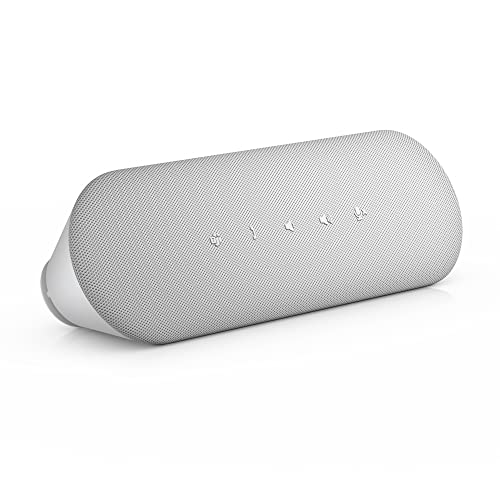
- MS Teams certified with a dedicated Teams button
- AI noise cancellation and full-duplex audio
- USB-A and USB-C connections for easy setup
Best For: small offices and tidy desk setups
Portable Wireless Teams Pick
Jabra Speak2 55 Bluetooth Speakerphone

- Microsoft Teams compatible with four beamforming mics
- Bluetooth plus USB-C and USB-A adapter support
- Up to 12 hours of battery life with carry pouch
Best For: hybrid workers who need portability
Battery-Strong Teams Speaker
Yealink SP92 Teams Bluetooth Speakerphone

- AI noise cancellation and full-duplex audio
- 20-hour talk time with fast USB-C charging
- Bluetooth 5.3 and USB-C/A wired connectivity
Best For: frequent callers and hybrid teams
Portable Teams-Ready Pick
Poly Sync 20 USB-C Personal Speakerphone

- Teams certified with dedicated Teams button
- Noise and echo reduction with full-duplex audio
- Up to 20 hours battery life; USB-C and Bluetooth
Best For: Mobile workers and small Teams calls
Travel-Friendly Team Call Option
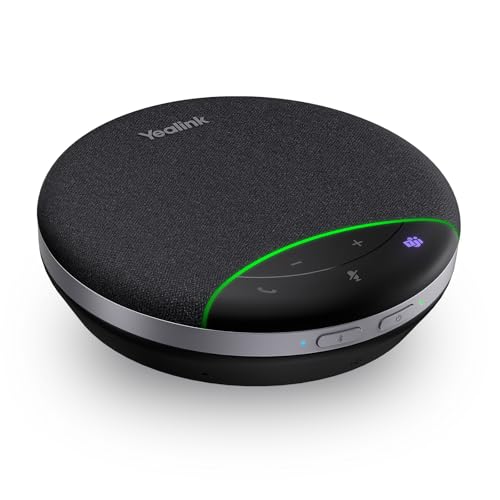
- Teams certified with full-duplex calling
- AI noise cancellation and 360° mic pickup
- Up to 20 hours talk time with carrying case
Best For: Small rooms and travel-friendly Teams calls
Wired Desktop Standout
Dell Pro SP325 USB-C Speakerphone

- Teams certified wired USB-C speakerphone
- Four omnidirectional mics with AI noise cancellation
- Full-duplex audio for small meeting spaces
Best For: Desk-based Teams meetings and shared workspaces
Portable 360° Pickups – Anker PowerConf Speakerphone
If you want conference speakerphones for Microsoft Teams that can turn a home office into a usable meeting space, the Anker PowerConf is a flexible wireless option with 6 microphones and 360° pickup. It connects over Bluetooth or USB-C, so it works well for people who move between laptop and phone calls and don’t want driver hassles.
Best For: Personal workspaces, home offices, and small meetings that need flexible wireless or USB-C use.
Pros:
- 6-mic 360° array helps capture voices from all directions.
- Voice Radar 3.0 is designed to reduce noise, cancel echo, and detect multiple speakers.
- USB-C or Bluetooth connection keeps setup simple.
- 24-hour battery support is useful for long meeting days.
Cons:
- Not certified for Microsoft Teams specifically.
- Best suited to personal workspaces rather than larger conference rooms.
- Portable design may not match the room-filling output of bigger wired units.
Overall, the PowerConf is a practical pick when you need a straightforward speakerphone for mixed-platform meetings and value portability. Its strength is easy setup and broad compatibility, not Teams-specific certification.
Teams-Certified Desk Choice – Lenovo Go Wired Speakerphone
For conference speakerphones for Microsoft Teams, the Lenovo Go Wired Speakerphone is built around Teams certification and a simple USB-C plug-and-play design. It focuses on dependable audio for remote work and online meetings, with dual microphones and multiple noise-reduction tools to keep calls clear.
Best For: Microsoft Teams users who want a wired, travel-friendly speakerphone with dedicated controls.
Pros:
- Certified for Microsoft Teams for seamless integration.
- Dual omni-directional microphones help deliver consistent audio.
- Includes AEC, AGC, ENC, and ANC for cleaner call quality.
- Dedicated Teams button and volume wheel make control easy.
Cons:
- Wired-only design is less flexible than Bluetooth models.
- Built for smaller setups rather than large rooms.
- Not designed as a high-powered portable speaker.
This is a strong buy if Teams compatibility is your top priority and you prefer a no-fuss USB solution. Its value comes from reliable wired performance and easy access to meeting controls.
Expandable Huddle-Room Pick – EMEET M0 Plus Speakerphone
The EMEET M0 Plus is a flexible choice among conference speakerphones for Microsoft Teams when you need wider room coverage without moving to a full room system. Its 4-mic 360° pickup, USB-C and Bluetooth 5.0 connectivity, and daisy-chain support make it a practical fit for small to medium meetings.
Best For: Huddle rooms, home offices, and growing meetings that may need daisy-chained expansion.
Pros:
- 4 AI mics provide 360° voice pickup.
- VoiceIA noise reduction is designed to cut background noise and echo.
- Daisy-chain support can expand coverage for up to 16 attendees.
- Works with Microsoft Teams and other major conferencing platforms.
Cons:
- Bluetooth range is limited to 10 meters.
- Small 3W speaker output may be modest in larger spaces.
- Best for meetings rather than general speaker use.
If you want a compact speakerphone that can grow with your room, the M0 Plus is a smart middle ground. It balances portability, easy setup, and expansion options better than many simple single-unit models.
Portable All-Platform Pick – Jabra Speak 510 2025 Edition
If you need conference speakerphones for Microsoft Teams that travel well, the Jabra Speak 510 is a compact Bluetooth or USB option with a strong focus on portability. It works across major meeting platforms, has a built-in microphone, and offers simple setup for calls at a desk, in a hotel room, or on the go.
Best For: Travelers and hybrid workers who want a lightweight speakerphone for meetings across platforms.
Pros:
- Bluetooth or USB connectivity gives you flexible connection options.
- Portable design makes it easy to carry between locations.
- Works with Microsoft Teams, Google Meet, Zoom, and other platforms.
- 15-hour battery life supports long workdays.
Cons:
- Single microphone design is less advanced than multi-mic rivals.
- Not ideal for larger conference rooms.
- Maximum range is limited compared with some desk-focused models.
For users who care more about portability than room-filling audio, the Speak 510 is a dependable everyday option. It’s best viewed as a mobile meeting tool rather than a full-scale conference-room speakerphone.
Desk-Friendly Teams Speaker – Dell SP3022 USB Computer Speakerphone
If you want a compact option among conference speakerphones for Microsoft Teams, the Dell SP3022 is built for desk setups where space matters. It works as a mini soundbar speakerphone with AI noise and echo cancellation, full-duplex audio, and easy USB-A or USB-C connectivity for monitors, laptops, and desktops.
Best For: Teams users who want a neat, monitor-friendly USB speakerphone for small business or home office calls.
Pros:
- MS Teams certified with a dedicated Teams button for quick access to meetings and notifications.
- Full-duplex audio and AI noise cancellation help multiple people speak clearly at once.
- USB-A and USB-C connectivity makes setup simple across PCs, laptops, and monitors.
- Compact soundbar design fits easily on a monitor base or beside a laptop.
Cons:
- Wired USB design means it is not a wireless conference speakerphone.
- 2 x 1.8W output is better for personal or small-group use than larger rooms.
- It is not water resistant.
The SP3022 is a practical pick if you value straightforward Teams integration and a tidy desktop footprint more than portable or high-power room audio. It focuses on clear conferencing essentials rather than extra bells and whistles.
Portable Wireless Teams Pick – Jabra Speak2 55 Bluetooth Speakerphone
For buyers comparing conference speakerphones for Microsoft Teams, the Jabra Speak2 55 stands out as a portable wireless option with strong call-focused features. It offers four beamforming microphones, voice level normalization, Bluetooth or USB-C/USB-A connectivity, and up to 12 hours of battery life for meetings on the go.
Best For: Mobile professionals and hybrid teams that need a compact Teams speakerphone with wireless flexibility.
Pros:
- Microsoft Teams compatible and designed to work cleanly with the Teams ecosystem.
- Four noise-cancelling microphones and voice normalization help balance voices from all directions.
- Bluetooth plus USB-C and USB-A adapter support gives you flexible connection options.
- Up to 12 hours of battery life and a carry pouch make it easy to move between rooms.
Cons:
- Battery-powered design means you still need to recharge it regularly.
- Best suited to portable collaboration rather than fixed, always-plugged-in desktop use.
The Speak2 55 is a strong choice if you want a travel-friendly Teams speakerphone that still feels polished in daily meetings. Its mix of wireless convenience and call clarity makes it especially appealing for hybrid work.
Battery-Strong Teams Speaker – Yealink SP92 Teams Bluetooth Speakerphone
The Yealink SP92 is a compact choice in conference speakerphones for Microsoft Teams, combining AI noise cancellation, full-duplex audio, and a 360-degree omni mic for call-heavy workdays. It supports Bluetooth 5.3 and USB-C wired use, and its 20-hour battery life makes it a practical option when you need long runtime between charges.
Best For: Hybrid teams and frequent callers who want a portable Teams-ready speakerphone with long battery life.
Pros:
- AI noise cancellation filters background noise for clearer business calls.
- 20-hour talk time and quick 2.5-hour USB-C charging support long meeting days.
- Bluetooth 5.3 plus USB-C/A wired connectivity adds useful flexibility.
- Pre-configured for Teams and other meeting platforms with no setup needed.
Cons:
- Bluetooth use requires a device with built-in Bluetooth.
- The BT51C dongle is not included.
- Maximum pickup range is 4m, so it is aimed at smaller meeting spaces.
The SP92 is a smart fit if battery endurance and portable convenience matter more than room-filling sound. It brings the key Teams conference features into a lightweight unit that is easy to carry and deploy.
Portable Teams-Ready Pick – Poly Sync 20 USB-C Personal Speakerphone
If you need a conference speakerphone for Microsoft Teams that can move between your desk, travel bag, and a small meeting space, the Poly Sync 20 is built for that kind of flexibility. It combines USB-C and Bluetooth connectivity, noise and echo reduction, and a dedicated Teams button in a compact unit that also doubles as a music speaker and phone charger.
Best For: Mobile professionals and hybrid workers who want a portable Teams-certified speakerphone with long battery life.
Pros:
- Microsoft Teams certified with a dedicated Teams button for quick access.
- Multi-microphone design with echo and noise reduction for clearer voice pickup.
- Up to 20 hours of battery life, plus it can charge a smartphone.
- USB-C and Bluetooth connectivity with a USB-A adapter included.
Cons:
- Designed more for personal or small-group use than larger conference rooms.
- No mention of multi-device room-mic expansion or daisy-chaining.
For users who prioritize portability and straightforward Teams integration, the Sync 20 is a practical all-in-one speakerphone. Its slim, water-resistant design and full-duplex audio make it especially appealing for everyday calls outside a fixed office setup.
Travel-Friendly Team Call Option – Yealink SP92 USB Speakerphone
The Yealink SP92 is a strong choice if you want conference speakerphones for Microsoft Teams that are easy to carry and simple to set up. It is Teams certified, offers full-duplex calling, and uses AI noise cancellation plus 360-degree microphone pickup to keep meetings clear in small rooms or on the go.
Best For: Small meeting rooms, travel, and everyday UC calling where portability matters.
Pros:
- Teams certified and compatible with other leading UC platforms.
- 360-degree microphone pickup and full-duplex audio for natural conversation.
- AI noise cancellation helps reduce background distractions.
- Up to 20 hours of talk time and includes a carrying case.
Cons:
- This version does not include a dongle.
- Mono audio may be less immersive than larger stereo speakerphones.
Overall, the SP92 is aimed at users who need reliable voice capture without a complicated setup. The USB-C/A adapter and plug-and-play design make it a convenient option for Teams meetings across laptops, desktops, and travel setups.
Wired Desktop Standout – Dell Pro SP325 USB-C Speakerphone
If you want conference speakerphones for Microsoft Teams with a simple wired setup, the Dell Pro SP325 is built for dependable desktop use. It is Zoom and Microsoft Teams certified, uses four omnidirectional microphones plus AI-based noise cancellation, and is designed to capture voices clearly from up to 2.5 meters away.
Best For: Desk-based professionals and small teams that want a wired, no-fuss Teams-certified speakerphone.
Pros:
- Microsoft Teams certified with USB-C connectivity.
- Four omnidirectional microphones for broad voice pickup.
- AI-based noise cancellation helps reduce background noise.
- Full-duplex audio supports natural back-and-forth conversation.
Cons:
- Wired-only design limits mobility compared with Bluetooth models.
- Maximum range is listed at 2.5 meters, so it is best for smaller spaces.
The SP325 makes sense when consistency matters more than portability. With a travel pouch, USB-A adapter, and clear voice-focused tuning, it is a practical pick for a shared desk or compact meeting area.
How We Picked These Conference Speakerphones for Microsoft Teams
We prioritized models that are practical for daily Teams use: clear voice pickup, reliable connectivity, strong noise reduction, and a setup process that does not slow meetings down. We also looked for devices that fit different room sizes and workstyles, from personal desks to small conference spaces.
Certification, compatibility, battery life, and microphone performance all mattered, but so did convenience. A great speakerphone should work quickly, sound consistent across calls, and suit the way your team actually meets.
Quick Comparison
If you want the shortest path to a good choice, start with use case. Wired models are usually best for fixed desks and dependable plug-and-play use. Wireless and Bluetooth models offer more flexibility for hybrid workers and shared rooms. Compact personal speakerphones are ideal for one or two people, while larger conference units are better for group conversations and noisier environments.
For Conference Speakerphones for Microsoft Teams, the main tradeoff is often portability versus audio coverage. Smaller units are easier to carry, while larger arrays typically do a better job capturing multiple voices around a table.
Key Buying Factors for Conference Speakerphones for Microsoft Teams
Microphone Pickup and Voice Clarity
Look for omnidirectional or multi-mic designs that can capture voices evenly from different directions. If your meetings often include several people, stronger pickup range and better noise handling are more important than raw volume.
Noise Reduction and Echo Cancellation
Good noise suppression helps reduce keyboard clicks, HVAC hum, and background chatter. Echo cancellation is especially useful in smaller rooms or home offices where speakers and microphones sit close together.
Connectivity and Setup
USB-C wired models are the easiest choice for stable, no-fuss use. Bluetooth adds flexibility for laptops, tablets, and mobile devices. If you switch between devices often, check how quickly the speakerphone reconnects and whether it supports simultaneous options.
Battery Life and Portability
For hybrid work, battery life matters. A compact speakerphone with long runtime is easier to move between home, office, and travel. If the unit will stay on one desk, battery life is less critical than cable length and connection stability.
Teams Certification and Compatibility
Certification can simplify setup and improve confidence that the device behaves well in Microsoft Teams environments. Even when a model is broadly compatible, Teams-focused features may still be worth paying for if your organization uses Microsoft tools every day.
Who Should Buy Which Conference Speakerphones for Microsoft Teams?
If you work solo or take calls from a home office, a compact personal speakerphone is usually the smartest buy. If you run regular group meetings in a small room, choose a conference-focused model with stronger mic coverage and noise control. For desk-based users who want maximum reliability, a wired USB-C unit is often the best value. If portability matters most, go with a wireless model that still offers solid pickup and long battery life.
Ultimately, the best choice depends on room size, how many people speak at once, and whether you want convenience or flexibility. For most buyers, the top Conference Speakerphones for Microsoft Teams are the ones that disappear into the workflow and simply make every call easier to hear.