Choosing the right document camera can make art demos clearer, faster, and easier to follow. Whether you’re showing brushwork, sketching steps, or color blending, the best models keep details sharp and your setup simple.
Below, we’ve rounded up 10 of the best document cameras for art demonstrations in 2026, focusing on image quality, lighting, flexibility, and compatibility for classrooms, studios, and remote teaching.
Best 10 Document Cameras for Art Demonstrations Picks for 2026
Pro-Grade Large-Format Capture

- 4K Ultra HD with a 13MP SONY sensor
- A3 capture area for artwork and large pages
- LED light, anti-glare sheet, and autofocus
Best For: Educators and art instructors showing large-format work
Flexible Dual-Mode Teaching Tool
IPEVO VZ-R HDMI/USB Visualizer
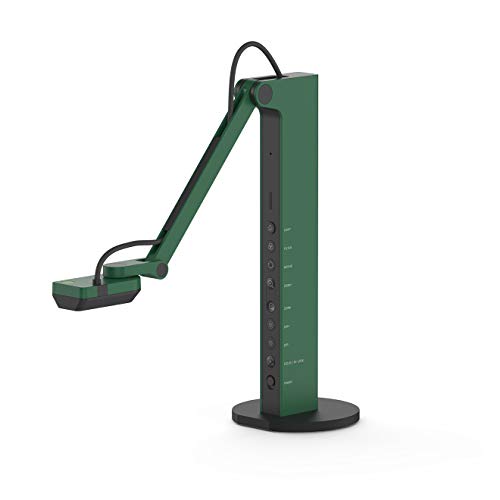
- HDMI and USB dual mode for flexible setups
- 8MP camera with up to 3264 x 2448 in USB mode
- LED light and multi-jointed stand for live demos
Best For: Teachers who want direct projection and computer use
Portable Classroom Visualizer
HUE HD Pro 11x17 Document Camera

- Full HD 1080p with built-in LED lights
- Plug-and-play across major desktop platforms
- Flexible neck and optional software for annotation
Best For: Portable teaching and online demo use
Ultra-Portable Foldable Pick
INSWAN INS-Flip 4 4K Doc Camera

- Foldable 0.67 lb design for easy travel
- 4K 13MP live image capture at 30fps
- Works as both document camera and webcam
Best For: Mobile teachers needing a compact 4K demo camera
Studio-Ready 8MP Visualiser
THUSTAR 8MP USB Camera with Dual Mics

- 8MP / 2448p live capture at 30fps
- 3-level LED light and manual brightness control
- Foldable A3-size design with dual microphones
Best For: Artists and teachers who want an easy plug-and-play visualiser
Portable AI Pointer Pick
OKIOCAM S-4K Ultra HD Document Camera

- 8MP Sony sensor with up to 3264 x 2448p capture
- OKIOPoint AI pointer helps guide viewers to details
- Portable build with annotation and recording software
Best For: Teachers and artists who want portable demos with smart presentation tools
Bright A3 Demo Cam
Kitchbai 4K USB Visualiser with Dual Mics

- 8MP / 2448p video at 30fps for live demos
- Manual image reversal and brightness adjustment
- Foldable A3-size design with USB-C plug-and-play
Best For: Creators who want an adjustable, well-lit visualiser for studio demos
Editor’s Pick
IPEVO V4K 8MP Ultra HD Document Camera

- 8MP sensor with up to 3264 x 2448 capture
- 30 fps Full HD streaming for smoother demos
- Fast autofocus and strong color reproduction
Best For: Artists and teachers who want a simple, high-resolution USB doc cam for live demos
Most Versatile
8MP 4K USB Document Camera with Mic and LED

- 8MP 2448P ultra HD capture for artwork and notes
- Adjustable arm works in doc cam, overhead, and webcam modes
- Built-in mic plus 3-level LED fill light
Best For: Teachers and creators who want an all-in-one camera for demos, classes, and meetings
Budget-Friendly
Gawervan 1080P USB Document Camera

- 1080P at 30 fps for basic demo capture
- Manual focus and foldable portable design
- Built-in dual mics for clearer calls
Best For: Budget-conscious buyers who want a compact USB camera for simple art demos
Pro-Grade Large-Format Capture – INSWAN INS-2 4K A3 Doc Camera
If you need document cameras for art demonstrations, the INSWAN INS-2 is built for showing large artwork, two-page spreads, and classroom materials with a crisp 4K feed. Its A3 capture area, flexible multi-joint arm, and strong lighting tools make it a practical choice when detail and framing matter during live teaching or exhibition demos.
Best For: Professional educators and art instructors who need clear display for large documents, artwork, and big-screen presentations.
Pros:
- 13MP sensor captures up to 4K Ultra HD at 30fps.
- A3 capture support and multi-joint arm suit larger artworks and spreads.
- Built-in LED, anti-glare sheet, brightness control, and macro capability help with clear demonstrations.
- Documate software adds zoom, annotation, recording, OCR, and whiteboard tools.
Cons:
- More feature-rich than a basic plug-and-play camera, so setup may be more involved.
- Best suited to desk-based demonstrations rather than ultra-portable use.
For art instructors who want a polished presentation setup, the INS-2 combines high resolution with practical classroom tools. It is especially appealing if you regularly show larger work and need flexible positioning plus software features for annotation and recording.
Flexible Dual-Mode Teaching Tool – IPEVO VZ-R HDMI/USB Visualizer
For document cameras for art demonstrations that need flexibility, the IPEVO VZ-R stands out with HDMI and USB dual mode. It can connect directly to a TV, monitor, or projector, or plug into a computer for live demos, making it a practical fit for studios, classrooms, and remote presentation setups.
Best For: Instructors who want direct HDMI projection or USB computer use in one camera.
Pros:
- Dual HDMI and USB connectivity supports both direct display and computer workflows.
- 8MP camera captures up to 3264 x 2448 in USB mode.
- Max capture area of 10.6″ x 18.9″ in 16:9 and 13.5″ x 18.1″ in 4:3.
- Built-in LED light, autofocus, and swiveling multi-jointed stand support live demos.
Cons:
- HDMI cable and wall power adapter are not included.
- Lower HDMI capture resolution than its USB mode output.
The VZ-R is a strong option when you need one device that can handle both classroom projection and computer-based teaching. Its dual-mode design and durable stand make it especially useful for instructors who move between live display setups and video conferencing.
Portable Classroom Visualizer – HUE HD Pro 11×17 Document Camera
If your priority is simplicity in document cameras for art demonstrations, the HUE HD Pro is a straightforward Full HD visualizer with built-in lights and a microphone. It is designed for quick plug-and-play use across common operating systems, and its flexible neck makes it easy to position over worksheets, sketches, and small demonstration setups.
Best For: Teachers and presenters who want a portable, easy-to-use camera for classroom demos and online lessons.
Pros:
- Full HD 1080p streaming with built-in LED lights and noise-reducing microphone.
- Plug-and-play compatibility with Windows, Chrome OS, macOS, and Linux camera apps.
- Flexible neck can be used without the base for extra portability.
- HUE Intuition software adds annotation, recording, and mirroring tools on Windows and macOS.
Cons:
- Manual focus means you may need to adjust more often than with autofocus models.
- No zoom feature is listed.
The HUE HD Pro is best when you want a lightweight, low-friction setup for everyday demonstrations. It does not chase premium specs, but it does cover the essentials well for teachers who value portability, wide compatibility, and simple classroom operation.
Ultra-Portable Foldable Pick – INSWAN INS-Flip 4 4K Doc Camera
When document cameras for art demonstrations need to travel easily, the INSWAN INS-Flip 4 is built around portability without giving up 4K capture. Its foldable body, light weight, built-in cable storage, and webcam mode make it a practical choice for instructors who move between classrooms, home offices, and live online sessions.
Best For: Teachers and presenters who want a compact 4K camera for travel and flexible demo use.
Pros:
- 13MP sensor delivers 4K live image capture up to 3840 x 2160 at 30fps.
- Very lightweight at 0.67 lbs with a foldable, ultra-slim design.
- Supports documents larger than B4 and macro shots from 3.9 inches.
- Works as both a document camera and a webcam, with plug-and-play compatibility.
Cons:
- The compact design may be less substantial than larger desk-based cameras.
- Some specs in the listing are internally inconsistent, so the core usability matters more than extras.
The INS-Flip 4 is a good fit if you need a camera that packs away easily and still gives you high-resolution output. It is especially appealing for teachers who split time between in-person demonstrations and video calls and want one device to do both.
Studio-Ready 8MP Visualiser – THUSTAR 8MP USB Camera with Dual Mics
If you need document cameras for art demonstrations, this THUSTAR model gives you the basics that matter: an 8MP image sensor, 30fps output, manual brightness control, and a foldable arm that makes it easy to position over sketches, brushwork, or mixed-media pieces. The A3-size coverage is especially useful when you want to show a larger page or full composition without constant repositioning.
Best For: Artists, teachers, and presenters who want a foldable plug-and-play visualiser with simple lighting control.
Pros:
- 8MP capture with 2448p output and 30fps for clear live demos
- 3-level LED lighting plus manual brightness adjustment helps in varied studio lighting
- Foldable, multi-joint design covers up to A3-sized work
- Dual microphones and broad compatibility with Windows, macOS, and Chromebooks
Cons:
- Noisy or complex setups may still require extra room for positioning
- Uses a USB workflow rather than wireless operation
- Macro focus is close, but you still need to place objects carefully for best results
This is a practical choice if your art demonstrations benefit from a camera that can move easily between flat work, 2D pages, and small 3D objects while keeping setup straightforward.
Portable AI Pointer Pick – OKIOCAM S-4K Ultra HD Document Camera
Among document cameras for art demonstrations, the OKIOCAM S-4K stands out when portability and presentation tools matter. Its 8MP Sony sensor captures up to 3264 x 2448p, while the OKIOPoint AI pointer in OKIOCAM Live can follow where you point and zoom in on details—useful for showing brushstrokes, layering, or small materials during a live lesson or demo.
Best For: Demonstrators who want a compact camera with software features that help guide attention during lessons.
Pros:
- 8MP Sony Exmor R sensor with ultra HD capture and improved low-light performance
- OKIOPoint AI-tracking can follow your pointer and zoom in during presentations
- Portable, lightweight design with durable hinges tested for repeated use
- Includes software options for annotation, zoom, recording, snapshots, stop-motion, and timelapse
Cons:
- No audio recording support built in
- Maximum resolution runs at a lower frame rate than full HD mode
- Letter-size landscape support is better for compact setups than larger workspaces
If your art demos rely on close visual guidance and you want software that adds teaching tools, this is a strong portable option. It is especially appealing for instructors who need a camera that travels well without giving up presentation features.
Bright A3 Demo Cam – Kitchbai 4K USB Visualiser with Dual Mics
This Kitchbai visualiser is built for art demonstrations where clarity and image control matter. It offers 8MP/2448p capture at 30fps, adjustable image reversal, and 3-level LED brightness, which can help when you are showing drawings, paintings, or hand techniques under different lighting conditions. The foldable arm and A3 coverage also make it easier to frame larger work without fuss.
Best For: Creators and instructors who want a bright, foldable document camera with easy image adjustment.
Pros:
- 8MP sensor with 2448p output and 30fps live transmission
- Manual image reversal makes left/right or up/down correction easy
- 3-level LED light and manual brightness control help in dark or bright rooms
- USB-C plug-and-play support for Windows, Mac, and Chromebooks
Cons:
- Wired USB setup may not suit mobile or fully wireless workflows
- Macro use requires thoughtful placement at close range
- Foldable design is practical, but still needs desk space during use
For art demos that need a dependable live image and simple light tuning, this model covers the essentials well. It is a good fit when you want a no-nonsense visualiser that works across common meeting platforms and classroom systems.
Editor’s Pick – IPEVO V4K 8MP Ultra HD Document Camera
If you want a dependable document camera for art demonstrations, the IPEVO V4K is built for clear close-up visuals and smooth live streaming. Its 8MP sensor, fast autofocus, and high frame rate make it a practical choice for showing brushwork, sketches, and mixed-media details without constant interruptions.
Best For: Artists and teachers who want a straightforward, high-resolution USB document camera for live demos and screen sharing.
Pros:
- 8MP sensor captures up to 3264 x 2448 resolution for detailed artwork views.
- Streams up to 30 fps at Full HD for smooth live demonstrations.
- Fast autofocus helps keep changing materials sharp during lessons.
- Sony CMOS sensor is designed for good color reproduction and noise reduction.
Cons:
- No built-in microphone or audio recording.
- Requires a reasonably capable computer for lag-free higher-resolution streaming.
- Stand joints may need tightening with heavy daily use.
Overall, this is a strong pick if your art demonstrations depend on clean image quality and reliable focus more than extra features. It stays simple, versatile, and compatible across Mac, Windows, and Chromebook setups.
Most Versatile – 8MP 4K USB Document Camera with Mic and LED
For document cameras for art demonstrations, this 8MP model stands out by combining overhead viewing, webcam use, and built-in lighting in one unit. The adjustable multi-joint arm and autofocus make it easier to switch between artwork, books, and face-to-face teaching without losing clarity.
Best For: Teachers, presenters, and creators who want a flexible all-in-one camera for art demos, classroom use, and online sessions.
Pros:
- 8MP sensor with 2448P ultra HD resolution for clear displays of artwork and notes.
- Multi-joint arm supports document camera, overhead camera, and webcam modes.
- Built-in microphone and 3-level LED fill light add convenience for online teaching.
- Compatible with Windows, Mac, Chromebook, and Linux with plug-and-play USB setup.
Cons:
- Bulky feature set may be more than needed if you only want basic capture.
- Product details emphasize classroom and presentation use over dedicated studio workflows.
This is a smart choice if you need one camera that can handle art demos, live classes, and webcam meetings. Its flexibility and built-in light make it especially useful in mixed or lower-light teaching spaces.
Budget-Friendly – Gawervan 1080P USB Document Camera
If you need a simpler document camera for art demonstrations, the Gawervan model focuses on the basics: portable design, manual focus, and 1080P capture. It is a practical option for showing sketches, fine details, and 3D objects in classrooms or home teaching setups.
Best For: Budget-conscious buyers who want a compact USB doc camera for basic art demos and remote lessons.
Pros:
- 1080P live capture at 30 fps is suitable for everyday demonstrations.
- Manual focus helps keep artwork and text sharp.
- Foldable hose and compact build make it easy to carry and store.
- Built-in dual mics help reduce background noise during calls.
Cons:
- Manual focus is less convenient than autofocus for frequent switching.
- Lower resolution than 4K-class models in this roundup.
- Feature set is more basic overall, with fewer presentation extras.
For straightforward art demos on a tighter budget, this camera covers the essentials without adding complexity. Its portability and plug-and-play compatibility make it easy to use in different teaching or home setups.
How We Picked the Best Document Cameras for Art Demonstrations
For Document Cameras for Art Demonstrations, clarity and ease of use matter most. We prioritized models with strong resolution, reliable autofocus, good close-up performance, and built-in lighting that helps reveal texture and fine detail. We also looked for practical features like plug-and-play setup, flexible arms, image inversion, microphone support, and compatibility with Mac, Windows, and Chromebook.
Quick Comparison
The best choice depends on where and how you teach. Higher-resolution 4K models are ideal for showing fine pen lines, small lettering, and paint texture, while 8MP options often deliver a strong balance of image quality and value. Portable foldable units suit artists who move between classrooms or studios, while larger A3-capable cameras are better for full-page sketches, prints, and mixed-media layouts.
Key Buying Factors for Document Cameras for Art Demonstrations
Image Quality
Look for at least 8MP if you want clean, detailed projection. If your demos involve fine detail, layered media, or color-critical work, a 4K-capable camera can be worth the upgrade.
Lighting and Focus
Even lighting reduces shadows from your hands and tools. Adjustable LED lights help in dim rooms, while autofocus keeps the image crisp as you move between close-up actions.
Capture Area and Flexibility
Check whether the camera can handle A3, A4, or larger surfaces based on your projects. A flexible arm or foldable body makes it easier to position over canvases, sketchbooks, and 3D objects.
Connectivity and Compatibility
Most Document Cameras for Art Demonstrations are simplest when they offer USB plug-and-play. If you present in multiple environments, confirm support for your operating system and any projection or recording needs.
Audio and Extra Tools
Built-in microphones are useful for live teaching and recorded lessons, but they are secondary to image performance. Helpful extras such as image inversion, AI pointer tools, and manual exposure controls can improve presentation flow.
Who Should Buy Which Document Cameras for Art Demonstrations?
Teachers and classroom presenters should favor durable, easy-to-set-up models with broad compatibility and dependable lighting. Artists and studio instructors who want maximum detail should lean toward higher-resolution cameras with flexible positioning. If portability matters most, choose a lightweight foldable model that travels easily without sacrificing image quality. For hybrid or remote instruction, a camera with strong USB performance, clear autofocus, and built-in mic support will deliver the most consistent results.