Hands-on projects make programming and electronics easier to understand. The best kits combine a programmable board with sensors, components, clear tutorials, and projects that encourage experimentation.
This roundup compares 10 single-board computer kits for hands-on learning, from beginner Arduino bundles and micro:bit sets to Raspberry Pi, ESP32, and Python-focused platforms. Use the guide below to match the kit’s learning path, hardware, and expansion options to the learner.
Best 10 Single-Board Computer Kits for Hands-On Learning Picks for 2026
Best Guided Starter

- Step-by-step electronics and programming curriculum
- Hands-on sensor, motor, and circuit projects
- Includes breadboard and core components
Best For: Students and beginners wanting structured STEM lessons
Best Component Variety
ELEGOO UNO R3 Super Starter Kit

- 22+ guided Arduino projects
- Solderless breadboard setup
- Includes motors, sensors, displays, and input modules
Best For: Classrooms, clubs, homeschool, and family building
Best Build-and-Code Experience
Piper Raspberry Pi Computer Kit

- Build a complete Raspberry Pi computer
- StoryMode and 11 visual coding projects
- Progresses from drag-and-drop coding to Python
Best For: Kids who enjoy games, stories, and tangible computer building
Best for IoT Exploration
SunFounder UNO R4 WiFi Explorer Kit

- 50 projects and 100+ video lessons
- 300+ components for broad experimentation
- Built-in WiFi and Bluetooth for IoT builds
Best For: Learners progressing from Arduino basics to connected projects
Power-User Project Kit

- 35+ guided electronics projects
- 200+ components and modules
- 54 digital I/O pins for larger builds
Best For: STEM learners and makers tackling multi-sensor Arduino projects
Python IoT Pathway
UNIHIKER M10 Touchscreen Dev Kit

- Pre-installed Debian and Python tools
- Built-in touchscreen and sensors
- Wi-Fi and Bluetooth for IoT projects
Best For: Beginners learning Python, IoT, and interactive computing
Classic Arduino Launchpad

- 30+ guided Arduino projects
- 200+ components across 63 types
- Includes power supply and solderless setup
Best For: Beginners, classrooms, and coding clubs learning electronics
Best Micro:bit Starter Kit

- Eight guided electronics projects
- MakeCode and Micro Python support
- Plug-in sensors with no soldering
Best For: Teens, classrooms, and first-time coders
Best for IoT Projects
ESP32 Electronics Learning Kit
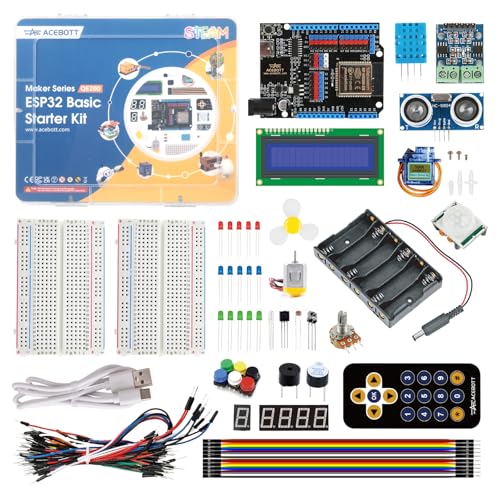
- Wi-Fi and Bluetooth ESP32 board
- 40-plus structured tutorials
- 96 labeled components included
Best For: IoT learners, makers, and STEM clubs
Best Video-Guided Option

- Arduino-compatible learning board
- Lifetime video course access
- Sensors, LEDs, servos, and wiring
Best For: Students, educators, and video-based learners
Best Guided Starter – Arduino Student Kit
The Arduino Student Kit is a structured entry point for anyone comparing single-board computer kits for hands-on learning. Its guided projects introduce circuit design, sensors, actuators, and Arduino programming through practical builds such as a traffic light, light-sensitive lamp, and motion-activated alarm.
Best For: Students, educators, and beginners who want step-by-step STEM instruction and a focused introduction to electronics.
Pros:
- Includes beginner-friendly projects covering digital and analog circuits.
- Provides step-by-step tutorials, video lessons, and online resources.
- Includes a breadboard plus LEDs, resistors, capacitors, motors, and sensors for experimentation.
Cons:
- Its curriculum-led format may feel less expansive than larger component kits.
- The supplied age guidance is broad, so younger learners may need adult support.
This kit emphasizes clear instruction over sheer component count, making it a practical choice for building foundational skills before moving into more independent projects.
Best Component Variety – ELEGOO UNO R3 Super Starter Kit
For shoppers seeking single-board computer kits for hands-on learning with lots of project flexibility, the ELEGOO UNO R3 Project Super Starter Kit offers 22+ guided lessons. It combines a solderless breadboard, UNO R3 controller, sensors, displays, motors, and input modules for learning by building.
Best For: Homeschool units, coding clubs, family builds, and STEM classrooms that want broad Arduino project coverage.
Pros:
- Offers more than 22 guided projects involving LEDs, sensors, motors, displays, and controls.
- Uses plug-in modules and a solderless breadboard, so beginners can start without soldering.
- Includes a substantial range of components, including an LCD, joystick, IR remote, servo, stepper motor, and relay.
Cons:
- The large component assortment may require careful organization and part identification.
- The power module should not be used above 9V, requiring attention during setup.
Its combination of guided code, varied hardware, and no-solder prototyping makes it a versatile choice for learners who want to progress from basic circuits to motion and display projects.
Best Build-and-Code Experience – Piper Raspberry Pi Computer Kit
The Piper Computer Kit takes a more immersive approach to single-board computer kits for hands-on learning. Learners assemble a Raspberry Pi-based computer with a 7-inch screen, speaker, battery, and wooden case, then use StoryMode, visual coding, games, and Python projects to continue exploring.
Best For: Children who are motivated by storytelling, game-like challenges, and building a complete working computer.
Pros:
- Includes the major components needed to build a functioning computer.
- Uses 11 progressively challenging projects and drag-and-drop PiperCode.
- Provides a path from visual coding to Python programming.
Cons:
- Its 3.4-pound, 13-by-13-by-4-inch format is less compact than a basic controller kit.
- The experience is centered on Piper’s guided ecosystem rather than general-purpose electronics experimentation.
With its physical build, integrated display and speaker, and narrative learning environment, Piper is a strong fit when engagement and computer-building are as important as learning code.
Best for IoT Exploration – SunFounder UNO R4 WiFi Explorer Kit
The SunFounder Elite Explorer Kit is designed for learners who want single-board computer kits for hands-on learning that extend into connected projects. Its original Arduino UNO R4 WiFi pairs with 300+ components, 50 projects, and more than 100 video lessons covering fundamentals, creative builds, and IoT.
Best For: Beginners, students, teachers, and aspiring makers who want a guided route from Arduino basics to WiFi, Bluetooth, and IoT projects.
Pros:
- Includes 50 projects divided into basic, fun, and IoT-focused tracks.
- The UNO R4 WiFi adds built-in WiFi and Bluetooth alongside a 32-bit processor and more memory than the UNO R3.
- Provides 300+ components, open-source code, video lessons, and technical support resources.
Cons:
- The large number of components and project options may be overwhelming for first-time learners.
- Its connected-project capabilities may be more than needed for learners focused only on basic circuits.
This is the most forward-looking option in the group for learners who want to keep advancing beyond introductory Arduino work into wireless control and IoT experimentation.
Power-User Project Kit – ELEGOO Mega 2560 Starter Kit
For learners who want single-board computer kits for hands-on learning with room for larger builds, this ELEGOO Mega 2560 package combines a high-I/O controller with more than 200 components and 35+ guided projects. It is a strong choice for progressing from basic circuits to sensor, motor, RFID, and display projects.
Best For: STEM learners, coding clubs, and makers who want a broad Arduino-compatible electronics curriculum and extra I/O for multi-module projects.
Pros:
- MEGA 2560 R3 provides 54 digital I/O pins, 15 PWM outputs, 16 analog inputs, four hardware serial ports, and 256 KB of flash.
- Includes more than 200 components, including RFID, RTC, motion, distance, environmental, motor, display, and keypad modules.
- PDF guidance covers 35+ projects and encourages modifying thresholds, timing, display text, and motor behavior.
- Pre-soldered modules, a solderless breadboard, storage case, and small-parts box simplify repeatable practice.
Cons:
- The extensive component collection may feel overwhelming for someone starting with only basic circuits.
- This is an Arduino-style electronics kit rather than a compact Linux computer with a desktop operating system.
The Mega board’s expanded I/O makes this the most flexible option here for combining several sensors, controls, and outputs in one build. Choose it when project variety and hardware capacity matter more than an integrated touchscreen or wireless setup.
Python IoT Pathway – UNIHIKER M10 Touchscreen Dev Kit
For single-board computer kits for hands-on learning that emphasize Python and immediate feedback, the UNIHIKER M10 offers pre-installed Debian, a built-in 2.8-inch touchscreen, and integrated sensors. Its ready-to-code setup helps beginners avoid much of the operating-system and driver configuration associated with traditional Linux boards.
Best For: Beginners, high-school computer science classes, and learners moving from block-based programming into Python, IoT, and data-driven projects.
Pros:
- Pre-installed Debian and a Python environment support coding through Jupyter Notebook or VS Code after USB connection.
- Built-in touchscreen, microphone, gyroscope, accelerometer, light sensor, and buzzer enable interactive projects without separate modules.
- Wi-Fi and Bluetooth support wireless control, MQTT, web-server, smart-home, and remote-monitoring experiments.
- Mind+ can bridge block-based programming to Python, while the edge connector and Gravity interfaces support expansion.
Cons:
- The included package is centered on the board and connection cables, so it does not provide the large component assortment found in the ELEGOO kits.
- Its 512 MB RAM and 1.2 GHz ARM processor are suited to educational projects rather than demanding desktop workloads.
The UNIHIKER is the most approachable option for learners who want to see Python results on the device itself and add wireless features quickly. Pick it over a traditional Arduino kit when software, touchscreen interaction, and IoT connectivity are the priority.
Classic Arduino Launchpad – ELEGOO UNO R3 Complete Kit
This ELEGOO UNO R3 is a practical entry point for single-board computer kits for hands-on learning, pairing 30+ guided projects with more than 200 components across 63 types. The solderless setup and included power accessories let beginners move from simple LEDs and buttons to displays, sensors, RFID, and motor control.
Best For: First-time electronics learners, classrooms, coding clubs, and hobbyists who want a structured Arduino IDE curriculum with a broad parts supply.
Pros:
- 30+ guided projects introduce LEDs, LCD displays, RFID, motion and distance sensing, environmental monitoring, and motors.
- Includes more than 200 components, with modules such as DHT11, RTC, PIR, ultrasonic, GY-521, relay, servo, stepper motor, and keypad.
- Pre-soldered modules, a solderless breadboard, organized storage, and a PDF tutorial reduce setup friction.
- Includes a 9 V, 1 A power supply, battery, USB cable, and breadboard power module for a more complete starting setup.
Cons:
- The UNO R3 has less expansion capacity than the included MEGA-based kit for very large multi-module projects.
- The component list can require careful organization as learners progress through the many exercises.
Choose this kit for a conventional, lesson-driven introduction to Arduino electronics. It offers a particularly complete starting package for beginners who value included power hardware and a wide range of experiments without immediately needing the Mega’s additional I/O.
Best Micro:bit Starter Kit – Micro:bit Coding & Sensor Kit
The KEYESTUDIO Micro:bit kit is a practical entry point for learners comparing single-board computer kits for hands-on learning. It combines a micro:bit V2 board with plug-in sensors, displays, LEDs, and guided projects, so beginners can focus on coding and experimentation without soldering or breadboard wiring.
Best For: Teens, first-time learners, classrooms, and beginners who want a gradual path from MakeCode blocks to Micro Python.
Pros:
- No soldering or breadboard required; Gravity connectors simplify setup.
- Includes eight step-by-step projects with wiring diagrams and code.
- Supports both MakeCode block programming and Micro Python.
- Expandable with additional KEYESTUDIO Gravity sensors.
Cons:
- The included project selection is limited to eight guided builds.
- Expansion beyond the box requires buying additional compatible sensors.
This is a particularly approachable kit for learners who may find traditional circuit assembly intimidating. Its guided curriculum and expandable sensor ecosystem make it useful for building confidence before moving to more complex electronics.
Best for IoT Projects – ESP32 Electronics Learning Kit
For learners ready to explore connected projects, the ACEBOTT ESP32 kit is one of the more capable single-board computer kits for hands-on learning. Its ESP32 board adds Wi-Fi and Bluetooth, while the 96-piece component set and structured tutorials support projects ranging from basic circuits to smart-home and IoT applications.
Best For: Beginners, makers, STEM clubs, and aspiring engineers who want to progress from graphical coding to Arduino IDE and Python programming.
Pros:
- ESP32 platform includes built-in Wi-Fi and Bluetooth.
- More than 40 step-by-step lessons provide a logical learning path.
- Includes 96 labeled components, including sensors, motors, RGB LEDs, and a breadboard.
- Supports graphical coding, Arduino IDE, and Python.
Cons:
- The broader component set may feel more involved for absolute beginners.
- Many projects require working with a breadboard and separate components.
This kit offers room to grow without requiring an immediate move to a separate development platform. Its combination of wireless connectivity, organized parts, and progressive lessons makes it a strong choice for learners interested in practical IoT experimentation.
Best Video-Guided Option – Uno Electronics Starter Kit
The Horizon Uno kit pairs an Arduino-compatible board with lifetime video lessons, making it a straightforward option among single-board computer kits for hands-on learning. It includes sensors, LEDs, servos, wiring, and other components for learning circuit design, coding logic, and microcontroller fundamentals through guided instruction.
Best For: Students, educators, hobbyists, and self-learners who prefer an organized video course with projects, labs, lectures, and problem sets.
Pros:
- Lifetime access to video lessons created by robotics engineers.
- Includes an Arduino-compatible board, sensors, LEDs, servos, and specialty components.
- Designed for classrooms, STEM programs, and independent learners.
- Components are presented as high-quality parts for reliable circuit practice.
Cons:
- The kit relies on a separate online course for its primary instruction.
- It does not specify wireless connectivity in the supplied details.
This kit stands out for learners who benefit from demonstration-based teaching rather than assembling projects from scattered instructions. The combination of an Arduino-compatible board and a structured course provides a clear foundation for electronics and coding basics.
How We Picked the Best Single-Board Computer Kits for Hands-On Learning
We focused on kits that support active learning rather than simple demonstration. Each selection includes a programmable board plus project hardware such as LEDs, sensors, displays, motors, or servos. We also considered the quality of the included curriculum, beginner accessibility, programming support, expandability, and the type of projects a learner can build.
The lineup covers several learning paths: block-based coding for younger beginners, Arduino-compatible electronics for foundational circuits, and Python- or IoT-capable boards for more advanced experimentation. Because included components and tutorials vary by package, check the current listing before buying.
Quick Comparison
| Best For | Recommended Kit Type | Why It Stands Out |
|---|---|---|
| Young learners | Guided STEM or block-coding kit | Structured projects and visual programming reduce the initial learning curve. |
| Learning basic electronics | Arduino UNO starter kit | Simple wiring, abundant tutorials, and broad accessory compatibility. |
| Many component types | Large Mega-compatible kit | More pins and parts support bigger multi-sensor projects. |
| IoT and wireless projects | UNO R4 WiFi or ESP32 kit | Enables connected devices, remote controls, and data-focused builds. |
| Python and Linux | UNIHIKER or Raspberry Pi-based kit | Provides a path toward Python applications and more capable computing. |
Key Buying Factors for Single-Board Computer Kits for Hands-On Learning
Curriculum and Project Guidance
Beginners benefit from numbered lessons, wiring diagrams, example code, and troubleshooting advice. A kit with fewer parts but better instructions can be more useful than a large bundle with little documentation.
Board and Programming Environment
Arduino boards are particularly approachable for learning circuits and embedded programming. Micro:bit and block-based platforms can make a gentler starting point, while ESP32, UNO R4 WiFi, and Linux-capable boards offer stronger options for wireless, Python, and IoT work.
Included Components
Look for a practical mix of resistors, LEDs, buttons, sensors, displays, motors, and servos. A component organizer and breadboard make repeated experiments easier. Confirm whether essentials such as a USB cable, power supply, or batteries are included.
Age, Supervision, and Expansion
Choose projects that match the learner’s reading level and patience. Younger children may need help with wiring and computer setup. For long-term value, prioritize standard headers, active community support, and compatibility with widely available add-on modules.
Who Should Buy Which Single-Board Computer Kits for Hands-On Learning?
Choose a guided student, Piper, or micro:bit-style kit when the priority is confidence-building, structured STEM activities, or learning through visual coding. Choose an Arduino UNO bundle for a first serious introduction to circuits, sensors, and text-based programming. A Mega kit is better for learners who want numerous components connected at once.
For connected-device projects, select an ESP32 or UNO R4 WiFi kit. Learners specifically interested in Python, a touchscreen interface, or Linux-based experimentation should consider the UNIHIKER. If the goal is flexible home learning, compare the quality of each tutorial and the included accessories before choosing the kit with the largest parts count.