The best flight simulator controls for family game rooms should be easy to share, quick to connect, and engaging for both beginners and experienced players. The right setup can make casual flying more approachable without sacrificing useful control or immersion.
This roundup compares yokes, HOTAS systems, rudder pedals, RC flight controllers, and mounting hardware across PC and Xbox-compatible options. Consider platform support, available space, learning curve, and how many players will use the equipment before choosing.
Best 10 Flight Simulator Controls for Family Game Rooms Picks for 2026
Best All-in-One Pick
Turtle Beach VelocityOne Flight
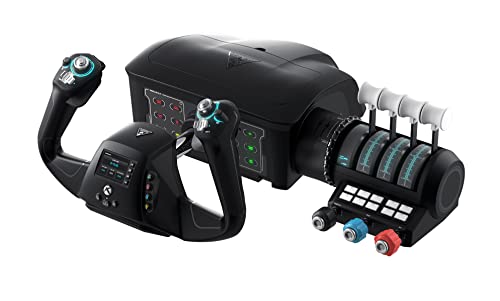
- Yoke, throttle, trim, rudder, and brake controls
- Compatible with Xbox and Windows PCs
- Clamping system for varied home setups
Best For: Families seeking comprehensive Microsoft Flight Simulator controls
Best Modular PC Option
Thrustmaster T16000M FCS Flight Pack

- Includes stick, throttle, and pedals
- Ambidextrous design for shared use
- TARGET software supports mapping profiles
Best For: Windows PC family rooms needing a flexible complete pack
Best Realistic Yoke Bundle
Logitech G Pro Flight Yoke System

- Yoke and rudder pedals included
- Differential toe brakes for runway control
- Adjustable footrests for shared use
Best For: Windows families wanting traditional yoke-based simulation
Best Xbox Starter Setup
Thrustmaster T-Flight Hotas One

- Official MSFS 2024 Xbox and PC support
- Detachable throttle for flexible placement
- Five axes and 14 action buttons
Best For: Families wanting versatile Xbox-and-PC flight controls
Premium PC HOTAS
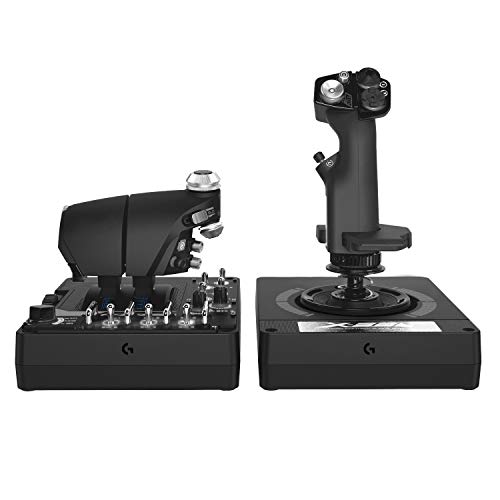
- 189 programmable controls with 24 buttons
- Twin throttles with adjustable friction and lock
- RGB lighting and VR-friendly control placement
Best For: PC families wanting highly customizable flight and space-sim controls
Complete Console Flight Kit
Thrustmaster T-Flight Full Kit HOTAS

- Compatible with Xbox Series X|S and PC
- Includes HOTAS controls and rudder pedals
- Five axes and 14 programmable buttons
Best For: Families seeking a complete Xbox-ready flight setup
Family-Friendly RC Simulator
RealFlight Evolution with InterLink DX
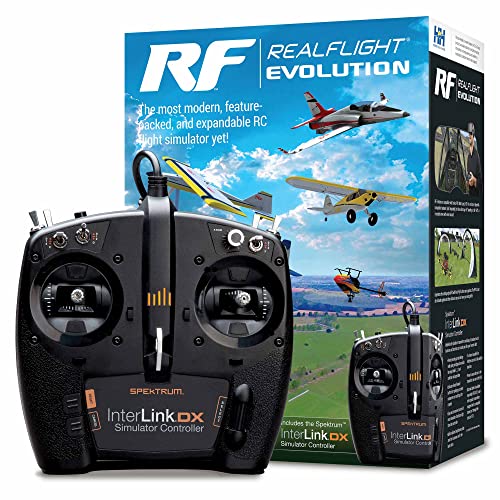
- Includes RC simulator software and controller
- More than 100 additional aircraft and many fields
- Supports VR and one-to-three-player options
Best For: Families learning and practicing RC aircraft and helicopter flying
Flexible Family Flight Setup

- Detachable full-size throttle
- 12 buttons and 5 programmable axes
- Plug-and-play setup with profile memory
Best For: Families sharing a PC flight-simulation setup
Advanced Shared Controls

- LCD display and illuminated buttons
- Adjustable progressive throttle with detents
- Contoured grip with five handle positions
Best For: PC players seeking detailed, cockpit-style controls
Organized Cockpit Foundation

- Pre-drilled frame for compatible controls
- Supports up to two throttle quadrants
- Dimmable LED cockpit lighting
Best For: Builders creating a dedicated home flight cockpit
Best All-in-One Pick – Turtle Beach VelocityOne Flight
For family game rooms that need versatile flight simulator controls for family game rooms, the Turtle Beach VelocityOne Flight combines a yoke, throttle quadrant, trim wheel, and rudder controls in one Xbox- and PC-compatible system. Its clamping setup is designed to fit a variety of home arrangements.
Best For: Families wanting a comprehensive control system for Microsoft Flight Simulator on Xbox or Windows PCs.
Pros:
- All-in-one design includes yoke, throttle quadrant, trim wheel, and integrated rudder and brake controls.
- Works with Xbox consoles and Windows 10 and 11 PCs.
- Offers 12 analog axes, programmable-style switches, and a full-color flight management display.
- Secure clamping system suits different home setups.
Cons:
- Its 10-pound weight and large footprint may require a dedicated game-room surface.
- The feature-rich layout may be more involved than a simple joystick for casual players.
This is the strongest choice when realism and an expansive control layout matter more than compact storage. It is especially well suited to a shared family setup built around Microsoft Flight Simulator.
Best Modular PC Option – Thrustmaster T16000M FCS Flight Pack
The Thrustmaster T16000M FCS Flight Pack is a practical PC-focused choice for flight simulator controls for family game rooms. It includes a flight stick, throttle, and pedals, while its ambidextrous design makes it easier to share between left- and right-handed players.
Best For: Families using Windows PCs who want a complete stick, throttle, and pedal setup with flexible player positioning.
Pros:
- Includes the flightstick, throttle, and pedals in one pack.
- Ambidextrous joystick can be configured for left- or right-handed use.
- Provides 16 action buttons, an 8-way hat switch, four axes, and twist rudder control.
- TARGET software supports game-specific mapping profiles.
Cons:
- Compatible with PC through USB rather than Xbox consoles.
- Its listed dimensions may make it less convenient for small shared desks.
With its included pedals and adaptable stick layout, this pack is a sensible shared-PC solution. The mapping software also helps different family members tailor controls to their preferred games.
Best Realistic Yoke Bundle – Logitech G Pro Flight Yoke System
The Logitech G Pro Flight Yoke System bundle adds realistic yoke handling and rudder pedals to a Windows flight-simulation station. For families comparing flight simulator controls for family game rooms, its adjustable footrests and programmable controls make it a comfortable option for multiple users.
Best For: Windows users who want a traditional yoke-and-pedal setup for learning or practicing flight controls.
Pros:
- Bundle includes the Pro Flight Yoke System and Pro Flight Rudder Pedals.
- Self-centering pedals provide smooth rudder control and include differential toe brakes.
- Yoke includes a POV hat, 14 buttons, and a three-position mode switch.
- Adjustable footrests and non-slip materials accommodate different users.
Cons:
- Compatibility is listed for Windows rather than Xbox consoles.
- A yoke-and-pedal arrangement needs more dedicated space than a basic flight stick.
This bundle is a good fit for a family room centered on a Windows desktop and realistic civilian-flight controls. The adjustable pedals are particularly useful when several players share the setup.
Best Xbox Starter Setup – Thrustmaster T-Flight Hotas One
The Thrustmaster T-Flight Hotas One MSFS 2024 Collector Edition is a compact, officially licensed option for flight simulator controls for family game rooms. It supports Xbox Series X|S and PC, and its detachable throttle can be used with the stick on a desk or separately on a lap.
Best For: Families seeking straightforward Microsoft Flight Simulator 2024 controls that work across Xbox and PC.
Pros:
- Officially licensed for Microsoft Flight Simulator 2024 and compatible with Xbox Series X|S and PC.
- Offers five axes, 10-bit precision, 14 action buttons, a rapid trigger, and a multidirectional hat switch.
- Detachable throttle supports desk, lap, or separated-control setups.
- Can expand with Thrustmaster TFRP rudder pedals, sold separately.
Cons:
- Additional TFRP rudder pedals are not included.
- It provides a joystick setup rather than a full yoke, throttle quadrant, and pedal bundle.
This is an accessible shared-room choice when plug-and-play Xbox compatibility and flexible placement are priorities. Its adjustable resistance and dual rudder options also give different family members room to find a comfortable control style.
Premium PC HOTAS – Logitech G X56 H.O.T.A.S.
For PC families building a dedicated game-room cockpit, the Logitech G X56 H.O.T.A.S. provides a broad set of flight simulator controls for family game rooms. Its twin throttles, adjustable stick force, RGB lighting, and programmable inputs suit players who want detailed control for space and flight simulations.
Best For: PC households and experienced players who want extensive customization, VR-friendly control placement, and a large number of programmable inputs.
Pros:
- Offers 189 programmable controls and 24 buttons for detailed setups.
- Includes twin throttles, a throttle lock, friction adjustment, and four spring options.
- Provides 16-bit aileron and elevator axes with Hall-effect sensors.
- RGB backlighting can be coordinated with other gaming peripherals.
Cons:
- Requires a Windows PC and two USB 2.0 ports.
- Its extensive controls may be more than casual players need.
- The 6.9-pound setup takes substantial room on a shared game-room desk.
The X56 is a strong choice when customization and cockpit-style control matter most. It is less appealing for families seeking a simple, compact plug-and-play controller.
Complete Console Flight Kit – Thrustmaster T-Flight Full Kit HOTAS
The Thrustmaster T-Flight Full Kit combines a HOTAS system with rudder pedals, making it a practical all-in-one option for flight simulator controls for family game rooms. Xbox integration and a full-foot pedal design make it approachable for households that want console-friendly, immersive controls.
Best For: Xbox Series X|S and PC families who want a complete setup with throttle, flight stick, and pedals for combat, civilian, and space flight games.
Pros:
- Works with Xbox Series X|S and PC, with dedicated Guide, View, and Menu buttons.
- Includes rudder pedals with a smooth S.M.A.R.T. slide rail system.
- Provides five axes, 14 programmable buttons, a trigger, and a multidirectional hat switch.
- Removable heel rests support a full-foot pedal position during longer sessions.
Cons:
- Its 12.4-pound weight and full kit design require dedicated floor and desk space.
- It uses a corded USB connection rather than a wireless setup.
- The feature set may be more involved than needed for occasional players.
With pedals included, this kit offers more complete directional control than a stick-and-throttle package alone. It is especially suitable when Xbox compatibility and shared family use are priorities.
Family-Friendly RC Simulator – RealFlight Evolution with InterLink DX
RealFlight Evolution takes a software-first approach to flight simulator controls for family game rooms by including an InterLink DX controller with the RC simulator. The refreshed interface, broad aircraft selection, VR headset compatibility, and online multiplayer options make it a flexible way to practice indoor RC flying.
Best For: Families interested in RC airplanes and helicopters who want a guided simulator experience with one-to-three-player support and room to add content.
Pros:
- Includes the RealFlight Evolution Steam key and InterLink DX controller.
- Offers more than 100 additional aircraft, along with 3D fields and PhotoFields.
- Supports VR headsets and online multiplayer options.
- Its interface is designed to reduce reliance on a mouse or keyboard.
Cons:
- The listed age range is 14+.
- Additional aircraft and fields may require separate purchases or season passes.
- It is focused on RC aircraft and helicopters rather than full-size aviation or combat HOTAS simulation.
RealFlight Evolution is a good fit when the game room needs an accessible RC flying package rather than a hardware-only cockpit. Its expanding content model can keep the experience fresh, though families should account for possible add-on costs.
Flexible Family Flight Setup – Thrustmaster T-Flight Hotas X
The Thrustmaster T-Flight Hotas X is a practical choice for family game rooms that need flight simulator controls for family game rooms without a complicated installation. Its detachable throttle, programmable controls, and weighted base make it easy to adapt for different players and desktop layouts.
Best For: Families sharing a PC flight-simulation setup and players who want flexible, plug-and-play controls.
Pros:
- Detachable, full-size throttle supports connected or separated layouts.
- Offers 12 programmable buttons, 5 axes, adjustable stick resistance, and dual rudder control.
- Preconfigured controls, profile switching, and built-in memory simplify setup.
- Weighted base and ergonomic hand rests support stable, comfortable sessions.
Cons:
- Designed for PC, with PlayStation 3 compatibility also listed.
- Its full-size design may require more desk space than a basic joystick.
For a shared game room, the Hotas X balances customization with easy setup. It is especially appealing when different players need to adjust the controls or move the throttle for each session.
Advanced Shared Controls – Logitech G Saitek X52 Pro
The Logitech G Saitek X52 Pro brings a more feature-rich option to flight simulator controls for family game rooms. Its illuminated buttons, LCD display, adjustable throttle, and contoured grip provide a cockpit-style experience for households with dedicated PC gaming space.
Best For: PC players who want detailed controls and a more immersive combat-simulation setup.
Pros:
- LCD multi-function display and illuminated buttons make controls easier to identify.
- Progressive throttle includes resistance adjustment plus afterburner and idle detents.
- Precision centering and no-contact X/Y-axis technology support controlled inputs.
- Five-position handle adjustment and soft-touch grip suit different hand sizes.
Cons:
- Requires Windows 7, 8.1, or 10, two USB 2.0 ports, and an internet connection for optional software.
- Programming relies on the included smart technology software, which adds setup steps.
- The two-piece system weighs about 5.1 pounds and occupies a sizable desktop footprint.
The X52 Pro is a strong fit when a family game room can accommodate a dedicated control station. Its adjustable fit and programmable software help multiple users personalize the experience, while the display and lighting add visual feedback.
Organized Cockpit Foundation – Meza Simulator Panel Kit
The Meza Cockpit Simulator Panel Kit is a mounting foundation rather than a complete controller. For family game rooms building flight simulator controls for family game rooms, it organizes compatible yokes, throttle quadrants, and flight panels into a stable cockpit-style station.
Best For: Home cockpit builders who already own compatible flight controls and want a cleaner, more permanent layout.
Pros:
- Pre-cut, pre-drilled panel supports Logitech controls, flight panels, and Honeycomb yokes.
- Supports up to two throttle quadrants and multiple instrument mounting positions.
- Dimmable integrated LED lighting provides adjustable cockpit illumination.
- Aluminum construction, rubber-tipped clamps, supporting legs, and adjustable feet promote stability.
Cons:
- Frame only: yokes, throttle quadrants, electronic instruments, displays, and other controls are not included.
- Requires compatible components and a suitable desk or simulator platform.
- Its approximately 30-inch-wide footprint may be substantial for smaller game-room desks.
This kit makes the most sense as the centerpiece of a growing simulator station. It can give a family setup a more organized, training-style appearance, but the total cost and complexity depend on the controls added separately.
How We Picked the Best Flight Simulator Controls for Family Game Rooms
We focused on control systems that suit shared entertainment spaces rather than highly specialized cockpit installations alone. The selection includes beginner-friendly sticks, complete HOTAS and rudder-pedal bundles, yokes for civilian flight simulation, and an RC-focused controller with included software. We also considered platform compatibility, setup complexity, programmability, physical footprint, and whether a family can use the system without extensive calibration or technical knowledge.
Because family game rooms often support multiple consoles and PCs, compatibility is especially important. Check the exact game and platform requirements before buying: Xbox support is not universal, and some advanced controls are designed primarily for Windows PCs.
Quick Comparison
- Best for broad console and PC use: Turtle Beach VelocityOne Flight Universal Control System.
- Best complete PC starter bundle: Thrustmaster T16000M FCS Flight Pack.
- Best for civilian-sim realism: Logitech G Pro Flight Yoke System bundle.
- Best for Xbox beginners: Thrustmaster T-Flight Hotas One.
- Best for extensive customization: Logitech G X56 H.O.T.A.S.
- Best for a complete Xbox and PC setup: Thrustmaster T-Flight Full Kit HOTAS.
- Best for RC flight practice: REALFLIGHT Evolution with Interlink DX Controller.
- Best compact PC option: Thrustmaster T-Flight Hotas X.
- Best enthusiast HOTAS system: Logitech G Saitek X52 Pro.
- Best for a permanent installation: Meza Cockpit Simulator Panel Kit.
Key Buying Factors for Flight Simulator Controls for Family Game Rooms
Platform and Game Compatibility
Verify support for Windows, Xbox consoles, Microsoft Flight Simulator, arcade-style flight games, or RC simulation software as appropriate. A control that works on PC may not function on Xbox, even when the connector appears similar.
Control Type and Learning Curve
Yokes feel natural for many airliners and general-aviation aircraft, while HOTAS systems are better suited to fighters, space games, and aircraft that use a stick and throttle. Rudder pedals add realism but increase cost and floor-space requirements.
Sharing, Storage, and Durability
For a family room, choose controls with straightforward cable management, sturdy clamps or mounting options, and settings that are easy to reset between users. Compact systems are easier to store, while a dedicated panel or bundle works better when the simulator remains set up.
Programmability and Comfort
Extra buttons can reduce keyboard use, but a large number of controls may overwhelm younger or first-time players. Look for adjustable resistance, comfortable grips, clear labeling, and profiles that let different family members use preferred layouts.
Who Should Buy Which Flight Simulator Controls for Family Game Rooms?
Choose a simple HOTAS such as the T-Flight Hotas X for occasional PC play and limited space. Families using Xbox and PC should prioritize a clearly supported multiplatform model, while PC households seeking a more realistic civilian-flight experience may prefer a yoke and rudder-pedal bundle. The X56 or X52 Pro suits enthusiasts who want many programmable inputs and room to grow. If children are primarily interested in radio-controlled aircraft, REALFLIGHT is the more targeted choice. Finally, select the Meza panel kit when the room has a dedicated simulator station and you want a cleaner, more permanent installation.